-
[如何编译openGauss对应版本的wal2json.so]
wal2json是逻辑解码插件,使用该插件可以访问由INSERT和UPDATE生成的元组,解析WAL中的内容。
本篇文章介绍了如何手动编译openGauss对应版本的wal2json.so。首先,需要一套对应版本数据库的软件和openGauss-server的源码,以及wal2json代码进行编译安装。本篇文章以openGauss 3.0.0为例
对应的网址如下:
1.openGauss-server源码路径:openGauss-server: openGauss kernel ~ openGauss is an open source relational database management system.
2.openGauss软件下载路径:软件包 | openGauss
3.wal2json代码路径:wal2json: This project is a fork from wal2json, a compatibility version for openGuass.我编译好的openGauss 3.0的 wal2json.so(x86)放到了gitee上,需要的朋友可以自取:wal2json-openGauss3.0-x86: wal2json-openGauss3.0-x86
一、下载openGauss-server源码
- [mog@localhost ~]$ pwd
- /home/mog
- [mog@localhost ~]$ mkdir opengauss-server-package
- [mog@localhost ~]$ cd opengauss-server-package/
- [mog@localhost opengauss-server-package]$ git clone https://gitee.com/opengauss/openGauss-server.git
- Cloning into 'openGauss-server'...
- remote: Enumerating objects: 59079, done.
- remote: Counting objects: 100% (13276/13276), done.
- remote: Compressing objects: 100% (4659/4659), done.

二、复制openGauss部分源码到软件目录下,并替换pg_config_os.h
复制opengauss源码src/include/*的内容到数据库安装目录的include/postgresql/server 下,cd到这个目录下,执行 rm -f pg_config_os.h; cp port/linux.h pg_config_os.h
因此我本地源码对应的要拷贝的目录为:
/home/mog/opengauss-server-package/openGauss-server/src/include/*这里 /mogdb/software是我本地数据库的软件目录。

因此我软件的对应目录为
/mogdb/software/include/postgresql/server
进行拷贝
cp -r /home/mog/opengauss-server-package/openGauss-server/src/include/* /mogdb/software/include/postgresql/server替换pg_config_os.h
- cd /mogdb/software/include/postgresql/server
- rm -f pg_config_os.h
- cp port/linux.h pg_config_os.h
三、源码安装g++
#编译前需要确保g+ +安装,g+ +需要c+ +14版本
本地发现g++版本不够,重新编译安装较高版本,这里gcc要至少6.1版本,否则会有相关报错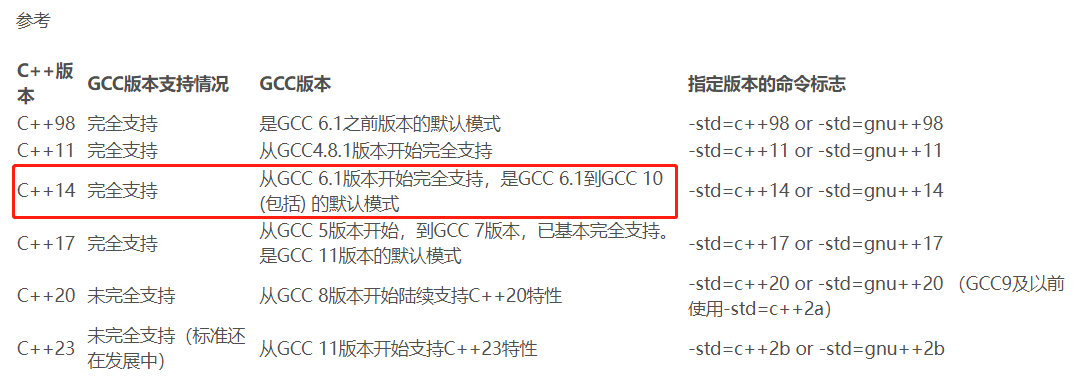
yum -y install gcc+ gcc-c++
当前版本较低
1.下载源码包
wget http://ftp.gnu.org/gnu/gcc/gcc-6.2.0/gcc-6.2.0.tar.bz22.解压
tar jxf gcc-6.2.0.tar.bz23.下载编译依赖
- cd gcc-6.2.0
- ./contrib/download_prerequisites
4.生成makefile文件
- mkdir gcc-build-6.2.0
- cd gcc-build-6.2.0/
- ../configure -enable-checking=release -enable-languages=c,c++ -disable-multilib
5.编译
make漫长的等待
6.安装
make install四、下载wal2json代码并编译
git clone https://gitee.com/enmotech/wal2json
- export PATH=/mogdb/software/bin:$PATH
- make
- make install

发现编译过程存在报错,我们把对应的几个.h里进行修改,去掉std::

最后编译成功

wal2json放到对应路径下

已经可以正常使用了
- postgres=# select * from pg_create_logical_replication_slot('mdb_20220823025242_slot','wal2json');
- slotname | xlog_position
- -------------------------+---------------
- mdb_20220823025242_slot | D70/EE73A0A8
- (1 row)
-
相关阅读:
改进YOLOv5系列:首发结合 RepLKNet 构建 最新 RepLKDeXt 结构|CVPR2022 超大卷积核, 越大越暴力,大到31x31, 涨点高效
南京邮电大学高级语言程序设计实验六(结构体与文件实验)
Win10更新错误代码0x800f081f的解决方法
校园网络工程规划与设计
python基础语法——类和对象
算法的概述
移动通信基础(14)均衡
备忘录模式(Memento Pattern)
ARM 版 Kylin V10 部署 KubeSphere 3.4.0 不完全指南
选择商品属性弹框从底部弹出动画效果
- 原文地址:https://blog.csdn.net/weixin_47308871/article/details/126651895
- 最新文章
-
沪漂五周年了:我越来越迷茫了
Agentic Skill Routing 实战:别再把所有 Skill 塞进 AI Agent 上下文
MySQL-Seconds_behind_master的精度误差
[MAF预定义ChatClient中间件-03]CachingChatClient——利用缓存省钱省时间
AI的至暗历史:从万众期待到被政府撤资,AI的两次死亡徘徊
Agent OS :五种驯服不确定性的范式
PortSwigger SQL注入LAB11
数据库即时编译JIT
[Begin]AI Learn Data Day 0
深度学习进阶(二十七)现代 LLM 的核心架构设计其二:SwiGLU