-
opencv中直方图和颜色跟踪相关:calcHist, calcBackProject, Meanshift和Camshift
1. 理解calcHist的应用
1)单通道hist
calcHist比较好理解,就是计算 图像的直方图,单通道来说就是 灰度的分布
比如下图是灰度像素的分布,在0-255的灰度图上划分为若干个bin, 统计数量

2) 多维的hist
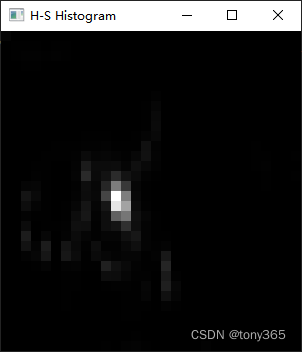
比如计算 二维hist, 横纵坐标轴分别为 Hue 和 saturation
代码如下:首先 cvtColor(src, hsv, COLOR_BGR2HSV) 转换为HSV空间
然后统计hsv的信息calcHist(&hsv, 1, channels, Mat(), // do not use mask
hist, 2, histSize, ranges,
true, // the histogram is uniform
false);
其他一些操作是为了显示hist图像#include#include using namespace cv; int main(int argc, char** argv) { Mat src, hsv; //if (argc != 2 || !(src = imread(argv[1], 1)).data) // return -1; std::string file = "D:\\dataset\\dang_yingxiangzhiliangceshi\\gain\\2022-07-28-20-49-03_GAIN4_of_simu.png"; src = imread(file, 1); cvtColor(src, hsv, COLOR_BGR2HSV); // Quantize the hue to 30 levels // and the saturation to 32 levels int hbins = 30, sbins = 32; int histSize[] = { hbins, sbins }; // hue varies from 0 to 179, see cvtColor float hranges[] = { 0, 180 }; // saturation varies from 0 (black-gray-white) to // 255 (pure spectrum color) float sranges[] = { 0, 256 }; const float* ranges[] = { hranges, sranges }; MatND hist; // we compute the histogram from the 0-th and 1-st channels int channels[] = { 0, 1 }; calcHist(&hsv, 1, channels, Mat(), // do not use mask hist, 2, histSize, ranges, true, // the histogram is uniform false); double maxVal = 0; minMaxLoc(hist, 0, &maxVal, 0, 0); int scale = 10; Mat histImg = Mat::zeros(sbins * scale, hbins * 10, CV_8UC3); for (int h = 0; h < hbins; h++) for (int s = 0; s < sbins; s++) { float binVal = hist.at<float>(h, s); int intensity = cvRound(binVal * 255 / maxVal); rectangle(histImg, Point(h * scale, s * scale), Point((h + 1) * scale - 1, (s + 1) * scale - 1), Scalar::all(intensity), cv::FILLED); } namedWindow("Source", 1); imshow("Source", src); namedWindow("H-S Histogram", 1); imshow("H-S Histogram", histImg); waitKey(); return 0; } - 1
- 2
- 3
- 4
- 5
- 6
- 7
- 8
- 9
- 10
- 11
- 12
- 13
- 14
- 15
- 16
- 17
- 18
- 19
- 20
- 21
- 22
- 23
- 24
- 25
- 26
- 27
- 28
- 29
- 30
- 31
- 32
- 33
- 34
- 35
- 36
- 37
- 38
- 39
- 40
- 41
- 42
- 43
- 44
- 45
- 46
- 47
- 48
- 49
- 50
如下,分别是原图和 HS hist

2. 理解 calcBackProject
可以参考反向投影calcBackProject()
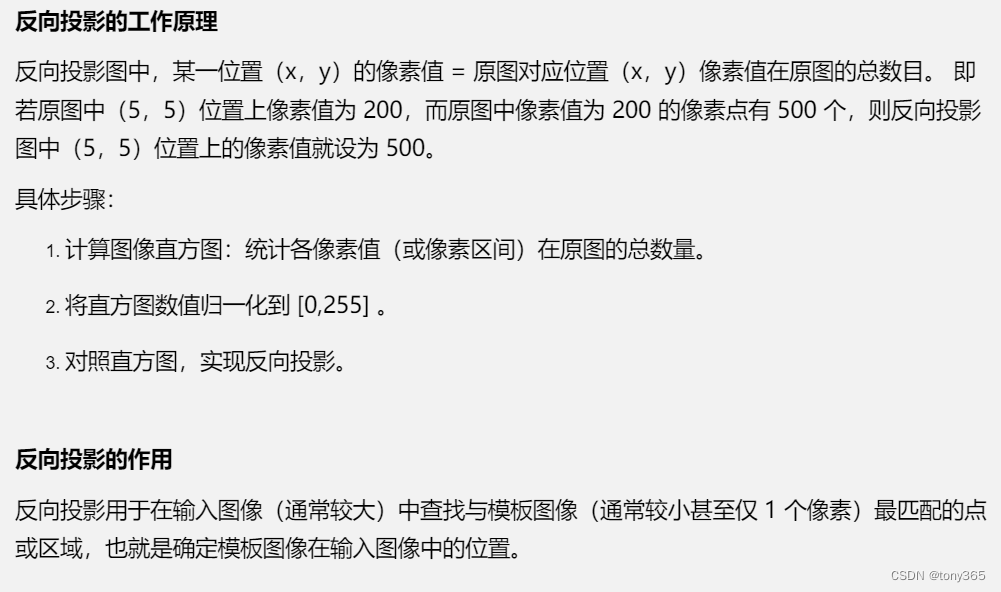
calcBackProject 反向投影
意思就是
1)我们首先获得一个物体(比较单一的颜色)的hist,比如是手,或者运动的皮球。最好物体颜色和背景区分度比较大,否则容易出现出错,比如下面的球有红色白色和背景灰色区别较大。然后可想而知,该物体的hist分布一定是集中在某个颜色。那么在一副被搜索的图像上这个颜色是目标的概率应该比较大

2)在另一个大图像上(上面有我们要搜寻的物体,比如手,皮球),那么back project就是对每个像素查找目标 hist所属的bin 对应的数量,每个像素遍历一遍。归一化后就表示物体的概率
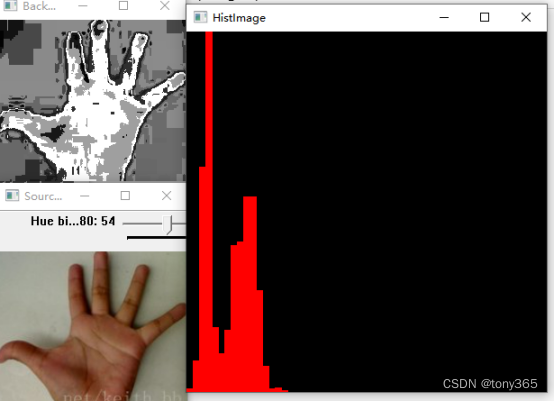
如下图,手的图像,手的hist, 以及 被搜索的图像上的 back project()。可以当作手图像的概率,越亮表示概率越大。
#include#include #include #include using namespace std; using namespace cv; //定义全局变量 Mat srcImage, hsvImage, hueImage; const int hueBinMaxValue = 180; int hueBinValue = 25; //声明回调函数 void Hist_and_Backprojection(int, void*); int main() { srcImage = imread("hand.png"); //判断图像是否加载成功 if (srcImage.empty()) { cout << "图像加载失败" << endl; return -1; } else cout << "图像加载成功..." << endl << endl; //将图像转化为HSV图像 cvtColor(srcImage, hsvImage, cv::COLOR_BGR2HSV); //只使用图像的H参数 hueImage.create(hsvImage.size(), hsvImage.depth()); int ch[] = { 0,0 }; mixChannels(&hsvImage, 1, &hueImage, 1, ch, 1); //轨迹条参数设置 char trackBarName[20]; sprintf_s(trackBarName, "Hue bin:%d", hueBinMaxValue); namedWindow("SourceImage", WINDOW_AUTOSIZE); //创建轨迹条并调用回调函数 createTrackbar(trackBarName, "SourceImage", &hueBinValue, hueBinMaxValue, Hist_and_Backprojection); Hist_and_Backprojection(hueBinValue, 0); imshow("SourceImage", srcImage); waitKey(0); return 0; } void Hist_and_Backprojection(int, void*) { MatND hist; int histsize = MAX(hueBinValue, 2); float hue_range[] = { 0,180 }; const float* ranges = { hue_range }; //计算图像直方图并归一化处理 calcHist(&hueImage, 1, 0, Mat(), hist, 1, &histsize, &ranges, true, false); normalize(hist, hist, 0, 255, NORM_MINMAX, -1, Mat()); //获取反向投影 MatND backProjection; calcBackProject(&hueImage, 1, 0, hist, backProjection, &ranges, 1, true); //输出反向投影 imshow("BackProjection", backProjection); //绘制图像直方图 int w = 400; int h = 400; int bin_w = cvRound((double)w / histsize); Mat histImage = Mat::zeros(w, h, CV_8UC3); for (int i = 0; i < hueBinValue; i++) { rectangle(histImage, Point(i * bin_w, h), Point((i + 1) * bin_w, h - cvRound(hist.at<float>(i) * h / 255.0)), Scalar(0, 0, 255), -1); } imshow("HistImage", histImage); } - 1
- 2
- 3
- 4
- 5
- 6
- 7
- 8
- 9
- 10
- 11
- 12
- 13
- 14
- 15
- 16
- 17
- 18
- 19
- 20
- 21
- 22
- 23
- 24
- 25
- 26
- 27
- 28
- 29
- 30
- 31
- 32
- 33
- 34
- 35
- 36
- 37
- 38
- 39
- 40
- 41
- 42
- 43
- 44
- 45
- 46
- 47
- 48
- 49
- 50
- 51
- 52
- 53
- 54
- 55
- 56
- 57
- 58
- 59
- 60
- 61
- 62
- 63
- 64
- 65
- 66
- 67
- 68
- 69
- 70
- 71
- 72
- 73
- 74
- 75
- 76
- 77
- 78
- 79
- 80
- 81
- 82
3. 理解meanshift
Meanshift 的原理就是不断更新区域的质心, 与calcBackProject结合比较容易,因为calcBackProject后得到的是目标的概率,那么通过meanshift可以将目标框移动到概率较大的区域
c1_o是原始中心点,计算质心c1_r, 然后移动目标框,不断迭代,使目标框移动到数据密集或者数值较大的区域

opencv中的源码也比较简单for( i = 0; i < niters; i++ ) { cur_rect = cur_rect & Rect(0, 0, size.width, size.height); if( cur_rect == Rect() ) { cur_rect.x = size.width/2; cur_rect.y = size.height/2; } cur_rect.width = std::max(cur_rect.width, 1); cur_rect.height = std::max(cur_rect.height, 1); Moments m = isUMat ? moments(umat(cur_rect)) : moments(mat(cur_rect)); // Calculating center of mass if( fabs(m.m00) < DBL_EPSILON ) break; //计算质心和目标框中心的偏差,然后不断更新 int dx = cvRound( m.m10/m.m00 - window.width*0.5 ); int dy = cvRound( m.m01/m.m00 - window.height*0.5 ); int nx = std::min(std::max(cur_rect.x + dx, 0), size.width - cur_rect.width); int ny = std::min(std::max(cur_rect.y + dy, 0), size.height - cur_rect.height); dx = nx - cur_rect.x; dy = ny - cur_rect.y; cur_rect.x = nx; cur_rect.y = ny; // Check for coverage centers mass & window if( dx*dx + dy*dy < eps ) break; }- 1
- 2
- 3
- 4
- 5
- 6
- 7
- 8
- 9
- 10
- 11
- 12
- 13
- 14
- 15
- 16
- 17
- 18
- 19
- 20
- 21
- 22
- 23
- 24
- 25
- 26
- 27
- 28
- 29
- 30
- 31
- 32
4. camshift的跟踪应用
相比meanshift主要多了框的大小和方向的变化,毕竟目标物体在图像中远近不同,姿态不同。
opencv3中camshift详解(二)camshift原理介绍系列文章介绍的比较详细,可以取看该博主的分析求主轴角度
opencv中camshift的代码://camshift首先调用 meanshift,更新框的位置 meanShift( _probImage, window, criteria ); // 然后将目标框 四周扩大 TOLERANCE=10个像素,框变大了 window.x -= TOLERANCE; if( window.x < 0 ) window.x = 0; window.y -= TOLERANCE; if( window.y < 0 ) window.y = 0; window.width += 2 * TOLERANCE; if( window.x + window.width > size.width ) window.width = size.width - window.x; window.height += 2 * TOLERANCE; if( window.y + window.height > size.height ) window.height = size.height - window.y; // 然后计算矩,然后可以利用矩可以计算 质心,主轴长度,主轴角度等几何数据 // Calculating moments in new center mass Moments m = isUMat ? moments(umat(window)) : moments(mat(window)); double m00 = m.m00, m10 = m.m10, m01 = m.m01; double mu11 = m.mu11, mu20 = m.mu20, mu02 = m.mu02; if( fabs(m00) < DBL_EPSILON ) return RotatedRect(); double inv_m00 = 1. / m00; int xc = cvRound( m10 * inv_m00 + window.x ); int yc = cvRound( m01 * inv_m00 + window.y ); double a = mu20 * inv_m00, b = mu11 * inv_m00, c = mu02 * inv_m00; // Calculating width & height double square = std::sqrt( 4 * b * b + (a - c) * (a - c) ); // Calculating orientation double theta = atan2( 2 * b, a - c + square ); // Calculating width & length of figure double cs = cos( theta ); double sn = sin( theta ); double rotate_a = cs * cs * mu20 + 2 * cs * sn * mu11 + sn * sn * mu02; double rotate_c = sn * sn * mu20 - 2 * cs * sn * mu11 + cs * cs * mu02; rotate_a = std::max(0.0, rotate_a); // avoid negative result due calculation numeric errors rotate_c = std::max(0.0, rotate_c); // avoid negative result due calculation numeric errors double length = std::sqrt( rotate_a * inv_m00 ) * 4; double width = std::sqrt( rotate_c * inv_m00 ) * 4; // In case, when tetta is 0 or 1.57... the Length & Width may be exchanged if( length < width ) { std::swap( length, width ); std::swap( cs, sn ); theta = CV_PI*0.5 - theta; } // Saving results int _xc = cvRound( xc ); int _yc = cvRound( yc ); int t0 = cvRound( fabs( length * cs )); int t1 = cvRound( fabs( width * sn )); t0 = MAX( t0, t1 ) + 2; window.width = MIN( t0, (size.width - _xc) * 2 ); t0 = cvRound( fabs( length * sn )); t1 = cvRound( fabs( width * cs )); t0 = MAX( t0, t1 ) + 2; window.height = MIN( t0, (size.height - _yc) * 2 ); window.x = MAX( 0, _xc - window.width / 2 ); window.y = MAX( 0, _yc - window.height / 2 ); window.width = MIN( size.width - window.x, window.width ); window.height = MIN( size.height - window.y, window.height ); RotatedRect box; box.size.height = (float)length; box.size.width = (float)width; box.angle = (float)((CV_PI*0.5+theta)*180./CV_PI); while(box.angle < 0) box.angle += 360; while(box.angle >= 360) box.angle -= 360; if(box.angle >= 180) box.angle -= 180; box.center = Point2f( window.x + window.width*0.5f, window.y + window.height*0.5f);- 1
- 2
- 3
- 4
- 5
- 6
- 7
- 8
- 9
- 10
- 11
- 12
- 13
- 14
- 15
- 16
- 17
- 18
- 19
- 20
- 21
- 22
- 23
- 24
- 25
- 26
- 27
- 28
- 29
- 30
- 31
- 32
- 33
- 34
- 35
- 36
- 37
- 38
- 39
- 40
- 41
- 42
- 43
- 44
- 45
- 46
- 47
- 48
- 49
- 50
- 51
- 52
- 53
- 54
- 55
- 56
- 57
- 58
- 59
- 60
- 61
- 62
- 63
- 64
- 65
- 66
- 67
- 68
- 69
- 70
- 71
- 72
- 73
- 74
- 75
- 76
- 77
- 78
- 79
- 80
- 81
- 82
- 83
- 84
- 85
- 86
- 87
- 88
- 89
- 90
- 91
-
相关阅读:
Leftover Hash Lemma(LHL):剩余哈希引理
关于eclipse导入项目出现红色叉或者红色感叹号的各种处理方法
Maven项目管理(一)
Mysql概念
14.ElasticSearch系列之分布式特性及分布式搜索机制(三)
1、拓扑排序 2、逆拓扑 3、i到j之间长度为k的路径 4、i到j之间包含顶点x的路径是否存在 5、如果边是带权的,求解 i 到 j 之间长度最长的路径
C++学习笔记-this指针
二、Eclipse 安装(Neon 版本)
【老生谈算法】matlab实现LCMV和LCEC算法抗干扰性能比较研究——LCEC算法
AQS实现原理
- 原文地址:https://blog.csdn.net/tywwwww/article/details/126642118
