-
springboot实现websocket
一、maven依赖
- <dependency>
- <groupId>org.springframework.bootgroupId>
- <artifactId>spring-boot-starter-websocketartifactId>
- dependency>
二、websocket配置类
- @ServerEndpoint("/websocket/{userId}")
- @Component
- public class WebSocketServer {
- static Log log = LogFactory.get(WebSocketServer.class);
- /**
- * 静态变量,用来记录当前在线连接数。应该把它设计成线程安全的。
- */
- private static int onlineCount = 0;
- /**
- * concurrent包的线程安全Set,用来存放每个客户端对应的MyWebSocket对象。
- */
- private static ConcurrentHashMap
- /**
- * 与某个客户端的连接会话,需要通过它来给客户端发送数据
- */
- private Session session;
- /**
- * 接收userId
- */
- private String userId = "";
- /**
- * 连接建立成功调用的方法
- */
- @OnOpen
- public void onOpen(Session session, @PathParam("userId") String userId) {
- this.session = session;
- this.userId = userId;
- if (webSocketMap.containsKey(userId)) {
- webSocketMap.remove(userId);
- webSocketMap.put(userId, this);
- //加入set中
- } else {
- webSocketMap.put(userId, this);
- //加入set中
- addOnlineCount();
- //在线数加1
- }
- log.info("用户连接:" + userId + ",当前在线人数为:" + getOnlineCount());
- try {
- sendMessage("连接成功");
- } catch (IOException e) {
- log.error("用户:" + userId + ",网络异常!!!!!!");
- }
- }
- /**
- * 连接关闭调用的方法
- */
- @OnClose
- public void onClose() {
- if (webSocketMap.containsKey(userId)) {
- webSocketMap.remove(userId);
- //从set中删除
- subOnlineCount();
- }
- log.info("用户退出:" + userId + ",当前在线人数为:" + getOnlineCount());
- }
- /**
- * 收到客户端消息后调用的方法
- *
- * @param message 客户端发送过来的消息
- */
- @OnMessage
- public void onMessage(String message, Session session) {
- log.info("用户消息:" + userId + ",报文:" + message);
- //可以群发消息
- //消息保存到数据库、redis
- if (StringUtils.isNotBlank(message)) {
- try {
- //解析发送的报文
- JSONObject jsonObject = JSON.parseObject(message);
- //追加发送人(防止串改)
- jsonObject.put("fromUserId", this.userId);
- String toUserId = jsonObject.getString("toUserId");
- //传送给对应toUserId用户的websocket
- if (StringUtils.isNotBlank(toUserId) && webSocketMap.containsKey(toUserId)) {
- log.info("请求的userId:" + toUserId + "在该服务器上");
- webSocketMap.get(toUserId).sendMessage(jsonObject.toJSONString());
- } else {
- log.error("请求的userId:" + toUserId + "不在该服务器上");
- //否则不在这个服务器上,发送到mysql或者redis
- }
- } catch (Exception e) {
- e.printStackTrace();
- }
- }
- }
- /**
- * @param session
- * @param error
- */
- @OnError
- public void onError(Session session, Throwable error) {
- log.error("用户错误:" + this.userId + ",原因:" + error.getMessage());
- error.printStackTrace();
- }
- /**
- * 实现服务器主动推送
- */
- public void sendMessage(String message) throws IOException {
- this.session.getBasicRemote().sendText(message);
- }
- /**
- * 发送自定义消息
- */
- public static void sendInfo(String message, @PathParam("userId") String userId) throws IOException {
- log.info("发送消息到:" + userId + ",报文:" + message);
- if (StringUtils.isNotBlank(userId) && webSocketMap.containsKey(userId)) {
- webSocketMap.get(userId).sendMessage(message);
- } else {
- log.error("用户" + userId + ",不在线!");
- }
- }
- public static synchronized int getOnlineCount() {
- return onlineCount;
- }
- public static synchronized void addOnlineCount() {
- WebSocketServer.onlineCount++;
- }
- public static synchronized void subOnlineCount() {
- WebSocketServer.onlineCount--;
- }
- }
- /**
- * 开启WebSocket支持
- * @author
- */
- @Configuration
- public class WebSocketConfig {
- @Bean
- public ServerEndpointExporter serverEndpointExporter() {
- return new ServerEndpointExporter();
- }
- }
三、controller
- @RestController
- public class DemoController {
- @GetMapping("index")
- public ResponseEntity
index() { - return ResponseEntity.ok("请求成功");
- }
- @GetMapping("page")
- public ModelAndView page() {
- return new ModelAndView("websocket");
- }
- @RequestMapping("/push/{toUserId}")
- public ResponseEntity
pushToWeb(String message, @PathVariable String toUserId) throws IOException { - WebSocketServer.sendInfo(message, toUserId);
- return ResponseEntity.ok("MSG SEND SUCCESS");
- }
- }
以上代码完成了websocket的接入,可以用在线的websocket测试网站测试
四、在线websocket测试网站
websocket在线测试
1、下面是测试连接的页面
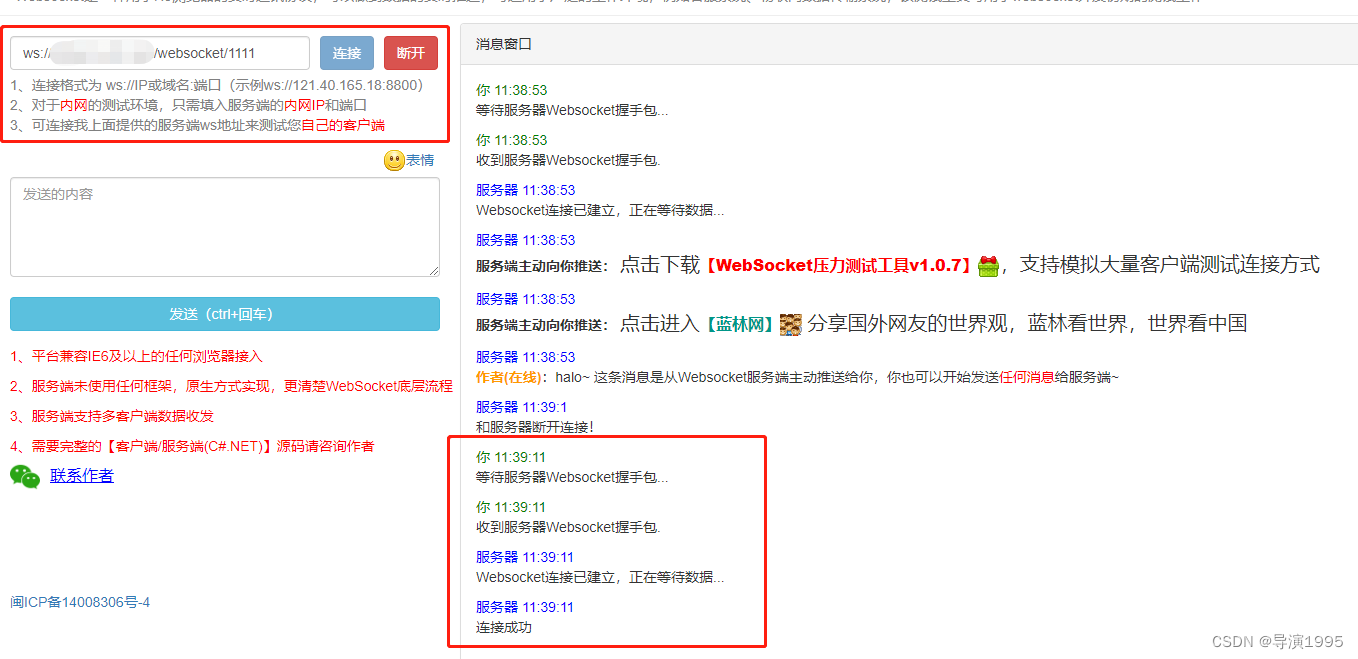
本地调试的话,用ws://ip:port/websocket/{{userId}} 连接
2、发送消息

发送内容{"toUserId":"1111","body":"测试消息"},服务器受到消息后,会带上fromUserId返回
五、 nginx配置
如果使用了nginx,需要进行配置实现websocket协议的转发
- location /websocket/ {
- proxy_pass http://127.0.0.1:7017/websocket/;
- proxy_http_version 1.1;
- proxy_set_header Upgrade $http_upgrade;
- proxy_set_header Connection "upgrade";
- }
上面的配置放在 server配置里
六、遇到的问题
本地启动项目可以正常测试,但是准备打个jar包扔到服务器的时候,使用maven install出现问题,解决方案:删除 spring-boot-starter-test 依赖和 test测试类代码,或者install时忽略test文件夹。
-
相关阅读:
操作系统学习笔记7 | 进程同步与合作
Golang开发习惯:变量、常量声明&使用惯例
基于深度学习的Deepfake检测综述
(动手学习深度学习)第13章 计算机视觉---微调
如何管理“问题成员”?手段要“狠”
SSM整合-表现层与前端数据传输数据协议定义与实现
念一句咒语 AI 就帮我写一个应用,我人麻了...
TypeScript24:TS中的声明文件
【ARM 裸机】模仿 STM32 驱动开发
十大排序算法(C语言)
- 原文地址:https://blog.csdn.net/xrq1995/article/details/126581698

- 最新文章
-
沪漂五周年了:我越来越迷茫了
Agentic Skill Routing 实战:别再把所有 Skill 塞进 AI Agent 上下文
MySQL-Seconds_behind_master的精度误差
[MAF预定义ChatClient中间件-03]CachingChatClient——利用缓存省钱省时间
AI的至暗历史:从万众期待到被政府撤资,AI的两次死亡徘徊
Agent OS :五种驯服不确定性的范式
PortSwigger SQL注入LAB11
数据库即时编译JIT
[Begin]AI Learn Data Day 0
深度学习进阶(二十七)现代 LLM 的核心架构设计其二:SwiGLU