-
二十、商城 - 商家入驻审核-BCrypt 加密算法(8)
目录 🌻🌻
一、商家申请入驻
1.1 需求分析
商家申请入驻,需要填写商家相关的信息。待运营商平台审核通过后即可使用。
1.2 准备工作
(1)拷贝资源 : 将 / 静态原型 / 商家管理后台下的页面拷贝到 youlexuan_shop_web工程 webapp下面

(2)参照“运营商后台”构建 js 分别将 youlexuan_manager_web 下面的 js 👇🏾👇🏾copy到youlexuan_shop_web ② ③ ④

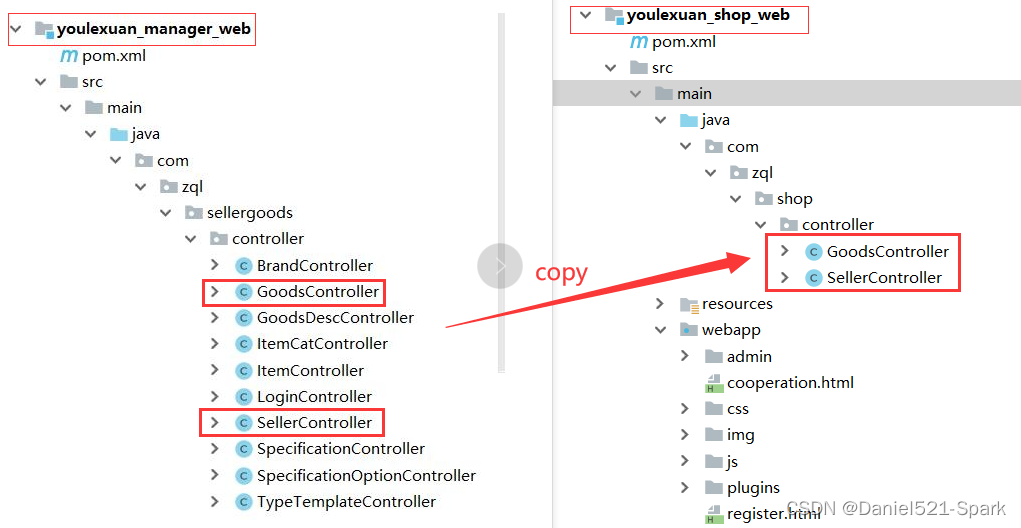
(3)拷贝 后端控制层代码 :将 youlexuan_manager_web 对应 👇🏾👇🏾 copy到 youlexuan_shop_web 下面 👇🏾👇🏾
1.3 前端代码
修改 youlexuan_shop_web 下面 register.html 引入JS 并添加指令 👇🏾👇🏾

<script type="text/javascript" src="plugins/angularjs/angular.min.js"> </script> <script type="text/javascript" src="js/base.js"> </script> <script type="text/javascript" src="js/service/sellerService.js"> </script> <script type="text/javascript" src="js/controller/baseController.js"> </script> <script type="text/javascript" src="js/controller/sellerController.js"> </script>- 1
- 2
- 3
- 4
- 5
<body ng-app="youlexuan" ng-controller="sellerController">- 1

绑定表单 register.html(部分代码)推荐快速高效绑定 :
- 打开数据库找到对应表 tb_seller
- 根据表字段备注对应实体
- 将对应的实体copy到register.html中

绑定“申请入驻”按钮ng-click="save()"
1.4 后端代码
修改后端代码 youlexuan-sellergoods-service的SellerServiceImpl 类的 add 方法,设置默认状态为0
(1) 在 youlexuan_shop_web 中添加安全依赖 pom.xml
<dependency> <groupId>org.springframework.securitygroupId> <artifactId>spring-security-webartifactId> <version>4.1.0.RELEASEversion> dependency> <dependency> <groupId>org.springframework.securitygroupId> <artifactId>spring-security-configartifactId> <version>4.1.0.RELEASEversion> dependency>- 1
- 2
- 3
- 4
- 5
- 6
- 7
- 8
- 9
- 10
- 11
(2)添加 密码加密(先加入这段代码下面会详细总结哈)到 SellerController.java中 👇🏾👇🏾

//密码加密 BCryptPasswordEncoder passwordEncoder = new BCryptPasswordEncoder(); String password = passwordEncoder.encode(seller.getPassword()); seller.setPassword(password);- 1
- 2
- 3
- 4
seller.setStatus("0"); //看下面 0 代表未审核状态- 1
最终显示 :
http://127.0.0.1:9102/register.html(1) Daniel 还没未注册

(2)Daniel正在注册中

(3) Daniel 注册成功

数据库同步显示 👇🏾👇🏾
二、商家审核
2.1 需求分析
商家申请入驻后,需要网站运营人员在运营商管理后台进行审核,审核后商家才可以登陆系统。
状态值: 0:未审核 1:已审核 2:审核未通过 3:关闭
2.2 商家待审核列表
查询商家注册信息
2.2.1 需求分析
动态获取数据库注册列查询并分页

2.2.2 动态查询商家注册信息
(1) 在数据库中全部设置为 “未审核”
UPDATE tb_seller SET STATUS = '0'- 1

浏览器入口:
http://localhost:9101/login.html

(2)修改模块:youlexuan_manager_web 的页面 seller_1.html
引入JS

<script type="text/javascript" src="../plugins/angularjs/angular.min.js"> </script> <!-- 分页组件开始 --> <script src="../plugins/angularjs/pagination.js"></script> <link rel="stylesheet" href="../plugins/angularjs/pagination.css"> <!-- 分页组件结束 --> <script type="text/javascript" src="../js/base_pagination.js"> </script> <script type="text/javascript" src="../js/service/sellerService.js"> </script> <script type="text/javascript" src="../js/controller/baseController.js"> </script> <script type="text/javascript" src="../js/controller/sellerController.js"> </script>- 1
- 2
- 3
- 4
- 5
- 6
- 7
- 8
- 9
<body class="hold-transition skin-red sidebar-mini" ng-app="youlexuan" ng-controller="sellerController" ng-init="searchEntity={status:'0'}">- 1
(3) 加入分页控件并动态循环获取 👇🏾👇🏾

从数据库中循环
<tr ng-repeat="entity in list"> <td><input type="checkbox">td> <td>{{entity.sellerId}}td> <td>{{entity.name}}td> <td>{{entity.nickName}}td> <td>{{entity.linkmanName}}td> <td>{{entity.telephone}}td> <td class="text-center"> <button type="button" class="btn bg-olive btn-xs" data-toggle="modal" data-target="#sellerModal" >详情button> td> tr>- 1
- 2
- 3
- 4
- 5
- 6
- 7
- 8
- 9
- 10
- 11
- 12
分页控件
<tm-pagination conf="paginationConf">tm-pagination>- 1
- 2
2.2.3 按条件查询
<div class="box-tools pull-right"> <div class="has-feedback"> 公司名称:<input ng-model="searchEntity.name" > 店铺名称: <input ng-model="searchEntity.nickName"> <button class="btn btn-default" ng-click="reloadList()">查询button> div> div>- 1
- 2
- 3
- 4
- 5
- 6
- 7
- 8

seller_1.html 暂且完整代码:
DOCTYPE html> <html> <head> <meta charset="utf-8"> <meta http-equiv="X-UA-Compatible" content="IE=edge"> <title>商家审核title> <meta content="width=device-width,initial-scale=1,maximum-scale=1,user-scalable=no" name="viewport"> <link rel="stylesheet" href="../plugins/bootstrap/css/bootstrap.min.css"> <link rel="stylesheet" href="../plugins/adminLTE/css/AdminLTE.css"> <link rel="stylesheet" href="../plugins/adminLTE/css/skins/_all-skins.min.css"> <link rel="stylesheet" href="../css/style.css"> <script src="../plugins/jQuery/jquery-2.2.3.min.js">script> <script src="../plugins/bootstrap/js/bootstrap.min.js">script> <script type="text/javascript" src="../plugins/angularjs/angular.min.js">script> <script src="../plugins/angularjs/pagination.js">script> <link rel="stylesheet" href="../plugins/angularjs/pagination.css"> <script type="text/javascript" src="../js/base_pagination.js">script> <script type="text/javascript" src="../js/service/sellerService.js">script> <script type="text/javascript" src="../js/controller/baseController.js">script> <script type="text/javascript" src="../js/controller/sellerController.js">script> head> <body class="hold-transition skin-red sidebar-mini" ng-app="youlexuan" ng-controller="sellerController" ng-init="searchEntity={status:'0'}"> <div class="box box-primary"> <div class="box-header with-border"> <h3 class="box-title">商家审核h3> div> <div class="box-body"> <div class="table-box"> <div class="box-tools pull-right"> <div class="has-feedback"> 公司名称:<input ng-model="searchEntity.name"> 店铺名称: <input ng-model="searchEntity.nickName"> <button class="btn btn-default" ng-click="reloadList()">查询button> div> div> <table id="dataList" class="table table-bordered table-striped table-hover dataTable"> <thead> <tr> <th class="" style="padding-right:0px"> <input id="selall" type="checkbox" class="icheckbox_square-blue"> th> <th class="sorting_asc">商家IDth> <th class="sorting">公司名称th> <th class="sorting">店铺名称th> <th class="sorting">联系人姓名th> <th class="sorting">公司电话th> <th class="text-center">操作th> tr> thead> <tbody> <tr ng-repeat="entity in list"> <td><input type="checkbox">td> <td>{{entity.sellerId}}td> <td>{{entity.name}}td> <td>{{entity.nickName}}td> <td>{{entity.linkmanName}}td> <td>{{entity.telephone}}td> <td class="text-center"> <button type="button" class="btn bg-olive btn-xs" data-toggle="modal" data-target="#sellerModal">详情 button> td> tr> tbody> table> <tm-pagination conf="paginationConf">tm-pagination> div> div> <div class="modal fade" id="sellerModal" tabindex="-1" role="dialog" aria-labelledby="myModalLabel" aria-hidden="true"> <div class="modal-dialog modal-lg"> <div class="modal-content"> <div class="modal-header"> <button type="button" class="close" data-dismiss="modal" aria-hidden="true">×button> <h3 id="myModalLabel">商家详情h3> div> <div class="modal-body"> <ul class="nav nav-tabs"> <li class="active"><a href="#home" data-toggle="tab">基本信息a>li> <li><a href="#linkman" data-toggle="tab">联系人a>li> <li><a href="#certificate" data-toggle="tab">证件a>li> <li><a href="#ceo" data-toggle="tab">法定代表人a>li> <li><a href="#bank" data-toggle="tab">开户行a>li> ul> <div id="myTabContent" class="tab-content"> <div class="tab-pane active in" id="home"> <br> <table class="table table-bordered table-striped" width="800px"> <tr> <td>公司名称td> <td>美琪数码经营店td> tr> <tr> <td>公司手机td> <td>13900221212td> tr> <tr> <td>公司电话td> <td>010-20112222td> tr> <tr> <td>公司详细地址td> <td>北京市朝阳区五方桥基地88号td> tr> table> div> <div class="tab-pane fade" id="linkman"> <br> <table class="table table-bordered table-striped"> <tr> <td>联系人姓名td> <td>王美琪td> tr> <tr> <td>联系人QQtd> <td>78223322td> tr> <tr> <td>联系人手机td> <td>13500223322td> tr> <tr> <td>联系人E-Mailtd> <td>78223322@qq.comtd> tr> table> div> <div class="tab-pane fade" id="certificate"> <br> <table class="table table-bordered table-striped"> <tr> <td>营业执照号td> <td>330106000109206td> tr> <tr> <td>税务登记证号td> <td>0292039393011td> tr> <tr> <td>组织机构代码证号td> <td>22320320302421td> tr> table> div> <div class="tab-pane fade" id="ceo"> <br> <table class="table table-bordered table-striped"> <tr> <td>法定代表人td> <td>王小聪td> tr> <tr> <td>法定代表人身份证号td> <td>211030198503223122td> tr> table> div> <div class="tab-pane fade" id="bank"> <br> <table class="table table-bordered table-striped"> <tr> <td>开户行名称td> <td>中国建设银行北京市分行td> tr> <tr> <td>开户行支行td> <td>海淀支行td> tr> <tr> <td>银行账号td> <td>999000111222td> tr> table> div> div> div> <div class="modal-footer"> <button class="btn btn-success" data-dismiss="modal" aria-hidden="true">审核通过button> <button class="btn btn-danger" data-dismiss="modal" aria-hidden="true">审核未通过button> <button class="btn btn-danger" data-dismiss="modal" aria-hidden="true">关闭商家button> <button class="btn btn-default" data-dismiss="modal" aria-hidden="true">关闭button> div> div> div> div> body> html>- 1
- 2
- 3
- 4
- 5
- 6
- 7
- 8
- 9
- 10
- 11
- 12
- 13
- 14
- 15
- 16
- 17
- 18
- 19
- 20
- 21
- 22
- 23
- 24
- 25
- 26
- 27
- 28
- 29
- 30
- 31
- 32
- 33
- 34
- 35
- 36
- 37
- 38
- 39
- 40
- 41
- 42
- 43
- 44
- 45
- 46
- 47
- 48
- 49
- 50
- 51
- 52
- 53
- 54
- 55
- 56
- 57
- 58
- 59
- 60
- 61
- 62
- 63
- 64
- 65
- 66
- 67
- 68
- 69
- 70
- 71
- 72
- 73
- 74
- 75
- 76
- 77
- 78
- 79
- 80
- 81
- 82
- 83
- 84
- 85
- 86
- 87
- 88
- 89
- 90
- 91
- 92
- 93
- 94
- 95
- 96
- 97
- 98
- 99
- 100
- 101
- 102
- 103
- 104
- 105
- 106
- 107
- 108
- 109
- 110
- 111
- 112
- 113
- 114
- 115
- 116
- 117
- 118
- 119
- 120
- 121
- 122
- 123
- 124
- 125
- 126
- 127
- 128
- 129
- 130
- 131
- 132
- 133
- 134
- 135
- 136
- 137
- 138
- 139
- 140
- 141
- 142
- 143
- 144
- 145
- 146
- 147
- 148
- 149
- 150
- 151
- 152
- 153
- 154
- 155
- 156
- 157
- 158
- 159
- 160
- 161
- 162
- 163
- 164
- 165
- 166
- 167
- 168
- 169
- 170
- 171
- 172
- 173
- 174
- 175
- 176
- 177
- 178
- 179
- 180
- 181
- 182
- 183
- 184
- 185
- 186
- 187
- 188
- 189
- 190
- 191
- 192
- 193
- 194
- 195
- 196
- 197
- 198
- 199
- 200
- 201
- 202
- 203
- 204
- 205
- 206
- 207
- 208
- 209
- 210
- 211
- 212
- 213
- 214
- 215
- 216
- 217
- 218
- 219
2.3 商家详情
2.3.1 最终效果

关闭商家 :相当于拉黑(卖违法商品)
2.3.2 代码实现
(1)绑定页面弹出窗口 youlexuan_manager_web /webapp / admin / seller_1.html
<div id="myTabContent" class="tab-content"> <div class="tab-pane active in" id="home"> <br> <table class="table table-bordered table-striped" width="800px"> <tr> <td>公司名称td> <td>{{entity.name}}td> tr> <tr> <td>公司手机td> <td>{{entity.linkmanMobile}}td> tr> <tr> <td>公司电话td> <td>{{entity.telephone}}td> tr> <tr> <td>公司详细地址td> <td>{{entity.addressDetail}}td> tr> table> div> <div class="tab-pane fade" id="linkman"> <br> <table class="table table-bordered table-striped"> <tr> <td>联系人姓名td> <td>{{entity.linkmanName}}td> tr> <tr> <td>联系人QQtd> <td>{{entity.linkmanQq}}td> tr> <tr> <td>联系人手机td> <td>{{entity.linkmanMobile}}td> tr> <tr> <td>联系人E-Mailtd> <td>{{entity.linkmanEmail}}td> tr> table> div> <div class="tab-pane fade" id="certificate"> <br> <table class="table table-bordered table-striped"> <tr> <td>营业执照号td> <td>{{entity.licenseNumber}}td> tr> <tr> <td>税务登记证号td> <td>{{entity.taxNumber}}td> tr> <tr> <td>组织机构代码证号td> <td>{{entity.orgNumber}}td> tr> table> div> <div class="tab-pane fade" id="ceo"> <br> <table class="table table-bordered table-striped"> <tr> <td>法定代表人td> <td>{{entity.legalPerson}}td> tr> <tr> <td>法定代表人身份证号td> <td>{{entity.legalPersonCardId}}td> tr> table> div> <div class="tab-pane fade" id="bank"> <br> <table class="table table-bordered table-striped"> <tr> <td>开户行名称td> <td>{{entity.bankName}}td> tr> <tr> <td>银行账号td> <td>{{entity.bankUser}}td> tr> table> div> div>- 1
- 2
- 3
- 4
- 5
- 6
- 7
- 8
- 9
- 10
- 11
- 12
- 13
- 14
- 15
- 16
- 17
- 18
- 19
- 20
- 21
- 22
- 23
- 24
- 25
- 26
- 27
- 28
- 29
- 30
- 31
- 32
- 33
- 34
- 35
- 36
- 37
- 38
- 39
- 40
- 41
- 42
- 43
- 44
- 45
- 46
- 47
- 48
- 49
- 50
- 51
- 52
- 53
- 54
- 55
- 56
- 57
- 58
- 59
- 60
- 61
- 62
- 63
- 64
- 65
- 66
- 67
- 68
- 69
- 70
- 71
- 72
- 73
- 74
- 75
- 76
- 77
- 78
- 79
- 80
- 81
- 82
- 83
- 84
- 85
- 86
- 87
- 88
- 89
(2)列表的“详情”按钮
ng-click="findOne(entity.sellerId)"
(3)修改sellerService.js 的findOne方法的请求参数名称由id换成sellerId
2.4 商家审核
2.4.1 后端代码
(1)在youlexuan_sellergoods_interface 工程的 SellerService.java 服务接口新增方法定义
/** * 商家审核 * 更改状态 * @param * @param status */ public void updateStatus(String sellerId,String status);- 1
- 2
- 3
- 4
- 5
- 6
- 7
(2)在youlexuan_sellergoods_service的SellerServiceImpl.java新增方法
//商家审核 @Override public void updateStatus(String sellerId, String status) { TbSeller tbSeller = sellerMapper.selectByPrimaryKey(sellerId); tbSeller.setStatus(status); sellerMapper.updateByPrimaryKey(tbSeller); }- 1
- 2
- 3
- 4
- 5
- 6
- 7
- 8
- 9
- 10
- 11
(3)在youlexuan_manager_web的 SellerController.java新增方法
@RequestMapping("/updateStatus") public Result updateStatus(String sellerId, String status){ try { sellerService.updateStatus(sellerId,status); return new Result(true,"更行成功"); }catch (Exception e){ e.printStackTrace(); return new Result(false,"更新失败"); } }- 1
- 2
- 3
- 4
- 5
- 6
- 7
- 8
- 9
- 10
- 11
- 12
- 13
- 14
- 15
2.4.2 前端代码
修改youlexuan_manager_web 的 sellerService.js
//商家入驻审核 更新状态 this.updateStatus=function (sellerId,status) { return $http.get('../seller/updateStatus.do?sellerId='+sellerId+'&status='+status); }- 1
- 2
- 3
- 4
- 5
- 6
修改youlexuan_manager_web的 sellerController.js
//商家入驻审核 $scope.updateStatus=function (sellerId,status) { sellerService.updateStatus(sellerId,status).success(function(response){ if(response.success){ $scope.reloadList();//刷新列表 alert(response.message); }else { alert(response.message) } }); }- 1
- 2
- 3
- 4
- 5
- 6
- 7
- 8
- 9
- 10
- 11
- 12
- 13
- 14
- 15
- 16
- 17
youlexuan_manager_web / webapp / admin / seller_1.html 修改按钮,调用方法

<div class="modal-footer"> <button class="btn btn-success" data-dismiss="modal" aria-hidden="true" ng-click= "updateStatus(entity.sellerId,'1')">审核通过button> <button class="btn btn-danger" data-dismiss="modal" aria-hidden="true" ng-click="updateStatus(entity.sellerId,'2')">审核未通过button> <button class="btn btn-danger" data-dismiss="modal" aria-hidden="true" ng-click="updateStatus(entity.sellerId,'3')">关闭商家button> <button class="btn btn-default" data-dismiss="modal" aria-hidden="true" >关闭button> div>- 1
- 2
- 3
- 4
- 5
- 6
最终测试
http://localhost:9101/admin/index.html
① 审核通过

② 审核未通过
③ 关闭商家

由①②③ 审核后数据库显示 👇🏾👇🏾
问题:👉🏾👉🏾为啥是null

解决:👉🏾👉🏾 不要忘记这个等号哦 👇🏾👇🏾

三、商家系统登录与安全控制
3.1 需求分析
完成商家系统登陆与安全控制,商家账号来自数据库,并实现密码加密
3.2 自定义认证类
(1)模块youlexuan_shop_web 的pom.xml 增加如下依赖包
<dependency> <groupId>org.springframework.securitygroupId> <artifactId>spring-security-webartifactId> <version>4.1.0.RELEASEversion> dependency> <dependency> <groupId>org.springframework.securitygroupId> <artifactId>spring-security-configartifactId> <version>4.1.0.RELEASEversion> dependency>- 1
- 2
- 3
- 4
- 5
- 6
- 7
- 8
- 9
- 10
- 11
(2)youlexuan_shop_web 的web.xml 中配置SpringSecurity安全过滤器
<filter> <filter-name>springSecurityFilterChainfilter-name> <filter-class>org.springframework.web.filter.DelegatingFilterProxyfilter-class> filter> <filter-mapping> <filter-name>springSecurityFilterChainfilter-name> <url-pattern>/*url-pattern> filter-mapping>- 1
- 2
- 3
- 4
- 5
- 6
- 7
- 8
- 9
直接从 youlexuan_manager_web 下面 copy 后修改 如下

(3)shoplogin.html

shoplogin.html 完整代码: 👇🏾👇🏾DOCTYPE html> <html> <head> <meta charset="UTF-8"> <meta http-equiv="X-UA-Compatible" content="IE=9; IE=8; IE=7; IE=EDGE"> <meta http-equiv="X-UA-Compatible" content="IE=EmulateIE7" /> <title>优乐选,欢迎登录title> <link rel="icon" href="assets/img/favicon.ico"> <link rel="stylesheet" type="text/css" href="css/webbase.css" /> <link rel="stylesheet" type="text/css" href="css/pages-shoplogin.css" /> head> <body> <div class="login-box"> <div class="py-container logoArea"> <a href="" class="logo">a> div> <div class="loginArea"> <div class="login "> <div class="py-container"> <div class="loginform"> <ul class="sui-nav nav-tabs tab-wraped"> <li> <a href="#index" data-toggle="tab"> <h3>扫描登录h3> a> li> <li class="active"> <a href="#profile" data-toggle="tab"> <h3>账户登录h3> a> li> ul> <div class="tab-content tab-wraped"> <div id="index" class="tab-pane"> <p>二维码登录,暂为官网二维码p> <img src="img/wx_cz.jpg" /> div> <div id="profile" class="tab-pane active"> <form id="loginForm" class="sui-form" action="/login" method="post"> <div class="input-prepend"><span class="add-on loginname">span> <input id="prependedInput" name="username" type="text" placeholder="邮箱/用户名/手机号" class="span2 input-xfat"> div> <div class="input-prepend"><span class="add-on loginpwd">span> <input id="prependedInput" name="password" type="password" placeholder="请输入密码" class="span2 input-xfat"> div> <div class="setting"> <label class="checkbox inline"><input name="m1" type="checkbox" value="2" checked="">自动登录label> <span class="forget">忘记密码?span> div> <div class="logined"> <a class="sui-btn btn-block btn-xlarge btn-danger" target="_blank" onclick="document:loginForm.submit()">登 录a> div> form> <div class="otherlogin"> <div class="types"> <ul> <li><img src="img/qq.png" width="35px" height="35px" />li> <li><img src="img/sina.png" />li> <li><img src="img/ali.png" />li> <li><img src="img/weixin.png" />li> ul> div> <span class="register"><a href="register.html" target="_blank">立即注册a>span> div> div> div> div> div> div> div> <div class="py-container copyright"> <ul> <li>关于我们li> <li>联系我们li> <li>联系客服li> <li>商家入驻li> <li>营销中心li> <li>手机优乐选li> <li>销售联盟li> <li>优乐选社区li> ul> <div class="address">地址:深圳市福田区泰然科技园div> <div class="beian"><a href="https://beian.miit.gov.cn/#/Integrated/index">粤 ICP备2022521724311号-501a> 京公网安备2022521724311号 div> div> div> <script type="text/javascript" src="js/plugins/jquery/jquery.min.js">script> <script type="text/javascript" src="js/plugins/jquery.easing/jquery.easing.min.js">script> <script type="text/javascript" src="js/plugins/sui/sui.min.js">script> <script type="text/javascript" src="js/plugins/jquery-placeholder/jquery.placeholder.min.js">script> <script type="text/javascript" src="js/pages/shoplogin.js">script> body> html>- 1
- 2
- 3
- 4
- 5
- 6
- 7
- 8
- 9
- 10
- 11
- 12
- 13
- 14
- 15
- 16
- 17
- 18
- 19
- 20
- 21
- 22
- 23
- 24
- 25
- 26
- 27
- 28
- 29
- 30
- 31
- 32
- 33
- 34
- 35
- 36
- 37
- 38
- 39
- 40
- 41
- 42
- 43
- 44
- 45
- 46
- 47
- 48
- 49
- 50
- 51
- 52
- 53
- 54
- 55
- 56
- 57
- 58
- 59
- 60
- 61
- 62
- 63
- 64
- 65
- 66
- 67
- 68
- 69
- 70
- 71
- 72
- 73
- 74
- 75
- 76
- 77
- 78
- 79
- 80
- 81
- 82
- 83
- 84
- 85
- 86
- 87
- 88
- 89
- 90
- 91
- 92
- 93
- 94
- 95
- 96
- 97
- 98
- 99
- 100
- 101
浏览器输入 :
http://127.0.0.1:9102/shoplogin.html用户名 :zql 密码 :123
(4)修改 youlexuan_shop_web下的 spring-security.xml
spring-security.xml 完整代码:
<beans:beans xmlns="http://www.springframework.org/schema/security" xmlns:beans="http://www.springframework.org/schema/beans" xmlns:xsi="http://www.w3.org/2001/XMLSchema-instance" xmlns:dubbo="http://code.alibabatech.com/schema/dubbo" xsi:schemaLocation="http://www.springframework.org/schema/beans http://www.springframework.org/schema/beans/spring-beans.xsd http://www.springframework.org/schema/security http://www.springframework.org/schema/security/spring-security.xsd http://code.alibabatech.com/schema/dubbo http://code.alibabatech.com/schema/dubbo/dubbo.xsd"> <http pattern="/favicon.ico" security="none"/> <http pattern="/shoplogin.html" security="none">http> <http pattern="/css/**" security="none">http> <http pattern="/img/**" security="none">http> <http pattern="/js/**" security="none">http> <http pattern="/plugins/**" security="none">http> <http use-expressions="false"> <intercept-url pattern="/**" access="ROLE_SELLER" /> <form-login login-page="/shoplogin.html" default-target-url="/admin/index.html" always-use-default-target="true" authentication-failure-url="/shoplogin.html"/> <csrf disabled="true">csrf> <headers> <frame-options policy="SAMEORIGIN"/> headers> <logout/> http> <authentication-manager> <authentication-provider user-service-ref="UserDetailsServiceImpl"> <password-encoder ref="bcryptEncoder">password-encoder> authentication-provider> authentication-manager> <dubbo:application name="youlexuan_shop_web"/> <dubbo:registry address="zookeeper://192.168.188.180:2181"/> <dubbo:reference id="sellerService" interface="com.zql.sellergoods.service.SellerService"/> <beans:bean id="UserDetailsServiceImpl" class="com.zql.service.UserDetailsServiceImpl"> <beans:property name="sellerService" ref="sellerService"/> beans:bean> <beans:bean id="bcryptEncoder" class="org.springframework.security.crypto.bcrypt.BCryptPasswordEncoder" /> beans:beans>- 1
- 2
- 3
- 4
- 5
- 6
- 7
- 8
- 9
- 10
- 11
- 12
- 13
- 14
- 15
- 16
- 17
- 18
- 19
- 20
- 21
- 22
- 23
- 24
- 25
- 26
- 27
- 28
- 29
- 30
- 31
- 32
- 33
- 34
- 35
- 36
- 37
- 38
- 39
- 40
- 41
- 42
- 43
- 44
- 45
- 46
- 47
- 48
- 49
- 50
- 51
- 52
(4)在 youlexuan_shop_web 创建 com.zql.service包,包下创建类 UserDetailsServiceImpl.java 实现SpringSecurity 的 UserDetailsService 接口,重写loadUserByUsername方法
注:UserDetailsService 是 spring security 中的类哦 !!!

package com.zql.service; import com.zql.pojo.TbSeller; import com.zql.sellergoods.service.SellerService; import org.springframework.security.core.GrantedAuthority; import org.springframework.security.core.authority.SimpleGrantedAuthority; import org.springframework.security.core.userdetails.User; import org.springframework.security.core.userdetails.UserDetails; import org.springframework.security.core.userdetails.UserDetailsService; import org.springframework.security.core.userdetails.UsernameNotFoundException; import java.util.ArrayList; import java.util.List; /** * @Author:Daniel * @Version 1.0 */ public class UserDetailsServiceImpl implements UserDetailsService { //因为要从zookeeper中获取所以无法使用注解 private SellerService sellerService; public void setSellerService(SellerService sellerService) { this.sellerService = sellerService; } @Override public UserDetails loadUserByUsername(String username) throws UsernameNotFoundException { //定义一个角色集合 List<GrantedAuthority> grantedAuthorities = new ArrayList<>(); //声明一个ROLE_SELLER角色并将这个角色添加到集合中 grantedAuthorities.add(new SimpleGrantedAuthority("ROLE_SELLER")); //ROLE_SELLER 为spring security配置中的角色 //第一个用户名 第二个为密码 第三个为角色权限 //return new User(username,"123456",grantedAuthorities); //从数据库中获取用户 TbSeller seller = sellerService.findOne(username); if(username != null){ //获得状态,如果为 1 则为审核通过 if("1".equals(seller.getStatus())){ return new User(username,seller.getPassword(),grantedAuthorities); } } return null; } }- 1
- 2
- 3
- 4
- 5
- 6
- 7
- 8
- 9
- 10
- 11
- 12
- 13
- 14
- 15
- 16
- 17
- 18
- 19
- 20
- 21
- 22
- 23
- 24
- 25
- 26
- 27
- 28
- 29
- 30
- 31
- 32
- 33
- 34
- 35
- 36
- 37
- 38
- 39
- 40
- 41
- 42
- 43
- 44
- 45
- 46
- 47
- 48
3.3 密码加密
上面已经实现了再细细了解哈就 ok🤞🤞
3.3.1 BCrypt加密算法
用户表的密码通常使用MD5等不可逆算法加密后存储,为防止彩虹表破解更会先使用一个特定的字符串(如域名)加密,然后再使用一个随机的salt(盐值)加密。 特定字符串是程序代码中固定的,salt是每个密码单独随机,一般给用户表加一个字段单独存储,比较麻烦。 BCrypt算法将salt随机并混入最终加密后的密码,验证时也无需单独提供之前的salt,从而无需单独处理salt问题。
3.3.2 商家入驻密码加密
前面总结中已经开发了
商家申请入驻的密码要使用BCrypt算法进行加密存储,修改SellerController.java的add方法
//密码加密 BCryptPasswordEncoder passwordEncoder = new BCryptPasswordEncoder(); String password = passwordEncoder.encode(seller.getPassword()); seller.setPassword(password);- 1
- 2
- 3
- 4
3.3.3 加密配置
( 看3.2 (4)截图)
修改youlexuan_shop_web 的 spring-security.xml ,添加如下配置
<beans:bean id="bcryptEncoder" class="org.springframework.security.crypto.bcrypt.BCryptPasswordEncoder" />- 1
- 2
修改认证管理器的配置
<password-encoder ref="bcryptEncoder">password-encoder>- 1
3.4 显示登录名
3.4.1 copy 上节实现代码
copy 2.3 主界面显示登陆人 到如下相应位置即可

3.4.2 页面admin/index.html上引入JS

<script type="text/javascript" src="../plugins/angularjs/angular.min.js"></script> <script type="text/javascript" src="../js/base.js"></script> <script type="text/javascript" src="../js/service/loginService.js"></script> <script type="text/javascript" src="../js/controller/indexController.js"></script>- 1
- 2
- 3
- 4
ng-app="youlexuan" ng-controller="indexController" ng-init="showLoginName ()">将页面上的
测试用户替换成{{loginName}}3.5 退出登录
参考 2.4 退出登录

开启三服务进行测试:
http://127.0.0.1:9102/shoplogin.html
登录成功显示:👇🏾👇🏾

3.6 完整源码
register.html 完整代码 👇🏾👇🏾
DOCTYPE html> <html> <head> <meta charset="UTF-8"> <meta http-equiv="X-UA-Compatible" content="IE=9; IE=8; IE=7; IE=EDGE"> <meta http-equiv="X-UA-Compatible" content="IE=EmulateIE7" /> <title>商家入驻申请title> <link rel="stylesheet" type="text/css" href="css/webbase.css" /> <link rel="stylesheet" type="text/css" href="css/pages-register.css" /> <script type="text/javascript" src="plugins/angularjs/angular.min.js"> script> <script type="text/javascript" src="js/base.js"> script> <script type="text/javascript" src="js/service/sellerService.js"> script> <script type="text/javascript" src="js/controller/baseController.js"> script> <script type="text/javascript" src="js/controller/sellerController.js"> script> head> <body ng-app="youlexuan" ng-controller="sellerController"> <div class="register py-container "> <div class="logoArea"> <a href="" class="logo">a> div> <div class="registerArea"> <h3>商家入驻申请<span class="go">我有账号,去<a href="shoplogin.html" target="_blank">登陆a>span>h3> <div class="info"> <form class="sui-form form-horizontal"> <div class="control-group"> <label class="control-label">登陆名(不可修改):label> <div class="controls"> <input type="text" placeholder="登陆名" ng-model="entity.sellerId" class="input-xfat input-xlarge"> div> div> <div class="control-group"> <label class="control-label">登陆密码:label> <div class="controls"> <input type="password" placeholder="登陆密码" ng-model="entity.password" class="input-xfat input-xlarge"> div> div> <div class="control-group"> <label class="control-label">店铺名称:label> <div class="controls"> <input type="text" placeholder="店铺名称" ng-model="entity.nickName" class="input-xfat input-xlarge"> div> div> <div class="control-group"> <label class="control-label">公司名称:label> <div class="controls"> <input type="text" placeholder="公司名称" ng-model="entity.name" class="input-xfat input-xlarge"> div> div> <div class="control-group"> <label class="control-label">公司电话:label> <div class="controls"> <input type="text" placeholder="公司电话" ng-model="entity.telephone" class="input-xfat input-xlarge"> div> div> <div class="control-group"> <label class="control-label">公司详细地址:label> <div class="controls"> <input type="text" placeholder="公司详细地址" ng-model="entity.addressDetail" class="input-xfat input-xlarge"> div> div> <div class="control-group"> <label class="control-label">联系人姓名:label> <div class="controls"> <input type="text" placeholder="联系人姓名" ng-model="entity.linkmanName" class="input-xfat input-xlarge"> div> div> <div class="control-group"> <label class="control-label">联系人QQ:label> <div class="controls"> <input type="text" placeholder="联系人QQ" ng-model="entity.linkmanQq" class="input-xfat input-xlarge"> div> div> <div class="control-group"> <label class="control-label">联系人手机:label> <div class="controls"> <input type="text" placeholder="联系人手机" ng-model="entity.linkmanMobile" class="input-xfat input-xlarge"> div> div> <div class="control-group"> <label class="control-label">联系人EMAIL:label> <div class="controls"> <input type="text" placeholder="联系人EMAIL" ng-model="entity.linkmanEmail" class="input-xfat input-xlarge"> div> div> <div class="control-group"> <label class="control-label">营业执照号:label> <div class="controls"> <input type="text" placeholder="营业执照号" ng-model="entity.licenseNumber" class="input-xfat input-xlarge"> div> div> <div class="control-group"> <label class="control-label">税务登记证号:label> <div class="controls"> <input type="text" placeholder="税务登记证号" ng-model="entity.taxNumber" class="input-xfat input-xlarge"> div> div> <div class="control-group"> <label class="control-label">组织机构代码证:label> <div class="controls"> <input type="text" placeholder="组织机构代码证" ng-model="entity.orgNumber" class="input-xfat input-xlarge"> div> div> <div class="control-group"> <label class="control-label">法定代表人:label> <div class="controls"> <input type="text" placeholder="法定代表人" ng-model="entity.legalPerson" class="input-xfat input-xlarge"> div> div> <div class="control-group"> <label class="control-label">法定代表人身份证号:label> <div class="controls"> <input type="text" placeholder="法定代表人身份证号" ng-model="entity.legalPersonCardId" class="input-xfat input-xlarge"> div> div> <div class="control-group"> <label class="control-label">开户行名称:label> <div class="controls"> <input type="text" placeholder="开户行名称" ng-model="entity.bankUser" class="input-xfat input-xlarge"> div> div> <div class="control-group"> <label class="control-label">开户行支行:label> <div class="controls"> <input type="text" placeholder="开户行支行" ng-model="entity.bankName" class="input-xfat input-xlarge"> div> div> <div class="control-group"> <label class="control-label">银行账号:label> <div class="controls"> <input type="text" placeholder="银行账号" ng-model="entity.serialVersionUID" class="input-xfat input-xlarge"> div> div> <div class="control-group"> <label for="inputPassword" class="control-label"> label> <div class="controls"> <input name="m1" type="checkbox" value="2" checked=""><span>同意协议并注册 <a href="sampling.html">《优乐选商家入驻协议》a>span> div> div> <div class="control-group"> <label class="control-label">label> <div class="controls btn-reg"> <a class="sui-btn btn-block btn-xlarge btn-danger" target="_blank" ng-click="save()">申请入驻a> div> div> form> <div class="clearfix">div> div> div> <div class="py-container copyright"> <ul> <li>关于我们li> <li>联系我们li> <li>联系客服li> <li>商家入驻li> <li>营销中心li> <li>手机优乐选li> <li>销售联盟li> <li>优乐选社区li> ul> <div class="address">地址:深圳市福田区泰然科技园div> <div class="beian"><a href="https://beian.miit.gov.cn/#/Integrated/index">粤 ICP备2022521724311号-501a> 京公网安备2022521724311号 div> div> div> <script type="text/javascript" src="js/plugins/jquery/jquery.min.js">script> <script type="text/javascript" src="js/plugins/jquery.easing/jquery.easing.min.js">script> <script type="text/javascript" src="js/plugins/sui/sui.min.js">script> <script type="text/javascript" src="js/plugins/jquery-placeholder/jquery.placeholder.min.js">script> <script type="text/javascript" src="js/pages/register.js">script> body> html>- 1
- 2
- 3
- 4
- 5
- 6
- 7
- 8
- 9
- 10
- 11
- 12
- 13
- 14
- 15
- 16
- 17
- 18
- 19
- 20
- 21
- 22
- 23
- 24
- 25
- 26
- 27
- 28
- 29
- 30
- 31
- 32
- 33
- 34
- 35
- 36
- 37
- 38
- 39
- 40
- 41
- 42
- 43
- 44
- 45
- 46
- 47
- 48
- 49
- 50
- 51
- 52
- 53
- 54
- 55
- 56
- 57
- 58
- 59
- 60
- 61
- 62
- 63
- 64
- 65
- 66
- 67
- 68
- 69
- 70
- 71
- 72
- 73
- 74
- 75
- 76
- 77
- 78
- 79
- 80
- 81
- 82
- 83
- 84
- 85
- 86
- 87
- 88
- 89
- 90
- 91
- 92
- 93
- 94
- 95
- 96
- 97
- 98
- 99
- 100
- 101
- 102
- 103
- 104
- 105
- 106
- 107
- 108
- 109
- 110
- 111
- 112
- 113
- 114
- 115
- 116
- 117
- 118
- 119
- 120
- 121
- 122
- 123
- 124
- 125
- 126
- 127
- 128
- 129
- 130
- 131
- 132
- 133
- 134
- 135
- 136
- 137
- 138
- 139
- 140
- 141
- 142
- 143
- 144
- 145
- 146
- 147
- 148
- 149
- 150
- 151
- 152
- 153
- 154
- 155
- 156
- 157
- 158
- 159
- 160
- 161
- 162
- 163
- 164
- 165
- 166
- 167
- 168
- 169
- 170
- 171
- 172
- 173
- 174
- 175
- 176
- 177
- 178
- 179
- 180
- 181
- 182
- 183
- 184
- 185
- 186
- 187
- 188
- 189
- 190
- 191
- 192
- 193
- 194
- 195
- 196
- 197
- 198
- 199
- 200
index.html 完整代码 👇🏾👇🏾
DOCTYPE html> <html> <head> <meta charset="utf-8"> <meta http-equiv="X-UA-Compatible" content="IE=edge"> <title>商家后台管理系统title> <meta content="width=device-width,initial-scale=1,maximum-scale=1,user-scalable=no" name="viewport"> <link rel="stylesheet" href="../plugins/bootstrap/css/bootstrap.min.css"> <link rel="stylesheet" href="../plugins/adminLTE/css/AdminLTE.css"> <link rel="stylesheet" href="../plugins/adminLTE/css/skins/_all-skins.min.css"> <link rel="stylesheet" href="../css/style.css"> <script src="../plugins/jQuery/jquery-2.2.3.min.js">script> <script src="../plugins/jQueryUI/jquery-ui.min.js">script> <script src="../plugins/bootstrap/js/bootstrap.min.js">script> <script src="../plugins/adminLTE/js/app.min.js">script> <script type="text/javascript" src="../plugins/angularjs/angular.min.js">script> <script type="text/javascript" src="../js/base.js">script> <script type="text/javascript" src="../js/service/loginService.js">script> <script type="text/javascript" src="../js/controller/indexController.js">script> <script type="text/javascript"> function SetIFrameHeight() { var iframeid = document.getElementById("iframe"); //iframe id if (document.getElementById) { iframeid.height = document.documentElement.clientHeight; } } script> head> <body class="hold-transition skin-blue sidebar-mini" ng-app="youlexuan" ng-controller="indexController" ng-init="showLoginName()"> <div class="wrapper"> <header class="main-header"> <a href="index.html" class="logo"> <span class="logo-mini"><b>优乐选b>span> <span class="logo-lg"><b>优乐选b>商家后台span> a> <nav class="navbar navbar-static-top"> <a href="#" class="sidebar-toggle" data-toggle="offcanvas" role="button"> <span class="sr-only">Toggle navigationspan> a> <div class="navbar-custom-menu"> <ul class="nav navbar-nav"> <li class="dropdown messages-menu"> <a href="#" class="dropdown-toggle" data-toggle="dropdown"> <i class="fa fa-envelope-o">i> <span class="label label-success">4span> a> <ul class="dropdown-menu"> <li class="header">你有4个邮件li> <li> <ul class="menu"> <li> <a href="#"> <div class="pull-left"> <img src="../img/user2-160x160.jpg" class="img-circle" alt="User Image"> div> <h4> 系统消息 <small><i class="fa fa-clock-o">i> 5 分钟前small> h4> <p>欢迎登录系统?p> a> li> <li> <a href="#"> <div class="pull-left"> <img src="../img/user3-128x128.jpg" class="img-circle" alt="User Image"> div> <h4> 团队消息 <small><i class="fa fa-clock-o">i> 2 小时前small> h4> <p>你有新的任务了p> a> li> <li> <a href="#"> <div class="pull-left"> <img src="../img/user4-128x128.jpg" class="img-circle" alt="User Image"> div> <h4> Developers <small><i class="fa fa-clock-o">i> Todaysmall> h4> <p>Why not buy a new awesome theme?p> a> li> <li> <a href="#"> <div class="pull-left"> <img src="../img/user3-128x128.jpg" class="img-circle" alt="User Image"> div> <h4> Sales Department <small><i class="fa fa-clock-o">i> Yesterdaysmall> h4> <p>Why not buy a new awesome theme?p> a> li> <li> <a href="#"> <div class="pull-left"> <img src="../img/user4-128x128.jpg" class="img-circle" alt="User Image"> div> <h4> Reviewers <small><i class="fa fa-clock-o">i> 2 dayssmall> h4> <p>Why not buy a new awesome theme?p> a> li> ul> li> <li class="footer"><a href="#">See All Messagesa>li> ul> li> <li class="dropdown notifications-menu"> <a href="#" class="dropdown-toggle" data-toggle="dropdown"> <i class="fa fa-bell-o">i> <span class="label label-warning">10span> a> <ul class="dropdown-menu"> <li class="header">你有10个新消息li> <li> <ul class="menu"> <li> <a href="#"> <i class="fa fa-users text-aqua">i> 5 new members joined today a> li> <li> <a href="#"> <i class="fa fa-warning text-yellow">i> Very long description here that may not fit into the page and may cause design problems a> li> <li> <a href="#"> <i class="fa fa-users text-red">i> 5 new members joined a> li> <li> <a href="#"> <i class="fa fa-shopping-cart text-green">i> 25 sales made a> li> <li> <a href="#"> <i class="fa fa-user text-red">i> You changed your username a> li> ul> li> <li class="footer"><a href="#">View alla>li> ul> li> <li class="dropdown tasks-menu"> <a href="#" class="dropdown-toggle" data-toggle="dropdown"> <i class="fa fa-flag-o">i> <span class="label label-danger">9span> a> <ul class="dropdown-menu"> <li class="header">你有9个新任务li> <li> <ul class="menu"> <li> <a href="#"> <h3> Design some buttons <small class="pull-right">20%small> h3> <div class="progress xs"> <div class="progress-bar progress-bar-aqua" style="width: 20%" role="progressbar" aria-valuenow="20" aria-valuemin="0" aria-valuemax="100"> <span class="sr-only">20% Completespan> div> div> a> li> <li> <a href="#"> <h3> Create a nice theme <small class="pull-right">40%small> h3> <div class="progress xs"> <div class="progress-bar progress-bar-green" style="width: 40%" role="progressbar" aria-valuenow="20" aria-valuemin="0" aria-valuemax="100"> <span class="sr-only">40% Completespan> div> div> a> li> <li> <a href="#"> <h3> Some task I need to do <small class="pull-right">60%small> h3> <div class="progress xs"> <div class="progress-bar progress-bar-red" style="width: 60%" role="progressbar" aria-valuenow="20" aria-valuemin="0" aria-valuemax="100"> <span class="sr-only">60% Completespan> div> div> a> li> <li> <a href="#"> <h3> Make beautiful transitions <small class="pull-right">80%small> h3> <div class="progress xs"> <div class="progress-bar progress-bar-yellow" style="width: 80%" role="progressbar" aria-valuenow="20" aria-valuemin="0" aria-valuemax="100"> <span class="sr-only">80% Completespan> div> div> a> li> ul> li> <li class="footer"> <a href="#">View all tasksa> li> ul> li> <li class="dropdown user user-menu"> <a href="#" class="dropdown-toggle" data-toggle="dropdown"> <img src="../img/user2-160x160.jpg" class="user-image" alt="User Image"> <span class="hidden-xs">{{loginName}}span> a> <ul class="dropdown-menu"> <li class="user-header"> <img src="../img/user2-160x160.jpg" class="img-circle" alt="User Image"> <p> {{loginName}} <small>最后登录 11:20AMsmall> p> li> <li class="user-footer"> <div class="pull-left"> <a href="#" class="btn btn-default btn-flat">修改密码a> div> <div class="pull-right"> <a href="/logout" class="btn btn-default btn-flat">注销a> div> li> ul> li> ul> div> nav> header> <aside class="main-sidebar"> <section class="sidebar"> <div class="user-panel"> <div class="pull-left image"> <img src="../img/user2-160x160.jpg" class="img-circle" alt="User Image"> div> <div class="pull-left info"> <p>{{loginName}}p> <a href="#"><i class="fa fa-circle text-success">i> 在线a> div> div> <ul class="sidebar-menu"> <li class="header">菜单li> <li id="admin-index"><a href="index.html"><i class="fa fa-dashboard">i> <span>首页span>a>li> <li class="treeview"> <a href="#"> <i class="fa fa-folder">i> <span>基本管理span> <span class="pull-right-container"> <i class="fa fa-angle-left pull-right">i> span> a> <ul class="treeview-menu"> <li id="admin-login"> <a href="seller.html" target="iframe"> <i class="fa fa-circle-o">i> 修改资料 a> li> <li id="admin-login"> <a href="password.html" target="iframe"> <i class="fa fa-circle-o">i> 修改密码 a> li> ul> li> <li class="treeview"> <a href="#"> <i class="fa fa-folder">i> <span>商品管理span> <span class="pull-right-container"> <i class="fa fa-angle-left pull-right">i> span> a> <ul class="treeview-menu"> <li id="admin-login"> <a href="goods_edit.html" target="iframe"> <i class="fa fa-circle-o">i> 新增商品 a> li> <li id="admin-login"> <a href="goods.html" target="iframe"> <i class="fa fa-circle-o">i> 商品管理 a> li> ul> li> ul> section> aside> <div class="content-wrapper"> <iframe width="100%" id="iframe" name="iframe" onload="SetIFrameHeight()" frameborder="0" src="home.html">iframe> div> <footer class="main-footer"> <div class="pull-right hidden-xs"> <b>Versionb> 1.0.8 div> <strong>Copyright © 2022-2099 <a href="https://blog.csdn.net/weixin_42171159?spm=1010.2135.3001.5343">Welcome to Daniel's bloga>.strong> All rights reserved. footer> div> body> html>- 1
- 2
- 3
- 4
- 5
- 6
- 7
- 8
- 9
- 10
- 11
- 12
- 13
- 14
- 15
- 16
- 17
- 18
- 19
- 20
- 21
- 22
- 23
- 24
- 25
- 26
- 27
- 28
- 29
- 30
- 31
- 32
- 33
- 34
- 35
- 36
- 37
- 38
- 39
- 40
- 41
- 42
- 43
- 44
- 45
- 46
- 47
- 48
- 49
- 50
- 51
- 52
- 53
- 54
- 55
- 56
- 57
- 58
- 59
- 60
- 61
- 62
- 63
- 64
- 65
- 66
- 67
- 68
- 69
- 70
- 71
- 72
- 73
- 74
- 75
- 76
- 77
- 78
- 79
- 80
- 81
- 82
- 83
- 84
- 85
- 86
- 87
- 88
- 89
- 90
- 91
- 92
- 93
- 94
- 95
- 96
- 97
- 98
- 99
- 100
- 101
- 102
- 103
- 104
- 105
- 106
- 107
- 108
- 109
- 110
- 111
- 112
- 113
- 114
- 115
- 116
- 117
- 118
- 119
- 120
- 121
- 122
- 123
- 124
- 125
- 126
- 127
- 128
- 129
- 130
- 131
- 132
- 133
- 134
- 135
- 136
- 137
- 138
- 139
- 140
- 141
- 142
- 143
- 144
- 145
- 146
- 147
- 148
- 149
- 150
- 151
- 152
- 153
- 154
- 155
- 156
- 157
- 158
- 159
- 160
- 161
- 162
- 163
- 164
- 165
- 166
- 167
- 168
- 169
- 170
- 171
- 172
- 173
- 174
- 175
- 176
- 177
- 178
- 179
- 180
- 181
- 182
- 183
- 184
- 185
- 186
- 187
- 188
- 189
- 190
- 191
- 192
- 193
- 194
- 195
- 196
- 197
- 198
- 199
- 200
- 201
- 202
- 203
- 204
- 205
- 206
- 207
- 208
- 209
- 210
- 211
- 212
- 213
- 214
- 215
- 216
- 217
- 218
- 219
- 220
- 221
- 222
- 223
- 224
- 225
- 226
- 227
- 228
- 229
- 230
- 231
- 232
- 233
- 234
- 235
- 236
- 237
- 238
- 239
- 240
- 241
- 242
- 243
- 244
- 245
- 246
- 247
- 248
- 249
- 250
- 251
- 252
- 253
- 254
- 255
- 256
- 257
- 258
- 259
- 260
- 261
- 262
- 263
- 264
- 265
- 266
- 267
- 268
- 269
- 270
- 271
- 272
- 273
- 274
- 275
- 276
- 277
- 278
- 279
- 280
- 281
- 282
- 283
- 284
- 285
- 286
- 287
- 288
- 289
- 290
- 291
- 292
- 293
- 294
- 295
- 296
- 297
- 298
- 299
- 300
- 301
- 302
- 303
- 304
- 305
- 306
- 307
- 308
- 309
- 310
- 311
- 312
- 313
- 314
- 315
- 316
- 317
- 318
- 319
- 320
- 321
- 322
- 323
- 324
- 325
- 326
- 327
- 328
- 329
- 330
- 331
- 332
- 333
- 334
- 335
- 336
- 337
- 338
- 339
- 340
- 341
- 342
- 343
- 344
- 345
- 346
- 347
- 348
- 349
- 350
- 351
- 352
- 353
- 354
- 355
- 356
- 357
- 358
- 359
- 360
- 361
- 362
- 363
- 364
- 365
- 366
- 367
- 368
- 369
- 370
- 371
- 372
- 373
- 374
- 375
- 376
- 377
- 378
- 379
- 380
- 381
- 382
- 383
- 384
- 385
- 386
- 387
- 388
- 389
- 390
- 391
- 392
- 393
- 394
- 395
- 396
开发到当前的整个项目代码:8节及之前项目源码数据库
-
相关阅读:
Cesium Vue(八)— 加载kml数据
C++项目实战——基于多设计模式下的同步&异步日志系统-⑥-日志等级类与日志消息类设计
如何使用Python脚本
系分 - 数学与经济管理
AM@定积分的定义求某些类型的极限
GEE开发之Landsat_SR计算地表温度(不推荐)
Python基础入门(6)----Python控制流:if语句、for循环、while循环、循环控制语句
第13章、类继承
指标与标签的区别?
时序逻辑设计之计数器
- 原文地址:https://blog.csdn.net/weixin_42171159/article/details/126273017

- 最新文章
-
沪漂五周年了:我越来越迷茫了
Agentic Skill Routing 实战:别再把所有 Skill 塞进 AI Agent 上下文
MySQL-Seconds_behind_master的精度误差
[MAF预定义ChatClient中间件-03]CachingChatClient——利用缓存省钱省时间
AI的至暗历史:从万众期待到被政府撤资,AI的两次死亡徘徊
Agent OS :五种驯服不确定性的范式
PortSwigger SQL注入LAB11
数据库即时编译JIT
[Begin]AI Learn Data Day 0
深度学习进阶(二十七)现代 LLM 的核心架构设计其二:SwiGLU