-
springboot基础篇(快速入门 + 完整项目案例)
1.springboot简介
SpringBoot程序优点:
-
起步依赖(简化依赖配置)
-
- parent
所有SpringBoot项目要继承的项目,定义了若干个坐标版本号(依赖管理,而非依赖),以达到减少依赖冲突的目的

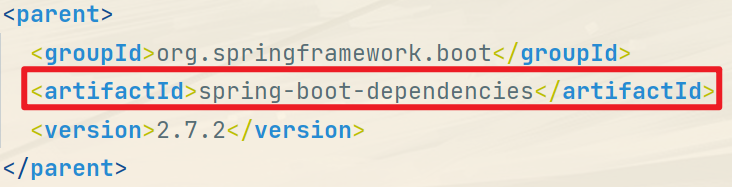

- parent
-
自动配置(简化常用工程相关配置)
-
- stater
SpringBoot中常见项目名称,定义了当前项目使用的所有依赖坐标,以达到减少依赖配置的目的


- stater
-
引导类
springboot的启动方式: -
- SpringBoot的引导类是Boot工程的执行入口,运行main方法就可以启动项目
-
- SpringBoot工程运行后初始化Spring容器,扫描引导类所在包加载bean

- SpringBoot工程运行后初始化Spring容器,扫描引导类所在包加载bean
-
辅助功能(内置服务器,……)
-
- 内嵌Tomcat


- 内嵌Tomcat
2.REST风格
1.简介
REST(Representational State Transfer): 表现形式状态转换。
- 传统风格资源描述形式:
http://localhost/user/getById?id=1
http://localhost/user/saveUser - REST风格描述形式:
http://localhost/user/id=1
http://localhost/user - 优点:
-
- 隐藏资源的访问行为,无法通过地址得知对资源是何种操作
-
- 书写简化
REST风格访问资源时使用 行为动作 区分对资源进行了何种操作
- 查询 GET
- 新增/修改 POST
- 修改/更新 PUT
- 删除 DELETE
2.RESTful
RESTful:按照REST风格对资源进行访问。
- 通过
@RequestMapping注解的路径设置,通过@PathVariable注解绑定参数

-
@PostMapping
-
@GetMapping
-
@DeleteMapping
-
@PutMapping
@RestController类注解
基于SpringMVC的RESTful开发控制器类定义上方
设置当前控制器类为RESTful风格,等同于@Controller与@RresponseBody组合
@RequestBody、 @RequestParam 、 @PathVariable 和 @Vaild 注解的使用及区别
3.复制工程
原则:
- 保留工程基础结构
- 抹掉原始工程痕迹
步骤:
- 在工作空间中复制对应工程,并修改工程名称
- 删除与Idea相关配置文件,仅保留
src目录与pom.xml文件 - 修改
pom.xml文件中的artifactId与新工程/模块名相同 - 删除name标签(可选)
- 保留备份工程供后期使用
4.属性配置
1.application.properties

SpringBoot内置属性查询: https://docs.spring.io/spring-boot/docs/current/reference/html/application-properties.html#application-properties
2.application.yml、.yaml

SpringBoot配置文件加载顺序: application.properties > application.yml > application.yaml
3.关于写配置文件的时候没有提示的解决方案

如果点击不了OK的解决方案:
- 在输入框里面填入配置文件的名
4.yaml
1.语法格式
YAML(YAML Ain’t Markup Language): 一种数据序列化格式。
优点:
- 容易阅读
- 容易与脚本语言交互
- 以数据为核心,重数据轻格式
YAML文件扩展名:
- .yml(主流)
- .yaml
yaml语法规则:
- 大小写敏感
- 属性层级关系使用多行描述,每行结尾使用
:结束 - 使用缩进表示层级关系,同层级左侧对齐,只允许使用空格(不允许使用Tab键)
- 属性值前面添加空格(属性名与属性值之间使用冒号+空格作为分隔)
#表示注释- 核心规则:数据前面要加空格与冒号隔开
字面值表示方式:
boolean: TRUE #TRUE,true,True,FALSE,false,False均可 float: 3.14 #6.8523015e+5 #支持科学计数法 int: 123 #0b1010_0111_0100_1010_1110 #支持二进制、八进制、十六进制 null: ~ #使用~表示null string: HelloWorld #字符串可以直接书写 string2: "Hello World" #可以使用双引号包裹特殊字符 date: 2022-06-10 #日期必须使用yyyy-MM-dd格式 datetime: 2022-06-10T15:02:31+08:00 #时间和日期之间使用T连接,最后使用+代表时区- 1
- 2
- 3
- 4
- 5
- 6
- 7
- 8
数组表示方式:
subject: - Java - 前端 - 大数据 enterprise: name: itcast age: 16 subject: - Java - 前端 - 大数据 likes: [王者荣耀,刺激战场] #数组书写缩略格式 users: #对象数组格式 - name: Tom age: 4 - name: Jerry age: 5 users: #对象数组格式二 - name: Tom age: 4 - name: Jerry age: 5 #对象数组缩略格式 users2: [ { name:Tom , age:4 } , { name:Jerry , age:5 } ]- 1
- 2
- 3
- 4
- 5
- 6
- 7
- 8
- 9
- 10
- 11
- 12
- 13
- 14
- 15
- 16
- 17
- 18
- 19
- 20
- 21
- 22
- 23
- 24
- 25
- 26
2.读取数据
使用
@Value读取单个数据,属性名引用方式:${一级属性名.二级属性名……}lesson: SpringBoot server: port: 82 enterprise: name: itcast age: 16 tel: 4006184000 subject: - Java - 前端 - 大数据- 1
- 2
- 3
- 4
- 5
- 6
- 7
- 8
- 9
- 10
- 11
- 12
- 13
@RestController @RequestMapping("/books") public class BookController { @Value("${lesson}") private String lessonName; @Value("${server.port}") private int port; @Value("${enterprise.subject[1]}") private String[] subject_01; }- 1
- 2
- 3
- 4
- 5
- 6
- 7
- 8
- 9
- 10
在配置文件中可以使用属性名引用方式引用属性
baseDir: /usr/local/fire center: dataDir: ${baseDir}/data tmpDir: ${baseDir}/tmp logDir: ${baseDir}/log msgDir: ${baseDir}/msgDir- 1
- 2
- 3
- 4
- 5
- 6
属性值中如果出现转移字符,需要使用双引号包裹
lesson: "Spring\tboot\nlesson"- 1
3.封装对象
封装全部数据到Environment对象
lesson: SpringBoot server: port: 82 enterprise: name: itcast age: 16 tel: 4006184000 subject: - Java - 前端 - 大数据- 1
- 2
- 3
- 4
- 5
- 6
- 7
- 8
- 9
- 10
- 11
- 12
- 13
@RestController @RequestMapping("/books") public class BookController { @Value("${lesson}") private String lessonName; @Value("${server.port}") private int port; @Value("${enterprise.subject[1]}") private String[] subject_01; }- 1
- 2
- 3
- 4
- 5
- 6
- 7
- 8
- 9
- 10
自定义对象封装指定数据
@ConfigurationProperties(prefix = "")lesson: SpringBoot server: port: 82 enterprise: name: itcast age: 16 tel: 4006184000 subject: - Java - 前端 - 大数据- 1
- 2
- 3
- 4
- 5
- 6
- 7
- 8
- 9
- 10
- 11
- 12
- 13
@Component @ConfigurationProperties(prefix = "enterprise") public class Enterprise { private String name; private Integer age; private String[] subject; }- 1
- 2
- 3
- 4
- 5
- 6
- 7
@RestController @RequestMapping("/books") public class BookController { @Autowired private Enterprise enterprise; }- 1
- 2
- 3
- 4
- 5
- 6
5.整合第三方技术
1.整合Junit
1.实现
导入测试对应的starter:
<dependency> <groupId>org.springframework.bootgroupId> <artifactId>spring-boot-starter-testartifactId> <scope>testscope> dependency>- 1
- 2
- 3
- 4
- 5
测试类使用@SpringBootTest修饰:
@SpringBootTest class SpringbootDemo1ApplicationTests { @Test void contextLoads() { } }- 1
- 2
- 3
- 4
- 5
- 6
- 7
- 8
使用自动装配的形式添加要测试的对象(impl实现类)
2.注意事项
正确的测试类路径应该与引导类路径一致,如下:

当路径不一致的时候,如下:

此时测试类就无法依赖注入,需要做以下配置(任选其一):@SpringBootTest(classes = SpringbootDemo1Application.class)@ContextConfiguration(classes = SpringbootDemo1Application.class)
2.整合mybatis
导入依赖:
<dependency> <groupId>org.mybatis.spring.bootgroupId> <artifactId>mybatis-spring-boot-starterartifactId> <version>2.1.2version> dependency> <dependency> <groupId>mysqlgroupId> <artifactId>mysql-connector-javaartifactId> dependency>- 1
- 2
- 3
- 4
- 5
- 6
- 7
- 8
- 9
设置数据源参数:
spring: datasource: driver-class-name: com.mysql.cj.jdbc.Driver url: jdbc:mysql://localhost:3306/book username: root password: root- 1
- 2
- 3
- 4
- 5
- 6
注意: SpringBoot版本低于2.4.3(不含),Mysql驱动版本大于8.0时,需要在url连接串中配置时区
jdbc:mysql://localhost:3306/ssm_db?serverTimezone=UTC
或在MySQL数据库端配置时区解决此问题定义实体类:
@Data @AllArgsConstructor @NoArgsConstructor public class Book { private String name; private Integer id; private String type; private BigDecimal price; }- 1
- 2
- 3
- 4
- 5
- 6
- 7
- 8
- 9
定义数据层接口与映射配置:
@Mapper public interface BookDao { @Select("select * from book") public List<User> getAll(); }- 1
- 2
- 3
- 4
- 5
测试类中注入dao接口,测试功能:
@SpringBootTest class Springboot08MybatisApplicationTests { @Autowired private BookDao bookDao; @Test public void testGetById() { Book book = bookDao.getById(1); System.out.println(book); } }- 1
- 2
- 3
- 4
- 5
- 6
- 7
- 8
- 9
- 10
3.整合mybatis-plus
https://blog.csdn.net/qq_41402200/article/details/88891511
4.整合Druid
<dependency> <groupId>com.alibabagroupId> <artifactId>druid-spring-boot-starterartifactId> <version>1.1.22version> dependency>- 1
- 2
- 3
- 4
- 5
spring: main: banner-mode: off datasource: druid: driver-class-name: com.mysql.cj.jdbc.Driver url: jdbc:mysql://localhost:3306/ssm_db?serverTimezone=UTC username: root password: root- 1
- 2
- 3
- 4
- 5
- 6
- 7
- 8
- 9
6.完结案例
项目完整目录结构:


1.项目初始化
项目初始化:


2.数据库搭建&数据源配置
SQL语句:
create database `spbt`; use `spbt`; create table `sp_book` ( `id` int primary key auto_increment comment '主键id', `type` varchar(20) not null comment '书籍类型', `name` varchar(30) not null comment '书籍名称', `description` varchar(100) not null comment '书籍描述' )default charset=utf8 comment '书籍表'; insert into `sp_book`(`type`,`name`,`description`) values ('科幻','地球往事','《三体》三部曲第一部,作品讲述了地球人类文明和三体文明的信息交流、生死搏杀及两个文明在宇宙中的兴衰历程。'), ('科幻','黑暗森林','《三体》三部曲第二部,作品讲述了地球人类文明和三体文明的信息交流、生死搏杀及两个文明在宇宙中的兴衰历程。'), ('科幻','死神永生','《三体》三部曲第三部,作品讲述了地球人类文明和三体文明的信息交流、生死搏杀及两个文明在宇宙中的兴衰历程。'), ('仙侠','将夜','这本小说讲述的是一段可歌可泣可笑可爱的草根崛起史,一个物质要求宁滥勿缺的开朗少年行。小说基于修真世界,却又胜于修真,讲述了人定胜天,花开彼岸天的历史,引人深思。'), ('仙侠','雪中悍刀行','该小说讲述一个关于庙堂权争与刀剑交错的时代,一个暗潮涌动粉墨登场的江湖。'), ('都市','大国重工','国家重大装备办处长冯啸辰穿越到了1980年,看他如何与同代人一道,用汗水和智慧,铸就大国重工。'), ('架空','赘婿','本书主要讲述了主角从现代金融界巨头的身份回到了古代,进入一个商贾之家最没地位的赘婿身体后,涉及到一系列家国天下事的故事。'), ('科幻','北京折叠','该小说讲述北京在未来按照社会阶层被分成三个空间,生活在第三空间的垃圾工老刀穿越三层空间送信的故事。'), ('鬼怪','地煞七十二变','地煞七十二般变化,每一般变化,就是一项神通。一本神奇的黄壳书将李长安送回古代世界,每斩杀一个妖魔,就获得一项神通。'), ('魔幻','诡秘之主','作品融汇了克苏鲁风格、西方魔幻元素、第一次工业革命时代风情和蒸汽朋克情怀。这是一个蒸汽与机械的世界,这是一段“愚者”的传说。'), ('幻想','第一序列','作品讲述了主角任小粟通过吸收正能量一步步崛起,同时逐渐改变了世界的故事。'), ('人文','明朝那些事儿','作品主要讲述的是从1344年到1644年这三百年间关于明朝的一些故事 。'), ('人文','三国那些事儿','本书分为上下两篇,上篇为读者介绍了三国里的著名人物,下篇讲述了发生在这些人物身上的经典故事。'), ('都市','余罪','警校学生余罪从一场特殊的选拔开始,进入了生活和社会矛盾之中,成为一个卧底,是一种挑战,也是一种难以想象的痛苦生活的开始。'), ('科幻','安德的游戏','第三次虫族入侵已迫在眉睫,而地球舰队尚未找到任何抵抗的可能。世界即将毁灭。人类最后的救世主 ,是一个六岁的儿童——安德。'), ('科幻','死者代言人','安德遭遇了一起残忍而离奇的虐杀事件。安德隐匿身份,再次踏入一个异生物星球。随着调查的深入,他一步步走向异种生物的圈套,而真相,居然与他童年的那段回忆有千丝万缕的联系……'), ('科幻','安德的影子','当安德和队员们全力以赴挑战最后的难关时,只有一人早已知晓这背后残酷的真相。他是影子,在英雄如阳光照射大地之时,只有影子能承接必然尾随而至的黑暗。'), ('惊悚','我有一座冒险屋','作该作品讲述主人公陈歌在翻旧物时寻得黑色手机,在手机的指引下探寻世界的另一面。'), ('科幻','星门','传说,在那古老的星空深处,伫立着一道血与火侵染的红色之门。'), ('仙侠','凡人修仙传','小说讲述了一个普通的山村穷小子,偶然之下,跨入到一个江湖小门派,虽然资质平庸,但依靠自身努力和合理算计最后修炼成仙的故事。'), ('惊悚','地狱公寓','在这公寓内,如果住户房间的墙壁上出现了血字,住户就必须完成血字任务,一旦违背就会死亡。'), ('仙侠','求魔','该书主要讲述了主角苏铭不甘命运被掌控,与命运斗争的故事。修仙觅长生,热血任逍遥,踏莲曳波涤剑骨,凭虚御风塑圣魂。'), ('仙侠','仙逆','作该小说讲述的是一个平庸的少年,踏入仙途,如何一步一步走向巅峰,凭一己之力扬名修真界的故事。'), ('诗集','炸裂志','陈年喜以其平实婉转的文字,在诗句中建构了一个中年男人的世界,以白雪抗衡黑洞,以爱感悟生死,以诗超越世间。'), ('仙侠','大奉打更人','作者巧妙地将俗世朝堂背景,百家文化与仙侠修炼结合起来,并设计了一个个精妙的案件作为引线,一步步展现出了一个波澜壮阔的全新世界');- 1
- 2
- 3
- 4
- 5
- 6
- 7
- 8
- 9
- 10
- 11
- 12
- 13
- 14
- 15
- 16
- 17
- 18
- 19
- 20
- 21
- 22
- 23
- 24
- 25
- 26
- 27
- 28
- 29
- 30
- 31
- 32
- 33
- 34
- 35
- 36
- 37
创建实体类:
@Data @AllArgsConstructor @NoArgsConstructor public class Book { private Integer id; private String type; private String name; private String description; }- 1
- 2
- 3
- 4
- 5
- 6
- 7
- 8
- 9
配置数据源:
spring: datasource: druid: driver-class-name: com.mysql.cj.jdbc.Driver url: jdbc:mysql://localhost:3306/spbt?serverTimezone=UTC username: root password: admin mybatis-plus: global-config: db-config: # 表前缀 table-prefix: sp_ # 设置数据库的自增策略 id-type: auto # 开启mybatis-plus的运行日志 configuration: log-impl: org.apache.ibatis.logging.stdout.StdOutImpl- 1
- 2
- 3
- 4
- 5
- 6
- 7
- 8
- 9
- 10
- 11
- 12
- 13
- 14
- 15
- 16
- 17
- 18
3.测试Mybatis-plus
注意: mybatis-plus不用提交事务。
1.增删改查
mapper接口:
@Mapper public interface QueryBookMapper extends BaseMapper<Book> { }- 1
- 2
- 3
- 4
测试类:
@SpringBootTest public class BookMapperTests { @Autowired private BookMapper mapper; @Test void testGetById() { System.out.println(mapper.selectById(1)); } @Test void testGetAll() { System.out.println(mapper.selectList(null)); } @Test void testSave() { Book book = new Book(); book.setName("一念永恒"); book.setType("仙侠"); book.setDescription("一念成沧海,一念化桑田。一念斩千魔,一念诛万仙。"); mapper.insert(book); } @Test void testUpdate() { Book book = new Book(); book.setId(20); book.setDescription("韩老魔的杀人夺宝一路升级的传奇故事"); mapper.updateById(book); } @Test void testDelet() { mapper.deleteById(26); } }- 1
- 2
- 3
- 4
- 5
- 6
- 7
- 8
- 9
- 10
- 11
- 12
- 13
- 14
- 15
- 16
- 17
- 18
- 19
- 20
- 21
- 22
- 23
- 24
- 25
- 26
- 27
- 28
- 29
- 30
- 31
- 32
- 33
- 34
- 35
- 36
- 37
- 38
2.分页查询
- 设定分页对象 IPage
- IPage 对象中封装了分页操作中的所有数据
当前页码值、每页数据总量、最大页码值、数据总量、数据 - 分页操作是在MyBatisPlus的常规操作基础上增强得到,内部是动态的拼写SQL语句,因此需要增强对应的功能,
使用 MyBatisPlus拦截器 实现
/*分页查询*/ @Test void testGetPage() { IPage page = new Page(2,5); mapper.selectPage(page,null); System.out.println(page.getCurrent()); System.out.println(page.getSize()); System.out.println(page.getTotal()); System.out.println(page.getPages()); System.out.println(page.getRecords()); }- 1
- 2
- 3
- 4
- 5
- 6
- 7
- 8
- 9
- 10
- 11
@Configuration public class MPConfig { @Bean public MybatisPlusInterceptor mybatisPlusInterceptor() { MybatisPlusInterceptor interceptor = new MybatisPlusInterceptor(); interceptor.addInnerInterceptor(new PaginationInnerInterceptor()); return interceptor; } }- 1
- 2
- 3
- 4
- 5
- 6
- 7
- 8
- 9
3.条件查询
- 使用
QueryWrapper对象封装查询条件,推荐使用LambdaQueryWrapper对象,所有查询操作封装成方法调用
/*条件*/ @Test void testGetBy() { /* 一般写法 QueryWrapperqw = new QueryWrapper<>(); qw.like("type","仙"); mapper.selectList(qw);*/ /*Lambda写法*/ String type = "仙"; LambdaQueryWrapper<Book> lqw = new LambdaQueryWrapper<>(); lqw.like(type!=null, Book::getType, type); mapper.selectList(lqw); }- 1
- 2
- 3
- 4
- 5
- 6
- 7
- 8
- 9
- 10
- 11
- 12
- 13
- 14
- 15
4.业务层开发
1.业务接口与实体类
业务接口:
public interface BookService { Boolean save(Book book); Boolean update(Book book); Boolean delete(Integer id); Book getById(Integer id); List<Book> getAll(); IPage<Book> getPage(int currentPage, int pageSize); }- 1
- 2
- 3
- 4
- 5
- 6
- 7
- 8
- 9
实现类:
@Service public class BookServiceImpl implements BookService { @Resource BookMapper mapper; @Override public Boolean save(Book book) { return mapper.insert(book) > 0; } @Override public Boolean update(Book book) { return mapper.updateById(book) > 0; } @Override public Boolean delete(Integer id) { return mapper.deleteById(id) > 0; } @Override public Book getById(Integer id) { return mapper.selectById(id); } @Override public List<Book> getAll() { return mapper.selectList(null); } @Override public IPage<Book> getPage(int currentPage, int pageSize) { IPage page = new Page(currentPage, pageSize); mapper.selectPage(page, null); return page; } }- 1
- 2
- 3
- 4
- 5
- 6
- 7
- 8
- 9
- 10
- 11
- 12
- 13
- 14
- 15
- 16
- 17
- 18
- 19
- 20
- 21
- 22
- 23
- 24
- 25
- 26
- 27
- 28
- 29
- 30
- 31
- 32
- 33
- 34
- 35
- 36
- 37
- 38
2.测试类
选中实体类名,Ctrl shift t 快速创建测试类


@SpringBootTest public class BookServiceImplTest { @Resource BookServiceImpl bookService; @Test void save() { Book book = new Book(); book.setName("诛仙"); book.setType("仙侠"); book.setDescription("天地不仁,以万物为刍狗"); bookService.save(book); } @Test void update() { Book book = new Book(); book.setId(5); book.setDescription("高人雅士、王者之痴、匹夫之怒、美人之勇、凡人琐事"); bookService.update(book); } @Test void delete() { bookService.delete(27); } @Test void getById() { bookService.getById(5); } @Test void getAll() { bookService.getAll(); } @Test void getPage() { IPage<Book> page = bookService.getPage(2,5); System.out.println(page.getCurrent()); System.out.println(page.getSize()); System.out.println(page.getTotal()); System.out.println(page.getPages()); System.out.println(page.getRecords()); } }- 1
- 2
- 3
- 4
- 5
- 6
- 7
- 8
- 9
- 10
- 11
- 12
- 13
- 14
- 15
- 16
- 17
- 18
- 19
- 20
- 21
- 22
- 23
- 24
- 25
- 26
- 27
- 28
- 29
- 30
- 31
- 32
- 33
- 34
- 35
- 36
- 37
- 38
- 39
- 40
- 41
- 42
- 43
- 44
- 45
- 46
- 47
- 48
3.MP业务层快速开发
接口:
public interface IBookService extends IService<Book> { }- 1
- 2
实现类:
@Service public class IBookServiceImpl extends ServiceImpl<BookMapper, Book> implements IBookService { }- 1
- 2
- 3
测试类:
@SpringBootTest class IBookServiceImplTest { @Resource private IBookServiceImpl iBookService; @Test void testGetById() { System.out.println(iBookService.getById(1)); } @Test void testGetAll() { System.out.println(iBookService.list(null)); } @Test void testSave() { Book book = new Book(); book.setName("重生之超级战舰"); book.setType("科幻"); book.setDescription("探索宇宙之中的奥秘,和系外行星,各种恒星,白矮星,中子星,黑洞,类星体等进行亲密接触,和各种宇宙文明进行血腥厮杀,探寻被隐藏在重重迷雾之后的宇宙真理……"); iBookService.save(book); } @Test void testUpdate() { Book book = new Book(); book.setId(20); book.setDescription("韩老魔的杀人夺宝一路升级的传奇故事"); iBookService.updateById(book); } @Test void testDelet() { iBookService.removeById(26); } /*分页*/ @Test void testGetPage() { IPage<Book> page = new Page<>(2,5); iBookService.page(page,null); System.out.println(page.getCurrent()); System.out.println(page.getSize()); System.out.println(page.getTotal()); System.out.println(page.getPages()); System.out.println(page.getRecords()); } }- 1
- 2
- 3
- 4
- 5
- 6
- 7
- 8
- 9
- 10
- 11
- 12
- 13
- 14
- 15
- 16
- 17
- 18
- 19
- 20
- 21
- 22
- 23
- 24
- 25
- 26
- 27
- 28
- 29
- 30
- 31
- 32
- 33
- 34
- 35
- 36
- 37
- 38
- 39
- 40
- 41
- 42
- 43
- 44
- 45
- 46
- 47
- 48
- 49
注意: 如果有特殊的业务需求,可以在 IBookService 中重写方法。
5.表现层开发
1.表现层代码
使用REST风格写接口:
@RestController @RequestMapping("/books") public class BookController { @Resource private IBookService iBookService; @GetMapping public List<Book> getAll() { return iBookService.list(null); } @PostMapping public Boolean save(@RequestBody Book book){ return iBookService.save(book); } @PutMapping public Boolean update(@RequestBody Book book){ return iBookService.updateById(book); } @DeleteMapping("{id}") public Boolean delete(@PathVariable Integer id){ return iBookService.removeById(id); } @GetMapping("{id}") public Book getById(@PathVariable Integer id){ return iBookService.getById(id); } @GetMapping("{currentPage}/{pageSize}") public IPage<Book> getPage(@PathVariable int currentPage, @PathVariable int pageSize){ IPage<Book> page = new Page<>(currentPage,pageSize); iBookService.page(page,null); return page; } }- 1
- 2
- 3
- 4
- 5
- 6
- 7
- 8
- 9
- 10
- 11
- 12
- 13
- 14
- 15
- 16
- 17
- 18
- 19
- 20
- 21
- 22
- 23
- 24
- 25
- 26
- 27
- 28
- 29
- 30
- 31
- 32
- 33
- 34
- 35
- 36
- 37
- 38
- 39
2.接口测试
本文采用的测试工具是: ApiPost

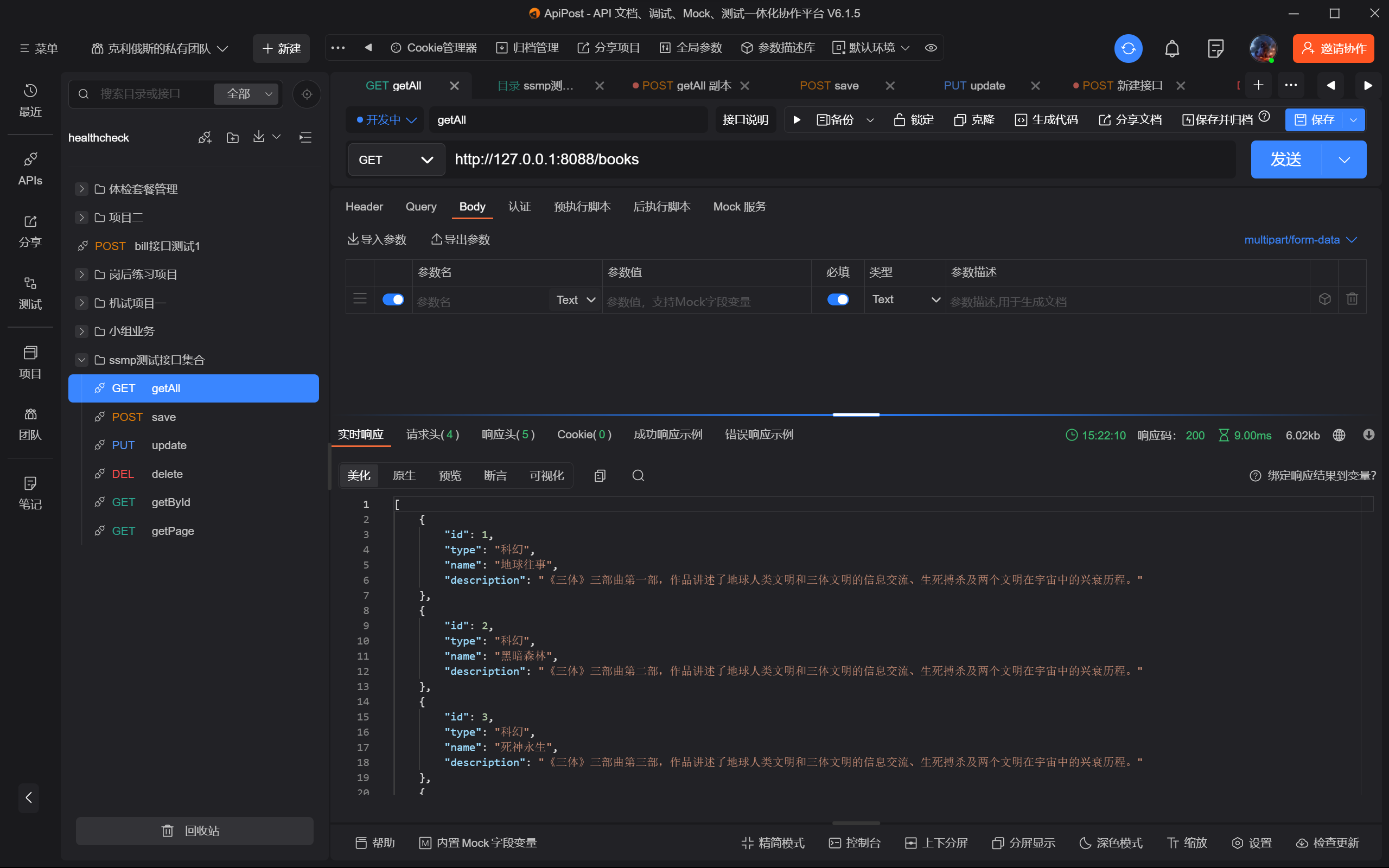
接口测试目录文档: https://console-docs.apipost.cn/preview/7f61bffaaafd5a1c/44eae2dee5dca510
3.表现层消息一致性处理
设计表现层返回结果的模型类,用于后端与前端进行数据格式统一,也称为前后端数据协议。
工具类:
@Data @AllArgsConstructor @NoArgsConstructor public class R { // 标志接口是否成功执行 private Boolean flag; // 调用接口返回数据格式 private Object data; public R(Boolean flag) { this.flag = flag; } }- 1
- 2
- 3
- 4
- 5
- 6
- 7
- 8
- 9
- 10
- 11
- 12
- 13
升级版的表现层:
@RestController @RequestMapping("/books") public class BookControllerPro { @Resource private IBookService iBookService; @GetMapping public R getAll() { return new R(true, iBookService.list()); } @PostMapping public R save(@RequestBody Book book){ return new R(iBookService.save(book)); } @PutMapping public R update(@RequestBody Book book){ return new R(iBookService.updateById(book)); } @DeleteMapping("{id}") public R delete(@PathVariable Integer id){ return new R(iBookService.removeById(id)); } @GetMapping("{id}") public R getById(@PathVariable Integer id){ return new R(true, iBookService.getById(id)); } @GetMapping("{currentPage}/{pageSize}") public R getPage(@PathVariable int currentPage, @PathVariable int pageSize){ IPage<Book> page = new Page<>(currentPage,pageSize); return new R(true, iBookService.page(page,null)); } }- 1
- 2
- 3
- 4
- 5
- 6
- 7
- 8
- 9
- 10
- 11
- 12
- 13
- 14
- 15
- 16
- 17
- 18
- 19
- 20
- 21
- 22
- 23
- 24
- 25
- 26
- 27
- 28
- 29
- 30
- 31
- 32
- 33
- 34
- 35
- 36
- 37
4.异常消息处理
工具类:
@Data @AllArgsConstructor @NoArgsConstructor public class R { // 标志接口是否成功执行 private Boolean flag; // 调用接口返回数据格式 private Object data; // 返回状态信息 private String msg; public R(Boolean flag) { this.flag = flag; } public R(Boolean flag, Object data) { this.flag = flag; this.data = data; } public R(Boolean flag, String msg) { this.flag = flag; this.msg = msg; } }- 1
- 2
- 3
- 4
- 5
- 6
- 7
- 8
- 9
- 10
- 11
- 12
- 13
- 14
- 15
- 16
- 17
- 18
- 19
- 20
- 21
- 22
- 23
- 24
- 25
@RestControllerAdvice public class ProjectExceptionAdvice { @ExceptionHandler public R doException(Exception e) { return new R(false, "服务器故障,稍后再试"); } }- 1
- 2
- 3
- 4
- 5
- 6
- 7
新增接口修改:
@PostMapping public R save(@RequestBody Book book){ boolean flag = iBookService.save(book); return new R(flag, flag ? "新增成功" : "新增失败"); }- 1
- 2
- 3
- 4
- 5
前端save接口调用:
//添加 handleAdd () { axios.post("/books", this.formData).then((res) => { // 判断是否添加成功 if (res.data.flag) { // 关闭弹窗 this.dialogFormVisible = false; this.$message({ message: '新增成功', type: 'success' }); } else { // this.$message.error('新增失败'); this.$message.error(res.data.msg); } }).finally(() => { // 重新加载一下数据 this.getAll(); }) },- 1
- 2
- 3
- 4
- 5
- 6
- 7
- 8
- 9
- 10
- 11
- 12
- 13
- 14
- 15
- 16
- 17
- 18
- 19
- 20
6.前后端协议联调
项目代码地址:git@github.com:Crashinging/ssmp.git
本部分到此为止了…

-
-
相关阅读:
DP53 取数游戏
高德地图脚本加载异常,浏览器报错
华为云云耀云服务器L实例评测|华为云云耀云服务器L实例评测使用
C语言switch语句判断星期
C++基础01
十个面试排序算法
Keras CIFAR-10图像分类 ResNet 篇
QT网络协议知识体系(一)
Ansible自动化
【git】Git 指令统计代码行数
- 原文地址:https://blog.csdn.net/m0_54355172/article/details/126227899

- 最新文章
-
沪漂五周年了:我越来越迷茫了
Agentic Skill Routing 实战:别再把所有 Skill 塞进 AI Agent 上下文
MySQL-Seconds_behind_master的精度误差
[MAF预定义ChatClient中间件-03]CachingChatClient——利用缓存省钱省时间
AI的至暗历史:从万众期待到被政府撤资,AI的两次死亡徘徊
Agent OS :五种驯服不确定性的范式
PortSwigger SQL注入LAB11
数据库即时编译JIT
[Begin]AI Learn Data Day 0
深度学习进阶(二十七)现代 LLM 的核心架构设计其二:SwiGLU