-
Opencv立体相机标定
0. 简要
立体相机标定是立体视觉深度测量的重要步骤,相机标定的精度很大程度上决定了深度的精度,因此掌握立体相机的标定算法和过程至关重要。由于相机标定原理可以在网上找到很多相关资料,因此本文不展开讲原理部分,感兴趣的同学可以移步到https://blog.csdn.net/rs_lys/article/details/118661215理解原理,本文主要讲如何利用Opencv进行立体相机标定,首先对用到的函数展开讲解,最后附上标定的代码。
1. 函数
stereoCalibrate:标定立体相机
#includedouble cv::stereoCalibrate ( InputArrayOfArrays objectPoints, InputArrayOfArrays imagePoints1, InputArrayOfArrays imagePoints2, InputOutputArray cameraMatrix1, InputOutputArray distCoeffs1, InputOutputArray cameraMatrix2, InputOutputArray distCoeffs2, Size imageSize, InputOutputArray R, InputOutputArray T, OutputArray E, OutputArray F, OutputArray perViewErrors, int flags = CALIB_FIX_INTRINSIC, TermCriteria criteria = TermCriteria(TermCriteria::COUNT+TermCriteria::EPS, 30, 1e-6) ) - 1
- 2
- 3
- 4
- 5
- 6
- 7
- 8
- 9
- 10
- 11
- 12
- 13
- 14
- 15
- 16
- 17
- 18
参数:
- objectPoints:
Vector of vectorsof the calibration pattern points. - imagePoints1:
Vector of vectorsof the projections of the calibration pattern points, observed by thefirst camera. - imagePoints2:
Vector of vectorsof the projections of the calibration pattern points, observed by thesecond camera. - cameraMatrix1:
Input/outputfirst cameramatrix,Opencv没有考虑倾斜因子 - distCoeffs1:
Input/output vectorof distortion coefficients (k1,k2,p1,p2[,k3[,k4,k5,k6[,s1,s2,s3,s4[,τx,τy]]]]) of 4, 5, 8, 12 or 14 elements. 输出向量的长度取决于flags - cameraMatrix2:
Input/outputsecond cameramatrix. - distCoeffs2:
Input/outputlens distortion coefficients for the second camera. - imageSize:图像尺寸,(width, height)
- R:
Output rotation matrixbetween the 1st and the 2nd camera coordinate systems. - T:
Output translation vectorbetween the coordinate systems of the cameras. - E:
Output essential matrix. - F:
Output fundamental matrix. - perViewErrors:
Output vectorof theRMS re-projection errorestimatedfor each pattern view. - flags:Different flags that may be zero or a combination of the following values:
- CALIB_FIX_INTRINSIC:固定内参和畸变,只优化R、T、E、F
- CALIB_USE_INTRINSIC_GUESS:根据指定的flags优化部分或全部内参,并提供初始值
- CALIB_USE_EXTRINSIC_GUESS:根据提供的外参初始值进一步优化外参,否则R, T被初始化为两个视图的中值
- CALIB_FIX_PRINCIPAL_POINT:固定主点
- CALIB_FIX_FOCAL_LENGTH:固定焦距
- CALIB_FIX_ASPECT_RATIO:固定fx / fy,优化fy
- CALIB_SAME_FOCAL_LENGTH:施加约束,使得fx_0=fx_1, fy_0=fy_1
- CALIB_ZERO_TANGENT_DIST:将切向畸变固定为零
- CALIB_FIX_K1,…,CALIB_FIX_K6:固定畸变系数k1,…k6。如果设置CALIB_USE_INTRINSIC_GUESS,则畸变系数固定为传入的distCoeffs向量,否则固定为零
- CALIB_RATIONAL_MODEL:启用系数k4, k5和k6。如果设置这个标志,则畸变将计算并返回8个系数,如果没有设置标志,函数只计算并返回5个失真系数。
- CALIB_THIN_PRISM_MODEL:启用系数s1、s2、s3、s4。如果设置这个标志,标定函数使用薄棱镜模型并返回12个系数。如果没有设置标志,函数只计算并返回5个失真系数。
- CALIB_FIX_S1_S2_S3_S4:在优化过程中,薄棱镜畸变系数s1、s2、s3、s4不发生变化。如果设置了CALIB_USE_INTRINSIC_GUESS,则使用提供的distCoeffs矩阵中的系数。否则,它被设置为0。
- CALIB_TILTED_MODEL:启用系数tauX和tauY。如果设置这个标志,标定函数使用倾斜传感器模型并返回14个系数。如果没有设置标志,函数只计算并返回5个失真系数。
- CALIB_FIX_TAUX_TAUY:优化过程中不改变倾斜传感器模型的系数tauX和tauY。如果设置了CALIB_USE_INTRINSIC_GUESS,则使用提供的distCoeffs矩阵中的系数。否则,它被设置为0。
- criteria:算法迭代终止条件
除了立体相关信息外,该函数还可以对两个摄像头各进行单目标定。然而,由于参数空间的高维性和输入数据中的噪声,函数可能会偏离正确的解。建议先使用calibrateCamera单独标定每个相机的内参和畸变,然后将CALIB_FIX_INTRINSIC标志连同计算的内部参数一起传递给函数,以达到更高的标定精度。否则,如果一次性估计所有参数,那么限制一些参数是有意义的,例如,传递CALIB_SAME_FOCAL_LENGTH和CALIB_ZERO_TANGENT_DIST标志,这通常是一个合理的假设。与calibrateCamera类似,
该函数将两个相机的所有可用视图中所有点的总重投影误差降至最低。该函数返回重投影错误的最终值。calibrateCamera:单目标定
#includedouble cv::calibrateCamera ( InputArrayOfArrays objectPoints, InputArrayOfArrays imagePoints, Size imageSize, InputOutputArray cameraMatrix, InputOutputArray distCoeffs, OutputArrayOfArrays rvecs, OutputArrayOfArrays tvecs, OutputArray stdDeviationsIntrinsics, OutputArray stdDeviationsExtrinsics, OutputArray perViewErrors, int flags = 0, TermCriteria criteria = TermCriteria(TermCriteria::COUNT+TermCriteria::EPS, 30, DBL_EPSILON) ) - 1
- 2
- 3
- 4
- 5
- 6
- 7
- 8
- 9
- 10
- 11
- 12
- 13
- 14
- 15
参数:
- objectPoints:
Vector of vectorsof the calibration pattern points.如果是一个平面标定板,那么所有的vectors都是相同的 - imagePoints:
vector of vectorsof the projections of calibration pattern points (e.g.std::vector). imagePoints.size()must be equal toobjectPoints.size(), and imagePoints[i].size()must be equal toobjectPoints[i].size() for each i. - imageSize:图像尺寸,(width, height)
- cameraMatrix:
Output 3x3 floating-point camera matrix - distCoeffs:
Output vectorof distortion coefficients (k1,k2,p1,p2[,k3[,k4,k5,k6[,s1,s2,s3,s4[,τx,τy]]]]) of 4, 5, 8, 12 or 14 elements. - rvecs:
Output vector of rotation vectors(see Rodrigues ) estimated for each pattern view (e.g.std::vector). - tvecs:
Output vector of translation vectorsestimated for each pattern view. - stdDeviationsIntrinsics:
Output vector of standard deviations estimated for intrinsic parameters.Order of deviations values: (fx,fy,cx,cy,k1,k2,p1,p2,k3,k4,k5,k6,s1,s2,s3,s4,τx,τy) If one of parameters is not estimated, it’s deviation is equals to zero. - stdDeviationsExtrinsics:
Output vector of standard deviations estimated for extrinsic parameters.Order of deviations values: (R1,T1,…,RM,TM) where M is number of pattern views, Ri,Ti are concatenated 1x3 vectors. - perViewErrors:
Output vectorof theRMS re-projection errorestimatedfor each pattern view. - flags:Different flags that may be zero or a combination of the following values:
- CALIB_USE_INTRINSIC_GUESS:cameraMatrix包含fx, fy, cx, cy的有效初始值,并进一步优化。否则,(cx, cy)初始设置为图像中心(使用imageSize),焦距以最小二乘方式计算。注意,如果内参数已知,就不需要用这个函数来估计外参数。使用
solvePnP代替。 - CALIB_FIX_PRINCIPAL_POINT:全局优化过程中不改变主点。当设置CALIB_USE_INTRINSIC_GUESS时,它会停留在中心或者不同的位置,这取决于cameraMatrix是否包含有效初始值。
- CALIB_FIX_ASPECT_RATIO:函数只考虑fy作为自由参数。fx/fy的比率与输入的摄像矩阵保持相同。当没有设置CALIB_USE_INTRINSIC_GUESS时,fx和fy的实际输入值将被忽略,只计算它们的比率并进一步使用。
- CALIB_ZERO_TANGENT_DIST:切向失真系数(p1,p2)固定为零
- CALIB_FIX_K1,…,CALIB_FIX_K6:在优化过程中,相应的径向畸变系数不发生变化。如果设置了CALIB_USE_INTRINSIC_GUESS,则使用提供的distCoeffs矩阵中的系数。否则,它被设置为0。
- CALIB_RATIONAL_MODEL:启用系数k4、k5、k6。如果设置了标志,标定函数使用合理的模型并返回8个系数。如果没有设置标志,函数只计算并返回5个失真系数。
- CALIB_THIN_PRISM_MODEL:启用系数s1、s2、s3、s4。如果设置这个标志,标定函数使用薄棱镜模型并返回12个系数。如果没有设置标志,函数只计算并返回5个失真系数。
- CALIB_FIX_S1_S2_S3_S4:在优化过程中,薄棱镜畸变系数s1、s2、s3、s4不发生变化。如果设置了CALIB_USE_INTRINSIC_GUESS,则使用提供的distCoeffs矩阵中的系数。否则,它被设置为0。
- CALIB_TILTED_MODEL:启用系数tauX和tauY。如果设置这个标志,标定函数使用倾斜传感器模型并返回14个系数。如果没有设置标志,函数只计算并返回5个失真系数。
- CALIB_FIX_TAUX_TAUY:优化过程中不改变倾斜传感器模型的系数tauX和tauY。如果设置了CALIB_USE_INTRINSIC_GUESS,则使用提供的distCoeffs矩阵中的系数。否则,它被设置为0。
- CALIB_USE_INTRINSIC_GUESS:cameraMatrix包含fx, fy, cx, cy的有效初始值,并进一步优化。否则,(cx, cy)初始设置为图像中心(使用imageSize),焦距以最小二乘方式计算。注意,如果内参数已知,就不需要用这个函数来估计外参数。使用
- criteria:算法迭代终止条件
该函数估计每个视图的相机内参数和外部参数。3D物体点的坐标和它们在每个视图中对应的2D投影必须指定。这可以通过使用具有已知几何形状的物体和容易检测到的特征点来实现。这样的对象被称为标定模式,OpenCV内置了对棋盘作为校准装置的支持(参见findChessboardCorners)。算法执行如下步骤:
- 计算初始内在参数(该选项仅适用于平面校准模式)或从输入参数中读取它们。畸变系数最初都设置为零,除非使用CALIB_FIX_K指定。
- 假设内在参数已经知,估计初始相机姿态。这是用
solvePnP完成的。 - 运行全局
Levenberg-Marquardt优化算法来最小化重投影误差,即观测特征点imagePoints和投影(使用当前对相机参数和位姿的估计)物体点objectPoints之间距离的平方和。详见projectPoints。
See also
findChessboardCorners, solvePnP, initCameraMatrix2D, stereoCalibrate, undistort- 1
findChessboardCorners():找出棋盘角点的位置
#includebool cv::findChessboardCorners ( InputArray image, Size patternSize, OutputArray corners, int flags = CALIB_CB_ADAPTIVE_THRESH+CALIB_CB_NORMALIZE_IMAGE ) - 1
- 2
- 3
- 4
- 5
- 6
- 7
参数:
- image:棋盘格图像。It must be an
8-bit grayscale or color image. - patternSize:Number of inner corners per a chessboard row and column (
patternSize = cvSize(points_per_row,points_per_colum)). - corners:
Output array of detected corners. - flags:Various operation flags that can be zero or a combination of the following values:
- CALIB_CB_ADAPTIVE_THRESH:使用自适应阈值对图像进行二值化处理
- CALIB_CB_NORMALIZE_IMAGE:在应用固定阈值或自适应阈值之前,使用equalizeHist将图像归一化。
- CALIB_CB_FILTER_QUADS:使用额外的标准(如轮廓面积,周长,正方形形状)来过滤掉在轮廓检索阶段提取的假四边形。
- CALIB_CB_FAST_CHECK:对图像进行快速检查,查找棋盘角点,如果没有找到,则使用快捷方式调用。这可以大大加快退化状态下的调用,当没有棋盘被观察到。
该函数试图确定输入图像是否为棋盘图案的视图,并定位内部棋盘角。如果找到了所有的角点,并且按一定的顺序放置(每行从左到右),则该函数返回一个非零值。否则,如果函数未能找到所有的角或重新排序它们,它将返回0。例如,一个普通的棋盘有8 x 8个正方形和7 x 7个内角,也就是黑色方块相互接触的点。检测到的坐标是近似的,为了更准确地确定它们的位置,该函数调用cornerSubPix。如果返回的坐标不够精确,您还可以使用带有不同参数的函数cornerSubPix。该函数需要在棋盘格周围留出空白(比如方形粗的边框,越宽越好),以使检测在各种环境中更稳健。否则,如果没有边框且背景为深色,则无法正确分割出外部的黑色方块,从而导致方块分组排序算法失败。Sample:
Size patternsize(8, 6); //interior number of corners Mat gray = ....; //source image vector<Point2f> corners; //this will be filled by the detected corners //CALIB_CB_FAST_CHECK saves a lot of time on images //that do not contain any chessboard corners bool patternfound = findChessboardCorners(gray, patternsize, corners, CALIB_CB_ADAPTIVE_THRESH + CALIB_CB_NORMALIZE_IMAGE + CALIB_CB_FAST_CHECK); if (patternfound) cornerSubPix(gray, corners, Size(11, 11), Size(-1, -1), TermCriteria(CV_TERMCRIT_EPS + CV_TERMCRIT_ITER, 30, 0.1)); drawChessboardCorners(img, patternsize, Mat(corners), patternfound);- 1
- 2
- 3
- 4
- 5
- 6
- 7
- 8
- 9
- 10
- 11
- 12
cornerSubPix():对初始的整数角点坐标进行亚像素精度的优化
#includevoid cv::cornerSubPix ( InputArray image, InputOutputArray corners, Size winSize, Size zeroZone, TermCriteria criteria ) - 1
- 2
- 3
- 4
- 5
- 6
- 7
- 8
原理解释:亚像素角点的求法
参数:
- image:
Input single-channel, 8-bit or float image. - corners:
Initial coordinatesof the input corners andrefined coordinatesprovided for output. - winSize:
Half of the side length of the search window.For example, if winSize=Size(5,5) , then a (5∗2+1)×(5∗2+1)=11×11 search window is used. - zeroZone:搜索区域中间的死区大小的一半,在此范围上没有进行下式求和它有时被用来避免自相关矩阵可能的奇异性。(-1,-1)表示不存在这样的大小。没弄明白怎么用,
设置为(-1, -1)即可。 - criteria:角点亚像素精度优化的迭代过程的终止条件。要么达到
最大迭代次数,要么相邻两次迭代的角点位置移动小于给定阈值,则终止。
drawChessboardCorners():绘制检测出来的棋盘角点。
#includevoid cv::drawChessboardCorners ( InputOutputArray image, Size patternSize, InputArray corners, bool patternWasFound ) - 1
- 2
- 3
- 4
- 5
- 6
- 7
参数:
- image:Destination image. It must be an
8-bit color image. - patternSize:Number of inner corners per a chessboard row and column (
patternSize = cv::Size(points_per_row,points_per_column)). - corners:
Array of detected corners, the output of findChessboardCorners. - patternWasFound:Parameter indicating whether the complete board was found or not.
The return value of findChessboardCorners should be passed here.
该函数绘制单独的棋盘角点,如果没有找到棋盘,则检测到红色圆圈,如果找到了棋盘,则检测到与线相连的彩色角点。TermCriteria():为迭代算法定义终止标准的类。可以通过默认构造函数初始化它
#includecv::TermCriteria::TermCriteria ( int type, int maxCount, double epsilon ) - 1
- 2
- 3
- 4
- 5
- 6
参数:
- type:The type of termination criteria, one of
TermCriteria::Type- COUNT
- EPS
- COUNT + EPS
- maxCount:The maximum number of iterations or elements to compute.
- epsilon:The desired accuracy or change in parameters at which the iterative algorithm stops.
stereoRectify():基于立体相机内外参,计算极线校正变换。
#includevoid cv::stereoRectify ( InputArray cameraMatrix1, InputArray distCoeffs1, InputArray cameraMatrix2, InputArray distCoeffs2, Size imageSize, InputArray R, InputArray T, OutputArray R1, OutputArray R2, OutputArray P1, OutputArray P2, OutputArray Q, int flags = CALIB_ZERO_DISPARITY, double alpha = -1, Size newImageSize = Size(), Rect * validPixROI1 = 0, Rect * validPixROI2 = 0 ) - 1
- 2
- 3
- 4
- 5
- 6
- 7
- 8
- 9
- 10
- 11
- 12
- 13
- 14
- 15
- 16
- 17
- 18
- 19
- 20
参数:
- cameraMatrix1:First camera matrix.
- distCoeffs1:First camera distortion parameters. 畸变参数应该是为了配合alpha使用,没有其他的用处。
- cameraMatrix2:Second camera matrix.
- distCoeffs2:Second camera distortion parameters. 畸变参数应该是为了配合alpha使用,没有其他的用处。
- imageSize:
Size of the image used for stereo calibration. - R:Rotation matrix between the coordinate systems of the first and the second cameras.
- T:Translation vector between coordinate systems of the cameras.
- R1:
Output 3x3rectification transform (rotation matrix) for the first camera. - R2:
Output 3x3rectification transform (rotation matrix) for the second camera. - P1:
Output 3x4 projection matrixin the new (rectified) coordinate systems for the first camera. - P2:
Output 3x4 projection matrixin the new (rectified) coordinate systems for the second camera. - Q:
Output 4×4 disparity-to-depth mapping matrix(seereprojectImageTo3D). - flags:操作标志可以是
零或CALIB_ZERO_DISPARITY。如果设置了该标志,该函数使每个摄像头的主要点在校正视图中具有相同的像素坐标。如果没有设置标志,该函数仍然可以在水平或垂直方向(取决于极线的方向)移动图像,以最大化有用的图像区域。 - alpha:自由的尺度参数。如果是-1或不存在,函数执行默认缩放。否则,该参数应在0 ~ 1之间。
Alpha =0意味着校正后的图像被缩放和移动,因此有效的像素可见(校正后没有黑色区域)。Alpha =1意味着校正后的图像被抽取和移位,因此所有来自相机的原始图像的像素都保留在修正后的图像中(没有源图像像素丢失)。显然,任何中间值都会产生介于这两种极端情况之间的中间结果。没弄明白原理,直接设置为-1或缺省就行。 - newImageSize:校正后的新图像分辨率。同样的大小应该传递给
initUndistortRectifyMap(参见OpenCV samples目录中的stereo_calib.cpp示例)。当(0,0)被传递时(默认),它被设置为原始的imageSize。将其设置为较大的值可以帮助您保存原始图像中的细节,特别是当有较大的径向失真时。 - validPixROI1:
可选输出校正图像内的矩形区域,其中所有像素是有效的。如果alpha=0, roi覆盖整个图像。否则,它们可能会更小(见下图)。 - validPixROI2:
可选输出校正图像内的矩形区域,其中所有像素是有效的。如果alpha=0, roi覆盖整个图像。否则,它们可能会更小(见下图)。
该函数计算每个相机的旋转矩阵,使两个相机图像平面相同。因此,这使得所有的极线平行,从而简化了密集立体对应问题。该函数以
sterecalibrate计算的矩阵作为输入。作为输出,它提供了两个旋转矩阵和两个在新坐标中的投影矩阵。该函数区分以下两种情况:
正如你所看到的,P1和P2的前三列将有效地成为新的“校正”相机矩阵。校正矩阵,连同R1和R2,然后可以传递给initUndistortRectifyMap来初始化每个相机的校正坐标映射。下面是来自
stereo_calib.cpp示例的截图。一些红色的水平线穿过相应的图像区域。这意味着图像得到了很好的校正,这是大多数立体匹配算法所依赖的。绿色矩形是roi1和roi2。你可以看到它们的内部都是有效的像素。
initUndistortRectifyMap():计算去畸变和极线校正变换图。
#includevoid cv::initUndistortRectifyMap ( InputArray cameraMatrix, InputArray distCoeffs, InputArray R, InputArray newCameraMatrix, Size size, int m1type, OutputArray map1, OutputArray map2 ) - 1
- 2
- 3
- 4
- 5
- 6
- 7
- 8
- 9
- 10
- 11
参数:
- cameraMatrix:Input camera matrix A
- distCoeffs:Input vector of distortion coefficients (k1,k2,p1,p2[,k3[,k4,k5,k6[,s1,s2,s3,s4[,τx,τy]]]]) of 4, 5, 8, 12 or 14 elements. If the vector is NULL/empty, the zero distortion coefficients are assumed.
- R:
Optional rectification transformation in the object space (3x3 matrix).对于单目相机,直接忽略,默认是Identity;对于立体相机,传入stereoRectify输出的R1/R2。 - newCameraMatrix:New camera matrix
- size:Undistorted image size.
这个size必须与stereoRectify中的newImageSize一样。 - m1type:Type of the first output map that can be
CV_32FC1, CV_32FC2 or CV_16SC2, seeconvertMaps - map1:
The first output map. - map2:
The second output map.
在
单目相机的情况下,newCameraMatrix通常等于cameraMatrix,或者它可以通过getOptimalNewCameraMatrix来计算,以便更好地控制缩放。对于立体相机来说,newCameraMatrix通常设置为通过立体矫正计算出的P1或P2。该函数实际上为remap使用的反向映射算法构建映射。即,对于目标(校正和校正)图像中的每个像素(u,v),该函数计算源图像(即来自相机的原始图像)中对应的坐标。应用以下流程:
如果是立体相机,这个函数会被调用两次:每个相机调用一次。但是如果立体相机没有被校准,仍然可以使用stereoRectifyUncalibrated从基本矩阵直接计算校正变换。感兴趣的可以看Opencv官网文档。remap():对图像进行几何变换
#includevoid cv::remap ( InputArray src, OutputArray dst, InputArray map1, InputArray map2, int interpolation, int borderMode = BORDER_CONSTANT, const Scalar & borderValue = Scalar() ) - 1
- 2
- 3
- 4
- 5
- 6
- 7
- 8
- 9
- 10
参数:
- src:Source image.
- dst:Destination image.
It has the same size as map1 and the same type as src . - map1:The first map of either (x,y) points or just x values having the type
CV_16SC2 , CV_32FC1, or CV_32FC2. SeeconvertMapsfor details on converting a floating point representation to fixed-point for speed. - map2:The second map of y values having the type
CV_16UC1, CV_32FC1, or none (empty map if map1 is (x,y) points), respectively. - interpolation:Interpolation method (see
InterpolationFlags). The method INTER_AREA is not supported by this function. - borderMode:Pixel extrapolation method (see
BorderTypes). When borderMode=BORDER_TRANSPARENT, it means that the pixels in the destination image that corresponds to the “outliers” in the source image are not modified by the function. - borderValue:Value used in case of a
constant border. By default, it is 0.

convertMaps():将图像变换映射从一种表示转换为另一种表示。
#includevoid cv::convertMaps ( InputArray map1, InputArray map2, OutputArray dstmap1, OutputArray dstmap2, int dstmap1type, bool nninterpolation = false ) - 1
- 2
- 3
- 4
- 5
- 6
- 7
- 8
- 9
参数:
- map1:The first input map of type
CV_16SC2, CV_32FC1, or CV_32FC2. - map2:The second input map of type
CV_16UC1, CV_32FC1, or none (empty matrix),respectively. - dstmap1:The first output map that
has the type dstmap1type and the same size as src . - dstmap2:The second output map.
- dstmap1type:Type of the first output map that should be
CV_16SC2, CV_32FC1, or CV_32FC2 . - nninterpolation:标志,指示定点映射是
用于最近邻插值(false)还是用于更复杂的插值(true)。
该函数将一对映射从一种表示转换为另一种表示。支持以下选项:

initCameraMatrix2D():计算初始相机内参,目前仅适用与平面标定板。具体原理参考张正友标定法
#includeMat cv::initCameraMatrix2D ( InputArrayOfArrays objectPoints, InputArrayOfArrays imagePoints, Size imageSize, double aspectRatio = 1.0 ) - 1
- 2
- 3
- 4
- 5
- 6
- 7
参数:
- objectPoints:
Vector of vectors of the calibration pattern pointsin the calibration pattern coordinate space. In the old interface all the per-view vectors are concatenated. SeecalibrateCamerafor details. - imagePoints:
Vector of vectors of the projections of the calibration pattern points.In the old interface all the per-view vectors are concatenated. - imageSize:Image size in pixels used to
initialize the principal point. - aspectRatio:If it is zero or negative, both fx and fy are estimated independently. Otherwise, fx=fy∗aspectRatio .
2. 代码
首先我们来展示一下Opencv立体标定的流程,这样更利于我们理解下面的代码。
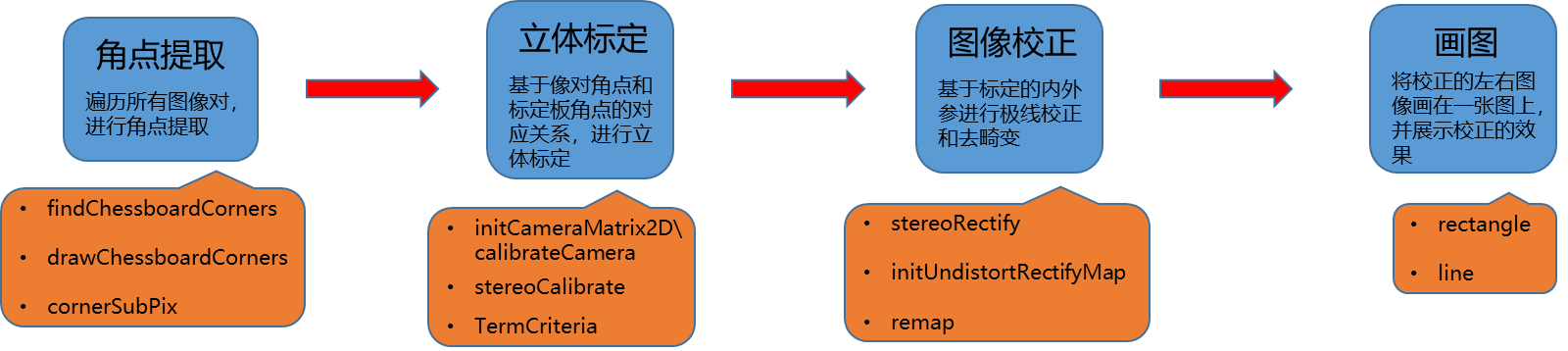
#include "opencv2/calib3d.hpp" #include "opencv2/imgcodecs.hpp" #include "opencv2/highgui.hpp" #include "opencv2/imgproc.hpp" #include#include #include #include #include #include #include #include using namespace cv; using namespace std; static void StereoCalib(const vector<string>& imagelist, Size boardSize, float squareSize, bool displayCorners = false, bool showRectified = true) { if (imagelist.size() % 2 != 0) { cout << "Error: the image list contains odd (non-even) number of elements\n"; return; } const int maxScale = 2; // ARRAY AND VECTOR STORAGE: vector<vector<Point2f> > imagePoints[2]; //这是一个数组,imagePoints[0]和imagePoints[1]都是一个vector - 1
- 2
- 3
- 4
- 5
- 6
- 7
- 8
- 9
- 10
- 11
- 12
- 13
- 14
- 15
- 16
- 17
- 18
- 19
- 20
- 21
- 22
- 23
- 24
- 25
- 26
- 27
- 28
- 29
- 30
- 31
- 32
- 33
- 34
- 35
- 36
- 37
- 38
- 39
- 40
- 41
- 42
- 43
- 44
- 45
- 46
- 47
- 48
- 49
- 50
- 51
- 52
- 53
- 54
- 55
- 56
- 57
- 58
- 59
- 60
- 61
- 62
- 63
- 64
- 65
- 66
- 67
- 68
- 69
- 70
- 71
- 72
- 73
- 74
- 75
- 76
- 77
- 78
- 79
- 80
- 81
- 82
- 83
- 84
- 85
- 86
- 87
- 88
- 89
- 90
- 91
- 92
- 93
- 94
- 95
- 96
- 97
- 98
- 99
- 100
- 101
- 102
- 103
- 104
- 105
- 106
- 107
- 108
- 109
- 110
- 111
- 112
- 113
- 114
- 115
- 116
- 117
- 118
- 119
- 120
- 121
- 122
- 123
- 124
- 125
- 126
- 127
- 128
- 129
- 130
- 131
- 132
- 133
- 134
- 135
- 136
- 137
- 138
- 139
- 140
- 141
- 142
- 143
- 144
- 145
- 146
- 147
- 148
- 149
- 150
- 151
- 152
- 153
- 154
- 155
- 156
- 157
- 158
- 159
- 160
- 161
- 162
- 163
- 164
- 165
- 166
- 167
- 168
- 169
- 170
- 171
- 172
- 173
- 174
- 175
- 176
- 177
- 178
- 179
- 180
- 181
- 182
- 183
- 184
- 185
- 186
- 187
- 188
- 189
- 190
- 191
- 192
- 193
- 194
- 195
- 196
- 197
- 198
- 199
- 200
- 201
- 202
- 203
- 204
- 205
- 206
- 207
- 208
- 209
- 210
- 211
- 212
- 213
- 214
- 215
- 216
- 217
- 218
- 219
- 220
- 221
- 222
- 223
- 224
- 225
- 226
- 227
- 228
- 229
- 230
- 231
- 232
- 233
- 234
- 235
- 236
- 237
- 238
- 239
- 240
- 241
- 242
- 243
- 244
- 245
- 246
- 247
- 248
- 249
- 250
- 251
- 252
- 253
- 254
- 255
- 256
- 257
- 258
- 259
- 260
- 261
- 262
- 263
- 264
- 265
- 266
- 267
- 268
- 269
- 270
- 271
- 272
- 273
- 274
- 275
- 276
- 277
- 278
- 279
- 280
- 281
- 282
- 283
- 284
- 285
- 286
下面直接放出一组极线校正的图像对,从图中可以看出,极线是水平对齐的。

至此,Opencv立体标定的过程和代码都已经讲完了,希望大家有所收获,有疑问的话请留言评论区。 -
相关阅读:
自制了一个开发团队展示控制器来为成员引流【前端】
有这些症状要考虑是湿气重的原因?
洛谷 P7174 [COCI2014-2015#4] CESTA
865. 具有所有最深节点的最小子树
骚操作!居然能修改已运行的 Docker 容器端口映射?
1033 To Fill or Not to Fill
[leetcode 优先队列] 2512. 奖励最顶尖的 K 名学生 M
十年Python老鸟总结的5条Python开发最佳实践
组件的自定义事件②
DCMM数据管理能力成熟度等级划分
- 原文地址:https://blog.csdn.net/qq_42676511/article/details/126100148

- 最新文章
-
沪漂五周年了:我越来越迷茫了
Agentic Skill Routing 实战:别再把所有 Skill 塞进 AI Agent 上下文
MySQL-Seconds_behind_master的精度误差
[MAF预定义ChatClient中间件-03]CachingChatClient——利用缓存省钱省时间
AI的至暗历史:从万众期待到被政府撤资,AI的两次死亡徘徊
Agent OS :五种驯服不确定性的范式
PortSwigger SQL注入LAB11
数据库即时编译JIT
[Begin]AI Learn Data Day 0
深度学习进阶(二十七)现代 LLM 的核心架构设计其二:SwiGLU