-
flask框架初学-06-对数据库的增删改查
上一节学习了怎么在flask中连接数据库,使得flask中的模型类可以与数据库中的表和字段一一映射。本节将具体介绍如果通过对模型对象进行操作,从而实现对数据库进行操作。
小知识点: CDN:内容分发网络,构建在现有网络基础之上的智能虚拟网络,依靠部署在各地的边缘服务器,通过中心平台的负载均衡'内容分发'、调度等功能模块,使用户就近截取 所需内容,调高用户访问响应速度和命中率- 1
- 2
一、查询
1、模型类.query.filter_by 简单查询
查询 模型类操作 对应数据库语句 查询所有 模型类.query.all select * from user; 查询一个 模型类.query.get() 有条件的查询 模型类.query.filter_by(字段名 = 值) select * from user where 字段名=值 模型类.query.filter_by(字段名 = 值).firdst() select * from user where 字段名=值 limit 0,1 除了模型类.query.filter_by(),还有一种模型类.query.filter()的查询方式,两者不同的地方在于:
- 模型类.query.filter() 里面是一个布尔的条件 模型类.query.filter(模型名.字段名 == 值)
- 模型类.query.filter_by() 里面是一个等值 模型类.query.filter_by(字段名 = 值)
2、模型类.query.filter()
简单查询
查询 模型类操作 对应数据库语句 查询所有,返回一个列表 模型类.query.filter.all() select * from user; 查询所有结果的第一个,返回一个对象 模型类.query.filter.first() select * from user where 字段名=值 模糊查询
查询 模型类操作 对应数据库语句 查询User中以t结尾的数据 User.query.filter(User.username.endswith(‘t’)).all() select * from User where username like ‘%t’; 查询User中以t开头的数据 User.query.filter(User.username.startswith(‘t’)).all() select * from User where username like ‘t%’; 查询User中包含t的数据 User.query.filter(User.username.contains(‘t’)).all() select * from User where username like ‘%t%’; 查询User中包含t的数据 User.query.filter(User.username.like(‘%t%’)).all() select * from User where username like ‘%t%’; 多条件判断查询 :需要先导入sqlalchemy
from sqlalchemy import or_, and_, not_, __gt__,__lt__,__ge__(gt equal),__le__(le equal)- 1
查询 模型类操作 对应数据库语句 查询User中username以t结尾或者包含i的所有数据 User.query.filter(or_(User.username.like(‘t%’),User.username.contains(‘i’))).all() select * from User where username like ‘%t’ or username like '%i%; 查询User中username包含i并且rdatetine>2021-12-15 00:00:00的所有数据 User.query.filter(and_(User.rdatetime. __ gt __ (‘2021-12-15 00:00:00’), User.username.contains(‘i’))).all() select * from User where username like '%i% and rdatetime>‘2021-12-15 00:00:00’; 查询User中phone为18176641567的所有数据 User.query.filter(User.phone.in_([‘18176641567’,‘’,‘’])).all() seslect * from User where phone in (‘18179641567’,‘’,‘’); 如果要检索的字段是字符串 (varchar, db.String) : User.username.startswith('') User.username.endswith('') User.username.contains('') User.username.like('') User.username.in_(['','','']) User.username == 'zzz' 如果要检索的字段是整型或者日期: User,age.__lt__(18) User.rdatetime.__gt__('') User.age.__le__(18) User.age.__ge__(18) User.age.between(15,30) 如果多个条件一起检索: and_ or_ not_- 1
- 2
- 3
- 4
- 5
- 6
- 7
- 8
- 9
- 10
- 11
- 12
- 13
- 14
- 15
- 16
- 17
排序 :order_by
查询 模型类操作 对应数据库语句 查询User中所有数据并进行倒序返回 User.query.order_by(-User.id).all() select * from user desc; 查询User中包含i的所有数据并根据rdatetime正序返回 User.query.filter(User.username.contains(‘i’)).order_by(‘rdatetime’).all() select * from user where username like '%i% order by rdatetime; 查询User中包含i的所有数据并根据rdatetime倒序返回 User.query.filter(User.username.contains(‘i’)).order_by(-User.rdatetime).all() select * from user where username like '%i% order by rdatetime desc; 限制:limit
查询 模型类操作 对应数据库语句 查询User中根据id正序的前两条数据 User.query.order_by(‘id’).limit(2).all() select * from User order by id limit 2; 跳过前两条记录再获取User中的两条记录 User.query.offset(2).limit(2).all() select * from User order by id limit 2,4 ; 二、删除
1、逻辑删除(定义数据库中的表的时候,添加一个字段isdelete,通过此字段控制是否删除)
id = request.args.get('id') user = User.query.get(id) user.isdelete = True db.session.commit()- 1
- 2
- 3
- 4
2、物理删除
id = request.args.get('id') user = User.query.get(id) db.session.delete(user) db.session.commit()- 1
- 2
- 3
- 4
三、更新
id = request.args.get('id') username = request.args.get('username') phone = request.args.get('phone') user = User.query.get(id) user.phone = phone user.username = username db.session.commit()- 1
- 2
- 3
- 4
- 5
- 6
- 7
四、添加
user = User() user.xxx = xxx db.session.add(user) db.session.commit()- 1
- 2
- 3
- 4
五、Example
项目结构
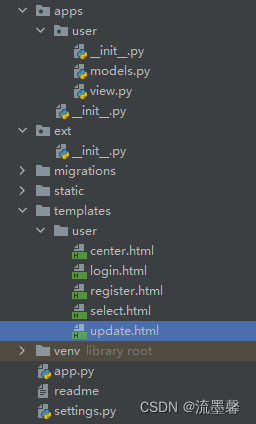
settings.py
class Config: DEBUG = True SQLALCHEMY_DATABASE_URI = 'mysql://root:123456@127.0.0.1:3306/flaskday06' SQLALCHEMY_TRACK_MODIFICATIONS = True SQLALCHEMY_ECHO = True class DevelopmentConfig(Config): ENV = 'development' DEBUG = True class ProductionConfig(Config): ENV = 'production' DEBUG = True- 1
- 2
- 3
- 4
- 5
- 6
- 7
- 8
- 9
- 10
- 11
- 12
- 13
- 14
apps下的__ init __.py
from flask import Flask import settings from apps.user.view import user_bp from ext import db def create_app(): app = Flask(__name__,template_folder='../templates',static_folder='../static') app.config.from_object(settings.DevelopmentConfig) # 初始化db db.init_app(app) app.register_blueprint(user_bp) return app- 1
- 2
- 3
- 4
- 5
- 6
- 7
- 8
- 9
- 10
- 11
- 12
- 13
- 14
- 15
- 16
ext下的__ init __.py
from flask_sqlalchemy import SQLAlchemy import pymysql pymysql.install_as_MySQLdb() db = SQLAlchemy()- 1
- 2
- 3
- 4
- 5
app.py
from flask_migrate import Migrate, MigrateCommand from flask_script import Manager from apps.user.models import User from apps import create_app from ext import db app = create_app() manager = Manager(app = app) migrate = Migrate(app = app, db = db) manager.add_command('db',MigrateCommand) @manager.command def init(): print('初始化') if __name__ == '__main__': manager.run()- 1
- 2
- 3
- 4
- 5
- 6
- 7
- 8
- 9
- 10
- 11
- 12
- 13
- 14
- 15
- 16
- 17
- 18
- 19
models.py
from datetime import datetime from ext import db class User(db.Model): id = db.Column(db.Integer,primary_key = True,autoincrement = True) username = db.Column(db.String(15),unique=True,nullable=False) password = db.Column(db.String(64),nullable=False) phone = db.Column(db.String(11),nullable=False,unique= True) isdelete = db.Column(db.Boolean,default=False) rdatetime = db.Column(db.DateTime,default = datetime.now()) def __str__(self): return self.username- 1
- 2
- 3
- 4
- 5
- 6
- 7
- 8
- 9
- 10
- 11
- 12
- 13
- 14
- 15
view.py
import hashlib from flask import Blueprint, request, render_template, url_for from sqlalchemy import or_, and_, not_ from werkzeug.utils import redirect from apps.user.models import User from ext import db user_bp = Blueprint('user',__name__) # 注册 @user_bp.route('/register',methods=['POST','GET']) def register(): if request.method == 'POST': username = request.form.get('username') password = request.form.get('password') repassword = request.form.get('repassword') phone = request.form.get('phone') if password == repassword: user = User() user.username = username user.password = hashlib.md5(password.encode('utf-8')).hexdigest() user.phone = phone db.session.add(user) db.session.commit() return redirect(url_for('user.user_center')) return render_template('user/register.html',msg='用户确认密码不正确!') return render_template('user/register.html') # 用户中心 @user_bp.route('/') def user_center(): users = User.query.filter(User.isdelete == False).all() return render_template('user/center.html',users = users) # 登录 @user_bp.route('/login') def login(): if request.method == 'POST': username = request.form.get('username') password = request.form.get('password') new_password = hashlib.md5(password.encode('utf-8')).hexdigest() user_list = User.query.filter_by(username=username) print(user_list) for u in user_list: if u.password == new_password: return '用户登录成功!' else: return render_template('user/login.html',msg='用户名或密码有误!') print(u) return 'testing' return render_template('user/login.html') # 检索 @user_bp.route('/search') def search(): keyword = request.args.get('search') # 查询 user_list = User.query.filter(or_(User.username.contains(keyword),User.phone.contains(keyword))) return render_template('user/center.html',users=user_list) # 删除 @user_bp.route('/delete',endpoint='delete') def user_delete(): id = request.args.get('id') # 获取该id的用户 user = User.query.get(id) # 1、逻辑删除 user.isdelete = True """ # 2、物理删除 db.session.delete(user) """ # 提交 db.session.commit() return redirect(url_for('user.user_center')) # 更新 @user_bp.route('/update',endpoint='update',methods=['GET','POST']) def user_update(): if request.method == 'POST': id = request.form.get('id') username = request.form.get('username') phone = request.form.get('phone') user = User.query.get(id) user.phone = phone user.username = username db.session.commit() return redirect(url_for('user.user_center')) else: id = request.args.get('id') user = User.query.get(id) return render_template('user/update.html',user=user) @user_bp.route('/test') def test(): username = request.args.get('username') user = User.query.filter_by(username=username).first() print(user.username,user.rdatatime) user = User.query.filter_by(username=username).last() print(user.username, user.rdatatime) return 'test' @user_bp.route('/select') def user_select(): # 根据主键查询用户 user = User.query.get(1) user1 = User.query.filter(User.username == 'tom').all() user2 = User.query.filter(User.username == 'tom').first() # 相当于 select * from User where username like 't%'; user_list = User.query.filter(User.username.startswith('t')).all() user_list2 = User.query.filter(User.username.like('%t%')).all() user_list3 = User.query.filter(or_(User.username.like('t%'), User.username.contains('i'))).all() user_list4 = User.query.filter(and_(User.rdatetime>'2021-12-15 00:00:00', User.username.contains('i'))).all() user_list5= User.query.filter(and_(User.rdatetime.__gt__('2021-12-15 00:00:00'), User.username.contains('i'))).all() user_list6 = User.query.filter(not_(User.username.contains('i'))).all() user_list7 = User.query.filter(User.phone.in_(['18179641567','',''])).all() user_list8= User.query.filter(User.rdatetime.between('2021-12-05 00:00:00','2021-12-15 23:00:00')).all() user_list9 = User.query.order_by(-User.id).all() user_list10 = User.query.filter(User.username.contains('i')).order_by('rdatetime').all() user_list11 = User.query.filter(User.username.contains('i')).order_by(-User.rdatetime).all() # limit的使用 + offset偏移 user_list12 = User.query.order_by('id').limit(2).all() usee_list13 = User.query.offset(1).limit(2).all() return render_template('user/select.html',user=user,user1=user1,user2=user2,user_list=user_list, user_list2=user_list2,user_list3=user_list3,user_list4=user_list4,user_list5=user_list5, user_list6=user_list6,user_list7=user_list7,user_list8=user_list8,user_list9=user_list9, user_list10=user_list10,user_list11=user_list11,user_list12=user_list12,usee_list13=usee_list13)- 1
- 2
- 3
- 4
- 5
- 6
- 7
- 8
- 9
- 10
- 11
- 12
- 13
- 14
- 15
- 16
- 17
- 18
- 19
- 20
- 21
- 22
- 23
- 24
- 25
- 26
- 27
- 28
- 29
- 30
- 31
- 32
- 33
- 34
- 35
- 36
- 37
- 38
- 39
- 40
- 41
- 42
- 43
- 44
- 45
- 46
- 47
- 48
- 49
- 50
- 51
- 52
- 53
- 54
- 55
- 56
- 57
- 58
- 59
- 60
- 61
- 62
- 63
- 64
- 65
- 66
- 67
- 68
- 69
- 70
- 71
- 72
- 73
- 74
- 75
- 76
- 77
- 78
- 79
- 80
- 81
- 82
- 83
- 84
- 85
- 86
- 87
- 88
- 89
- 90
- 91
- 92
- 93
- 94
- 95
- 96
- 97
- 98
- 99
- 100
- 101
- 102
- 103
- 104
- 105
- 106
- 107
- 108
- 109
- 110
- 111
- 112
- 113
- 114
- 115
- 116
- 117
- 118
- 119
- 120
- 121
- 122
- 123
- 124
- 125
- 126
- 127
- 128
- 129
- 130
- 131
- 132
- 133
- 134
center.html
DOCTYPE html> <html lang="en"> <head> <meta charset="UTF-8"> <title>用户中心title> <script crossorigin="anonymous" integrity="sha384-nrOSfDHtoPMzJHjVTdCopGqIqeYETSXhZDFyniQ8ZHcVy08QesyHcnOUpMpqnmWq" src="https://lib.baomitu.com/jquery/3.1.0/jquery.min.js">script> head> <body> <div><a href="{{ url_for('user.register') }}">注册a> <a href="{{ url_for('user.login') }}">登录a> <a href="">退出a> div> <div> <h1>所有用户信息如下:h1> 搜索: <input type="text" name="search" placeholder="输入用户名或手机号码"><input type="button" value="搜索" id="search"> <br> {% if users %} <table border="1" cellspacing="0" width="50%" > <tr> <td>序号td> <td>用户名td> <td>电话td> <td>注册时间td> <td>操作td> tr> {% for user in users %} <tr> <td>{{ loop.index }}td> <td>{{ user.username }}td> <td>{{ user.phone }}td> <td>{{ user.rdatetime }}td> <td> <a href="{{ url_for('user.update') }}?id={{ user.id }}">更新a> <a href="{{ url_for('user.delete') }}?id={{ user.id }}">删除a> td> tr> {% endfor %} table> {% else %} <p style="color:red; font-size: 20px;">当前还没有任何用户,抓紧时间注册吧!!!p> {% endif %} div> <script> $('#search').click(function(){ let content = $("input[name='search']").val(); <!-- alert(content);--> location.href = '{{ url_for('user.search') }}?search='+content }) script> body> html>- 1
- 2
- 3
- 4
- 5
- 6
- 7
- 8
- 9
- 10
- 11
- 12
- 13
- 14
- 15
- 16
- 17
- 18
- 19
- 20
- 21
- 22
- 23
- 24
- 25
- 26
- 27
- 28
- 29
- 30
- 31
- 32
- 33
- 34
- 35
- 36
- 37
- 38
- 39
- 40
- 41
- 42
- 43
- 44
- 45
- 46
- 47
- 48
- 49
- 50
- 51
- 52
register.html
DOCTYPE html> <html lang="en"> <head> <meta charset="UTF-8"> <title>注册title> head> <body> <h1>用户注册h1> <form action='{{ url_for("user.register") }}' method="POST"> <input type="text" name="username" placeholder="用户名"><br> <input type="password" name="password" placeholder="密码"><br> <input type="password" name="repassword" placeholder="确认密码"><br> <input type="text" name="phone" placeholder="手机号码"><br> <input type="submit" value="用户注册" > form> body> html>- 1
- 2
- 3
- 4
- 5
- 6
- 7
- 8
- 9
- 10
- 11
- 12
- 13
- 14
- 15
- 16
- 17
- 18
- 19
login.html
DOCTYPE html> <html lang="en"> <head> <meta charset="UTF-8"> <title>登录title> head> <body> <h1>用户登录h1> <p style="color:red">{{ msg }}p> <form action='{{ url_for("user.login") }}' method="POST"> <input type="text" name="username" placeholder="用户名"><br> <input type="password" name="password" placeholder="密码"><br> <input type="submit" value="用户登录" > form> body> html>- 1
- 2
- 3
- 4
- 5
- 6
- 7
- 8
- 9
- 10
- 11
- 12
- 13
- 14
- 15
- 16
- 17
- 18
select.html
DOCTYPE html> <html lang="en"> <head> <meta charset="UTF-8"> <title>Titletitle> head> <body> user-----{{ user }}------{{ user.username }}-------{{ user.rdatetime }} <br> user1----{{ user1 }} <br> user2-----{{ user2 }} <br> user_list----{{ user_list | length }} <br> user_list2-----{{ user_list2 | length }} <br> user_list3-----{{ user_list3 | length }} <br> user_list4-----{{ user_list4 | length }} <br> user_list5-----{{ user_list5 | length }} <br> user_list6------{{ user_list6 | length }} <br> user_list7------{{ user_list7 | length }} <br> user_list8------{{ user_list8 | length }} <br> user_list9------{{ user_list9 | length }} <br> user_list10-----{{ user_list10 | length }} <br> user_list11------{{ user_list11 | length }} <br> user_list12------{{ user_list12 | length }} <br> user_list13------{{ user_list13 | length }} <br> body> html>- 1
- 2
- 3
- 4
- 5
- 6
- 7
- 8
- 9
- 10
- 11
- 12
- 13
- 14
- 15
- 16
- 17
- 18
- 19
- 20
- 21
- 22
- 23
- 24
- 25
- 26
- 27
- 28
- 29
- 30
- 31
- 32
- 33
- 34
- 35
- 36
- 37
- 38
- 39
- 40
- 41
update.html
DOCTYPE html> <html lang="en"> <head> <meta charset="UTF-8"> <title>用户更新title> head> <body> <h1>用户更新操作h1> <form action="{{url_for('user.update')}}" method="post"> <input type="hidden" name="id" value="{{ user.id }}"> <p><input type="text" name="username" value="{{ user.username}}"> p> <p><input type="text" name="phone" value="{{ user.phone}}"> p> <p><input type="submit" value="更新用户"> p> form> body> html>- 1
- 2
- 3
- 4
- 5
- 6
- 7
- 8
- 9
- 10
- 11
- 12
- 13
- 14
- 15
- 16
- 17
- 18
终端运行
python app.py runserver- 1
运行结果


-
相关阅读:
“Python+”集成技术高光谱遥感数据处理与机器学习深度应用
力扣70. 爬楼梯
springboot服务和python服务如何自定义启动banner
35二叉树-树的最小深度
[PyTorch][chapter 57][WGAN-GP 代码实现]
<C++> STL_set/map
LVS 集群架构介绍 (linux 虚拟服务器)
Nginx监控模块
Day07-06_13【CT】LeetCode手撕—1. 两数之和
springboot+websocket聊天室(私聊+群聊)
- 原文地址:https://blog.csdn.net/weixin_42724501/article/details/126041978

- 最新文章
-
沪漂五周年了:我越来越迷茫了
Agentic Skill Routing 实战:别再把所有 Skill 塞进 AI Agent 上下文
MySQL-Seconds_behind_master的精度误差
[MAF预定义ChatClient中间件-03]CachingChatClient——利用缓存省钱省时间
AI的至暗历史:从万众期待到被政府撤资,AI的两次死亡徘徊
Agent OS :五种驯服不确定性的范式
PortSwigger SQL注入LAB11
数据库即时编译JIT
[Begin]AI Learn Data Day 0
深度学习进阶(二十七)现代 LLM 的核心架构设计其二:SwiGLU