-
jquery动画效果
显示于隐藏方法:
- DOCTYPE html>
- <html>
- <head>
- <meta charset="utf-8" />
- <meta name="viewport" content="width=device-width, initial-scale=1">
- <title>title>
- <script src="../jQuery3.6.0.js">script>
- <script>
- $(function() {
- $("#anniu").click(function() {
- if ($("#anniu").val() == "显示") {
- $("#img1").show("slow", function() {
- $("#img1").css({
- "border": "1px solid red",
- "background-color": "red"
- });
- });
- $("#anniu").val("隐藏");
- } else {
- $("#img1").hide("slow");
- $("#anniu").val("显示")
- }
- });
- });
- script>
- head>
- <body>
- <img style="display: none;" src="../img/3.png" id="img1" />
- <br/>
- <input type="button" value="显示" id="anniu" />
- body>
- html>
多个参数时可以用“{}”包起来,用“,”隔开
隐藏与显示之间切换:
- DOCTYPE html>
- <html>
- <head>
- <meta charset="utf-8" />
- <meta name="viewport" content="width=device-width, initial-scale=1">
- <title>title>
- <style>
- * {
- margin: 0px;
- padding: 0px;
- }
- body {
- font-size: 12px;
- }
- ul {
- list-style: none;
- }
- ul li {
- height: 30px;
- width: 100px;
- text-align: center;
- border: 1px solid paleturquoise;
- border-bottom: none;
- }
- ul li a {
- text-decoration: none;
- }
- ul li.img1 {
- background-image: url(../img/up.png);
- background-repeat: no-repeat;
- border-top: 1px solid paleturquoise;
- border-right: 0;
- }
- ul li.down{
- background-image: url(../img/end.png);
- }
- style>
- <script src="../jQuery3.6.0.js">script>
- <script>
- $(function(){
- $(".img1").click(function(){
- $("#div1 li:gt(5):not(:last)").fadeToggle();
- $(".img1").toggleClass("down");
- });
- });
- script>
- head>
- <body id="div1">
- <ul>
- <li><a href="#">9快9包邮a>li>
- <li><a href="#">大货精选a>li>
- <li><a href="#">海外海购a>li>
- <li><a href="#">大厂直销a>li>
- <li><a href="#">超值抢购a>li>
- <li><a href="#">家电办公a>li>
- <li><a href="#">母婴用品a>li>
- <li><a href="#">护肤美容a>li>
- <li><a href="#">手机数码a>li>
- <li><a href="#">户外运动a>li>
- <li><a href="#">家具家电a>li>
- <li class="img1">li>
- ul>
- body>
- html>
fadeToggle方法会检测是否隐藏或显示,来回之间互相切换
缓慢出现和缓慢隐藏:
- DOCTYPE html>
- <html>
- <head>
- <meta charset="utf-8" />
- <meta name="viewport" content="width=device-width, initial-scale=1">
- <title>title>
- <script src="../jQuery3.6.0.js">script>
- <script>
- $(function() {
- $("#anniu").click(function() {
- if ($("#anniu").val() == "显示") {
- $("#img1").fadeIn("slow", function() {
- $("#img1").css({
- "border": "1px solid red",
- "background-color": "red"
- });
- });
- $("#anniu").val("隐藏");
- } else {
- $("#img1").fadeOut("slow");
- $("#anniu").val("显示")
- }
- });
- });
- script>
- head>
- <body>
- <img style="display: none;" src="../img/3.png" id="img1" />
- <br/>
- <input type="button" value="显示" id="anniu" />
- body>
- html>
通过下拉框改变透明度:
- DOCTYPE html>
- <html>
- <head>
- <meta charset="utf-8" />
- <meta name="viewport" content="width=device-width, initial-scale=1">
- <title>title>
- <script src="../jQuery3.6.0.js">script>
- <script>
- $(function(){
- $("#sel").change(function(){
- var date=$("#sel").val();
- $("#img").fadeTo(1000,date);
- });
- });
- script>
- head>
- <body>
- <img src="../img/ys.png" id="img"/>
- <select id="sel">
- <option value="0.2">0.2option>
- <option value="0.4">0.4option>
- <option value="0.6">0.6option>
- <option value="0.8">0.8option>
- <option value="1" selected="selected">1option>
- select>
- body>
- html>
鼠标悬浮、点击:显示、隐藏:
- DOCTYPE html>
- <html>
- <head>
- <meta charset="utf-8" />
- <meta name="viewport" content="width=device-width, initial-scale=1">
- <title>title>
- <style>
- * {
- margin: 0px;
- padding: 0px;
- }
- #ul1 {
- list-style: none;
- }
- #ul1 li {
- width: 120px;
- float: left;
- margin-left: 20px;
- }
- #ul1 li ul li {
- width: 100px;
- float: none;
- list-style: none;
- border: 1px solid red;
- display: none;
- }
- style>
- <script src="../jQuery3.6.0.js">script>
- <script>
- $(function() {
- //点击显示、隐藏
- // $("#rmyy").click(function(){
- // $("#rmyy ul li").stop(true,false).slideToggle(250);
- // });
- $("#rmyy").hover(function() {
- $("#rmyy ul li").slideDown(250);
- }, function() {
- $("#rmyy ul li").stop(true, false).slideUp(250);
- });
- });
- script>
- head>
- <body>
- <ul id="ul1">
- <li id="rmyy"><a href="#">热门音乐a>
- <ul>
- <li><a href="#">江南stala>li>
- <li>错错错li>
- <li>御剑飞行li>
- ul>
- li>
- <li>我的音乐li>
- <li>联系商家li>
- <li>我的VIPli>
- ul>
- body>
- html>
自定义动画:
- DOCTYPE html>
- <html>
- <head>
- <meta charset="utf-8" />
- <meta name="viewport" content="width=device-width, initial-scale=1">
- <title>title>
- <script src="../jQuery3.6.0.js">script>
- <script>
- $(function() {
- $("#img1").click(function() {
- $(this).animate({
- width: "500px"
- }, "slow");
- $(this).animate({
- height: "200px"
- }, "slow");
- $(this).animate({
- width: "200px"
- }, "slow");
- $(this).animate({
- height: "50px"
- }, "slow");
- });
- });
- script>
- head>
- <body id="div1">
- <img src="../img/3.png" id="img1" />
- body>
- html>
利用animate方法
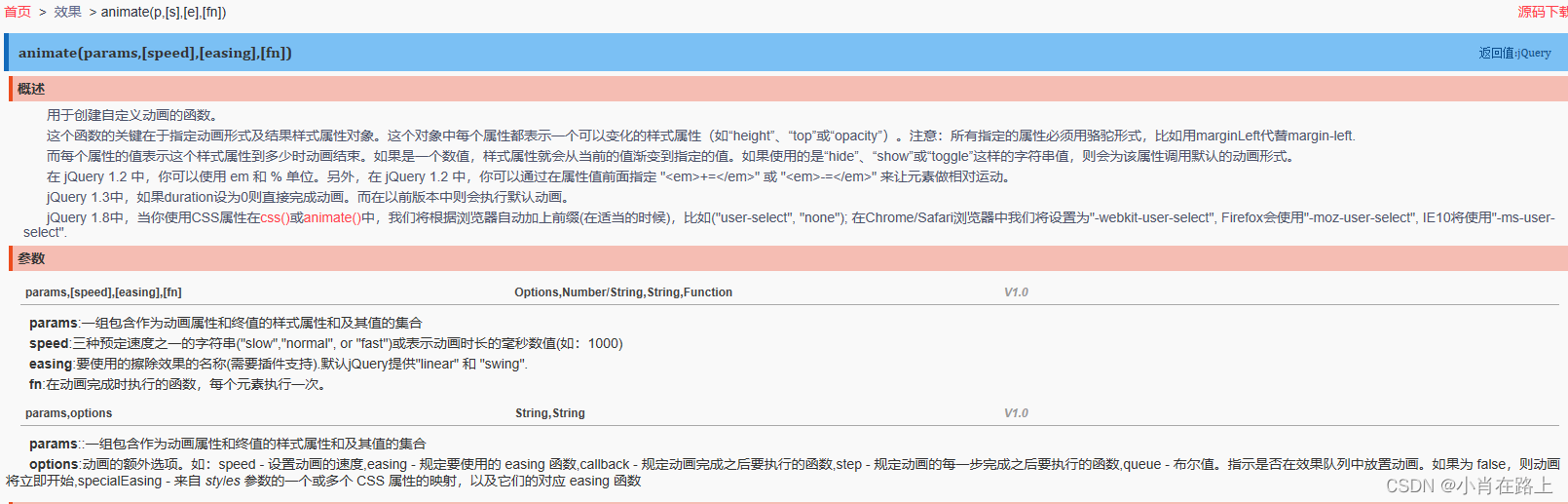
- DOCTYPE html>
- <html>
- <head>
- <meta charset="utf-8" />
- <meta name="viewport" content="width=device-width, initial-scale=1">
- <title>title>
- <script src="../jQuery3.6.0.js">script>
- <script>
- $(function() {
- $("#img1").click(function() {
- $(this).animate({left:"+=100px",top:"+=100px",opacity:0.5},3000);
- });
- });
- script>
- <style>
- #img1{
- position: absolute;
- }
- style>
- head>
- <body id="div1">
- <img src="../img/3.png" id="img1" />
- body>
- html>
移动位置前要将位置改为绝对定位
position: absolute;
-
相关阅读:
SQL教程之 掌握 SQL GROUP BY 的 5 个实用 SQL 示例(含完整sql与测试数据)
Elasticsearch 8.X 分词插件版本更新不及时解决方案
REST-Framework: 认证组件 | token的介绍和使用
音频技术的下一个“热点”,会出现在哪个领域?丨一期一会 • 音频工程师专场
前端HTML CSS JS风格规范
【C++编程语言】之 加号 左移 递增 赋值 关系 函数调用 的 运算符重载
electron-log使用
常用设计模式总结
C语言数组越界和内存分布
excel映射xml方法
- 原文地址:https://blog.csdn.net/qx020814/article/details/126033318

- 最新文章
-
沪漂五周年了:我越来越迷茫了
Agentic Skill Routing 实战:别再把所有 Skill 塞进 AI Agent 上下文
MySQL-Seconds_behind_master的精度误差
[MAF预定义ChatClient中间件-03]CachingChatClient——利用缓存省钱省时间
AI的至暗历史:从万众期待到被政府撤资,AI的两次死亡徘徊
Agent OS :五种驯服不确定性的范式
PortSwigger SQL注入LAB11
数据库即时编译JIT
[Begin]AI Learn Data Day 0
深度学习进阶(二十七)现代 LLM 的核心架构设计其二:SwiGLU