-
试用copilot过程中问题解决
目录
1.提示Please upgrade your Copilot extension to continue using this service
2. 提示: Failed to install Visual Studio Code update
0.copilot申请试用
1.提示Please upgrade your Copilot extension to continue using this service
解决:
This can be resolved by upgrading VSCode itself: Help → Check for Updates / Install Available Updates.
You may or may not need to re-install the extension and re-authenticate with git.
参考:github - Please upgrade your Copilot extension to continue using this service - Stack Overflow
2. 提示: Failed to install Visual Studio Code update
解决:
将VS Code 安装目录下的 Code.exe 文件 复制到C:\Users\用户名\AppData\Local\Programs\Microsoft VS Code文件夹下
参考: VS Code 报错: Failed to install Visual Studio Code update_z向前的博客-CSDN博客
3.加载 Web 视图时出错: Error: Could not register service workers: InvalidStateError: Failed to register a ServiceWorker: The document is in an invalid state..
In Windows, you can simply fix this error by clearing the cache for VSCode. Please follow the steps below:
-
Close VSCode and also kill any background processes running in the task manager.
-
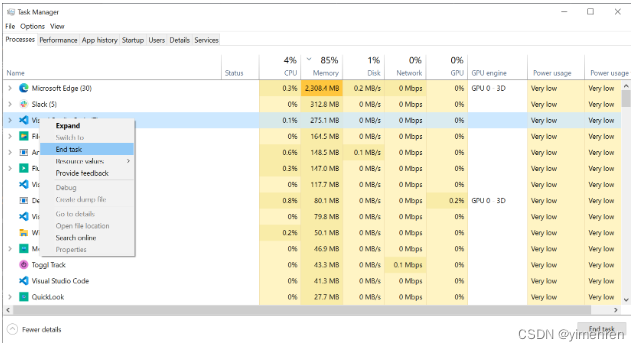
-
Go to the file explorer and to the path
C:\Users\and clear the contents of the folders\AppData\Roaming\Code Cache, CachedData, CachedExtensions, CachedExtensionVSIXs (if this folder exists) and Code Cache. -
Open VSCode and you are good to go.
-
-
相关阅读:
实现登陆模块时Cookie,Session,Token的理解
BrokerChain——基于“做市商账户”的区块链跨分片协议
biopython--PDB.polypepide
文件系统系列专题之 Btrfs
数据库应用:CentOS 7离线安装PostgreSQL
机构运动学分析
学习MySQL的第六天:事务(基础篇)
Linux驱动开发 --- IIC总线
JavaScript中的箭头函数
[书籍翻译]12周撰写期刊文章 学术出版成功指南——第 9 周:给予、获得和使用他人的反馈
- 原文地址:https://blog.csdn.net/yimenren/article/details/125906519
- 最新文章
-
沪漂五周年了:我越来越迷茫了
Agentic Skill Routing 实战:别再把所有 Skill 塞进 AI Agent 上下文
MySQL-Seconds_behind_master的精度误差
[MAF预定义ChatClient中间件-03]CachingChatClient——利用缓存省钱省时间
AI的至暗历史:从万众期待到被政府撤资,AI的两次死亡徘徊
Agent OS :五种驯服不确定性的范式
PortSwigger SQL注入LAB11
数据库即时编译JIT
[Begin]AI Learn Data Day 0
深度学习进阶(二十七)现代 LLM 的核心架构设计其二:SwiGLU