-
学生信息管理系统 图形用户界面(GUI) java 实现对数据库的操作 数据库用的mysql
学生信息管理系统
此项目包括四个类
- StartMySql → 用于启动登录界面
- Login → 登录进入操作界面
- MySQLGUI → 图形用户界面
- OperationMySql → 对数据库数据的操作功能实现
mysql 中 Table 的设计
涉及三个表
数据库名 StudentInfo 表名分别为 grade、course、summarygrade
ID
Name
Chinese
Math
English
course
ID
Name
Course
Credit
summary
Course
Average
实现概貌:

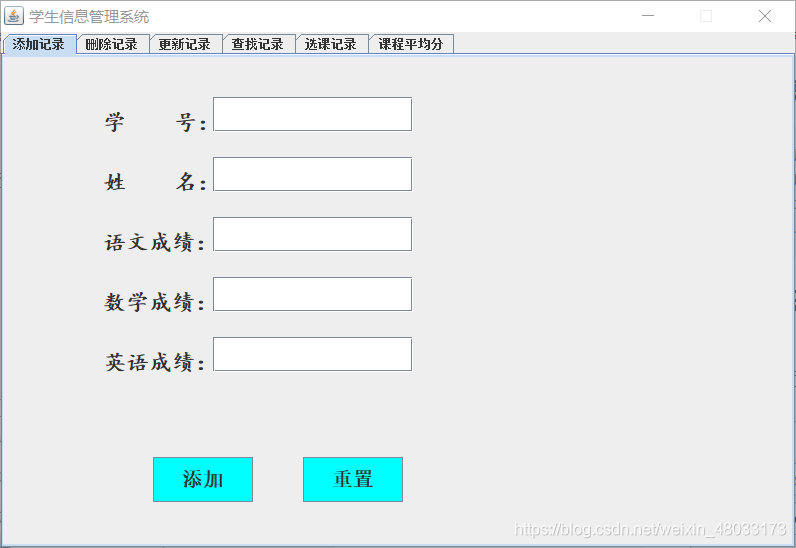
- 这个项目的注释真的 真的灰常详细 ~ o( ̄▽ ̄)ブ
- 此项目代码量在 1000 行左右,纯手打,奥力给
直接上代码啦
-
启动单独成类
// StartMySql.java
package StudentInfo;public class StartMySql {
// 启动登录界面
public static void main(String[] args) {
new Login();
}
} -
这是一个登录界面的小框框
// Login.java
package StudentInfo;import javax.swing.;
import java.awt.;
import java.awt.event.ActionEvent;
import java.awt.event.ActionListener;public class Login implements ActionListener {
// 定义主窗口
private final JFrame jf;
// 定义输入用户名和密码的标签提示
private final JLabel InputUserName;
private final JLabel InputPassWord;
// 定义输入用户名文本框
private final JTextField UserName;
// 定义输入密码框
private final JPasswordField PassWord;
// 定义登录和取消按钮
private final JButton Login;
private final JButton Cancel;Login() { // 各组件实例化过程 jf = new JFrame("Login"); InputUserName = new JLabel(" ID: "); InputPassWord = new JLabel("password:"); UserName = new JTextField(); PassWord = new JPasswordField(); Login = new JButton("登录"); Cancel = new JButton("退出"); // 设置主窗口大小、位置和布局 jf.setSize(400, 150); jf.setLocation(600, 400); // 设置窗口流式布局 jf.setLayout(new FlowLayout()); // 设置用户名和密码框大小 UserName.setPreferredSize(new Dimension(300, 30)); PassWord.setPreferredSize(new Dimension(300, 30)); // 依次向主窗口添加各组件 jf.getContentPane().add(InputUserName); jf.getContentPane().add(UserName); jf.getContentPane().add(InputPassWord); jf.getContentPane().add(PassWord); jf.getContentPane().add(Login); jf.getContentPane().add(Cancel); // 设置主窗口不可调节大小 jf.setResizable(false); // 设置主窗口默认关闭操作 jf.setDefaultCloseOperation(JFrame.EXIT_ON_CLOSE); // 给登录和取消按钮添加 Action 监听器 Login.addActionListener(this); Cancel.addActionListener(this); // 设置主窗口可见 jf.setVisible(true); } @Override public void actionPerformed(ActionEvent e) { // 如果单击【退出】按钮则程序退出 if (e.getSource().equals(Cancel)) { System.exit(0); } // 如果单击【登录】按钮则检查用户名和密码是否匹配 else if (e.getSource().equals(Login)) { // 如果用户名和密码匹配,则打开具体操作面板 if (UserName.getText().equals("admin") && String.valueOf(PassWord.getPassword()).equals("1234")) { // MySQLGUI myS = new MySQLGUI(); // myS.initial(); new MySQLGUI(); jf.setVisible(false); jf.dispose(); } // 如果用户名和密码不匹配,则给出提示对话框 else { JOptionPane.showOptionDialog(jf, "用户名或密码错误", "登陆失败", JOptionPane.CLOSED_OPTION, JOptionPane.ERROR_MESSAGE, null, null, null); } } }- 1
- 2
- 3
- 4
- 5
- 6
- 7
- 8
- 9
- 10
- 11
- 12
- 13
- 14
- 15
- 16
- 17
- 18
- 19
- 20
- 21
- 22
- 23
- 24
- 25
- 26
- 27
- 28
- 29
- 30
- 31
- 32
- 33
- 34
- 35
- 36
- 37
- 38
- 39
- 40
- 41
- 42
- 43
- 44
- 45
- 46
- 47
- 48
- 49
- 50
- 51
- 52
- 53
- 54
- 55
- 56
- 57
- 58
- 59
}
-
这是 GUI 界面代码
// MySQLGUI.java
package StudentInfo;import javax.swing.;
import java.awt.;
import java.awt.event.ItemEvent;
import java.awt.event.ItemListener;
import java.awt.event.MouseEvent;
import java.awt.event.MouseListener;public class MySQLGUI extends JFrame implements MouseListener, ItemListener {
// 定义选项卡
private JTabbedPane Base;
// 定义选项卡上的嵌板
/*
* jp1, 添加记录
* jp2, 删除记录
* jp3, 更新记录
* jp4, 查找记录
* jp5, 选课记录
* jp6 课程平均分
* /
private JPanel jp1, jp2, jp3, jp4, jp5, jp6;
// 定义各按钮
/
* InsertRecord, 添加记录按钮
* InsertReset, 添加取消按钮
* DeleteRecord, 删除记录按钮
* DeleteReset, 删除取消按钮
* QueryRecord, 查询记录按钮
* UpdateRecord, 更改记录按钮
* UpdateReset, 重置更新框
* CourseQuery, 选课表查询按钮
* GradeQuery, 成绩查询按钮
* /
private JButton InsertRecord, InsertReset, DeleteRecord, DeleteReset,
QueryRecord, UpdateRecord, UpdateReset, CourseQuery, GradeQuery;
// 定义各标签
/
* InsertID1, 插入学号提示标签
* InsertName1, 插入姓名提示标签
* InsertChinese1, 插入语文成绩提示标签
* InsertMath1, 插入数学提示标签
* InsertEnglish1, 插入英语提示标签
* DeleteID1, 删除学号提示标签
* UpdateID1, 更新学号提示标签
* /
private JLabel InsertID1, InsertName1, InsertChinese1, InsertMath1,
InsertEnglish1, DeleteID1, UpdateID1;
// 定义各文本框
/
* InsertID2, 插入学号文本框
* InsertName2, 插入姓名文本框
* InsertChinese2, 插入语文文本框
* InsertMath2, 插入数学文本框
* InsertEnglish2, 插入英语文本框
* DeleteID2, 所要删除学号的文本框
* UpdateID2, 所要更新学号的文本框
* UpdateContent, 更新内容填写文本框
* IDCondition, 查询ID文本框
* NameCondition, 查询姓名文本框
* ChineseCondition,查询语文文本框
* MathCondition, 查询数学文本框
* EnglishCondition,查询英语文本框
* /
private JTextField InsertID2, InsertName2, InsertChinese2, InsertMath2, InsertEnglish2,
DeleteID2, UpdateID2, UpdateContent, IDCondition, NameCondition, ChineseCondition, MathCondition,
EnglishCondition;
// 定义显示结果文本域 显示 jp4 jp5 jp6 的查询结果
/
* QueryRecordResult, 查询学生信息结果文本域
* CourseQueryResult, 查询课程信息文本域
* GradeQueryResult, 查询课程成绩平均分文本域
* /
private JTextArea QueryRecordResult, CourseQueryResult, GradeQueryResult;
// 定义查询选项
/
* ID, 选择学号查询
* Name, 选择姓名查询
* Chinese, 选择语文查询
* Math, 选择数学查询
* English, 选择英语查询
* */
private JRadioButton ID, Name, Chinese, Math, English;
// 定义一个数据库操作的实例
private OperationMySql db = null;
// 定义滚动条
private JScrollPane scroll = null;
private JScrollPane CourseScroll = null;
private JScrollPane GradeScroll = null;
// 定义一个复选框用于选择更新的项目
private JComboBox UpdateItem = null;
// 定义复选框用于选择查询的项目
private JComboBox CourseItem = null; // 课程信息复选框
private JComboBox GradeItem = null; // 课程成绩复选框MySQLGUI() { // 设置各按钮信息 setButton(); // 设置各标签信息 setLabel(); // 设置各文本框信息 setTextField(); // 设置各面板信息 setPanel(); // 设置布局信息 setLayout(); // 设置选项卡信息 setBase(); // 设置主窗口信息 setThis(); // 设置数据库信息 setDB(); } // 设置各按钮信息的方法 private void setButton() { // jp1 上的按钮 InsertRecord = new JButton("添加"); InsertRecord.setFont(new Font("宋体", 1, 20)); // 1 代表加粗,20 代表字体大小 InsertRecord.setBackground(Color.CYAN); InsertRecord.setBounds(150, 400, 100, 45); InsertRecord.setMargin(new Insets(0, 0, 0, 0)); // 设置按钮的边缘空白为四个方向全为0,也即让按钮中的文本与按钮边缘贴齐 InsertReset = new JButton("重置"); InsertReset.setFont(new Font("宋体", 1, 20)); InsertReset.setBackground(Color.CYAN); InsertReset.setBounds(300, 400, 100, 45); InsertReset.setMargin(new Insets(0, 0, 0, 0)); // jp2 上的按钮 DeleteRecord = new JButton("删除信息"); DeleteRecord.setFont(new Font("宋体", 1, 20)); DeleteRecord.setBackground(Color.CYAN); DeleteRecord.setBounds(150, 350, 100, 45); DeleteRecord.setMargin(new Insets(0, 0, 0, 0)); DeleteReset = new JButton("重置"); DeleteReset.setFont(new Font("宋体", 1, 20)); DeleteReset.setBackground(Color.CYAN); DeleteReset.setBounds(300, 350, 100, 45); DeleteReset.setMargin(new Insets(0, 0, 0, 0)); // jp3 上的按钮 UpdateRecord = new JButton("更新"); UpdateRecord.setFont(new Font("宋体", 1, 20)); UpdateRecord.setBackground(Color.CYAN); UpdateRecord.setBounds(250, 400, 100, 45); UpdateReset = new JButton("重置"); UpdateReset.setFont(new Font("宋体", 1, 20)); UpdateReset.setBackground(Color.CYAN); UpdateReset.setBounds(400, 400, 100, 45); // jp4 上的按钮 ID = new JRadioButton("学号"); ID.setFont(new Font("宋体", 1, 15)); ID.setMargin(new Insets(0, 0, 0, 0)); ID.setBounds(30, 300, 55, 20); Name = new JRadioButton("姓名"); Name.setFont(new Font("宋体", 1, 15)); Name.setMargin(new Insets(0, 0, 0, 0)); Name.setBounds(30, 330, 55, 20); Chinese = new JRadioButton("语文"); Chinese.setFont(new Font("宋体", 1, 15)); Chinese.setMargin(new Insets(0, 0, 0, 0)); Chinese.setBounds(30, 360, 55, 20); Math = new JRadioButton("数学"); Math.setFont(new Font("宋体", 1, 15)); Math.setMargin(new Insets(0, 0, 0, 0)); Math.setBounds(30, 390, 55, 20); English = new JRadioButton("英语"); English.setFont(new Font("宋体", 1, 15)); English.setMargin(new Insets(0, 0, 0, 0)); English.setBounds(30, 420, 55, 20); QueryRecord = new JButton("查询"); QueryRecord.setFont(new Font("宋体", 1, 20)); QueryRecord.setBackground(Color.CYAN); QueryRecord.setBounds(600, 400, 80, 45); // jp5 上的按钮 CourseQuery = new JButton("查询"); CourseQuery.setFont(new Font("宋体", 1, 20)); CourseQuery.setBackground(Color.CYAN); CourseQuery.setBounds(600, 400, 80, 45); // jp6 上的按钮 GradeQuery = new JButton("查询"); GradeQuery.setFont(new Font("宋体", 1, 20)); GradeQuery.setBackground(Color.PINK); GradeQuery.setBounds(600, 400, 80, 45); // 按键监听初始化 initial(); } // 设置各标签信息的方法 private void setLabel() { // jp1 上的标签 InsertID1 = new JLabel("学 号:"); InsertID1.setFont(new Font("楷体", 1, 22)); InsertID1.setBackground(Color.GREEN); InsertID1.setBounds(100, 40, 120, 50); InsertName1 = new JLabel("姓 名:"); InsertName1.setFont(new Font("楷体", 1, 22)); InsertName1.setBackground(Color.GREEN); InsertName1.setBounds(100, 100, 120, 50); InsertChinese1 = new JLabel("语文成绩:"); InsertChinese1.setFont(new Font("楷体", 1, 22)); InsertChinese1.setBackground(Color.GREEN); InsertChinese1.setBounds(100, 160, 120, 50); InsertMath1 = new JLabel("数学成绩:"); InsertMath1.setFont(new Font("楷体", 1, 22)); InsertMath1.setBackground(Color.GREEN); InsertMath1.setBounds(100, 220, 120, 50); InsertEnglish1 = new JLabel("英语成绩:"); InsertEnglish1.setFont(new Font("楷体", 1, 22)); InsertEnglish1.setBackground(Color.GREEN); InsertEnglish1.setBounds(100, 280, 120, 50); // jp2 上的标签 DeleteID1 = new JLabel("学 号:"); DeleteID1.setBounds(100, 100, 100, 50); DeleteID1.setFont(new Font("楷体", 1, 22)); // jp3 上的标签 UpdateID1 = new JLabel("学 号:"); UpdateID1.setFont(new Font("楷体", 1, 22)); UpdateID1.setBounds(200, 60, 120, 50); UpdateItem = new JComboBox<>(); UpdateItem.setFont(new Font("楷体", 1, 22)); UpdateItem.setBounds(200, 200, 100, 45); UpdateItem.addItem("姓名"); UpdateItem.addItem("语文"); UpdateItem.addItem("数学"); UpdateItem.addItem("英语"); // jp4 上的标签 //... // jp5 上的标签 CourseItem = new JComboBox<>(); CourseItem.setFont(new Font("楷体", 1, 22)); CourseItem.setBounds(100, 40, 140, 45); CourseItem.addItem("语文"); CourseItem.addItem("数学"); CourseItem.addItem("英语"); // jp6 上的标签 GradeItem = new JComboBox<>(); GradeItem.setFont(new Font("楷体", 1, 22)); GradeItem.setBounds(100, 40, 140, 45); GradeItem.addItem("语文"); GradeItem.addItem("数学"); GradeItem.addItem("英语"); } // 设置各文本框信息的方法 private void setTextField() { // jp1 上的文本框 InsertID2 = new JTextField(); InsertID2.setFont(new Font("宋体", 1, 23)); InsertID2.setBounds(210, 40, 200, 35); InsertName2 = new JTextField(); InsertName2.setFont(new Font("宋体", 1, 23)); InsertName2.setBounds(210, 100, 200, 35); InsertChinese2 = new JTextField(); InsertChinese2.setFont(new Font("宋体", 1, 23)); InsertChinese2.setBounds(210, 160, 200, 35); InsertMath2 = new JTextField(); InsertMath2.setFont(new Font("宋体", 1, 23)); InsertMath2.setBounds(210, 220, 200, 35); InsertEnglish2 = new JTextField(); InsertEnglish2.setFont(new Font("宋体", 1, 23)); InsertEnglish2.setBounds(210, 280, 200, 35); // jp2 上的文本框 DeleteID2 = new JTextField("输入要删除信息的学号"); DeleteID2.setFont(new Font("楷体", 1, 25)); DeleteID2.setBounds(210, 100, 350, 50); // jp3 上的文本框 UpdateID2 = new JTextField(); UpdateID2.setFont(new Font("楷体", 1, 20)); UpdateID2.setBounds(310, 60, 200, 45); UpdateContent = new JTextField("更新内容"); UpdateContent.setFont(new Font("楷体", 0, 22)); UpdateContent.setBounds(310, 200, 200, 45); // jp4 上的文本框 QueryRecordResult = new JTextArea("查询结果:"); QueryRecordResult.setFont(new Font("楷体", 1, 20)); //QueryRecordResult.setBounds(30,30,560,260); QueryRecordResult.setEditable(false); QueryRecordResult.setLineWrap(true); // 当一行文字过多时自动换行 scroll = new JScrollPane(QueryRecordResult); // 添加滚动条 scroll.setBounds(30, 30, 560, 260); scroll.setVerticalScrollBarPolicy(ScrollPaneConstants.VERTICAL_SCROLLBAR_AS_NEEDED); // 当需要垂直滚动条时显示 scroll.setHorizontalScrollBarPolicy(ScrollPaneConstants.HORIZONTAL_SCROLLBAR_AS_NEEDED);// 当需要水平滚动条时显示 IDCondition = new JTextField(); IDCondition.setFont(new Font("宋体", 1, 18)); IDCondition.setBounds(90, 300, 100, 21); NameCondition = new JTextField(); NameCondition.setFont(new Font("宋体", 1, 18)); NameCondition.setBounds(90, 330, 100, 21); ChineseCondition = new JTextField(); ChineseCondition.setFont(new Font("宋体", 1, 18)); ChineseCondition.setBounds(90, 360, 100, 21); MathCondition = new JTextField(); MathCondition.setFont(new Font("宋体", 1, 18)); MathCondition.setBounds(90, 390, 100, 21); EnglishCondition = new JTextField(); EnglishCondition.setFont(new Font("宋体", 1, 18)); EnglishCondition.setBounds(90, 420, 100, 21); IDCondition.setEditable(false); NameCondition.setEditable(false); ChineseCondition.setEditable(false); MathCondition.setEditable(false); EnglishCondition.setEditable(false); // jp5 上的文本框 CourseQueryResult = new JTextArea("查询结果:"); CourseQueryResult.setFont(new Font("楷体", 1, 20)); CourseQueryResult.setEditable(false); CourseQueryResult.setLineWrap(true); CourseScroll = new JScrollPane(CourseQueryResult); CourseScroll.setBounds(20, 100, 560, 340); CourseScroll.setVerticalScrollBarPolicy(ScrollPaneConstants.VERTICAL_SCROLLBAR_AS_NEEDED); CourseScroll.setHorizontalScrollBarPolicy(ScrollPaneConstants.HORIZONTAL_SCROLLBAR_AS_NEEDED); // jp6 上的文本框 GradeQueryResult = new JTextArea("查询结果:"); GradeQueryResult.setFont(new Font("楷体", 1, 20)); GradeQueryResult.setEditable(false); GradeQueryResult.setLineWrap(true); GradeScroll = new JScrollPane(GradeQueryResult); GradeScroll.setBounds(20, 100, 560, 340); GradeScroll.setVerticalScrollBarPolicy(ScrollPaneConstants.VERTICAL_SCROLLBAR_AS_NEEDED); GradeScroll.setHorizontalScrollBarPolicy(ScrollPaneConstants.HORIZONTAL_SCROLLBAR_AS_NEEDED); } // 设置各面板信息的方法 private void setPanel() { jp1 = new JPanel(); jp2 = new JPanel(); jp3 = new JPanel(); jp4 = new JPanel(); jp5 = new JPanel(); jp6 = new JPanel(); } // 设置布局信息的方法 private void setLayout() { // 添加 jp1 的组件 jp1.setLayout(null); jp1.add(InsertRecord); jp1.add(InsertReset); jp1.add(InsertID1); jp1.add(InsertName1); jp1.add(InsertChinese1); jp1.add(InsertMath1); jp1.add(InsertEnglish1); jp1.add(InsertID2); jp1.add(InsertName2); jp1.add(InsertChinese2); jp1.add(InsertMath2); jp1.add(InsertEnglish2); // 添加 jp2 上的组件 jp2.setLayout(null); jp2.add(DeleteID1); jp2.add(DeleteID2); jp2.add(DeleteRecord); jp2.add(DeleteReset); // 添加 jp3 上的组件 jp3.setLayout(null); jp3.add(UpdateID1); jp3.add(UpdateID2); jp3.add(UpdateItem); jp3.add(UpdateContent); jp3.add(UpdateRecord); jp3.add(UpdateReset); // 添加 jp4 上的组件 jp4.setLayout(null); // jp4.add(QueryRecordResult); jp4.add(scroll); jp4.add(QueryRecord); jp4.add(ID); jp4.add(Name); jp4.add(Chinese); jp4.add(Math); jp4.add(English); jp4.add(IDCondition); jp4.add(NameCondition); jp4.add(ChineseCondition); jp4.add(MathCondition); jp4.add(EnglishCondition); // 添加 jp5 上的组件 jp5.setLayout(null); jp5.add(CourseItem); jp5.add(CourseQuery); jp5.add(CourseScroll); // 添加 jp6 上的组件 jp6.setLayout(null); jp6.add(GradeQuery); jp6.add(GradeItem); jp6.add(GradeScroll); } // 设置选项卡信息的方法 private void setBase() { Base = new JTabbedPane(JTabbedPane.TOP); Base.addTab("添加记录", jp1); Base.addTab("删除记录", jp2); Base.addTab("更新记录", jp3); Base.addTab("查找记录", jp4); Base.addTab("选课记录", jp5); Base.addTab("课程平均分", jp6); } // 设置主窗口信息的方法 private void setThis() { this.add(Base); this.setTitle("学生信息管理系统"); this.setLocation(300, 200); this.setSize(800, 550); this.setDefaultCloseOperation(JFrame.EXIT_ON_CLOSE); this.setResizable(false); this.setVisible(true); } // 设置数据库信息的方法 private void setDB() { db = new OperationMySql(); // 连接 mysql db.setDburl("jdbc:mysql://localhost:3306/StudentInfo?useSSL=false&allowPublicKeyRetrieval=true&serverTimezone=UTC"); // 加载驱动 db.setDbdriver("com.mysql.cj.jdbc.Driver"); // 这里的用户名和密码是要和你的 mysql 对应的,也是唯一需要更改的地方 db.setUsername("root"); db.setPassword("6666"); } // 初始化 void initial() { // 给各按钮添加监听器 // InsertRecord, InsertReset, DeleteRecord, DeleteReset, QueryRecord, UpdateRecord, CourseQuery, GradeQuery; InsertRecord.addMouseListener(this); InsertReset.addMouseListener(this); DeleteRecord.addMouseListener(this); DeleteReset.addMouseListener(this); QueryRecord.addMouseListener(this); UpdateRecord.addMouseListener(this); UpdateReset.addMouseListener(this); CourseQuery.addMouseListener(this); GradeQuery.addMouseListener(this); // 给各复选按钮添加监听器 // ID,Name, Chinese, Math, English ID.addItemListener(this); Name.addItemListener(this); Chinese.addItemListener(this); Math.addItemListener(this); English.addItemListener(this); } @Override public void mouseClicked(MouseEvent e) { // 添加按钮功能 // 点击重置键则清空文本框 if (e.getSource().equals(InsertReset)) { InsertID2.setText(""); InsertID2.setFont(new Font("宋体", 1, 23)); InsertName2.setText(""); InsertName2.setFont(new Font("宋体", 1, 23)); InsertChinese2.setText(""); InsertChinese2.setFont(new Font("宋体", 1, 23)); InsertMath2.setText(""); InsertMath2.setFont(new Font("宋体", 1, 23)); InsertEnglish2.setText(""); InsertEnglish2.setFont(new Font("宋体", 1, 23)); } else if (e.getSource().equals(InsertRecord)) { // 添加记录功能 String InsertStuID = InsertID2.getText(); String InsertStuName = InsertName2.getText(); String InsertStuChinese = InsertChinese2.getText(); String InsertStuMath = InsertMath2.getText(); String InsertStuEnglish = InsertEnglish2.getText(); try { db.setRs(db.executeQuery(InsertStuID)); if (!db.getRs().next()) { db.executeInsert(InsertStuID, InsertStuName, InsertStuChinese, InsertStuMath, InsertStuEnglish); JOptionPane.showOptionDialog(this, "添加信息成功!", "数据库操作提示", JOptionPane.CLOSED_OPTION, JOptionPane.INFORMATION_MESSAGE, null, null, null); } else JOptionPane.showOptionDialog(this, "添加失败", "温馨提示", -1, 1, null, null, null); } catch (Exception exception) { exception.printStackTrace(); } finally { db.CloseRS(); db.CloseStmt(); db.CloseConnection(); } } else if (e.getSource().equals(DeleteReset)) { // 删除重置功能 DeleteID2.setText(""); DeleteID2.setFont(new Font("楷体", 1, 25)); } else if (e.getSource().equals(DeleteRecord)) { // 删除功能 String DeleteStuID = DeleteID2.getText(); try { db.setRs(db.executeQuery(DeleteStuID)); if (db.getRs().next()) { db.executeDelete(DeleteStuID); JOptionPane.showOptionDialog(this, "删除成功!", "数据库操作提示", -1, 1, null, null, null); } else JOptionPane.showOptionDialog(this, "删除失败", "温馨提示", -1, 1, null, null, null); } catch (Exception exception) { exception.printStackTrace(); } } else if (e.getSource().equals(UpdateReset)) { // 重置更新框功能 UpdateID2.setText(""); UpdateID2.setFont(new Font("宋体", 1, 20)); UpdateContent.setText(""); UpdateContent.setFont(new Font("宋体", 1, 20)); } else if (e.getSource().equals(UpdateRecord)) { // 完成更新功能 String UpdateStuID = UpdateID2.getText(); try { db.setRs(db.executeQuery(UpdateStuID)); if (!db.getRs().next()) { JOptionPane.showOptionDialog(this, "没有记录无法更新", "温馨提示", JOptionPane.CLOSED_OPTION, JOptionPane.INFORMATION_MESSAGE, null, null, null); } else { String updateItem = null; // 更新选项是姓名 if (UpdateItem.getSelectedItem().toString().equals("姓名")) { updateItem = "Name"; } // 更新的是语文成绩 else if (UpdateItem.getSelectedItem().toString().equals("语文")) { updateItem = "Chinese"; } // 更新的是数学成绩 else if (UpdateItem.getSelectedItem().toString().equals("数学")) { updateItem = "Math"; } // 更新的是英语成绩 else if (UpdateItem.getSelectedItem().toString().equals("英语")) { updateItem = "English"; } db.executeUpdate(UpdateStuID, updateItem, UpdateContent.getText()); JOptionPane.showOptionDialog(this, "更新成功!", "数据库操作提示", -1, 1, null, null, null); } } catch (Exception exception) { exception.printStackTrace(); } finally { db.CloseRS(); db.CloseStmt(); db.CloseConnection(); } } else if (e.getSource().equals(QueryRecord)) { // 完成查询功能 try { // 默认设置各检索条件均为通配符 String a = "%", b = "%", c = "%", d = "%", f = "%"; // 如果 ID 选项被选中,则获得该选项的输入内容 if (ID.isSelected() && !IDCondition.getText().trim().isEmpty()) { a = IDCondition.getText(); } // 如果 Name 选项被选中,则获得该选项的输入内容 if (Name.isSelected() && !NameCondition.getText().trim().isEmpty()) { b = NameCondition.getText(); } // 如果 Math 选项被选中,则获得该选项的输入内容 if (Math.isSelected() && !MathCondition.getText().trim().isEmpty()) { d = MathCondition.getText(); } // 如果 English 选项被选中,则获得该选项的输入内容 if (English.isSelected() && !EnglishCondition.getText().trim().isEmpty()) { f = EnglishCondition.getText(); } // 如果 Chinese 选项被选中,则获得该选项的输入内容 if (Chinese.isSelected() && !ChineseCondition.getText().trim().isEmpty()) { c = ChineseCondition.getText(); } // 根据各选项检索关键字进行查询,并返回结果集 db.setRs(db.executeQueryByCondition(a, b, c, d, f)); // 定义结果集中记录条数 int i = 0; QueryRecordResult.setText("查询结果:"); // 输出结果集记录 while (db.getRs().next()) { ++i; QueryRecordResult.append("- 1
- 2
- 3
- 4
- 5
- 6
- 7
- 8
- 9
- 10
- 11
- 12
- 13
- 14
- 15
- 16
- 17
- 18
- 19
- 20
- 21
- 22
- 23
- 24
- 25
- 26
- 27
- 28
- 29
- 30
- 31
- 32
- 33
- 34
- 35
- 36
- 37
- 38
- 39
- 40
- 41
- 42
- 43
- 44
- 45
- 46
- 47
- 48
- 49
- 50
- 51
- 52
- 53
- 54
- 55
- 56
- 57
- 58
- 59
- 60
- 61
- 62
- 63
- 64
- 65
- 66
- 67
- 68
- 69
- 70
- 71
- 72
- 73
- 74
- 75
- 76
- 77
- 78
- 79
- 80
- 81
- 82
- 83
- 84
- 85
- 86
- 87
- 88
- 89
- 90
- 91
- 92
- 93
- 94
- 95
- 96
- 97
- 98
- 99
- 100
- 101
- 102
- 103
- 104
- 105
- 106
- 107
- 108
- 109
- 110
- 111
- 112
- 113
- 114
- 115
- 116
- 117
- 118
- 119
- 120
- 121
- 122
- 123
- 124
- 125
- 126
- 127
- 128
- 129
- 130
- 131
- 132
- 133
- 134
- 135
- 136
- 137
- 138
- 139
- 140
- 141
- 142
- 143
- 144
- 145
- 146
- 147
- 148
- 149
- 150
- 151
- 152
- 153
- 154
- 155
- 156
- 157
- 158
- 159
- 160
- 161
- 162
- 163
- 164
- 165
- 166
- 167
- 168
- 169
- 170
- 171
- 172
- 173
- 174
- 175
- 176
- 177
- 178
- 179
- 180
- 181
- 182
- 183
- 184
- 185
- 186
- 187
- 188
- 189
- 190
- 191
- 192
- 193
- 194
- 195
- 196
- 197
- 198
- 199
- 200
- 201
- 202
- 203
- 204
- 205
- 206
- 207
- 208
- 209
- 210
- 211
- 212
- 213
- 214
- 215
- 216
- 217
- 218
- 219
- 220
- 221
- 222
- 223
- 224
- 225
- 226
- 227
- 228
- 229
- 230
- 231
- 232
- 233
- 234
- 235
- 236
- 237
- 238
- 239
- 240
- 241
- 242
- 243
- 244
- 245
- 246
- 247
- 248
- 249
- 250
- 251
- 252
- 253
- 254
- 255
- 256
- 257
- 258
- 259
- 260
- 261
- 262
- 263
- 264
- 265
- 266
- 267
- 268
- 269
- 270
- 271
- 272
- 273
- 274
- 275
- 276
- 277
- 278
- 279
- 280
- 281
- 282
- 283
- 284
- 285
- 286
- 287
- 288
- 289
- 290
- 291
- 292
- 293
- 294
- 295
- 296
- 297
- 298
- 299
- 300
- 301
- 302
- 303
- 304
- 305
- 306
- 307
- 308
- 309
- 310
- 311
- 312
- 313
- 314
- 315
- 316
- 317
- 318
- 319
- 320
- 321
- 322
- 323
- 324
- 325
- 326
- 327
- 328
- 329
- 330
- 331
- 332
- 333
- 334
- 335
- 336
- 337
- 338
- 339
- 340
- 341
- 342
- 343
- 344
- 345
- 346
- 347
- 348
- 349
- 350
- 351
- 352
- 353
- 354
- 355
- 356
- 357
- 358
- 359
- 360
- 361
- 362
- 363
- 364
- 365
- 366
- 367
- 368
- 369
- 370
- 371
- 372
- 373
- 374
- 375
- 376
- 377
- 378
- 379
- 380
- 381
- 382
- 383
- 384
- 385
- 386
- 387
- 388
- 389
- 390
- 391
- 392
- 393
- 394
- 395
- 396
- 397
- 398
- 399
- 400
- 401
- 402
- 403
- 404
- 405
- 406
- 407
- 408
- 409
- 410
- 411
- 412
- 413
- 414
- 415
- 416
- 417
- 418
- 419
- 420
- 421
- 422
- 423
- 424
- 425
- 426
- 427
- 428
- 429
- 430
- 431
- 432
- 433
- 434
- 435
- 436
- 437
- 438
- 439
- 440
- 441
- 442
- 443
- 444
- 445
- 446
- 447
- 448
- 449
- 450
- 451
- 452
- 453
- 454
- 455
- 456
- 457
- 458
- 459
- 460
- 461
- 462
- 463
- 464
- 465
- 466
- 467
- 468
- 469
- 470
- 471
- 472
- 473
- 474
- 475
- 476
- 477
- 478
- 479
- 480
- 481
- 482
" + “第” + i + “条记录:” + "
"
+ “学号:” + db.getRs().getString(1) + "
"
+ “姓名:” + db.getRs().getString(2) + "
"
+ “语文:” + db.getRs().getString(3) + "
"
+ “数学:” + db.getRs().getString(4) + "
"
+ “英语:” + db.getRs().getString(5) +
("
--------------------------------------“));
}
QueryRecordResult.setText(QueryRecordResult.getText() +
"
" + “共有” + i + “条学生记录”);
} catch (Exception e1) {
e1.printStackTrace();
} finally {
db.CloseRS();
db.CloseStmt();
db.CloseConnection();
}
} else if (e.getSource().equals(CourseQuery)) {
// 完成选课查询
String Course = CourseItem.getSelectedItem().toString();
try {
db.setRs(db.executeQueryByCourse(Course));
int count = 0;
CourseQueryResult.setText(“查询结果:”);
// 输出结果集记录
while (db.getRs().next()) {
++count;
CourseQueryResult.append(”
" + “第” + count + “条记录” + "
"
+ "学号: " + db.getRs().getString(1) + "
"
+ “姓名: " + db.getRs().getString(2) + "
"
+ “课程: " + db.getRs().getString(3) + "
"
+ “学分: " + db.getRs().getString(4) +
(”
--------------------------------------”));
}
CourseQueryResult.setText(CourseQueryResult.getText() +
"
" + “共有” + count + “条选课记录”);
} catch (Exception exception) {
exception.printStackTrace();
} finally {
db.CloseRS();
db.CloseStmt();
db.CloseConnection();
}
} else if (e.getSource().equals(GradeQuery)) {
// 完成课程平均分统计查询
String Course = GradeItem.getSelectedItem().toString();
try {
db.setRs(db.executeQueryByGrade(Course));
int j = 0;
GradeQueryResult.setText(“查询结果:”);
// 输出查询结果集
while (db.getRs().next()) {
++j;
GradeQueryResult.append(”
" + “第” + j + “条记录” + "
"
+ “课程: " + db.getRs().getString(1) + " " +
“平均分: " + db.getRs().getString(2) +
(”
--------------------------------------”));
}
GradeQueryResult.setText(GradeQueryResult.getText() +
"
" + “共有” + j + “条记录”);
} catch (Exception exception) {
exception.printStackTrace();
} finally {
db.CloseRS();
db.CloseStmt();
db.CloseConnection();
}
}
}@Override public void mousePressed(MouseEvent e) { } @Override public void mouseReleased(MouseEvent e) { } @Override public void mouseEntered(MouseEvent e) { } @Override public void mouseExited(MouseEvent e) { } @Override public void itemStateChanged(ItemEvent e) { // 如果查询选项 ID 被选中,则可以输入 ID 进行查询 if (e.getSource().equals(ID)) { IDCondition.setEditable(ID.isSelected()); } // 如果选项姓名被选中,则可以输入姓名进行查询 else if (e.getSource().equals(Name)) { NameCondition.setEditable(Name.isSelected()); } // 如果语文被选中,则可以输入语文成绩进行查询 else if (e.getSource().equals(Chinese)) { ChineseCondition.setEditable(Chinese.isSelected()); } // 如果数学选项被选中,则可以输入数学成绩查询 else if (e.getSource().equals(Math)) { MathCondition.setEditable(Math.isSelected()); } // 如果英语选项被选中,则可以输入英语成绩来查询 else if (e.getSource().equals(English)) { EnglishCondition.setEditable(English.isSelected()); } }- 1
- 2
- 3
- 4
- 5
- 6
- 7
- 8
- 9
- 10
- 11
- 12
- 13
- 14
- 15
- 16
- 17
- 18
- 19
- 20
- 21
- 22
- 23
- 24
- 25
- 26
- 27
- 28
- 29
- 30
- 31
- 32
- 33
- 34
- 35
- 36
- 37
- 38
- 39
- 40
- 41
- 42
- 43
}
-
最后一个类实现数据库的有关操作
// OperationMySql.java
package StudentInfo;import java.sql.*;
public class OperationMySql {
// 定义数据库连接url
private String dburl = null;
// 定义数据库连接
private Connection conn = null;
// 定义数据库状态
private PreparedStatement stmt = null;
// 定义数据库返回结果集
private ResultSet rs = null;
// 定义数据库用户名
private String username = null;
// 定义数据库连接密码
private String password = null;
// 定义数据库驱动方式
private String dbdriver = null;// 设置数据库连接url的方法 public void setDburl(String dburl) { this.dburl = dburl; } // 返回当前实例数据库连接url public String getDburl() { return dburl; } // 返回当前实例结果集的方法 public ResultSet getRs() { return rs; } // 设置当前实例结果集的方法 public void setRs(ResultSet rs) { this.rs = rs; } // 设置数据库用户名的方法 public void setUsername(String username) { this.username = username; } // 返回当前实例化数据库用户名 public String getUsername() { return username; } // 设置数据库连接的方法 public void setPassword(String password) { this.password = password; } // 返回当前实例数据库连接密码 public String getPassword() { return password; } // 设置数据库驱动方式的方法 public void setDbdriver(String dbdriver) { this.dbdriver = dbdriver; } // 返回当前实例数据库驱动方式的方法 public String getDbdriver() { return dbdriver; } // 创建数据库连接的方法 Connection CreateConnection(String dburl, String username, String password) throws Exception { setDburl(dburl); setUsername(username); setPassword(password); Class.forName(getDbdriver()); // 根据数据库路径、用户名和密码创建连接并返回该连接 return DriverManager.getConnection(dburl, username, password); } // 关闭结果集的方法 public void CloseRS() { try { rs.close(); } catch (SQLException e) { System.out.println("关闭结果集时发生错误!"); } } // 关闭状态的方法 public void CloseStmt() { try { stmt.close(); } catch (SQLException e) { System.out.println("关闭状态时发生错误!"); } } // 关闭连接的方法 public void CloseConnection() { try { conn.close(); } catch (SQLException e) { System.out.println("关闭连接时发生错误!"); } } // 增 void executeInsert(String InsertID, String InsertName, String Chinese, String Math, String English) throws Exception { try { conn = CreateConnection(getDburl(), getUsername(), getPassword()); stmt = conn.prepareStatement("insert into grade values(?,?,?,?,?)"); stmt.setString(1, InsertID); stmt.setString(2, InsertName); stmt.setString(3, Chinese); stmt.setString(4, Math); stmt.setString(5, English); stmt.executeUpdate(); } catch (SQLException ex) { System.err.println(ex.getMessage()); } } // 删 void executeDelete(String DeleteID) throws Exception { try { conn = CreateConnection(getDburl(), getUsername(), getPassword()); stmt = conn.prepareStatement("delete from grade where ID = ?"); stmt.setString(1, DeleteID); stmt.executeUpdate(); CloseStmt(); CloseConnection(); } catch (SQLException ex) { System.err.println(ex.getMessage()); } } // 查 主键 是否在表中 ResultSet executeQuery(String StuID) throws Exception { try { String sql = "select * from grade where ID = ?"; conn = CreateConnection(getDburl(), getUsername(), getPassword()); stmt = conn.prepareStatement(sql); stmt.setString(1, StuID); rs = stmt.executeQuery(); } catch (SQLException e) { System.err.println(e.getMessage()); } return rs; } // 改 void executeUpdate(String UpdateID, String UpdateItem, String UpdateContent) throws Exception { try { conn = CreateConnection(getDburl(), getUsername(), getPassword()); String sql = "update grade set " + UpdateItem + " = ? where ID = ?"; stmt = conn.prepareStatement(sql); stmt.setString(1, UpdateContent); stmt.setString(2, UpdateID); stmt.executeUpdate(); } catch (SQLException ex) { System.err.println(ex.getMessage()); } } // 按条件查询 ResultSet executeQueryByCondition(String stuid, String stuname, String chinese, String math, String english) throws Exception { try { String sql = "select * from grade where ID like ? and Name like ? and Chinese like ? " + "and Math like ? and English like ? order by ID asc"; conn = CreateConnection(getDburl(), getUsername(), getPassword()); stmt = conn.prepareStatement(sql); if (stuid.equals("%")) { stmt.setString(1, "%"); } else { stmt.setString(1, "%" + stuid + "%"); } if (stuname.equals("%")) { stmt.setString(2, "%"); } else { stmt.setString(2, "%" + stuname + "%"); } if (chinese.equals("%")) { stmt.setString(3, "%"); } else { stmt.setString(3, "%" + chinese + "%"); } if (math.equals("%")) { stmt.setString(4, "%"); } else { stmt.setString(4, "%" + math + "%"); } if (english.equals("%")) { stmt.setString(5, "%"); } else { stmt.setString(5, "%" + english + "%"); } rs = stmt.executeQuery(); } catch (SQLException ex) { System.err.println(ex.getMessage()); } return rs; } // 选课表查询 ResultSet executeQueryByCourse(String course) throws Exception { try { conn = CreateConnection(getDburl(), getUsername(), getPassword()); String sql = "select * from course where Course = ?"; stmt = conn.prepareStatement(sql); stmt.setString(1, course); rs = stmt.executeQuery(); } catch (SQLException ex) { System.err.println(ex.getMessage()); } return rs; } // 课程总计查询 ResultSet executeQueryByGrade(String grade) throws Exception { try { conn = CreateConnection(getDburl(), getUsername(), getPassword()); String sql = "select * from summary where Course = ?"; stmt = conn.prepareStatement(sql); stmt.setString(1, grade); rs = stmt.executeQuery(); } catch (SQLException ex) { System.err.println(ex.getMessage()); } return rs; }- 1
- 2
- 3
- 4
- 5
- 6
- 7
- 8
- 9
- 10
- 11
- 12
- 13
- 14
- 15
- 16
- 17
- 18
- 19
- 20
- 21
- 22
- 23
- 24
- 25
- 26
- 27
- 28
- 29
- 30
- 31
- 32
- 33
- 34
- 35
- 36
- 37
- 38
- 39
- 40
- 41
- 42
- 43
- 44
- 45
- 46
- 47
- 48
- 49
- 50
- 51
- 52
- 53
- 54
- 55
- 56
- 57
- 58
- 59
- 60
- 61
- 62
- 63
- 64
- 65
- 66
- 67
- 68
- 69
- 70
- 71
- 72
- 73
- 74
- 75
- 76
- 77
- 78
- 79
- 80
- 81
- 82
- 83
- 84
- 85
- 86
- 87
- 88
- 89
- 90
- 91
- 92
- 93
- 94
- 95
- 96
- 97
- 98
- 99
- 100
- 101
- 102
- 103
- 104
- 105
- 106
- 107
- 108
- 109
- 110
- 111
- 112
- 113
- 114
- 115
- 116
- 117
- 118
- 119
- 120
- 121
- 122
- 123
- 124
- 125
- 126
- 127
- 128
- 129
- 130
- 131
- 132
- 133
- 134
- 135
- 136
- 137
- 138
- 139
- 140
- 141
- 142
- 143
- 144
- 145
- 146
- 147
- 148
- 149
- 150
- 151
- 152
- 153
- 154
- 155
- 156
- 157
- 158
- 159
- 160
- 161
- 162
- 163
- 164
- 165
- 166
- 167
- 168
- 169
- 170
- 171
- 172
- 173
- 174
- 175
- 176
- 177
- 178
- 179
- 180
- 181
- 182
- 183
- 184
- 185
- 186
- 187
- 188
- 189
- 190
- 191
- 192
- 193
- 194
- 195
- 196
- 197
- 198
- 199
- 200
- 201
- 202
- 203
- 204
- 205
- 206
- 207
- 208
- 209
- 210
- 211
}
-
相关阅读:
道路千万条,为什么这家创新存储公司会选这条?
蔚来自动驾驶,从 2020 年开始讲起的故事
基于视觉的机器人抓取-综述
硬件管理平台-硬件产品库-反射模块
FPGA工程师面试试题集锦111~120
校招补一个什么样的项目比较好?
[教程] 一文进阶Redis
vue-router 学习知识汇总
一招解决IDEA使用Junit4自动创建的测试类无内容问题
Qt多线程http下载器之一:仿百度网盘的http下载器
- 原文地址:https://blog.csdn.net/m0_67401606/article/details/125401508
- 最新文章
-
沪漂五周年了:我越来越迷茫了
Agentic Skill Routing 实战:别再把所有 Skill 塞进 AI Agent 上下文
MySQL-Seconds_behind_master的精度误差
[MAF预定义ChatClient中间件-03]CachingChatClient——利用缓存省钱省时间
AI的至暗历史:从万众期待到被政府撤资,AI的两次死亡徘徊
Agent OS :五种驯服不确定性的范式
PortSwigger SQL注入LAB11
数据库即时编译JIT
[Begin]AI Learn Data Day 0
深度学习进阶(二十七)现代 LLM 的核心架构设计其二:SwiGLU