-
Cocos3.4.2版本 获取手指滑动到的区域的Label文本并记录文本内容进行判定操作
- import { _decorator, Component, Event, EventTouch, find, Input, input, Label, Node, Rect, sys, TextAsset, tween, UIOpacity, UITransform, Vec2, Vec3 } from 'cc';
- import { JsonMgr } from '../Managers/JsonMgr';
- import { strings } from '../Struct/GameStruct';
- import { GAMEFUNC } from '../Tip/GameFunc';
- import { SingleMgr } from '../Managers/SingleMgr';
- const { ccclass, property } = _decorator;
- ///用于获取手指滑动区域的文本并记录文本内容
- @ccclass('Getstring')
- export class Getstring extends Component {
- label: Label;
- b: boolean = true;
- op:UIOpacity;
- onLoad() {
- let a = GAMEFUNC.Search(this.node, "name");
- this.label = a.getComponent(Label);
- this.op=a.getComponent(UIOpacity);
- //this.label = this.node.getChildByName("name").getComponent(Label);
- //input.on(Input.EventType.TOUCH_END, this.onTouchEnd, this);
- //input.on(Input.EventType.TOUCH_START, this.onTouchStart, this);
- input.on(Input.EventType.TOUCH_MOVE, this.onTouchMove, this);
- this.node.parent.parent.on(Node.EventType.TOUCH_END, this.onTouchEnd, this);
- //this.node.on(Node.EventType.TOUCH_MOVE, this.onTouchMove, this);
- //JsonMgr.getInstance().SetJsonOne(strings.InputTxt,""); //初始化数据
- }
- start() {
- }
- update(deltaTime: number) {
- }
- onTouchEnd(event: EventTouch) {
- this.b = true;
- //JsonMgr.getInstance().SetJsonOne(strings.InputTxt,""); //清空数据
- //判断内容
- //JsonMgr.getInstance().SetJson(strings.InputTxt);
- SingleMgr.getInstance().csvKnow = true; //允许查看
- // if(SingleMgr.getInstance().ShowText){
- // console.log("渐变!!!");
- // tween(this.op)
- // .to(1, {opacity: 0})
- // .to(1, {opacity: 255})
- // .start();
- // SingleMgr.getInstance().ShowText=false;
- // }
- }
- onTouchMove(event: EventTouch) {
- const x=event.touch.getUILocationX();
- const y=event.touch.getUILocationY();
- //const touchPos = event.getLocation();
- //const localPos = this.node.getComponent(UITransform).convertToNodeSpaceAR(new Vec3(touchPos.x, touchPos.y));
- const localPos = this.node.getComponent(UITransform).convertToNodeSpaceAR(new Vec3(x, y));
- const size = this.node.getComponent(UITransform).contentSize;
- const rect = new Rect(-size.width / 2, -size.height / 2, size.width, size.height);
- //console.log("位置更新:"+localPos);
- if (rect.contains(new Vec2(localPos.x, localPos.y))) {
- const text = this.label.string;
- if (this.b) {
- //动画效果
- tween(this.node)
- .to(0.2, { scale: new Vec3(1.2, 1.2, 1.2) })
- .to(0.1, { scale: new Vec3(1, 1, 1) })
- .start();
- let inputText = JsonMgr.getInstance().GetJson(strings.InputTxt);
- // 在这里操作获取到的文本内容
- JsonMgr.getInstance().SetJsonOne(strings.InputTxt, inputText + text);//字符串连接
- this.b = false;
- let te = JsonMgr.getInstance().GetJson(strings.InputTxt); //字符串赋值
- console.log(te);
- }
- }
- }
- }
- //递归获取子物体
- public static Search(targetNode: Node, name: string): Node {
- if (targetNode.name == name) {
- return targetNode;
- }
- for (let i = 0; i < targetNode.children.length; i++) {
- const child = targetNode.children[i];
- let result = this.Search(child, name);
- if (result != null) {
- return result;
- }
- }
- return null;
- }
- }
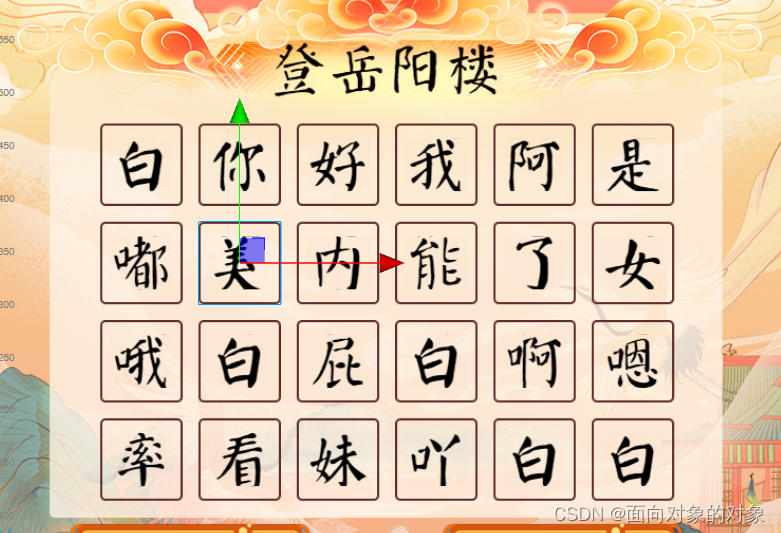
注:可以获取到多个挂载到此脚本的文本内容
例如:每个框都挂载这个脚本时,通过拖动即可获取到其内容

-
相关阅读:
细数35个单元测试准则
两数乘积:输出1~100整数乱序列表中两数乘积是目标整数的最小下标对
PCIe实用调试工具MindShare Arbor增加试用天数
file.close总是标红的解决方法
SpringCloud入门学习
一篇带你学完HTML基础
基于springcloud+web实现智慧养老平台系统项目【项目源码+论文说明】计算机毕业设计
修改Jenkins主目录
浅谈电力电容器技术的发展及选型
C++文件操作->文本文件(->写文件、读文件)、二进制文件(->写文件、读文件)
- 原文地址:https://blog.csdn.net/m0_71624363/article/details/134262646
