-
SpringMVC 学习(八)整合SSM
10. 整合 SSM
(1) 新建数据库

CREATE DATABASE `SSM`; USE `SSM`; DROP TABLE IF EXISTS `BOOKS`; CREATE TABLE `BOOKS` ( `BOOK_ID` INT(10) NOT NULL AUTO_INCREMENT COMMENT '书ID', `BOOK_NAME` VARCHAR(100) NOT NULL COMMENT '书名', `BOOK_COUNTS` INT(11) NOT NULL COMMENT '数量', `DETAIL` VARCHAR(200) NOT NULL COMMENT '描述', KEY `BOOK_ID` (`BOOK_ID`) ) ENGINE=INNODB DEFAULT CHARSET=utf8 INSERT INTO `BOOKS`(`BOOK_ID`,`BOOK_NAME`,`BOOK_COUNTS`,`DETAIL`)VALUES (1,'Java',1,'从入门到放弃'), (2,'MySQL',10,'从删库到跑路'), (3,'Linux',5,'从进门到进牢');- 1
- 2
- 3
- 4
- 5
- 6
- 7
- 8
- 9
- 10
- 11
- 12
- 13
- 14
- 15
- 16
- 17
- 18
(2) 新建 maven 项目

1) 导入依赖
<dependencies> <dependency> <groupId>junitgroupId> <artifactId>junitartifactId> <version>4.13.2version> <scope>testscope> dependency> <dependency> <groupId>mysqlgroupId> <artifactId>mysql-connector-javaartifactId> <version>8.0.26version> dependency> <dependency> <groupId>com.mchangegroupId> <artifactId>c3p0artifactId> <version>0.9.5.5version> dependency> <dependency> <groupId>javax.servletgroupId> <artifactId>javax.servlet-apiartifactId> <version>4.0.1version> <scope>providedscope> dependency> <dependency> <groupId>javax.servlet.jspgroupId> <artifactId>javax.servlet.jsp-apiartifactId> <version>2.3.3version> <scope>providedscope> dependency> <dependency> <groupId>javax.servletgroupId> <artifactId>jstlartifactId> <version>1.2version> dependency> <dependency> <groupId>org.mybatisgroupId> <artifactId>mybatisartifactId> <version>3.5.7version> dependency> <dependency> <groupId>org.mybatisgroupId> <artifactId>mybatis-springartifactId> <version>2.0.6version> dependency> <dependency> <groupId>org.springframeworkgroupId> <artifactId>spring-webmvcartifactId> <version>5.3.9version> dependency> <dependency> <groupId>org.springframeworkgroupId> <artifactId>spring-jdbcartifactId> <version>5.3.9version> dependency> <dependency> <groupId>org.projectlombokgroupId> <artifactId>lombokartifactId> <version>1.18.20version> dependency> dependencies>- 1
- 2
- 3
- 4
- 5
- 6
- 7
- 8
- 9
- 10
- 11
- 12
- 13
- 14
- 15
- 16
- 17
- 18
- 19
- 20
- 21
- 22
- 23
- 24
- 25
- 26
- 27
- 28
- 29
- 30
- 31
- 32
- 33
- 34
- 35
- 36
- 37
- 38
- 39
- 40
- 41
- 42
- 43
- 44
- 45
- 46
- 47
- 48
- 49
- 50
- 51
- 52
- 53
- 54
- 55
- 56
- 57
- 58
- 59
- 60
- 61
- 62
- 63
- 64
- 65
- 66
- 67
- 68
- 69
- 70
- 71
- 72
- 73
- 74
- 75
- 76
- 77
- 78
- 79
- 80
- 81
- 82
2) 静态资源过滤
<build> <resources> <resource> <directory>src/main/javadirectory> <includes> <include>**/*.propertiesinclude> <include>**/*.xmlinclude> includes> <filtering>falsefiltering> resource> <resource> <directory>src/main/resourcesdirectory> <includes> <include>**/*.propertiesinclude> <include>**/*.xmlinclude> includes> <filtering>falsefiltering> resource> resources> build>- 1
- 2
- 3
- 4
- 5
- 6
- 7
- 8
- 9
- 10
- 11
- 12
- 13
- 14
- 15
- 16
- 17
- 18
- 19
- 20
- 21
(3) IDEA 连接数据库


(4) Spring 整合 Mybatis
1) 新建包结构

2) 新建配置文件
● spring
配置文件名称 :
applicationContext.xml<beans xmlns="http://www.springframework.org/schema/beans" xmlns:xsi="http://www.w3.org/2001/XMLSchema-instance" xsi:schemaLocation="http://www.springframework.org/schema/beans http://www.springframework.org/schema/beans/spring-beans.xsd"> beans>- 1
- 2
- 3
- 4
- 5
- 6
● 创建 spring 应用上下文

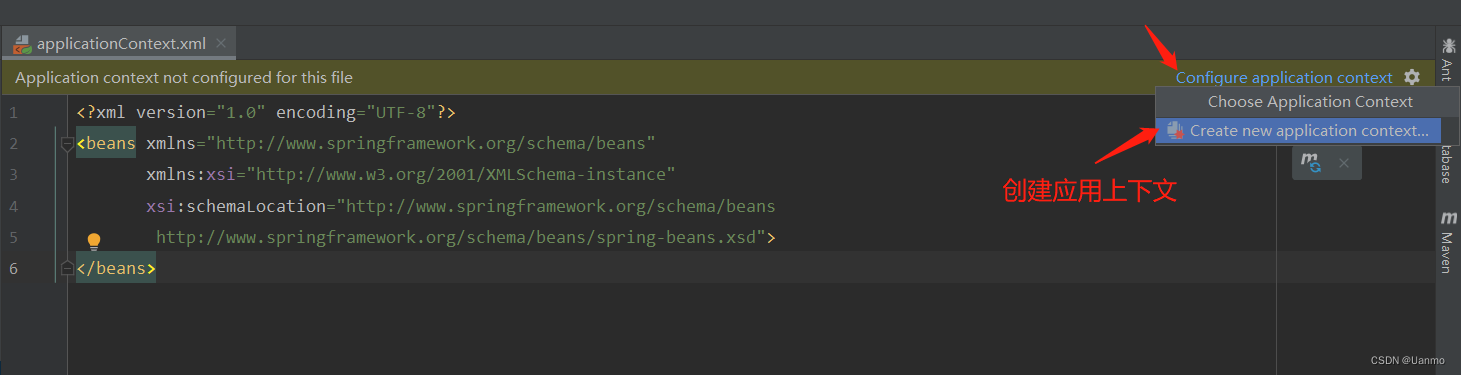

应用上下文关联了所有的 spring 配置文件,最好保证所有的配置文件都在其中。
● mybatis
配置文件名 :
mybatis-config.xmlDOCTYPE configuration PUBLIC "-//mybatis.org//DTD Config 3.0//EN" "http://mybatis.org/dtd/mybatis-3-config.dtd"> <configuration> configuration>- 1
- 2
- 3
- 4
- 5
- 6
3) 新建实体类
● 开启驼峰命名自动映射
配置路径:resources/com/why/dao/
mybatis-config.xml<settings> <setting name="mapUnderscoreToCamelCase" value="true"/> settings>- 1
- 2
- 3
- 4
- 5
- 6
● 开启别名映射
配置路径:resources/com/why/dao/
mybatis-config.xml<typeAliases> <package name="com.why.pojo"/> typeAliases>- 1
- 2
- 3
- 4
- 5
● 编写实体类
package com.why.pojo; import lombok.AllArgsConstructor; import lombok.Data; import lombok.NoArgsConstructor; /** * TODO * Books 实体类 * @author why * @since 2021/9/16 10:59 */ @Data @NoArgsConstructor @AllArgsConstructor public class Books { private Integer bookId; private String bookName; private Integer bookCounts; private String detail; }- 1
- 2
- 3
- 4
- 5
- 6
- 7
- 8
- 9
- 10
- 11
- 12
- 13
- 14
- 15
- 16
- 17
- 18
- 19
- 20
- 21
- 22
- 23
- 24
- 25
- 26

4) 新建映射器接口

package com.why.dao; import com.why.pojo.Books; import org.apache.ibatis.annotations.Param; import java.util.List; /** * TODO * Book 映射器 * @author why * @since 2021/9/16 13:20 */ public interface BookMapper { /** * 增加一本书 * @param book Books 对象 * @return Integer 结果 */ Integer addBook(Books book); /** * 根据书 ID 删除一本书 * @param id 书 ID * @return Integer 结果 */ Integer deleteBookById(@Param("bookId") Integer id); /** * 更新一本书 * @param book Books 对象 * @return Integer 结果 */ Integer updateBook(Books book); /** * 根据书 ID 查询一本书 * @param id 书 ID * @return Books 结果 */ Books queryBookById(@Param("bookId") Integer id); /** * 查询全部书 * @return List 结果 */ List<Books> queryAllBook(); }- 1
- 2
- 3
- 4
- 5
- 6
- 7
- 8
- 9
- 10
- 11
- 12
- 13
- 14
- 15
- 16
- 17
- 18
- 19
- 20
- 21
- 22
- 23
- 24
- 25
- 26
- 27
- 28
- 29
- 30
- 31
- 32
- 33
- 34
- 35
- 36
- 37
- 38
- 39
- 40
- 41
- 42
- 43
- 44
- 45
- 46
- 47
- 48
- 49
- 50
5) 新建映射器
xml● 文件路径

● 文件内容
DOCTYPE mapper PUBLIC "-//mybatis.org//DTD Config 3.0//EN" "http://mybatis.org/dtd/mybatis-3-mapper.dtd"> <mapper namespace="com.why.dao.BookMapper"> <insert id="addBook" parameterType="Books"> insert into ssm.books (BOOK_NAME, BOOK_COUNTS, DETAIL) values (#{bookName}, #{bookCounts}, #{detail}); insert> <delete id="deleteBookById" parameterType="int"> delete from ssm.books where BOOK_ID = #{bookId}; delete> <update id="updateBook" parameterType="Books"> update ssm.books set BOOK_NAME = #{bookName}, BOOK_COUNTS = #{bookCounts}, DETAIL = #{detail} where BOOK_ID = #{bookId}; update> <select id="queryBookById" resultType="Books"> select * from ssm.books where BOOK_ID = #{bookId}; select> <select id="queryAllBook" resultType="Books"> select * from ssm.books; select> mapper>- 1
- 2
- 3
- 4
- 5
- 6
- 7
- 8
- 9
- 10
- 11
- 12
- 13
- 14
- 15
- 16
- 17
- 18
- 19
- 20
- 21
- 22
- 23
- 24
- 25
- 26
- 27
- 28
- 29
- 30
6) 注册映射器接口
注册路径:resources/com/why/dao/
mybatis-config.xml<mappers> <mapper class="com.why.dao.BookMapper"/> mappers>- 1
- 2
- 3
7) 编写服务层

● 服务接口
package com.why.service; import com.why.pojo.Books; import java.util.List; /** * TODO * Book 服务接口 * @author why * @since 2021/9/16 14:03 */ public interface BookService { /** * 增加一本书 * @param book Books 对象 * @return Integer 结果 */ Integer addBook(Books book); /** * 根据书 ID 删除一本书 * @param id 书 ID * @return Integer 结果 */ Integer deleteBookById(Integer id); /** * 更新一本书 * @param book Books 对象 * @return Integer 结果 */ Integer updateBook(Books book); /** * 根据书 ID 查询一本书 * @param id 书 ID * @return Books 结果 */ Books queryBookById(Integer id); /** * 查询全部书 * @return List 结果 */ List<Books> queryAllBook(); }- 1
- 2
- 3
- 4
- 5
- 6
- 7
- 8
- 9
- 10
- 11
- 12
- 13
- 14
- 15
- 16
- 17
- 18
- 19
- 20
- 21
- 22
- 23
- 24
- 25
- 26
- 27
- 28
- 29
- 30
- 31
- 32
- 33
- 34
- 35
- 36
- 37
- 38
- 39
- 40
- 41
- 42
- 43
- 44
- 45
- 46
- 47
- 48
- 49
● 服务实现类
package com.why.service.Impl; import com.why.dao.BookMapper; import com.why.pojo.Books; import com.why.service.BookService; import org.springframework.beans.factory.annotation.Autowired; import org.springframework.stereotype.Service; import java.util.List; /** * TODO * Book 服务实现类 * @author why * @since 2021/9/16 14:05 */ public class BookServiceImpl implements BookService { private BookMapper bookMapper; public void setBookMapper(BookMapper bookMapper) { this.bookMapper = bookMapper; } public Integer addBook(Books book) { return bookMapper.addBook(book); } public Integer deleteBookById(Integer id) { return bookMapper.deleteBookById(id); } public Integer updateBook(Books book) { return bookMapper.updateBook(book); } public Books queryBookById(Integer id) { return bookMapper.queryBookById(id); } public List<Books> queryAllBook() { return bookMapper.queryAllBook(); } }- 1
- 2
- 3
- 4
- 5
- 6
- 7
- 8
- 9
- 10
- 11
- 12
- 13
- 14
- 15
- 16
- 17
- 18
- 19
- 20
- 21
- 22
- 23
- 24
- 25
- 26
- 27
- 28
- 29
- 30
- 31
- 32
- 33
- 34
- 35
- 36
- 37
- 38
- 39
- 40
- 41
- 42
- 43
- 44
- 45
8) spring 整合 dao 层
● 编写数据库配置文件

jdbc.driver=com.mysql.jdbc.Driver # MySQL 8.0+ 需配置时区:&serverTimezone=Asia/Shanghai jdbc.url=jdbc:mysql://localhost:3306/ssm?useSSL=true&useUnicode=true&characterEncoding=utf8&serverTimezone=Asia/Shanghai jdbc.username=root jdbc.password=981030- 1
- 2
- 3
- 4
- 5
● 新建 spring 配置文件
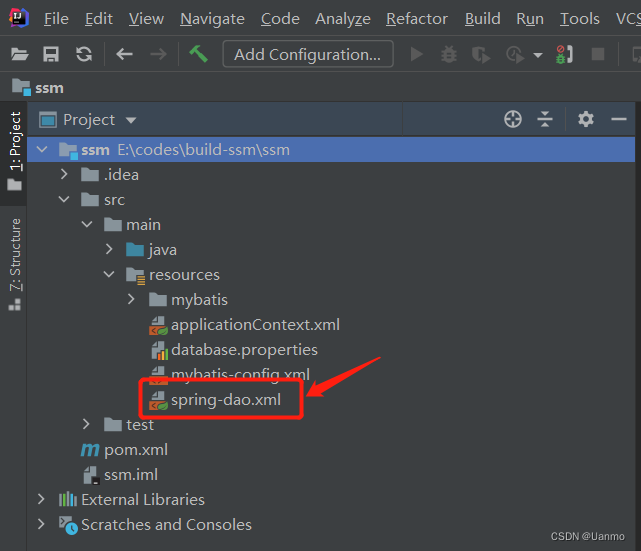
<beans xmlns="http://www.springframework.org/schema/beans" xmlns:xsi="http://www.w3.org/2001/XMLSchema-instance" xsi:schemaLocation="http://www.springframework.org/schema/beans http://www.springframework.org/schema/beans/spring-beans.xsd"> beans>- 1
- 2
- 3
- 4
- 5
- 6
- 7
● 加入到 spring 应用上下文


● 关联数据库配置文件
-
引入 context 约束
xmlns:context="http://www.springframework.org/schema/context" http://www.springframework.org/schema/context http://www.springframework.org/schema/context/spring-context.xsd- 1
- 2
- 3

-
此处也可用 IDEA 自动引入,但引入的为 c 空间和 p 空间约束,编写代码无提示。


配置数据库配置文件路径
<context:property-placeholder location="classpath:database.properties"/>- 1
- 2
● 配置数据库连接池
<bean id="dataSource" class="com.mchange.v2.c3p0.ComboPooledDataSource"> <property name="driverClass" value="${jdbc.driver}"/> <property name="jdbcUrl" value="${jdbc.url}"/> <property name="user" value="${jdbc.username}"/> <property name="password" value="${jdbc.password}"/> <property name="maxPoolSize" value="30"/> <property name="minPoolSize" value="10"/> <property name="autoCommitOnClose" value="false"/> <property name="checkoutTimeout" value="10000"/> <property name="acquireRetryAttempts" value="2"/> bean>- 1
- 2
- 3
- 4
- 5
- 6
- 7
- 8
- 9
- 10
- 11
- 12
- 13
- 14
- 15
- 16
- 17
● 创建 sqlSessionFactory
<bean id="sqlSessionFactory" class="org.mybatis.spring.SqlSessionFactoryBean"> <property name="dataSource" ref="dataSource"/> <property name="configLocation" value="classpath:mybatis-config.xml"/> bean>- 1
- 2
- 3
- 4
- 5
- 6
- 7
● 配置 dao 层映射器扫描包
此处配置可理解为由 Spring 完成 Mybatis 中 getSqlSession 操作
<bean class="org.mybatis.spring.mapper.MapperScannerConfigurer"> <property name="sqlSessionFactoryBeanName" value="sqlSessionFactory"/> <property name="basePackage" value="com.why.dao"/> bean>- 1
- 2
- 3
- 4
- 5
- 6
- 7
● 引入到
applicationContext.xml引入路径:resources/
applicationContext.xml<import resource="classpath:spring-dao.xml"/>- 1
9) spring 整合 service 层
● 新建 spring 配置文件
<beans xmlns="http://www.springframework.org/schema/beans" xmlns:xsi="http://www.w3.org/2001/XMLSchema-instance" xsi:schemaLocation="http://www.springframework.org/schema/beans http://www.springframework.org/schema/beans/spring-beans.xsd"> beans>- 1
- 2
- 3
- 4
- 5
- 6
- 7
● 将配置文件加入到 spring 上下文

● 扫描 service 包
<context:component-scan base-package="com.why.service"/>- 1
- 2
● 将业务类注入到 spring 容器
<bean id="bookMapperImpl" class="com.why.service.impl.BookServiceImpl"> <property name="bookMapper" ref="bookMapper"/> bean>- 1
- 2
- 3
- 4
- 5
- 6
- 7
- 8
//注解实现: @Service public class BookServiceImpl implements BookService { @Autowired private BookMapper bookMapper; ... }- 1
- 2
- 3
- 4
- 5
- 6
- 7
● 声明式事务配置
<bean id="transactionManager" class="org.springframework.jdbc.datasource.DataSourceTransactionManager"> <property name="dataSource" ref="dataSource"/> bean>- 1
- 2
- 3
- 4
- 5
● 引入到
applicationContext.xml引入路径:resources/
applicationContext.xml10) 测试
<import resource="classpath:spring-service.xml"/>- 1
● 新建测试类

package com.why; import com.why.pojo.Books; import com.why.service.BookService; import org.junit.Test; import org.springframework.context.ApplicationContext; import org.springframework.context.support.ClassPathXmlApplicationContext; import java.util.List; /** * TODO * 测试类 * @author why * @since 2021/9/16 20:12 */ public class MyTest { @Test public void testAllBooks() { ApplicationContext context = new ClassPathXmlApplicationContext("applicationContext.xml"); System.out.println(context); BookService bookService = (BookService) context.getBean("bookServiceImpl"); System.out.println(bookService); List<Books> books = bookService.queryAllBook(); for (Books book : books) { System.out.println(book); } } }- 1
- 2
- 3
- 4
- 5
- 6
- 7
- 8
- 9
- 10
- 11
- 12
- 13
- 14
- 15
- 16
- 17
- 18
- 19
- 20
- 21
- 22
- 23
- 24
- 25
- 26
- 27
- 28
- 29
- 30
● 运行测试函数

Mybatis 整合完毕!!!
(5) 整合 Spring MVC
1) 添加 web 支持


2) 新建 Spring MVC 配置文件

<beans xmlns="http://www.springframework.org/schema/beans" xmlns:xsi="http://www.w3.org/2001/XMLSchema-instance" xsi:schemaLocation="http://www.springframework.org/schema/beans http://www.springframework.org/schema/beans/spring-beans.xsd"> beans>- 1
- 2
- 3
- 4
- 5
- 6
- 7
● 引入 mvc 约束
xmlns:mvc="http://www.springframework.org/schema/mvc" ... http://www.springframework.org/schema/mvc http://www.springframework.org/schema/mvc/spring-mvc.xsd- 1
- 2
- 3
- 4

● 引入 context 约束
xmlns:context="http://www.springframework.org/schema/context" ... http://www.springframework.org/schema/context http://www.springframework.org/schema/context/spring-context.xsd- 1
- 2
- 3
- 4

● 注解驱动
<mvc:annotation-driven/>- 1
- 2
● 静态资源过滤
<mvc:default-servlet-handler/>- 1
- 2
● 扫描
controller包<context:component-scan base-package="com.why.controller"/>- 1
- 2
● 视图解析器
<bean class="org.springframework.web.servlet.view.InternalResourceViewResolver"> <property name="prefix" value="/WEB-INF/jsp/"/> <property name="suffix" value=".jsp"/> bean>- 1
- 2
- 3
- 4
- 5
● 引入到
applicationContext.xml引入路径:resources/ `applicationContext.xml
<import resource="classpath:spring-mvc.xml"/>- 1
3) 编写
web.xml● 注册 DispatcherServlet
<servlet> <servlet-name>springmvcservlet-name> <servlet-class>org.springframework.web.servlet.DispatcherServletservlet-class> <init-param> <param-name>contextConfigLocationparam-name> <param-value>classpath:applicationContext.xmlparam-value> init-param> <load-on-startup>1load-on-startup> servlet> <servlet-mapping> <servlet-name>springmvcservlet-name> <url-pattern>/url-pattern> servlet-mapping>- 1
- 2
- 3
- 4
- 5
- 6
- 7
- 8
- 9
- 10
- 11
- 12
- 13
- 14
- 15
● 中文乱码过滤
<filter> <filter-name>encodingFilterfilter-name> <filter-class>org.springframework.web.filter.CharacterEncodingFilterfilter-class> <init-param> <param-name>encodingparam-name> <param-value>utf-8param-value> init-param> filter> <filter-mapping> <filter-name>encodingFilterfilter-name> <url-pattern>/*url-pattern> filter-mapping>- 1
- 2
- 3
- 4
- 5
- 6
- 7
- 8
- 9
- 10
- 11
- 12
- 13
● Session
<session-config> <session-timeout>15session-timeout> session-config>- 1
- 2
- 3
- 4
4) 测试
● 编写
index.jsp<%-- User: why Date: 2021/9/16 Time: 17:03 --%> <%@ page contentType="text/html;charset=UTF-8" language="java" %>首页 进入书籍页面
- 1
- 2
- 3
- 4
- 5
- 6
- 7
- 8
- 9
- 10
- 11
- 12
- 13
- 14
- 15
- 16
● 新建测试页面

<%-- User: why Date: 2021/9/16 Time: 20:02 --%> <%@ page isELIgnored="false" %> <%@ taglib prefix="c" uri="http://java.sun.com/jsp/jstl/core" %> <%@ page contentType="text/html;charset=UTF-8" language="java" %>All Books 书籍列表
编号 数量 数量 详情 ${book.bookId} ${book.bookName} ${book.bookCounts} ${book.detail} - 1
- 2
- 3
- 4
- 5
- 6
- 7
- 8
- 9
- 10
- 11
- 12
- 13
- 14
- 15
- 16
- 17
- 18
- 19
- 20
- 21
- 22
- 23
- 24
- 25
- 26
- 27
- 28
- 29
- 30
- 31
- 32
- 33
- 34
- 35
- 36
- 37
- 38
- 39
- 40
- 41
- 42
- 43
- 44
- 45
- 46
- 47
- 48
- 49
- 50
- 51
- 52
- 53
- 54
● 新建控制器

package com.why.controller; import com.why.pojo.Books; import com.why.service.BookService; import org.springframework.beans.factory.annotation.Autowired; import org.springframework.beans.factory.annotation.Qualifier; import org.springframework.stereotype.Controller; import org.springframework.ui.Model; import org.springframework.web.bind.annotation.RequestMapping; import java.util.List; /** * TODO * Book 控制器 * @author why * @since 2021/9/16 19:51 */ @Controller @RequestMapping("/book") public class BookController { // 自动装配 @Autowired // 指定一个 bean (bookServiceImpl)为 bookService 属性进行装配,可省略 @Qualifier("bookServiceImpl") private BookService bookService; @RequestMapping("/allBooks") public String allBooks(Model model) { List<Books> books = bookService.queryAllBook(); model.addAttribute("books", books); return "allBooks"; } }- 1
- 2
- 3
- 4
- 5
- 6
- 7
- 8
- 9
- 10
- 11
- 12
- 13
- 14
- 15
- 16
- 17
- 18
- 19
- 20
- 21
- 22
- 23
- 24
- 25
- 26
- 27
- 28
- 29
- 30
- 31
- 32
- 33
- 34
- 35
- 36
- 37
● 发布项目中导入依赖


● 添加服务器


● 运行服务器


Spring MVC 整合完毕!!!
(6) 整合测试

(7) CRUD
1) 增加
● 添加界面元素
- 1
- 2
- 3
- 4
- 5
- 6
- 7
- 8
● 添加跳转控制器
@RequestMapping("/toAddBook") public String toAddBook() { return "addBook"; }- 1
- 2
- 3
- 4
● 新建增加界面

<%-- Created by IntelliJ IDEA. User: LENOVO Date: 2021/9/17 Time: 19:24 To change this template use File | Settings | File Templates. --%> <%@ page contentType="text/html;charset=UTF-8" language="java" %>Add Book 添加书籍
- 1
- 2
- 3
- 4
- 5
- 6
- 7
- 8
- 9
- 10
- 11
- 12
- 13
- 14
- 15
- 16
- 17
- 18
- 19
- 20
- 21
- 22
- 23
- 24
- 25
- 26
- 27
- 28
- 29
- 30
- 31
- 32
- 33
- 34
- 35
- 36
- 37
- 38
- 39
- 40
- 41
- 42
- 43
- 44
- 45
- 46
- 47
- 48
- 49
- 50
- 51
- 52

● 添加增加书籍控制器
@RequestMapping("/addBook") public String addBook(Books book) { System.out.println("addBook.book => "+book); Integer addRes = bookService.addBook(book); System.out.println("addRes => " + addRes); return "redirect:/book/allBooks"; }- 1
- 2
- 3
- 4
- 5
- 6
- 7
2) 删除
● 添加界面元素
操作 ...<%--删除--%> - 1
- 2
- 3
- 4
- 5
- 6
- 7
- 8
- 9
- 10
- 11
● 添加删除控制器
@RequestMapping("/deleteBook/{id}") public String deleteBook(@PathVariable("id") Integer id) { Integer deleteRes = bookService.deleteBookById(id); System.out.println("deleteRes => " + deleteRes); return "redirect:/book/allBooks"; }- 1
- 2
- 3
- 4
- 5
- 6
3) 修改
● 添加界面元素
<%--修改--%>- 1
- 2
- 3
- 4
- 5
- 6
- 7
● 添加跳转控制器
@RequestMapping("/toUpdate") public String toUpdate(Integer id, Model model) { Books book = bookService.queryBookById(id); System.out.println("toUpdate.book => "+book); model.addAttribute("book", book); return "updateBook"; }- 1
- 2
- 3
- 4
- 5
- 6
- 7
● 添加修改界面

<%@ page contentType="text/html;charset=UTF-8" language="java" %>Update Book 修改书籍
- 1
- 2
- 3
- 4
- 5
- 6
- 7
- 8
- 9
- 10
- 11
- 12
- 13
- 14
- 15
- 16
- 17
- 18
- 19
- 20
- 21
- 22
- 23
- 24
- 25
- 26
- 27
- 28
- 29
- 30
- 31
- 32
- 33
- 34
- 35
- 36
- 37
- 38
- 39
- 40
- 41
- 42
- 43
- 44
- 45
- 46
- 47
- 48
- 49
- 50
- 51
- 52
- 53

● 添加修改控制器
@RequestMapping("/updateBook") public String updateBook(Books book) { System.out.println("updateBook.book => "+book); Integer updateRes = bookService.updateBook(book); System.out.println("updateRes => " + updateRes); return "redirect:/book/allBooks"; }- 1
- 2
- 3
- 4
- 5
- 6
- 7
4) 查询
● 添加界面元素
... <%--警告提示框--%>× ${error}- 1
- 2
- 3
- 4
- 5
- 6
- 7
- 8
- 9
- 10
- 11
- 12
- 13
- 14
- 15
- 16
- 17
- 18
- 19
- 20
- 21
- 22
- 23
- 24
- 25
- 26
- 27
- 28
- 29
- 30
- 31
- 32
- 33
- 34
- 35
- 36
- 37
- 38
- 39
- 40
- 41
- 42
- 43
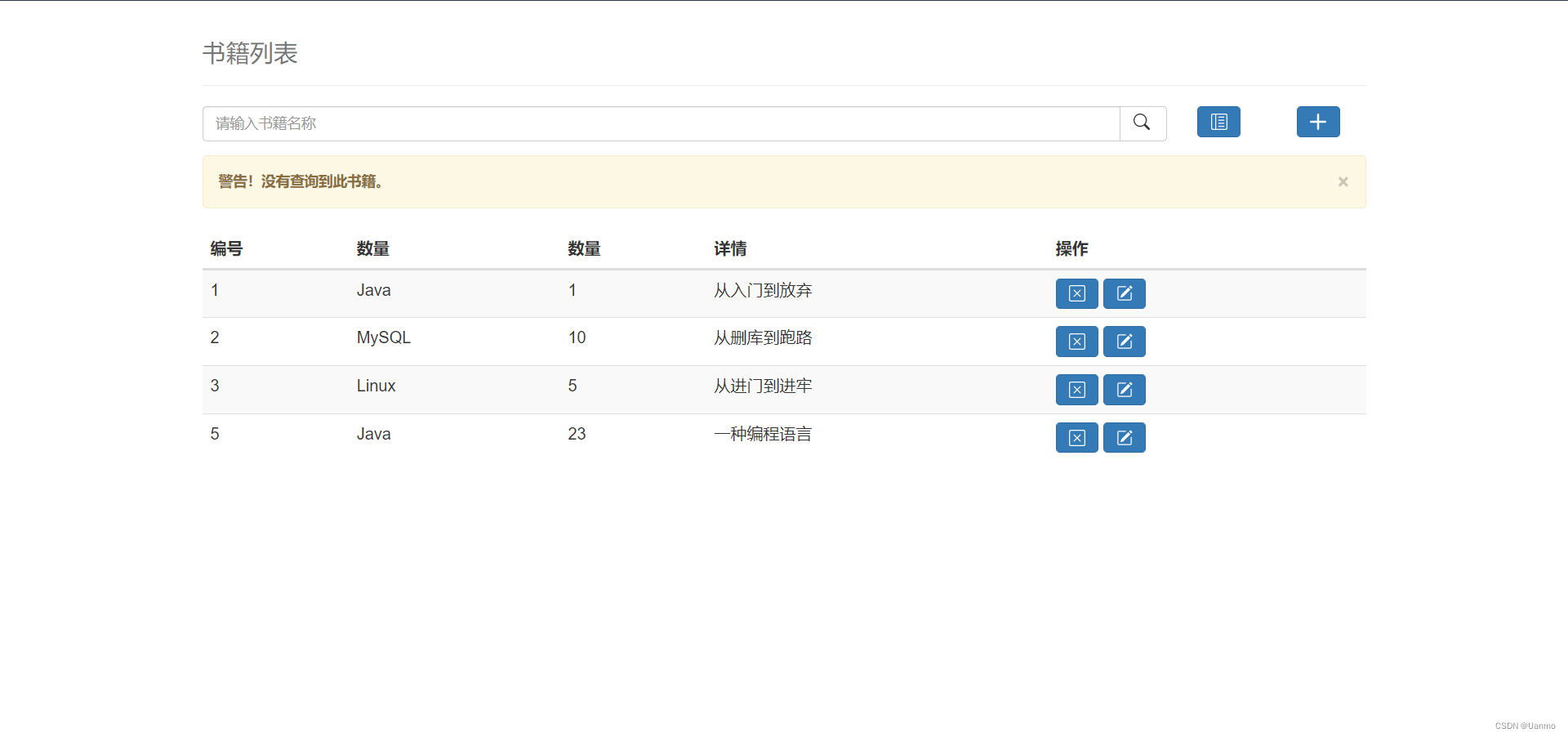
● 添加查询控制器
@RequestMapping("/queryBookByName") public String queryBookByName(String name, Model model) { System.out.println("queryBookByName.name => " + name); if (name == null || name.equals("")) { return "redirect:/book/allBooks"; } List<Books> books = bookService.queryBookByName(name); System.out.println("queryBookByName.books.size => " + books.size()); if (books.size() == 0) { String error = "警告!没有查询到此书籍。"; model.addAttribute("error", error); books = bookService.queryAllBook(); } model.addAttribute("books", books); return "allBooks"; }- 1
- 2
- 3
- 4
- 5
- 6
- 7
- 8
- 9
- 10
- 11
- 12
- 13
- 14
- 15
- 16
-
相关阅读:
springCloudAlibaba之服务熔断组件---sentinel
通过minikube搭建k8s单机环境
操作系统不等于 Linux,六问操作系统新时代 | 1024 程序员节
【计算机网络系列】数据链路层①:数据链路层的三个基本问题(封装成帧、透明传输和差错检测)
【Linux】Linux的常见指令详解(上)
探索MATLAB在计算机视觉与深度学习领域的实战应用
前缀和与树状数组(数据结构基础篇)
请求和响应
QT+OpenGL高级光照 Blinn-Phong和Gamma校正
十九、【文本编辑器(五)】排版功能
- 原文地址:https://blog.csdn.net/qq_42651415/article/details/133265861

- 最新文章
-
沪漂五周年了:我越来越迷茫了
Agentic Skill Routing 实战:别再把所有 Skill 塞进 AI Agent 上下文
MySQL-Seconds_behind_master的精度误差
[MAF预定义ChatClient中间件-03]CachingChatClient——利用缓存省钱省时间
AI的至暗历史:从万众期待到被政府撤资,AI的两次死亡徘徊
Agent OS :五种驯服不确定性的范式
PortSwigger SQL注入LAB11
数据库即时编译JIT
[Begin]AI Learn Data Day 0
深度学习进阶(二十七)现代 LLM 的核心架构设计其二:SwiGLU