-
Java知识点
Java浅拷贝
Java的深拷贝和浅拷贝 - YSOcean - 博客园 (cnblogs.com)
Clone 是 Object 类中的一个方法,通过对象A.clone() 方法会创建一个内容和对象 A 一模一样的对象 B,clone 克隆,顾名思义就是创建一个一模一样的对象出来(浅拷贝)。
package com.JavaCour; public class HelloWorld { public static void main(String[] args) throws CloneNotSupportedException { Person p1 = new Person("zhangsan",21); p1.setAddress("湖北省", "武汉市"); Person p2 = (Person) p1.clone(); System.out.println("p1:"+p1); System.out.println("p1.getPname:"+p1.getPname().hashCode()); System.out.println("p2:"+p2); System.out.println("p2.getPname:"+p2.getPname().hashCode()); p1.display("p1"); p2.display("p2"); p2.setAddress("湖北省", "荆州市"); System.out.println("将复制之后的对象地址修改:"); p1.display("p1"); p2.display("p2"); } }- 1
- 2
- 3
- 4
- 5
- 6
- 7
- 8
- 9
- 10
- 11
- 12
- 13
- 14
- 15
- 16
- 17
- 18
- 19
- 20
- 21
Java类的static方法
当运行java程序的时候,java中的类方法就分配了入口地址,所以可以不创建对象就直接访问。
toString()方法
很像c++cout<<的重载,返回反映这个对象的字符串
import方法
比如:
cn.ahut.test.A a = new cn.ahut.text.A();
在这里包的名字过长,使用import cn.ahut.test.A;
这样这个变量就可以改变写法为:A a = new A();//非常的方便
java系统包的常见的方法
(2条消息) Java基础类库(系统包)_软件开发技术爱好者的博客-CSDN博客_java系统包
Java.lang
有Java自动调用,不需要导入,经常使用的类:Object, System, Runtime, Math, String, StringBuffer等。
Object的介绍:它是所有类的父类,一个类没有指定父类,就会默认继承该类,可以new一个Object类。
方法:clone(), equals(), hashCode(), toString(), getClass(), 还有几个线程和垃圾回收的类。
System的简介:该类是private修饰,所以不可以new一个System类,提供了标准输入、输出和错误输出的变量,还有一些静态方法。
方法:
public final static InputStream in; //标准输入流
public final static PrintStream out; //标准输出流
public final static PrintStream err; //标准错误流
其中System.out和System.err都被包装成了一个PrintStream,使用起来比较方便;但是System.in不一样,不可以直接处理数据,需要其他类一起处理。
System.in是一个很原始、很简陋的输入流对象,因为只能按字节读取,返回值是占一个字节的整形数据。
Scanner in = new Scanner(System.in); String name = in.nextLine();
InputStream in = System.in; byte[] b = new byte[1024]; int len = in.read(b); Sout(new String(b, 0, len));
BufferedReader in = new BufferedReader(new InputStreamReader(System.in)); String s = in.readLine();
System的其他常用的方法:
System.arrayCopy(src, startSrc, dest, startDest, endDest);
System.currentTimeMillis();//返回毫秒数
**Math类简介:**final的,提供多种数学方法,并且该类中所有的方法都是静态的,
常用的方法:Random(),产生0-1之间的数字,sqrt(),abs(),pow()
字符串类:String和StringBuffer
Java.util
Date, Scanner
Date的常用方法:after、before、clone、compareTo、hashCode、getTime、setTime、toString、valueOf
String的常用方法
s1.equals(s2);
s1.equalsIgnoreCase(s2);//忽略大小写
“Hello”.contains(“ll”); // true
“Hello”.substring(2, 4);//“llo”
“hello”.indexOf(“l”);// 2
s1.isEmpty();//字符串长度是否为空
s1.isBlank();//是否是空串,如"\n";
String s = "I am a 123!"; byte b[] = s.getBytes(); // 73 32 97 109 32 97 32 49 50 51 33- 1
- 2
- 3
String s = "A, b, c, d"; String[] ss = s.split("\\,");- 1
- 2
StringBuider
动态字符串,可以修改的字符串
判断汉字
汉字基本集中在[19968,40869]之间,共有20901个汉字
unicode编码范围:
汉字:[0x4e00,0x9fa5](或十进制[19968,40869])
char c;
if(c>=“\u4e00” && c<=“\u9fa5”){c就是汉字};
public class ImportTest { public static void main(String[] args) { String s = new String("2022年 9月14日 , , 12239 qwerr"); int l=0; int num=0; String s1="", s2="";//s1是存储数字字符串,s2是存储汉字字符串。 for(int i=0; i<s.length(); i++){ Character c = new Character(s.charAt(i)); l=0; while(Character.isDigit(c)){ i++; c = new Character(s.charAt(i)); l++; } s1 += s.substring(i-l, i); l=0; while(String.valueOf(c).matches("[\u4e00-\u9fa5]")){ i++; c = new Character(s.charAt(i)); l++; } s2 += s.substring(i-l, i); } System.out.println(s1); System.out.println(s2); } }- 1
- 2
- 3
- 4
- 5
- 6
- 7
- 8
- 9
- 10
- 11
- 12
- 13
- 14
- 15
- 16
- 17
- 18
- 19
- 20
- 21
- 22
- 23
- 24
- 25
- 26
- 27
- 28
- 29
Java提供的常用工具类
-
Math:数学计算
-
Random:生成伪随机数
-
public class TestAll { public static void main(String... args) { Random random = new Random(22); Random random1 = new Random(21);// 如果是同一个种子,生成的随机数字是相同的 System.out.println(random1.nextInt(10)+" "+random.nextInt());//nextInt(10)==>[0, 10); System.out.println(random1.nextBoolean()+" "+random.nextBoolean()); System.out.println(random1.nextDouble()+ " "+random.nextDouble()); } } @Test public void RandomNextIntDemo3(){ Random r = new Random(); int n3 = r.nextInt(11);//左闭右开 int n4 = Math.abs(r.nextInt() % 11); System.out.println("n3:"+n3); System.out.println("n4:"+n4); }- 1
- 2
- 3
- 4
- 5
- 6
- 7
- 8
- 9
- 10
- 11
- 12
- 13
- 14
- 15
- 16
- 17
-
-
SecureRandom:生成安全的随机数
继承
向上转型与向下转型:upcasting,downcasting;
-
子类的构造方法可以通过
super()调用父类的构造方法; -
可以强制向下转型,最好借助
instanceof判断;
接口
default关键字可以让子类不用复写父类接口的这个方法。
package com.JavaCour; public class JavaCourse { public static void main(String[] args) { Per p = new Per("123"); System.out.println(p.getName()); p.run(); } } interface PersonInterface{ default void run(){ System.out.println("run"); } String getName(); } class Per implements PersonInterface{ String name; Per(String name){ this.name=name; } public String getName(){ return "123"; } }- 1
- 2
- 3
- 4
- 5
- 6
- 7
- 8
- 9
- 10
- 11
- 12
- 13
- 14
- 15
- 16
- 17
- 18
- 19
- 20
- 21
- 22
- 23
- 24
- 25
- 26
- 27
范型
即模板Template
Java的泛型是伪泛型,这是因为Java在编译期间,所有的泛型信息(就是Template会变成Object)都会被擦掉。
擦掉之后变成原始类型(object)
所以不能用类型参数替换基本类型。就比如,没有
ArrayList,只有ArrayList。因为当类型擦除后,ArrayList的原始类型变为Object,但是Object类型不能存储double值,只能引用Double的值。public class Test { public static void main(String[] args) { ArrayList<String> list1 = new ArrayList<String>(); list1.add("abc"); ArrayList<Integer> list2 = new ArrayList<Integer>(); list2.add(123); System.out.println(list1.getClass() == list2.getClass());//true } }- 1
- 2
- 3
- 4
- 5
- 6
- 7
- 8
- 9
- 10
- 11
- 12
使用范型数据的时候只能使用封装的类。
原始类型 封装类 boolean Boolean char Character byte Byte short Short int Integer long Long float Float double Double JavaDoc
该命令可以自动为我们生成JavaDoc标准文档,
在命令行下面 javaDoc Java.java- 1
- 2
会生成一个
index.html,打开之后发现里面会有很详细的写的类的说明文档。@auther
@version
@since
@param
@return
@throws
Java多态注意事项
1、多态指的是方法的多态,属性没有多态,多态的意思是指同一个方法可以通过不同对象的引用去调用。
2、父类和子类是有联系的,否则报异常,
CalssCastException!3、存在条件:继承关系的出现,
Father f = new Son()有一些方法不可以重写:static、private、final
Father f = new Father(); Son s = (Son)f; s.disPlay();- 1
- 2
- 3
·Exception in thread “main” java.lang.ClassCastException: com.JavaCour.Father cannot be cast to com.JavaCour.Son
package com.JavaCour; import java.util.Calendar; import java.util.Date; public class CalendarTest { public static void main(String[] args) { Father f = new Son(); // Son s = (Son) new Father(); Son son = new Son(); f.disPlay(); son.disPlay(); } } class Father{ String name; Father(){ this.name = ""; } Father(String name){ this.name = name; } public String getName() { return name; } public void setName(String name) { this.name = name; } public void disPlay(){ System.out.println("I am your father!"); } } class Son extends Father{ int age; Son(String name, int age){ super(name); this.age = age; } Son(){ this.name=""; this.age=0; } public int getAge() { return age; } public void setAge(int age) { this.age = age; } @Override public void disPlay(){ System.out.println("I am your son!"); } }- 1
- 2
- 3
- 4
- 5
- 6
- 7
- 8
- 9
- 10
- 11
- 12
- 13
- 14
- 15
- 16
- 17
- 18
- 19
- 20
- 21
- 22
- 23
- 24
- 25
- 26
- 27
- 28
- 29
- 30
- 31
- 32
- 33
- 34
- 35
- 36
- 37
- 38
- 39
- 40
- 41
- 42
- 43
- 44
- 45
- 46
- 47
- 48
- 49
- 50
- 51
- 52
- 53
- 54
- 55
- 56
- 57
- 58
测试冒泡排序的速度
public static void main(String[] args) { int a1=50000; int a=2000; Calendar calendar = Calendar.getInstance(); // System.out.println(calendar.getTimeInMillis()); int[] array = new int[50000]; for(int i=0; i<a1; i++){ array[i]=(int)(Math.random()*100); } long start = calendar.getTimeInMillis(); for(int i=0; i<a1; i++){ for(int j=i+1; j<a1; j++){ if(array[i]>array[j]){ int temp = array[i]; array[i] = array[j]; array[j] = temp; } } } calendar.setTime(new Date()); // System.out.println(calendar.getTimeInMillis()); long end = calendar.getTimeInMillis(); System.out.println(end-start); }- 1
- 2
- 3
- 4
- 5
- 6
- 7
- 8
- 9
- 10
- 11
- 12
- 13
- 14
- 15
- 16
- 17
- 18
- 19
- 20
- 21
- 22
- 23
- 24
Java的反射
Java反射的解释:可以在程序运行期间获取类的信息,利用反射机制的类:Class,Fliect
正射:Peoson p = new Person();
反射:非常复杂,不好写,要用到forName()方法,
Java匿名类
Java匿名类的出现:接口的实现或父类的子类只需要使用一次的时候,
这个时候可以直接定义一个内部实现类,实现接口或者继承父类。
package com.JavaCour; public class HelloWorld { public static void main(String[] args){ Score s = new Score(){ @Override public double getAverageScore() { System.out.println("定义了一个变量的匿名接口"); return 0; } }; s.getAverageScore(); new Score(){ @Override public double getAverageScore(){ System.out.println("直接调用的匿名接口"); return 0; } }.getAverageScore(); } }- 1
- 2
- 3
- 4
- 5
- 6
- 7
- 8
- 9
- 10
- 11
- 12
- 13
- 14
- 15
- 16
- 17
- 18
- 19
- 20
Java正则表达式
单个字符匹配:
正则表达式 规则 可以匹配 A指定字符 A\u548c指定Unicode字符 和.任意字符 a,b,&,0\d数字0~9 0~9\w大小写字母,数字和下划线 a`z`,`A`Z,0~9,_\s空格、Tab键 空格,Tab \D非数字 a,A,&,_,……\W非\w &,@,中,……\S非\s a,A,&,_,……复杂匹配的规则:
正则表达式 规则 可以匹配 ^ 开头 字符串开头 $ 结尾 字符串结束 [ABC] […]内任意字符 A,B,C [A-F0-9xy] 指定范围的字符 A,……,F,0,……,9,x,y[^A-F] 指定范围外的任意字符 非 A~FAB|CD|EF AB或CD或EF AB,CD,EF主要是两个类的使用:Pattern,Matcher。
Pattern类用于创建一个正则表达式,也可以说创建一个匹配模式,它的构造方法是私有的,不可以直接创建,但可以通过Pattern.complie(String regex)简单工厂方法创建一个正则表达式。返回值就是regex。
Pattern.matcher(CharSequence input)返回一个Matcher对象.
Matcher类的构造方法也是私有的,不能随意创建,只能通过Pattern.matcher(CharSequence input)方法得到该类的实例。Matcher有几个常用的方法:find(), matches(), start(), end(), group().
find():是否存在与该模式匹配的下一个子序列。简单来说就是在字符某部分匹配上模式就会返回true,同时匹配位置会记录到当前位置,再次调用时从该处匹配下一个。
matches():整个字符串是否匹配上模式,匹配上则返回true,否则false。完全匹配
Matcher中的start()和end()。start(),点进方法可以看到返回的是上一个匹配项的起始索引,如果没有匹配项将抛出IllegalStateException异常。同理,end()则为结束的索引。
Matcher中的group()返回值是匹配好的字符串,
Matcher.group(index)返回值是匹配部分的子串,如1代表第一个子串。public class HelloWorld { public static void main(String[] args){ String s = "23:01:59"; String regex = "([0-9]{2}):([0-9]{2}):([0-9]{2})"; Pattern p = Pattern.compile(regex); Matcher m = p.matcher(s); if(m.matches()){ System.out.println(m.group(1)); System.out.println(m.group(2)); System.out.println(m.group(3)); } } }- 1
- 2
- 3
- 4
- 5
- 6
- 7
- 8
- 9
- 10
- 11
- 12
- 13
- 14
匹配电话号码:
package com.JavaCour; import java.util.regex.Matcher; import java.util.regex.Pattern; public class CalendarTest { public static void main(String[] args) { String regex = "[1-9][0-9]{10}"; Pattern p = Pattern.compile(regex); System.out.println(p); Matcher m = p.matcher("123456789011234567890112345678901"); // System.out.println(m.find()); System.out.println(m.matches()); while(m.find()){ String match = m.group(); System.out.println(m.start()+"->"+m.end()); System.out.println(match); } } } [1-9][0-9]{10} false 11->22 12345678901 22->33 12345678901- 1
- 2
- 3
- 4
- 5
- 6
- 7
- 8
- 9
- 10
- 11
- 12
- 13
- 14
- 15
- 16
- 17
- 18
- 19
- 20
- 21
- 22
- 23
- 24
- 25
- 26
- 27
- 28
示例中没有第一个0->11的串:因为前面matches()方法改变了匹配字符串的索引,将索引改成了11->22.
BigInteger
StringTokenizer
字符串分词器,和String的split比较相似,有三个重载方法:常用方法里都有Token这个单词
-
- StringTokenizer(String str) :指定默认的分隔符,有空格(“”)、制表符(\t)、换行符(\n)、回车符(\r)。
-
- StringTokenizer(String str, String delim) :用一个指定的分隔符delim。
-
- StringTokenizer(String str, String delim, boolean returnDelims) :用一个指定的分隔符delim,同时,指定是否返回分隔符。
ArrayList
package com.JavaCour; import java.util.*; public class HelloWorld { public static void main(String[] args) { // get foreach iterator ArrayList<Person> array = new ArrayList<Person>(10); Person p1 = new Person("122", 2); Person p2 = new Person("122", 6); Person p3 = new Person("122", 4); Person p4 = new Person("122", 1); Person p5 = new Person("122", 9); Person p6 = new Person("122", 100); Person p7 = new Person("122", 20); array.add(p1); array.add(p2); array.add(p3); array.add(p4); array.add(p5); array.add(p6); array.add(p7); array.remove(0); array.set(1, new Person("123", 23)); Iterator<Person> iter = array.iterator(); System.out.println("Iterator:"); while(iter.hasNext()){ System.out.println(iter.next()); // iter.next(); } System.out.println("Get:"); for(int i=0; i<array.size(); i++){ System.out.println(array.get(i)); } System.out.println("Foreach:"); for(Person p:array){ System.out.println(p.toString()); } System.out.println("Sort:"); Collections.sort(array); for(Person p:array){ System.out.println(p.toString()); } } }- 1
- 2
- 3
- 4
- 5
- 6
- 7
- 8
- 9
- 10
- 11
- 12
- 13
- 14
- 15
- 16
- 17
- 18
- 19
- 20
- 21
- 22
- 23
- 24
- 25
- 26
- 27
- 28
- 29
- 30
- 31
- 32
- 33
- 34
- 35
- 36
- 37
- 38
- 39
- 40
- 41
- 42
- 43
HashMap
package com.JavaCour; import java.util.*; public class HelloWorld { public static void main(String[] args) { Map<String , String> m = new HashMap<String, String>(); m.put("1", "value1"); m.put("2", "value2"); m.put("3", "value3"); System.out.println("1.......Use keySet():"); for(String key: m.keySet()){ System.out.println("key:"+key+" value:"+m.get(key)); } System.out.println("2........entrySet iterator :"); Iterator<Map.Entry<String, String>> iter = m.entrySet().iterator(); while(iter.hasNext()){ System.out.println(iter.next()); } System.out.println("3........entrySet :"); for(Map.Entry<String, String> entry: m.entrySet()){ System.out.println("key: "+ entry.getKey()+" Value:"+entry.getValue()); } System.out.println("4..............Map.values():"); for(String value:m.values()){ System.out.println("Value: "+value); } } }- 1
- 2
- 3
- 4
- 5
- 6
- 7
- 8
- 9
- 10
- 11
- 12
- 13
- 14
- 15
- 16
- 17
- 18
- 19
- 20
- 21
- 22
- 23
- 24
- 25
- 26
- 27
- 28
- 29
Java 集合框架
Collections
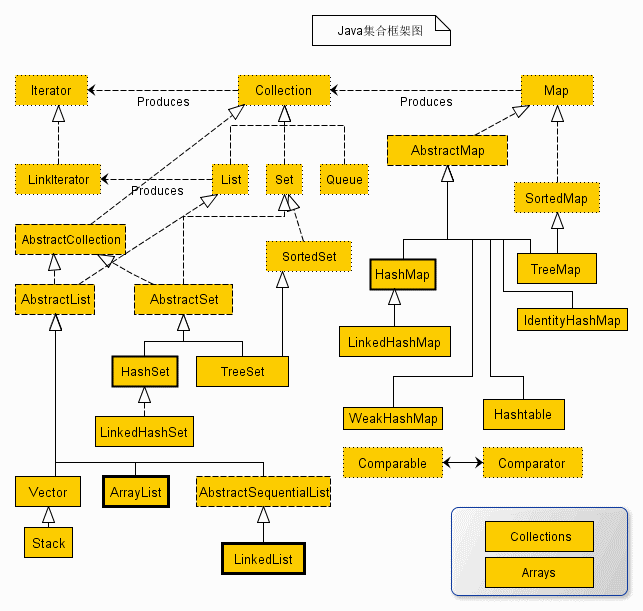
顶层的都是一些Interface,下面的具体的每一个都是继承它们。
主要包括两种类型的容器:
- Collections
- Map
Collection 接口又有 3 种子类型,List、Set 和 Queue,再下面是一些抽象类,最后是具体实现类,常用的有 ArrayList、LinkedList、HashSet、LinkedHashSet、HashMap、LinkedHashMap 等等。
Map也属于Collection,都是存储数据的。
Java Swing的简单使用
Java Swing有5种布局方式:BorderLayout(边界布局)、FlowLayout(流式布局)、BoxLayout(盒子布局)、GridLayout(网格布局)、null(空布局)
使用panel和Container显示一些控件,下面显示的是用户名和密码的简单的验证。
package com.JavaCour; import java.awt.*; import java.awt.event.ActionEvent; import java.awt.event.ActionListener; import javax.swing.*; public class HelloWorld extends JFrame{ public static void main(String[] args) { new HelloWorld(); } JPanel panel; Container cp; JTextField jTextField; JPasswordField jPasswordField; JButton jButton; JButton jButton1; public HelloWorld(){ // 设置定位 JLabel label = new JLabel("用户");label.setBounds(20, 20, 80, 30); JLabel label1 = new JLabel("密码");label1.setBounds(20, 70, 80, 30); jTextField = new JTextField();jTextField.setBounds(50, 20, 80, 30); jPasswordField = new JPasswordField();jPasswordField.setBounds(50, 70, 80, 30); jButton = new JButton("登录");jButton.setBounds(20, 120, 60, 30); jButton1 = new JButton("清空");jButton1.setBounds(90, 120, 60, 30); // 添加事件的监听 jButton1.addActionListener(new Listen()); jButton.addActionListener(new JButtonListen()); panel = new JPanel(); panel.setLayout(null);// 设置水平布局,而且设置了水平布局label等的setBounds才有作用 panel.add(label); panel.add(label1); panel.add(jTextField); panel.add(jPasswordField); panel.add(jButton); panel.add(jButton1); cp = this.getContentPane(); cp.add(panel); this.setTitle("登录"); this.setDefaultCloseOperation(WindowConstants.EXIT_ON_CLOSE);//点击X程序退出,否则会一直运行 this.setSize(800, 600); this.setBounds(200, 300, 200, 200);//设置定位 this.setVisible(true); } //实现登录和密码框的清空的监听器 public class Listen implements ActionListener { @Override public void actionPerformed(ActionEvent e) { jTextField.setText(""); jPasswordField.setText(""); } } // 实现登录成功按钮的dialog public class JButtonListen implements ActionListener { @Override public void actionPerformed(ActionEvent e) { if(jTextField.getText().equals("黄志缘") && jPasswordField.getText().equals("123456")) { JOptionPane.showMessageDialog(null, "成功"); } else { JOptionPane.showMessageDialog(null, "失败"); } } } }- 1
- 2
- 3
- 4
- 5
- 6
- 7
- 8
- 9
- 10
- 11
- 12
- 13
- 14
- 15
- 16
- 17
- 18
- 19
- 20
- 21
- 22
- 23
- 24
- 25
- 26
- 27
- 28
- 29
- 30
- 31
- 32
- 33
- 34
- 35
- 36
- 37
- 38
- 39
- 40
- 41
- 42
- 43
- 44
- 45
- 46
- 47
- 48
- 49
- 50
- 51
- 52
- 53
- 54
- 55
- 56
- 57
- 58
- 59
- 60
- 61
- 62
- 63
- 64
- 65
- 66
- 67
- 68
- 69
读写文件
读文件
1、
BufferedReadernew一个FileReader对象,然后利用BufferedReader的readline方法一行一行读取。public static void main(String[] args) { try{ BufferedReader in = new BufferedReader(new FileReader("D:\\AA-Idea\\JULItheima\\src\\main\\java\\com\\JavaCour\\123.html")); String str; while((str=in.readLine())!=null){ System.out.println(str); } }catch(Exception e){ System.out.println(e); } } @Test public void readFile02() throws IOException { String path = "D:\\AA-Idea\\JULItheima\\src\\main\\java\\com\\JavaCour\\123.html"; Stream<String> lines = Files.lines(Paths.get(path)); lines.forEach(ele ->{ System.out.println(ele); }); // lines.forEachOrdered(System.out::println); }- 1
- 2
- 3
- 4
- 5
- 6
- 7
- 8
- 9
- 10
- 11
- 12
- 13
- 14
- 15
- 16
- 17
- 18
- 19
- 20
2、
b的
getByte方法是将字符串编码为byte序列,https://www.runoob.com/java/java-string-getbytes.htmlout是一个 FileOutputStream对象,将b写入流,in是一个FileInputStaeam流对象,利用in.read从流中读取数据,一次两个字节。在这个过程中b,只是作为一个缓冲对象,read之后改变b的前两位。基本文件字节流FileInputStream、FileOutputStream:https://juejin.cn/post/7002410593625833479
@Test public void readFile03(){ String path = "D:\\AA-Idea\\JULItheima\\src\\main\\java\\com\\JavaCour\\123.html"; File file = new File("path"); byte[] b = "欢迎welcome".getBytes(); System.out.println(b.length);//13个字节,一个汉字三个字节:6+7 try{ FileOutputStream out = new FileOutputStream(file); out.write(b);//将b写入流中 out.close(); FileInputStream in = new FileInputStream(file); int n=0; //从流中读取数据的时候会改变b作为缓冲区数组的前两位 while((n=in.read(b, 0, 2))!=-1){//从流中一次读取两个byte,只有一个时不会返回-1 String str = new String(b, 0, 2); System.out.println(str); } in.close(); } catch (IOException e) { e.printStackTrace(); } }- 1
- 2
- 3
- 4
- 5
- 6
- 7
- 8
- 9
- 10
- 11
- 12
- 13
- 14
- 15
- 16
- 17
- 18
- 19
- 20
- 21
- 22
写文件
FileWriter用来创建写文件,BufferWriter用来指定从缓冲区写入文件的对象。
filewriterFile创建一个文件夹对象,指定要过滤文件的文件夹FileAccept实现了一个接口FilenameFilter,指定要过滤的文件的后缀,
FileAccept类的接口File filename[]数组是所有符合后缀的文件对象注意点:
out.write之后不能直接写到文件内,要使用out.flush- 因为进行读写操作时, 数据先读取到缓存中, 再从缓存中读取写入文件. 因此从缓冲区读完数据后, 必须
flush清空缓冲区, 同时将缓冲区的内容输出到文件夹内, 然后close关闭读写流. - https://blog.csdn.net/stzy00/article/details/39156819
@Test public void readFile05() throws IOException { FileWriter toFile = new FileWriter("D:\\name1.txt"); BufferedWriter out = new BufferedWriter(toFile); File dir = new File("D:\\图片"); FileAccept accept = new FileAccept("jpg"); File fileName[] = dir.listFiles(accept); for(int i=0; i<fileName.length; i++){ System.out.println(fileName[i].getName() + fileName[i].length()); out.write(i+" "+fileName[i].getName()); out.newLine(); } out.flush(); out.close(); } class FileAccept implements FilenameFilter{//过滤文件的名字 String str=null; FileAccept(String s){ str="."+s;//加上.,后缀 } @Override public boolean accept(File dir, String name) { return name.endsWith(str); } }- 1
- 2
- 3
- 4
- 5
- 6
- 7
- 8
- 9
- 10
- 11
- 12
- 13
- 14
- 15
- 16
- 17
- 18
- 19
- 20
- 21
- 22
- 23
- 24
- 25
多种方法实现文件的读写:多种方法实现文件读写
Java并发编程
Thread类:Thread类
守护线程,setDaemon(true);
线程优先级,setPriority();
线程同步:同步代码块、同步锁、同步方法(考试主要考这个)。
同步方法:使用synchronized关键字,多线程的同步机制对资源进行加锁,使得在同一个时间,只有一个线程可以进行操作,同步用以解决多个线程同时访问时可能出现的问题。同步机制可以使用synchronized关键字实现。**当synchronized关键字修饰一个方法的时候,该方法叫做同步方法。**当synchronized方法执行完或发生异常时,会自动释放锁。
synchronized关键字:https://www.cnblogs.com/mengdd/archive/2013/02/16/2913806.html
Java多线程示例
package com.JavaCour; import static java.lang.Thread.*; public class test { private int i = 10; private Object object = new Object(); public static void main(String[] args) { test test = new test(); Account account = new Account(); MyThread1 myThread1 = test.new MyThread1(account); MyThread1 myThread11 = test.new MyThread1(account); myThread1.start(); myThread11.start(); } class MyThread extends Thread { @Override public void run() { synchronized (object) { i++; System.out.println("i:"+i); try { System.out.println("线程"+Thread.currentThread().getName()+"进入睡眠状态"); Thread.currentThread().sleep(1000); } catch (InterruptedException e) { // TODO: handle exception e.printStackTrace(); } System.out.println("线程"+Thread.currentThread().getName()+"睡眠结束"); i++; System.out.println("i:"+i); } } } class MyThread1 extends Thread{ Account account; public MyThread1(Account account){ this.account=account; } @Override public void run(){ try{ sleep(100);// 要加上,不然执行太快了,看不出来交叉运行 }catch(Exception e){ e.printStackTrace(); } account.display(); } } } class Bank extends Thread{ } class Account extends Thread{ String accountNo; int money; /** * 不加synchronized输出的顺序是不一致的,加上会显示一个先一个后,不会交叉 */ public synchronized void display(){ // 不加synchronized输出的顺序是不一致的,加上会显示一个先一个后,不会交叉 for(int i=0; i<5; i++){ System.out.println(Thread.currentThread().getName()+": "+i); } } } class Ticket implements Runnable{ private int ticket=20; @Override public void run() { this.sell(); } public synchronized void sell(){ while(true){ if(ticket<1){ System.out.println("票已售完"); System.exit(0); } System.out.println(Thread.currentThread().getName()+"卖出第"+(ticket--)+"张票"); try{ sleep(500); notifyAll(); wait(); }catch(Exception e){ e.printStackTrace(); } } } }- 1
- 2
- 3
- 4
- 5
- 6
- 7
- 8
- 9
- 10
- 11
- 12
- 13
- 14
- 15
- 16
- 17
- 18
- 19
- 20
- 21
- 22
- 23
- 24
- 25
- 26
- 27
- 28
- 29
- 30
- 31
- 32
- 33
- 34
- 35
- 36
- 37
- 38
- 39
- 40
- 41
- 42
- 43
- 44
- 45
- 46
- 47
- 48
- 49
- 50
- 51
- 52
- 53
- 54
- 55
- 56
- 57
- 58
- 59
- 60
- 61
- 62
- 63
- 64
- 65
- 66
- 67
- 68
- 69
- 70
- 71
- 72
- 73
- 74
- 75
- 76
- 77
- 78
- 79
- 80
- 81
- 82
- 83
- 84
- 85
- 86
- 87
- 88
- 89
- 90
- 91
- 92
- 93
wait、notify、notifyAll
https://www.liaoxuefeng.com/wiki/1252599548343744/1306580911915042
wait会将这个线程的锁释放掉,this锁。调用了wait之后,其他线程可以使用这个锁,和C++的条件变量类似
在这个教程里,一个添加任务队列的方法,一个是执行任务的方法,如果只是用synchronized关键字把这两个方法锁住,当需要getTask之前,这个线程可以检测任务队列是否为空,为空的话会一直阻塞这个线程;这个时候this就被锁住了,其他线程也不能获得,所以也不能添加任务,然后所有的线程都被锁住了。这个时候可以使用this.wait()方法将这个锁释放掉,这个问题就解决了。
调用wait方法之后,这个线程会处于等待的状态,可以使用notifyall(或notify)方法唤醒这个线程,继续获得任务执行。
注:wait、notify、notifyAll这三个方法都必须在被已经获得锁的方法里面使用,被notify、notifyAll唤醒的进程必须重新获得锁才可以继续执行
class TaskQueue { Queue<String> queue = new LinkedList<>(); public synchronized void addTask(String s) { this.queue.add(s); } public synchronized String getTask() { while (queue.isEmpty()) { //this.wait();//优化版本 } return queue.remove(); } }- 1
- 2
- 3
- 4
- 5
- 6
- 7
- 8
- 9
- 10
- 11
- 12
- 13
- 14
买票的例子
package com.JavaCour; import java.util.Scanner; public class test implements Runnable{ public static void main(String[] args) { // TODO 自动生成的方法存根 test st=new test(); String name; Scanner input=new Scanner(System.in); int imoney,flag; flag=1; while(flag==1) { System.out.println("input name:"); name=input.next(); System.out.println("input money"); imoney=input.nextInt(); Thread th=new Thread (st,name+"-"+imoney); th.start(); System.out.println("1 continue; 0 end"); flag=input.nextInt(); } } int x[]=new int [5];// 手里有的币种数量 5 10 20 50 100 private int bk=0;//是否有钱 1/0 test() { } //判断是否能找钱成功 public boolean check(int money) { int a[] =new int [5];// 5 10 20 50 100 System.arraycopy(x, 0, a, 0, 5); int needchange=money-5; if(needchange==0) return true;//不需要找钱 else { int tp=0;//票子的金额 for(int i=4;i>=0;i--) {//从最大的开始找钱,合乎实际情况 if(a[i]>0) {//这个票种有剩余 if(i==4) tp=100; else if(i==3) tp=50; else if(i==2) tp=20; else if(i==1) tp=10; else if(i==0) tp=5; while(needchange-tp>=0) { needchange-=tp;//找钱 a[i]--; if(a[i]<=0) break;//没有这个票种了 } if(needchange==0) {//正好找完钱 System.arraycopy(a, 0, x, 0, 5); return true; } } } return false; } } @Override public void run() { // TODO 自动生成的方法存根 String sst=Thread.currentThread().getName();// name+"-"+imoney String sstr[]=sst.split("-"); int money=Integer.valueOf(sstr[1]); if(bk==0) x[1]=1; synchronized(this) { boolean fg=false; while(fg==false) { String st=Thread.currentThread().getName();// name+"-"+imoney String str[]=st.split("-"); money=Integer.valueOf(str[1]); //System.out.println(money+"qqqqqq"); if(check(money)==true) {//可以找完钱 System.out.println(Thread.currentThread().getName()+"买到票"); if(money==5) x[0]++; else if(money==10) x[1]++; else if(money==20) x[2]++; else if(money==50) x[3]++; else x[4]++; for(int j=0;j<5;j++) System.out.print("x["+j+"] " +x[j]+" "); System.out.println(""); super.notifyAll();//如果某一个顾客买票成功,则唤醒所有等待的顾客。 fg=true; bk=1;// 卖完票银行就有钱了 } else { try { System.out.println(Thread.currentThread().getName()+"没买到票"); for(int j=0;j<5;j++) System.out.print("x["+j+"] " +x[j]+" ");//输出bank的票种数量 System.out.println(""); super.wait();// 释放锁 }catch(InterruptedException e) { e.printStackTrace(); } } } } } }- 1
- 2
- 3
- 4
- 5
- 6
- 7
- 8
- 9
- 10
- 11
- 12
- 13
- 14
- 15
- 16
- 17
- 18
- 19
- 20
- 21
- 22
- 23
- 24
- 25
- 26
- 27
- 28
- 29
- 30
- 31
- 32
- 33
- 34
- 35
- 36
- 37
- 38
- 39
- 40
- 41
- 42
- 43
- 44
- 45
- 46
- 47
- 48
- 49
- 50
- 51
- 52
- 53
- 54
- 55
- 56
- 57
- 58
- 59
- 60
- 61
- 62
- 63
- 64
- 65
- 66
- 67
- 68
- 69
- 70
- 71
- 72
- 73
- 74
- 75
- 76
- 77
- 78
- 79
- 80
- 81
- 82
- 83
- 84
- 85
- 86
- 87
- 88
- 89
- 90
- 91
- 92
- 93
- 94
- 95
- 96
- 97
- 98
- 99
- 100
- 101
- 102
交替按序输出1、2的例子:
package com.JavaCour; public class ThreadTest{ public static void main(String[] args) throws InterruptedException { ThreadTest2 t=new ThreadTest2(); ThreadTest2 t2 = new ThreadTest2();//不能创建两个类,因为this锁,不一致 for(int i=0; i<7; i++) { t.outA(); } for(int i=0; i<7; i++) { t2.outB(); } // new Thread(){ // @Override // public void run() { // for(int i=0; i<7; i++) { // try { // t.outA(); // } catch (InterruptedException e) { // e.printStackTrace(); // } // } // } // }.start(); // new Thread(){ // @Override // public void run() { // for(int i=0; i<7; i++) { // try { // t.outB(); // } catch (InterruptedException e) { // e.printStackTrace(); // } // } // } // }.start(); } } class ThreadTest2 extends Thread { @Override public void run() { } synchronized void outA() throws InterruptedException { this.notify(); System.out.print(1); this.wait(1); } synchronized void outB() throws InterruptedException{ this.notify(); System.out.println(2); this.wait(1); } } //public class ThreadTest { // // 创建一个将被两个线程同时访问的共享对象 // public static Object object = new Object(); // // // Thread0线程,执行wait()方法 // static class Thread0 extends Thread { // @Override // public void run() { // synchronized (object) { // for(int i=1;i<=7;i++){ // object.notifyAll(); // System.out.println(Thread.currentThread().getName() + "---1"); // try { // object.wait(1);} // catch (InterruptedException e) { // e.printStackTrace(); // } // } // } // } // } // // Thread1线程,执行notify()方法 // static class Thread1 extends Thread { // // @Override // public void run() { // synchronized (object) { // for(int i=1;i<=7;i++){ // object.notifyAll(); // System.out.println(Thread.currentThread().getName() + "---2"); // try { // object.wait(1); // } catch (InterruptedException e) { // e.printStackTrace(); // } // } // } // } // } // // // 主线程 // public static void main(String[] args) { // Thread0 thread0 = new Thread0(); // Thread1 thread1 = new Thread1(); // thread0.start(); // thread1.start(); // System.out.println("over!"); // } //}- 1
- 2
- 3
- 4
- 5
- 6
- 7
- 8
- 9
- 10
- 11
- 12
- 13
- 14
- 15
- 16
- 17
- 18
- 19
- 20
- 21
- 22
- 23
- 24
- 25
- 26
- 27
- 28
- 29
- 30
- 31
- 32
- 33
- 34
- 35
- 36
- 37
- 38
- 39
- 40
- 41
- 42
- 43
- 44
- 45
- 46
- 47
- 48
- 49
- 50
- 51
- 52
- 53
- 54
- 55
- 56
- 57
- 58
- 59
- 60
- 61
- 62
- 63
- 64
- 65
- 66
- 67
- 68
- 69
- 70
- 71
- 72
- 73
- 74
- 75
- 76
- 77
- 78
- 79
- 80
- 81
- 82
- 83
- 84
- 85
- 86
- 87
- 88
- 89
- 90
- 91
- 92
- 93
- 94
- 95
- 96
- 97
- 98
- 99
- 100
- 101
- 102
- 103
- 104
- 105
- 106
JDBC
package com.hzy; import java.sql.*; public class HelloJDBC { public static void main(String[] args) { String url = "jdbc:mysql://localhost:3306/hotel?serverTimezone=UTC&characterEncoding=utf8&useUnicode=true&useSSL=false"; String drive = "com.mysql.cj.jdbc.Driver"; String JDBC_USER = "root"; String JDBC_PASSWORD = "123456"; try (Connection conn = DriverManager.getConnection(url, JDBC_USER, JDBC_PASSWORD)) {// 先使用DriverManger.getConnection获取连接 try (Statement stmt = conn.createStatement()) {// 使用Connection对象创建一个Statment对象,可能会有SQL注入, // PrepareStatement preStat=conn.prepareStatement();后面相同 try (ResultSet rs = stmt.executeQuery("SELECT * FROM admin1")) {// 使用Statment的executeQuery传入Sql语句,返回结果用ResultSet来接受 while (rs.next()) {// 反复调用next方法来查询结果集 // long id = rs.getLong(1); // 注意:索引从1开始 // long grade = rs.getLong(2); int id= rs.getInt(1); String name = rs.getString(2); int gender = rs.getInt(3); System.out.println(id+name+gender); } conn.close(); stmt.close(); } } } catch (SQLException e) { e.printStackTrace(); } // try { // Class.forName(drive); // System.out.println("success"); // }catch(Exception e){ // e.printStackTrace(); // } } }- 1
- 2
- 3
- 4
- 5
- 6
- 7
- 8
- 9
- 10
- 11
- 12
- 13
- 14
- 15
- 16
- 17
- 18
- 19
- 20
- 21
- 22
- 23
- 24
- 25
- 26
- 27
- 28
- 29
- 30
- 31
- 32
- 33
- 34
- 35
- 36
- 37
- 38
Array、ArrayList、数组、Arrays的简单区分
https://blog.csdn.net/weixin_44844089/article/details/103594587
javap的使用
https://www.cnblogs.com/baby123/p/10756614.html
Java的重载和重写
重载发生在:重载(overloading) 是在一个类里面,方法名字相同,而参数不同。返回类型可以相同也可以不同。
重写发生在:重写是子类对父类的允许访问的方法的实现过程进行重新编写, 返回值和形参都不能改变。即外壳不变,核心重写!
split() 方法
Declare: public String[] split(String regex, int limit);// limit是个数
Declare: public String[] split(String regex);
-
相关阅读:
pandas 学习 第15篇:分组 groupby
Ubuntu虚拟机安装教程
GPS北斗模块串口助手输出测试
ES聚合统计
JSP的相关语法
简单的布局的初级智能文本提示器
Vue 移动端(H5)项目怎么实现页面缓存(即列表页面进入详情返回后列表页面缓存且还原页面滚动条位置)keep-alive缓存及清除keep-alive缓存
Docker命令-build
用acme.sh给网站域名,申请免费SSL永久证书(自动续期)
二阶段day1
- 原文地址:https://blog.csdn.net/m0_67623521/article/details/128122328

- 最新文章
-
沪漂五周年了:我越来越迷茫了
Agentic Skill Routing 实战:别再把所有 Skill 塞进 AI Agent 上下文
MySQL-Seconds_behind_master的精度误差
[MAF预定义ChatClient中间件-03]CachingChatClient——利用缓存省钱省时间
AI的至暗历史:从万众期待到被政府撤资,AI的两次死亡徘徊
Agent OS :五种驯服不确定性的范式
PortSwigger SQL注入LAB11
数据库即时编译JIT
[Begin]AI Learn Data Day 0
深度学习进阶(二十七)现代 LLM 的核心架构设计其二:SwiGLU