-
【window下配置Maxim SDK环境】

1. 前言
MAX78000FTHR为快速开发平台,帮助工程师利用MAX78000 Arm® Cortex® M4F处理器快速实施超低功耗、人工智能(AI)方案,器件集成卷积神经网络加速器。本文为MAX78000羽毛板搭建window开发环境。
- 下图为板载资源

具体硬件介绍见
2. Maxim SDK下载
🥳🥳🥳温馨提示:接下来需要安全上网,否则一定会失败哟!
官网地址:https://www.maximintegrated.com/en/design/software-description.html/swpart=SFW0010820A

3. Maxim SDK安装
3.1 安装详解
- 下载完成后,双击安装

- 看到上面的提示点击下一步

- 此过程需要远程连接maxin官网,一定要安全上网

- 修改安装位置,下一步

- 勾选VS code支持,只选择MAX7800,下一步
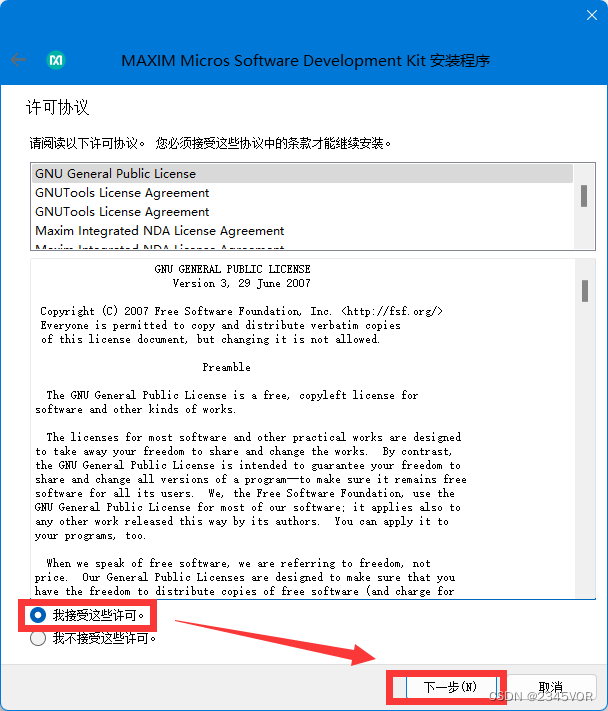
- 接受许可,下一步

- 默认下一步

- 需要4.43GB,点击安装

静静需要20分钟左右,可以去喝杯咖啡,也不介意你打赏一下小弟,请我喝杯咖啡,下面有交流群,可以相互问问题哟!
💖💖💖
3.2 安装完成

在搜索栏中找到这全家桶,- Eclipse就是🎏调试编译下载🎏全覆盖的UI编程软件;
- Maxim就是🎏辅助下载🎏的软件;
- MinGW就是命令行方式的🎏编译下载🎏的软件;
4. 测试环境
4.1 新建Hello word demo

- 点击Eclipse,这个是检查更新,不急

- 新建一个demo,file>new>Project

- 选择Maxim Microcontrollers,下一步

- 配置默认工作位置,首先helloworld吧,下一步

- 按照我的配置就好,finish

- 打开Helloword demo如下
main.c
/****************************************************************************** * Copyright (C) 2022 Maxim Integrated Products, Inc., All Rights Reserved. * * Permission is hereby granted, free of charge, to any person obtaining a * copy of this software and associated documentation files (the "Software"), * to deal in the Software without restriction, including without limitation * the rights to use, copy, modify, merge, publish, distribute, sublicense, * and/or sell copies of the Software, and to permit persons to whom the * Software is furnished to do so, subject to the following conditions: * * The above copyright notice and this permission notice shall be included * in all copies or substantial portions of the Software. * * THE SOFTWARE IS PROVIDED "AS IS", WITHOUT WARRANTY OF ANY KIND, EXPRESS * OR IMPLIED, INCLUDING BUT NOT LIMITED TO THE WARRANTIES OF * MERCHANTABILITY, FITNESS FOR A PARTICULAR PURPOSE AND NONINFRINGEMENT. * IN NO EVENT SHALL MAXIM INTEGRATED BE LIABLE FOR ANY CLAIM, DAMAGES * OR OTHER LIABILITY, WHETHER IN AN ACTION OF CONTRACT, TORT OR OTHERWISE, * ARISING FROM, OUT OF OR IN CONNECTION WITH THE SOFTWARE OR THE USE OR * OTHER DEALINGS IN THE SOFTWARE. * * Except as contained in this notice, the name of Maxim Integrated * Products, Inc. shall not be used except as stated in the Maxim Integrated * Products, Inc. Branding Policy. * * The mere transfer of this software does not imply any licenses * of trade secrets, proprietary technology, copyrights, patents, * trademarks, maskwork rights, or any other form of intellectual * property whatsoever. Maxim Integrated Products, Inc. retains all * ownership rights. * ******************************************************************************/ /** * @file main.c * @brief Hello World! * @details This example uses the UART to print to a terminal and flashes an LED. */ /***** Includes *****/ #include#include #include "mxc_device.h" #include "led.h" #include "board.h" #include "mxc_delay.h" /***** Definitions *****/ /***** Globals *****/ /***** Functions *****/ // ***************************************************************************** int main(void) { int count = 0; printf("Hello World!\n"); while (1) { LED_On(LED1); MXC_Delay(500000); LED_Off(LED1); MXC_Delay(500000); printf("count : %d\n", count++); } } - 1
- 2
- 3
- 4
- 5
- 6
- 7
- 8
- 9
- 10
- 11
- 12
- 13
- 14
- 15
- 16
- 17
- 18
- 19
- 20
- 21
- 22
- 23
- 24
- 25
- 26
- 27
- 28
- 29
- 30
- 31
- 32
- 33
- 34
- 35
- 36
- 37
- 38
- 39
- 40
- 41
- 42
- 43
- 44
- 45
- 46
- 47
- 48
- 49
- 50
- 51
- 52
- 53
- 54
- 55
- 56
- 57
- 58
- 59
- 60
- 61
- 62
- 63
- 64
- 65
- 66
- 67
- 68
- 69

- 大家插入系统demo可以看看readme.md,分别实验验证

4.2 编译调试下载
- 将Maxim通过安卓数据线连接到电脑上

- 连接正常会出现DAPLINK 的U盘,如下查看

如果故障了,可参照官网刷固件还原!
4.2.1 clean
-
鼠标右键项目,点击
clean project,清除原有编译结果(clean)
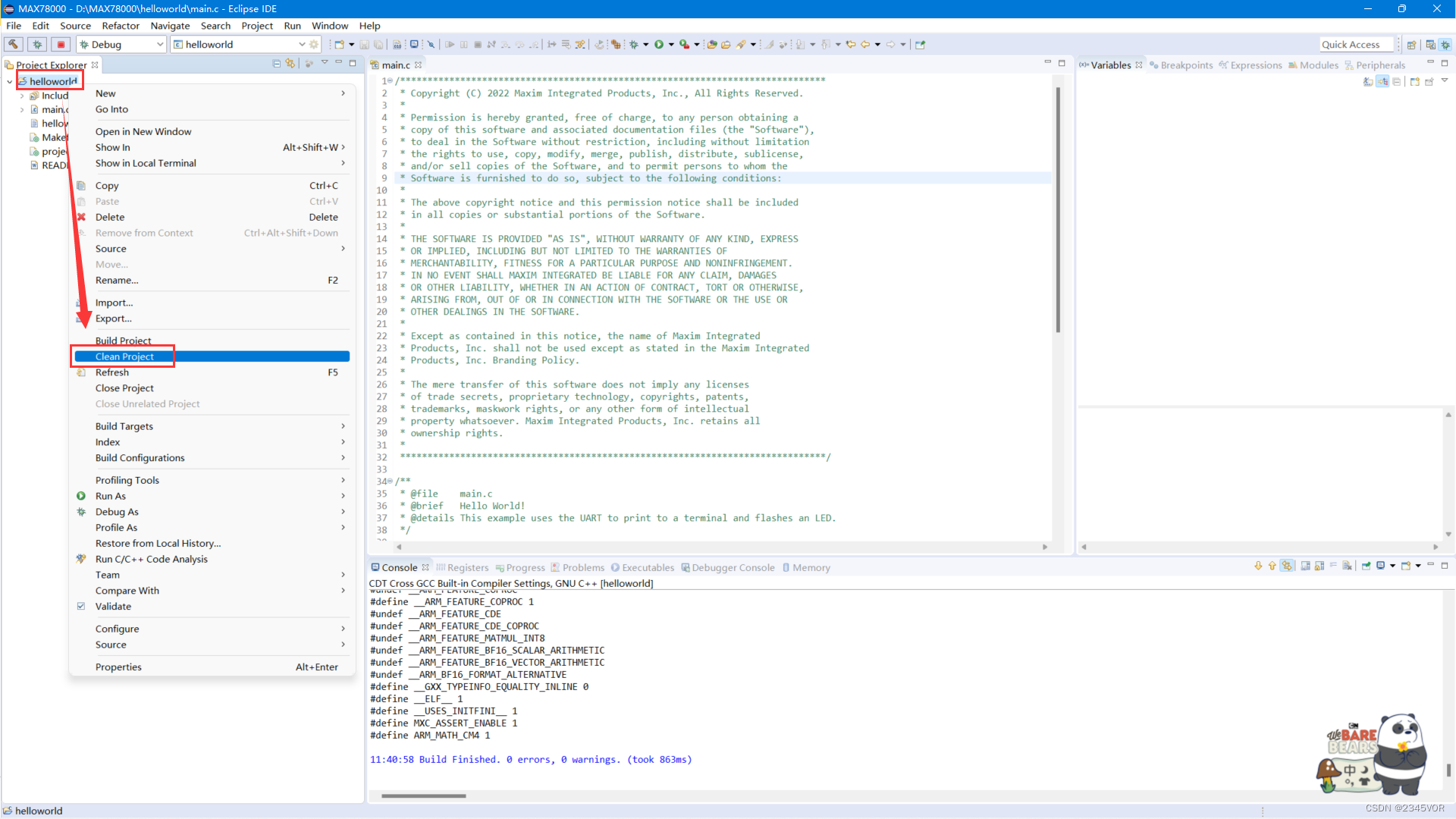
-
显示清除成功

4.2.2 build
- 鼠标右键项目,点击
build project,编译项目(build)

- 呼吸灯,打印
Hello World!程序,生成elf为编译成功

4.2.3 Openocd
现在下载程序,采用Openocd
- 鼠标右键项目,点击
Debug as,选择Debug configurations(Debug)

- 选择
GDB Openocd Debugging下的Helloworld,点击Debug就开始下载程序啦!

打印如下,就下载成功啦!
Open On-Chip Debugger 0.11.0+dev-g56a818e4c (2022-11-16-05:46) Licensed under GNU GPL v2 For bug reports, read http://openocd.org/doc/doxygen/bugs.html DEPRECATED! use 'adapter driver' not 'interface' Started by GNU MCU Eclipse Info : Listening on port 6666 for tcl connections Info : Listening on port 4444 for telnet connections Info : CMSIS-DAP: SWD supported Info : CMSIS-DAP: Atomic commands supported Info : CMSIS-DAP: FW Version = 0254 Info : CMSIS-DAP: Serial# = 04440001405d035900000000000000000000000097969906 Info : CMSIS-DAP: Interface Initialised (SWD) Info : SWCLK/TCK = 1 SWDIO/TMS = 1 TDI = 0 TDO = 0 nTRST = 0 nRESET = 1 Info : CMSIS-DAP: Interface ready Info : clock speed 2000 kHz Info : SWD DPIDR 0x2ba01477 Info : max32xxx.cpu: Cortex-M4 r0p1 processor detected Info : max32xxx.cpu: target has 6 breakpoints, 4 watchpoints Info : max32xxx.cpu: external reset detected Info : starting gdb server for max32xxx.cpu on 3333 Info : Listening on port 3333 for gdb connections Info : accepting 'gdb' connection on tcp/3333 target halted due to debug-request, current mode: Thread xPSR: 0x21030000 pc: 0x10002524 msp: 0x2001ffc0 Warn : Prefer GDB command "target extended-remote :3333" instead of "target remote :3333" Info : SWD DPIDR 0x2ba01477 target halted due to debug-request, current mode: Thread xPSR: 0x81000000 pc: 0x00002124 msp: 0x20003ff0 Info : SWD DPIDR 0x2ba01477 target halted due to debug-request, current mode: Thread xPSR: 0x81000000 pc: 0x00002124 msp: 0x20003ff0 Info : Padding image section 0 at 0x10008b04 with 12 bytes Info : SWD DPIDR 0x2ba01477 target halted due to debug-request, current mode: Thread xPSR: 0x81000000 pc: 0x00002124 msp: 0x20003ff0 ===== arm v7m registers (0) r0 (/32): 0x10000000 (1) r1 (/32): 0xe000ed08 (2) r2 (/32): 0x00000001 (3) r3 (/32): 0x40000000 (4) r4 (/32): 0x00000000 (5) r5 (/32): 0x00000000 (6) r6 (/32): 0x00000000 (7) r7 (/32): 0x00000000 (8) r8 (/32): 0x00000000 (9) r9 (/32): 0x00000000 (10) r10 (/32): 0x00000000 (11) r11 (/32): 0x00000000 (12) r12 (/32): 0x20003fc8 (13) sp (/32): 0x20003ff0 (14) lr (/32): 0x0000211d (15) pc (/32): 0x100004b4 (dirty) (16) xPSR (/32): 0x81000000 (17) msp (/32): 0x20003ff0 (18) psp (/32): 0x00000000 (20) primask (/1): 0x00 (21) basepri (/8): 0x00 (22) faultmask (/1): 0x00 (23) control (/3): 0x00 (42) d0 (/64): 0x0000000000000000 (43) d1 (/64): 0x0000000000000000 (44) d2 (/64): 0x0000000000000000 (45) d3 (/64): 0x0000000000000000 (46) d4 (/64): 0x0000000000000000 (47) d5 (/64): 0x0000000000000000 (48) d6 (/64): 0x0000000000000000 (49) d7 (/64): 0x0000000000000000 (50) d8 (/64): 0x0000000000000000 (51) d9 (/64): 0x0000000000000000 (52) d10 (/64): 0x0000000000000000 (53) d11 (/64): 0x0000000000000000 (54) d12 (/64): 0x0000000000000000 (55) d13 (/64): 0x0000000000000000 (56) d14 (/64): 0x0000000000000000 (57) d15 (/64): 0x0000000000000000 (58) fpscr (/32): 0x00000000 ===== Cortex-M DWT registers- 1
- 2
- 3
- 4
- 5
- 6
- 7
- 8
- 9
- 10
- 11
- 12
- 13
- 14
- 15
- 16
- 17
- 18
- 19
- 20
- 21
- 22
- 23
- 24
- 25
- 26
- 27
- 28
- 29
- 30
- 31
- 32
- 33
- 34
- 35
- 36
- 37
- 38
- 39
- 40
- 41
- 42
- 43
- 44
- 45
- 46
- 47
- 48
- 49
- 50
- 51
- 52
- 53
- 54
- 55
- 56
- 57
- 58
- 59
- 60
- 61
- 62
- 63
- 64
- 65
- 66
- 67
- 68
- 69
- 70
- 71
- 72
- 73
- 74
- 75
- 76
- 77
- 78
- 79
5. 实验效果
- 此时板载绿灯一直闪烁,

- 复位或者F8开始运行程序


- 打开串口调试助手,我用的Serial studio,设置好115200波特率,选择端口连接,调试如下

6.小结
通过对这篇文章我们掌握了window下配置Maxim SDK环境,接下来会有许多有趣的实验,尝试与Arduino通讯做语音小车,进而丰富我们的生活。🛹🛹🛹从而实现对外部世界进行感知,充分认识这个有机与无机的环境,科学地合理地进行创作和发挥效益,然后为人类社会发展贡献一点微薄之力。🤣🤣🤣
🥳🥳🥳再次非常感谢大赛支持和胡同学🥳🥳🥳
参考文献:
window10下配置Maxim SDK
数据手册
MAX78000板卡项目汇总
应用笔记 - 下图为板载资源
-
相关阅读:
OpenCV入门2:OpenCV中的图像表示
借助Log360实现综合可见性的增强网络安全
J2EE--MVC
2303. 计算应缴税款总额
GraphQL基础知识与Spring for GraphQL使用教程
PingCode 完成近亿元人民币C轮融资,打造世界级研发管理与协作平台
(五)fastai应用
使用K8S进行蓝绿部署的简明实操指南
从搭建SpringMVC环境到实现增删改查&&文件上传-文件下载
Mysql数据库 5.SQL语言聚合函数 语言日期-字符串函数
- 原文地址:https://blog.csdn.net/vor234/article/details/128061754
- 最新文章
-
沪漂五周年了:我越来越迷茫了
Agentic Skill Routing 实战:别再把所有 Skill 塞进 AI Agent 上下文
MySQL-Seconds_behind_master的精度误差
[MAF预定义ChatClient中间件-03]CachingChatClient——利用缓存省钱省时间
AI的至暗历史:从万众期待到被政府撤资,AI的两次死亡徘徊
Agent OS :五种驯服不确定性的范式
PortSwigger SQL注入LAB11
数据库即时编译JIT
[Begin]AI Learn Data Day 0
深度学习进阶(二十七)现代 LLM 的核心架构设计其二:SwiGLU