-
【面试题】BFC的理解
1. BFC
Block format context(BFC)表示块级格式上下文,它是CSS中的一种布局模式,用来决定块级元素如何布局以及与其他元素的关系。BFC是一个独立的布局环境,BFC内部的元素的渲染不会影响到边界以外的元素,并且BFC中的元素会按照一定的规则进行布局。
2. BFC的布局规则
- BFC中的所有元素垂直排列,即每个元素从上到下排列,元素之间的垂直距离由 margin 决定,同一个 BFC 中的相邻元素之间的 margin 会发生重叠。
- 每个块的左外边框紧贴包含块的左边框。
- 开启了BFC的元素和浮动元素不会重叠,会挨着浮动元素显示。
- BFC是一个独立的渲染区域,内部元素的布局不会影响外部元素的布局。
- 计算BFC高度时,浮动子元素也参与运算。
3. 触发BFC的方式
- HTML根元素自动触发BFC;
- 浮动的元素;
- 定位的元素,
position:absolute,position:fixed; display:inline-block/flex/table-cell-inline-flxe;overflow: hidden。
4. 利用BFC清除浮动
在元素中添加
overflow:hidden;样式来清除浮动<style type="text/css"> .container{ background-color: #f1f1f1; } .left{ float: left; } .bfc{ overflow: hidden; } style> <div class="container bfc"> <img src="https://profile-avatar.csdnimg.cn/default.jpg!1" class="left" style="margin-right: 10px"> <p class="bfc">我是一段文字。。。p> div>- 1
- 2
- 3
- 4
- 5
- 6
- 7
- 8
- 9
- 10
- 11
- 12
- 13
- 14
- 15
- 16
清除浮动前,图片脱离文档流
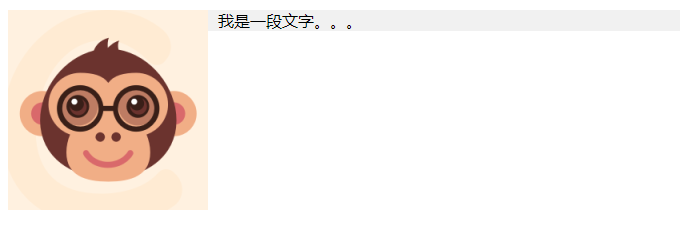
清除浮动后,图片撑开容器

5. BFC解决margin塌陷问题
<style> .top{width: 300px; height: 300px; background-color: red; margin-bottom: 100px} .bottom{width: 300px; height: 300px; background-blue: red; margin-top: 200px} style> <body> <div class = "top">div> <div class = "bottom">div> body>- 1
- 2
- 3
- 4
- 5
- 6
- 7
- 8
- 9
因为top和bottom这两个div都存在于根html中,所以这两个div处于同一个BFC,它们之间会发生margin塌陷。两个块之间的margin距离为较大的那个margin值,即200px。

将其中一个块放入另一个开启了BFC的区域中之后,就可以解决margin塌陷问题。<style> .top{width: 300px; height: 300px; background-color: red; margin-bottom: 100px} .bottom{width: 300px; height: 300px; background-color: blue; margin-top: 200px} .bfc{overflow: hidden} style> <body> <div class = "bfc"> <div class = "top">div> div> <div class = "bottom">div> body>- 1
- 2
- 3
- 4
- 5
- 6
- 7
- 8
- 9
- 10
- 11
- 12

6. 利用BFC实现双栏布局
双栏布局:左边宽度固定,右边宽度自适应(随着屏幕的缩放而缩放)
<style> .top{background-color: red; width: 200px; height: 200px; float: left;} .bottom{height: 300px; background-color: blue; overflow: hidden;} style> <body> <div class = "top">div> <div class = "bottom">div> body>- 1
- 2
- 3
- 4
- 5
- 6
- 7
- 8
- 9

-
相关阅读:
根据两向量求旋转矩阵(C++)
elasticsearch 概述
【FAQ】本地录像视频文件如何推送到视频监控平台EasyCVR进行AI视频智能分析?
(8)SpringMVC中的视图类型及其特点,以及视图控制器view-controller的配置
DolphinScheduler——介绍及架构设计
比亚迪越来越像华为?
人大金仓分析型数据库COPY装载数据
ansible自动化运维工具及常见模块的使用
Juniper Networks Junos OS EX远程命令执行漏洞(CVE-2023-36845)
民安智库(北京第三方窗口测评)开展汽车消费者焦点小组座谈会调查
- 原文地址:https://blog.csdn.net/zx1041561837/article/details/127867873

- 最新文章
-
沪漂五周年了:我越来越迷茫了
Agentic Skill Routing 实战:别再把所有 Skill 塞进 AI Agent 上下文
MySQL-Seconds_behind_master的精度误差
[MAF预定义ChatClient中间件-03]CachingChatClient——利用缓存省钱省时间
AI的至暗历史:从万众期待到被政府撤资,AI的两次死亡徘徊
Agent OS :五种驯服不确定性的范式
PortSwigger SQL注入LAB11
数据库即时编译JIT
[Begin]AI Learn Data Day 0
深度学习进阶(二十七)现代 LLM 的核心架构设计其二:SwiGLU