-
Stream流
Stream的创建
//第 一种 实现或继承 Collection接口的集合 // 如list.set 直接调用 stream() 方法 List<Integer> ids = Arrays.asList(10, 20, 30, 40, 50); ids.stream(); Set<String> sets = new HashSet<>(); sets.stream(); // 数组使用 Arrays.stream(array) 转未Stream流 Integer[] array = new Integer[]{1, 5, 5, 8, 6, 7, 9, 5}; Stream<Integer> stream = Arrays.stream(array); //Stream.of() Integer min = Stream .of(1, 2, 3) //获取 最小值 .min(Comparator.comparingInt(x -> x)) .get(); System.out.println(min); //1 Integer max = Stream .of(1, 2, 3) //获取 最大值 .max(Comparator.comparingInt(x -> x)) .get(); System.out.println(max); //3- 1
- 2
- 3
- 4
- 5
- 6
- 7
- 8
- 9
- 10
- 11
- 12
- 13
- 14
- 15
- 16
- 17
- 18
- 19
- 20
- 21
- 22
- 23
- 24
例子
从给定句子 中返回单词长度大于 5 的单词列表,按长度倒序输出,最多返回 3 个
//长度大于5 ,按长度倒序排序,输出 单词,最多3个 public static void lenMoreThan5SortConTop3sentence(String sentence) { String[] sentences = sentence.split(" "); List<String> word = Arrays.stream(sentences) .filter(x -> x.length() > 5) .sorted((o1, o2) -> o2.length() - o1.length()) .limit(3) .collect(Collectors.toList()); }- 1
- 2
- 3
- 4
- 5
- 6
- 7
- 8
- 9
- 10
- 11
管道
开始管道

中间管道
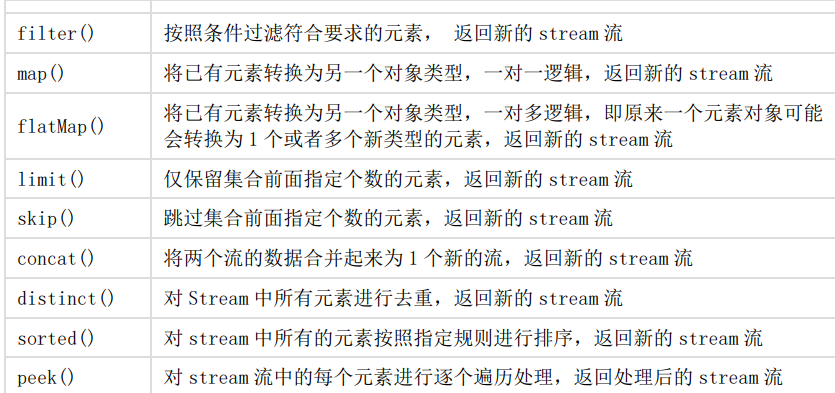
终止管道


Map与flatMap
有一个字符串 ID 列表,现在 需要将其转为 User 对象列表。
public void stringToIntMap() { List<String> ids = Arrays.asList("205", "105", "308", "469", "627", "193", "111"); // 使用流操作 List<User> results = ids.stream() .map(id -> { User user = new User(); user.setId(id); return user; }) .collect(Collectors.toList()); System.out.println(results); }- 1
- 2
- 3
- 4
- 5
- 6
- 7
- 8
- 9
- 10
- 11
- 12
- 13
现有一个句子列表,需要
将句子中每个单词都提取出来得到一个所有单词列表public static void stringToIntFlatmap() { List<String> sentences = Arrays.asList("hello world", "Jia Gou Wu Dao"); // 使用流操作 List<String> results = sentences.stream() // 将 其中的每个元素转为新的流操作 // 最后合并 .flatMap(sentence -> Arrays.stream(sentence.split(" "))) .collect(Collectors.toList()); System.out.println(results); }- 1
- 2
- 3
- 4
- 5
- 6
- 7
- 8
- 9
- 10
将两个字符数组合并成一个新的字符数组
public static void stringToIntFlatmap() { List<String> list = Arrays.asList("m,k,l,a", "1,3,5,7"); List<String> listNew = list.stream().flatMap(x -> { String[] split = x.split(","); return Arrays.stream(split); }).collect(Collectors.toList()); System.out.println("处理前的集合:" + list); System.out.println("处理后的集合:" + listNew); }- 1
- 2
- 3
- 4
- 5
- 6
- 7
- 8
- 9
- 10
- 11
peek 和 foreach 方法
peek 在终止操作后执行 ,foreach 为终止方法
List<String> sentences = Arrays.asList("hello world", "Jia Gou Wu Dao"); // 演示点 1:仅 peek 操作,最终不会执行 System.out.println("----before peek----"); sentences.stream().peek(sentence -> System.out.println(sentence)); System.out.println("----after peek----"); // 演示点 2:仅 foreach 操作,最终会执行 System.out.println("----before foreach----"); sentences.stream().forEach(sentence -> System.out.println(sentence)); System.out.println("----after foreach----"); // 演示点 3:peek 操作后面增加终止操作,peek 会执行 System.out.println("----before peek and count----"); sentences.stream().peek(sentence -> System.out.println(sentence)).count(); System.out.println("----after peek and count----");- 1
- 2
- 3
- 4
- 5
- 6
- 7
- 8
- 9
- 10
- 11
- 12
- 13
- 14
- 15
- 16
filter、sorted、distinct、limit、skip
List<String> ids = Arrays.asList("205", "10", "308", "49", "627", "193", "111", "193"); // 使用流操作, List<String> stringList = ids.stream() //111 193 205 308 627 .filter(s -> s.length() > 2) //去重 .distinct() //重新映射 .map(Integer::valueOf) //正排序 .sorted((o1, o2) -> o1 - o2) //跳过前2个元素 .skip(2) //最多显示三条 .limit(3) //再映射 .map(String::valueOf) //收集 .collect(Collectors.toList()); System.out.println(stringList);- 1
- 2
- 3
- 4
- 5
- 6
- 7
- 8
- 9
- 10
- 11
- 12
- 13
- 14
- 15
- 16
- 17
- 18
- 19
- 20
- 21
- 22
- 23
max、min
Integer min = Stream .of(1, 2, 3) //获取 最小值 .min(Comparator.comparingInt(x -> x)) .get(); System.out.println(min); Integer max = Stream .of(1, 2, 3) //获取 最大值 .max(Comparator.comparingInt(x -> x)) .get(); System.out.println(max);- 1
- 2
- 3
- 4
- 5
- 6
- 7
- 8
- 9
- 10
- 11
- 12
- 13
count、toArray
List<String> ids = Arrays.asList("205", "10", "308", "49", "627", "193", "111", "193"); long count = ids.stream() .map(Integer::valueOf) // 统计个数 .count(); System.out.println(count); Integer[] integers = ids.stream() .map(Integer::valueOf) // 需要 指定转成的数组类型!! .toArray(Integer[]::new);- 1
- 2
- 3
- 4
- 5
- 6
- 7
- 8
- 9
- 10
- 11
- 12
结果收集方法collect
toList、toSet、toMap
List<String> ids = Arrays.asList("205", "10", "308", "49", "627", "193", "111", "193"); Stream<Integer> integerStream = ids.stream().map(Integer::valueOf); List<Integer> list = integerStream.collect(Collectors.toList()); Set<Integer> set = integerStream.collect(Collectors.toSet()); ArrayList<Integer> ids = new ArrayList<> (); Map<Integer, Integer> idMap = ids.stream () // 第一个是拿什么作为 key // 第二个是拿什么作为 value .collect (Collectors.toMap (item -> item, item -> item));- 1
- 2
- 3
- 4
- 5
- 6
- 7
- 8
- 9
- 10
- 11
- 12
- 13
- 14
averaging

List<String> ids = Arrays.asList("205", "10", "308", "49", "627", "193", "111", "193"); Double avg = ids.stream() .map(Integer::valueOf) .collect(Collectors.averagingInt(Integer::valueOf)); System.out.println(avg); //----------------------------------- List<String> ids = Arrays.asList("205", "10", "308", "49", "627", "193", "111", "193"); Long collect = ids.stream() .map(Integer::valueOf) .collect(Collectors.counting()); System.out.println(collect); //----------------------------------- List<String> ids = Arrays.asList("205", "10", "308", "49", "627", "193", "111", "193"); IntSummaryStatistics summaryStatistics = ids.stream() .map(Integer::valueOf) .collect(Collectors.summarizingInt(x -> x)); System.out.println(summaryStatistics.getMax());- 1
- 2
- 3
- 4
- 5
- 6
- 7
- 8
- 9
- 10
- 11
- 12
- 13
- 14
- 15
- 16
- 17
- 18
- 19
- 20
- 21
joining拼接成 字符串
List<String> list = Arrays.asList("A", "B", "C"); String res = list.stream() .collect( Collectors.joining("---") ); System.out.println(res);- 1
- 2
- 3
- 4
- 5
- 6
partitioningBy分区、groupingBy分组
partitioningBy 分区
List<String> list = Arrays.asList("200", "100", "120", "110", "154"); // 将 数值 是否大于 120 分区!! // partitioningBy 参数类型为 Predicate,有参且 有个Boolean 返回值 Map<Boolean, List<Integer>> partitioningByMap = list.stream() .map(Integer::valueOf) .collect( Collectors.partitioningBy(x -> x > 120) ); for (Map.Entry<Boolean, List<Integer>> booleanListEntry : partitioningByMap.entrySet()) { System.out.println(booleanListEntry.getKey()); System.out.println(booleanListEntry.getValue()); }- 1
- 2
- 3
- 4
- 5
- 6
- 7
- 8
- 9
- 10
- 11
- 12
groupingBy 分组
// 将员工按性别分组 Map<String, List<Person>> group = list.stream().collect(Collectors.groupingBy(Person::getSex));- 1
- 2
// 将员工先按性别分组,再按地区分组 Map<String, Map<String, List<Person>>> group2 = personList.stream() .collect( Collectors.groupingBy( Person::getSex, Collectors.groupingBy(Person::getArea)) );- 1
- 2
- 3
- 4
- 5
- 6
- 7
避坑提醒
一旦一个 Stream 被执行了终止操作之后,后续便不可以再读这个流
执行其他的操作了,否则会报错
-
相关阅读:
Ubuntu常见问题及解决办法
我擦\那些测试员面试中的“潜规则”,千万不要踩坑
【初阶算法4】——归并排序的详解,及其归并排序的扩展
工具类xxxUtil从application.properties中读取参数
CentOS7安装时直接跳过了安装信息摘要页面的解决方法
30岁以上的程序员还死磕技术,别说拿高薪,可能连饭碗都会保不住
[Vue]写一个简单的文件上传控件
递归:判断一个数是否是2的幂
nginx配置指南
获取阿里云Docker镜像加速器
- 原文地址:https://blog.csdn.net/qq_30659573/article/details/127825458

- 最新文章
-
沪漂五周年了:我越来越迷茫了
Agentic Skill Routing 实战:别再把所有 Skill 塞进 AI Agent 上下文
MySQL-Seconds_behind_master的精度误差
[MAF预定义ChatClient中间件-03]CachingChatClient——利用缓存省钱省时间
AI的至暗历史:从万众期待到被政府撤资,AI的两次死亡徘徊
Agent OS :五种驯服不确定性的范式
PortSwigger SQL注入LAB11
数据库即时编译JIT
[Begin]AI Learn Data Day 0
深度学习进阶(二十七)现代 LLM 的核心架构设计其二:SwiGLU