-
车道线检测(二)——使用MNN部署PINet
目录
一、MNN简介
是阿里开源的一个轻量级的深度神经网络引擎,支持深度学习的推理与训练,适用于服务器/个人电脑/手机/嵌入式各类设备。目前,MNN已经在阿里巴巴的手机淘宝、手机天猫、优酷等30多个App中使用,覆盖直播、短视频、搜索推荐、商品图像搜索、互动营销、权益发放、安全风控等场景。github地址https://github.com/alibaba/MNN
二、MNN编译
在Linux平台编译流程如下。
1.依赖项安装
- cmake(3.10 以上)
- protobuf (3.0 以上)
-
- 指protobuf库以及protobuf编译器。版本号使用
protoc --version打印出来。 - 在某些Linux发行版上这两个包是分开发布的,需要手动安装
- Ubuntu需要分别安装
libprotobuf-dev以及protobuf-compiler两个包 - sudo apt install libprotobuf-dev
- sudo apt install protobuf-compiler
- Mac OS 上使用
brew install protobuf进行安装
- 指protobuf库以及protobuf编译器。版本号使用
- C++编译器
-
- GCC或Clang皆可 (macOS无需另外安装,Xcode自带)
-
-
- GCC推荐版本4.9以上
-
-
-
-
- 在某些发行版上GCC (GNU C编译器)和G++(GNU C++编译器是分开安装的)。
- 同样以Ubuntu为例,需要分别安装
gcc和g++
-
-
-
-
- Clang 推荐版本3.9以上
-
- zlib
2.下载MNN的代码,解压后如下操作
mkdir -p build/install
cd build
cmake .. -DMNN_OPENCL=true -DMNN_SEP_BUILD=false -DMNN_BUILD_CONVERTER=true -DMNN_BUILD_TORCH=true -DMNN_BUILD_DEMO=true -DMNN_BUILD_BENCHMARK=true -DMNN_BUILD_TOOLS=true -DCMAKE_INSTALL_PREFIX=./install
make -j4
make install
编译产生的头文件和库文件位于install目录下。
三、MNN部署PINet模型
首先模型需要转换为mnn定义的格式,流程为pytorch——onnx——mnn。
pytorch转onnx
下载PINet代码,配置好pytorch运行环境。代码库中onnx_converter.py提供了转换onnx模型的函数,onnx_inference.py提供了使用onnx推理的demo。运行onnx_conveter.py即可得到onnx模型。
onnx转mnn
./MNNConvert -f ONNX --modelFile pinet_v2.onnx --MNNModel pinet_v2.mnn --bizCode biz
由此得到pinet_v2.mnn模型。
mnn部署
参考onnx_inference.py和mnn的API接口做相关的部署,需要注意如下几点。
1)输入图像的格式,是否归一化;这里根据demo示例可知图像格式为BGR,且归一化到[0,1]
2)可使用Netron查看网络获取输入输出节点名称,据此获得输入输出的tensor
3)输入输出tensor的数据格式,根据MNN的官方文档说明,若对其内部格式不清楚,建议输入输出时显式转换为指定格式的tensor后再访问数据。
- #include
- #include
- #include
- #include
- #define MNN_OPEN_TIME_TRACE
- #include
- #include
- #include
- #include
- #include
- #include
- #include
- #include
- #include
- #include
- #include
- using namespace MNN;
- using namespace MNN::CV;
- using namespace MNN::Express;
- int main(int argc, char** argv)
- {
- std::shared_ptr
net(Interpreter::createFromFile("pinet_v2.mnn")) ; - //net->setCacheFile(".tempcache");
- //net->setSessionMode(Interpreter::Session_Debug);
- //net->setSessionMode(Interpreter::Session_Resize_Defer);
- ScheduleConfig config;
- config.numThread = 1;
- config.type = MNN_FORWARD_CPU;
- config.backupType = MNN_FORWARD_OPENCL;
- BackendConfig backendConfig;
- backendConfig.precision = static_cast
- config.backendConfig = &backendConfig;
- auto session = net->createSession(config);
- auto input = net->getSessionInput(session, NULL);
- std::vector<int> shape = input->shape();
- std::vector<int> nhwc_shape{ 1, shape[2], shape[3], shape[1] };
- auto nhwc_tensor = new Tensor(input, MNN::Tensor::TENSORFLOW);
- cv::Mat img = cv::imread("3.jpg");
- cv::Mat img_float;
- cv::Mat resized_img;
- cv::resize(img, resized_img, cv::Size(shape[3], shape[2]));
- resized_img.convertTo(resized_img, CV_32FC3);
- resized_img = resized_img / 255.f;
- memcpy(nhwc_tensor->host<float>(), resized_img.data, nhwc_tensor->size());
- input->copyFromHostTensor(nhwc_tensor);
- MNN::Timer time;
- time.reset();
- net->runSession(session);
- MNN_PRINT("use time %f ms\n", time.durationInUs()/ 1000.f);
- auto offset_output = net->getSessionOutput(session, "2830");
- auto nchw_offset_output = new Tensor(offset_output, Tensor::CAFFE);
- offset_output->copyToHostTensor(nchw_offset_output);
- auto feature_output = net->getSessionOutput(session, "2841");
- auto nchw_feature_output = new Tensor(feature_output, Tensor::CAFFE);
- feature_output->copyToHostTensor(nchw_feature_output);
- auto confidence_output = net->getSessionOutput(session, "input.1560");
- auto nchw_confidence_output = new Tensor(confidence_output, Tensor::CAFFE);
- confidence_output->copyToHostTensor(nchw_confidence_output);
- shape = confidence_output->shape();
- // get lines
- std::vector
- std::vector
- float width_scale_factor = img.cols / shape[3];
- float height_scale_factor = img.rows / shape[2];
- float* confidence_buf = nchw_confidence_output->host<float>();
- float* feature_buf = nchw_feature_output->host<float>();
- float* offset_buf = nchw_offset_output->host<float>();
- float point_threshold = 0.96;
- float instance_threshold = 0.08;
- for (int h = 0; h < shape[2]; h++)
- {
- for (int w = 0; w < shape[3]; w++)
- {
- int idx = h * shape[3] + w;
- float confidence = confidence_buf[idx];
- if (confidence < point_threshold)
- continue;
- float offset_x = offset_buf[idx];
- float offset_y = offset_buf[shape[3] * shape[2] + idx];
- std::vector<float> feature;
- feature.push_back(feature_buf[idx]);
- feature.push_back(feature_buf[shape[3] * shape[2] + idx]);
- feature.push_back(feature_buf[shape[3] * shape[2] * 2 + idx]);
- feature.push_back(feature_buf[shape[3] * shape[2] * 3 + idx]);
- cv::Point2f pt;
- pt.x = (offset_x + w) * width_scale_factor;
- pt.y = (offset_y + h) * height_scale_factor;
- if (pt.x > img.cols - 1 || pt.x < 0 || pt.y > img.rows - 1 || pt.y < 0)
- continue;
- if (lines_predicted.size() == 0)
- {
- line_features.push_back(feature);
- std::vector
- line.push_back(pt);
- lines_predicted.push_back(line);
- }
- else
- {
- int min_feature_idx = -1;
- float min_feature_dis = 10000;
- for (int n = 0; n < line_features.size(); n++)
- {
- float dis = 0;
- dis += (feature[0] - line_features[n][0]) * (feature[0] - line_features[n][0]);
- dis += (feature[1] - line_features[n][1]) * (feature[1] - line_features[n][1]);
- dis += (feature[2] - line_features[n][2]) * (feature[2] - line_features[n][2]);
- dis += (feature[3] - line_features[n][3]) * (feature[3] - line_features[n][3]);
- if (min_feature_dis > dis)
- {
- min_feature_dis = dis;
- min_feature_idx = n;
- }
- }
- if (min_feature_dis < instance_threshold)
- {
- line_features[min_feature_idx][0] = (line_features[min_feature_idx][0] * lines_predicted[min_feature_idx].size()
- + feature[0]) / (lines_predicted[min_feature_idx].size() + 1);
- line_features[min_feature_idx][1] = (line_features[min_feature_idx][1] * lines_predicted[min_feature_idx].size()
- + feature[1]) / (lines_predicted[min_feature_idx].size() + 1);
- line_features[min_feature_idx][2] = (line_features[min_feature_idx][2] * lines_predicted[min_feature_idx].size()
- + feature[2]) / (lines_predicted[min_feature_idx].size() + 1);
- line_features[min_feature_idx][3] = (line_features[min_feature_idx][3] * lines_predicted[min_feature_idx].size()
- + feature[3]) / (lines_predicted[min_feature_idx].size() + 1);
- lines_predicted[min_feature_idx].push_back(pt);
- }
- else
- {
- line_features.push_back(feature);
- std::vector
- line.push_back(pt);
- lines_predicted.push_back(line);
- }
- }
- }
- }
- delete nchw_confidence_output;
- delete nchw_feature_output;
- delete nchw_offset_output;
- delete nhwc_tensor;
- // draw point
- cv::Mat draw_lines;
- img.copyTo(draw_lines);
- for (int n = 0; n < lines_predicted.size(); n++)
- {
- if (lines_predicted[n].size() < 3)
- continue;
- cv::RNG rng(cv::getTickCount());
- cv::Scalar color = cv::Scalar(rng.uniform(0, 255), rng.uniform(0, 255), rng.uniform(0, 255));
- for (int i = 0; i < lines_predicted[n].size(); i++)
- cv::circle(draw_lines, lines_predicted[n][i], 5, color, 3);
- lines_final.push_back(lines_predicted[n]);
- }
- for (int n = 0; n < lines_final.size(); n++)
- {
- cv::Vec4f param;
- cv::fitLine(lines_final[n], param, CV_DIST_HUBER, 0, 0.01, 0.01);
- float vx, vy, x0, y0;
- vx = param[0];
- vy = param[1];
- x0 = param[2];
- y0 = param[3];
- float x1 = x0 + 1000 * vx;
- float y1 = y0 + 1000 * vy;
- x0 = x0 - 1000 * vx;
- y0 = y0 - 1000 * vy;
- cv::line(draw_lines, cv::Point(x0, y0), cv::Point(x1, y1), cv::Scalar(0, 0, 255), 2);
- }
- cv::imwrite("result.jpg", draw_lines);
- return 0;
- }
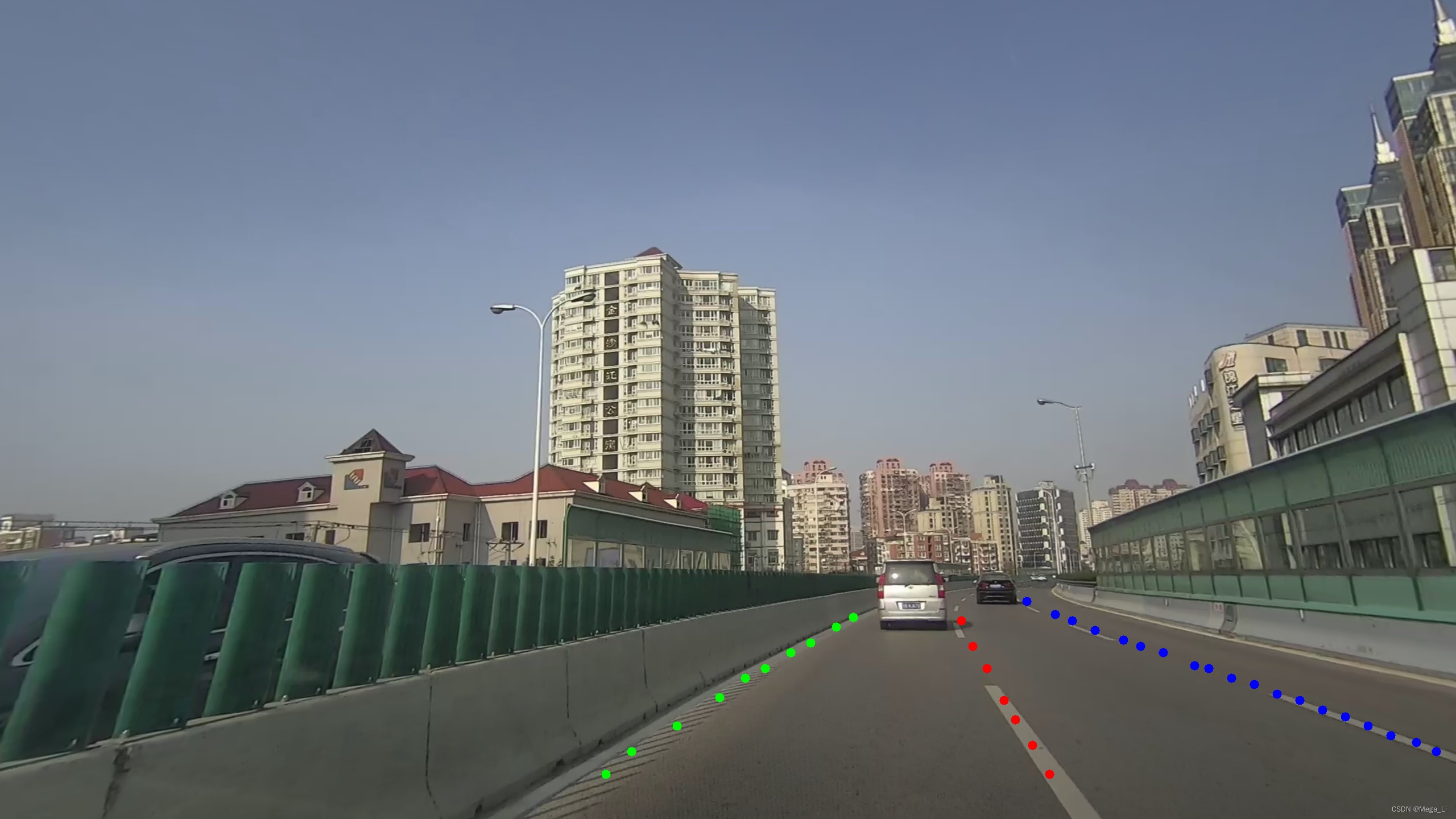
推理效果
推理结果如下图所示,完毕。
-
相关阅读:
常用网络接口自动化测试框架应用
电力电子转战数字IC20220824day68——uvm实战3
TypeScript进阶知识之接口(接口定义、接口属性、可索引类型、接口表示函数类型、额外的属性检查、接口继承、接口与类型别名的区别)
Redis的内存淘汰策略(简单版)
Java基于SpringBoot 的汽车租赁系统
C语言实现“队列“
人工智能如何管理实时视频流
【css】svg动画动态骷髅旋转html
深度学习之基础知识
springboot源码解析之自定义参数解析
- 原文地址:https://blog.csdn.net/lwx309025167/article/details/126732027
