-
Vue中组件化编码使用、实现组件之间的参数传递(实战练习二)
上一章节实现的是静态页面的设计、这一章节实现将数据抽取出来、通过组件间参数的传递来实现
上一章节链接地址:https://blog.csdn.net/weixin_43304253/article/details/1262185851、组件之间是怎样实现参数传递的?(基本的传递方式)
1.1、思路流程
1、将数据从
App.vue中传入TheList.vue组件中。- 2、在
TheList.vue组件中、通过遍历的形式遍历数组对象、每次遍历出来的对象作为参数传入TheItem.vue组件中 - 3、
TheItem.vue接收到传来的参数就可以展示对象中的属性
1.2 、代码流程(有点简陋)
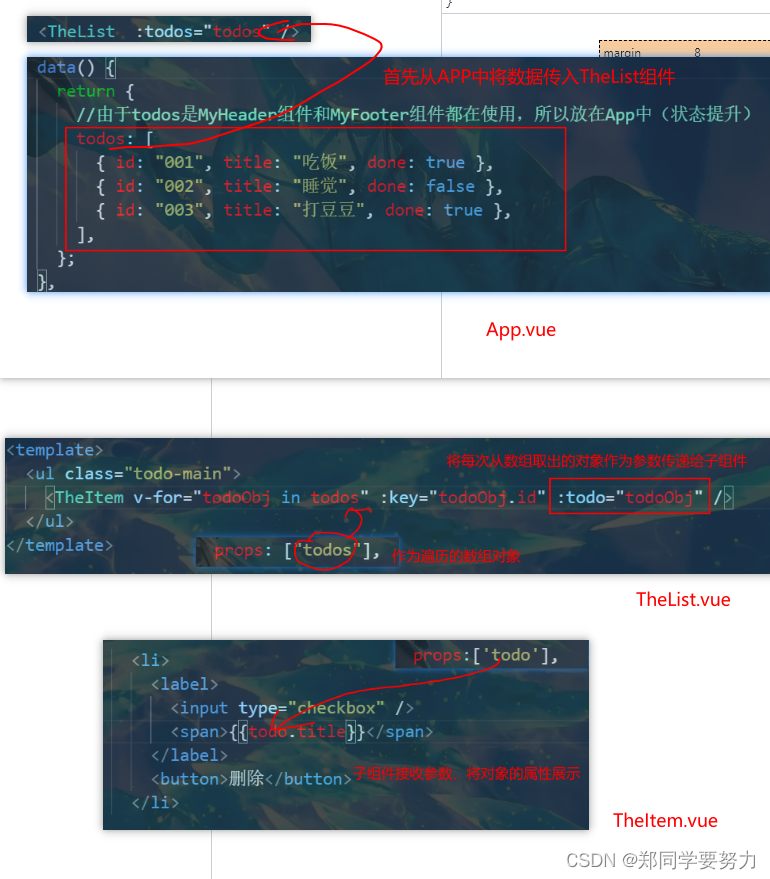
1.3 代码(这里只给出主要部分代码、详细代码请看上一章节)
1.3.1 App.vuepp.vue(省略了样式)
<template> <div id="root"> <div class="todo-container"> <div class="todo-wrap"> <TheHeader /> <TheList :todos="todos" /> <TheFooter /> div> div> div> template> <script> import TheHeader from "./components/TheHeader"; import TheList from "./components/TheList"; import TheFooter from "./components/TheFooter.vue"; export default { name: "App", components: { TheHeader, TheList, TheFooter }, data() { return { //由于todos是MyHeader组件和MyFooter组件都在使用,所以放在App中(状态提升) todos: [ { id: "001", title: "吃饭", done: true }, { id: "002", title: "睡觉", done: false }, { id: "003", title: "打豆豆", done: true }, ], }; }, methods: {}, }; script>- 1
- 2
- 3
- 4
- 5
- 6
- 7
- 8
- 9
- 10
- 11
- 12
- 13
- 14
- 15
- 16
- 17
- 18
- 19
- 20
- 21
- 22
- 23
- 24
- 25
- 26
- 27
- 28
- 29
- 30
- 31
- 32
- 33
- 34
- 35
- 36
1.3.2 TheList.vue (省略了样式)
<template> <ul class="todo-main"> <TheItem v-for="todoObj in todos" :key="todoObj.id" :todo="todoObj" /> ul> template> <script> import TheItem from "./TheItem"; export default { name: "TheList", components: { TheItem }, //声明接收App传递过来的数据,其中todos是自己用的 props: ["todos"], }; script>- 1
- 2
- 3
- 4
- 5
- 6
- 7
- 8
- 9
- 10
- 11
- 12
- 13
- 14
- 15
- 16
1.3.3 TheItem.vue(省略了样式)
<template> <li> <label> <input type="checkbox" /> <span>{{todo.title}}span> label> <button>删除button> li> template> <script> export default { name: "MyItem", //声明接收todo、checkTodo、deleteTodo props:['todo'], data() {}, methods: {}, }; script>- 1
- 2
- 3
- 4
- 5
- 6
- 7
- 8
- 9
- 10
- 11
- 12
- 13
- 14
- 15
- 16
- 17
- 18
- 19
- 20
- 21
- 22
1.4 、实现的效果

- 2、在
-
相关阅读:
ABYY FineReader PDF软件最新15个人版安装下载步骤教程
Linux:2. gcc、gdb、yum
前端垃圾回收机制
【Java EE】线程安全的集合类
nfs相关练习
AR产业变革中的“关键先生”和“关键力量”
C# 线程本地存储 为什么线程间值不一样
openGauss运维操作命令及其相关介绍
微创机器人:CRM撬动售后服务数字化升级
JavaScript高阶(属性操作|样式操作|事件)
- 原文地址:https://blog.csdn.net/weixin_43304253/article/details/126238030