-
2024-05-10 Ubuntu上面使用libyuv,用于转换、缩放、旋转和其他操作YUV图像数据,测试实例使用I420ToRGB24
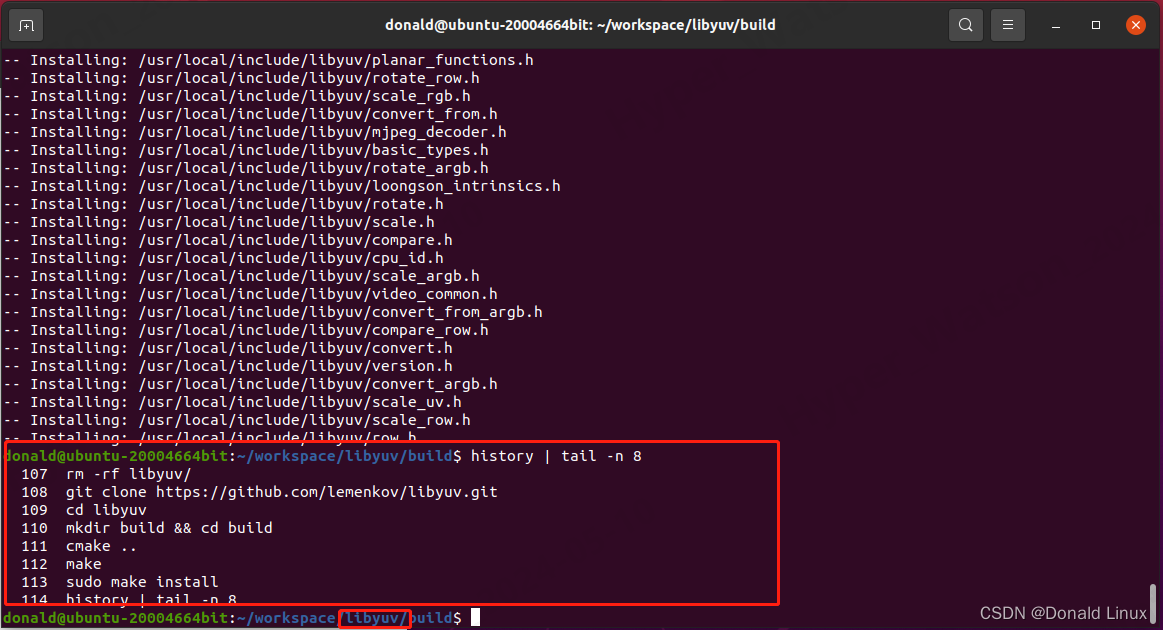
一、简介:libyuv最初是由Google开发的,主要是为了支持WebRTC项目中的视频处理需求。用于处理YUV格式图像数据的开源库。它提供了一系列的函数,用于转换、缩放、旋转和其他操作YUV图像数据。二、执行下面的命令下载和安装libyuv。
- git clone https://github.com/lemenkov/libyuv.git
- cd libyuv
- mkdir build && cd build
- cmake ..
- make
- sudo make install
三、测试实例convert_yuv_to_rgb.cpp,使用c编译的时候,I420ToRGB24前面就不要有libyuv::。
- #include <stdio.h>
- #include <stdlib.h>
- #include "libyuv/convert_from.h"
- #include "libyuv/convert.h"
- int main() {
- FILE *input_file = fopen("cowboy_girl_1024X1280_yuv420p_i420.yuv", "rb");
- if (!input_file) {
- printf("Error opening input file.\n");
- return 1;
- }
- int width = 1024;
- int height = 1280;
- size_t uv_size = (width * height) / 2;
- uint8_t *yuv_data = (uint8_t *)malloc(width * height * 3 / 2);
- if (!yuv_data) {
- printf("Memory allocation error.\n");
- fclose(input_file);
- return 1;
- }
- fread(yuv_data, sizeof(uint8_t), width * height * 3 / 2, input_file);
- fclose(input_file);
- // Convert YUV to RGB24
- uint8_t *rgb_data = (uint8_t *)malloc(width * height * 3);
- if (!rgb_data) {
- printf("Memory allocation error.\n");
- free(yuv_data);
- return 1;
- }
- libyuv::I420ToRGB24(yuv_data, width, yuv_data + width * height, width / 2,
- yuv_data + width * height * 5 / 4, width / 2,
- rgb_data, width * 3, width, height);
- /*
- libyuv::I420ToRAW(yuv_data, width, yuv_data + width * height, width / 2,
- yuv_data + width * height * 5 / 4, width / 2,
- rgb_data, width * 3, width, height);
- */
- // Save RGB image to file
- FILE *output_file = fopen("output.rgb", "wb");
- if (!output_file) {
- printf("Error opening output file.\n");
- free(yuv_data);
- free(rgb_data);
- return 1;
- }
- fwrite(rgb_data, sizeof(uint8_t), width * height * 3, output_file);
- fclose(output_file);
- free(yuv_data);
- free(rgb_data);
- printf("Conversion complete.\n");
- return 0;
- }
四、测试运行结果
- g++ -o convert_yuv_to_rgb convert_yuv_to_rgb.cpp -lyuv
- ./convert_yuv_to_rgb

五、上面的测试得出的yuv文件显示出来的效果有点异常,R和B对换了,为啥呢?这个问题困扰了我许久。直到我看到我看到libyuv/include/libyuv/convert.h里面有这一段才豁然开朗,因为RGB24ToI420也是存在这个问题,解决方法是使用I420ToRAW、RAWToI420对换。
- // RGB little endian (bgr in memory) to I420.
- LIBYUV_API
- int RGB24ToI420(const uint8_t* src_rgb24,
- int src_stride_rgb24,
- uint8_t* dst_y,
- int dst_stride_y,
- uint8_t* dst_u,
- int dst_stride_u,
- uint8_t* dst_v,
- int dst_stride_v,
- int width,
- int height);


六、如果运行的时候提示找不到libyuv.so库,按照下面的方法运行
sudo ldconfig更新动态链接库缓存。也可以直接用gcc -o yuv yuv.c /usr/local/lib/libyuv.so这种编译形式。- 编辑配置文件并使新安装的库生效:
- sudo vi /etc/ld.so.conf
- 在末尾加入如下行:
- include /usr/local/lib
- sudo ldconfig
-
相关阅读:
typescript46-函数之间的类型兼容性
12uec++多人游戏【自定义碰撞通道+头部暴击+连续开火】
【光电工程实训】几何光学 小孔成像 光的反射 光的折射 透镜成像
力扣刷题day47|392判断子序列、115不同的子序列
WebGPU 中的缓冲映射机制
Vue3 学习笔记
前端面试知识整理:vue的钩子函数
U盘格式化后 容量变小如何解决
动手学深度学习(Pytorch版)代码实践 -卷积神经网络-15参数管理
react下自定义Table
- 原文地址:https://blog.csdn.net/qq_37858386/article/details/138653421