-
【Vue】自定义事件实现组件之间的通信(案例讲解)
一、前言
这是部分哔哩哔哩上跟着一个博主【遇见狂神说】学习的,当然自己也是才开始学习的vue,在学到这个Vue的自定义事件的时候,虽然知识点很绕,但是在理解后又觉得很意思,觉得Vue真的很强大。这里博主将自己学习到的知识以博客的内容进行记录,采用大白话来描述吧,希望对大家有所帮助!
二、Vue的自定义事件
1、采用的语法:
this.$emit(自定义事件名,参数)
2、案例讲解
这里我们就通过一个点击事件的案例来理解如何实现组件之间的通信。
①:问题引出
这是一个源码,我们的案例会从这个源码讲起走
- html>
- <html lang="en">
- <head>
- <meta charset="UTF-8">
- <title>Titletitle>
- head>
- <body>
- <div id="app">
- <todo>
- <todo-title slot="todo-title" :title="title">todo-title>
- <todo-items slot="todo-items" v-for="item in todoItems" :item="item">todo-items>
- todo>
- div>
- <script src="https://cdn.jsdelivr.net/npm/vue@2.5.16/dist/vue.js">script>
- <script>
- Vue.component("todo",{
- template:
- '<div>\
- <slot name="todo-title">slot>\
- <ul>\
- <slot name="todo-items">slot>\
- ul>\
- div>'
- });
- Vue.component("todo-title",{
- props:['title'],
- template: '<div>{{title}}div>'
- });
- Vue.component("todo-items",{
- props:['item','index'],
- //只能绑定当前组件的方法
- template: '<li>{{index}}---{{item}}<button @click="Remove">删除button>li>',
- methods: {
- Remove:function (index) {
- this.$emit('remove',index);
- }
- }
- });
- var vm=new Vue({
- el:"#app",
- data:{
- title:"书籍列表",
- todoItems:['Java','C++','Php']
- }
- });
- script>
- body>
- html>
效果:

这个代码的意思是我们的这些数据都是通过todo-items组件显示的,但是我们的数据data在Vue对象里面,我们现在想要做的是,通过todo-items组件里面的点击事件,删除Vue对象中的数据,在这之前我们要知道组件里面的事件只能绑定当前组件的方法,所以要直接通过组件调用Vue对象中的方法,删除对应数组中的数据是行不通的,这时就需要使用我们的自定义事件了。
②:思路梳理
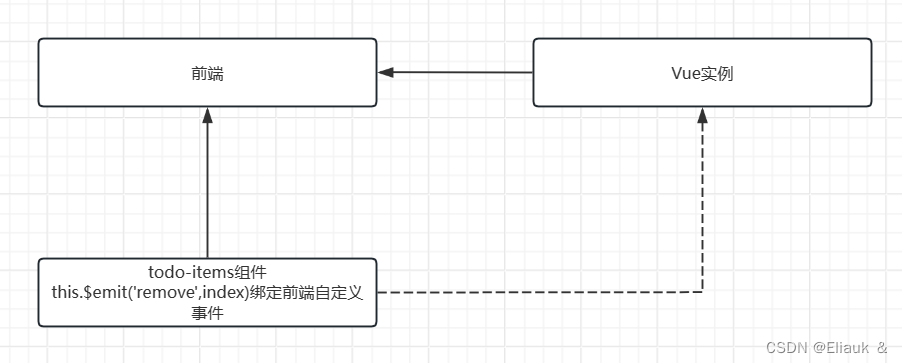
如图所示,Vue是有 双向绑定的特点的,Vue实例可以与前端进行绑定,而todo-items组件可以根据我们自定义事件与前端绑定,这样一来前端作为中间键,就可以将参数通过组件传递到Vue实例,这样一来就实现了组件间的通信。
③:代码实现
- html>
- <html lang="en">
- <head>
- <meta charset="UTF-8">
- <title>Titletitle>
- head>
- <body>
- <div id="app">
- <todo>
- <todo-title slot="todo-title" :title="title">todo-title>
- <todo-items slot="todo-items" v-for="(item,index) in todoItems"
- :item="item" :index="index" v-on:remove="RemoveItem(index)">todo-items>
- todo>
- div>
- <script src="https://cdn.jsdelivr.net/npm/vue@2.5.16/dist/vue.js">script>
- <script>
- Vue.component("todo",{
- template:
- '\
\ - \
\ \' - });
- Vue.component("todo-title",{
- props:['title'],
- template: '{{title}}'
- });
- Vue.component("todo-items",{
- props:['item','index'],
- //只能绑定当前组件的方法
- template: '
- {{item}}
', - methods: {
- Remove:function (index) {
- this.$emit('remove',index);
- }
- }
- });
- var vm=new Vue({
- el:"#app",
- data:{
- title:"书籍列表",
- todoItems:['Java','C++','Php']
- },
- methods:{
- RemoveItem:function (index) {
- this.todoItems.splice(index,1);
- }
- }
- });
- script>
- body>
- html>
ps:这段代码中运用了之前讲解过的v-for、v-on、v-bind等事件,如果是小白阅读起来可能不是很容易,可以先看看博主之前的一些vue相关的基础知识,再来理解。
效果:

点击“Java删除”后效果:

其它情况一次类推。
三、总结
到此来个总结吧,我们都是知道Vue是组件化开发,像这样的自定义事件在组件中的通信肯定是会经常遇到的,到后期如果博主在做项目中遇到相同的情况,到时候会结合项目做相关案例。最后,如果这篇博客对屏幕前的小伙伴有所帮助,不要忘点赞、评论、收藏支持一波哦~
-
相关阅读:
算法打卡day48|动态规划篇16| Leetcode 583. 两个字符串的删除操作、72. 编辑距离
Vue3 <script setup>中局部引入组件,动态组件不渲染内容
【数仓基础(一)】基础概念:数据仓库【用于决策的数据集合】的概念、建立数据仓库的原因与好处
[Java] Java 函数式编程
2023年四川省安全员B证证考试题库及四川省安全员B证试题解析
[R] ggplot2 - exercise (“fill =“)
习题 --- BFS
小小逻辑判断符的错误使用,资损几万块
甘露糖-聚乙二醇-异硫氰基荧光素FITC-PEG-mannose
salesforce零基础学习(一百二十)快去迁移你的代码中的 Alert / Confirm 以及 Prompt吧
- 原文地址:https://blog.csdn.net/qq_51933234/article/details/138120341
