-
Vue3 <script setup>中局部引入组件,动态组件不渲染内容
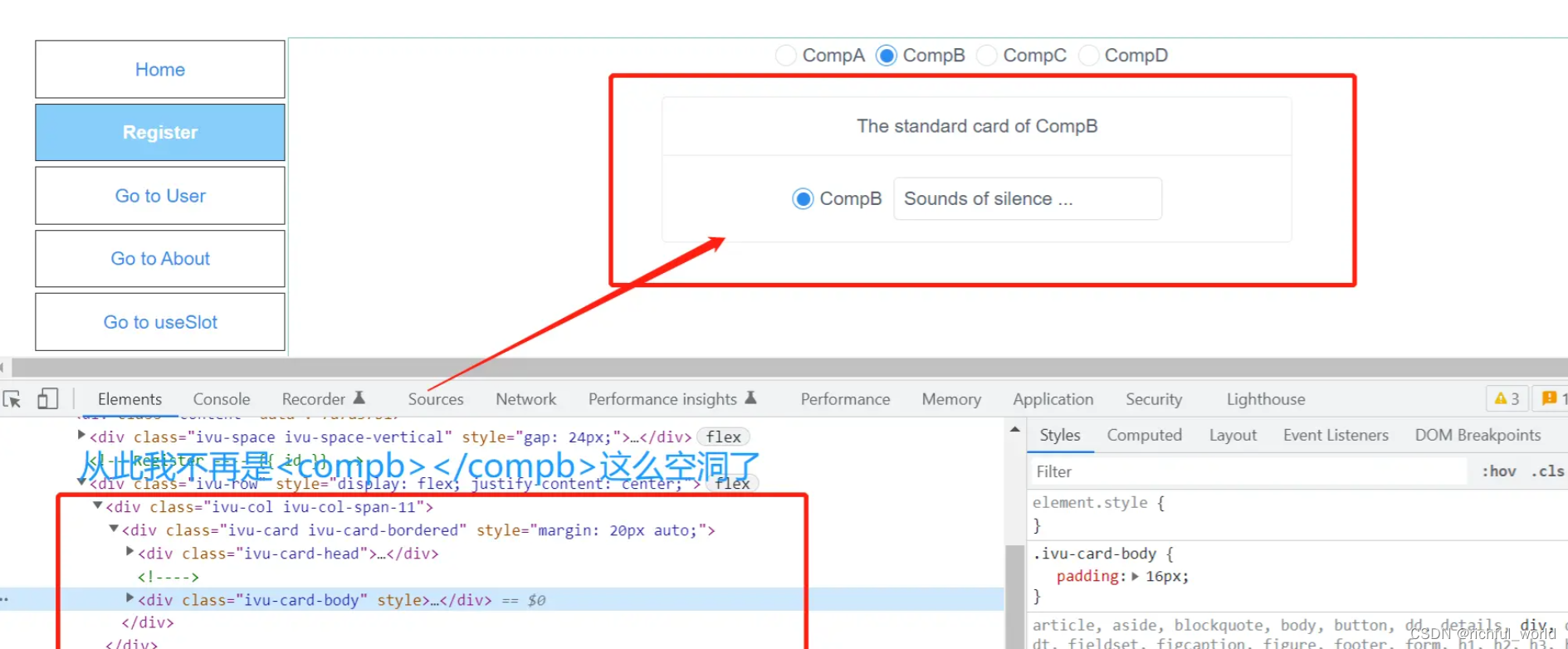
在Vue3开发中会发现直接使用动态组件,不像Vue2中那样丝滑了,不是动态绑定组件名就能跑起来的,发现下面的尴尬:
-
看问题现象:

-
聪明的你来看看你是不是也是这么写的:
- 1
- 2
- 3
- 4
- 5
- 6
- 7
- 8
- 9
- 10
- 11
- 12
- 13
- 14
- 15
- 16
- 17
- 18
- 19
- 20
- 21
- 22
- 23
- 24
- 25
- 26
- 27
- 28
- 29
- 30
结果你已经看到了,就是上面那张很精彩的效果
so, 我们直接 请出官文:Vue3 components 动态组件在setup 中的应用
其中动态组件中第一句话便是:
由于组件是通过变量引用而不是基于字符串组件名注册的,在
所以很明显,定义
name和currentName的ref()就应该是个组件类型,非组件名称字符串痛改前非后,其实有两种方式可解决
- 方法一:
- 1
- 2
- 3
- 4
- 5
- 6
- 7
- 8
- 9
- 10
- 11
- 12
- 13
- 14
- 15
- 16
- 17
- 18
- 19
- 20
- 21
- 22
- 23
- 24
- 25
- 26
- 27
- 28
- 29
- 30
- 31
- 32
- 33
- 34
- 35
- 36
所以还是仔细看API,多翻阅,多尝试
- 方法二:
其实你不想看文档,也有办法,无非是组件不显示么,对吧,那好你可以在main.js里面把你想动态引入的组件导入,再挂载到app全局组件部分不动: 我还是我,我只是坐地日行八万里,我很专一,没有变,我允许你无视我
// main.js import CompA from "./components/CompA.vue"; import CompB from "./components/CompB.vue"; import CompC from "./components/CompC.vue"; import CompD from "./components/CompD.vue"; const app = createApp(App); app .component("CompA", CompA) .component("CompB", CompB) .component("CompC", CompC) .component("CompD", CompD); // 刚才的代码 compotent.vue <script setup> import { ref, watch } from "vue"; const name = ref('CompA'); // 就写字符串 const currentComp = ref('CompA');// 就写字符串 watch(name, (v) => { currentComp.value = v // 我还写字符串 }) </script> <template> <Space direction="vertical" size="large"> <RadioGroup v-model="name"> <Radio label="CompA"></Radio> <Radio label="CompB"></Radio> <Radio label="CompC"></Radio> <Radio label="CompD"></Radio> </RadioGroup> </Space> <KeepAlive :include="['CompA', 'CompC']"> <component :is="currentComp"></component> </KeepAlive> </template>- 1
- 2
- 3
- 4
- 5
- 6
- 7
- 8
- 9
- 10
- 11
- 12
- 13
- 14
- 15
- 16
- 17
- 18
- 19
- 20
- 21
- 22
- 23
- 24
- 25
- 26
- 27
- 28
- 29
- 30
- 31
- 32
- 33
- 34
- 35
- 36
- 37
- 38
- 话不多少来看看效果吧:
- 小结:
- 首先推荐Vue3官方推荐的动态组件的用法,法一,简单又时尚;
- 第二种方式实在无计可施,可以一用,属于江湖救急。
-
-
相关阅读:
【Vue-Element-Admin】table添加自定义索引
A-level放榜,考生整体成绩大滑坡
人脸识别5.1- insightface人脸检测模型训练实战笔记
freeCodeCamp响应式网页设计笔记
设计模式——代理模式(Proxy Pattern)+ Spring相关源码
概念解析 | 心脏电活动和机械活动之间的关系
Angular项目简单使用拦截器 httpClient 请求响应处理
QT--气泡框的实现
设计模式:设计模式概述
JWT定义、生成规则及认证
- 原文地址:https://blog.csdn.net/youdu0213/article/details/126556682
