-
jsp获取数据 jsp直接获取后端数据 获取input选中的值 单选 没 checked属性
- let str0='${showList}';
- let str1=${showList};
然后可以通过JSON.parse() 转
获取input选中的值
- //goodsType 按类别 goods按货品
- var oneType= $("input[ name='criteria1' ] ").val();
- //count按数量 totalprice按费用
- var twoType = $("input[ name='criteria2' ] ").val();
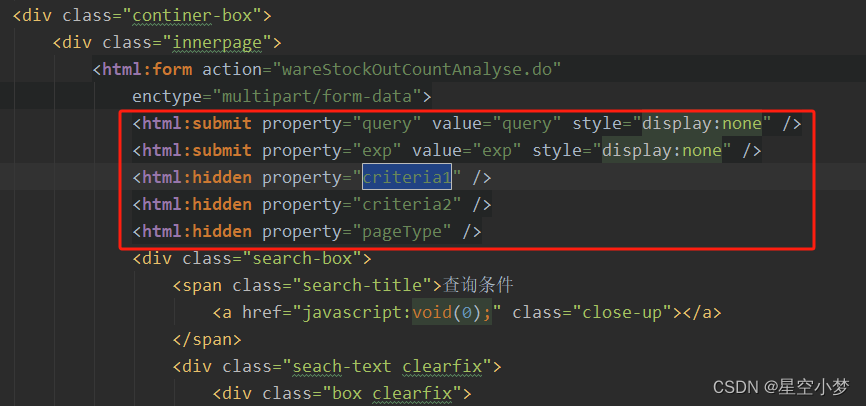
获取的是 下面红框中的值
- <script language="javascript">
- function querytr(){
- var startDate = document.getElementById("startDate");
- var endDate = document.getElementById("endDate");
- if(startDate.value != "" && endDate.value!= "" && (startDate.value > endDate.value)){
- parent.win.generalAlert("起始日期不能大于终止日期");
- return false;
- }
- document.all.query.click();
- }
- function exptr(){
- var startDate = document.getElementById("startDate");
- var endDate = document.getElementById("endDate");
- if(startDate.value != "" && endDate.value!= "" && (startDate.value > endDate.value)){
- parent.win.generalAlert("起始日期不能大于终止日期");
- return false;
- }
- document.all.exp.click();
- }
- // function fc(startDate,endDate){
- // Ext.Ajax.request({
- // method : 'POST',
- // url: 'servlet/wareStockOutCountAnalyseChartServlet',
- // params:{startDate:startDate,endDate:endDate},
- // success: function(request){
- // if(request.responseText != ""){
- // var data = request.responseText;
- // chart(data);
- // }
- // }
- // });
- // }
- // function chart(data){
- // if(document.forms[0].criteria1.value== "" || document.forms[0].criteria1.value== "goods"){
- // var chart = new FusionCharts('js/fc/Bar2D.swf?ChartNoDataText=无数据', "ChartId", "1000", "400");
- // }else if(document.forms[0].criteria2.value== ""){
- // var chart = new FusionCharts('js/fc/Bar2D.swf?ChartNoDataText=无数据', "ChartId", "1000", "400");
- // }else if(document.forms[0].criteria2.value== "count"){
- // var chart = new FusionCharts('js/fc/Bar2D.swf?ChartNoDataText=无数据', "ChartId", "1000", "400");
- // }else{
- // var chart = new FusionCharts('js/fc/Pie2D.swf?ChartNoDataText=无数据', "ChartId", "1000", "400");
- // }
- //
- // chart.addParam("wmode","Opaque");
- // chart.setDataXML(data);
- // chart.render('Chart');
- // }
- function fcPicture(){
- let title = "";
- let dataY = [];
- let dataX = [];
- let str0='${showList}';
- let showList = str0.replace(/[\\]/g,'/');
- // console.log(showList ,"出库情况统计");
- //goodsType 按类别 goods按货品
- var oneType= $("input[ name='criteria1' ] ").val();
- //count按数量 totalprice按费用
- var twoType = $("input[ name='criteria2' ] ").val();
- if(oneType === "goodsType"){
- //按类别 + 按数量;
- title = "货品分类出库数量统计(前十)";
- let arr = JSON.parse(showList)
- if(twoType === "count"){
- arr.forEach((item,index)=>{
- dataY.push(item[2]);
- dataX.push(item[3])
- })
- }else{
- //按类别 + 按费用 ---- 饼图
- bingPicture();
- return
- }
- }else{
- // 按货品 + 按数量;
- title = "货品出库数量统计(前十)";
- let arr = JSON.parse(showList)
- if(twoType === "count"){
- arr.forEach((item,index)=>{
- dataY.push(item[2]);
- dataX.push(item[7])
- })
- }else{
- //按货品 + 按费用
- title = "货品出库费用统计(前十)";
- arr.forEach((item,index)=>{
- dataY.push(item[2]);
- dataX.push(item[9])
- })
- }
- }
- // console.log(oneType,twoType,"111111111111111111")
- let chartDom = document.getElementById('Chart');
- let myChart = echarts.init(chartDom);
- let option = {
- backgroundColor: 'white',
- title: {
- text: title,
- left: 'center',
- top: "20",
- // padding: [10, 0, 0, 50],
- textStyle: {
- color: "#000",
- fontFamily: "Alibaba PuHuiTi",
- fontSize: 14,
- fontWeight: 600,
- // padding: [0, 0, 0, 35]
- },
- },
- tooltip: { show: false },
- grid: { left: 10, top: 50, bottom: 20, right: 80, containLabel: true },
- xAxis: {
- type: 'value',
- boundaryGap: false,
- // max: 20, // Math.ceil(max / 4) * 5 || 10
- axisLine: { show: true, lineStyle: { color: '#ccc' } },
- axisTick: { show: false },
- axisLabel: { color: '#999' },
- splitLine: { lineStyle: { color: ['#CEEDFF'], type: [5, 8], dashOffset: 3 } },
- min:0,
- max:dataX.length === 0 ? 1000 :null
- },
- yAxis: {
- type: 'category',
- data: dataY,
- axisLine: { show: true, lineStyle: { color: '#ccc' } },
- axisTick: { length: 3 },
- axisLabel: { fontSize: 14, color: '#666', margin: 16, padding: 0 },
- inverse: true,
- },
- series: [
- {
- name: '数量',
- type: 'bar',
- itemStyle: {
- color: '#52A8FF',
- color: function (params) {
- // 定义一个颜色集合
- let colorList = [
- '#52A8FF',
- '#00B389',
- '#FFA940',
- '#FF5A57',
- '#29EFC4',
- '#F8AEA4',
- '#FFC53D',
- '#009982',
- '#C099FC',
- '#F5855F',
- '#52A8FF',
- '#00B389',
- '#FFA940',
- '#FF5A57',
- '#29EFC4',
- '#F8AEA4',
- '#FFC53D',
- '#009982',
- '#C099FC',
- '#F5855F',
- ];
- // 对每个bar显示一种颜色
- return colorList[params.dataIndex];
- },
- },
- barMaxWidth: 20,
- label: { show: true, position: 'right', offset: [0, 2], fontSize: 16 },
- data: dataX,
- },
- ],
- };
- option && myChart.setOption(option);
- }
- function bingPicture(){
- let str0='${showList}';
- let showList = str0.replace(/[\\]/g,'/');;
- // console.log(showList ,"按类别 + 按费用");
- let arr0 = JSON.parse(showList);
- let arr=[];
- let total =0;
- arr0.forEach((item,index)=>{
- let obj={};
- // console.log(item,"888888888888")
- obj.name= item[2];
- obj.value = item[4];
- arr.push(obj);
- total+=item[4]
- })
- // console.log(arr,"777777777777777777777")
- let title="货品分类出库费用统计(合计:" + total.toFixed(2) + "元)";
- // let title="货品分类出库费用统计";
- // let color = ['#ffc140', '#d151d8', 'red'];
- let option = {
- backgroundColor: 'white',
- // color: color,
- grid: {
- left: '5%',
- right: '5%',
- top: '20%',
- containLabel: true,
- },
- title: {
- text: title,
- show: true, // 是否显示标题,默认 true。
- padding: [10, 0, 15, 0],
- textStyle: {
- color: "#23527c",
- fontSize: 14,
- fontFamily: "Alibaba PuHuiTi",
- fontWeight: 600,
- },
- left: 'center',
- },
- tooltip: {
- show: true,
- trigger: 'item',
- //{a}(系列名),{b}(数据项名),{c}(数值),{d}(百分比)
- formatter: "{b} : {c} ({d}%)",
- backgroundColor: "rgba(1, 13, 19, 0.5)",
- borderWidth: 0,
- textStyle: {
- color: "rgba(212, 232, 254, 1)",
- // fontSize: fontChart(0.24),
- },
- // extraCssText: "z-index:2"
- },
- series: [
- {
- // name: 'Access From',
- type: 'pie',
- radius: '50%',
- center: ['50%', '60%'],
- data: arr,
- label: {
- padding: [
- 15,
- 0,
- 0,
- 0
- ],
- color: "#4E5969",
- fontSize: 14,
- formatter: "{b|{b}}: {d|{c}} 元\n",
- rich: {
- b: {
- fontSize: 14,
- color: "#4E5969"
- },
- d: {
- fontSize: 14,
- fontWeight: 500,
- // fontFamily: "DINAlternate-Bold, DINAlternate",
- color: "#4E5969"
- }
- }
- },
- emphasis: {
- itemStyle: {
- shadowBlur: 10,
- shadowOffsetX: 0,
- shadowColor: 'rgba(0, 0, 0, 0.5)'
- },
- }
- }
- ]
- };
- let chartDom = document.getElementById('Chart');
- let myChart = echarts.init(chartDom);
- option && myChart.setOption(option);
- }
- function setCriteria(criteria,radioObj){
- if("goodsType" == criteria || "goods" == criteria){
- document.forms[0].criteria1.value = criteria;
- }else{
- document.forms[0].criteria2.value = criteria;
- }
- var arr = document.getElementsByName(radioObj.name);
- for(var i = 0;i<arr.length;i++){
- arr[i].value = "0";
- }
- radioObj.value = "1";
- }
- function initRadio(){
- if(document.forms[0].criteria1.value == 'goodsType'){
- document.getElementById('radio1').checked = "checked";
- }
- if(document.forms[0].criteria1.value == 'goods'){
- document.getElementById('radio2').checked = "checked";
- }
- if(document.forms[0].criteria2.value == 'count'){
- document.getElementById('radio3').checked = "checked";
- }
- if(document.forms[0].criteria2.value == 'totalprice'){
- document.getElementById('radio4').checked = "checked";
- }
- // fc()
- fcPicture()
- }
- </script>
- <style>
- #Chart{
- width: 100%;
- height: 500px;
- }
- </style>
- </head>
- <body
- onload="initRadio();">
- <div class="container-fluid">
- <span class="container-title"><span id="title">您现在所在的位置:查询统计 >
- 出库情况分析</span> </span>
- <div class="continer-box">
- <div class="innerpage">
- <html:form action="wareStockOutCountAnalyse.do"
- enctype="multipart/form-data">
- <html:submit property="query" value="query" style="display:none" />
- <html:submit property="exp" value="exp" style="display:none" />
- <html:hidden property="criteria1" />
- <html:hidden property="criteria2" />
- <html:hidden property="pageType" />
- <div class="search-box">
- <span class="search-title">查询条件
- <a href="javascript:void(0);" class="close-up"></a>
- </span>
- <div class="seach-text clearfix">
- <div class="box clearfix">
- <span>条件:</span>
- <div class="form-r">
- <input type="radio" id="radio1" name="groupName1" value="0"
- onclick="setCriteria('goodsType',this)" />
- 按类别
- <input type="radio" id="radio2" name="groupName1" value="1"
- onclick="setCriteria('goods',this)" />
- 按货品
- </div>
- </div>
- <div class="box clearfix">
- <span>条件:</span>
- <div class="form-r">
- <input type="radio" id="radio3" name="groupName2" value="1"
- onclick="setCriteria('count',this)" />
- 按数量
- <input type="radio" id="radio4" name="groupName2" value="0"
- onclick="setCriteria('totalprice',this)" />
- 按费用
- </div>
- </div>
- <div class="box box-time clearfix">
- <span>出库日期:</span>
- <div class="form-r">
- <div class="time-q">
- <div class="form-group">
- <div class="input-group date form_date" data-date=""
- data-date-format="" data-link-field="dtp_input2"
- data-link-format="yyyy-mm-dd">
- <html:text property="startDate" styleId="startDate" styleClass="form-control"
- readonly="true" />
- <span class="input-group-addon"> <span
- class="glyphicon glyphicon-calendar"> <img
- src="img_new/3-12_03.png"> </span> </span>
- </div>
- </div>
- </div>
- <span>~</span>
- <div class="time-h">
- <div class="form-group">
- <div class="input-group date form_date" data-date=""
- data-date-format="" data-link-field="dtp_input2"
- data-link-format="yyyy-mm-dd">
- <html:text property="endDate" styleId="endDate" styleClass="form-control"
- readonly="true" />
- <span class="input-group-addon"> <span
- class="glyphicon glyphicon-calendar"> <img
- src="img_new/3-12_03.png"> </span> </span>
- </div>
- </div>
- </div>
- </div>
- </div>
- <div class="box clearfix">
- <span>部门:</span>
- <div class="form-r">
- <html:select property="depId" styleClass="selectpicker">
- <logic:notEmpty name="depms">
- <html:options collection="depms" property="id"
- labelProperty="name" />
- </logic:notEmpty>
- </html:select>
- </div>
- </div>
- <div class="btn-right">
- <a class="btn btn-seach" href="#n" onClick="querytr();">查询</a>
- </div>
- </div>
- </div>
- <div id='Chart' align="center">
- </div>
- <div class="result-table">
- <span class="table-title"><i>出库情况分析</i>
- <div class="btn-right">
- <a class="btn btn-grey" href="#n" onClick="exptr();">导出</a>
- </div>
- </span>
- <div class="table-box">
- <table width="100%" class="dg" border="0">
- <col class="dgl"></col>
- <c:choose>
- <c:when test="${fn:length(wareStockInList[0]) == 10}">
- <tr class="dgh">
- <th>
- 货品编码
- </th>
- <th>
- 货品名称
- </th>
- <th>
- 规格型号
- </th>
- <th>
- 颜色
- </th>
- <th>
- 容量
- </th>
- <th>
- 品牌
- </th>
- <th>
- 出库总数量
- </th>
- <th>
- 单位
- </th>
- <th>
- 出库总价(元)
- </th>
- </tr>
- <logic:notEmpty name="wareStockInList">
- <logic:iterate id="wareStockIn" name="wareStockInList"
- indexId="rowID">
- <tr>
- <td class="companyname">
- ${wareStockIn[1]}
- </td>
- <td class="companyname">
- ${wareStockIn[2]}
- </td>
- <td class="companyname">
- ${wareStockIn[3]}
- </td>
- <td class="companyname">
- ${wareStockIn[4]}
- </td>
- <td class="companyname">
- ${wareStockIn[5]}
- </td>
- <td class="companyname">
- ${wareStockIn[6]}
- </td>
- <td class=jine>
- ${wareStockIn[7]}
- </td>
- <td class="companyname">
- ${wareStockIn[8]}
- </td>
- <td class="jine">
- <fmt:formatNumber pattern="#,##0.00">${wareStockIn[9]}</fmt:formatNumber>
- </td>
- </tr>
- </logic:iterate>
- </logic:notEmpty>
- </c:when>
- <c:otherwise>
- <tr class="dgh">
- <th>
- 分类编号
- </th>
- <th>
- 分类名称
- </th>
- <th>
- 出库总数量
- </th>
- <th>
- 出库总价(元)
- </th>
- </tr>
- <logic:notEmpty name="wareStockInList">
- <logic:iterate id="wareStockIn" name="wareStockInList"
- indexId="rowID">
- <tr>
- <td class="companyname">
- ${wareStockIn[1]}
- </td>
- <td class="companyname">
- ${wareStockIn[2]}
- </td>
- <td class="jine"">
- ${wareStockIn[3]}
"> 0 5 0 5;" colspan="11" align="center"> 无记录!
- <%@ include file="/common/page.jsp"%>