-
java jax-ws webservice编程,入门教程,包含服务端与客户端,编码
java jax-ws webservice
就是服务端程序提供接口,客户端,通过服务端提供的jar包(或者打包的类文件),通过jax-ws直接调用服务端暴露的接口来进行操作.
服务端
共三个文件

接口
- package com.jaxwsdemo.serveice;
- import javax.jws.WebMethod;
- import javax.jws.WebParam;
- import javax.jws.WebService;
- import javax.jws.soap.SOAPBinding;
- import javax.jws.soap.SOAPBinding.Style;
- @WebService
- @SOAPBinding(style = Style.RPC)
- public interface ICalculator {
- @WebMethod
- float add(@WebParam float a, @WebParam float b);
- @WebMethod
- float minus(@WebParam float a, @WebParam float b);
- @WebMethod
- float multiply(@WebParam float a, @WebParam float b);
- @WebMethod
- float divide(@WebParam float a, @WebParam float b);
- }
实现类
- package com.jaxwsdemo.serveice.impl;
- import com.jaxwsdemo.serveice.ICalculator;
- import javax.jws.WebService;
- @WebService(endpointInterface = "com.jaxwsdemo.serveice.ICalculator")
- public class ICalculatorimpl implements ICalculator {
- @Override
- public float add(float a, float b) {
- System.out.println("a+b="+(a+b));
- return a + b;
- }
- @Override
- public float minus(float a, float b) {
- System.out.println("a-b="+(a-b));
- return a - b;
- }
- @Override
- public float multiply(float a, float b) {
- return a * b;
- }
- @Override
- public float divide(float a, float b) {
- return a / b;
- }
- }
发布main类
- package com.jaxwsdemo.main;
- import com.jaxwsdemo.serveice.impl.ICalculatorimpl;
- import javax.xml.ws.Endpoint;
- public class mainTest {
- public static void main(String[] args) {
- System.out.println("发布开始:发布地址:http://localhost:9998/hw");
- String address="http://localhost:9998/hw";
- Endpoint.publish(address, new ICalculatorimpl());
- System.out.println("发布完成");
- }
- }
运行后会显示发布的地址

此时我们通过访问:http://localhost:9998/hw?wsdl
得到wsdl
- This XML file does not appear to have any style information associated with it. The document tree is shown below.
- <definitions xmlns:wsu="http://docs.oasis-open.org/wss/2004/01/oasis-200401-wss-wssecurity-utility-1.0.xsd" xmlns:wsp="http://www.w3.org/ns/ws-policy" xmlns:wsp1_2="http://schemas.xmlsoap.org/ws/2004/09/policy" xmlns:wsam="http://www.w3.org/2007/05/addressing/metadata" xmlns:soap="http://schemas.xmlsoap.org/wsdl/soap/" xmlns:tns="http://impl.serveice.jaxwsdemo.com/" xmlns:xsd="http://www.w3.org/2001/XMLSchema" xmlns="http://schemas.xmlsoap.org/wsdl/" targetNamespace="http://impl.serveice.jaxwsdemo.com/" name="ICalculatorimplService">
- <import namespace="http://serveice.jaxwsdemo.com/" location="http://localhost:9998/hw?wsdl=1"/>
- <binding xmlns:ns1="http://serveice.jaxwsdemo.com/" name="ICalculatorimplPortBinding" type="ns1:ICalculator">
- <soap:binding transport="http://schemas.xmlsoap.org/soap/http" style="rpc"/>
- <operation name="add">
- <soap:operation soapAction=""/>
- <input>
- <soap:body use="literal" namespace="http://serveice.jaxwsdemo.com/"/>
- input>
- <output>
- <soap:body use="literal" namespace="http://serveice.jaxwsdemo.com/"/>
- output>
- operation>
- <operation name="divide">
- <soap:operation soapAction=""/>
- <input>
- <soap:body use="literal" namespace="http://serveice.jaxwsdemo.com/"/>
- input>
- <output>
- <soap:body use="literal" namespace="http://serveice.jaxwsdemo.com/"/>
- output>
- operation>
- <operation name="multiply">
- <soap:operation soapAction=""/>
- <input>
- <soap:body use="literal" namespace="http://serveice.jaxwsdemo.com/"/>
- input>
- <output>
- <soap:body use="literal" namespace="http://serveice.jaxwsdemo.com/"/>
- output>
- operation>
- <operation name="minus">
- <soap:operation soapAction=""/>
- <input>
- <soap:body use="literal" namespace="http://serveice.jaxwsdemo.com/"/>
- input>
- <output>
- <soap:body use="literal" namespace="http://serveice.jaxwsdemo.com/"/>
- output>
- operation>
- binding>
- <service name="ICalculatorimplService">
- <port name="ICalculatorimplPort" binding="tns:ICalculatorimplPortBinding">
- <soap:address location="http://localhost:9998/hw"/>
- port>
- service>
- definitions>
此时我们服务端就算是完事了,服务端主要是提供加减乘除接口, 通过Endpoint.publish(address, new ICalculatorimpl());发布别的服务就可以调用了.
在编写服务端之前我们先导出服务端类,共于客户端使用
这里我们使用使用jdk提供的wsimport命令导出
命令:wsimport -s e:/wyc/work http://localhost:9998/hw?wsdl

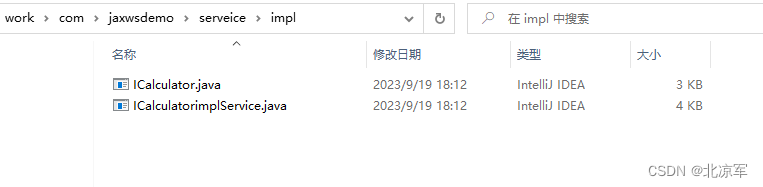
可以看到导出到了指定位置
小技巧:如果服务端在对方,如何生成服务端的jar包?
通过cmd命令: wsimport -keep http://localhost:9998/hw?wsdl
可直接生成

生成路径就是cmd打开的位置!

我们放到将导出的包放到客户端
客户端编写
完整目录
导出的实现类和接口,与在客户端写的接口结构完全不一样,一定要通过命令导出!!
导出后的接口结构:
- package jaxwsdemo.serveice.impl;
- import javax.jws.WebMethod;
- import javax.jws.WebParam;
- import javax.jws.WebResult;
- import javax.jws.WebService;
- import javax.jws.soap.SOAPBinding;
- import javax.xml.ws.Action;
- /**
- * This class was generated by the JAX-WS RI.
- * JAX-WS RI 2.2.9-b130926.1035
- * Generated source version: 2.2
- *
- */
- @WebService(name = "ICalculator", targetNamespace = "http://serveice.jaxwsdemo.com/")
- @SOAPBinding(style = SOAPBinding.Style.RPC)
- public interface ICalculator {
- /**
- *
- * @param arg1
- * @param arg0
- * @return
- * returns float
- */
- @WebMethod
- @WebResult(partName = "return")
- @Action(input = "http://serveice.jaxwsdemo.com/ICalculator/addRequest", output = "http://serveice.jaxwsdemo.com/ICalculator/addResponse")
- public float add(
- @WebParam(name = "arg0", partName = "arg0")
- float arg0,
- @WebParam(name = "arg1", partName = "arg1")
- float arg1);
- /**
- *
- * @param arg1
- * @param arg0
- * @return
- * returns float
- */
- @WebMethod
- @WebResult(partName = "return")
- @Action(input = "http://serveice.jaxwsdemo.com/ICalculator/divideRequest", output = "http://serveice.jaxwsdemo.com/ICalculator/divideResponse")
- public float divide(
- @WebParam(name = "arg0", partName = "arg0")
- float arg0,
- @WebParam(name = "arg1", partName = "arg1")
- float arg1);
- /**
- *
- * @param arg1
- * @param arg0
- * @return
- * returns float
- */
- @WebMethod
- @WebResult(partName = "return")
- @Action(input = "http://serveice.jaxwsdemo.com/ICalculator/multiplyRequest", output = "http://serveice.jaxwsdemo.com/ICalculator/multiplyResponse")
- public float multiply(
- @WebParam(name = "arg0", partName = "arg0")
- float arg0,
- @WebParam(name = "arg1", partName = "arg1")
- float arg1);
- /**
- *
- * @param arg1
- * @param arg0
- * @return
- * returns float
- */
- @WebMethod
- @WebResult(partName = "return")
- @Action(input = "http://serveice.jaxwsdemo.com/ICalculator/minusRequest", output = "http://serveice.jaxwsdemo.com/ICalculator/minusResponse")
- public float minus(
- @WebParam(name = "arg0", partName = "arg0")
- float arg0,
- @WebParam(name = "arg1", partName = "arg1")
- float arg1);
- }
导出后的实现类结构:
- package jaxwsdemo.serveice.impl;
- import java.net.MalformedURLException;
- import java.net.URL;
- import javax.xml.namespace.QName;
- import javax.xml.ws.Service;
- import javax.xml.ws.WebEndpoint;
- import javax.xml.ws.WebServiceClient;
- import javax.xml.ws.WebServiceException;
- import javax.xml.ws.WebServiceFeature;
- /**
- * This class was generated by the JAX-WS RI.
- * JAX-WS RI 2.2.9-b130926.1035
- * Generated source version: 2.2
- *
- */
- @WebServiceClient(name = "ICalculatorimplService", targetNamespace = "http://impl.serveice.jaxwsdemo.com/", wsdlLocation = "http://localhost:9998/hw?wsdl")
- public class ICalculatorimplService
- extends Service
- {
- private final static URL ICALCULATORIMPLSERVICE_WSDL_LOCATION;
- private final static WebServiceException ICALCULATORIMPLSERVICE_EXCEPTION;
- private final static QName ICALCULATORIMPLSERVICE_QNAME = new QName("http://impl.serveice.jaxwsdemo.com/", "ICalculatorimplService");
- static {
- URL url = null;
- WebServiceException e = null;
- try {
- url = new URL("http://localhost:9998/hw?wsdl");
- } catch (MalformedURLException ex) {
- e = new WebServiceException(ex);
- }
- ICALCULATORIMPLSERVICE_WSDL_LOCATION = url;
- ICALCULATORIMPLSERVICE_EXCEPTION = e;
- }
- public ICalculatorimplService() {
- super(__getWsdlLocation(), ICALCULATORIMPLSERVICE_QNAME);
- }
- public ICalculatorimplService(WebServiceFeature... features) {
- super(__getWsdlLocation(), ICALCULATORIMPLSERVICE_QNAME, features);
- }
- public ICalculatorimplService(URL wsdlLocation) {
- super(wsdlLocation, ICALCULATORIMPLSERVICE_QNAME);
- }
- public ICalculatorimplService(URL wsdlLocation, WebServiceFeature... features) {
- super(wsdlLocation, ICALCULATORIMPLSERVICE_QNAME, features);
- }
- public ICalculatorimplService(URL wsdlLocation, QName serviceName) {
- super(wsdlLocation, serviceName);
- }
- public ICalculatorimplService(URL wsdlLocation, QName serviceName, WebServiceFeature... features) {
- super(wsdlLocation, serviceName, features);
- }
- /**
- *
- * @return
- * returns ICalculator
- */
- @WebEndpoint(name = "ICalculatorimplPort")
- public ICalculator getICalculatorimplPort() {
- return super.getPort(new QName("http://impl.serveice.jaxwsdemo.com/", "ICalculatorimplPort"), ICalculator.class);
- }
- /**
- *
- * @param features
- * A list of {@link WebServiceFeature} to configure on the proxy. Supported features not in the
featuresparameter will have their default values. - * @return
- * returns ICalculator
- */
- @WebEndpoint(name = "ICalculatorimplPort")
- public ICalculator getICalculatorimplPort(WebServiceFeature... features) {
- return super.getPort(new QName("http://impl.serveice.jaxwsdemo.com/", "ICalculatorimplPort"), ICalculator.class, features);
- }
- private static URL __getWsdlLocation() {
- if (ICALCULATORIMPLSERVICE_EXCEPTION!= null) {
- throw ICALCULATORIMPLSERVICE_EXCEPTION;
- }
- return ICALCULATORIMPLSERVICE_WSDL_LOCATION;
- }
- }
注意一定要在客户端加入服务端提供的jar包(此处jar包指的是serveice包)
- import jaxwsdemo.serveice.impl.ICalculator;
- import java.net.URL;
- import java.net.MalformedURLException;
- import javax.xml.namespace.QName;
- import javax.xml.ws.Service;
- public class CelintMain {
- public static void main(String[] args) throws MalformedURLException {
- URL url=new URL("http://localhost:9998/hw?wsdl");
- QName qname = new QName("http://impl.serveice.jaxwsdemo.com/", "ICalculatorimplService");
- Service service = Service.create(url, qname);
- ICalculator cal = service.getPort(new QName("http://impl.serveice.jaxwsdemo.com/", "ICalculatorimplPort"),ICalculator.class);
- //cal.add((float)1, (float)2);
- float rusult = cal.minus(2, 1);
- System.out.println(rusult);
- }
- }
运行截图

服务端也会有相应的输出因为我们计算时打印了计算过程
服务端此时运行窗口截图

具体注解可自行百度,此文章已粘贴所有项目代码,粘贴即用!
-
相关阅读:
2023年 DevOps 七大趋势
辅助驾驶功能开发-功能规范篇(23)-1-Mobileye NOP功能规范
Java电商平台 - API 接口设计之 token、timestamp、sign 具体架构与实现
javaEE Web(Tomcat)深度理解 和 Servlet的本质
ElasticSearch中RESTFUL API(创建索引、增删改查、DSL搜索、高亮显示、聚合)
语句和表达式有什么不同
【FPGA】Verilog语言从零到精通
前端工程师-----HTML篇(引用牛客)
【黄啊码】MySQL入门—9、什么?都2022了,还不知道什么是事务?
Linux权限的认识
- 原文地址:https://blog.csdn.net/test1372965955/article/details/133063996