-
android 切换系统键盘笔记
先记录一下关于输入法的常用命令:
ime list -s//列出系统可用输入法,注意不是所有安装的输入法
settings get secure default_input_method//系统默认输入法的id
settings get secure enabled_input_methods//系统可用输入法的id通过:分隔

可以用命令手动切换默认输入法:settings put secure default_input_method “输入法的id”default_input_method 和 enabled_input_methods 定义的位置:
frameworks/base/core/java/android/provider/Settings.java

enabled_input_methods:当前启用的输入方法列表。这是一个字符串,包含所有启用的输入方法的ID,每个ID由“:”分隔最终在机器中存储的位置:
Android 从6.0之前是存储在数据库文件中的,无法直接查看,Android 从6.0版本开始后Settings全局配置属性存储在了xml,不会再有db存储
存储位置:/data/system/users/0/
比较常用的三个文件是:settings_system.xml
settings_global.xml
settings_secure.xml
default_input_method 和 enabled_input_methods 数值是存储在settings_secure.xml中

也就是说需要更改默认输入法和可使用输入法只需要更改这两个变量的值
系统设置中对应的界面Settings\src\com\android\tv\settings\inputmethod\KeyboardFragment.java
Settings\src\com\android\tv\settings\inputmethod\AvailableVirtualKeyboardFragment.java
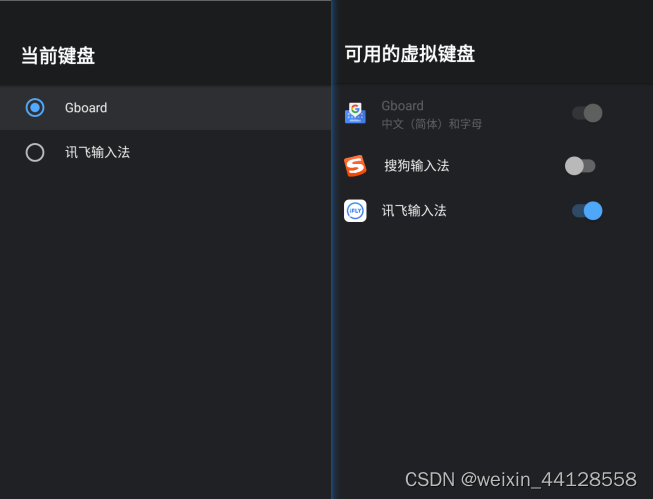
综上所述封装一些方法
import android.provider.Settings; import android.view.inputmethod.InputMethodInfo; import android.view.inputmethod.InputMethodManager; import com.android.settingslib.inputmethod.InputMethodSettingValuesWrapper; import android.app.ActivityManager; // 获得当前默认键盘id public String getDefaultInputMethodId() { return Settings.Secure.getString(mContext.getContentResolver(), Settings.Secure.DEFAULT_INPUT_METHOD); } // 获得可用键盘 public static List<InputMethodInfo> getEnabledSystemInputMethodList(Context context) { InputMethodManager inputMethodManager = (InputMethodManager) context.getSystemService(Context.INPUT_METHOD_SERVICE); List<InputMethodInfo> enabledInputMethodInfos = new ArrayList<>(inputMethodManager.getEnabledInputMethodList()); // Filter auxiliary keyboards out // for (InputMethodInfo inputMethodInfo : enabledInputMethodInfos){ // String id = inputMethodInfo.getId(); // String packName = inputMethodInfo.getPackageName(); // String ServiceName = inputMethodInfo.getServiceName(); // int isDefault = inputMethodInfo.getIsDefaultResourceId(); // } enabledInputMethodInfos.removeIf(InputMethodInfo::isAuxiliaryIme); return enabledInputMethodInfos; } // 获得当前所有输入法,包括可用和不可用的,注意InputMethodSettingValuesWrapper 是settingslib包里的,sdk中不含有,需要导入 private List<InputMethodInfo> getAllInputMethodList(){ InputMethodSettingValuesWrapper mInputMethodSettingValues = InputMethodSettingValuesWrapper.getInstance(mContext); mInputMethodSettingValues.refreshAllInputMethodAndSubtypes(); return mInputMethodSettingValues.getInputMethodList(); } // 设置系统默认键盘 public void setDefaultInputMethodId(String imid) { if (imid == null) { throw new IllegalArgumentException("Null ID"); } try { int userId = ActivityManager.getService().getCurrentUser().id; Settings.Secure.putStringForUser(mContext.getContentResolver(), Settings.Secure.DEFAULT_INPUT_METHOD, imid, userId); Intent intent = new Intent(Intent.ACTION_INPUT_METHOD_CHANGED); intent.addFlags(Intent.FLAG_RECEIVER_REPLACE_PENDING); intent.putExtra("input_method_id", imid); mContext.sendBroadcastAsUser(intent, UserHandle.CURRENT); } catch (RemoteException e) { Log.d(TAG, "set default input method remote exception", e); } } //将所有安装的输入发设置成可使用状态 public void setAllInputMethodToEnable(){ private List<InputMethodInfo> inputMethodInfoList = getAllInputMethodList(); String tem = Settings.Secure.getString(mContext.getContentResolver(), Settings.Secure.ENABLED_INPUT_METHODS); for (int i = 0; i < inputMethodInfoList.size(); i++){ if (tem!=null && !tem.contains(inputMethodInfoList.get(i).getId())){ tem = tem+":"+inputMethodInfoList.get(i).getId(); } } Settings.Secure.putString(mContext.getContentResolver(), Settings.Secure.ENABLED_INPUT_METHODS,tem); }- 1
- 2
- 3
- 4
- 5
- 6
- 7
- 8
- 9
- 10
- 11
- 12
- 13
- 14
- 15
- 16
- 17
- 18
- 19
- 20
- 21
- 22
- 23
- 24
- 25
- 26
- 27
- 28
- 29
- 30
- 31
- 32
- 33
- 34
- 35
- 36
- 37
- 38
- 39
- 40
- 41
- 42
- 43
- 44
- 45
- 46
- 47
- 48
- 49
- 50
- 51
- 52
- 53
- 54
- 55
- 56
- 57
- 58
- 59
- 60
- 61
- 62
- 63
- 64
- 65
这次主要的需求就是代码设置安装的输入法可用,不需要用户再去设置中开启
关于settingslib的导入这篇文章中又讲:https://blog.csdn.net/weixin_44128558/article/details/127241727
include frameworks/base/packages/SettingsLib/common.mk -
相关阅读:
vue3 + antd + typeScript 封装一个高仿的ProTable
基于51单片机的温度测量报警系统的设计与制作
C++第一讲:起源和规范
Java设计模式之创建型模式
opencv边缘-边界处理
RuntimeError: DataLoader worker (pid(s) 46220) exited unexpectedly
Spring注解之@Configuration和@Bean功能简介说明
Linux 报错:failed to run command ‘java’: No such file or directory
SwiftUI——如何使用新的NavigationStack和NavigationSplitView(如何页面跳转2.0以及如何制作侧栏)
不经意传输协议OT
- 原文地址:https://blog.csdn.net/weixin_44128558/article/details/127572708
