-
纯JavaScript实现表白代码
纯JavaScript实现表白代码
在国庆节当天,大家都在表达着对祖国的热爱,当然这也是个对自己爱的人表白的一个好机会,本文旨在使用JavaScript实现表白的代码。代码
首先是实现的具体代码:
DOCTYPE html PUBLIC "-//W3C//DTD XHTML 1.0 Transitional//EN" "http://www.w3.org/TR/xhtml1/DTD/xhtml1-transitional.dtd"> <html xmlns="http://www.w3.org/1999/xhtml"> <head> <meta http-equiv="Content-Type" content="text/html; charset=utf-8" /> <title>htm5浪漫表白title> head> <body> <script type="text/javascript"> BLUR = false; PULSATION = true; PULSATION_PERIOD = 600; PARTICLE_RADIUS = 4; /* disable blur before using blink */ BLINK = false; GLOBAL_PULSATION = false; QUALITY = 2; /* 0 - 5 */ /* set false if you prefer rectangles */ ARC = true; /* trembling + blur = fun */ TREMBLING = 0; /* 0 - infinity */ FANCY_FONT = "Arial"; BACKGROUND = "#000"; BLENDING = true; /* if empty the text will be a random number */ var TEXT; num = 0; TEXTArray = ["陌陌", "深爱", "某某", "直到", "永远"]; QUALITY_TO_FONT_SIZE = [10, 12, 40, 50, 100, 350]; QUALITY_TO_SCALE = [20, 6, 4, 2, 0.9, 0.5]; QUALITY_TO_TEXT_POS = [10, 20, 60, 100, 370, 280]; window.onload = function () { document.body.style.backgroundColor = BACKGROUND; var canvas = document.getElementById("canvas"); var ctx = canvas.getContext("2d"); var W = canvas.width; var H = canvas.height; var tcanvas = document.createElement("canvas"); var tctx = tcanvas.getContext("2d"); tcanvas.width = W; tcanvas.height = H; total_area = W * H; total_particles = 928; single_particle_area = total_area / total_particles; area_length = Math.sqrt(single_particle_area); var particles = []; for (var i = 1; i <= total_particles; i++) { particles.push(new particle(i)); } function particle(i) { this.r = Math.round(Math.random() * 255 | 0); this.g = Math.round(Math.random() * 255 | 0); this.b = Math.round(Math.random() * 255 | 0); this.alpha = 1; this.x = (i * area_length) % W; this.y = (i * area_length) / W * area_length; /* randomize delta to make particles sparkling */ this.deltaOffset = Math.random() * PULSATION_PERIOD | 0; this.radius = 0.1 + Math.random() * 2; } var positions = []; function new_positions() { TEXT = TEXTArray[num]; if (num < TEXTArray.length - 1) { num++; } else { num = 0; } //alert(TEXT); tctx.fillStyle = "white"; tctx.fillRect(0, 0, W, H) //tctx.fill(); tctx.font = "bold " + QUALITY_TO_FONT_SIZE[QUALITY] + "px " + FANCY_FONT; //tctx.textAlign='center';//文本水平对齐方式 //tctx.textBaseline='middle'; //tctx.strokeStyle = "black"; tctx.fillStyle = "#f00"; //tctx.strokeText(TEXT,30, 50); tctx.fillText(TEXT, 20, 60); image_data = tctx.getImageData(0, 0, W, H); pixels = image_data.data; positions = []; for (var i = 0; i < pixels.length; i = i + 2) { if (pixels[i] != 255) { position = { x: (i / 2 % W | 0) * QUALITY_TO_SCALE[QUALITY] | 0, y: (i / 2 / W | 0) * QUALITY_TO_SCALE[QUALITY] | 0 } positions.push(position); } } get_destinations(); } function draw() { var now = Date.now(); ctx.globalCompositeOperation = "source-over"; if (BLUR) ctx.globalAlpha = 0.1; else if (!BLUR && !BLINK) ctx.globalAlpha = 1.0; ctx.fillStyle = BACKGROUND; ctx.fillRect(0, 0, W, H) if (BLENDING) ctx.globalCompositeOperation = "lighter"; for (var i = 0; i < particles.length; i++) { p = particles[i]; /* in lower qualities there is not enough full pixels for all of them - dirty hack*/ if (isNaN(p.x)) continue ctx.beginPath(); ctx.fillStyle = "rgb(" + p.r + ", " + p.g + ", " + p.b + ")"; ctx.fillStyle = "rgba(" + p.r + ", " + p.g + ", " + p.b + ", " + p.alpha + ")"; if (BLINK) ctx.globalAlpha = Math.sin(Math.PI * mod * 1.0); if (PULSATION) { /* this would be 0 -> 1 */ var mod = ((GLOBAL_PULSATION ? 0 : p.deltaOffset) + now) % PULSATION_PERIOD / PULSATION_PERIOD; /* lets make the value bouncing with sinus */ mod = Math.sin(mod * Math.PI); } else var mod = 1; var offset = TREMBLING ? TREMBLING * (-1 + Math.random() * 2) : 0; var radius = PARTICLE_RADIUS * p.radius; if (!ARC) { ctx.fillRect(offset + p.x - mod * radius / 2 | 0, offset + p.y - mod * radius / 2 | 0, radius * mod, radius * mod); } else { ctx.arc(offset + p.x | 0, offset + p.y | 0, radius * mod, Math.PI * 2, false); ctx.fill(); } p.x += (p.dx - p.x) / 10; p.y += (p.dy - p.y) / 10; } } function get_destinations() { for (var i = 0; i < particles.length; i++) { pa = particles[i]; particles[i].alpha = 1; var distance = []; nearest_position = 0; if (positions.length) { for (var n = 0; n < positions.length; n++) { po = positions[n]; distance[n] = Math.sqrt((pa.x - po.x) * (pa.x - po.x) + (pa.y - po.y) * (pa.y - po.y)); if (n > 0) { if (distance[n] <= distance[nearest_position]) { nearest_position = n; } } } particles[i].dx = positions[nearest_position].x; particles[i].dy = positions[nearest_position].y; particles[i].distance = distance[nearest_position]; var po1 = positions[nearest_position]; for (var n = 0; n < positions.length; n++) { var po2 = positions[n]; distance = Math.sqrt((po1.x - po2.x) * (po1.x - po2.x) + (po1.y - po2.y) * (po1.y - po2.y)); if (distance <= 5) { positions.splice(n, 1); } } } else { //particles[i].alpha = 0; } } } function init() { new_positions(); setInterval(draw, 30); setInterval(new_positions, 2000); } init(); }; script> <style type="text/css"> body { background: #000; text-align: center; font-family: "simhei" } canvas { margin: auto; position: absolute; left: 0; right:0; top: 0; bottom: 0; } style> <canvas id="canvas" width="1000" height="800">canvas> <div style="text-align:center;"> <p><a href="" title="" target="_blank">a>p> div> body> html>- 1
- 2
- 3
- 4
- 5
- 6
- 7
- 8
- 9
- 10
- 11
- 12
- 13
- 14
- 15
- 16
- 17
- 18
- 19
- 20
- 21
- 22
- 23
- 24
- 25
- 26
- 27
- 28
- 29
- 30
- 31
- 32
- 33
- 34
- 35
- 36
- 37
- 38
- 39
- 40
- 41
- 42
- 43
- 44
- 45
- 46
- 47
- 48
- 49
- 50
- 51
- 52
- 53
- 54
- 55
- 56
- 57
- 58
- 59
- 60
- 61
- 62
- 63
- 64
- 65
- 66
- 67
- 68
- 69
- 70
- 71
- 72
- 73
- 74
- 75
- 76
- 77
- 78
- 79
- 80
- 81
- 82
- 83
- 84
- 85
- 86
- 87
- 88
- 89
- 90
- 91
- 92
- 93
- 94
- 95
- 96
- 97
- 98
- 99
- 100
- 101
- 102
- 103
- 104
- 105
- 106
- 107
- 108
- 109
- 110
- 111
- 112
- 113
- 114
- 115
- 116
- 117
- 118
- 119
- 120
- 121
- 122
- 123
- 124
- 125
- 126
- 127
- 128
- 129
- 130
- 131
- 132
- 133
- 134
- 135
- 136
- 137
- 138
- 139
- 140
- 141
- 142
- 143
- 144
- 145
- 146
- 147
- 148
- 149
- 150
- 151
- 152
- 153
- 154
- 155
- 156
- 157
- 158
- 159
- 160
- 161
- 162
- 163
- 164
- 165
- 166
- 167
- 168
- 169
- 170
- 171
- 172
- 173
- 174
- 175
- 176
- 177
- 178
- 179
- 180
- 181
- 182
- 183
- 184
- 185
- 186
- 187
- 188
- 189
- 190
- 191
- 192
- 193
- 194
- 195
- 196
- 197
- 198
- 199
- 200
- 201
- 202
- 203
- 204
- 205
- 206
- 207
- 208
- 209
- 210
- 211
- 212
- 213
- 214
- 215
- 216
- 217
- 218
- 219
- 220
- 221
- 222
- 223
- 224
- 225
- 226
- 227
- 228
- 229
- 230
- 231
- 232
- 233
- 234
- 235
- 236
- 237
- 238
- 239
- 240
- 241
- 242
- 243
- 244
- 245
- 246
- 247
- 248
- 249
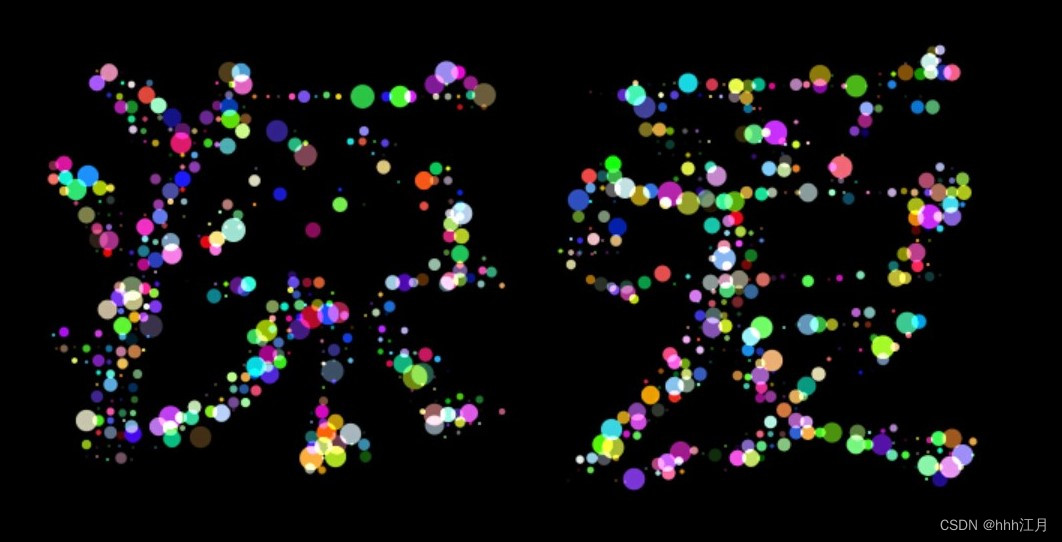
效果图
下面展示代码的部分效果图,完整的效果可以复制上述的代码之后运行即就可以了。
最后,谢谢大家的支持了。 -
相关阅读:
cuda11安装 nvidia-455配置报错 解决方法
业务处理系统(TPS)
【微信小程序开发】IDE安装使用- Hello Cocos
spring webflux的简单使用
excel文档损坏打不开的原因是什么?
zabbix监控中间件服务
[分布式算法] 生成树广播与敛播
PostgreSQL数据优化——死元组清理
Python - 基础语法|逻辑语句|函数定义|列表|元组|字符串|切片|集合|字典
算法|Day48 动态规划16
- 原文地址:https://blog.csdn.net/m0_54218263/article/details/127135049