-
SpringBoot 整合 WebSocket 实现长连接,将数据库中的数据进行推送
什么是 WebSocket?
WebSocket 是一种在单个 TCP 连接上进行全双工通信的协议。
WebSocket 通信协议于2011年被 IETF 定为标准 RFC 6455,并由 RFC7936 补充规范。WebSocket API 也被W3C定为标准。
WebSocket 使得客户端和服务器之间的数据交换变得更加简单,允许服务端主动向客户端推送数据。在WebSocket API 中,浏览器和服务器只需要完成一次握手,两者之间就直接可以创建持久性的连接,并进行双向数据传输。
为什么有了 HTTP 协议还要 WebSocket
HTTP 协议采用的是客户端(浏览器)轮询的方式,即客户端发送请求,服务端做出响应,为了获取最新的数据,需要不断的轮询发出 HTTP 请求,占用大量带宽。
WebSocket 采用了一些特殊的报头,使得浏览器和服务器只需要通过「握手」建立一条连接通道后,此链接保持活跃状态,之后的客户端和服务器的通信都使用这个连接,解决了 Web 实时性的问题,相比于 HTTP 有以下好处:
- 一个 Web 客户端只建立一个 TCP 连接
- WebSocket 服务端可以主动推送(push)数据到 Web 客户端
- 有更加轻量级的头,减少了数据传输量
简单实现
将下来我将使用一个简单的案例,使用 WebSocket 实现长连接,将数据库中的数据进行推送。
pom.xml
<project xmlns="http://maven.apache.org/POM/4.0.0" xmlns:xsi="http://www.w3.org/2001/XMLSchema-instance" xsi:schemaLocation="http://maven.apache.org/POM/4.0.0 https://maven.apache.org/xsd/maven-4.0.0.xsd"> <modelVersion>4.0.0modelVersion> <parent> <groupId>org.springframework.bootgroupId> <artifactId>spring-boot-starter-parentartifactId> <version>2.7.3version> <relativePath/> parent> <groupId>com.examplegroupId> <artifactId>demoartifactId> <version>0.0.1-SNAPSHOTversion> <name>demoname> <description>Demo project for Spring Bootdescription> <properties> <java.version>1.8java.version> properties> <dependencies> <dependency> <groupId>org.springframework.bootgroupId> <artifactId>spring-boot-starter-webartifactId> dependency> <dependency> <groupId>org.projectlombokgroupId> <artifactId>lombokartifactId> <optional>trueoptional> dependency> <dependency> <groupId>org.springframework.bootgroupId> <artifactId>spring-boot-starter-testartifactId> <scope>testscope> dependency> <dependency> <groupId>org.springframework.bootgroupId> <artifactId>spring-boot-starter-websocketartifactId> dependency> <dependency> <groupId>com.alibabagroupId> <artifactId>fastjsonartifactId> <version>1.2.79version> dependency> <dependency> <groupId>mysqlgroupId> <artifactId>mysql-connector-javaartifactId> dependency> <dependency> <groupId>com.baomidougroupId> <artifactId>mybatis-plus-boot-starterartifactId> <version>3.4.3.4version> dependency> <dependency> <groupId>com.alibabagroupId> <artifactId>druidartifactId> <version>1.2.8version> dependency> dependencies> <build> <plugins> <plugin> <groupId>org.springframework.bootgroupId> <artifactId>spring-boot-maven-pluginartifactId> <configuration> <excludes> <exclude> <groupId>org.projectlombokgroupId> <artifactId>lombokartifactId> exclude> excludes> configuration> plugin> plugins> build> project>- 1
- 2
- 3
- 4
- 5
- 6
- 7
- 8
- 9
- 10
- 11
- 12
- 13
- 14
- 15
- 16
- 17
- 18
- 19
- 20
- 21
- 22
- 23
- 24
- 25
- 26
- 27
- 28
- 29
- 30
- 31
- 32
- 33
- 34
- 35
- 36
- 37
- 38
- 39
- 40
- 41
- 42
- 43
- 44
- 45
- 46
- 47
- 48
- 49
- 50
- 51
- 52
- 53
- 54
- 55
- 56
- 57
- 58
- 59
- 60
- 61
- 62
- 63
- 64
- 65
- 66
- 67
- 68
- 69
- 70
- 71
- 72
- 73
- 74
- 75
- 76
- 77
- 78
- 79
- 80
- 81
WebSocket 核心配置
@Configuration public class WebsocketConfiguration { @Bean public ServerEndpointExporter serverEndpointExporter() { return new ServerEndpointExporter(); } }- 1
- 2
- 3
- 4
- 5
- 6
- 7
添加 WebSocket 工具类
@Component @ServerEndpoint(value = "/ws/asset") public class WebSocket { private Session session; private static CopyOnWriteArraySet<WebSocket> webSocketSet = new CopyOnWriteArraySet<>(); @OnOpen public void onOpen(Session session) { this.session = session; webSocketSet.add(this); } @OnClose public void onClose() { webSocketSet.remove(this); } @OnMessage public void onMessage(String message) { } public void sendMessage(String message) { for (WebSocket webSocket : webSocketSet) { try { webSocket.session.getBasicRemote().sendText(message); } catch (Exception e) { e.printStackTrace(); } } } }- 1
- 2
- 3
- 4
- 5
- 6
- 7
- 8
- 9
- 10
- 11
- 12
- 13
- 14
- 15
- 16
- 17
- 18
- 19
- 20
- 21
- 22
- 23
- 24
- 25
- 26
- 27
- 28
- 29
- 30
- 31
- 32
- 33
实体类
@Data @NoArgsConstructor @AllArgsConstructor @TableName("t_user") public class User { @TableId(value = "id",type = IdType.AUTO) private Long id; private String name; private String age; }- 1
- 2
- 3
- 4
- 5
- 6
- 7
- 8
- 9
- 10
配置文件
server: port: 8989 spring: datasource: username: root password: root url: jdbc:mysql://127.0.0.1:3306/test?serverTimezone=GMT%2B8&userUnicode=true&characterEncoding=utf8 driver-class-name: com.mysql.cj.jdbc.Driver type: com.alibaba.druid.pool.DruidDataSource- 1
- 2
- 3
- 4
- 5
- 6
- 7
- 8
- 9
- 10
测试接口
@RestController public class TestController { @Autowired private WebSocket webSocket; @Autowired private UserDao userDao; /** * http://localhost:8989/add?name=zhangsan&age=12 * @param name * @param age */ @GetMapping("add") public void add(String name,String age) { User user = new User(); user.setName(name); user.setAge(age); userDao.insert(user); send(); } /** * http://localhost:8989/delete?id=? * @param id */ @GetMapping("delete") public void delete(String id) { userDao.deleteById(id); send(); } @GetMapping("list") public void list() { send(); } public void send() { List<User> users = userDao.selectList(new QueryWrapper<>()); webSocket.sendMessage(JSON.toJSONString(users)); } }- 1
- 2
- 3
- 4
- 5
- 6
- 7
- 8
- 9
- 10
- 11
- 12
- 13
- 14
- 15
- 16
- 17
- 18
- 19
- 20
- 21
- 22
- 23
- 24
- 25
- 26
- 27
- 28
- 29
- 30
- 31
- 32
- 33
- 34
- 35
- 36
- 37
- 38
- 39
- 40
- 41
- 42
- 43
建立 WebSocket 连接
前端页面直接使用「ws协议」建立连接
var socket = new WebSocket("ws://localhost:8989/ws/asset");- 1
index.html
DOCTYPE html> <html lang="en"> <head> <meta charset="UTF-8"> <title>展示数据title> <script src="http://libs.baidu.com/jquery/2.0.0/jquery.min.js">script> <style> #data_info { width: 100%; font-size: 16px; white-space: pre-wrap; word-wrap: break-word; background-color: white; border: 0px; } .string { color: green; } .number { color: darkorange; } .boolean { color: blue; } .null { color: magenta; } .key { color: red; } style> head> <body> <div class="col-sm-10 healthName" id="msg" style="height: 550px;overflow-x: auto;overflow-y: auto"> <pre id="data_info">pre> div> <script> script> <script type="text/javascript"> var socket; if (typeof (WebSocket) == "undefined") { alert("出现错误") } else { socket = new WebSocket("ws://localhost:8989/ws/asset"); socket.onopen = function () { console.log("Socket 已打开"); socket.send("消息发送测试(From Client)"); }; socket.onmessage = function (msg) { $("#messageId").append(msg.data + "n"); var show = document.getElementById('data_info'); var msg = msg.data; var jsondata = {}; jsondata = JSON.parse(msg); show.innerHTML = pretifyJson(jsondata, true); function pretifyJson(json, pretify = true) { if (typeof json !== 'string') { if (pretify) { json = JSON.stringify(json, undefined, 4); } else { json = JSON.stringify(json); } } return json.replace(/("(\\u[a-zA-Z0-9]{4}|\\[^u]|[^\\"])*"(\s*:)?|\b(true|false|null)\b|-?\d+(?:\.\d*)?(?:[eE][+\-]?\d+)?)/g, function (match) { let cls = ""; if (/^"/.test(match)) { if (/:$/.test(match)) { cls = ""; } else { cls = ""; } } else if (/true|false/.test(match)) { cls = ""; } else if (/null/.test(match)) { cls = ""; } return cls + match + ""; } ); } }; socket.onclose = function () { }; socket.onerror = function () { alert("发生了错误"); } window.unload = function () { socket.close(); }; } script> body> html>- 1
- 2
- 3
- 4
- 5
- 6
- 7
- 8
- 9
- 10
- 11
- 12
- 13
- 14
- 15
- 16
- 17
- 18
- 19
- 20
- 21
- 22
- 23
- 24
- 25
- 26
- 27
- 28
- 29
- 30
- 31
- 32
- 33
- 34
- 35
- 36
- 37
- 38
- 39
- 40
- 41
- 42
- 43
- 44
- 45
- 46
- 47
- 48
- 49
- 50
- 51
- 52
- 53
- 54
- 55
- 56
- 57
- 58
- 59
- 60
- 61
- 62
- 63
- 64
- 65
- 66
- 67
- 68
- 69
- 70
- 71
- 72
- 73
- 74
- 75
- 76
- 77
- 78
- 79
- 80
- 81
- 82
- 83
- 84
- 85
- 86
- 87
- 88
- 89
- 90
- 91
- 92
- 93
- 94
- 95
- 96
- 97
- 98
- 99
- 100
- 101
- 102
- 103
- 104
- 105
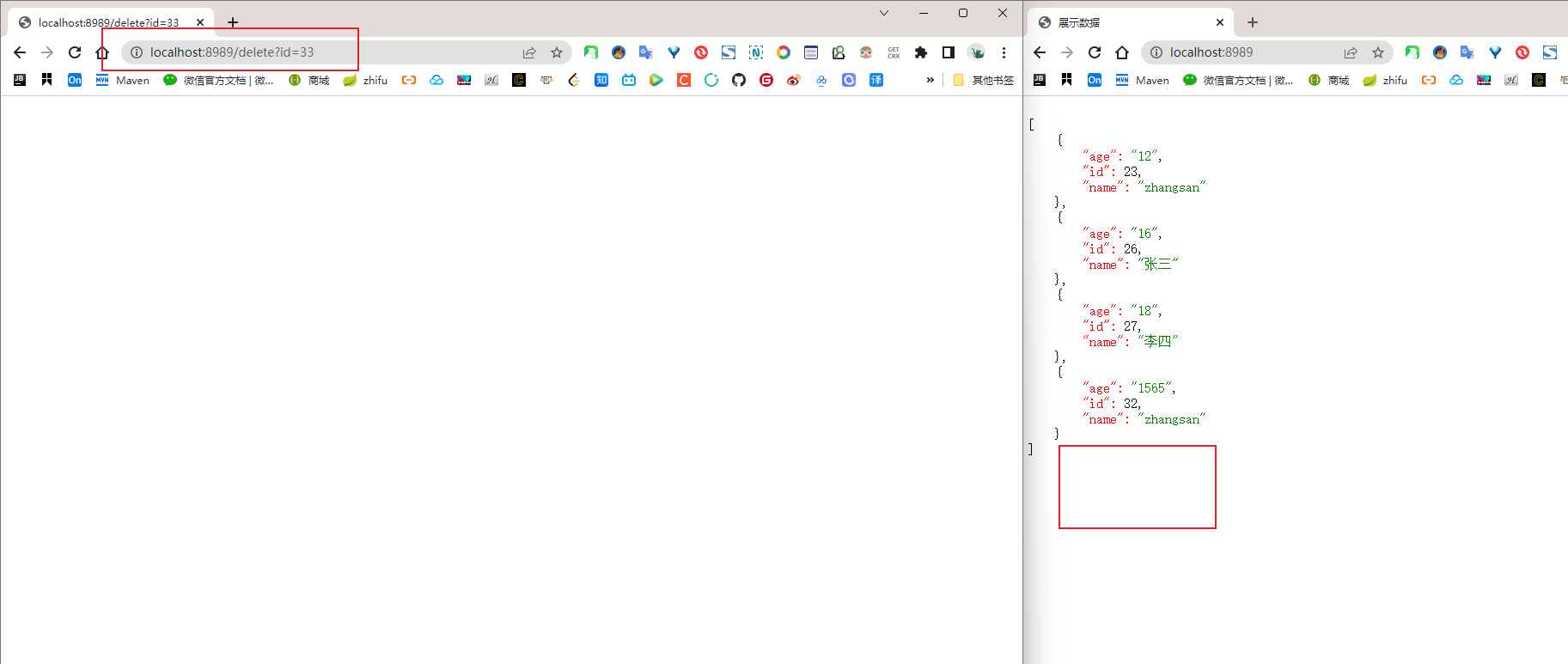
测试结果


-
相关阅读:
IO和进程day06(线程续、同步线程互斥)
基于BP神经网络算法的性别识别
汽车屏类产品(二):360全景环视(SVC)、多分割显示、行车记录
Jenkins部署springboot项目至远程服务器
分布式事物-全面详解(学习总结---从入门到深化)
python pip notes
银河麒麟V10 + 飞腾D2000(ARM64) 安装Qt
解决hadoop使用put上传报错问题
tcmalloc 框架介绍
java - 网络编程TCP/IP
- 原文地址:https://blog.csdn.net/weixin_44129618/article/details/127131334
