-
Kubernetes: Overview, Kaniko & Helm
Overview
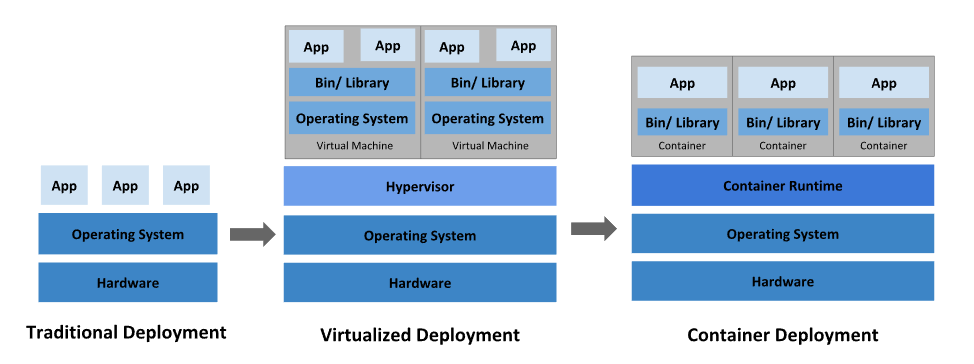
**kubelet: **An agent that runs on each node in the cluster. It makes sure that containers are running in a Pod.
Concept
https://medium.com/google-cloud/kubernetes-101-pods-nodes-containers-and-clusters-c1509e409e16
Hardware
1. Node

2. Cluster

3. Persistent Volumes

Software
1. Container

2. Pod
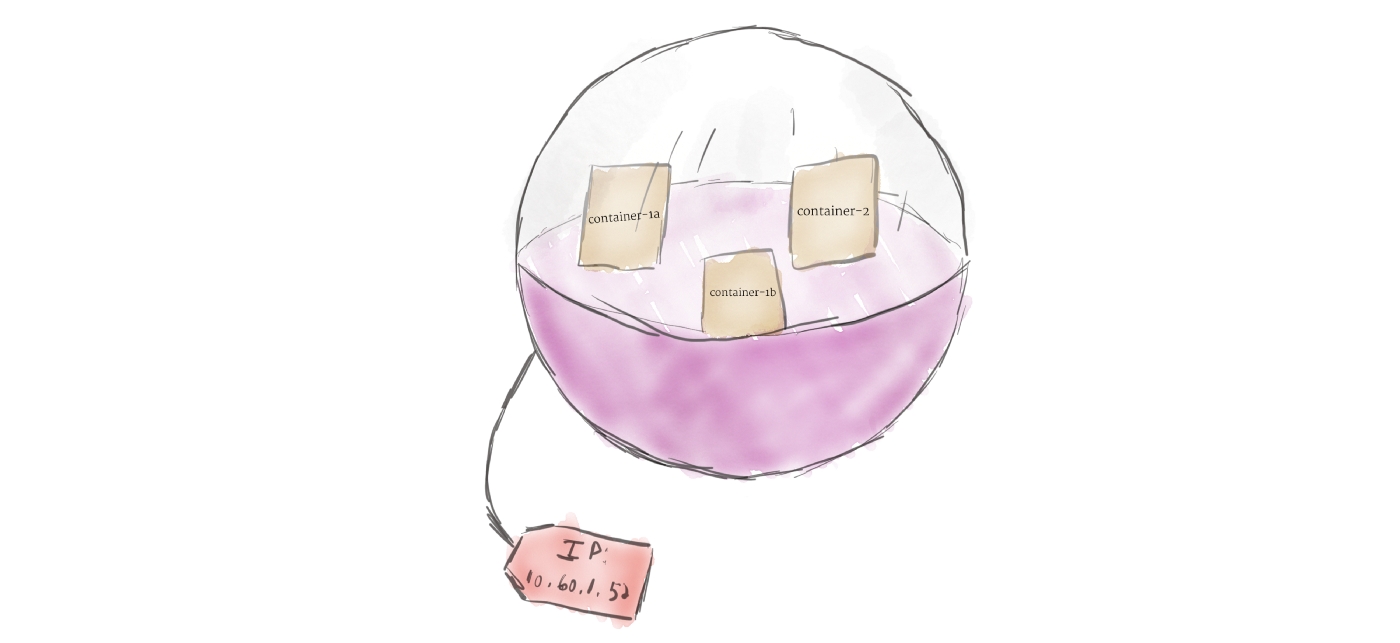
Unlike other systems you may have used in the past, Kubernetes doesn’t run containers directly; instead it wraps one or more containers into a higher-level structure called a pod. Any containers in the same pod will share the same resources and local network. Containers can easily communicate with other containers in the same pod as though they were on the same machine while maintaining a degree of isolation from others.3. Deployment

A deployment’s primary purpose is to declare how many replicas of a pod should be running at a time. When a deployment is added to the cluster, it will automatically spin up the requested number of pods, and then monitor them. If a pod dies, the deployment will automatically re-create it.4. Ingress

There are multiple ways to add ingress to your cluster. The most common ways are by adding either an Ingress controller, or a LoadBalancer.
Kaniko
Since docker is not the only tool to use container, we have many other choices.
As a container engine, docker can be the best choice.
While there are tools that can build image without daemon thread: Buildah & Kaniko.
While Podman is a container engine without daemon thread and root, and podman build == buildah.
While Kaniko is widely used to build image in K8S.Since is difficult for docker to build image in container:
- mount socket to access the docker daemon, root needed.
- use dind container with –privileged.
Kaniko totally run in user space, do not need daemon or root:
- in k8s
- in docker
It has three parameters:
- dockerfile: the container dockerfile need to be build
- context
- destination: the cloud image base need to upload
using docker
docker run --name kaniko \
    -v $HOME/.docker/:/kaniko/.docker \
    -v /data/kaniko:/workspace \
    gcr.azk8s.cn/kaniko-project/executor:latest \
    --dockerfile /workspace/Dockerfile \
    --destination willdockerhub/ubuntu:test \
    --context dir:///workspace/
using k8s
cat > kaniko-pod.yaml <<EOF
apiVersion: v1
kind: Pod
metadata:
  name: kaniko
spec:
  containers:
  - name: kaniko
    image: gcr.azk8s.cn/kaniko-project/executor:latest
    args: ["--dockerfile=/workspace/Dockerfile",
            "--context=dir://workspace",
            "--destination=willdockerhub/ubuntu:test"] # replace with your dockerhub account
    volumeMounts:
      - name: kaniko-secret
        mountPath: /kaniko/.docker
      - name: dockerfile-storage
        mountPath: /workspace
  restartPolicy: Never
  volumes:
    - name: kaniko-secret
      secret:
        secretName: regcred
        items:
          - key: .dockerconfigjson
            path: config.json
    - name: dockerfile-storage
      hostPath:
        path: /data/kaniko/
        type: Directory
EOF
Helm
对于应用发布者而言,可以通过Helm打包应用,管理应用依赖关系,管理应用版本并发布应用到软件仓库。
对于使用者而言,使用Helm后不用需要了解Kubernetes的Yaml语法并编写应用部署文件,可以通过Helm下载并在kubernetes上安装需要的应用。
**A Chart **is a Helm package. It contains all of the resource definitions necessary to run an application, tool, or service inside of a Kubernetes cluster. Think of it like the Kubernetes equivalent of a Homebrew formula, an Apt dpkg, or a Yum RPM file.
**A Repository **is the place where charts can be collected and shared. It’s like Perl’s CPAN archive or the Fedora Package Database, but for Kubernetes packages.
**A Release **is an instance of a chart running in a Kubernetes cluster. One chart can often be installed many times into the same cluster. And each time it is installed, a new release is created. Consider a MySQL chart. If you want two databases running in your cluster, you can install that chart twice. Each one will have its own release, which will in turn have its own release name. -
相关阅读:
Python基础set集合定义与函数
Java游戏服务器开发之概念扫盲
【Unity数据交互】JSON开山篇
Docker linux 安装
【vue】在vue项目中按顺序动态24个英文字母选项:A B C D E F......
超市促销叫卖的语音是怎么做的?介绍简单小方法,方便又快捷
如何写专利的相关经验
基于数学模型水动力模拟、水质建模、复杂河网构建技术在环境影响评价、排污口论证及防洪评价中的实践技术应用
Spire.Office for Java 8.8.3 Crack-姗姗来迟
golang中的select原理解析
- 原文地址:https://blog.csdn.net/qq_39384184/article/details/127042696
- 最新文章
-
沪漂五周年了:我越来越迷茫了
Agentic Skill Routing 实战:别再把所有 Skill 塞进 AI Agent 上下文
MySQL-Seconds_behind_master的精度误差
[MAF预定义ChatClient中间件-03]CachingChatClient——利用缓存省钱省时间
AI的至暗历史:从万众期待到被政府撤资,AI的两次死亡徘徊
Agent OS :五种驯服不确定性的范式
PortSwigger SQL注入LAB11
数据库即时编译JIT
[Begin]AI Learn Data Day 0
深度学习进阶(二十七)现代 LLM 的核心架构设计其二:SwiGLU