-
style样式优先级问题【display:block依旧无法显示DOM元素】
问题描述
最近在实现一个记事本的时候遇到了一个问题,需求是当鼠标放在如下列表一条元素上时,这一行出现阴影效果,并且出现删除按钮

正确结果如下图(错误结果就是红色按钮不出现)
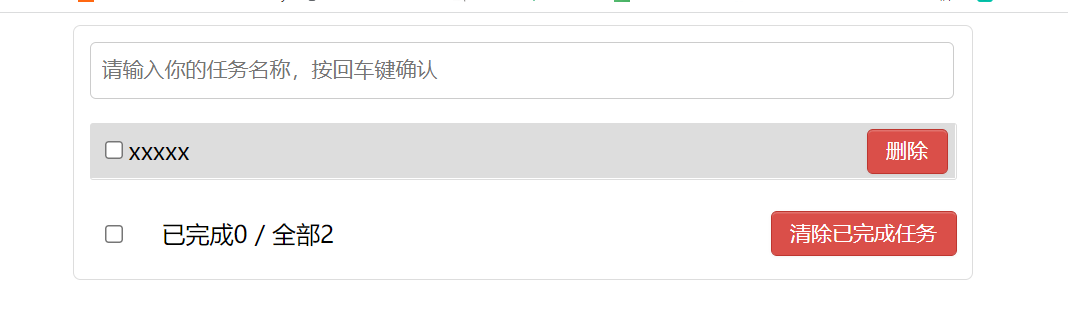
由于距离学习前端三大件时间已久,忘记了优先级的问题。只顾在浏览器控制台与dom元素页面排查错误。最后想到优先级这个事恍然大悟。问题原因
根源及样式优先级排序
根源:style样式优先级问题,搞明白优先级问题这个问题就不是问题。检查一下自己是不是使用了行内样式将相应的标签隐藏了。
优先级排序:!important>行内样式>样式选择器>继承样式>浏览器默认样式
样式选择器有:内联样式 > ID 选择器 > 类选择器 = 属性选择器 = 伪类选择器 > 标签选择器 = 伪元素选择器
优先级相等实行覆盖原则值得注意的是:
使用!important要谨慎,一定要优先考虑使用样式规则的优先级来解决问题而不是!important。
只有在需要覆盖全站或外部CSS的特定页面中使用!important。
永远不要在你的插件中使用!important。
永远不要在全站范围的CSS代码中使用!important。有问题的代码
html
doctype html>
<html lang="en">
<head>
  <meta charset="utf-8">
  <title>React Apptitle>

  <link rel="stylesheet" href="index.css">
head>
<body>
<div id="root">
  <div class="todo-container">
    <div class="todo-wrap">
      <div class="todo-header">
        <input type="text" placeholder="请输入你的任务名称,按回车键确认"/>
      div>
      <ul class="todo-main">
        <li>
          <label>
            <input type="checkbox"/>
            <span>xxxxxspan>
          label>
          <button class="btn btn-danger" style="display:none">删除button>
        li>
        <li>
          <label>
            <input type="checkbox"/>
            <span>yyyyspan>
          label>
          <button class="btn btn-danger" style="display:none">删除button>
        li>
      ul>
      <div class="todo-footer">
        <label>
          <input type="checkbox"/>
        label>
        <span>
          <span>已完成0span> / 全部2
        span>
        <button class="btn btn-danger">清除已完成任务button>
      div>
    div>
  div>
div>

body>
html>
css
/*base*/
body {
  background: #fff;
}

.btn {
  display: inline-block;
  padding: 4px 12px;
  margin-bottom: 0;
  font-size: 14px;
  line-height: 20px;
  text-align: center;
  vertical-align: middle;
  cursor: pointer;
  box-shadow: inset 0 1px 0 rgba(255, 255, 255, 0.2), 0 1px 2px rgba(0, 0, 0, 0.05);
  border-radius: 4px;
}

.btn-danger {
  color: #fff;
  background-color: #da4f49;
  border: 1px solid #bd362f;
}

.btn-danger:hover {
  color: #fff;
  background-color: #bd362f;
}

.btn:focus {
  outline: none;
}

.todo-container {
  width: 600px;
  margin: 0 auto;
}
.todo-container .todo-wrap {
  padding: 10px;
  border: 1px solid #ddd;
  border-radius: 5px;
}

/*header*/
.todo-header input {
  width: 560px;
  height: 28px;
  font-size: 14px;
  border: 1px solid #ccc;
  border-radius: 4px;
  padding: 4px 7px;
}

.todo-header input:focus {
  outline: none;
  border-color: rgba(82, 168, 236, 0.8);
  box-shadow: inset 0 1px 1px rgba(0, 0, 0, 0.075), 0 0 8px rgba(82, 168, 236, 0.6);
}

/*main*/
.todo-main {
  margin-left: 0px;
  border: 1px solid #ddd;
  border-radius: 2px;
  padding: 0px;
}

.todo-empty {
  height: 40px;
  line-height: 40px;
  border: 1px solid #ddd;
  border-radius: 2px;
  padding-left: 5px;
  margin-top: 10px;
}
/*item*/
li {
  list-style: none;
  height: 36px;
  line-height: 36px;
  padding: 0 5px;
  border-bottom: 1px solid #ddd;
}

li label {
  float: left;
  cursor: pointer;
}

li label li input {
  vertical-align: middle;
  margin-right: 6px;
  position: relative;
  top: -1px;
}

li button {
  float: right;
  display: none;
  margin-top: 3px;
}

li:before {
  content: initial;
}

li:last-child {
  border-bottom: none;
}
    li:hover{
      background-color: #ddd;
    }
    li:hover button{
      display:block !important;
    }
/*footer*/
.todo-footer {
  height: 40px;
  line-height: 40px;
  padding-left: 6px;
  margin-top: 5px;
}

.todo-footer label {
  display: inline-block;
  margin-right: 20px;
  cursor: pointer;
}

.todo-footer label input {
  position: relative;
  top: -1px;
  vertical-align: middle;
  margin-right: 5px;
}

.todo-footer button {
  float: right;
  margin-top: 5px;
}
解决方案
解决方案一:
删除掉删除按钮行内的样式display:none
解决方案二(不推荐):
将li:hover button{display:block;}改为 li:hover button{display:block !important;}
问题解决!
-
相关阅读:
不容易解的题9.26
数据的IO和复用
全自动模拟布局设计的挑战和机遇
T31开发笔记: 移动侦测
numpy数组创建
初始结构体
小目标检测的注意特征金字塔网络
Git系列,自定义 git 命令,用 shell 脚本帮助你更好的实现 git 版本控制
2023面试知识点二
阿里云CentOS 安装 Nginx
- 原文地址:https://blog.csdn.net/apple_51931783/article/details/127039033