-
Elasticsearch 8.X 路径检索的企业级玩法
1、企业级实战问题
问题描述如下:
"path":"hdfs://xx.xx.xx:8200/home/lht/aaa.doc"。想检索到aaa文件。并且以doc为筛选条件。可行吗?
就是我有文件数组。匹配到文件数组里的文件类型就检索出来?
——问题来源:GPVIP 微信群
2、问题定义
给定一个路径 path,期待实现:输入扩展名,可以实现检索?
扩展要求:有没有专门针对 path 路径的检索或者相关实现?
问题描述清楚了,接下来我们先做分析和方案的探讨。
3、解决方案的探讨
思考几个问题:
问题1:传统的分词器能否搞得定?
问题2:分词搞不定的话,预处理能协助搞定吗?
问题3:落脚到题目的需求,最终探讨如何解决问题?!
3.1 传统的分词器能否搞定?
Elasticsearch 内置的分词器包含但不限于:
standard(默认分词器);
simple 分词器;
whitespace 分词器;
keyword 分词器
等等.....
我们拿标准分词器 standard 举例:
- DELETE test-index-20220917
- PUT test-index-20220917
- {
- "mappings": {
- "properties": {
- "path": {
- "type": "text",
- "analyzer": "standard",
- "fields": {
- "keyword": {
- "type": "keyword"
- }
- }
- }
- }
- }
- }
- POST test-index-20220917/_bulk
- {"index":{"_id":1}}
- {"path":"hdfs://xx.xx.xx:8200/home/lht/aaa.doc"}
通过 analyze API 看看分词结果。
- POST _analyze
- {
- "text": [
- "hdfs://xx.xx.xx:8200/home/lht/aaa.doc"
- ],
- "analyzer": "standard"
- }
分词结果为:

如下的检索,standard 分词器检索不到!!
- POST test-index-20220917/_search
- {
- "query": {
- "match": {
- "path": "doc"
- }
- }
- }
2.2 能否以扩展名进行检索?
如上的仅 standard 标准分词搞不定扩展名的检索。主要原因分词无法分出扩展名。
没有扩展名怎么办?需要借助数据预处理的方式来解决。
当我们在写入ES 之前,我们需要把 扩展名提炼出来!
模拟一把!
- POST _ingest/pipeline/_simulate
- {
- "pipeline": {
- "processors": [
- {
- "script": {
- "description": "Extract 'tags' from 'env' field",
- "lang": "painless",
- "source": """
- String[] envSplit = ctx['path'].splitOnToken(params['delimiter']);
- int envArrayLen = envSplit.length;
- ctx['extension'] = envSplit[envArrayLen -1];
- """,
- "params": {
- "delimiter": "."
- }
- }
- }
- ]
- },
- "docs": [
- {
- "_source": {
- "path": "hdfs://xx.xx.xx:8200/home/lht/aaa.pdf"
- }
- }
- ]
- }
结果包含扩展名,符合预期。
模拟可以搞定,剩下的定义索引+指定缺省管道,必然也可以搞定。
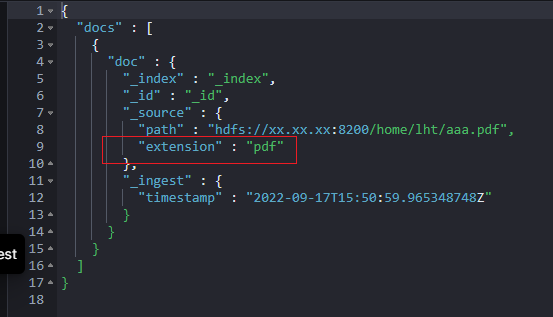
篇幅原因,不再赘述。
至此,扩展名问题通过 script 预处理管道可以搞定了!
还有问题2亟待解决,那就是我们能否覆盖类似路径更全的场景?全部路径都能检索到!
2.3 路径分词的解决方案实现
提到分词器,大家脑海里立马要映射出分词器的“三段论”组成结构。
第一:0或者多个 character filter 过滤器;
第二:唯一的tokenizer;
第三:0或多个 token filter 过滤器。

通过官方文档,我们能找到有:Path hierarchy tokenizer。其实它就是我们一直想找的路径分词器。
如何来使用?好不好用呢?
拿个例子一看便知:
- POST _analyze
- {
- "tokenizer": "path_hierarchy",
- "text": "hdfs://xx.xx.xx:8200/home/lht/ccc.doc"
- }
如下截图所示:至少初步达到预期,看着非常专业了!

但,ccc.doc 没有给出分词结果,能否有参数可以搞定呢?
可以的。reverse 默认 false,改成 true 就可以实现。
实战如下:
- PUT my-index-000001
- {
- "settings": {
- "analysis": {
- "analyzer": {
- "my_analyzer": {
- "tokenizer": "my_tokenizer"
- }
- },
- "tokenizer": {
- "my_tokenizer": {
- "type": "path_hierarchy",
- "delimiter": "/",
- "reverse": true
- }
- }
- }
- }
- }
- POST my-index-000001/_analyze
- {
- "analyzer": "my_analyzer",
- "text": "hdfs://xx.xx.xx:8200/home/lht/ccc.doc"
- }

有了这些,我们整合一下,其实能实现复杂的路径检索实现。
整合如下:
- PUT _ingest/pipeline/extension_pipeline
- {
- "processors": [
- {
- "script": {
- "description": "get file extension of path",
- "lang": "painless",
- "source": """
- String[] envSplit = ctx['path'].splitOnToken(params['delimiter']);
- int envArrayLen = envSplit.length;
- ctx['extension'] = envSplit[envArrayLen -1];
- """,
- "params": {
- "delimiter": "."
- }
- }
- }
- ]
- }
- PUT test-index-20220917-02
- {
- "settings": {
- "index": {
- "default_pipeline": "extension_pipeline"
- },
- "analysis": {
- "analyzer": {
- "custom_path_tree": {
- "tokenizer": "custom_hierarchy"
- },
- "custom_path_tree_reversed": {
- "tokenizer": "custom_hierarchy_reversed"
- }
- },
- "tokenizer": {
- "custom_hierarchy": {
- "type": "path_hierarchy",
- "delimiter": "/"
- },
- "custom_hierarchy_reversed": {
- "type": "path_hierarchy",
- "delimiter": "/",
- "reverse": "true"
- }
- }
- }
- },
- "mappings": {
- "properties": {
- "path": {
- "type": "text",
- "fields": {
- "tree": {
- "type": "text",
- "analyzer": "custom_path_tree"
- },
- "tree_reversed": {
- "type": "text",
- "analyzer": "custom_path_tree_reversed"
- }
- }
- }
- }
- }
- }
- POST test-index-20220917-02/_bulk
- {"index":{"_id":1}}
- {"path":"hdfs://xx.xx.xx:8200/home/lht/aaa.doc"}
- {"index":{"_id":2}}
- {"path":"hdfs://xx.xx.xx:8200/home/lht/bbb.pptx"}
- {"index":{"_id":3}}
- {"path":"hdfs://xx.xx.xx:8200/home/lht/ccc.doc"}
简单解释一下:
第一:定义了预处理器,通过脚本获取了路径的扩展名。
第二:定义了正向和反向的两个分词器,实现了路径的全覆盖分词。
第三:导入了数据。
用了一个分词器的两种不同的实现方式,实现了正向路径和反向路径的双重检索,同时加了类型的精准匹配!
- POST test-index-20220917-02/_search
- {
- "query": {
- "bool": {
- "must": [
- {
- "term": {
- "extension.keyword": {
- "value": "doc"
- }
- }
- },
- {
- "match": {
- "path.tree_reversed": "home/lht/aaa.doc"
- }
- },
- {
- "match": {
- "path.tree": "hdfs://xx.xx.xx:8200/home/lht"
- }
- }
- ]
- }
- }
- }
如下的结果达到预期。

3、小结

通过 script 预处理获取到的路径中文件的扩展名,以便后续继续扩展名进行检索。
没有使用 standard 标准分词器,而是使用路径相关的 path 路径的正向和反向的分词器来解决路径检索问题,path 路径相关的检索都推荐使用!
你有没有遇到类似问题,如何解决的呢?欢迎留言交流。
4、视频讲解如下
推荐阅读

更短时间更快习得更多干货!
和全球 近1800+ Elastic 爱好者一起精进!

比同事抢先一步学习进阶干货!
-
相关阅读:
Python easyOCR图像文本提取 初识
【COMP329 LEC4 Locomotion and Kinematics】
[java]windows和linux下jdk1.8安装包所有版本系列下载地址汇总
从根上理解elasticsearch(lucene)查询原理(1)-lucece查询逻辑介绍
基于R语言的糖尿病检测模型准确率97%
【Kubernetes】k8s集群中pod的容器资源限制和三种探针
【LVGL 学习】样式(style)过渡动画学习
Apache Spark 的基本概念和在大数据分析中的应用
JDBC学习笔记
git-新增业务代码分支
- 原文地址:https://blog.csdn.net/wojiushiwo987/article/details/126945075