-
系统数据数据和信息
一、口令文件
UNIX系统口令文件包含如图所示各字段,在
passwd结构中:

//获取口令文件: //给出用户登录名或数值用户ID,就能查看相关项。 #includestruct passwd *getpwuid(uid_t uid); struct passwd *getpwnam(const char *name) //成功,返回指针,错误返回NULL。 //查看登录名和用户ID #include struct passwd *getpwent(void);// 返回值:若成功,返回指针;若出错或到达文件尾端,返回NULL void setpwent(void); void endpwent(void) //函数setpwent反绕它所使用的文件,endpwent则关闭这些文件。 //getpwent查看完口令文件后,一定要调用endpwent关闭这些文件。 //getpwent知道什么时间应当打开它所使用的文件(第一次被调用时),但是它并不知道何时 关闭这些文件。 //成功返回指针,错误或到达文件尾端,返回NULL。 - 1
- 2
- 3
- 4
- 5
- 6
- 7
- 8
- 9
- 10
- 11
- 12
- 13
- 14
- 15
- 16
- 17
- 18
#include#include #include struct passwd * getpwnam(const char *name) { struct passwd *ptr; setpwent(); while ((ptr = getpwent()) != NULL) if (strcmp(name, ptr->pw_name) == 0) break; /* found a match */ endpwent(); return(ptr); /* ptr } - 1
- 2
- 3
- 4
- 5
- 6
- 7
- 8
- 9
- 10
- 11
- 12
- 13
- 14
- 15
1.密码加密和用户认证
#include//设置密码 char *crypt(const char *key,const char *salt); //接受最长可达8字符的秘钥 //salt:指向两字符的字符串 //返回一个指针,指向长度为13字符的字符串,字符串为静态分配 //salt组成成员均来自同一字符集,[a-zA-z0-9/.] //Linux使用。编译开启-lcrypt //从控制台获得密码,不显示字符串 char *getpass(const char *prompt); //prompt:输入字符串地址 - 1
- 2
- 3
- 4
- 5
- 6
- 7
- 8
- 9
- 10
- 11
- 12
- 13
例:用
cypt和getpass对密码进行加密。#define _BSD_SOURCE /* 从获取getpass()声明 */ #define _XOPEN_SOURCE /* 从获取crypt()声明 */ #include#include #include #include int main(int argc, char *argv[]) { char *username, *password, *encrypted, *p; struct passwd *pwd; struct spwd *spwd; Boolean authOk; size_t len; long lnmax; lnmax = sysconf(_SC_LOGIN_NAME_MAX); if (lnmax == -1) /* 如果限制不确定 */ lnmax = 256; /* 猜一猜 */ username = malloc(lnmax); if (username == NULL) errExit("malloc"); printf("Username: "); fflush(stdout); if (fgets(username, lnmax, stdin) == NULL) exit(EXIT_FAILURE); /* Exit on EOF */ len = strlen(username); if (username[len - 1] == '\n') username[len - 1] = '\0'; /* Remove trailing '\n' */ pwd = getpwnam(username); if (pwd == NULL) fatal("couldn't get password record"); spwd = getspnam(username); if (spwd == NULL && errno == EACCES) fatal("no permission to read shadow password file"); if (spwd != NULL) /* 如果有影子密码记录 */ pwd->pw_passwd = spwd->sp_pwdp; /* 用影子密码 */ password = getpass("Password: "); /* 加密密码并立即清除明文版本 */ encrypted = crypt(password, pwd->pw_passwd); for (p = password; *p != '\0'; ) *p++ = '\0'; if (encrypted == NULL) errExit("crypt"); authOk = strcmp(encrypted, pwd->pw_passwd) == 0; if (!authOk) { printf("Incorrect password\n"); exit(EXIT_FAILURE); } printf("Successfully authenticated: UID=%ld\n", (long) pwd->pw_uid); /* 现在执行验证工作。。。 */ exit(EXIT_SUCCESS); } - 1
- 2
- 3
- 4
- 5
- 6
- 7
- 8
- 9
- 10
- 11
- 12
- 13
- 14
- 15
- 16
- 17
- 18
- 19
- 20
- 21
- 22
- 23
- 24
- 25
- 26
- 27
- 28
- 29
- 30
- 31
- 32
- 33
- 34
- 35
- 36
- 37
- 38
- 39
- 40
- 41
- 42
- 43
- 44
- 45
- 46
- 47
- 48
- 49
- 50
- 51
- 52
- 53
- 54
- 55
- 56
- 57
- 58
- 59
- 60
- 61
- 62
- 63
- 64
- 65
- 66
二、阴影口令
-
加密口令是经单向加密算法处理过的用户口令副本。因为此算法是单向 的,所以不能从加密口令猜测到原来的口令。
-
64字符集
[a-zA-Z0-9./]产生13个打印字符、MD5或SHA-1算法加密。 -
由于加密口令,找不到一种算法可以将其转换到明文口令,但可以对口令猜测,将猜测的口令经单向算法换成加密形式,然后与用户的加密口令比较。用户口令随机的,这种方法表示很有用。
-
由于这样做难以获得原始资料,系统将加密口令存放在另一个通常称为阴影口令的文件中,文件中至少包含用户名和加密口令。
-
阴影口令不是一般用户能读取,有阴影口令普通口令文件
/etc/passwd用户自由读取。

//访问阴影口令 #includestruct spwd *getspnam(const char *name); struct spwd *getspent(void); //两个函数返回值:若成功,返回指针;若出错,返回NULL void setspent(void); void endspent(void); - 1
- 2
- 3
- 4
- 5
- 6
- 7
- 8
三、组文件
UNIX组文件包含下图所示字段,在
字段
gr_mem是一个指针数组,其中每个指针指向一个属于该组的用户名。

///查看组名或数值组ID #includestruct group *getgrgid(gid_t gid); struct group *getgrnam(const char *name); //同对口令文件进行操作的函数一样,这两个函数通常也返回指向一个静态变量的指针,在每次调用时都重写该静态变量。 //两个函数返回值:若成功,返回指针;若出错,返回NULL //两个函数都返回指针,指向如下结构: struct group{ char *gr_name; char *gr_passwd; gid_t gr_gid; char **mem; }; //搜索整个组文件 #include struct group *getgrent(void); // 返回值:若成功,返回指针;若出错或到达文件尾端,返回NULL void setgrent(void); void endgrent(void); //setgrent函数打开组文件(如若它尚末被打开)并反绕它。 //getgrent函数从组 文件中读下一个记录,如若该文件尚未打开,则先打开它。 //endgrent函数关闭组 - 1
- 2
- 3
- 4
- 5
- 6
- 7
- 8
- 9
- 10
- 11
- 12
- 13
- 14
- 15
- 16
- 17
- 18
- 19
- 20
- 21
- 22
- 23
- 24
- 25
- 26
- 27
- 28
- 29
四、附属组ID
-
用户属于组,用户登录时,系统按口令文件记录项中的数值组ID,赋给时间组ID,
newgrp(1)更改组ID,则实际组ID将更改为新的组ID,用于后续的文件访问权限检查。newgrp不带任何参数,返回原来的组。 -
附属组ID不仅可以属于口令文件记录项中组 ID所对应的组,也可属于多至16个
(MGROUPS_MAX)另外的组。文件访问权限检查相应被修改为:不仅将进程的有效组ID与文件的组ID相比较,而且也将所有附属组ID与文件的组ID进行比较。 -
使用附属组 ID 的优点是不必再显式地经常更改组。一个用户会参与多个项 目,因此也就要同时属于多个组,此类情况是常有的。
//获取和设置附属组ID #includeint getgroups(int gidsetsize, gid_t grouplist[]); //getgroups将进程所属用户的各附属组ID填写到数组grouplist中,填写入该数组的附属组ID数最多为gidsetsize个。 //实际填写到数组中的附属组ID数由函数返回。 //若gidsetsize为0,则函数只返回附属组ID数,而对数组grouplist则不做修改。 //返回值:若成功,返回附属组ID数量;若出错,返回-1 #include #include int setgroups(int ngroups, const gid_t grouplist[]); //可由超级用户调用以便为调用进程设置附属组ID表。 //grouplist是组 ID数组,而ngroups说明了数组中的元素数。 //ngroups的值不能大于NGROUPS_MAX。 #include #include int initgroups(const char *username, gid_t basegid); //username确定其组的成员关系。 //initgroups读整个组文件。 //initgroups要调用setgroups,所以只有超级用户才能调用 initgroups。 //除了在组文件中找到 username 是成员的所有组, // initgroups也在附属组ID表中包括了basegid。basegid 是username在口令文件中的组ID。 //两个函数的返回值:若成功,返回0;若出错,返回-1 - 1
- 2
- 3
- 4
- 5
- 6
- 7
- 8
- 9
- 10
- 11
- 12
- 13
- 14
- 15
- 16
- 17
- 18
- 19
- 20
- 21
- 22
- 23
- 24
五、实现区别
4种平台存储用户和组信息如下所示:

六、其他数据文件
每个数据文件至少有3个函数:
- get函数:读下一个记录,如果需要,还会打开该文件。此种函数通 常返回指向一个结构的指针。当已达到文件尾端时返回空指针。大多数get函数 返回指向一个静态存储类结构的指针,如果要保存其内容,则需复制它。
- set 函数:打开相应数据文件(如果尚末打开),然后反绕该文件。 如果希望在相应文件起始处开始处理,则调用此函数
- end函数:关闭相应数据文件。如前所述,在结束了对相应数据文件 的读、写操作后,总应调用此函数以关闭所有相关文件。
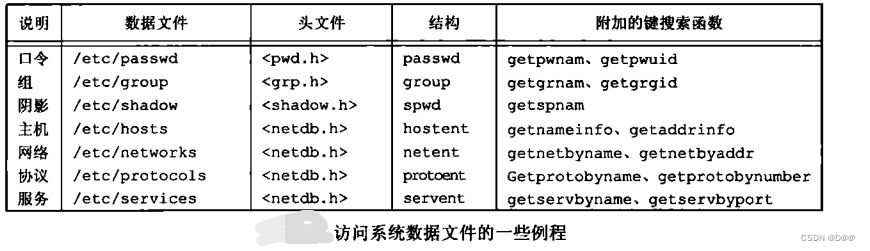
如果数据文件支持某种形式的键搜索,则也提供搜索具有指定键的 记录的例程。对于口令文件,提供了两个按键进行搜索的程序:
getpwnam寻找具有指定用户名的记录;getpwuid寻找具有指定用户ID的记录。下图中列出了针对口令文件和组文件的函数:
七、登录账号记录
大多数UNIX系统都提供下列两个数据文件:
-
utmp文件记录当前登录到系统 的各个用户;
- wtmp文件跟踪各个登录和注销事件
每次写入这两个文件中的是包含下列结构的一个二进制记录:
struct utmp { char ut_line[8]; char ut_name[8]; long ut_time; };- 1
- 2
- 3
- 4
- 5
八、系统标识
//返回与主机和操作系统有关的信息。 #includeint uname(struct utsname *name); //传递一个utsname结构的地址,然后该函数填写此 结构。 //每个字符串都以null字节结尾。 //返回值:若成功,返回非负值;若出错,返回-1 - 1
- 2
- 3
- 4
- 5
- 6
最少所需字段:
struct utsname { char sysname[ ]; char nodename[ ]; char release[ ]; char version[ ]; char machine[ ]; }; #include//只返回主机名,该名字通常就是TCP/IP网络上主机的名字。 int gethostname(char *name, int namelen); //namelen参数指定name缓冲区长度,如若提供足够的空间,则通过name返回的字符串以null字节结尾。 //如若没有提供足够的空间,则没有说明通过name 返回的字符串是否以null结尾 //指定最大主机名长度为HOST_NAME_MAX。 //hostname获取和设置主机名。 //返回值:若成功,返回0;若出错,返回-1 - 1
- 2
- 3
- 4
- 5
- 6
- 7
- 8
- 9
- 10
- 11
- 12
- 13
- 14
- 15
- 16
- 17
- 18
九、时间和日期例程
基本时间访问的作用:
- 以协调统一时间而非本地时间计时;
- 可自动进行转换,如变换到夏 令时
- 将时间和日期作为一个量值保存。
//返回当前时间和日期。 #includetime_t time(time_t *calptr); //时间值作为函数值返回。如果参数非空,则时间值也存放在由calptr指向的单元内。 //获取指定时钟的时间 #include int clock_gettime(clockid_t clock_id, struct timespec *tsp); // 返回值:若成功,返回0;若出错,返回-1 #include int clock_getres(clockid_t clock_id, struct timespec *tsp); //把参数tsp指向的timespec结构初始化为与clock_id参数对应的时钟精度。 //例如,如果精度为1毫秒,则tv_sec字段就是0,tv_nsec字段就是1 000 000。 //返回值:若成功,返回0;若出错,返回-1 //特定的时钟设置时间 #include int clock_settime(clockid_t clock_id, const struct timespec *tsp); //返回值:若成功,返回0;若出错,返回-1 //与time函数相比,gettimeofday提供了更高的精度(可到微秒级) include <sys/time.h> int gettimeofday(struct timeval *restrict tp, void *restrict tzp); //tzp的唯一合法值是NULL,其他值将产生不确定的结果。 //将时间存放在tp指向的timeval结构中 //返回值:总是返回0 - 1
- 2
- 3
- 4
- 5
- 6
- 7
- 8
- 9
- 10
- 11
- 12
- 13
- 14
- 15
- 16
- 17
- 18
- 19
- 20
- 21
- 22
- 23
- 24
- 25
- 26
- 27
- 28
- 29
- 30
- 31
- 32
- 33
- 34
- 35
时钟通过
clockid_t类型标识:

如下图所示时间函数之间的关系:

//将time_t转换为可打印格式 #includechar *ctime(const time_t *timep); //将一个指向time_t的指针作为timep参数传入函数ctime,将返回一个长达26字节的字符串。内含标准格式的日期和时间。 #include #include int main() { time_t ctime; time(ctime); printf("当地时间\n,%s",ctime(&ctime); } - 1
- 2
- 3
- 4
- 5
- 6
- 7
- 8
- 9
- 10
- 11
- 12
- 13
- 14
#includestruct tm *gmtime(const time_t *calptr); struct tm *localtime(const time_t *calptr); //两个函数的返回值:指向分解的tm结构的指针;若出错,返回NULL。 //localtime和gmtime之间的区别是: //localtime将日历时间转换成本地时间(考 虑到本地时区和夏令时标志), //gmtime 则将日历时间转换成协调统一时间的年、月、日、时、分、秒、周日分解结构。 - 1
- 2
- 3
- 4
- 5
- 6
- 7
函数
localtime和gmtime将日历时间转换成分解的时间,并将这些存放 在一个tm结构中:struct tm { int tm_sec; /* seconds after the minute: [0 - 60] */ int tm_min; /* minutes after the hour: [0 - 59] */ int tm_hour; /* hours after midnight: [0 - 23] */ int tm_mday; /* day of the month: [1 - 31] */ int tm_mon; /* months since January: [0 - 11] */ int tm_year; /* years since 1900 */ int tm_wday; /* days since Sunday: [0 - 6] */ int tm_yday; /* days since January 1: [0 - 365] */ int tm_isdst; /* daylight saving time flag: <0, 0, >0 */ }; //秒可以超过59的理由是可以表示润秒。 //除了月日字段,其他字段的 值都以0开始。 //如果夏令时生效,则夏令时标志值为正; //如果为非夏令时时间,则该标志值为0; //如果此信息不可用,则其值为负。- 1
- 2
- 3
- 4
- 5
- 6
- 7
- 8
- 9
- 10
- 11
- 12
- 13
- 14
- 15
- 16
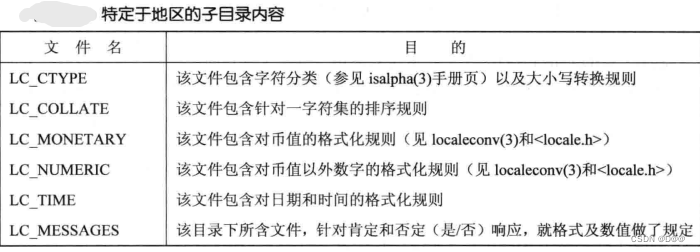
//即可设置也可查询当前地区 #includechar *setlocale(int category,const char *lcoale); //category:选择设置或查询地区的那一部分,如下图所示。 //locale:字符串,指定系统已经定义的地区(例如:/usr/lib/local中子目录名称)。 //locale指定空字符串,从环境变量获取地区时间设置 setlocale(LC_ALL,""); - 1
- 2
- 3
- 4
- 5
- 6
- 7
//分解时间转换为打印格式 //和ctime差不多 #includechar *asctime(const struct tm *timeptr); //tm中提供一个指向分解时间结构的指针 //asctime返回一指针,指向静态分配的字符串,内含时间。 - 1
- 2
- 3
- 4
- 5
- 6
//本地时间的年、月、日等作为参数,将其变换成time_t值。 #includetime_t mktime(struct tm *tmptr); //返回值:若成功,返回日历时间;若出错,返回-1 //函数strftime是一个类似于printf的时间值函数 //通过可用的多个参数来定制产生的字符串 #include //同printf一样,strftime对某些转换说明支持修饰符。 //可以使用E和O修饰符产 生本地支持的另一种格式。 size_t strftime(char *restrict buf, size_t maxsize, const char *restrict format, const struct tm *restrict tmptr); size_t strftime_l(char *restrict buf, size_t maxsize, const char *restrict format, const struct tm *restrict tmptr, locale_t locale); //返回值:若有空间,返回存入数组的字符数;否则,返回0 //strftime_l允许调用者将区域指定为参数,除此之外,strftime和strftime_l函数是相同的。 //strftime使用通过TZ环境变量指定的区域。 //tmptr参数是要格式化的时间值,由一个指向分解时间值tm结构的指针说 明。 //格式化结果存放在长度为maxsize个字符的buf数组中,如果buf长度足以存放格式化结果及null终止符,则该函数返回在buf中存放的字符数(不 包括null终止符); //否则该函数返回0。 //format参数控制时间值的格式。转换说明的形式是百分号之后跟一个特定字符。 //format中的其他字符则按原样输出。 //两个连续的百分号在输出中产生一个百分号。 //与printf函数的不同之处是,每个转换说明产生一 个不同的定长输出字符串,在format字符串中没有字段宽度修饰符。 //如下图所示转换说明 - 1
- 2
- 3
- 4
- 5
- 6
- 7
- 8
- 9
- 10
- 11
- 12
- 13
- 14
- 15
- 16
- 17
- 18
- 19
- 20
- 21
- 22
- 23
- 24
- 25
- 26
- 27
- 28
- 29

#include#include #include int main(void) { time_t t; struct tm *tmp; char buf1[16]; char buf2[64]; time(&t); tmp = localtime(&t); if (strftime(buf1, 16, "time and date: %r, %a %b %d, %Y", tmp) == 0) printf("buffer length 16 is too small\n"); else printf("%s\n", buf1); if (strftime(buf2, 64, "time and date: %r, %a %b %d, %Y", tmp) == 0) printf("buffer length 64 is too small\n"); else printf("%s\n", buf2); exit(0); } - 1
- 2
- 3
- 4
- 5
- 6
- 7
- 8
- 9
- 10
- 11
- 12
- 13
- 14
- 15
- 16
- 17
- 18
- 19
- 20
- 21
- 22
- 23
//strptime函数与strftime相反 //把字符串时间转换成分解时间。 #includechar *strptime(const char *restrict buf, const char *restrict format, struct tm *restrict tmptr); //format参数给出了buf参数指向的缓冲区内的字符串的格式。 //虽然与strftime 函数的说明稍有不同,但格式说明是类似的。 // 返回值:指向上次解析的字符的 - 1
- 2
- 3
- 4
- 5
- 6
- 7
strptime函数转换说明符如图所示:
十、更新系统时钟
//设置系统时间 #includeint settimeofday(const struct timeval *tv,const struct timezone *tz); //tz常被置为NULL //由于settimeofday造成系统时间变化,会产生有何影响。推荐使用adjtime。 //将系统时间逐步调整正确时间 int adjtime(struct timeval *delta,struct timeval *olddelta); //delta:指向一个timeval结构体,指定是要改变时间的秒和微秒。 //剩余未经调整的时间存放在olddelta指向等待timeval结构体体中,可以指定olddelta为NULL。 //只关心当前未完成时间校正的信息,不想改变olddelta可以指定delta为NULL。 - 1
- 2
- 3
- 4
- 5
- 6
- 7
- 8
- 9
- 10
- 11
十一、进程时间
//检索进程时间信息,并把结果通过buf指向的结构体返回。 clock_t times(struct tms *buf); struct tms{ clock_t tms_utime; clock_t tms_stime; clock_t tms_cutime; clock_t tms_cstime; };- 1
- 2
- 3
- 4
- 5
- 6
- 7
- 8
- 9
- 10
//取得进程时间 #includeclock_t clock(void); - 1
- 2
- 3
十二、获取特定进程或线程的时钟ID
测量特定进程或线程所销毁的CPU时间,利用下面的函数来获取时钟ID。接着再以此返回id去调用clock_gettime(),从而获得进程或线程消耗的CPU时间。
#include//此函数将隶属于pid进程的CPU时间时钟的标识置于clockid指针所指向的缓冲区中。 int clock_getcpuclockid(pid_t pid,clock_t *clockid); //pid:0,此函数返回调用进程的CPU时间时钟ID。 - 1
- 2
- 3
- 4
- 5
//线程版 #include#include int pthread_getcpuclockid(pthread_t thread,clockid *clockid); - 1
- 2
- 3
- 4
-
相关阅读:
《TCP/IP网络编程》阅读笔记--基于 TCP 的半关闭
python 根据shp文件解析经纬度市县信息
Zabbix监控系统与部署添加 zabbix 客户端主机
金仓数据库KingbaseES接口协议解析工具使用指南(3. 解析工具的使用)
如何进行JMeter分布式压测?一个案例教你详细解读!
Go基础4
Web前端开发基础教程二
数组常见方法
【Linux守护进程】二、守护进程详解
PHP8中字符串与数组的转换-PHP8知识详解
- 原文地址:https://blog.csdn.net/weixin_50866517/article/details/126900870
