-
三、Helm3常见命令
三、Helm3常见命令
- 查看helm3可用命令
- 1、helm completion:自动补全命令
- 2、helm create : 创建chart包
- 3、helm dependency:管理chart依赖。
- 4、helm env:查看helm环境变量
- 5、helm get :获取关于发布的扩展信息
- 6、helm help:获取帮助信息
- 7、helm history:获取发布历史
- 8、helm install:安装一个chart包
- 9、helm lint:检测chart包格式
- 10、helm list:获取所有的发布列表
- 11、helm package:将一个chart打包为版本化的chart归档文件中
- 12、helm plugin:安装、列出或卸载 Helm 插件
- 13、helm pull:从仓库拉取chart包
- 14、helm repo:仓库管理
- 15、helm rollback:将版本回滚到以前的版本
- 16、helm search:在chart包内搜索关键字
- 17、helm show:查看chart包信息
- 18、show 显示chart包信息
- 19、status 显示命名发布的状态
- 20、template 本地渲染模板
- 21、test 为发布运行测试
- 22、uninstall 卸载一个release
- 23、upgrade 升级一个release
- 24、verify 验证给定路径上的图表是否已签名并且有效
- 25、version 打印客户端版本信息
查看helm3可用命令
helm repo -h 可用命令: completion 为指定的 shell 生成自动完成脚本 create 使用给定名称创建一个新chart包 dependency 管理图表的依赖关系 env helm 客户端环境信息 get 下载命名版本的扩展信息 help 关于任何命令的帮助 history 获取发布历史 install 安装一个chart包 lint 检查chart包以查找可能的问题 list 列出所有 releases package 将chart目录打包到chart存档中 plugin 安装、列出或卸载 Helm 插件 pull 从存储库下载chart包并(可选)将其解压缩到本地目录 repo 添加、列出、删除、更新和索引图表存储库 rollback 将版本回滚到以前的版本 search 在chart包中搜索关键字 show 显示chart包信息 status 显示命名发布的状态 template 本地渲染模板 test 为发布运行测试 uninstall 卸载一个release upgrade 升级一个release verify 验证给定路径上的cahrt包是否已签名并且有效 version 打印客户端版本信息- 1
- 2
- 3
- 4
- 5
- 6
- 7
- 8
- 9
- 10
- 11
- 12
- 13
- 14
- 15
- 16
- 17
- 18
- 19
- 20
- 21
- 22
- 23
- 24
- 25
- 26
1、helm completion:自动补全命令
在执行helm命令的时候,使用tab键默认时无法自动补全的。
如键入helm re,此时双击tab键是不能自动补全命令的 。如果我们想在bash下能够自动补全,执行
helm completion bash可用打印出实现自动补全的脚本。执行补全命令脚本
实际使用,执行如下命令即可:
echo "source <(helm completion bash)" >> ~/.bash_profile source ~/.bash_profile #执行完毕后,就可以使用tab自动补全命令了- 1
- 2
- 3
此时,
键入helm后,双击tab发现,会自动弹出子命令供选择,
键入helm rep后,双击tab发现,会自动补全为helm repo。2、helm create : 创建chart包
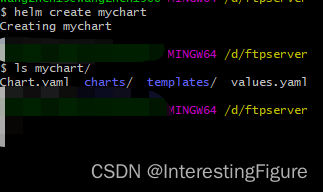
创建一个名为mychart的chart包
helm create mychart
3、helm dependency:管理chart依赖。
helm dependency [command]Helm chart将它们的依赖存储在charts/目录中。对于chart开发人员来说,管理一个声明所有依赖的依赖文件(requirements.yaml)通常更容易。
helm dependency命令对该文件进行操作,使得在所需的依赖和存储在charts/目录中的实际依赖项之间进行同步变得很容易。
可用命令: build rebuild the charts/ directory based on the Chart.lock file list list the dependencies for the given chart update update charts/ based on the contents of Chart.yaml- 1
- 2
- 3
- 4
4、helm env:查看helm环境变量
helm env5、helm get :获取关于发布的扩展信息
helm get [command]可用命令
Available Commands: all download all information for a named release hooks download all hooks for a named release manifest download the manifest for a named release notes download the notes for a named release values download the values file for a named release- 1
- 2
- 3
- 4
- 5
- 6
6、helm help:获取帮助信息
7、helm history:获取发布历史
helm history RELEASE_NAME [flags]可用的flag
Flags: -h, --help help for history --max int maximum number of revision to include in history (default 256) -o, --output format prints the output in the specified format. Allowed values: table, json, yaml (default table)- 1
- 2
- 3
- 4
默认最多返回256个修订。设置–max配置返回的修订列表的最大长度。
历史发布集合被打印为格式化的表格,例如:
#打印名为angry-bird的四个版本 helm history angry-bird --max=4- 1
- 2
8、helm install:安装一个chart包
该命令安装一个chart归档。
安装参数必须是chart引用、打包chart的路径、未打包chart目录的路径或URL。
要覆盖chart中的值,可以使用–values选项并传递到文件中,也可以使用–set选项并从命令行传递配置。若要强制–set指定的值为字符串,请使用–set-string。如果一个值很大,因此你不希望使用–values或–set,则使用–set-file从文件中读取单个大值。
9、helm lint:检测chart包格式
检查图表以查找可能的问题
helm lint path
如果在chart包外:
helm lint chartname
如果在chart包内
helm lint .10、helm list:获取所有的发布列表
获取指定命名空间的发布列表:
helm list -n namespace-name获取所有命令空间的发布列表
helm list -A其他可用的flag
Flags: -a, --all show all releases without any filter applied -A, --all-namespaces list releases across all namespaces -d, --date sort by release date --deployed show deployed releases. If no other is specified, this will be automatically enabled --failed show failed releases -f, --filter string a regular expression (Perl compatible). Any releases that match the expression will be included in the results -h, --help help for list -m, --max int maximum number of releases to fetch (default 256) --offset int next release index in the list, used to offset from start value -o, --output format prints the output in the specified format. Allowed values: table, json, yaml (default table) --pending show pending releases -r, --reverse reverse the sort order -l, --selector string Selector (label query) to filter on, supports '=', '==', and '!='.(e.g. -l key1=value1,key2=value2). Works only for secret(default) and configmap storage backends. -q, --short output short (quiet) listing format --superseded show superseded releases --time-format string format time using golang time formatter. Example: --time-format "2006-01-02 15:04:05Z0700" --uninstalled show uninstalled releases (if 'helm uninstall --keep-history' was used) --uninstalling show releases that are currently being uninstalled- 1
- 2
- 3
- 4
- 5
- 6
- 7
- 8
- 9
- 10
- 11
- 12
- 13
- 14
- 15
- 16
- 17
- 18
- 19
11、helm package:将一个chart打包为版本化的chart归档文件中
将名为mychart的chart包归档:
helm package mychart
此时会得到一个mychart-0.1.0.tgz的压缩包

12、helm plugin:安装、列出或卸载 Helm 插件
13、helm pull:从仓库拉取chart包
14、helm repo:仓库管理
helm repo [command]查看仓库可用命令
helm repo -h- 1
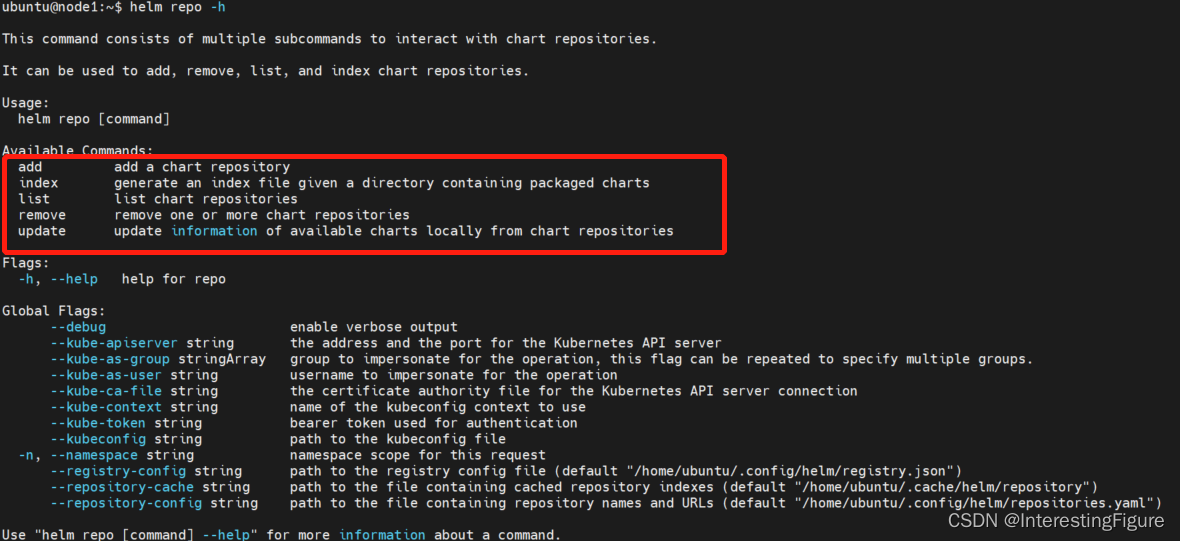
可用命令:- 新增仓库:
helm repo add xxx - 仓库列表:
helm repo list - 移除仓库:
helm repo remove xxx - 更新仓库:
helm repo update - 索引:
helm repo index [DIR] [flags]
15、helm rollback:将版本回滚到以前的版本
16、helm search:在chart包内搜索关键字
17、helm show:查看chart包信息
18、show 显示chart包信息
19、status 显示命名发布的状态
20、template 本地渲染模板
21、test 为发布运行测试
22、uninstall 卸载一个release
23、upgrade 升级一个release
24、verify 验证给定路径上的图表是否已签名并且有效
25、version 打印客户端版本信息
-
相关阅读:
c++ LRU(最近最少使用)缓存机制
阿里云配置https,配置SSL证书
springboot maven项目环境搭建idea
基于springboot+vue的大学生科创项目在线管理系统
typescript83-属性的默认值
如何破解企业数字化转型的焦虑
A tour of gRPC:05 - gRPC server straming 服务端流
电脑突然开机无反应,怎么办
vue类与样式的绑定&&列表渲染
ByteArray转byte[]的两种方式
- 原文地址:https://blog.csdn.net/Edu_enth/article/details/126891369
- 最新文章
-
沪漂五周年了:我越来越迷茫了
Agentic Skill Routing 实战:别再把所有 Skill 塞进 AI Agent 上下文
MySQL-Seconds_behind_master的精度误差
[MAF预定义ChatClient中间件-03]CachingChatClient——利用缓存省钱省时间
AI的至暗历史:从万众期待到被政府撤资,AI的两次死亡徘徊
Agent OS :五种驯服不确定性的范式
PortSwigger SQL注入LAB11
数据库即时编译JIT
[Begin]AI Learn Data Day 0
深度学习进阶(二十七)现代 LLM 的核心架构设计其二:SwiGLU