-
SPI_OLED模块操作方法
一、硬件
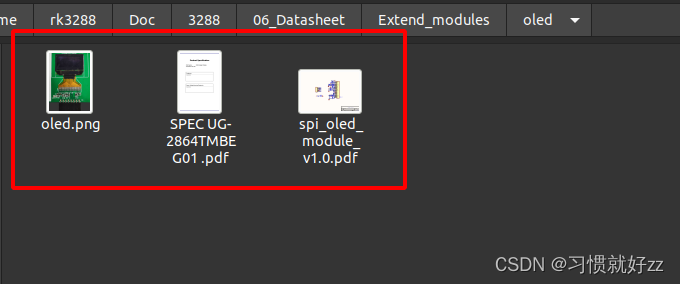
1.1 硬件资料
1.2 原理图

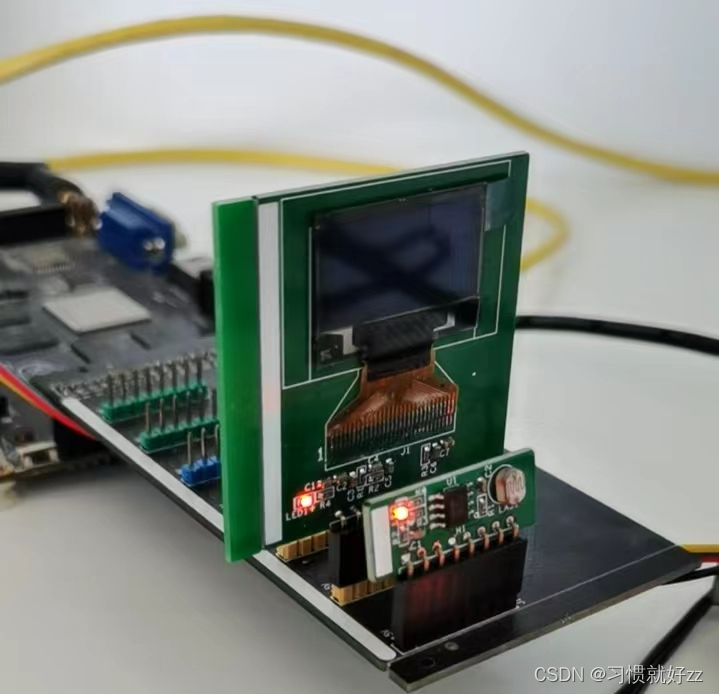
1.3 连接方式
二、OLED操作原理

要操作OLED,只需要使用spi接口发送数据,并不需要使用SPI接口读取数据。除此之外,还需要控制D/C引脚
- 当D/C引脚是低电平时,是命令:比如复位、打开显示、设置地址
- 当D/C引脚是高电平时,是数据:写入要显示的数据
2.1 显存和像素
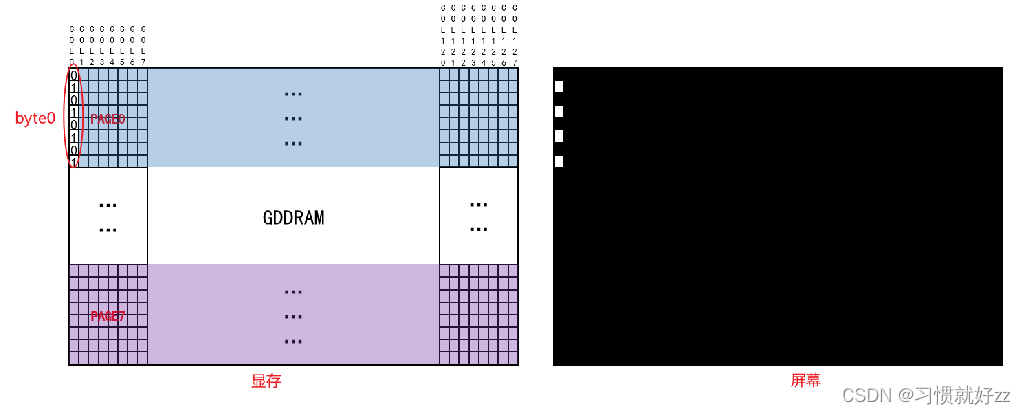
OLED上有128*64个像素,每个像素只有2中状态:亮、灭。

OLED内部有显存GDDRAM(Graphic Display Data RAM):

显存中,每位对应一个像素,如下图所示:
2.2 显存寻址模式
OLED有三种寻址模式:
-
页地址模式(Page addressing mode):每写入1个字节,行地址不变,列地址增1,列地址达到127后会从0开始

-
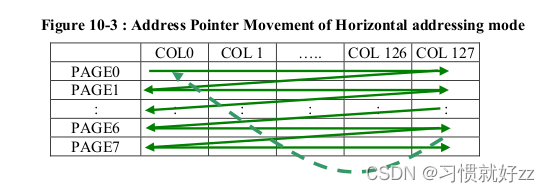
水平地址模式(Horizontal addressing mode):
- 每写入1个字节,行地址不变,列地址增1
- 列地址达到127后从0开始,行地址指向下一页
- 列地址达到127、行地址达到7时,列地址和行地址都被复位为0,指向左上角
-
垂直地址模式(Vertical addressing mode):
- 每写入1个字节,行地址增1,列地址不变
- 行地址达到7后从0开始,列地址指向下一列
- 列地址达到127、行地址达到7时,列地址和行地址都被复位为0,指向左上角

2.3 具体操作
2.3.1 初始化
对于OLED的初始化,在参考手册中,列出了流程图:

2.3.2 设置地址
-
设置地址模式,如果为页地址模式时,先写命令0x22,在写命令0x02,页地址模式是默认的,可以不设置。

-
设置页地址:有0~7页,想设置哪一页(n)就发出命令:0xB0|n

-
设置列地址:列地址范围是0~127,需要使用2个命令来设置列地址

2.3.4 写入数据
让D/C引脚为高,发起SPI写操作就可以了。
DC引脚使用GPIO0_B5,在APP里直接控制DC引脚,无需在设备树里指定。
引脚号为 = 0 * 32 + 1 * 8 + 5 = 13三、在OLED上显示文字
3.1 设备树配置
&spi0 { oled: oled@00{ compatible = "spidev"; reg = <0>; spi-max-frequency = <10000000>; status="okay"; }; };- 1
- 2
- 3
- 4
- 5
- 6
- 7
- 8
3.2 编写代码
// SPDX-License-Identifier: GPL-2.0 #include#include #include #include #include #include #include #include #include #include #include "font.h" #define OLED_CMD 0 #define OLED_DATA 1 static int fd_spidev; static int dc_pin_num; void dc_pin_init(int number) { char cmd[100]; dc_pin_num = number; sprintf(cmd, "echo %d > /sys/class/gpio/export", dc_pin_num); system(cmd); sprintf(cmd, "echo out > /sys/class/gpio/gpio%d/direction", dc_pin_num); system(cmd); } void oled_set_dc_pin(int val) { char cmd[100]; sprintf(cmd, "echo %d > /sys/class/gpio/gpio%d/value", val, dc_pin_num); system(cmd); } void spi_write_datas(unsigned char *buf, int len) { write(fd_spidev, buf, len); } void oled_write_cmd_data(unsigned char uc_data, unsigned char uc_cmd) { unsigned char uc_read = 0; if(uc_cmd == 0) { oled_set_dc_pin(0); } else { oled_set_dc_pin(1); } spi_write_datas(&uc_data, 1); } int oled_init(void) { oled_write_cmd_data(0xae, OLED_CMD); oled_write_cmd_data(0x00, OLED_CMD); oled_write_cmd_data(0x10, OLED_CMD); oled_write_cmd_data(0x40, OLED_CMD); oled_write_cmd_data(0xb0, OLED_CMD); oled_write_cmd_data(0x81, OLED_CMD); oled_write_cmd_data(0x66, OLED_CMD); oled_write_cmd_data(0xa1, OLED_CMD); oled_write_cmd_data(0xa6, OLED_CMD); oled_write_cmd_data(0xa8, OLED_CMD); oled_write_cmd_data(0x3f, OLED_CMD); oled_write_cmd_data(0xc8, OLED_CMD); oled_write_cmd_data(0xd3, OLED_CMD); oled_write_cmd_data(0x00, OLED_CMD); oled_write_cmd_data(0xd5, OLED_CMD); oled_write_cmd_data(0x80, OLED_CMD); oled_write_cmd_data(0xd9, OLED_CMD); oled_write_cmd_data(0x1f, OLED_CMD); oled_write_cmd_data(0xda, OLED_CMD); oled_write_cmd_data(0x12, OLED_CMD); oled_write_cmd_data(0xdb, OLED_CMD); oled_write_cmd_data(0x30, OLED_CMD); oled_write_cmd_data(0x8d, OLED_CMD); oled_write_cmd_data(0x14, OLED_CMD); oled_write_cmd_data(0xaf, OLED_CMD); return 0; } void OLED_DIsp_Set_Pos(int x, int y) { oled_write_cmd_data(0xb0+y, OLED_CMD); oled_write_cmd_data((x&0x0f), OLED_CMD); oled_write_cmd_data(((x&0xf0)>>4)|0x10, OLED_CMD); } void OLED_DIsp_Char(int x, int y, unsigned char c) { int i=0; const unsigned char *dots = oled_asc2_8x16[ c - ' ']; OLED_DIsp_Set_Pos(x, y); for(i=0;i<8;i++) { oled_write_cmd_data(dots[i], OLED_DATA); } OLED_DIsp_Set_Pos(x, y+1); for(i=0;i<8;i++) { oled_write_cmd_data(dots[i+8], OLED_DATA); } } void OLED_DIsp_String(int x, int y, char *str) { unsigned char j=0; while(str[j]) { OLED_DIsp_Char(x, y, str[j]); x += 8; if(x > 127) { x = 0; y += 2; } j++; } } void OLED_DIsp_Test(void) { int i; OLED_DIsp_String(0, 0, "wiki.100ask.net"); OLED_DIsp_String(0, 2, "book.100ask.net"); OLED_DIsp_String(0, 4, "bbs.100ask.net"); } /* spi_oled /dev/spidevB.D */ int main(int argc, char **argv) { int dc_pin; if(argc != 3) { printf("Usage: %s \n" , argv[0]); return -1; } fd_spidev = open(argv[1], O_RDWR); if(fd_spidev < 0) { printf("open %s failed\n", argv[1]); return -1; } dc_pin = strtoul(argv[2], NULL, 0); dc_pin_init(dc_pin); oled_init(); OLED_DIsp_Test(); close(fd_spidev); return 0; }- 1
- 2
- 3
- 4
- 5
- 6
- 7
- 8
- 9
- 10
- 11
- 12
- 13
- 14
- 15
- 16
- 17
- 18
- 19
- 20
- 21
- 22
- 23
- 24
- 25
- 26
- 27
- 28
- 29
- 30
- 31
- 32
- 33
- 34
- 35
- 36
- 37
- 38
- 39
- 40
- 41
- 42
- 43
- 44
- 45
- 46
- 47
- 48
- 49
- 50
- 51
- 52
- 53
- 54
- 55
- 56
- 57
- 58
- 59
- 60
- 61
- 62
- 63
- 64
- 65
- 66
- 67
- 68
- 69
- 70
- 71
- 72
- 73
- 74
- 75
- 76
- 77
- 78
- 79
- 80
- 81
- 82
- 83
- 84
- 85
- 86
- 87
- 88
- 89
- 90
- 91
- 92
- 93
- 94
- 95
- 96
- 97
- 98
- 99
- 100
- 101
- 102
- 103
- 104
- 105
- 106
- 107
- 108
- 109
- 110
- 111
- 112
- 113
- 114
- 115
- 116
- 117
- 118
- 119
- 120
- 121
- 122
- 123
- 124
- 125
- 126
- 127
- 128
- 129
- 130
- 131
- 132
- 133
- 134
- 135
- 136
- 137
- 138
- 139
- 140
- 141
- 142
- 143
- 144
- 145
- 146
- 147
- 148
- 149
- 150
- 151
- 152
- 153
- 154
- 155
- 156
- 157
- 158
- 159
- 160
- 161
- 162
- 163
- 164
- 165
- 166
- 167
- 168
- 169
- 170
- 171
- 172
- 173
- 174
- 175
- 176
- 177
- 178
最后效果
[root@firefly-rk3288:/home/picture/spi]# ./spidev-oled /dev/spidev0.0 13 [root@firefly-rk3288:/home/picture/spi]#- 1
- 2
- 3

-
相关阅读:
Windows服务器监控工具
ES6, ES7, ES8, ES9 以及 ES10 新特征
jpg格式图片无法打开可以修复吗?有哪些方法?
VT 入门番外篇——最小 VT 实现(上)
overload(重载),override(覆盖 / 重写),overwrite(隐藏重 / 定义)
【MySQL】浅谈视图
前端HTML5 +CSS3 4.CSS基础 6 元素显示模式 && 7 CSS特性
51单片机电子钟闹钟温度LCD1602液晶显示设计( proteus仿真+程序+原理图+设计报告+讲解视频)
书签管理工具有哪些,下载使用书签插件的方法
C++ Reference: Standard C++ Library reference: C Library: cmath: remquo
- 原文地址:https://blog.csdn.net/ch122633/article/details/126725028