-
VUE3 博客全栈-前端-07
本节:博客分类的编写

div: 循环列表

添加和修改模态框的形式

script:1.引入模块 2.实例化引入的模块

1.获取分类方法 (1)定义变量接收数据 (2)写方法连接接口,赋值 (3)页面上循环渲染 ,挂载分类方法
 2. 添加分类的方法:(1)定义变量接收前端添加的数据 (2)写方法连接接口,传值给后端 ,状态的返回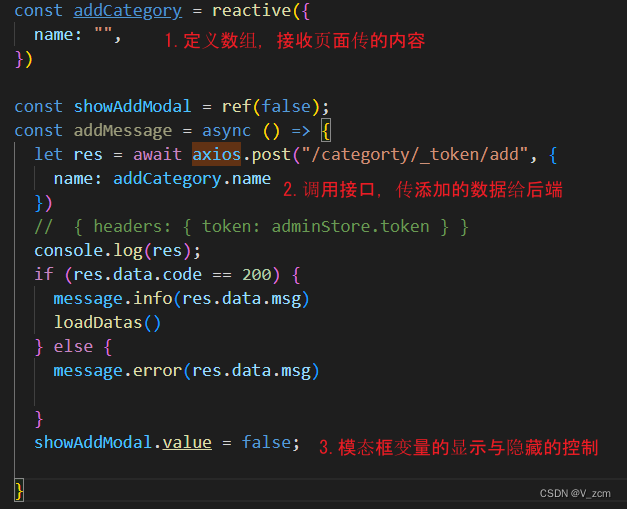
3.删除方法:把删除的id传给后端,后端就可以删除数据了。

4.修改方法:(1)定义变量接收修改后的数据 (2)点击获取修改的数据,赋值
(3)写方法调用接口,传值给后端修改 ,返回状态

整个分类页面的代码:
- <template>
- <div>
- <n-button @click="showAddModal=true">添加</n-button>
- <n-table :bordered="false" :single-line="false">
- <thead>
- <tr>
- <th>编号</th>
- <th>名称</th>
- <th>操作</th>
- </tr>
- </thead>
- <tbody>
- <tr v-for="(i,index) in categortyList">
- <td>{{i.id}}</td>
- <td>{{i.name}}</td>
- <td>
- <n-space>
- <!-- n-space可以自动调试合适的距离 -->
- <n-button @click="toUpdate(i)">修改</n-button>
- <n-button @click="deleteCategory(i)">删除</n-button>
- </n-space>
- </td>
- </tr>
- </tbody>
- </n-table>
- <n-modal v-model:show="showAddModal" preset="dialog" title="Dialog">
- <template #header>
- <div>添加分类</div>
- </template>
- <div>
- <n-input v-model:value="addCategory.name" type="text" placeholder="请输入名称" />
- </div>
- <template #action>
- <div>
- <n-button @click="addMessage">提交</n-button>
- </div>
- </template>
- </n-modal>
- <n-modal v-model:show="showUpdateModal" preset="dialog" title="Dialog">
- <template #header>
- <div>修改分类</div>
- </template>
- <div>
- <n-input v-model:value="updateCategory.name" type="text" placeholder="请输入名称" />
- </div>
- <template #action>
- <div>
- <n-button @click="updateMessage">提交</n-button>
- </div>
- </template>
- </n-modal>
- </div>
- </template>
- <script setup>
- import { AdminStore } from '../../stores/AdminStore' //1.引入
- import { ref, reactive, inject, onMounted } from 'vue'
- import { useRouter, useRoute } from 'vue-router'; //路由
- const router = useRouter()
- const route = useRoute()
- const dialog = inject("dialog")
- const message = inject("message")
- const axios = inject("axiosTool") //axiosTool 是我provide定义的名字
- const adminStore = AdminStore(); //2.实例化
- onMounted(() => {
- loadDatas()
- })
- const categortyList = ref([])
- const loadDatas = async () => {
- let res = await axios.get("/categorty/list")
- categortyList.value = res.data.rows
- console.log(res);
- }
- const addCategory = reactive({
- name: "",
- })
- const showAddModal = ref(false);
- const addMessage = async () => {
- let res = await axios.post("/categorty/_token/add", {
- name: addCategory.name
- })
- // { headers: { token: adminStore.token } }
- console.log(res);
- if (res.data.code == 200) {
- message.info(res.data.msg)
- loadDatas()
- } else {
- message.error(res.data.msg)
- }
- showAddModal.value = false;
- }
- const updateCategory = reactive({
- name: "",
- id: 0
- })
- const showUpdateModal = ref(false);
- const toUpdate = async (i) => {
- showUpdateModal.value = true
- updateCategory.id = i.id
- updateCategory.name = i.name
- }
- const updateMessage = async () => {
- let res = await axios.post("/categorty/_token/update", {
- name: updateCategory.name,
- id: updateCategory.id,
- })
- // { headers: { token: adminStore.token } }
- console.log(res);
- if (res.data.code == 200) {
- message.info(res.data.msg)
- loadDatas()
- } else {
- message.error(res.data.msg)
- }
- showUpdateModal.value = false;
- }
- const deleteCategory = async (i) => {
- dialog.warning({
- title: '警告',
- content: '是否要删除',
- positiveText: '确定',
- negativeText: '取消',
- onPositiveClick: async () => {
- // message.success('确定')
- let res = await axios.delete(`/categorty/_token/delete?id=${i.id}`)
- if (res.data.code == 200) {
- loadDatas()
- message.info(res.data.msg)
- } else {
- message.error(res.data.msg)
- }
- },
- onNegativeClick: () => {
- }
- })
- }
- </script>
- <style lang="scss" scoped>
- </style>
-
相关阅读:
Linux开机自动执行某些命令运行自定义脚本的方法
Java集合相关总结(List | Set | Map)
2023-09-28 monetdb-databae的概念和作用-分析
Rust开发——使用rust实现Redis中hset
1.1 Joyvan的矩阵
RabbitMQ入门教学
软考 系统架构设计师系列知识点之软件可靠性基础知识(6)
【入门Flink】- 10基于时间的双流联合(join)
快速使用BRTR公式出具的大模型Prompt提示语
Web项目 - 登录注册业务逻辑
- 原文地址:https://blog.csdn.net/m0_59214979/article/details/126779970

- 最新文章
-
沪漂五周年了:我越来越迷茫了
Agentic Skill Routing 实战:别再把所有 Skill 塞进 AI Agent 上下文
MySQL-Seconds_behind_master的精度误差
[MAF预定义ChatClient中间件-03]CachingChatClient——利用缓存省钱省时间
AI的至暗历史:从万众期待到被政府撤资,AI的两次死亡徘徊
Agent OS :五种驯服不确定性的范式
PortSwigger SQL注入LAB11
数据库即时编译JIT
[Begin]AI Learn Data Day 0
深度学习进阶(二十七)现代 LLM 的核心架构设计其二:SwiGLU