-
Netty——基础(笔记)
文章目录
一、概述
Netty是一个异步的(基于多路复用)、基于事件驱动的网络应用框架,用于快速开发可维护、高性能的网络服务器和客户端。
使用Netty的框架
- Cassandra - nosql 数据库
- Spark - 大数据分布式计算框架
- Hadoop - 大数据分布式存储框架
- Rocket MQ - ali 开源的消息队列
- ElasticSearch - 搜索引擎
- gRPC - rpc框架
- Dubbo - rpc框架
- Spring 5.X - flux api 完全抛弃了tomcat,使用Netty作为服务器端
- Zookeeper - 分布式协调框架
1.1 Netty优势
- 用NIO开发一套自己的网络处理:工作量大,bug多
- 需要自己构建协议
- 解决TCP传输问题,如粘包、半包
- epoll(Linux多路复用调用)空轮询导致CPU100%(这是一个bug,有些时候select阻塞失败导致的)
- 对API进行增强,是指更使用,如FastThreadLocal=>ThreaLocal,ByteBuf=>ByteBuffer
- 其他网络应用框架
- Mina由apache维护,将来3.X版本可能会有较大重构,破坏API向下兼容性
- Netty发展了16年
- 2.x 2004
- 3.x 2008
- 4.x 2013
- 5.x 已废弃,没有明显提升
1.2 Netty模型
图片源自互联网

二、Netty的基本使用
2.1 快速开始helloworld
首先导入如下依赖
<project xmlns="http://maven.apache.org/POM/4.0.0" xmlns:xsi="http://www.w3.org/2001/XMLSchema-instance" xsi:schemaLocation="http://maven.apache.org/POM/4.0.0 http://maven.apache.org/xsd/maven-4.0.0.xsd"> <modelVersion>4.0.0modelVersion> <parent> <artifactId>spring-boot-starter-parentartifactId> <groupId>org.springframework.bootgroupId> <version>2.6.5version> parent> <groupId>org.examplegroupId> <artifactId>netty-testartifactId> <version>1.0-SNAPSHOTversion> <properties> <maven.compiler.source>8maven.compiler.source> <maven.compiler.target>8maven.compiler.target> properties> <dependencies> <dependency> <groupId>io.nettygroupId> <artifactId>netty-allartifactId> dependency> <dependency> <groupId>org.springframework.bootgroupId> <artifactId>spring-boot-starter-webartifactId> dependency> <dependency> <groupId>org.projectlombokgroupId> <artifactId>lombokartifactId> dependency> dependencies> project>- 1
- 2
- 3
- 4
- 5
- 6
- 7
- 8
- 9
- 10
- 11
- 12
- 13
- 14
- 15
- 16
- 17
- 18
- 19
- 20
- 21
- 22
- 23
- 24
- 25
- 26
- 27
- 28
- 29
- 30
- 31
- 32
- 33
- 34
其实和NIO创建的东西类似,不过使用了他封装的方式。
服务器端下面的标注序号是执行顺序
package com.yjx23332.netty.test; import io.netty.bootstrap.ServerBootstrap; import io.netty.channel.ChannelHandler; import io.netty.channel.ChannelHandlerContext; import io.netty.channel.ChannelInboundHandlerAdapter; import io.netty.channel.ChannelInitializer; import io.netty.channel.nio.NioEventLoopGroup; import io.netty.channel.socket.nio.NioServerSocketChannel; import io.netty.channel.socket.nio.NioSocketChannel; import io.netty.handler.codec.string.StringDecoder; public class HelloServer { public static void main(String[] args){ //1. 启动器,负责组装 Netty 组件,启动服务器 new ServerBootstrap() //2. NioEventLoopGroup:可包含多个thread以及对应的selector /** * 可以理解为帮助我们创建多线程模式的多个Worker线程和boss线程 * 他就是多个Worker线程或者boss线程的集合 * */ .group(new NioEventLoopGroup()) // 3. 支持OIO(BIO)、NIO、针对某种操作系统的实现 /** * 就是我们服务器的socketChannel创建 * 此处选择的是原生NIO的进行实现 * */ .channel(NioServerSocketChannel.class) //4. boss 负责处理连接 worker(chile)负责处理读写 /** * 决定worker能干什么事情 * 此处给予具体的处理逻辑 * */ .childHandler( //5. 与客户端进行读写的通道,进行初始化,它本身也是一个handler,负责添加具体的handler,连接建立后调用 new ChannelInitializer<NioSocketChannel>(){ //12. 在与客户端完成连接的建立后,调用初始化方法 @Override protected void initChannel(NioSocketChannel nioSocketChannel) throws Exception { //添加具体的handler,像最后加入 //16.读到read事件后,调用处理其中的方法处理 nioSocketChannel.pipeline().addLast(new StringDecoder());// 将 ByteBuf 转换为字符串 //17.此处关注了读事件,于是进一步处理 nioSocketChannel.pipeline().addLast(new ChannelInboundHandlerAdapter() {//自定义的业务处理 //关注读事件 @Override public void channelRead(ChannelHandlerContext channelHandlerContext,Object msg)throws Exception{ System.out.println(msg); } }); } }) //6. 绑定端口 .bind(8080); } }- 1
- 2
- 3
- 4
- 5
- 6
- 7
- 8
- 9
- 10
- 11
- 12
- 13
- 14
- 15
- 16
- 17
- 18
- 19
- 20
- 21
- 22
- 23
- 24
- 25
- 26
- 27
- 28
- 29
- 30
- 31
- 32
- 33
- 34
- 35
- 36
- 37
- 38
- 39
- 40
- 41
- 42
- 43
- 44
- 45
- 46
- 47
- 48
- 49
- 50
- 51
- 52
- 53
- 54
- 55
- 56
- 57
- 58
客户端
package com.yjx23332.netty.test; import io.netty.bootstrap.Bootstrap; import io.netty.channel.ChannelInitializer; import io.netty.channel.nio.NioEventLoopGroup; import io.netty.channel.socket.nio.NioSocketChannel; import io.netty.handler.codec.string.StringEncoder; import java.net.InetSocketAddress; public class HelloClient { public static void main(String[] args) throws InterruptedException { //7. 启动类 new Bootstrap() //8. 添加 EventLoop .group(new NioEventLoopGroup()) //9. 选择客户端Channel .channel(NioSocketChannel.class) //10. 添加处理器 .handler(new ChannelInitializer<NioSocketChannel>() { //12.在连接建立后被调用 @Override protected void initChannel(NioSocketChannel nioSocketChannel) throws Exception { //15.执行处理器,将hello,world转为byteBuffer nioSocketChannel.pipeline().addLast(new StringEncoder()); } }) //11. 连接到服务器 .connect(new InetSocketAddress("localhost",8080)) //13.阻塞方法,阻塞到连接建立 .sync() //代表连接对象 .channel() //14.向服务器发送数据 .writeAndFlush("hello,world"); } }- 1
- 2
- 3
- 4
- 5
- 6
- 7
- 8
- 9
- 10
- 11
- 12
- 13
- 14
- 15
- 16
- 17
- 18
- 19
- 20
- 21
- 22
- 23
- 24
- 25
- 26
- 27
- 28
- 29
- 30
- 31
- 32
- 33
- 34
- 35
- 36
- 37
- 38

- channel:可以理解为数据通道
- msg理解为流动的数据,最开始是ByteBuf,经过pipeline的加工,会变成其他类型对象,最后输出右边为ByteBuf
- handler是处理工序
- 工序合在一起就是pipeline,pipeline处理发布事件,传播给每一个handler,handler会对自己感兴趣的事件进行处理(我们通过重写相应事件处理方法,来决定)
- handler分为Inbound(入站)和OutBound(出站)两类
- 以责任链的的形式,按照代码中,加入后的顺序执行
- 把eventLoop理解为处理数据的工人
- 工人可以管理多个channel的IO操作,并且一旦工人负责了某个channel,就要负责到底(绑定)
- 工人既可以执行IO操作,也可以进行任务处理,每位工人有任务队列,队列可以对方多个channel的待处理任务,任务分为普通任务、定时任务
- 工人按照pipeline顺序,依次按照handler的规划(代码)处理数据,可以为没到哦工序指定不同的工人
2.2 EventLoop
本质是一个单线程执行器(同时维护了一个Selector),里面有run方法处理Channel上源源不断的IO事件。
它的继承关系比较复杂
- 继承自j.u.c.ScheduledExecutorService,因此包含了线程池中的所有方法
- 另一条线是继承自netty自己的OrderedEventExecutor
- 提供了boolean inEventLoop(Thread thread)方法判断一个线程是否属于此EventLoop
- 提供了parent方法来看看自己属于哪个EventLoopGroup
事件循环组
- EventLoopGroup是一组EventLoop,Channel一般会调用EventLoopGroup的register方法来绑定其中一个EventLoop,后续这个Channel上的io事件都由此EventLoop来处理(保证了IO事件处理时的线程安全)
继承自Netty自己的EventExecutorGroup
- 实现了Iterator接口提供遍历EventLoop的能力
- 另有next方法获取集合中下一个EventLoop
package com.yjx23332.netty.test; import io.netty.channel.DefaultEventLoopGroup; import io.netty.channel.EventLoopGroup; import io.netty.channel.nio.NioEventLoopGroup; import lombok.extern.slf4j.Slf4j; import java.util.concurrent.TimeUnit; @Slf4j public class TestEventLoop { public static void main(String[] args){ /** * 默认传入0值,使用默认线程池数目 * 默认线程池数目:取 1和NettyRuntime.availableProcessors()*2 间的最大值 * */ EventLoopGroup eventLoopGroup = new NioEventLoopGroup(2);//io 事件,普通任务,定时任务 //EventLoopGroup eventLoopGroup1 = new DefaultEventLoopGroup();//普通任务,定时任务 //next类似一个环,到末尾会回到开头 log.debug("{}",eventLoopGroup.next()); log.debug("{}",eventLoopGroup.next()); log.debug("{}",eventLoopGroup.next()); //提交任务 eventLoopGroup.next().submit(()->{ try { Thread.sleep(1000); } catch (InterruptedException e) { throw new RuntimeException(e); } log.debug("ok"); }); log.debug("main"); //定时任务 eventLoopGroup.next().scheduleAtFixedRate(()->{ log.debug("{}","ok!"); },0,1, TimeUnit.SECONDS); log.debug("main!"); } }- 1
- 2
- 3
- 4
- 5
- 6
- 7
- 8
- 9
- 10
- 11
- 12
- 13
- 14
- 15
- 16
- 17
- 18
- 19
- 20
- 21
- 22
- 23
- 24
- 25
- 26
- 27
- 28
- 29
- 30
- 31
- 32
- 33
- 34
- 35
- 36
- 37
- 38
- 39
- 40
- 41
- 42
- 43
- 44
接下来为IO任务
服务端package com.yjx23332.netty.test; import io.netty.bootstrap.ServerBootstrap; import io.netty.buffer.ByteBuf; import io.netty.channel.ChannelHandlerContext; import io.netty.channel.ChannelInboundHandlerAdapter; import io.netty.channel.ChannelInitializer; import io.netty.channel.nio.NioEventLoopGroup; import io.netty.channel.socket.nio.NioServerSocketChannel; import io.netty.channel.socket.nio.NioSocketChannel; import lombok.extern.slf4j.Slf4j; import java.nio.charset.StandardCharsets; @Slf4j public class EventLoopServer { public static void main(String[] args){ new ServerBootstrap() .group(new NioEventLoopGroup()) .channel(NioServerSocketChannel.class) .childHandler(new ChannelInitializer<NioSocketChannel>() { @Override protected void initChannel(NioSocketChannel nioSocketChannel) throws Exception { nioSocketChannel.pipeline().addLast(new ChannelInboundHandlerAdapter(){ @Override public void channelRead(ChannelHandlerContext ctx , Object msg) throws Exception{ ByteBuf byteBuf = (ByteBuf) msg; log.debug("{}",byteBuf.toString(StandardCharsets.UTF_8)); } }); } }) .bind(8080); } }- 1
- 2
- 3
- 4
- 5
- 6
- 7
- 8
- 9
- 10
- 11
- 12
- 13
- 14
- 15
- 16
- 17
- 18
- 19
- 20
- 21
- 22
- 23
- 24
- 25
- 26
- 27
- 28
- 29
- 30
- 31
- 32
- 33
- 34
- 35
- 36
- 37
package com.yjx23332.netty.test; import io.netty.bootstrap.Bootstrap; import io.netty.channel.Channel; import io.netty.channel.ChannelHandlerContext; import io.netty.channel.ChannelInitializer; import io.netty.channel.nio.NioEventLoopGroup; import io.netty.channel.socket.nio.NioSocketChannel; import io.netty.handler.codec.string.StringEncoder; import java.net.InetSocketAddress; public class EventLoopClient { public static void main(String[] args) throws InterruptedException{ Channel channel = new Bootstrap() .group(new NioEventLoopGroup()) .channel(NioSocketChannel.class) .handler(new ChannelInitializer<NioSocketChannel>() { @Override protected void initChannel(NioSocketChannel nioSocketChannel) throws Exception { nioSocketChannel.pipeline().addLast(new StringEncoder()); } }) .connect(new InetSocketAddress("localhost",8080)) .sync() .channel(); System.out.println(channel); System.out.println(""); } }- 1
- 2
- 3
- 4
- 5
- 6
- 7
- 8
- 9
- 10
- 11
- 12
- 13
- 14
- 15
- 16
- 17
- 18
- 19
- 20
- 21
- 22
- 23
- 24
- 25
- 26
- 27
- 28
- 29
- 30
- 31
- 32
在客户端处打断点

在下图手动发送消息


会发现,服务器无法收到。
我们在NIO上可以执行,因为NIO上是单线程,而Netty上是多线程。
因此,我们断点要将ALL换为Thread

同时,处理的NIO是同一个NIO线程

2.2.1 分工与细化
细分,分开BOSS和Worker
public static void main(String[] args){ new ServerBootstrap() /** * @Param boss,worker * 第一个参数只负责ServerSocketChannel上的连接(accept)事件 * 第二个参数只负责SocketChannel上的读写事件 * */ .group(new NioEventLoopGroup(),new NioEventLoopGroup()) .channel(NioServerSocketChannel.class) .childHandler(new ChannelInitializer<NioSocketChannel>() { @Override protected void initChannel(NioSocketChannel nioSocketChannel) throws Exception { nioSocketChannel.pipeline().addLast(new ChannelInboundHandlerAdapter(){ @Override public void channelRead(ChannelHandlerContext ctx , Object msg) throws Exception{ ByteBuf byteBuf = (ByteBuf) msg; log.debug("{}",byteBuf.toString(StandardCharsets.UTF_8)); } }); } }) .bind(8080); }- 1
- 2
- 3
- 4
- 5
- 6
- 7
- 8
- 9
- 10
- 11
- 12
- 13
- 14
- 15
- 16
- 17
- 18
- 19
- 20
- 21
- 22
- 23
- 24
注意,EventLoopGroup本质上是一个线程池,核心线程不是一次性就创建好的,基本是通过group.next()申请的。
细分,分开耗时长的事件
package com.yjx23332.netty.test; import io.netty.bootstrap.ServerBootstrap; import io.netty.buffer.ByteBuf; import io.netty.channel.*; import io.netty.channel.nio.NioEventLoopGroup; import io.netty.channel.socket.nio.NioServerSocketChannel; import io.netty.channel.socket.nio.NioSocketChannel; import lombok.extern.slf4j.Slf4j; import java.nio.charset.StandardCharsets; @Slf4j public class EventLoopServer { public static void main(String[] args){ //专门处理耗时较长的事件 EventLoopGroup group = new DefaultEventLoopGroup(); new ServerBootstrap() /** * @Param boss,worker * 第一个参数只负责ServerSocketChannel上的连接(accept)事件 * 第二个参数只负责SocketChannel上的读写事件 * */ .group(new NioEventLoopGroup(),new NioEventLoopGroup()) .channel(NioServerSocketChannel.class) .childHandler(new ChannelInitializer<NioSocketChannel>() { @Override protected void initChannel(NioSocketChannel nioSocketChannel) throws Exception { nioSocketChannel.pipeline().addLast("handler1",new ChannelInboundHandlerAdapter(){ @Override public void channelRead(ChannelHandlerContext ctx , Object msg) throws Exception{ ByteBuf byteBuf = (ByteBuf) msg; log.debug("{}",byteBuf.toString(StandardCharsets.UTF_8)); // 将消息传递给下一个Handler ctx.fireChannelRead(msg); } }); //使用另一个EventLoopGroup nioSocketChannel.pipeline().addLast(group,"handler2",new ChannelInboundHandlerAdapter(){ @Override public void channelRead(ChannelHandlerContext ctx , Object msg) throws Exception{ ByteBuf byteBuf = (ByteBuf) msg; log.debug("{}",byteBuf.toString(StandardCharsets.UTF_8)); } }); } }) .bind(8080); } }- 1
- 2
- 3
- 4
- 5
- 6
- 7
- 8
- 9
- 10
- 11
- 12
- 13
- 14
- 15
- 16
- 17
- 18
- 19
- 20
- 21
- 22
- 23
- 24
- 25
- 26
- 27
- 28
- 29
- 30
- 31
- 32
- 33
- 34
- 35
- 36
- 37
- 38
- 39
- 40
- 41
- 42
- 43
- 44
- 45
- 46
- 47
- 48
- 49
- 50
- 51
- 52

2.2.2 切换线程
如果两个handler绑定的不是同一个eventLoop,应该怎么处理。
源码static void invokeChannelRead(final AbstractChannelHandlerContext next, Object msg) { final Object m = next.pipeline.touch(ObjectUtil.checkNotNull(msg, "msg"), next); // 下一个handler的eventloop是否与当前的eventloop是同一个线程 //通过next获取下个EventLoop EventExecutor executor = next.executor(); if (executor.inEventLoop()) { //如果是,就直接调用 next.invokeChannelRead(m); } else { //如果不是,则交给下一个eventloop的handler线程 executor.execute(new Runnable() { @Override public void run() { next.invokeChannelRead(m); } }); } }- 1
- 2
- 3
- 4
- 5
- 6
- 7
- 8
- 9
- 10
- 11
- 12
- 13
- 14
- 15
- 16
- 17
- 18
public void execute(Runnable command) { this.next().execute(command); }- 1
- 2
- 3
2.3 Channel
channel的主要作用
- close():关闭
- closeFuture():处理channel的关闭
- sync的方法是同步等待channel关闭
- addListener方法是异步等待channel关闭
- pipeline():方法添加处理器
- write():方法将数据写入(不一定立即发出,因为有一个缓冲机制)
- writeAndFlush():方法将数据写入并立即刷出
2.3 ChannelFuture
2.3.1 Sync()
package com.yjx23332.netty.test; import io.netty.bootstrap.Bootstrap; import io.netty.channel.Channel; import io.netty.channel.ChannelFuture; import io.netty.channel.ChannelInitializer; import io.netty.channel.nio.NioEventLoopGroup; import io.netty.channel.socket.nio.NioSocketChannel; import io.netty.handler.codec.string.StringEncoder; import java.net.InetSocketAddress; public class EventLoopClient { public static void main(String[] args) throws InterruptedException{ ChannelFuture channelFuture = new Bootstrap() .group(new NioEventLoopGroup()) .channel(NioSocketChannel.class) .handler(new ChannelInitializer<NioSocketChannel>() { @Override protected void initChannel(NioSocketChannel nioSocketChannel) throws Exception { nioSocketChannel.pipeline().addLast(new StringEncoder()); } }) /** * connect异步非阻塞,主线程发起调用,但是是nio线程处理 * */ .connect(new InetSocketAddress("localhost",8080)); //不选择同步等待,则有可能发送失败 channelFuture.sync(); /** * 因为无阻塞执行到这里,有可能连接还没有建立 * */ Channel channel = channelFuture.channel(); channel.writeAndFlush("hello,world"); } }- 1
- 2
- 3
- 4
- 5
- 6
- 7
- 8
- 9
- 10
- 11
- 12
- 13
- 14
- 15
- 16
- 17
- 18
- 19
- 20
- 21
- 22
- 23
- 24
- 25
- 26
- 27
- 28
- 29
- 30
- 31
- 32
- 33
- 34
- 35
- 36
- 37
2.3.2 addListener()
回调对象方法异步处理结果,不再是主线程处理而是NIO线程处理。
package com.yjx23332.netty.test; import io.netty.bootstrap.Bootstrap; import io.netty.channel.Channel; import io.netty.channel.ChannelFuture; import io.netty.channel.ChannelFutureListener; import io.netty.channel.ChannelInitializer; import io.netty.channel.nio.NioEventLoopGroup; import io.netty.channel.socket.nio.NioSocketChannel; import io.netty.handler.codec.string.StringEncoder; import java.net.InetSocketAddress; public class EventLoopClient { public static void main(String[] args) throws InterruptedException{ ChannelFuture channelFuture = new Bootstrap() .group(new NioEventLoopGroup()) .channel(NioSocketChannel.class) .handler(new ChannelInitializer<NioSocketChannel>() { @Override protected void initChannel(NioSocketChannel nioSocketChannel) throws Exception { nioSocketChannel.pipeline().addLast(new StringEncoder()); } }) .connect(new InetSocketAddress("localhost",8080)); channelFuture.addListener(new ChannelFutureListener() { //在NIO线程中,连接建立好后,调用 @Override public void operationComplete(ChannelFuture channelFuture) throws Exception { Channel channel = channelFuture.channel(); channel.writeAndFlush("hello,world"); } }); } }- 1
- 2
- 3
- 4
- 5
- 6
- 7
- 8
- 9
- 10
- 11
- 12
- 13
- 14
- 15
- 16
- 17
- 18
- 19
- 20
- 21
- 22
- 23
- 24
- 25
- 26
- 27
- 28
- 29
- 30
- 31
- 32
- 33
- 34
- 35
- 36
- 37
2.4 关闭操作 closeFuture
如果我们想要不断输入后,关闭
package com.yjx23332.netty.test; import io.netty.bootstrap.Bootstrap; import io.netty.channel.Channel; import io.netty.channel.ChannelFuture; import io.netty.channel.ChannelInitializer; import io.netty.channel.nio.NioEventLoopGroup; import io.netty.channel.socket.nio.NioSocketChannel; import io.netty.handler.codec.string.StringEncoder; import java.net.InetSocketAddress; import java.util.Scanner; public class EventLoopClient { public static void main(String[] args) throws InterruptedException{ ChannelFuture channelFuture = new Bootstrap() .group(new NioEventLoopGroup()) .channel(NioSocketChannel.class) .handler(new ChannelInitializer<NioSocketChannel>() { @Override protected void initChannel(NioSocketChannel nioSocketChannel) throws Exception { nioSocketChannel.pipeline().addLast(new StringEncoder()); } }) .connect(new InetSocketAddress("localhost",8080)); Channel channel = channelFuture.sync().channel(); new Thread(()->{ Scanner scanner = new Scanner(System.in); while(true){ String line = scanner.nextLine(); if("q".equals(line)){ //异步操作 channel.close(); break; } channel.writeAndFlush(line); } },"input").start(); } }- 1
- 2
- 3
- 4
- 5
- 6
- 7
- 8
- 9
- 10
- 11
- 12
- 13
- 14
- 15
- 16
- 17
- 18
- 19
- 20
- 21
- 22
- 23
- 24
- 25
- 26
- 27
- 28
- 29
- 30
- 31
- 32
- 33
- 34
- 35
- 36
- 37
- 38
- 39
- 40
- 41
- 42
但是我们想要处理关闭之后的操作,就没有办法,因此需要用到closeFuture()
同步等待package com.yjx23332.netty.test; import io.netty.bootstrap.Bootstrap; import io.netty.channel.Channel; import io.netty.channel.ChannelFuture; import io.netty.channel.ChannelInitializer; import io.netty.channel.nio.NioEventLoopGroup; import io.netty.channel.socket.nio.NioSocketChannel; import io.netty.handler.codec.string.StringEncoder; import io.netty.handler.logging.LogLevel; import io.netty.handler.logging.LoggingHandler; import lombok.extern.slf4j.Slf4j; import java.net.InetSocketAddress; import java.util.Scanner; @Slf4j public class EventLoopClient { public static void main(String[] args) throws InterruptedException{ ChannelFuture channelFuture = new Bootstrap() .group(new NioEventLoopGroup()) .channel(NioSocketChannel.class) .handler(new ChannelInitializer<NioSocketChannel>() { @Override protected void initChannel(NioSocketChannel nioSocketChannel) throws Exception { nioSocketChannel.pipeline().addLast(new StringEncoder()); //日志处理,自动写入连接相关日志 nioSocketChannel.pipeline().addLast(new LoggingHandler(LogLevel.DEBUG)); } }) .connect(new InetSocketAddress("localhost",8080)); Channel channel = channelFuture.sync().channel(); log.debug("{}",channel); new Thread(()->{ Scanner scanner = new Scanner(System.in); while(true){ String line = scanner.nextLine(); if("q".equals(line)){ channel.close(); log.debug("关闭操作触发"); break; } channel.writeAndFlush(line); } },"input").start(); //获取 ChannelFuture channelFuture1 = channel.closeFuture(); log.debug("waitting to close"); channelFuture1.sync(); log.debug("已经关闭"); } }- 1
- 2
- 3
- 4
- 5
- 6
- 7
- 8
- 9
- 10
- 11
- 12
- 13
- 14
- 15
- 16
- 17
- 18
- 19
- 20
- 21
- 22
- 23
- 24
- 25
- 26
- 27
- 28
- 29
- 30
- 31
- 32
- 33
- 34
- 35
- 36
- 37
- 38
- 39
- 40
- 41
- 42
- 43
- 44
- 45
- 46
- 47
- 48
- 49
- 50
- 51
- 52
- 53
异步监听
package com.yjx23332.netty.test; import io.netty.bootstrap.Bootstrap; import io.netty.channel.Channel; import io.netty.channel.ChannelFuture; import io.netty.channel.ChannelFutureListener; import io.netty.channel.ChannelInitializer; import io.netty.channel.nio.NioEventLoopGroup; import io.netty.channel.socket.nio.NioSocketChannel; import io.netty.handler.codec.string.StringEncoder; import io.netty.handler.logging.LogLevel; import io.netty.handler.logging.LoggingHandler; import lombok.extern.slf4j.Slf4j; import java.net.InetSocketAddress; import java.util.Scanner; @Slf4j public class EventLoopClient { public static void main(String[] args) throws InterruptedException{ ChannelFuture channelFuture = new Bootstrap() .group(new NioEventLoopGroup()) .channel(NioSocketChannel.class) .handler(new ChannelInitializer<NioSocketChannel>() { @Override protected void initChannel(NioSocketChannel nioSocketChannel) throws Exception { nioSocketChannel.pipeline().addLast(new StringEncoder()); //日志处理,自动写入连接现相关日志 nioSocketChannel.pipeline().addLast(new LoggingHandler(LogLevel.DEBUG)); } }) .connect(new InetSocketAddress("localhost",8080)); Channel channel = channelFuture.sync().channel(); log.debug("{}",channel); new Thread(()->{ Scanner scanner = new Scanner(System.in); while(true){ String line = scanner.nextLine(); if("q".equals(line)){ channel.close(); log.debug("关闭操作触发"); break; } channel.writeAndFlush(line); } },"input").start(); log.debug("waitting to close"); channel.closeFuture().addListener(new ChannelFutureListener() { @Override public void operationComplete(ChannelFuture channelFuture) throws Exception { log.debug("已经关闭"); } }); } }- 1
- 2
- 3
- 4
- 5
- 6
- 7
- 8
- 9
- 10
- 11
- 12
- 13
- 14
- 15
- 16
- 17
- 18
- 19
- 20
- 21
- 22
- 23
- 24
- 25
- 26
- 27
- 28
- 29
- 30
- 31
- 32
- 33
- 34
- 35
- 36
- 37
- 38
- 39
- 40
- 41
- 42
- 43
- 44
- 45
- 46
- 47
- 48
- 49
- 50
- 51
- 52
- 53
- 54
- 55
- 56
2.5 关闭EventLoopGroup
我们前面连接关闭了,但是项目没有停止,就是因为事件循环线程还没有关闭。
package com.yjx23332.netty.test; import io.netty.bootstrap.Bootstrap; import io.netty.channel.Channel; import io.netty.channel.ChannelFuture; import io.netty.channel.ChannelFutureListener; import io.netty.channel.ChannelInitializer; import io.netty.channel.nio.NioEventLoopGroup; import io.netty.channel.socket.nio.NioSocketChannel; import io.netty.handler.codec.string.StringEncoder; import io.netty.handler.logging.LogLevel; import io.netty.handler.logging.LoggingHandler; import lombok.extern.slf4j.Slf4j; import java.net.InetSocketAddress; import java.util.Scanner; @Slf4j public class EventLoopClient { public static void main(String[] args) throws InterruptedException{ NioEventLoopGroup group = new NioEventLoopGroup(); ChannelFuture channelFuture = new Bootstrap() .group(group) .channel(NioSocketChannel.class) .handler(new ChannelInitializer<NioSocketChannel>() { @Override protected void initChannel(NioSocketChannel nioSocketChannel) throws Exception { nioSocketChannel.pipeline().addLast(new StringEncoder()); //日志处理,自动写入连接现相关日志 nioSocketChannel.pipeline().addLast(new LoggingHandler(LogLevel.DEBUG)); } }) .connect(new InetSocketAddress("localhost",8080)); Channel channel = channelFuture.sync().channel(); log.debug("{}",channel); new Thread(()->{ Scanner scanner = new Scanner(System.in); while(true){ String line = scanner.nextLine(); if("q".equals(line)){ channel.close(); log.debug("关闭连接操作触发"); break; } channel.writeAndFlush(line); } },"input").start(); log.debug("waitting to close"); channel.closeFuture().addListener(new ChannelFutureListener() { @Override public void operationComplete(ChannelFuture channelFuture) throws Exception { log.debug("连接已经关闭"); log.debug("等待停止事件循环组"); /** * 先拒绝接收新的任务,等待一段时间 * 现有任务执行完,才会停止 * */ group.shutdownGracefully(); } }); } }- 1
- 2
- 3
- 4
- 5
- 6
- 7
- 8
- 9
- 10
- 11
- 12
- 13
- 14
- 15
- 16
- 17
- 18
- 19
- 20
- 21
- 22
- 23
- 24
- 25
- 26
- 27
- 28
- 29
- 30
- 31
- 32
- 33
- 34
- 35
- 36
- 37
- 38
- 39
- 40
- 41
- 42
- 43
- 44
- 45
- 46
- 47
- 48
- 49
- 50
- 51
- 52
- 53
- 54
- 55
- 56
- 57
- 58
- 59
- 60
- 61
- 62
- 63
2.6 为什么需要异步执行
单线程
多线程
处理模式一处理模式二
- 单线程没法异步提高效率,必须配合多线程,多核CPU才能发挥异步优势
- 异步没有缩短响应时间,反而有所增加(CPU上下文切换、任务简单的线程会被闲置)
- 合理拆分,是利用异步的关键
- 多线程真正目的是为了提高吞吐量
2.7 Future & Promise
在异步处理时,经常用到这两个接口。
netty中的Future与jdk中的Future同名,但是是两个接口。
netty的Future继承自jdk的Futrue,而Promise又对nettyFuture进行了扩展- jdk Future:只能同步等待任务结束(成功或失败)才能得到结果
- netty Future:可以同步等待任务结束得到结果,也可以异步方式得到结果,但都是要等待任务结束才能获取结果
- netty Promise:不仅有netty Future的功能,而且脱离了任务独立存在,只作为两个线程间传递结果的容器。
功能名称 jdk Future netty Future Promise cancel 取消任务 - - isCanceled 任务是否取消 - - isDone 任务是否完成,不能区分成功失败 - - get 获取任务结果,阻塞等待 - - getNow - 获取任务结果,非阻塞,还未产生结果时放回Null - await - 等待任务结束,如果任务失败,不会抛出异常,而是通过isSuccess判断 - sync - 等待任务结束,如果任务失败,抛出异常 - isSuccess - 判断任务是否成功 - cause - 获取失败信息,非阻塞,如果没有失败,返回Null - addListener - 添加回调,异步接收结果 - setSuccess - - 设置成功结果 setFailure - - 设置失败结果 2.7.1 jdk中的Future
一般关联线程池一起使用
package com.yjx23332.netty.test; import lombok.extern.slf4j.Slf4j; import java.util.concurrent.ExecutionException; import java.util.concurrent.ExecutorService; import java.util.concurrent.Executors; import java.util.concurrent.Future; @Slf4j public class TestJdkFuture { public static void main(String[] args) throws ExecutionException, InterruptedException { ExecutorService service = Executors.newFixedThreadPool(2); Future future = service.submit(()->{ try { log.debug("线程池中线程处理结果中"); Thread.sleep(1000); return 50; } catch (InterruptedException e) { throw new RuntimeException(e); } }); log.debug("等待结果"); //同步阻塞等待结果 log.debug("结果是:{}",future.get() ); } }- 1
- 2
- 3
- 4
- 5
- 6
- 7
- 8
- 9
- 10
- 11
- 12
- 13
- 14
- 15
- 16
- 17
- 18
- 19
- 20
- 21
- 22
- 23
- 24
- 25
- 26
- 27
- 28
- 29
2.7.2 Netty中的Future
package com.yjx23332.netty.test; import io.netty.channel.EventLoop; import io.netty.channel.nio.NioEventLoopGroup; import io.netty.util.concurrent.Future; import lombok.extern.slf4j.Slf4j; import java.util.concurrent.ExecutionException; @Slf4j public class TestNettyFuture { public static void main(String[] args) throws ExecutionException, InterruptedException { NioEventLoopGroup group = new NioEventLoopGroup(); EventLoop eventLoop = group.next(); Future<Integer> future = eventLoop.submit(()->{ log.debug("线程池中线程处理结果中"); Thread.sleep(1000); return 50; }); log.debug("等待结果"); //同步阻塞等待结果 log.debug("结果是:{}",future.get() ); } }- 1
- 2
- 3
- 4
- 5
- 6
- 7
- 8
- 9
- 10
- 11
- 12
- 13
- 14
- 15
- 16
- 17
- 18
- 19
- 20
- 21
- 22
- 23
- 24
- 25
- 26
package com.yjx23332.netty.test; import io.netty.channel.EventLoop; import io.netty.channel.nio.NioEventLoopGroup; import io.netty.util.concurrent.Future; import io.netty.util.concurrent.GenericFutureListener; import lombok.extern.slf4j.Slf4j; import java.util.concurrent.ExecutionException; @Slf4j public class TestNettyFuture { public static void main(String[] args) throws ExecutionException, InterruptedException { NioEventLoopGroup group = new NioEventLoopGroup(); EventLoop eventLoop = group.next(); Future<Integer> future = eventLoop.submit(()->{ log.debug("线程池中线程处理结果中"); Thread.sleep(1000); return 50; }); future.addListener(new GenericFutureListener<Future<? super Integer>>() { @Override public void operationComplete(Future<? super Integer> future) throws Exception { log.debug("接收结果",future.getNow()); } }); } }- 1
- 2
- 3
- 4
- 5
- 6
- 7
- 8
- 9
- 10
- 11
- 12
- 13
- 14
- 15
- 16
- 17
- 18
- 19
- 20
- 21
- 22
- 23
- 24
- 25
- 26
- 27
- 28
- 29
- 30
2.7.3 Netty中的Promise
package com.yjx23332.netty.test; import io.netty.channel.EventLoop; import io.netty.channel.nio.NioEventLoopGroup; import io.netty.util.concurrent.DefaultPromise; import lombok.extern.slf4j.Slf4j; import java.util.concurrent.ExecutionException; @Slf4j public class TestNettyPromise { public static void main(String[] args) throws ExecutionException, InterruptedException { EventLoop eventLoop = new NioEventLoopGroup().next(); DefaultPromise<Integer> promise = new DefaultPromise<>(eventLoop); eventLoop.submit(()->{ log.debug("开始计算"); try { int i = 1/0; Thread.sleep(1000); promise.setSuccess(1); } catch (Exception e) { e.printStackTrace(); promise.setFailure(e); } }); log.debug("等待结果..."); log.debug("结果是:{}",promise.get()); } }- 1
- 2
- 3
- 4
- 5
- 6
- 7
- 8
- 9
- 10
- 11
- 12
- 13
- 14
- 15
- 16
- 17
- 18
- 19
- 20
- 21
- 22
- 23
- 24
- 25
- 26
- 27
- 28
- 29
- 30
- 31
2.8 Handler & Pipeline
Handler分为入站和出站。
- 入站:处理器通常是ChannelInboundHandlerAdapter的子类,主要用来读取客户端数据,写回结果
- 出站:处理器通常是ChannelOutboundHandlerAdapter的子类,主要对写回结果进行加工
2.8.1 Handler执行顺序
入站从头到尾
出站从尾到头客户端就用前面写得关闭操作中的代码。
package com.yjx23332.netty.test; import io.netty.bootstrap.ServerBootstrap; import io.netty.channel.*; import io.netty.channel.nio.NioEventLoopGroup; import io.netty.channel.socket.nio.NioServerSocketChannel; import io.netty.channel.socket.nio.NioSocketChannel; import lombok.extern.slf4j.Slf4j; import java.nio.charset.StandardCharsets; @Slf4j public class TestPipline { public static void main(String[] args){ new ServerBootstrap() .group(new NioEventLoopGroup()) .channel(NioServerSocketChannel.class) .childHandler(new ChannelInitializer<NioSocketChannel>() { @Override protected void initChannel(NioSocketChannel ch) throws Exception { ChannelPipeline pipeline = ch.pipeline(); //添加处理器,双向链表 head <-> h1 <-> h2 <-> h3 <-> h4 <-> h5 <-> h6 <-> tail pipeline.addLast("h1",new ChannelInboundHandlerAdapter(){ @Override public void channelRead(ChannelHandlerContext ctx, Object msg) throws Exception { log.debug("1"); //将事件继续传递 super.channelRead(ctx,msg); } }); pipeline.addLast("h2",new ChannelInboundHandlerAdapter(){ @Override public void channelRead(ChannelHandlerContext ctx, Object msg) throws Exception { log.debug("2"); super.channelRead(ctx,msg); } }); pipeline.addLast("h3",new ChannelInboundHandlerAdapter(){ @Override public void channelRead(ChannelHandlerContext ctx, Object msg) throws Exception { log.debug("3"); //触发写操作 ch.writeAndFlush(ctx.alloc().buffer().writeBytes("server...".getBytes(StandardCharsets.UTF_8))); } }); pipeline.addLast("h4",new ChannelOutboundHandlerAdapter(){ @Override public void write(ChannelHandlerContext ctx, Object msg, ChannelPromise promise) throws Exception { log.debug("4"); } }); pipeline.addLast("h5",new ChannelOutboundHandlerAdapter(){ @Override public void write(ChannelHandlerContext ctx, Object msg, ChannelPromise promise) throws Exception { log.debug("5"); super.write(ctx,msg,promise); } }); pipeline.addLast("h6",new ChannelOutboundHandlerAdapter(){ @Override public void write(ChannelHandlerContext ctx, Object msg, ChannelPromise promise) throws Exception { log.debug("6"); //将事件继续传递 super.write(ctx,msg,promise); } }); } }) .bind(8080); } }- 1
- 2
- 3
- 4
- 5
- 6
- 7
- 8
- 9
- 10
- 11
- 12
- 13
- 14
- 15
- 16
- 17
- 18
- 19
- 20
- 21
- 22
- 23
- 24
- 25
- 26
- 27
- 28
- 29
- 30
- 31
- 32
- 33
- 34
- 35
- 36
- 37
- 38
- 39
- 40
- 41
- 42
- 43
- 44
- 45
- 46
- 47
- 48
- 49
- 50
- 51
- 52
- 53
- 54
- 55
- 56
- 57
- 58
- 59
- 60
- 61
- 62
- 63
- 64
- 65
- 66
- 67
- 68
- 69
- 70
- 71
- 72
- 73
- 74
- 75
- 76

2.8.2 消息的传递
将消息传给接下来的处理器
- super.channelRead(ctx,msg):找到当前位置下一个的入站处理器
- 内部调用 ctx.fireChannelRead(msg)
- super.write(ctx,msg,promise):找到当前位置下一个出站处理器
- 内部调用 ctx.write(msg,promise)
- super.writeAndFlush(ctx,msg,promise):从尾部开始查找下一个出站处理器
- 内部调用 tail.writeAndFlush(msg)
- ctx.writeAndFlush(ctx,msg,promise):找到当前位置下一个出站处理器
package com.yjx23332.netty.test; import io.netty.bootstrap.ServerBootstrap; import io.netty.buffer.ByteBuf; import io.netty.channel.*; import io.netty.channel.nio.NioEventLoopGroup; import io.netty.channel.socket.nio.NioServerSocketChannel; import io.netty.channel.socket.nio.NioSocketChannel; import lombok.extern.slf4j.Slf4j; import java.nio.charset.StandardCharsets; @Slf4j public class TestPipline { public static void main(String[] args){ new ServerBootstrap() .group(new NioEventLoopGroup()) .channel(NioServerSocketChannel.class) .childHandler(new ChannelInitializer<NioSocketChannel>() { @Override protected void initChannel(NioSocketChannel ch) throws Exception { ChannelPipeline pipeline = ch.pipeline(); //添加处理器,双向链表 head <-> h1 <-> h2 <-> h3 <-> h4 <-> h5 <-> h6 <-> tail pipeline.addLast("h1",new ChannelInboundHandlerAdapter(){ @Override public void channelRead(ChannelHandlerContext ctx, Object msg) throws Exception { log.debug("1:{}",((ByteBuf) msg).toString(StandardCharsets.UTF_8)); //将事件继续传递 super.channelRead(ctx,msg); } }); pipeline.addLast("h2",new ChannelInboundHandlerAdapter(){ @Override public void channelRead(ChannelHandlerContext ctx, Object msg) throws Exception { log.debug("2:{}",((ByteBuf) msg).toString(StandardCharsets.UTF_8)); ch.writeAndFlush(ctx.alloc().buffer().writeBytes("server...".getBytes(StandardCharsets.UTF_8))); } }); pipeline.addLast("h3",new ChannelOutboundHandlerAdapter(){ @Override public void write(ChannelHandlerContext ctx, Object msg, ChannelPromise promise) throws Exception { log.debug("3:{}",((ByteBuf) msg).toString(StandardCharsets.UTF_8)); } }); pipeline.addLast("h4",new ChannelOutboundHandlerAdapter(){ @Override public void write(ChannelHandlerContext ctx, Object msg, ChannelPromise promise) throws Exception { log.debug("4:{}",((ByteBuf) msg).toString(StandardCharsets.UTF_8)); //将事件继续传递 super.write(ctx,msg,promise); } }); } }) .bind(8080); } }- 1
- 2
- 3
- 4
- 5
- 6
- 7
- 8
- 9
- 10
- 11
- 12
- 13
- 14
- 15
- 16
- 17
- 18
- 19
- 20
- 21
- 22
- 23
- 24
- 25
- 26
- 27
- 28
- 29
- 30
- 31
- 32
- 33
- 34
- 35
- 36
- 37
- 38
- 39
- 40
- 41
- 42
- 43
- 44
- 45
- 46
- 47
- 48
- 49
- 50
- 51
- 52
- 53
- 54
- 55
- 56
- 57
- 58
- 59
- 60
- 61

2.8.3 head与tail handler
head与tail handler是流水线中特殊的两个处理器,可以用来定位、收尾处理等。
2.9 embedded-channel
用于测试的Channel,不用启动服务器端与客户端
package com.yjx23332.netty.test; import io.netty.buffer.ByteBuf; import io.netty.buffer.ByteBufAllocator; import io.netty.channel.ChannelHandlerContext; import io.netty.channel.ChannelInboundHandlerAdapter; import io.netty.channel.ChannelOutboundHandlerAdapter; import io.netty.channel.ChannelPromise; import io.netty.channel.embedded.EmbeddedChannel; import lombok.extern.slf4j.Slf4j; import javax.xml.stream.events.StartDocument; import java.nio.charset.StandardCharsets; @Slf4j public class TestEmbeddedChannel { public static void main(String[] args){ ChannelInboundHandlerAdapter h1 = new ChannelInboundHandlerAdapter(){ @Override public void channelRead(ChannelHandlerContext ctx, Object msg) throws Exception { log.debug("1:{}",((ByteBuf) msg).toString(StandardCharsets.UTF_8)); super.channelRead(ctx, msg); } }; ChannelInboundHandlerAdapter h2 = new ChannelInboundHandlerAdapter(){ @Override public void channelRead(ChannelHandlerContext ctx, Object msg) throws Exception { log.debug("2:{}",((ByteBuf) msg).toString(StandardCharsets.UTF_8)); super.channelRead(ctx, msg); } }; ChannelOutboundHandlerAdapter h3 = new ChannelOutboundHandlerAdapter(){ @Override public void write(ChannelHandlerContext ctx, Object msg, ChannelPromise promise) throws Exception { log.debug("3:{}",((ByteBuf) msg).toString(StandardCharsets.UTF_8)); super.write(ctx,msg,promise); } }; ChannelOutboundHandlerAdapter h4 = new ChannelOutboundHandlerAdapter(){ @Override public void write(ChannelHandlerContext ctx, Object msg, ChannelPromise promise) throws Exception { log.debug("4:{}",((ByteBuf) msg).toString(StandardCharsets.UTF_8)); super.write(ctx,msg,promise); } }; EmbeddedChannel channel = new EmbeddedChannel(h1,h2,h3,h4); /** * 模拟入站 * */ channel.writeInbound(ByteBufAllocator.DEFAULT.buffer().writeBytes("hello".getBytes(StandardCharsets.UTF_8))); /** * 模拟出站 * */ channel.writeOutbound(ByteBufAllocator.DEFAULT.buffer().writeBytes("world".getBytes(StandardCharsets.UTF_8))); } }- 1
- 2
- 3
- 4
- 5
- 6
- 7
- 8
- 9
- 10
- 11
- 12
- 13
- 14
- 15
- 16
- 17
- 18
- 19
- 20
- 21
- 22
- 23
- 24
- 25
- 26
- 27
- 28
- 29
- 30
- 31
- 32
- 33
- 34
- 35
- 36
- 37
- 38
- 39
- 40
- 41
- 42
- 43
- 44
- 45
- 46
- 47
- 48
- 49
- 50
- 51
- 52
- 53
- 54
- 55
- 56
- 57
- 58
- 59
三、ByteBuf
3.1 创建
调试方法
package com.yjx23332.netty.test; import io.netty.buffer.ByteBuf; import io.netty.buffer.ByteBufAllocator; import static io.netty.buffer.ByteBufUtil.appendPrettyHexDump; import static io.netty.util.internal.StringUtil.NEWLINE; public class TestByteBuf { private static void log(ByteBuf buffer){ int length = buffer.readableBytes(); int rows = length/16 + (length % 15 == 0?0:1) + 4; StringBuilder buf = new StringBuilder(rows * 80 * 2) .append("read index:") .append(buffer.readerIndex()) .append(" write index:") .append(buffer.writerIndex()) .append(" capacity:") .append(buffer.capacity()) .append(NEWLINE); appendPrettyHexDump(buf,buffer); System.out.println(buf.toString()); } public static void main(String[] args){ /** * 默认创建,容量默认为256Byte * 它是动态扩容,当容量不够时,会自动扩容 * */ ByteBuf byteBuf = ByteBufAllocator.DEFAULT.buffer(20); log(byteBuf); StringBuilder stringBuilder = new StringBuilder(); for(int i = 0;i < 32;i++){ stringBuilder.append(i); } byteBuf.writeBytes(stringBuilder.toString().getBytes()); log(byteBuf); } }- 1
- 2
- 3
- 4
- 5
- 6
- 7
- 8
- 9
- 10
- 11
- 12
- 13
- 14
- 15
- 16
- 17
- 18
- 19
- 20
- 21
- 22
- 23
- 24
- 25
- 26
- 27
- 28
- 29
- 30
- 31
- 32
- 33
- 34
- 35
- 36
- 37
- 38
- 39
- 40
- 41
3.2 直接内存与堆内存
//默认创建直接内存 ByteBuf byteBuf = ByteBufAllocator.DEFAULT.buffer(); ByteBuf byteBuf = ByteBufAllocator.DEFAULT.heapBuffer(); ByteBuf byteBuf = ByteBufAllocator.DEFAULT.directBuffer();- 1
- 2
- 3
- 4
- 5
3.2.1 池化与非池化
池化的意义在于可以重复调用ByteBuf,优点有
- 没有池化,则每次都要创建新的ByteBuf示例,这个操作对直接内存代价昂贵,对堆内存也会增加GC压力
- 有了池化,可以重用ByteBuf中的实例,并且采用了与jemalloc类似的内存分配算法提升分配效率
- 高并发时,池化功能更节约内存,减少内存溢出的可能
通过配置系统环境变量设置
-Dio.netty.allocator.type={unpooled|pooled}- 1
- 4.1 之后,非安卓平台默认启用池化实现,Android平台启用非池化实现
- 4.1之前,池化功能还不成熟,默认是非池化实现
System.out.println(byteBuf.getClass());- 1


3.3 组成

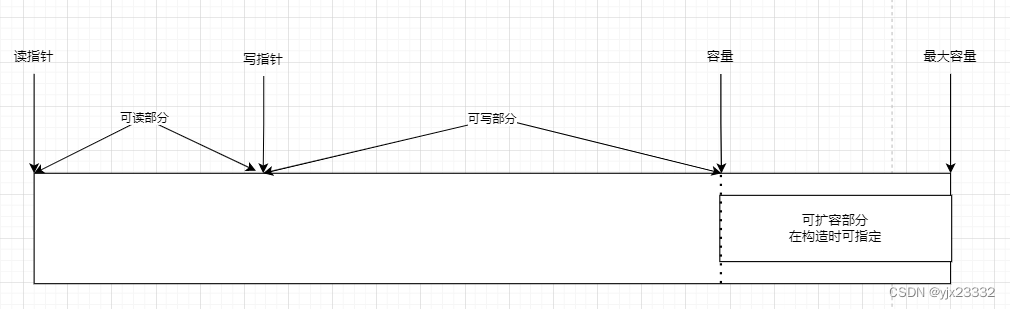

最大容量可以通过,查看
byteBuf.maxCapacity()- 1
3.4 写入
方法签名 含义 备注 writeBoolean(boolean value) 写入 boolean 值 用一字解01|00,表示true|false writeByte(int value) 写入Byte writeShort(int value) 写入short值 writeInt(int value) 写入int值 Big Endian高位写入,0x250写入后 00 00 02 50 writeIntLE(int value) 写入int值 Little Endian低位写入,0x250写入后 50 02 00 00 writeLong(long value) 写入long值 writeChar(char value) 写入char值 writeFloat(float value) 写入float值 writeDouble(double value) 写入double值 writeBytes(ByteBuf src) 写入netty的ByteBuf值 writeBytes(byte[] src) 写入byte[]值 writeBytes(ByteBuffer src) 写入nio的ByteBuffer值 writeCharSequence(CharSequence sequence,Charset charset) 写入字符串 3.4.1 扩容规则
- 如果写入后数据大小未超过512,则选择下一个16(0x0000)的整数倍。如果写入后大小为12,则扩容后为16。17,则扩容为32。
- 如果写入后数据大小超过了512,则选择下一个 2 n 2^n 2n。写入后大小为513( 2 9 2^9 29),扩容为1024( 2 10 2^{10} 210)
- 扩容不能超过最大容量(默认为有符号整型的最大值)
3.5 读出
读取一个字节
读出的部分为废弃数据,无法再次读写buffer.readByte();- 1
mark标记当前read位置,随后实现重复读取
buffer.markReaderIndex(); System.out.println(buffer.readInt()); log(buffer); buffer.resetReaderIndex(); log(buffer);- 1
- 2
- 3
- 4
- 5
- 6
此外,使用get系列的方法,不会改变readindex(读指针)位置
3.6 内存回收
- UnpooledHeapByteBuf:使用的是JVM内存,只需要等待GC回收即可
- UnpooledDirectByteBuf:使用的直接内存,需要特俗的方法来回收内存
- PooledByteBuf和其它的子类,使用了池化机制,需要更复杂的规则来回收内存
回收源码都是实现了deallocate,来对不同的类型进行回收。
protected abstract void deallocate();- 1
Netty 这里采用了引用计数法来控制回收内存,每个ByteBuf都实现了ReferenceCounted接口
- 每个ByteBuf对象的初始记数为1
- 调用release方法计数减1,如果为计数为0,ByteBuf内存被回收
- 调用retain方法计数加1,表示调用者没有用完之前,其他handler即使调用了release也不会造成回收
- 当计数为0,底层内存会被回收,这是即使ByteBuf对象还在,其各个方法均无法正常使用
有Pipeline的存在,我们无法直接用finally去buf.release()。
在Netty中,使用的是谁是最后使用者,谁负责release。
- 我们虽然有head和tail两个帮忙处理和释放,但是,如果过中间数据就被处理了,传递的是处理的后的数据,那么就无法传递到最后。
3.7 slice零拷贝
我们之前的NIO零拷贝指的操作系统上的零拷贝。
此处指的是,对原始ByteBuf进行切片成多个ByteBuf,切片后的ByteBuf并没有发生内存复制,还是使用ByteBuf的内存,切片后的ByteBuf维护独立的read,write指针package com.yjx23332.netty.test; import io.netty.buffer.ByteBuf; import io.netty.buffer.ByteBufAllocator; import static io.netty.buffer.ByteBufUtil.appendPrettyHexDump; import static io.netty.util.internal.StringUtil.NEWLINE; public class TestByteBuf { private static void log(ByteBuf buffer){ int length = buffer.readableBytes(); int rows = length/16 + (length % 15 == 0?0:1) + 4; StringBuilder buf = new StringBuilder(rows * 80 * 2) .append("read index:") .append(buffer.readerIndex()) .append(" write index:") .append(buffer.writerIndex()) .append(" capacity:") .append(buffer.capacity()) .append(NEWLINE); appendPrettyHexDump(buf,buffer); System.out.println(buf.toString()); } public static void main(String[] args){ ByteBuf byteBuf = ByteBufAllocator.DEFAULT.buffer(10); byteBuf.writeBytes(new byte[]{'a','b','c','d','e','f','g','h','i','j'}); log(byteBuf); ByteBuf f1 = byteBuf.slice(0,5); ByteBuf f2 = byteBuf.slice(5,5); log(f1); log(f2); System.out.println("================================="); f1.setByte(0,'b'); log(f1); log(byteBuf); } }- 1
- 2
- 3
- 4
- 5
- 6
- 7
- 8
- 9
- 10
- 11
- 12
- 13
- 14
- 15
- 16
- 17
- 18
- 19
- 20
- 21
- 22
- 23
- 24
- 25
- 26
- 27
- 28
- 29
- 30
- 31
- 32
- 33
- 34
- 35
- 36
- 37
- 38
- 39
- 物理上没有变化,只是逻辑上进行了分割。
- 切片后,会自动对切片的最大容量进行限制。不允许继续向切片中加入数据。
- 如果原有byteBuf被释放,分片无法使用,分片被释放,原有的也无法使用。
- 那么如何解决,我们可以用retain()来避免该问题。
public static void main(String[] args){ ByteBuf byteBuf = ByteBufAllocator.DEFAULT.buffer(10); byteBuf.writeBytes(new byte[]{'a','b','c','d','e','f','g','h','i','j'}); log(byteBuf); ByteBuf f1 = byteBuf.slice(0,5); f1.retain(); ByteBuf f2 = byteBuf.slice(5,5); f2.retain(); byteBuf.release(); log(f1); log(f2); f2.release(); f1.release(); }- 1
- 2
- 3
- 4
- 5
- 6
- 7
- 8
- 9
- 10
- 11
- 12
- 13
- 14
- 15
3.8 duplicate零拷贝
截取了原始ByteBuf的所有内容,并且没有max capacity的限制,也是与原始ByteBuf使用同一块底层内存,只是读写指针是独立的。
3.9 copy
会对底层内存数据进行深拷贝。
3.10 composite零拷贝
把多个小的ByteBuf合为一个打的ByteBuf。
通过offset和endOffset 将每一个component 所代表的ByteBuf 连接起来 就可以将全部的ByteBuf 视为一个ByteBuf。

private static final class Component { final ByteBuf srcBuf; final ByteBuf buf; int srcAdjustment; int adjustment; int offset; int endOffset; private ByteBuf slice; ... }- 1
- 2
- 3
- 4
- 5
- 6
- 7
- 8
- 9
- 10
public static void main(String[] args){ ByteBuf byteBuf1 = ByteBufAllocator.DEFAULT.buffer(5); byteBuf1.writeBytes(new byte[]{'a','b','c','d','e'}); ByteBuf byteBuf2 = ByteBufAllocator.DEFAULT.buffer(5); byteBuf1.writeBytes(new byte[]{'f','g','h','i','j'}); CompositeByteBuf buffer = ByteBufAllocator.DEFAULT.compositeBuffer(); /** * 默认 false,不自动调整写指针位置。这将导致加入失败,因为写入指针必须指向最后写入位置 * */ buffer.addComponents(true,byteBuf1,byteBuf2); log(buffer); byteBuf1.setByte(0,'3'); log(buffer); }- 1
- 2
- 3
- 4
- 5
- 6
- 7
- 8
- 9
- 10
- 11
- 12
- 13
- 14
- 15
下面写法将让bytebuf2在bytebuf1前面
public static void main(String[] args){ ByteBuf byteBuf1 = ByteBufAllocator.DEFAULT.buffer(5); byteBuf1.writeBytes(new byte[]{'a','b','c','d','e'}); ByteBuf byteBuf2 = ByteBufAllocator.DEFAULT.buffer(5); byteBuf2.writeBytes(new byte[]{'f','g','h','i','j'}); CompositeByteBuf buffer = ByteBufAllocator.DEFAULT.compositeBuffer(); /** * 是否移动写指针,写入组件位置,写入的组件 * */ buffer.addComponent(true,0,byteBuf1); buffer.addComponent(true,0,byteBuf2); log(buffer); }- 1
- 2
- 3
- 4
- 5
- 6
- 7
- 8
- 9
- 10
- 11
- 12
- 13
- 14
- 15
下面的写法因为不移动写指针,于是byteBuf1被挤出去了
public static void main(String[] args){ ByteBuf byteBuf1 = ByteBufAllocator.DEFAULT.buffer(5); byteBuf1.writeBytes(new byte[]{'a','b','c','d','e'}); ByteBuf byteBuf2 = ByteBufAllocator.DEFAULT.buffer(5); byteBuf2.writeBytes(new byte[]{'f','g','h','i','j'}); CompositeByteBuf buffer = ByteBufAllocator.DEFAULT.compositeBuffer(); /** * 是否移动写指针,写入组件位置,写入的组件 * */ buffer.addComponent(true,0,byteBuf1); buffer.addComponent(false,0,byteBuf2); log(buffer); }- 1
- 2
- 3
- 4
- 5
- 6
- 7
- 8
- 9
- 10
- 11
- 12
- 13
- 14
- 15
如果想要retain
public static void main(String[] args){ ByteBuf byteBuf1 = ByteBufAllocator.DEFAULT.buffer(5); byteBuf1.writeBytes(new byte[]{'a','b','c','d','e'}); ByteBuf byteBuf2 = ByteBufAllocator.DEFAULT.buffer(5); byteBuf2.writeBytes(new byte[]{'f','g','h','i','j'}); CompositeByteBuf buffer = ByteBufAllocator.DEFAULT.compositeBuffer(); /** * 是否移动写指针,写入组件位置,写入的组件 * */ buffer.addComponent(true,0,byteBuf1); buffer.addComponent(true,1,byteBuf2); buffer.component(0).retain(); buffer.component(1).retain(); byteBuf1.release(); byteBuf2.release(); log(buffer); }- 1
- 2
- 3
- 4
- 5
- 6
- 7
- 8
- 9
- 10
- 11
- 12
- 13
- 14
- 15
- 16
- 17
- 18
- 19
- 20
3.11 Unpooled
是一个工具类,提供了非池化的ByteBuf创建、组合、赋值等操作。
零拷贝wrappedBuffer方法,可以用来包装ByteBuf。public static void main(String[] args){ ByteBuf byteBuf1 = ByteBufAllocator.DEFAULT.buffer(5); byteBuf1.writeBytes(new byte[]{'a','b','c','d','e'}); ByteBuf byteBuf2 = ByteBufAllocator.DEFAULT.buffer(5); byteBuf1.writeBytes(new byte[]{'f','g','h','i','j'}); /** * 当包装ByteBuf个数超过1时,CompositeByteBuf * */ ByteBuf bytebuf3 = Unpooled.wrappedBuffer(byteBuf1,byteBuf2); log(bytebuf3); /** * 也可以用来包装普通字节数组,底层也不会有拷贝操作 * */ ByteBuf byteBuf4 = Unpooled.wrappedBuffer(new byte[]{1,2,3},new byte[]{4,5,6}); log(byteBuf4); }- 1
- 2
- 3
- 4
- 5
- 6
- 7
- 8
- 9
- 10
- 11
- 12
- 13
- 14
- 15
- 16
- 17
3.12 ByteBuf优势
- 池化-可以重用池中ByteBuf实例,更节约内存,减少内存溢出的可能
- 读写指针分离,不需要像ByteBuffer一样切换读写模式
- 可以自动扩容
- 链式调用,使用更流畅
- 很多地方体现零拷贝
四、练习-双向通信
package com.yjx23332.netty.test; import io.netty.bootstrap.ServerBootstrap; import io.netty.buffer.ByteBuf; import io.netty.channel.*; import io.netty.channel.nio.NioEventLoopGroup; import io.netty.channel.socket.nio.NioServerSocketChannel; import io.netty.channel.socket.nio.NioSocketChannel; import io.netty.handler.codec.string.StringEncoder; import lombok.extern.slf4j.Slf4j; import java.nio.charset.StandardCharsets; @Slf4j public class EventLoopServer { public static void main(String[] args){ new ServerBootstrap() .group(new NioEventLoopGroup(),new NioEventLoopGroup()) .channel(NioServerSocketChannel.class) .childHandler(new ChannelInitializer<NioSocketChannel>() { @Override protected void initChannel(NioSocketChannel ch) throws Exception { ch.pipeline().addLast(new ChannelInboundHandlerAdapter(){ @Override public void channelRead(ChannelHandlerContext ctx, Object msg) throws Exception { ByteBuf byteBuf = ((ByteBuf) msg); log.debug("收到信息:{}",byteBuf.toString(StandardCharsets.UTF_8)); byteBuf.release(); ByteBuf response = ctx.alloc().buffer(20); response.writeBytes("您好,您已经连接上了服务器!".getBytes(StandardCharsets.UTF_8)); ctx.writeAndFlush(response); } }); } }) .bind(8080); } }- 1
- 2
- 3
- 4
- 5
- 6
- 7
- 8
- 9
- 10
- 11
- 12
- 13
- 14
- 15
- 16
- 17
- 18
- 19
- 20
- 21
- 22
- 23
- 24
- 25
- 26
- 27
- 28
- 29
- 30
- 31
- 32
- 33
- 34
- 35
- 36
- 37
- 38
- 39
- 40
package com.yjx23332.netty.test; import io.netty.bootstrap.Bootstrap; import io.netty.buffer.ByteBuf; import io.netty.channel.*; import io.netty.channel.nio.NioEventLoopGroup; import io.netty.channel.socket.nio.NioSocketChannel; import io.netty.handler.codec.string.StringEncoder; import io.netty.handler.logging.LogLevel; import io.netty.handler.logging.LoggingHandler; import lombok.extern.slf4j.Slf4j; import java.net.InetSocketAddress; import java.nio.charset.StandardCharsets; import java.util.Scanner; @Slf4j public class EventLoopClient { public static void main(String[] args) throws InterruptedException{ NioEventLoopGroup group = new NioEventLoopGroup(); ChannelFuture channelFuture = new Bootstrap() .group(group) .channel(NioSocketChannel.class) .handler(new ChannelInitializer<NioSocketChannel>() { @Override protected void initChannel(NioSocketChannel nioSocketChannel) throws Exception { nioSocketChannel.pipeline().addLast(new ChannelInboundHandlerAdapter(){ @Override public void channelActive(ChannelHandlerContext ctx) throws Exception { ByteBuf byteBuf = ctx.alloc().buffer(10); byteBuf.writeBytes("你好,这里客户端".getBytes(StandardCharsets.UTF_8)); ctx.writeAndFlush(byteBuf); } @Override public void channelRead(ChannelHandlerContext ctx, Object msg) throws Exception { ByteBuf byteBuf = ((ByteBuf) msg); log.debug("收到信息:{}",((ByteBuf) msg).toString(StandardCharsets.UTF_8)); byteBuf.release(); } }); } }) .connect(new InetSocketAddress("localhost",8080)); } }- 1
- 2
- 3
- 4
- 5
- 6
- 7
- 8
- 9
- 10
- 11
- 12
- 13
- 14
- 15
- 16
- 17
- 18
- 19
- 20
- 21
- 22
- 23
- 24
- 25
- 26
- 27
- 28
- 29
- 30
- 31
- 32
- 33
- 34
- 35
- 36
- 37
- 38
- 39
- 40
- 41
- 42
- 43
- 44
- 45
- 46
- 47
- 48
- 49
参考文献
-
相关阅读:
你对云计算可能有些误解
【Android】功能丰富的dumpsys activity
分类与回归梯度下降公式推导
MSQL系列(九) Mysql实战-Join算法底层原理
控制台相关
HTML5期末大作业:基于 html css js仿腾讯课堂首页
极限多标签之FastXML
P1622 释放囚犯,区间dp,区间dp初始化问题
CString 转 unsigned int ;int 转16进制CString
RK3588 USB蓝牙调试
- 原文地址:https://blog.csdn.net/weixin_46949627/article/details/126691750

- 最新文章
-
沪漂五周年了:我越来越迷茫了
Agentic Skill Routing 实战:别再把所有 Skill 塞进 AI Agent 上下文
MySQL-Seconds_behind_master的精度误差
[MAF预定义ChatClient中间件-03]CachingChatClient——利用缓存省钱省时间
AI的至暗历史:从万众期待到被政府撤资,AI的两次死亡徘徊
Agent OS :五种驯服不确定性的范式
PortSwigger SQL注入LAB11
数据库即时编译JIT
[Begin]AI Learn Data Day 0
深度学习进阶(二十七)现代 LLM 的核心架构设计其二:SwiGLU