-
SpringCloud 三种服务调用方式,你知道几种?
搭建服务测试环境
测试中,服务发现层采用Netflix的Eureka搭建。
主要步骤如下:
1.引入Eureka所需依赖
org.springframework.cloud
spring-cloud-starter-eureka-server
org.springframework.cloud
spring-cloud-starter-eureka
2.修改配置文件
服务端:
eureka:
instance:
hostname: eureka9001.com #eureka服务端的实例名称
instance-id: eureka9001
client:
register-with-eureka: false #false表示不向注册中心注册自己
fetch-registry: false # #false 表示自己就是注册中心,职责就是维护服务实例,并不需要去检索服务
service-url:
defaulteZone: http://127.0.0.1:9001
客户端1:
server:
port: 8002
spring:
application:
name: licensingservice
eureka:
instance:
instance-id: licensing-service-8002
prefer-ip-address: true
client:
register-with-eureka: true
fetch-registry: true
service-url:
defaultZone: http://127.0.0.1:9001/eureka/,
客户端2:
server:
port: 8002
spring:
application:
name: licensingservice
eureka:
instance:
instance-id: licensing-service-8002
prefer-ip-address: true
client:
register-with-eureka: true
fetch-registry: true
service-url:
defaultZone: http://127.0.0.1:9001/eureka/,
一组微服务的不同实例采服务名相同,不同的实例Id区分,分别对应,spring.application.name 和eureka.instance.instance-id。
3.启动服务
服务端:
@SpringBootApplication
@EnableEurekaServer
public class EurekaServerPort9001_App {
public static void main(String[] args) {
SpringApplication.run(EurekaServerPort9001_App .class,args);
}
}
客户端:
@SpringBootApplication
@RefreshScope
@EnableEurekaClient
public class LicenseApplication_8002 {
public static void main(String[] args) {
SpringApplication.run(LicenseApplication_8002 .class, args);
}
}
4.测试
进入到Eureka服务端地址,我这是127.0.0.1:9001,可以查看注册到注册中心的服务。
如图:
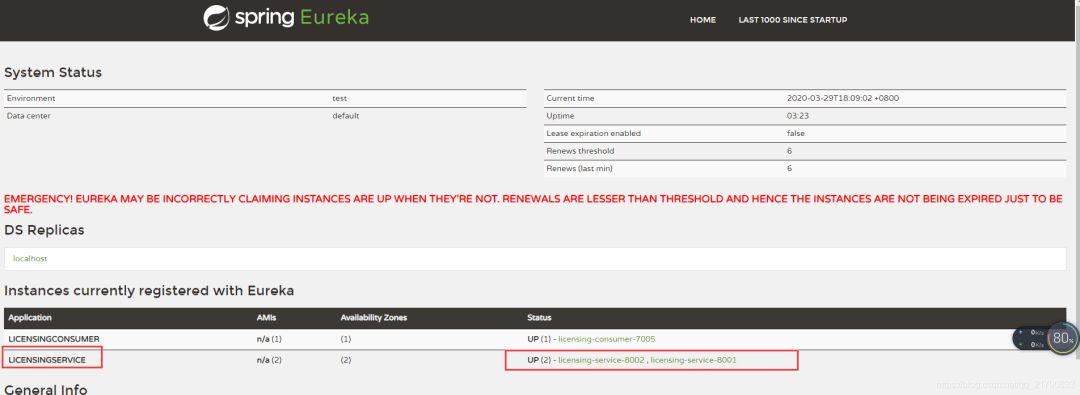
注意事项:Eureka通过三次心跳检测均通过,服务才会成功注册到注册中心,默认每次间隔10s,及初次启动服务需等待30s才能在Eureka中看到注册服务。
消费者搭建
1.Discover Client方式
微服务中服务既是消费者也可以是调用者,因此消费者配置和上面服务配置大体一致,依赖及配置参考上面服务端搭建方式。启动主类添加EnableEurekaClient注释:
@SpringBootApplication
@EnableEurekaClient
@EnableDiscoveryClient
public class ConsumerApplication_7002 {
public static void main(String[] args) {
SpringApplication.run(ConsumerApplication_7002 .class, args);
}
}
核心配置类:
@Component
public class ConsumerDiscoveryClient {
@Autowired
private DiscoveryClient discoveryClient;
public ServiceInstance getServiceInstance() {
ListserviceInstances = discoveryClient.getInstances( "licensingservice");
if (serviceInstances.size() == 0) {
return null;
}
return serviceInstances.get( 0);
}
public String getUrl(String url) {
ServiceInstance serviceInstance= this.getServiceInstance();
if (serviceInstance== null)
throw new RuntimeException( "404 ,NOT FOUND");
String urlR=String.format(url,serviceInstance.getUri().toString());
return urlR;
}
}
通过DiscoveryClient从Eureka中获取licensingservice服务的实例数组,并返回第一个实例。
测试Controller
@RestController
@RequestMapping( "test")
public class TestController {
//注意必须new,否则会被ribbon拦截器拦截,改变URL行为
private RestTemplate restTemplate= new RestTemplate();
@Autowired
private ConsumerDiscoveryClient consumerDiscoveryClient;
@RequestMapping( "/getAllEmp")
public ListgetAllLicense(){
String url=consumerDiscoveryClient.getUrl( "%s/test/getAllEmp");
return restTemplate.getForObject(url,List .class);
}
}
测试:
- 调试信息
 从该图可以直观看到licensingservice,拥有两个服务实例,并可以查看实例信息。
- 页面返回信息
 成功查询到数据库存储信息。
2.Ribbon功能的Spring RestTemplate方式
依赖同上。
核心配置类:
//指明负载均衡算法
@Bean
public IRule iRule() {
return new RoundRobinRule();
}
@Bean
@LoadBalanced //告诉Spring创建一个支持Ribbon负载均衡的RestTemplate
public RestTemplate restTemplate() {
return new RestTemplate();
}
设置负载均衡方式为轮询方式。
测试类:
@RestController
@RequestMapping( "rest")
public class ConsumerRestController {
@Autowired
private RestTemplate restTemplate;
private final static String SERVICE_URL_PREFIX = "http://LICENSINGSERVICE";
@RequestMapping( "/getById")
public Emp getById(Long id) {
MultiValueMap
paramMap.add( "id", id);
return restTemplate.postForObject(SERVICE_URL_PREFIX + "/test/getById", paramMap, Emp .class);
}
}
测试结果:
- 第一次:

- 第二次:

- 第三次:
因为采用轮询负载均衡方式分别调用不同服务实例,未区别,将name做出了一定更改。以上两种方式对比,Ribbon方式是对第一种方式的封装且内置不同的负载算法,支持自定义。使用更加简单,但此两次均需编写RestTemplate的请求方法,较为繁琐且容易出错,第三种方式Feign客户端则极大的降低了开发难度和提升速度。
3.feign客户端方式
引入依赖:
org.springframework.cloud
spring-cloud-starter-feign
主要代码:
@FeignClient(value = "LICENSINGSERVICE",fallbackFactory = ServiceImp .class)
public interface ServiceInterface {
@RequestMapping( "/test/getById")
Emp getById(@RequestParam("id") Long id);
@RequestMapping( "/test/getLicenseById")
License getLicenseById(@RequestParam("id") Long id);
@RequestMapping( "/test/getAllEmp")
ListgetAllLicense();
}
@Component
public class ServiceImp implements FallbackFactory{
@Override
public ServiceInterface create(Throwable throwable) {
return new ServiceInterface() {
@Override
public Emp getById(Long id) {
Emp emp = new Emp();
emp.setName( "i am feign fallback create");
return emp;
}
@Override
public License getLicenseById(Long id) {
return null;
}
@Override
public ListgetAllLicense() {
return null;
}
};
}
}
采用接口模式开发,通过注解指明服务名以及后备方法,在服务表现不佳时,方便返回默认的结果,而不是一个不友好的错误。
主启动类:
@SpringBootApplication
@EnableEurekaClient
@EnableFeignClients
public class Consumer_feign_Application_7004 {
public static void main(String[] args) {
SpringApplication.run(Consumer_feign_Application_7004 .class, args);
}
}
测试类:
@RestController
@RequestMapping( "rest")
public class ConsumerRestController {
@Autowired
private ServiceInterface serviceInterface;
@Autowired
private RestTemplate restTemplate;
@RequestMapping( "/getById")
public Emp getById(Long id) {
return serviceInterface.getById(id);
}
}
测试结果:
- 正常测试:

- 关闭两个服务实例,模拟服务实例死亡:
 Feign除了能简化服务调用,也可以实现当调用的服务失败时,友好的反馈信息。
此三种调用方式,由低至上,从不同层次实现了SpringCloud中的微服务互相调用。
-
相关阅读:
08-Redis 【哨兵挂了,redis 还能正常工作吗?】
获得1688商品详情 API 返回值说明
MySql截取字符串的几个常用函数详解
系统架构设计之微内核架构(Microkernel Architecture)
I.MX6U-驱动开发-1-第一个linux驱动(字符读写)
Omniverse Machinima
SeaweedFS安全配置(Security Configuration)
1057 Stack
数据可视化系列教程之组件构成
互联网Java工程师面试题·Java 总结篇·第一弹
- 原文地址:https://blog.csdn.net/jjc4261/article/details/126688925