-
【css揭秘】- 47个不可不知的 css 技巧(上篇0-19)

前言
《css 揭秘》这本书以案例的形式,介绍了 47 个网页设计经典难题的解决方案,我在学习之余将其一一记录下来,方便回顾,本文介绍前 19个案例效果及代码。
在线预览 play.csssecrets.io
1-半透明边框
难题
当你用 rgba() 或者 hsla() ,写了一个半透明的颜色,给到容器边框时候,你会发现,没有半透明效果,这是因为默认情况下,背景色会填充到边框区域,导致边框的半透明效果失效,当把 border 样式设置为 dashed 时候,你会很直观的发现这一点。

方案
使用 background-clip 属性调整上面的默认效果,这个属性的默认值为 border-box,此时背景会被元素的border 给遮盖,它还可以配置 padding-box || content-box, 此时浏览器将以内边距或内容区外沿来渲染。 修改后,border 的半透明效果就生效了。

拓展
background-clip 还有个 text 属性,很有意思,当设置为text 后,背景会被裁剪成文字的
前景色。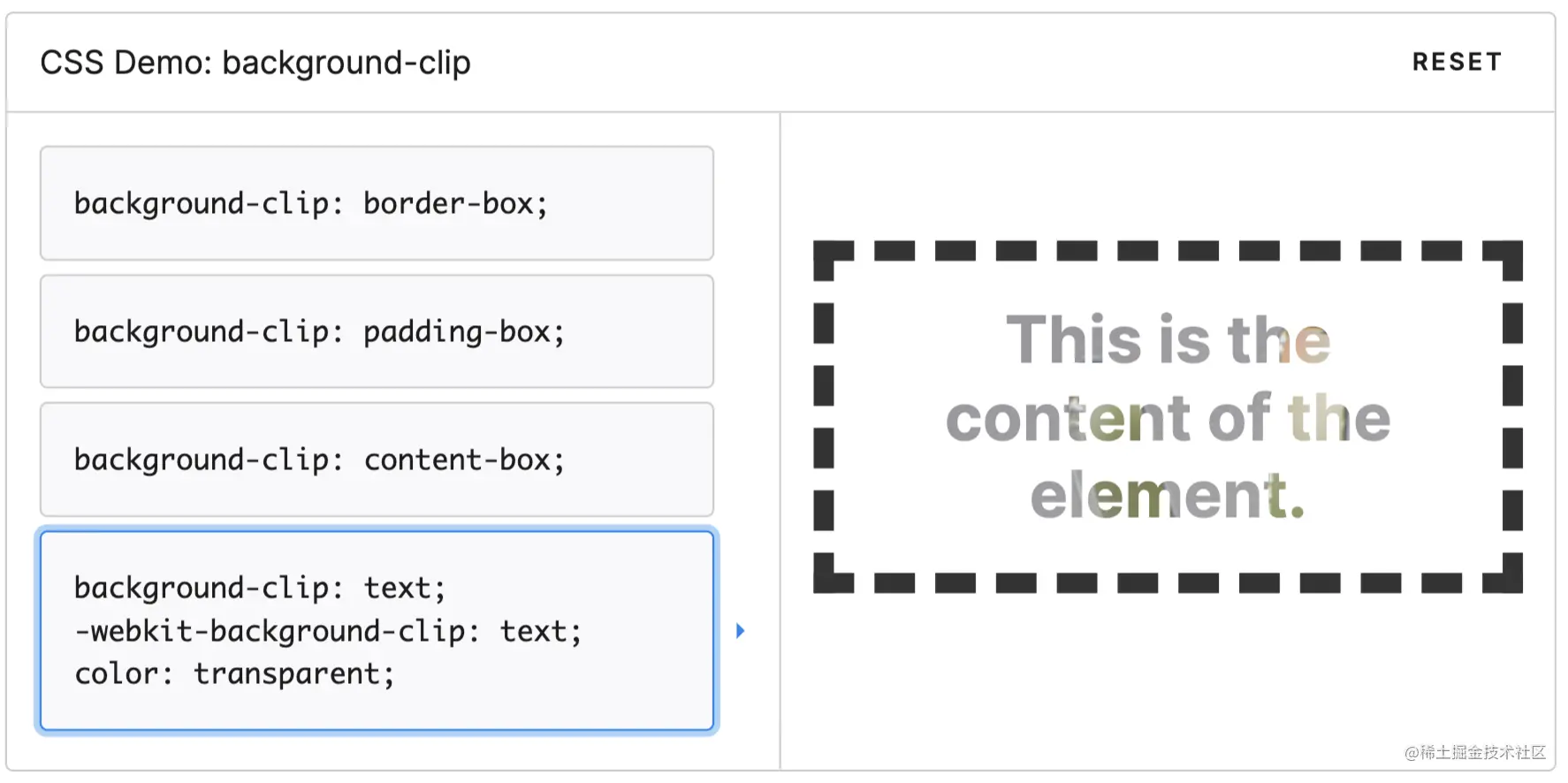
2-多重边框
难题
使用 border 来生成单一的边框很容易,但是若想生成多重边框就做不到了,通常需要使用各种 hack 例如使用多个元素来模拟实现。
方案1: box-shadow
一个正值的扩张半径加上两个为零的偏移量以及为零的模糊值,得到的“投影”其实就是一条实线;再结合 box-shadow 的逗号分隔语法,来创建任意数量的投影。

注意:
- 投影行为跟边框不完全一致
- 生成的边框默认出现在元素外圈,可以加上 inset 关键字来使投影绘制在元素的内圈,注意预留足够的内边距来腾出足够的间隙
方案2 : outline
如果只需要两层边框,可以在常规边框的基础上,增加 outline(描边)属性来产生外层的边框,特点是比较灵活。
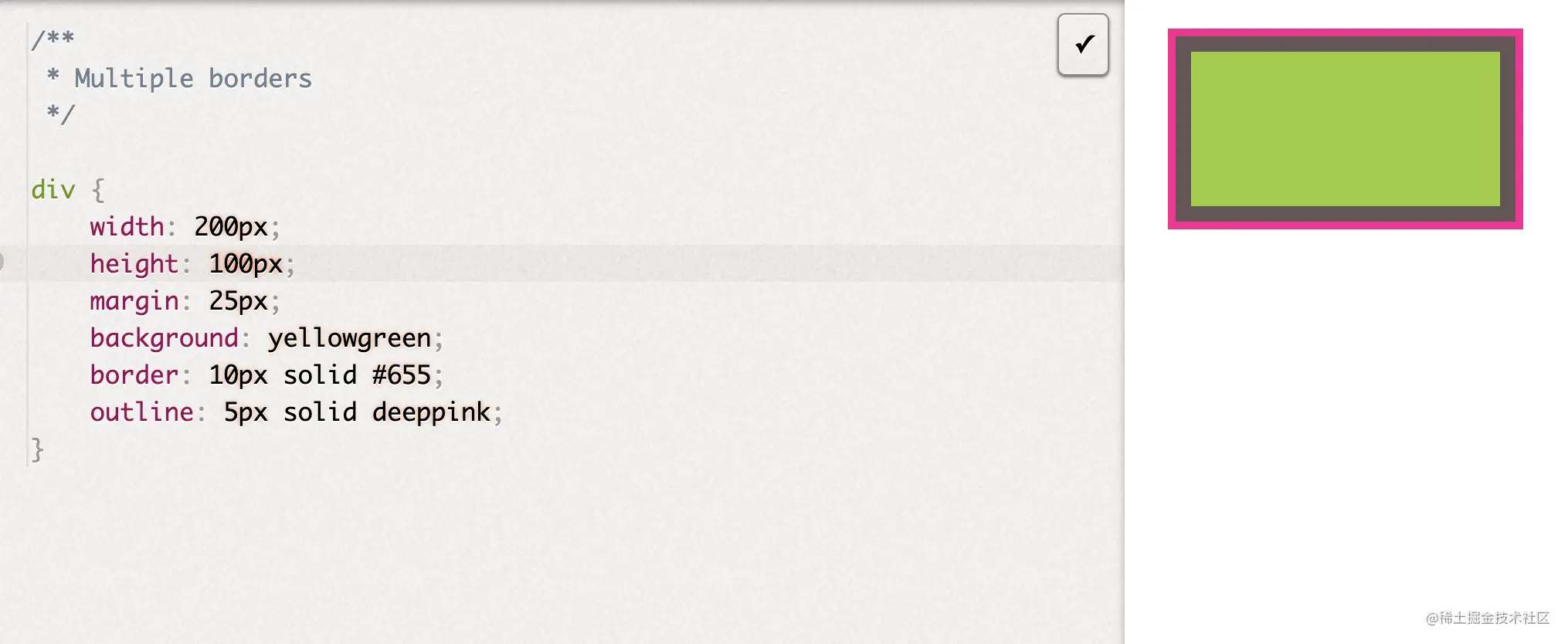
总结
这两种方案都可以实现多重边框的效果,但是outline 只适用于双层边框的场景,如果需要更多层边框,可以用 box-shadow 来实现,另外这两种方案都有一个潜在的缺陷,采用时一定要在不同的浏览器中测试好最终效果。
3-灵活的背景定位
难题
想要的效果:使背景图片针对某个角进行准确的偏移定位?
方案1 background-position

方案2 background-origin
这种方案的优点是,当内边距改变时,其会自动进行位置偏移更新,不用重新声明新的偏移量。

方案3 calc()
calc() 也可以结合 background-position 进行准确的计算偏移量,达到同样的效果。注意 calc() 函数内部的 - 和 + 运算符两侧需要各加一个空白符,否则会解析错误。
- background-position: calc(100% - 20px) calc(100% - 10px);
- 复制代码
4-边框内圆角
想要的效果如下,只显示内部圆角,外部仍然为矩角

方案1双元素叠加
使用双 div 元素叠加来实现
- <div class="parent">
- <div class="child">div>
- div>
- .parent {
- margin: 100px auto;
- width: 400px;
- height: 200px;
- background: #655;
- padding: 0.8em;
- }
- .child {
- height: 170px;
- background: tan;
- padding: 1em;
- border-radius: 0.8em;
- }
- 复制代码
方案2 单元素
这种方案在书中提到是个 hack, 果然我写这篇文章的时候,验证了谷歌浏览器中 outline 的样式会跟着border-radius 走,所以这个方案基本已经失效了。
- div {
- outline: .6em solid #655;
- box-shadow: 0 0 0 .4em #655; /* todo calculate max of this */
- max-width: 10em;
- border-radius: .8em;
- padding: 1em;
- margin: 1em;
- background: tan;
- font: 100%/1.5 sans-serif;
- }
- 复制代码
5-条纹背景

介绍
传统方案都是用 svg 或者图片来解决,这里直接使用 css 来创建条纹图案
- // 水平条纹效果
- background: linear-gradient(#fb3 50%, #58a 50%);
- background-size: 100% 30px;
- // 垂直条纹效果
- background: linear-gradient(to right, #fb3 50%, #58a 0);
- background-size: 30px 100%;
- // 斜向条纹
- background: linear-gradient(45deg, #fb3 50%, #58a 0);
- background-size: 30px 30px;
- // 同色系条纹
- background: repeating-linear-gradient(30deg, #79b, #79b 15px, #58a 0, #58a 30px);
- background: #58a;
- // 同色系条纹 重构
- background: repeating-linear-gradient(
- 30deg,
- hsla(0, 0%, 100%, .1),
- hsla(0, 0%, 100%, .1) 15px,
- transparent 0,
- transparent 30px);
- background: #58a;
- 复制代码
6-复杂的背景图案
桌布图案

- /**
- * Checkerboard
- */
- background: #eee;
- background-image:
- linear-gradient(45deg, rgba(0,0,0,.25) 25%, transparent 0, transparent 75%, rgba(0,0,0,.25) 0),
- linear-gradient(45deg, rgba(0,0,0,.25) 25%, transparent 0, transparent 75%, rgba(0,0,0,.25) 0);
- background-position: 0 0, 15px 15px;
- background-size: 30px 30px;
- min-height: 100%;
- /**
- * Polka dot
- */
- background: #655;
- background-image: radial-gradient(tan 20%, transparent 0),
- radial-gradient(tan 20%, transparent 0);
- background-size: 30px 30px;
- background-position: 0 0, 15px 15px;
- 复制代码
棋盘

- /**
- * Checkerboard
- */
- background: #eee;
- background-image:
- linear-gradient(45deg, rgba(0,0,0,.25) 25%, transparent 0, transparent 75%, rgba(0,0,0,.25) 0),
- linear-gradient(45deg, rgba(0,0,0,.25) 25%, transparent 0, transparent 75%, rgba(0,0,0,.25) 0);
- background-position: 0 0, 15px 15px;
- background-size: 30px 30px;
- min-height: 100%;
- /**
- * Checkerboard with SVG
- */
- background: #eee url('data:image/svg+xml,\
\ \ - ');
- background-size: 30px 30px;
- 复制代码
角向渐变

- /**
- * Conic gradients test
- * PASS if green gradient, FAIL if red.
- */
- background: red;
- background: conic-gradient(limegreen, green, limegreen);
- min-height: 100%;
- 复制代码
7-伪随机背景
难点:重复的平铺图案虽然美观,但是不太自然,下面介绍增加随机性背景的方法

- /**
- * Pseudorandom stripes
- */
- background: hsl(20, 40%, 90%);
- background-image:
- linear-gradient(90deg, #fb3 11px, transparent 0),
- linear-gradient(90deg, #ab4 23px, transparent 0),
- linear-gradient(90deg, #655 23px, transparent 0);
- background-size: 83px 100%, 61px 100%, 41px 100%;
- 复制代码
8-连续的图像边框
难点:通常这种效果是借助双 Dom 来实现,一个作为背景图,一个作为内容;我们的改进方案是基于一个元素来实现的。

- /**
- * Basic border-image demo
- */
- div {
- border: 40px solid transparent;
- border-image: 33.334% url('data:image/svg+xml,<svg xmlns="http:%2F%2Fwww.w3.org%2F2000%2Fsvg" width="30" height="30"> \
- <circle cx="5" cy="5" r="5" fill="%23ab4"%2F><circle cx="15" cy="5" r="5" fill=" %23655"%2F> \
- <circle cx="25" cy="5" r="5" fill="%23e07"%2F><circle cx="5" cy="15" r="5" fill=" %23655"%2F> \
- <circle cx="15" cy="15" r="5" fill="hsl(15, 25%, 75%)"%2F> \
- <circle cx="25" cy="15" r="5" fill=" %23655"%2F><circle cx="5" cy="25" r="5" fill="%23fb3"%2F> \
- <circle cx="15" cy="25" r="5" fill=" %23655"%2F><circle cx="25" cy="25" r="5" fill="%2358a"%2F><%2Fsvg>');
- padding: 1em;
- max-width: 20em;
- font: 130%/1.6 Baskerville, Palatino, serif;
- }
- div:nth-child(2) {
- margin-top: 1em;
- border-image-repeat: round;
- }

利用上面的条纹背景
- /**
- * Vintage envelope themed border
- */
- div {
- padding: 1em;
- border: 1em solid transparent;
- background: linear-gradient(white, white) padding-box,
- repeating-linear-gradient(-45deg, red 0, red 12.5%, transparent 0, transparent 25%,
- #58a 0, #58a 37.5%, transparent 0, transparent 50%) 0 / 6em 6em;
- max-width: 20em;
- font: 100%/1.6 Baskerville, Palatino, serif;
- }
9-自适应的椭圆
难点:border-radius 其实可以单独指定水平和垂直半径,用斜杠(/)分隔这两个值即可。利用这个特性可以创建椭圆圆角。
椭圆

- /**
- * Flexible ellipse
- */
- div {
- width: 20em;
- height: 10em;
- background: #fb3;
- border-radius: 50%;
- }
半椭圆

- /**
- * Flexible half ellipse
- */
- div {
- display: inline-block;
- width: 16em;
- height: 10em;
- margin: 1em;
- background: #fb3;
- border-radius: 50% / 100% 100% 0 0;
- }
- div:nth-of-type(2) { border-radius: 50% / 0 0 100% 100%; }
- div:nth-of-type(3) { border-radius: 100% 0 0 100% / 50%; }
- div:nth-of-type(4) { border-radius: 0 100% 100% 0 / 50%; }
四分之一椭圆

- /**
- * Flexible quarter ellipse
- */
- div {
- display: inline-block;
- width: 16em;
- height: 10em;
- margin: 1em;
- background: #fb3;
- border-radius: 100% 0 0 0;
- }
- div:nth-of-type(2) { border-radius: 0 100% 0 0; }
- div:nth-of-type(3) { border-radius: 0 0 100% 0; }
- div:nth-of-type(4) { border-radius: 0 0 0 100%; }
10-平行四边形
背景知识: 基本的 css 变形 transform: skewx()

潜套元素方案
可以解决文字变形的问题
- /**
- * Parallelograms — with extra HTML element
- */
- <a href="#yolo" class="button"><div>Click mediv>a>
- <button class="button"><div>Click mediv>button>
- .button { transform: skewX(45deg); }
- .button > div { transform: skewX(-45deg); }
- .button {
- display: inline-block;
- padding: .5em 1em;
- border: 0; margin: .5em;
- background: #58a;
- color: white;
- text-transform: uppercase;
- text-decoration: none;
- font: bold 200%/1 sans-serif;
- }
伪元素方案
- /**
- * Parallelograms — with pseudoelements
- */
- <a href="#yolo" class="button"><div>Click mediv>a>
- <button class="button"><div>Click mediv>button>
- .button {
- position: relative;
- display: inline-block;
- padding: .5em 1em;
- border: 0; margin: .5em;
- background: transparent;
- color: white;
- text-transform: uppercase;
- text-decoration: none;
- font: bold 200%/1 sans-serif;
- }
- .button::before {
- content: ''; /* To generate the box */
- position: absolute;
- top: 0; right: 0; bottom: 0; left: 0;
- z-index: -1;
- background: #58a;
- transform: skew(45deg);
- }
11-菱形图片
介绍两种使用 css 制作菱形图片的方案,相对于设计师提供裁切好的图片,更加灵活

基于变形的方案
- /**
- * Diamond images — via transforms
- */
- <div class="diamond">
- <img src="http://placekitten.com/200/300" />
.diamond {width: 250px;height: 250px;transform: rotate(45deg);overflow: hidden;margin: 100px;}.diamond img {max-width: 100%;transform: rotate(-45deg) scale(1.42);z-index: -1;position: relative;}裁切路径方案

- /**
- * Diamond images — via clip-path
- */
- img {
- max-width: 250px;
- margin: 20px;
- -webkit-clip-path: polygon(50% 0, 100% 50%, 50% 100%, 0 50%);
- clip-path: polygon(50% 0, 100% 50%, 50% 100%, 0 50%);
- transition: 1s;
- }
- img:hover {
- -webkit-clip-path: polygon(0 0, 100% 0, 100% 100%, 0 100%);
- clip-path: polygon(0 0, 100% 0, 100% 100%, 0 100%);
- }
12-切角效果
背景知识:css 渐变,background-size,'条纹背景'
切角是一种流行的设计风格,使用css 制作切角可以实现更加灵活和多样的颜色效果
渐变方案

- <div>Hey, focus! You’re er!div>
- /**
- * Beveled corners — with gradients
- */
- div {
- background: #58a;
- background: linear-gradient(135deg, transparent 15px, #58a 0) top left,
- linear-gradient(-135deg, transparent 15px, #58a 0) top right,
- linear-gradient(-45deg, transparent 15px, #58a 0) bottom right,
- linear-gradient(45deg, transparent 15px, #58a 0) bottom left;
- background-size: 50% 50%;
- background-repeat: no-repeat;
- padding: 1em 1.2em;
- max-width: 12em;
- color: white;
- font: 150%/1.6 Baskerville, Palatino, serif;
- }
弧形切角
渐变技巧的一个变种

- /**
- * Scoop corners
- */
- div {
- background: #58a;
- background: radial-gradient(circle at top left, transparent 15px, #58a 0) top left,
- radial-gradient(circle at top right, transparent 15px, #58a 0) top right,
- radial-gradient(circle at bottom right, transparent 15px, #58a 0) bottom right,
- radial-gradient(circle at bottom left, transparent 15px, #58a 0) bottom left;
- background-size: 50% 50%;
- background-repeat: no-repeat;
- padding: 1em 1.2em;
- max-width: 12em;
- color: white;
- font: 130%/1.6 Baskerville, Palatino, serif;
- }
内联 SVG 与 border-image 方案

- /**
- * Beveled corners — with border-image and an inline SVG
- */
- div {
- border: 21px solid transparent;
- border-image: 1 url('data:image/svg+xml,\
- <svg xmlns="http://www.w3.org/2000/svg" width="3" height="3" fill="%2358a">\
- <polygon points="0,1 1,0 2,0 3,1 3,2 2,3 1,3 0,2" />\
- svg>');
- background: #58a;
- background-clip: padding-box;
- padding: .2em .3em;
- max-width: 12em;
- color: white;
- font: 150%/1.6 Baskerville, Palatino, serif;
- }
裁切路径方案

强烈推荐这种,可以比较方便的制作大量不同颜色的切角图片,只需要改变背景色就好。
- /**
- * Beveled corners — with clip-path
- */
- div {
- background: #58a;
- -webkit-clip-path:
- polygon(20px 0, calc(100% - 20px) 0, 100% 20px, 100% calc(100% - 20px),
- calc(100% - 20px) 100%,
- 20px 100%, 0 calc(100% - 20px), 0 20px);
- clip-path:
- polygon(20px 0, calc(100% - 20px) 0, 100% 20px, 100% calc(100% - 20px),
- calc(100% - 20px) 100%,
- 20px 100%, 0 calc(100% - 20px), 0 20px);
- padding: 1em 1.2em;
- max-width: 12em;
- color: white;
- font: 150%/1.6 Baskerville, Palatino, serif;
- }
13-梯形标签页
背景知识:基本的3D变形,“平行四边形”
方案1: 伪元素制作两条斜边,border 制作上下平行边 方案2: 3D 旋转,普通的3D 旋转会有副作用比如 文字的变形

- <nav>
- <a href="#">Homea>
- <a href="#" class="selected">Projectsa>
- <a href="#">Abouta>
- nav>
- <main>
- Content area
- main>
- <nav class="left">
- <a href="#">Homea>
- <a href="#" class="selected">Projectsa>
- <a href="#">Abouta>
- nav>
- <main>
- Content area
- main>
- <nav class="right">
- <a href="#">Homea>
- <a href="#" class="selected">Projectsa>
- <a href="#">Abouta>
- nav>
- <main>
- Content area
- main>
- /**
- * Trapezoid tabs
- */
- body {
- padding: 40px;
- font: 130%/2 Frutiger LT Std, sans-serif;
- }
- nav {
- position: relative;
- z-index: 1;
- padding-left: 1em;
- }
- nav > a {
- position: relative;
- display: inline-block;
- padding: .3em 1em 0;
- color: inherit;
- text-decoration: none;
- margin: 0 -.3em;
- }
- nav > a::before,
- main {
- border: .1em solid rgba(0,0,0,.4);
- }
- nav a::before {
- content: ''; /* To generate the box */
- position: absolute;
- top: 0; right: 0; bottom: 0; left: 0;
- z-index: -1;
- border-bottom: none;
- border-radius: .5em .5em 0 0;
- background: #ccc linear-gradient(hsla(0,0%,100%,.6), hsla(0,0%,100%,0));
- box-shadow: 0 .15em white inset;
- transform: scale(1.1, 1.3) perspective(.5em) rotateX(5deg);
- transform-origin: bottom;
- }
- nav a.selected { z-index: 2;}
- nav a.selected::before {
- background-color: #eee;
- margin-bottom: -.08em;
- }
- main {
- display: block;
- margin-bottom: 1em;
- background: #eee;
- padding: 1em;
- border-radius: .15em;
- }
- nav.left > a::before {
- transform: scale(1.2, 1.3) perspective(.5em) rotateX(5deg);
- transform-origin: bottom left;
- }
- nav.right { padding-left: 2em; }
- nav.right > a::before {
- transform: scale(1.2, 1.3) perspective(.5em) rotateX(5deg);
- transform-origin: bottom right;
- }
14-简单的饼图

基于transtorm 和 animation
- /**
- * Animated pie chart
- */
- .pie {
- width: 100px; height: 100px;
- border-radius: 50%;
- background: yellowgreen;
- background-image: linear-gradient(to right, transparent 50%, currentColor 0);
- color: #655;
- }
- .pie::before {
- content: '';
- display: block;
- margin-left: 50%;
- height: 100%;
- border-radius: 0 100% 100% 0 / 50%;
- background-color: inherit;
- transform-origin: left;
- animation: spin 3s linear infinite, bg 6s step-end infinite;
- }
- @keyframes spin {
- to { transform: rotate(.5turn); }
- }
- @keyframes bg {
- 50% { background: currentColor; }
- }

- /**
- * Static pie charts
- */
- .pie {
- display: inline-block;
- position: relative;
- width: 100px;
- line-height: 100px;
- border-radius: 50%;
- background: yellowgreen;
- background-image: linear-gradient(to right, transparent 50%, #655 0);
- color: transparent;
- text-align: center;
- }
- @keyframes spin {
- to { transform: rotate(.5turn); }
- }
- @keyframes bg {
- 50% { background: #655; }
- }
- .pie::before {
- content: '';
- position: absolute;
- top: 0; left: 50%;
- width: 50%; height: 100%;
- border-radius: 0 100% 100% 0 / 50%;
- background-color: inherit;
- transform-origin: left;
- animation: spin 50s linear infinite, bg 100s step-end infinite;
- animation-play-state: paused;
- animation-delay: inherit;
- }
SVG 方案

- /**
- * Pie charts — with SVG
- */
- .pie {
- width: 100px;
- height: 100px;
- display: inline-block;
- margin: 10px;
- transform: rotate(-90deg);
- }
- svg {
- background: yellowgreen;
- border-radius: 50%;
- }
- circle {
- fill: yellowgreen;
- stroke: #655;
- stroke-width: 32;
- }
- @keyframes grow { to { stroke-dasharray: 100 100 } }
- .pie.animated circle {
- animation: grow 2s infinite linear;
- }
15-单侧投影
单侧投影

- /**
- * One-sided shadow
- */
- div {
- width: 1.6in;
- height: 1in;
- background: #fb3;
- box-shadow: 0 5px 4px -4px black;
- }
邻边投影

- /**
- * One-sided shadow
- */
- div {
- width: 1.6in;
- height: 1in;
- background: #fb3;
- box-shadow: 3px 3px 6px -3px black;
- }
双侧投影

- /**
- * One-sided shadow
- */
- div {
- width: 1.6in;
- height: 1in;
- background: #fb3;
- box-shadow: 5px 0 5px -5px black,
- -5px 0 5px -5px black;
- }
- 复制代码
16-不规则投影
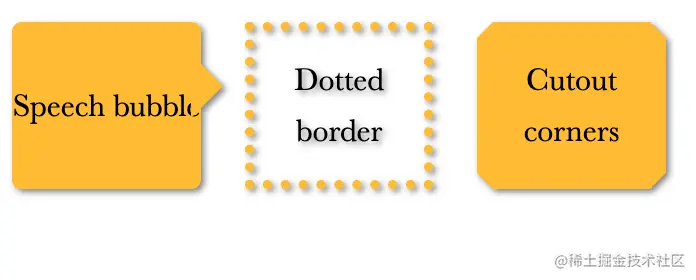
- <div class="speech">Speech bubblediv>
- <div class="dotted">Dotted borderdiv>
- <div class="cutout">Cutout cornersdiv>
- /**
- * Irregular drop-shadows
- */
- div {
- position: relative;
- display: inline-flex;
- flex-direction: column;
- justify-content: center;
- vertical-align: bottom;
- box-sizing: border-box;
- width: 5.9em;
- height: 5.2em;
- margin: .6em;
- background: #fb3;
- /*box-shadow: .1em .1em .3em rgba(0,0,0,.5);*/
- -webkit-filter: drop-shadow(.1em .1em .1em rgba(0,0,0,.5));
- filter: drop-shadow(.1em .1em .1em rgba(0,0,0,.5));
- font: 200%/1.6 Baskerville, Palatino, serif;
- text-align: center;
- }
- .speech {
- border-radius: .3em;
- }
- .speech::before {
- content: '';
- position: absolute;
- top: 1em;
- right: -.7em;
- width: 0;
- height: 0;
- border: 1em solid transparent;
- border-left-color: #fb3;
- border-right-width: 0;
- }
- .dotted {
- background: transparent;
- border: .3em dotted #fb3;
- }
- .cutout {
- border: .5em solid #58a;
- border-image: 1 url('data:image/svg+xml,\
- width="3" height="3" fill="%23fb3">\
\ - ');
- background-clip: padding-box;
- }
17-染色效果
基于滤镜的方案

- /**
- * Color tinting — with filters
- */
- img {
- max-width: 640px;
- transition: 1s filter, 1s -webkit-filter;
- -webkit-filter: sepia() saturate(4) hue-rotate(295deg);
- filter: sepia() saturate(4) hue-rotate(295deg);
- }
- img:hover,
- img:focus {
- -webkit-filter: none;
- filter: none;
- }
基于混合模式的方案

- /**
- * Color tinting — with blending modes
- */
- .tinted-image {
- width: 300px; height: 440px;
- background-size: cover;
- background-color: hsl(335, 100%, 50%);
- background-blend-mode: luminosity;
- transition: .5s background-color;
- }
- .tinted-image:hover {
- background-color: transparent;
- }
18-毛玻璃效果
背景知识:PGBA/HSLA 颜色 , filter: blur()

- /**
- * Frosted glass effect
- */
- body {
- min-height: 100vh;
- box-sizing: border-box;
- margin: 0;
- padding-top: calc(50vh - 6em);
- font: 150%/1.6 Baskerville, Palatino, serif;
- }
- body, main::before {
- background: url("http://placekitten.com/200/300") 0 / cover fixed;
- }
- main {
- position: relative;
- margin: 0 auto;
- padding: 1em;
- max-width: 23em;
- background: hsla(0,0%,100%,.25) border-box;
- overflow: hidden;
- border-radius: .3em;
- box-shadow: 0 0 0 1px hsla(0,0%,100%,.3) inset,
- 0 .5em 1em rgba(0, 0, 0, 0.6);
- text-shadow: 0 1px 1px hsla(0,0%,100%,.3);
- }
- main::before {
- content: '';
- position: absolute;
- top: 0; right: 0; bottom: 0; left: 0;
- margin: -30px;
- z-index: -1;
- -webkit-filter: blur(20px);
- filter: blur(20px);
- }
- blockquote { font-style: italic }
- blockquote cite { font-style: normal; }
- 复制代码
19-折角效果
背景知识: css 变形, css 渐变, “切角效果”
45度折角的解决方案

- /**
- * Folded corner effect
- */
- div {
- width: 12em;
- background: #58a; /* Fallback */
- background:
- linear-gradient(to left bottom, transparent 50%, rgba(0,0,0,.4) 0) 100% 0 no-repeat,
- linear-gradient(-135deg, transparent 1.5em, #58a 0);
- background-size: 2em 2em, auto;
- padding: 2em;
- color: white;
- font: 100%/1.6 Baskerville, Palatino, serif;
- }
- 复制代码
其他角度的解决方案
- /**
- * Folded corner effect — at an angle
- */
- div {
- position: relative;
- width: 12em;
- background: #58a; /* Fallback */
- background: linear-gradient(-150deg, transparent 1.5em, #58a 0);
- padding: 2em;
- color: white;
- font: 100%/1.6 Baskerville, Palatino, serif;
- border-radius: .5em;
- }
- div::before {
- content: '';
- position: absolute;
- top: 0; right: 0;
- width: 1.73em; height: 3em;
- background: linear-gradient(to left bottom, transparent 50%, rgba(0,0,0,.2) 0, rgba(0,0,0,.4)) 100% 0 no-repeat;
- transform: translateY(-1.3em) rotate(-30deg);
- transform-origin: bottom right;
- border-bottom-left-radius: .5em;
- box-shadow: -.2em .2em .3em -.1em rgba(0,0,0,.15)
- }
总结给大家推荐一个实用面试题库
1、前端面试题库 (面试必备) 推荐:★★★★★
地址:前端面试题库
3.21 小红书薯条改版了,都改了些什么呢?【玩赚小红书】
分享的ise文件synthesize出错,如何解决?
【测试工具】Jmeter常用beanshell
Encoder-decoder 与Decoder-only 模型之间的使用区别
yolov5官方开源项目地址github记录一下
[每周一更]-(第21期):什么是RPC?
滚珠螺杆应如何存放避免受损
Elasticsearch Data Stream 数据流使用
PostgreSQL操作-psql命令详解
- 最新文章
-
沪漂五周年了:我越来越迷茫了
Agentic Skill Routing 实战:别再把所有 Skill 塞进 AI Agent 上下文
MySQL-Seconds_behind_master的精度误差
[MAF预定义ChatClient中间件-03]CachingChatClient——利用缓存省钱省时间
AI的至暗历史:从万众期待到被政府撤资,AI的两次死亡徘徊
Agent OS :五种驯服不确定性的范式
PortSwigger SQL注入LAB11
数据库即时编译JIT
[Begin]AI Learn Data Day 0
深度学习进阶(二十七)现代 LLM 的核心架构设计其二:SwiGLU