-
Go Web——Gin使用session
Sessions介绍
因为http是无状态、短连接,如何保存客户端和服务器直接的会话状态呢?可以使用session。
session 是另一种记录客户状态的机制,不同的是 Cookie 保存在客户端浏览器中,而session保存在服务器上。
主要功能:
- 简单的API:将其用作设置签名(以及可选的加密)cookie的简便方法。
- 内置的后端可将session存储在cookie或文件系统中。
- Flash消息:一直持续读取的session值。
- 切换session持久性(又称“记住我”)和设置其他属性的便捷方法。
- 旋转身份验证和加密密钥的机制。
- 每个请求有多个session,即使使用不同的后端也是如此。
- 自定义session后端的接口和基础结构:可以使用通用API检索并批量保存来自不同商店的session。
工作流程:
当客户端浏览器第一次访问服务器并发送请求时,服务器端会创建一个session 对象,生成一个类似于 key-value 的键值对,然后将 value 保存到服务器 ,将 key(cookie)返回到浏览器(客户)端。浏览器下次访问时会携带 key(cookie),找到对应的 session(value)。
gin session中间件
gin 本身没有对session的支持,可以使用第三方中间件。
下载:
go get github.com/gin-contrib/sessions- 1
导入:
import "github.com/gin-contrib/sessions"- 1
该中间件提供了很多后端支持:
gin session中间件的基本使用
type Session
type Session interface { // ID of the session, generated by stores. It should not be used for user data. ID() string // Get returns the session value associated to the given key. Get(key interface{}) interface{} // Set sets the session value associated to the given key. Set(key interface{}, val interface{}) // Delete removes the session value associated to the given key. Delete(key interface{}) // Clear deletes all values in the session. Clear() // AddFlash adds a flash message to the session. // A single variadic argument is accepted, and it is optional: it defines the flash key. // If not defined "_flash" is used by default. AddFlash(value interface{}, vars ...string) // Flashes returns a slice of flash messages from the session. // A single variadic argument is accepted, and it is optional: it defines the flash key. // If not defined "_flash" is used by default. Flashes(vars ...string) []interface{} // Options sets configuration for a session. Options(Options) // Save saves all sessions used during the current request. Save() error }- 1
- 2
- 3
- 4
- 5
- 6
- 7
- 8
- 9
- 10
- 11
- 12
- 13
- 14
- 15
- 16
- 17
- 18
- 19
- 20
- 21
- 22
- 23
- 24
基于 Cookie 存储单个session
package main import ( "github.com/gin-contrib/sessions" "github.com/gin-contrib/sessions/cookie" "github.com/gin-gonic/gin" ) func Handler(c *gin.Context) { session := sessions.Default(c) // 获得session的Get if session.Get("hello") != "world" { // 设置 session.Set("hello", "world") // 保存 session.Save() } c.JSON(200, gin.H{"hello": session.Get("hello")}) } func main() { r := gin.Default() store := cookie.NewStore([]byte("secret")) // 使用session中间件 r.Use(sessions.Sessions("mysession", store)) r.GET("/hello", Handler) r.Run() }- 1
- 2
- 3
- 4
- 5
- 6
- 7
- 8
- 9
- 10
- 11
- 12
- 13
- 14
- 15
- 16
- 17
- 18
- 19
- 20
- 21
- 22
- 23
- 24
- 25
- 26
- 27
- 28
- 29
- 30
- 31
- 32
- 33
浏览器输入:
localhost:8080/hello查看结果:

基于 Cookie 存储多个sessions
package main import ( "github.com/gin-contrib/sessions" "github.com/gin-contrib/sessions/cookie" "github.com/gin-gonic/gin" ) func Handler(c *gin.Context) { sessionA := sessions.DefaultMany(c, "a") sessionB := sessions.DefaultMany(c, "b") if sessionA.Get("hello") != "world!" { sessionA.Set("hello", "world!") sessionA.Save() } if sessionB.Get("hello") != "world?" { sessionB.Set("hello", "world?") sessionB.Save() } c.JSON(200, gin.H{ "a": sessionA.Get("hello"), "b": sessionB.Get("hello"), }) } func main() { r := gin.Default() store := cookie.NewStore([]byte("secret")) sessionNames := []string{"a", "b"} r.Use(sessions.SessionsMany(sessionNames, store)) r.GET("/hello", Handler) r.Run() }- 1
- 2
- 3
- 4
- 5
- 6
- 7
- 8
- 9
- 10
- 11
- 12
- 13
- 14
- 15
- 16
- 17
- 18
- 19
- 20
- 21
- 22
- 23
- 24
- 25
- 26
- 27
- 28
- 29
- 30
- 31
- 32
- 33
- 34
- 35
- 36
- 37
浏览器输入:
localhost:8080/hello查看结果:

基于 Redis 存储 Session
- 如果我们想将 session 数据保存到 redis 中,只要将 session 的存储引擎改成 redis 即可。
- 首先安装 redis 存储引擎的包
go get github.com/gin-contrib/sessions/redis- 1
实例演示:
package main import ( "github.com/gin-contrib/sessions" "github.com/gin-contrib/sessions/redis" "github.com/gin-gonic/gin" ) //设置session func setSession(c *gin.Context) { //初始化 session 对象 session := sessions.Default(c) //设置过期时间,单位是秒 session.Options(sessions.Options{ MaxAge: 3600, }) //设置 Session session.Set("username", "Psych") session.Save() c.String(200, "session设置成功: %v", session.Get("username")) } //获取session func getSession(c *gin.Context) { // 初始化 session 对象 session := sessions.Default(c) // 通过 session.Get 读取 session 值 username := session.Get("username") c.String(200, "查询session成功: %v", username) } func main() { engine := gin.Default() // 初始化基于 redis 的存储引擎 //第 1 个参数 - redis 最大的空闲连接数 //第 2 个参数 - 数通信协议 tcp 或者 udp //第 3 个参数 - redis 地址, 格式,host:port //第 4 个参数 - redis 密码 //第 5 个参数 - session 加密密钥 store, _ := redis.NewStore(10, "tcp", "localhost:6379", "", []byte("secret3652")) // 设置 session 中间件,参数 mysession,指的是 session 的名字,也是 cookie 的名字 // store 是前面创建的存储引擎,我们可以替换成其他存储引擎 engine.Use(sessions.Sessions("mysession", store)) engine.GET("/setSession", setSession) engine.GET("/getSession", getSession) engine.Run() }- 1
- 2
- 3
- 4
- 5
- 6
- 7
- 8
- 9
- 10
- 11
- 12
- 13
- 14
- 15
- 16
- 17
- 18
- 19
- 20
- 21
- 22
- 23
- 24
- 25
- 26
- 27
- 28
- 29
- 30
- 31
- 32
- 33
- 34
- 35
- 36
- 37
- 38
- 39
- 40
- 41
- 42
- 43
- 44
- 45
- 46
- 47
- 48
- 49
首先打开redis服务端
然后浏览器输入
localhost:8080/setSession显示结果: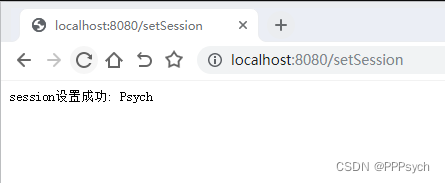
将url更改为:
localhost:8080/getSession查看结果
其他后端示例
参考:https://pkg.go.dev/github.com/gin-contrib/sessions#section-readme
-
相关阅读:
这980道JAVA面试题,刷完50%妥妥的也能上岸
数论分块
【测试沉思录】23. 如何实现基于场景的接口自动化测试用例?
猿创征文|深度学习基于ResNet18网络完成图像分类
MFC自定义消息的实现方法----(线程向主对话框发送消息)、MFC不能用UpdateData的解决方法
【文件格式_XML_HTML_】XML、HTML文件
Python flask怎么连接MySQL?
图像处理之LSB Matching Revisited论文复现
WPF分享一个登录界面设计
ASAN地址消毒+GCOV覆盖率分析
- 原文地址:https://blog.csdn.net/qq_39280718/article/details/126528563
