-
web前端面试高频考点——Vue的高级特性(动态组件、异步加载、keep-alive、mixin、Vuex、Vue-Router)
系列文章目录
一、Vue高级特性
1、动态组件
- 按未知顺序渲染组件
图片出处:https://coding.imooc.com/lesson/419.html#mid=33846

示例:动态组件的使用index.vue 父组件
- 在 data 中接收组件名
- 在
:is="xxx"绑定组件
<template> <div> <p>vue 高级特性-动态组件</p> <hr /> <component :is="NextTick"></component> </div> </template> <script> import NextTick from "./NextTick.vue"; export default { components: { NextTick }, data() { return { NextTick }; }, }; </script>- 1
- 2
- 3
- 4
- 5
- 6
- 7
- 8
- 9
- 10
- 11
- 12
- 13
- 14
- 15
- 16
- 17
- 18
- 19
- 20

示例:动态渲染多个组件
index.vue 父组件
<template> <div> <p>vue 高级特性-动态组件</p> <hr /> <div v-for="(val, key) in newsData" :key="key"> <component :is="val.type"></component> </div> </div> </template> <script> import myText from './myText' import myImage from './myImage' export default { components: { myText, myImage }, data() { return { newsData: { 1: { type: 'myText' }, 2: { type: 'myImage' } } }; }, }; </script>- 1
- 2
- 3
- 4
- 5
- 6
- 7
- 8
- 9
- 10
- 11
- 12
- 13
- 14
- 15
- 16
- 17
- 18
- 19
- 20
- 21
- 22
- 23
- 24
- 25
- 26
- 27
- 28
- 29
- 30
- 31
- 32
- 33
myText 子组件
<template> <div> <p>我是 myText 组件</p> --------------------- </div> </template>- 1
- 2
- 3
- 4
- 5
- 6
myImage 子组件
<template> <div> <p>我是 myImage 组件</p> <img src="xxx"> </div> </template>- 1
- 2
- 3
- 4
- 5
- 6

2、vue异步加载组件
- import() 函数
- 按需加载,异步加载大组件
示例:异步加载组件(按需加载,用的时候才加载)
index.vue 父组件
- components 里面按需引入组件
<template> <div> <my-image v-if="showImage" /> <button @click="showImage = true">点我显示</button> </div> </template> <script> export default { components: { myImage: () => import("./myImage"), }, data() { return { showImage: false, }; }, }; </script>- 1
- 2
- 3
- 4
- 5
- 6
- 7
- 8
- 9
- 10
- 11
- 12
- 13
- 14
- 15
- 16
- 17
- 18
- 19
myImage.vue 子组件
<template> <div> <p>我是 myImage 组件</p> <img src="xxx"> </div> </template>- 1
- 2
- 3
- 4
- 5
- 6

3、vue缓存组件(keep-alive)
- 缓存组件
- 频繁切换,不需要重复渲染
- Vue性能优化的一种方法
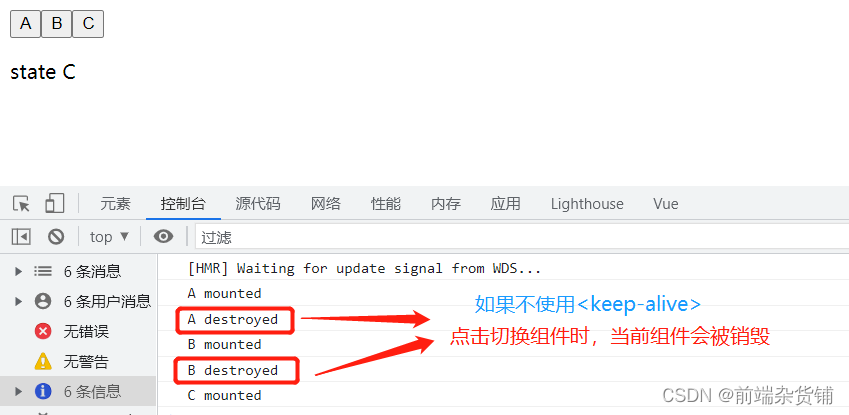
示例:keep-alive 实例,切换其他组件当前组件不会被销毁
KeepAlive.vue 父组件
- 导入 A,B,C 三个子组件
- 点击按钮显示对应组件的内容
<template> <div> <button @click="changeState('A')">A</button> <button @click="changeState('B')">B</button> <button @click="changeState('C')">C</button> <keep-alive> <keep-alive-state-a v-if="state === 'A'"></keep-alive-state-a> <keep-alive-state-b v-if="state === 'B'"></keep-alive-state-b> <keep-alive-state-c v-if="state === 'C'"></keep-alive-state-c> </keep-alive> </div> </template> <script> import KeepAliveStateA from "./KeepAliveStateA.vue"; import KeepAliveStateB from "./KeepAliveStateB.vue"; import KeepAliveStateC from "./KeepAliveStateC.vue"; export default { components: { KeepAliveStateA, KeepAliveStateB, KeepAliveStateC, }, data() { return { state: "A", }; }, methods: { changeState(state) { this.state = state; }, }, }; </script>- 1
- 2
- 3
- 4
- 5
- 6
- 7
- 8
- 9
- 10
- 11
- 12
- 13
- 14
- 15
- 16
- 17
- 18
- 19
- 20
- 21
- 22
- 23
- 24
- 25
- 26
- 27
- 28
- 29
- 30
- 31
- 32
- 33
- 34
- 35
- 36
KeepAliveStateA.vue 子组件
<template> <div> <p>state A</p> </div> </template> <script> export default { mounted() { console.log("A mounted"); }, destroyed() { console.log("A destroyed"); }, }; </script>- 1
- 2
- 3
- 4
- 5
- 6
- 7
- 8
- 9
- 10
- 11
- 12
- 13
- 14
- 15
- 16
KeepAliveStateB.vue 子组件
<template> <div> <p>state B</p> </div> </template> <script> export default { mounted() { console.log("B mounted"); }, destroyed() { console.log("B destroyed"); }, }; </script>- 1
- 2
- 3
- 4
- 5
- 6
- 7
- 8
- 9
- 10
- 11
- 12
- 13
- 14
- 15
- 16
KeepAliveStateC.vue 子组件
<template> <div> <p>state C</p> </div> </template> <script> export default { mounted() { console.log("C mounted"); }, destroyed() { console.log("C destroyed"); }, }; </script>- 1
- 2
- 3
- 4
- 5
- 6
- 7
- 8
- 9
- 10
- 11
- 12
- 13
- 14
- 15
- 16

4、mixin
- 多个组件有相同的逻辑,抽离出来
- mixin 并不是完美的解决方案,会有一些问题
- Vue3 提出的 Composition API 旨在解决这些问题
mixin 的一些问题
(1)变量来源不明确,不利于阅读
(2)多个 mixin 可能会造成命名冲突
(3)mixin 和组件可能出现多对多的关系,复杂度较高示例:使用 mixin
MixinDemo.vue 组件
- 首先导入
mixin.js文件 mixins: [xxx]使用它
<template> <div> <p>{{ name }} {{ major }} {{ city }}</p> <button @click="showName">显示姓名</button> </div> </template> <script> import myMixin from "./mixin"; export default { mixins: [myMixin], data() { return { name: "杂货铺", major: "web 前端", }; }, mounted() { console.log("component mounted", this.name); }, }; </script>- 1
- 2
- 3
- 4
- 5
- 6
- 7
- 8
- 9
- 10
- 11
- 12
- 13
- 14
- 15
- 16
- 17
- 18
- 19
- 20
- 21
- 22
mixin.js 文件
- mixin.js 里面的值和方法,可以在引用它的组件里直接使用
export default { data() { return { city: "北京", }; }, methods: { showName() { console.log("点击显示名字:", this.name); }, }, mounted() { console.log("mixin mounted", this.name); }, };- 1
- 2
- 3
- 4
- 5
- 6
- 7
- 8
- 9
- 10
- 11
- 12
- 13
- 14
- 15

二、Vuex
1、Vuex基本概念
- state
- getters
- action
- mutation
2、用于Vue组件
- dispatch
- commit
- mapState
- mapGetters
- mapActions
- mapMutations

三、Vue-router
- 路由模式(hash、H5 history)
- 路由配置(动态路由、懒加载)
- hash 模式(默认),如 http://abc.com/#/user/10(一般选择 hash 模式)
- H5 history 模式(默认),如 http://abc.com/user/10(需要 server 端支持)
1、动态路由
const User = { // 获取参数,如 10 20 template: 'User {{ $router.params.id }}' } const router = new VueRouter({ routes: [ // 动态路径参数 以冒号开头。能命中 `/user/10` `/user/20` 等格式的路由 {path: '/user/:id', component: User} ] })- 1
- 2
- 3
- 4
- 5
- 6
- 7
- 8
- 9
- 10
2、懒加载
- 按需引入,实现懒加载
export default new VueRouter({ routes: [ { path: '/', component: () => import('./components/xxx') } ] })- 1
- 2
- 3
- 4
- 5
- 6
- 7
- 8
不积跬步无以至千里 不积小流无以成江海点个关注不迷路,持续更新中…
-
相关阅读:
C++ vector容器的介绍与使用
大数据资料和开发工具
路由器配置静态和默认路由实现VLAN之间的通信
数据结构与算法编程题7
运动无线蓝牙耳机哪个品牌好、蓝牙运动耳机排行榜10强
国庆day6---学过的汇编指令整合
代理IP与Socks5代理:跨界电商之安全防护与智能数据引擎
一文学会java正则表达式
安装 Lua 的 HTTP 库
自动化测试练手项目推荐
- 原文地址:https://blog.csdn.net/qq_45902692/article/details/126478821