-
【SwiftUI模块】0012、SwiftUI-搭建一个类似微博、网易云、抖音个人页面的头部下拉放大图片效果
技术:SwiftUI、SwiftUI3.0、下拉放大、tableview粘性头部、头部下拉放大图片、Spotify
运行环境:
SwiftUI3.0 + Xcode13.4.1 + MacOS12.5 + iPhone Simulator iPhone 13 Pro Max概述
使用SwiftUI做一个一个类似
微博、网易云、抖音个人页面的头部下拉放大图片- 效果详细
一、运行效果

二、项目结构图

三、程序实现 - 过程
思路:
1.创建头部模块 进行测试上下滚动拥有放大缩小效果
2.搭建分类模块 固定在头部下面
3.搭建列表模块
4.监听滚动偏移的操作1.创建一个项目命名为
SpotifyResponvieUI

1.1.引入资源文件和颜色
颜色
BG#281A1A
Green#4DD037
随机图片9张
个人大图背景1张
logo1张
2. 创建一个虚拟文件
New Group命名为View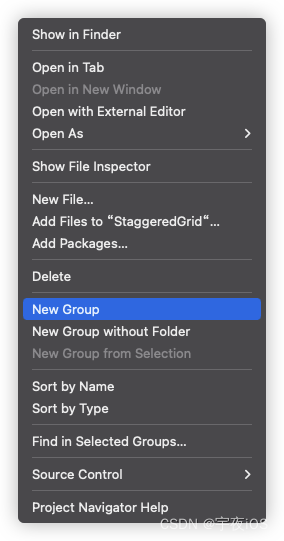

3. 创建一个虚拟文件
New Group命名为Model

4. 创建一个文件
New File选择SwiftUI View类型 命名为Album并且继承Identifiable


5. 创建一个文件
New File选择SwiftUI View类型 命名为Home主要是:
展示个人页面下拉放大缩小图片效果


6. 创建一个文件
New File选择SwiftUI View类型 命名为OffsetModifier
Code
ContentView - 主窗口
主要是展示主窗口
Home和设置暗黑模式import SwiftUI struct ContentView: View { var body: some View { Home() // 永远是黑暗模式 .preferredColorScheme(.dark) } } struct ContentView_Previews: PreviewProvider { static var previews: some View { ContentView() } }- 1
- 2
- 3
- 4
- 5
- 6
- 7
- 8
- 9
- 10
- 11
- 12
- 13
- 14
- 15
- 16
Home - 主页
思路
- 主要就是展示大图背景 + 固定的分类 + 列表模块
// // Home.swift // SpotifyResponvieUI (iOS) // // Created by lyh on 2022/8/23. // import SwiftUI struct Home: View { @State var currentType: String = "Popular" // 光滑滑动效果 @Namespace var animation @State var _albums: [Album] = albums // x,y @State var headerOffsets: (CGFloat,CGFloat) = (0,0) var body: some View { ScrollView(.vertical, showsIndicators: false) { VStack(spacing: 0){ HeaderView() // 带内容的固定标题 LazyVStack(pinnedViews: [.sectionHeaders]) { Section { SongList() } header: { PinnedHeaderView() .background(Color.black) .offset(y: headerOffsets.1 > 0 ? 0 : -headerOffsets.1 / 8) .modifier(OffsetModifier(offset: $headerOffsets.0, returnFromStart: false)) .modifier(OffsetModifier(offset: $headerOffsets.1)) } } } } .overlay(content: { Rectangle() .fill(.black) .frame(height: 50) .frame(maxHeight: .infinity,alignment: .top) .opacity(headerOffsets.0 < 5 ? 1 : 0) }) .coordinateSpace(name: "SCROLL") .ignoresSafeArea(.container, edges: .vertical) } // 固定的内容 @ViewBuilder func SongList()->some View{ VStack(spacing: 25){ ForEach($_albums){$album in HStack(spacing: 12){ Text("#\(getIndex(album: album) + 1)") .fontWeight(.semibold) .foregroundColor(.gray) Image(album.albumImage) .resizable() .aspectRatio(contentMode: .fill) .frame(width: 55, height: 55) .clipShape(RoundedRectangle(cornerRadius: 10, style: .continuous)) VStack(alignment: .leading, spacing: 8) { Text(album.albumName) .fontWeight(.semibold) Label { Text("65,587,909") } icon: { Image(systemName: "beats.headphones") .foregroundColor(.white) } .foregroundColor(.gray) .font(.caption) } .frame(maxWidth: .infinity,alignment: .leading) Button { album.isLiked.toggle() } label: { Image(systemName: album.isLiked ? "suit.heart.fill" : "suit.heart") .font(.title3) .foregroundColor(album.isLiked ? Color("Green") : .white) } Button { } label: { Image(systemName: "ellipsis") .font(.title3) .foregroundColor(.white) } } } } .padding() .padding(.top,25) .padding(.bottom,150) } func getIndex(album: Album)->Int{ return _albums.firstIndex { currentAlbum in return album.id == currentAlbum.id } ?? 0 } // 头部视图 @ViewBuilder func HeaderView()->some View{ GeometryReader{proxy in let minY = proxy.frame(in: .named("SCROLL")).minY let size = proxy.size let height = (size.height + minY) Image("Ariana") .resizable() .aspectRatio(contentMode: .fill) .frame(width: size.width,height: height > 0 ? height : 0,alignment: .top) .overlay(content: { ZStack(alignment: .bottom) { // 调暗文本内容 LinearGradient(colors: [ .clear, .black.opacity(0.8) ], startPoint: .top, endPoint: .bottom) VStack(alignment: .leading, spacing: 12) { Text("宇夜iOS") .font(.callout) .foregroundColor(.gray) HStack(alignment: .bottom, spacing: 10) { Text("Ariana Grande") .font(.title.bold()) Image(systemName: "checkmark.seal.fill") .foregroundColor(.blue) .background{ Circle() .fill(.white) .padding(3) } } Label { Text("Monthly Listeners") .fontWeight(.semibold) .foregroundColor(.white.opacity(0.7)) } icon: { Text("62,354,659") .fontWeight(.semibold) } .font(.caption) } .padding(.horizontal) .padding(.bottom,25) .frame(maxWidth: .infinity,alignment: .leading) } }) .cornerRadius(15) .offset(y: -minY) } .frame(height: 250) } // 固定在头部 @ViewBuilder func PinnedHeaderView()->some View{ let types: [String] = ["Popular","Albums","Songs","Fans also like","About"] ScrollView(.horizontal, showsIndicators: false) { HStack(spacing: 25){ ForEach(types,id: \.self){type in VStack(spacing: 12){ Text(type) .fontWeight(.semibold) .foregroundColor(currentType == type ? .white : .gray) ZStack{ if currentType == type{ RoundedRectangle(cornerRadius: 4, style: .continuous) .fill(.white) .matchedGeometryEffect(id: "TAB", in: animation) } else{ RoundedRectangle(cornerRadius: 4, style: .continuous) .fill(.clear) } } .padding(.horizontal,8) .frame(height: 4) } .contentShape(Rectangle()) .onTapGesture { withAnimation(.easeInOut){ currentType = type } } } } .padding(.horizontal) .padding(.top,25) .padding(.bottom,5) } } } struct Home_Previews: PreviewProvider { static var previews: some View { ContentView() } }- 1
- 2
- 3
- 4
- 5
- 6
- 7
- 8
- 9
- 10
- 11
- 12
- 13
- 14
- 15
- 16
- 17
- 18
- 19
- 20
- 21
- 22
- 23
- 24
- 25
- 26
- 27
- 28
- 29
- 30
- 31
- 32
- 33
- 34
- 35
- 36
- 37
- 38
- 39
- 40
- 41
- 42
- 43
- 44
- 45
- 46
- 47
- 48
- 49
- 50
- 51
- 52
- 53
- 54
- 55
- 56
- 57
- 58
- 59
- 60
- 61
- 62
- 63
- 64
- 65
- 66
- 67
- 68
- 69
- 70
- 71
- 72
- 73
- 74
- 75
- 76
- 77
- 78
- 79
- 80
- 81
- 82
- 83
- 84
- 85
- 86
- 87
- 88
- 89
- 90
- 91
- 92
- 93
- 94
- 95
- 96
- 97
- 98
- 99
- 100
- 101
- 102
- 103
- 104
- 105
- 106
- 107
- 108
- 109
- 110
- 111
- 112
- 113
- 114
- 115
- 116
- 117
- 118
- 119
- 120
- 121
- 122
- 123
- 124
- 125
- 126
- 127
- 128
- 129
- 130
- 131
- 132
- 133
- 134
- 135
- 136
- 137
- 138
- 139
- 140
- 141
- 142
- 143
- 144
- 145
- 146
- 147
- 148
- 149
- 150
- 151
- 152
- 153
- 154
- 155
- 156
- 157
- 158
- 159
- 160
- 161
- 162
- 163
- 164
- 165
- 166
- 167
- 168
- 169
- 170
- 171
- 172
- 173
- 174
- 175
- 176
- 177
- 178
- 179
- 180
- 181
- 182
- 183
- 184
- 185
- 186
- 187
- 188
- 189
- 190
- 191
- 192
- 193
- 194
- 195
- 196
- 197
- 198
- 199
- 200
- 201
- 202
- 203
- 204
- 205
- 206
- 207
- 208
- 209
- 210
- 211
- 212
- 213
- 214
- 215
- 216
- 217
- 218
- 219
- 220
- 221
OffsetModifier -
主要是监听ScrollView的滚动用来监听ScrollView的滚动 偏移量的改变
// // OffsetModifier.swift // SpotifyResponvieUI (iOS) // // Created by lyh on 2022/8/23. // import SwiftUI // 继承于 ViewModifier 最主要是能方便扩展一些常见的设置属性 /* 比如 给Text设置字体\背景颜色\阴影效果 extension Text { func songStyle() -> some View { self .font(.system(size: 24, weight: .bold)) .foregroundColor(.white) .shadow(radius: 20) } } ⭐️如果是继承ViewModifier struct SongTextViewModifier: ViewModifier { func body(content: Content) -> some View { content .font(.system(size: 24, weight: .bold)) .foregroundColor(.white) .shadow(radius: 20) } } 然后直接通过 Text(song) .modifier(SongTextViewModifier()) 设置 */ struct OffsetModifier: ViewModifier { @Binding var offset: CGFloat // 可选从0返回值 var returnFromStart: Bool = true @State var startValue: CGFloat = 0 func body(content: Content) -> some View { content .overlay { GeometryReader{proxy in Color.clear .preference(key: OffsetKey.self, value: proxy.frame(in: .named("SCROLL")).minY) .onPreferenceChange(OffsetKey.self) { value in if startValue == 0{ startValue = value } print(value); offset = (value - (returnFromStart ? startValue : 0)) print("offset is \(offset)"); } } } } } // 偏好的关键 struct OffsetKey: PreferenceKey{ static var defaultValue: CGFloat = 0 static func reduce(value: inout CGFloat, nextValue: () -> CGFloat) { value = nextValue() } }- 1
- 2
- 3
- 4
- 5
- 6
- 7
- 8
- 9
- 10
- 11
- 12
- 13
- 14
- 15
- 16
- 17
- 18
- 19
- 20
- 21
- 22
- 23
- 24
- 25
- 26
- 27
- 28
- 29
- 30
- 31
- 32
- 33
- 34
- 35
- 36
- 37
- 38
- 39
- 40
- 41
- 42
- 43
- 44
- 45
- 46
- 47
- 48
- 49
- 50
- 51
- 52
- 53
- 54
- 55
- 56
- 57
- 58
- 59
- 60
- 61
- 62
- 63
- 64
- 65
- 66
- 67
- 68
- 69
- 70
- 71
- 72
- 73
- 74
- 75
- 76
Album - 模型
// // Album.swift // SpotifyResponvieUI (iOS) // // Created by lyh on 2022/8/23. // import SwiftUI // Ablum模型和样本数据 struct Album: Identifiable { var id = UUID().uuidString var albumName: String var albumImage : String var isLiked : Bool = false } var albums : [Album] = [ Album(albumName: "Positions", albumImage: "Album1"), Album(albumName: "The Best", albumImage: "Album2",isLiked: true), Album(albumName: "My Everything", albumImage: "Album3"), Album(albumName: "Yours Truly", albumImage: "Album4"), Album(albumName: "Sweetener", albumImage: "Album5",isLiked: true), Album(albumName: "Rain On Me", albumImage: "Album6"), Album(albumName: "Stuck With U", albumImage: "Album7"), Album(albumName: "7 rings", albumImage: "Album8",isLiked: true), Album(albumName: "Bang Bang", albumImage: "Album9"), ]- 1
- 2
- 3
- 4
- 5
- 6
- 7
- 8
- 9
- 10
- 11
- 12
- 13
- 14
- 15
- 16
- 17
- 18
- 19
- 20
- 21
- 22
- 23
- 24
- 25
- 26
- 27
- 28
- 29
- 30
- 31
- 32
-
相关阅读:
基于nodejs+vue酒店综合服务[程序+论文+开题]-计算机毕业设计
使用PrepareStatement实现插入数据、查询数据、ResultSet和ResultSetMetaData及资源释放
阿里云服务器公网带宽如何修改?
【网络协议】聊聊网关 NAT机制
Vue3较Vue2的更新内容(一)
JavaSE笔记(八)重制版
realloc
简洁易用,更多算法,快来开箱新一代视频目标感知开源工具箱
Could not resolve dependencies for project
【Azure】构建安全架构的 Azure 云:深入了解零信任体系结构
- 原文地址:https://blog.csdn.net/qq_42816425/article/details/126494200
- 最新文章
-
沪漂五周年了:我越来越迷茫了
Agentic Skill Routing 实战:别再把所有 Skill 塞进 AI Agent 上下文
MySQL-Seconds_behind_master的精度误差
[MAF预定义ChatClient中间件-03]CachingChatClient——利用缓存省钱省时间
AI的至暗历史:从万众期待到被政府撤资,AI的两次死亡徘徊
Agent OS :五种驯服不确定性的范式
PortSwigger SQL注入LAB11
数据库即时编译JIT
[Begin]AI Learn Data Day 0
深度学习进阶(二十七)现代 LLM 的核心架构设计其二:SwiGLU