-
SSM、工厂模式和spring的IoC操作
SSM、工厂模式和spring的IoC操作
SSM框架集:
SSM https://baike.baidu.com/item/SSM/18801167?fr=aladdin


工厂模式和spring的IoC操作:


运行结果:

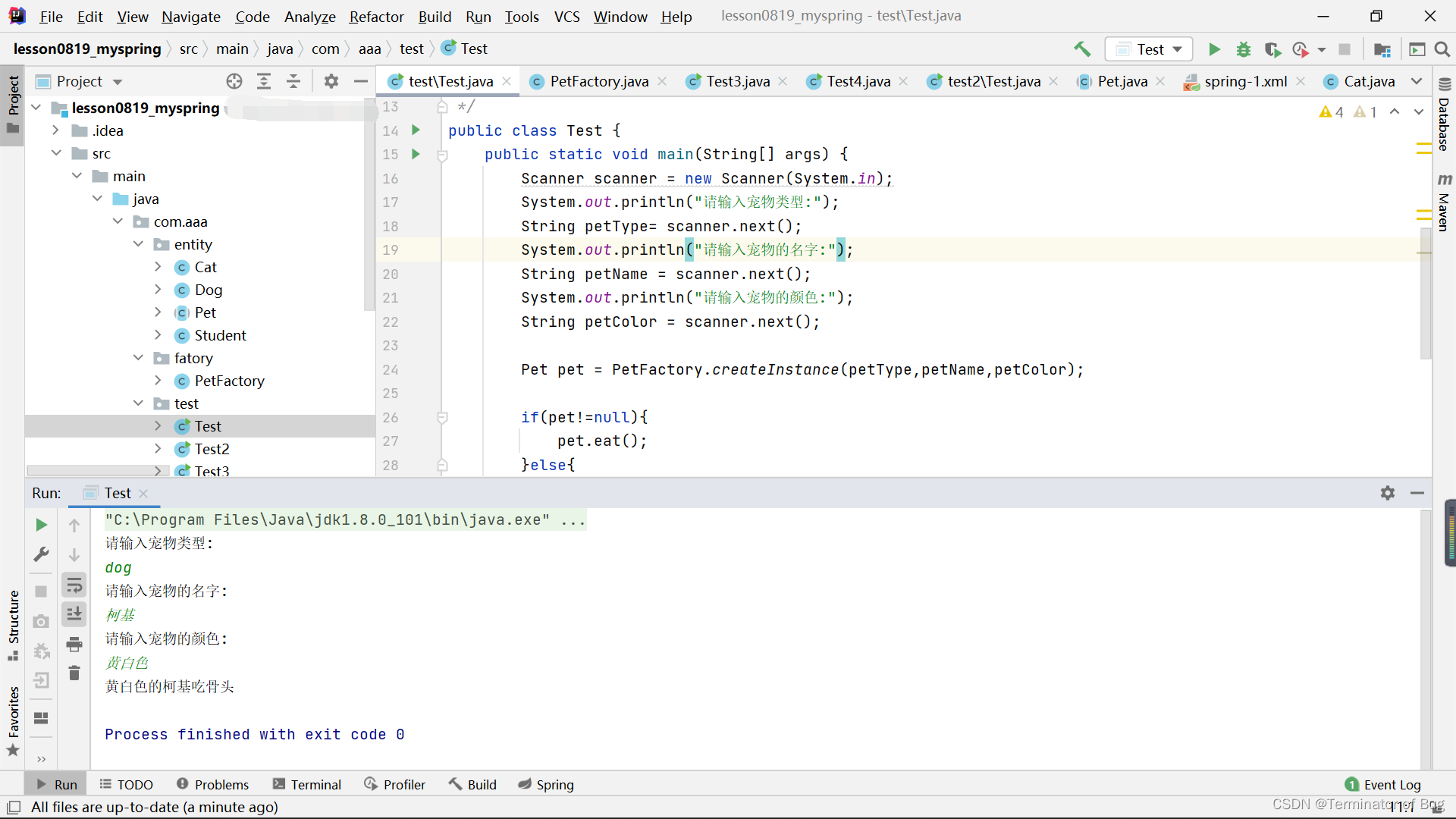
代码整体结构布局:

代码如下:
Pet:
package com.aaa.entity; public abstract class Pet { protected String name; protected String color; protected int health; public Pet(String name,String color,int health){ this.name=name; this.color=color; this.health=health; } public abstract void eat(); }- 1
- 2
- 3
- 4
- 5
- 6
- 7
- 8
- 9
- 10
- 11
- 12
- 13
- 14
- 15
- 16
- 17
Cat:
package com.aaa.entity; public class Cat extends Pet{ public Cat(){ super("aaa","bbb",100); } public Cat(String name, String color,int health) { super(name, color,health); } @Override public void eat() { System.out.println(this.color+"的"+this.name+"吃小鱼"); } }- 1
- 2
- 3
- 4
- 5
- 6
- 7
- 8
- 9
- 10
- 11
- 12
- 13
- 14
- 15
- 16
- 17
Dog:
package com.aaa.entity; public class Dog extends Pet{ public Dog(String name, String color,int health) { super(name, color,health); } @Override public void eat() { System.out.println(this.color+"的"+this.name+"吃骨头"); } }- 1
- 2
- 3
- 4
- 5
- 6
- 7
- 8
- 9
- 10
- 11
- 12
- 13
Student:
package com.aaa.entity; public class Student { public Student(){ System.out.println("调用了student的构造方法。。。"); } public void introduce(){ System.out.println("我是一个学生...."); } }- 1
- 2
- 3
- 4
- 5
- 6
- 7
- 8
- 9
- 10
- 11
- 12
- 13
PetFactory:
package com.aaa.fatory; import com.aaa.entity.Cat; import com.aaa.entity.Dog; import com.aaa.entity.Pet; public class PetFactory { //创建宠物对象实例 public static Pet createInstance(String petType,String petName,String petColor){ Pet pet = null; switch (petType){ case "cat": pet = new Cat(petName,petColor,100); break; case "dog": pet = new Dog(petName,petColor,100); break; } return pet; } }- 1
- 2
- 3
- 4
- 5
- 6
- 7
- 8
- 9
- 10
- 11
- 12
- 13
- 14
- 15
- 16
- 17
- 18
- 19
- 20
- 21
- 22
- 23
(test)Test:
(Test2\Test3\Test4代码与Test相同,省略)
package com.aaa.test; import com.aaa.entity.Cat; import com.aaa.entity.Dog; import com.aaa.entity.Pet; import com.aaa.fatory.PetFactory; import java.util.Scanner; public class Test { public static void main(String[] args) { Scanner scanner = new Scanner(System.in); System.out.println("请输入宠物类型:"); String petType= scanner.next(); System.out.println("请输入宠物的名字:"); String petName = scanner.next(); System.out.println("请输入宠物的颜色:"); String petColor = scanner.next(); Pet pet = PetFactory.createInstance(petType,petName,petColor); if(pet!=null){ pet.eat(); }else{ System.out.println("没有这个宠物,无法创建"); } //控制反转IoC //没有用spring的时候,对象的创建程序员自己写。 //用了spring之后,对象的创建交给spring来做。这就是spring IoC } }- 1
- 2
- 3
- 4
- 5
- 6
- 7
- 8
- 9
- 10
- 11
- 12
- 13
- 14
- 15
- 16
- 17
- 18
- 19
- 20
- 21
- 22
- 23
- 24
- 25
- 26
- 27
- 28
- 29
- 30
- 31
- 32
- 33
(test2)Test:
package com.aaa.test2; import com.aaa.entity.Cat; import com.aaa.entity.Student; import org.springframework.context.ApplicationContext; import org.springframework.context.support.ClassPathXmlApplicationContext; public class Test { public static void main(String[] args) { //Student student = new Student(); //student.introduce(); //构建spring容器对象,然后从容器中获取我们需要的对象(必须提前在xml中定义) ApplicationContext ac = new ClassPathXmlApplicationContext("spring-1.xml"); Student student = ac.getBean(Student.class); student.introduce(); Cat cat = ac.getBean(Cat.class); cat.eat(); } }- 1
- 2
- 3
- 4
- 5
- 6
- 7
- 8
- 9
- 10
- 11
- 12
- 13
- 14
- 15
- 16
- 17
- 18
- 19
- 20
- 21
- 22
spring-1.xml:
- 1
- 2
- 3
- 4
- 5
- 6
- 7
- 8
- 9
pom.xml:
4.0.0 org.example lesson0819_myspring 1.0-SNAPSHOT 8 8 org.springframework spring-context 5.3.18 - 1
- 2
- 3
- 4
- 5
- 6
- 7
- 8
- 9
- 10
- 11
- 12
- 13
- 14
- 15
- 16
- 17
- 18
- 19
- 20
- 21
- 22
- 23
- 24
- 25
// A code block var foo = 'bar';- 1
- 2
-
相关阅读:
基于SSM的网络安全宣传网站设计与实现
Linux shell - 目录栈操作(pushd popd dirs)
软件项目管理 6.7.参数估算法
创建自定义 Spring Cloud Gateway 过滤器 - spring.io
9.OpenFeign服务接口调用
人工智能与神经网络BenchMark--MLPerf
(原创)【MAUI】一步一步实现“悬浮操作按钮”(FAB,Floating Action Button)
Bean的装配
R语言学习:RFM分析,rfm包
如何进行企业设备管理?
- 原文地址:https://blog.csdn.net/Liu_wen_wen/article/details/126490404
