-
Android学习笔记 78. 输入控件
Android学习笔记
Android 开发者基础知识 (Java) —— Google Developers 培训团队
第2单元 用户体验
第4课 用户互动
78. 输入控件
你会做什么
- 显示用于输入电子邮件地址的键盘。
- 显示用于输入电话号码的数字键盘。
- 允许自动句子大写的多行文本输入。
- 添加用于选择选项的单选按钮。
onClick为单选按钮设置处理程序。- 为电话号码字段添加一个微调器,用于从一组值中选择一个值。
78.1 文本输入属性实验
-
添加一个 EditText 用于输入名称
-
添加多行EditText
-
使用键盘输入电话号码
-
在一个 EditText 中组合输入类型
78.2 使用单选按钮
-
添加一个 RadioGroup 和单选按钮
列出
RadioButton元素的顺序决定了它们在屏幕上出现的顺序。 -
添加单选按钮单击处理程序
到这里布局:
<android.support.constraint.ConstraintLayout xmlns:android="http://schemas.android.com/apk/res/android" xmlns:app="http://schemas.android.com/apk/res-auto" xmlns:tools="http://schemas.android.com/tools" android:layout_width="match_parent" android:layout_height="match_parent" tools:context="com.example.android.droidcafe.OrderActivity"> <TextView android:id="@+id/order_textview" android:layout_width="wrap_content" android:layout_height="wrap_content" android:layout_marginStart="24dp" android:layout_marginLeft="24dp" android:layout_marginTop="8dp" android:text="@string/order_label_text" android:textSize="18sp" app:layout_constraintStart_toStartOf="parent" app:layout_constraintTop_toTopOf="parent" /> <TextView android:id="@+id/name_label" android:layout_width="wrap_content" android:layout_height="wrap_content" android:layout_marginStart="24dp" android:layout_marginLeft="24dp" android:layout_marginTop="32dp" android:text="@string/name_label_text" app:layout_constraintStart_toStartOf="parent" app:layout_constraintTop_toBottomOf="@+id/order_textview" /> <EditText android:id="@+id/name_text" android:layout_width="wrap_content" android:layout_height="wrap_content" android:layout_marginStart="8dp" android:layout_marginLeft="8dp" android:ems="10" android:hint="@string/enter_name_hint" android:inputType="textPersonName" app:layout_constraintBaseline_toBaselineOf="@+id/name_label" app:layout_constraintStart_toEndOf="@+id/name_label" /> <TextView android:id="@+id/address_label" android:layout_width="wrap_content" android:layout_height="wrap_content" android:layout_marginStart="24dp" android:layout_marginLeft="24dp" android:layout_marginTop="24dp" android:text="@string/address_label_text" app:layout_constraintStart_toStartOf="parent" app:layout_constraintTop_toBottomOf="@+id/name_label" /> <EditText android:id="@+id/address_text" android:layout_width="wrap_content" android:layout_height="wrap_content" android:layout_marginStart="8dp" android:layout_marginLeft="8dp" android:ems="10" android:hint="@string/enter_address_hint" android:inputType="textMultiLine" app:layout_constraintBaseline_toBaselineOf="@+id/address_label" app:layout_constraintStart_toEndOf="@+id/address_label" /> <TextView android:id="@+id/phone_label" android:layout_width="wrap_content" android:layout_height="wrap_content" android:layout_marginStart="24dp" android:layout_marginLeft="24dp" android:layout_marginTop="24dp" android:text="@string/phone_label_string" app:layout_constraintStart_toStartOf="parent" app:layout_constraintTop_toBottomOf="@+id/address_text" /> <EditText android:id="@+id/phone_text" android:layout_width="134dp" android:layout_height="wrap_content" android:layout_marginStart="8dp" android:layout_marginLeft="8dp" android:ems="10" android:hint="@string/enter_phone_hint" android:inputType="phone" app:layout_constraintBaseline_toBaselineOf="@+id/phone_label" app:layout_constraintStart_toEndOf="@+id/phone_label" /> <TextView android:id="@+id/note_label" android:layout_width="wrap_content" android:layout_height="wrap_content" android:layout_marginStart="24dp" android:layout_marginLeft="24dp" android:layout_marginTop="24dp" android:text="@string/note_label_text" app:layout_constraintStart_toStartOf="parent" app:layout_constraintTop_toBottomOf="@+id/phone_label" /> <EditText android:id="@+id/note_text" android:layout_width="wrap_content" android:layout_height="wrap_content" android:layout_marginStart="8dp" android:layout_marginLeft="8dp" android:ems="10" android:hint="@string/enter_note_hint" android:inputType="textCapSentences|textMultiLine" app:layout_constraintBaseline_toBaselineOf="@+id/note_label" app:layout_constraintStart_toEndOf="@+id/note_label" /> <TextView android:id="@+id/delivery_label" android:layout_width="wrap_content" android:layout_height="wrap_content" android:layout_marginStart="24dp" android:layout_marginLeft="24dp" android:layout_marginTop="24dp" android:text="@string/choose_delivery_method" android:textSize="18sp" app:layout_constraintStart_toStartOf="parent" app:layout_constraintTop_toBottomOf="@+id/note_text" /> <RadioGroup android:layout_width="wrap_content" android:layout_height="wrap_content" android:layout_marginStart="24dp" android:layout_marginLeft="24dp" android:orientation="vertical" app:layout_constraintStart_toStartOf="parent" app:layout_constraintTop_toBottomOf="@id/delivery_label"> <RadioButton android:id="@+id/sameday" android:layout_width="wrap_content" android:layout_height="wrap_content" android:onClick="onRadioButtonClicked" android:text="@string/same_day_messenger_service" /> <RadioButton android:id="@+id/nextday" android:layout_width="wrap_content" android:layout_height="wrap_content" android:checked="true" android:onClick="onRadioButtonClicked" android:text="@string/next_day_ground_delivery" /> <RadioButton android:id="@+id/pickup" android:layout_width="wrap_content" android:layout_height="wrap_content" android:onClick="onRadioButtonClicked" android:text="@string/pick_up" /> RadioGroup> <Spinner android:id="@+id/label_spinner" android:layout_width="0dp" android:layout_height="wrap_content" android:layout_marginStart="8dp" android:layout_marginLeft="8dp" android:layout_marginTop="24dp" android:layout_marginEnd="24dp" android:layout_marginRight="24dp" app:layout_constraintEnd_toEndOf="parent" app:layout_constraintStart_toEndOf="@+id/phone_text" app:layout_constraintTop_toBottomOf="@+id/address_text" /> android.support.constraint.ConstraintLayout>- 1
- 2
- 3
- 4
- 5
- 6
- 7
- 8
- 9
- 10
- 11
- 12
- 13
- 14
- 15
- 16
- 17
- 18
- 19
- 20
- 21
- 22
- 23
- 24
- 25
- 26
- 27
- 28
- 29
- 30
- 31
- 32
- 33
- 34
- 35
- 36
- 37
- 38
- 39
- 40
- 41
- 42
- 43
- 44
- 45
- 46
- 47
- 48
- 49
- 50
- 51
- 52
- 53
- 54
- 55
- 56
- 57
- 58
- 59
- 60
- 61
- 62
- 63
- 64
- 65
- 66
- 67
- 68
- 69
- 70
- 71
- 72
- 73
- 74
- 75
- 76
- 77
- 78
- 79
- 80
- 81
- 82
- 83
- 84
- 85
- 86
- 87
- 88
- 89
- 90
- 91
- 92
- 93
- 94
- 95
- 96
- 97
- 98
- 99
- 100
- 101
- 102
- 103
- 104
- 105
- 106
- 107
- 108
- 109
- 110
- 111
- 112
- 113
- 114
- 115
- 116
- 117
- 118
- 119
- 120
- 121
- 122
- 123
- 124
- 125
- 126
- 127
- 128
- 129
- 130
- 131
- 132
- 133
- 134
- 135
- 136
- 137
- 138
- 139
- 140
- 141
- 142
- 143
- 144
- 145
- 146
- 147
- 148
- 149
- 150
- 151
- 152
- 153
- 154
- 155
- 156
- 157
- 158
- 159
- 160
- 161
- 162
- 163
- 164
- 165
- 166
- 167
- 168
- 169
- 170
- 171
- 172
-
设置点击事件
/* * Copyright (C) 2018 Google Inc. * * Licensed under the Apache License, Version 2.0 (the "License"); * you may not use this file except in compliance with the License. * You may obtain a copy of the License at * * http://www.apache.org/licenses/LICENSE-2.0 * * Unless required by applicable law or agreed to in writing, software * distributed under the License is distributed on an "AS IS" BASIS, * WITHOUT WARRANTIES OR CONDITIONS OF ANY KIND, either express or implied. * See the License for the specific language governing permissions and * limitations under the License. */ package com.example.android.droidcafe; import android.support.v7.app.AppCompatActivity; import android.os.Bundle; import android.view.View; import android.widget.RadioButton; import android.widget.Toast; /** * This activity is blank for now. Subsequent versions of the app * provide input controls and a delivery method for an order. */ public class OrderActivity extends AppCompatActivity { @Override protected void onCreate(Bundle savedInstanceState) { super.onCreate(savedInstanceState); setContentView(R.layout.activity_order); } public void onRadioButtonClicked(View view) { // Is the button now checked? boolean checked = ((RadioButton) view).isChecked(); // Check which radio button was clicked. switch (view.getId()) { case R.id.sameday: if (checked) // Same day service displayToast(getString(R.string.same_day_messenger_service)); break; case R.id.nextday: if (checked) // Next day delivery displayToast(getString(R.string.next_day_ground_delivery)); break; case R.id.pickup: if (checked) // Pick up displayToast(getString(R.string.pick_up)); break; default: // Do nothing. break; } } public void displayToast(String message) { Toast.makeText(getApplicationContext(), message, Toast.LENGTH_SHORT).show(); } }- 1
- 2
- 3
- 4
- 5
- 6
- 7
- 8
- 9
- 10
- 11
- 12
- 13
- 14
- 15
- 16
- 17
- 18
- 19
- 20
- 21
- 22
- 23
- 24
- 25
- 26
- 27
- 28
- 29
- 30
- 31
- 32
- 33
- 34
- 35
- 36
- 37
- 38
- 39
- 40
- 41
- 42
- 43
- 44
- 45
- 46
- 47
- 48
- 49
- 50
- 51
- 52
- 53
- 54
- 55
- 56
- 57
- 58
- 59
- 60
- 61
- 62
- 63
- 64
- 65
- 66
- 67
- 68
运行程序

78.3 使用微调器供用户选择
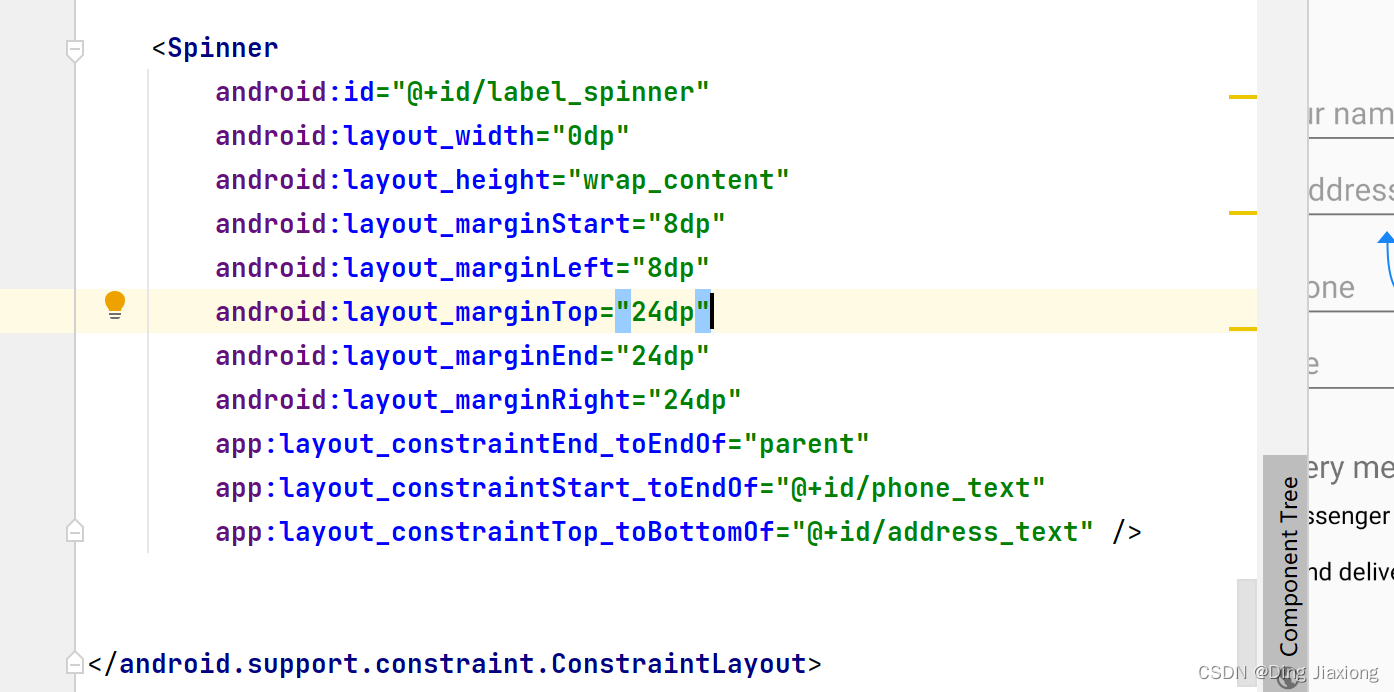
Spinner提供了一种从集合中选择一个值的快速方法。触摸Spinner屏幕会显示一个包含所有可用值的下拉列表,用户可以从中选择一个。如果您只提供两个或三个选项,如果您的布局中有空间供选择,您可能希望使用单选按钮;但是,如果有三个以上的选择,Spinner效果很好,可以根据需要滚动以显示项目,并且在布局中占用的空间很小。提供一种选择电话号码标签的方法(例如Home、Work、Mobile或Other),您可以在 DroidCafe 应用程序的布局中添加一个微调器,
OrderActivity以显示在电话号码字段的旁边。-
在布局中添加Spinner
-
添加代码激活Spinner及其监听
/* * Copyright (C) 2018 Google Inc. * * Licensed under the Apache License, Version 2.0 (the "License"); * you may not use this file except in compliance with the License. * You may obtain a copy of the License at * * http://www.apache.org/licenses/LICENSE-2.0 * * Unless required by applicable law or agreed to in writing, software * distributed under the License is distributed on an "AS IS" BASIS, * WITHOUT WARRANTIES OR CONDITIONS OF ANY KIND, either express or implied. * See the License for the specific language governing permissions and * limitations under the License. */ package com.example.android.droidcafe; import android.content.Intent; import android.support.v7.app.AppCompatActivity; import android.os.Bundle; import android.view.View; import android.widget.AdapterView; import android.widget.ArrayAdapter; import android.widget.RadioButton; import android.widget.Spinner; import android.widget.TextView; import android.widget.Toast; /** * This activity is blank for now. Subsequent versions of the app * provide input controls and a delivery method for an order. */ public class OrderActivity extends AppCompatActivity implements AdapterView.OnItemSelectedListener{ /** * Sets the content view to activity_order, and gets the intent and its * data. Also creates an array adapter and layout for a spinner. * * @param savedInstanceState Saved instance state bundle. */ @Override protected void onCreate(Bundle savedInstanceState) { super.onCreate(savedInstanceState); setContentView(R.layout.activity_order); // Get the intent and its data. Intent intent = getIntent(); String message = intent.getStringExtra(MainActivity.EXTRA_MESSAGE); TextView textView = findViewById(R.id.order_textview); textView.setText(message); // Create the spinner. Spinner spinner = findViewById(R.id.label_spinner); if (spinner != null) { spinner.setOnItemSelectedListener(this); } // Create an ArrayAdapter using the string array and default spinner // layout. ArrayAdapter<CharSequence> adapter = ArrayAdapter.createFromResource( this, R.array.labels_array, android.R.layout.simple_spinner_item); // Specify the layout to use when the list of choices appears. adapter.setDropDownViewResource (android.R.layout.simple_spinner_dropdown_item); // Apply the adapter to the spinner. if (spinner != null) { spinner.setAdapter(adapter); } } /** * Checks which radio button was clicked and displays a toast message to * show the choice. * * @param view The radio button view. */ public void onRadioButtonClicked(View view) { // Is the button now checked? boolean checked = ((RadioButton) view).isChecked(); // Check which radio button was clicked. switch (view.getId()) { case R.id.sameday: if (checked) // Same day service displayToast(getString( R.string.same_day_messenger_service)); break; case R.id.nextday: if (checked) // Next day delivery displayToast(getString( R.string.next_day_ground_delivery)); break; case R.id.pickup: if (checked) // Pick up displayToast(getString( R.string.pick_up)); break; default: // Do nothing. break; } } /** * Displays the actual message in a toast message. * * @param message Message to display. */ public void displayToast(String message) { Toast.makeText(getApplicationContext(), message, Toast.LENGTH_SHORT).show(); } // Interface callback for when any spinner item is selected. @Override public void onItemSelected(AdapterView<?> adapterView, View view, int i, long l) { String spinnerLabel = adapterView.getItemAtPosition(i).toString(); displayToast(spinnerLabel); } // Interface callback for when no spinner item is selected. @Override public void onNothingSelected(AdapterView<?> adapterView) { // Do nothing. } }- 1
- 2
- 3
- 4
- 5
- 6
- 7
- 8
- 9
- 10
- 11
- 12
- 13
- 14
- 15
- 16
- 17
- 18
- 19
- 20
- 21
- 22
- 23
- 24
- 25
- 26
- 27
- 28
- 29
- 30
- 31
- 32
- 33
- 34
- 35
- 36
- 37
- 38
- 39
- 40
- 41
- 42
- 43
- 44
- 45
- 46
- 47
- 48
- 49
- 50
- 51
- 52
- 53
- 54
- 55
- 56
- 57
- 58
- 59
- 60
- 61
- 62
- 63
- 64
- 65
- 66
- 67
- 68
- 69
- 70
- 71
- 72
- 73
- 74
- 75
- 76
- 77
- 78
- 79
- 80
- 81
- 82
- 83
- 84
- 85
- 86
- 87
- 88
- 89
- 90
- 91
- 92
- 93
- 94
- 95
- 96
- 97
- 98
- 99
- 100
- 101
- 102
- 103
- 104
- 105
- 106
- 107
- 108
- 109
- 110
- 111
- 112
- 113
- 114
- 115
- 116
- 117
- 118
- 119
- 120
- 121
- 122
- 123
- 124
- 125
- 126
- 127
- 128
- 129
- 130
- 131
- 132
- 133
- 134
- 135
-
运行程序

78.4 小结
以下
android:inputType属性值会影响屏幕键盘的外观:textAutoCorrect: 建议拼写更正。textCapSentences: 每个新句子都以大写字母开头。textPersonName:在用户键入时显示带有建议的单行文本,并在用户完成后点击**“完成”**键。textMultiLine:启用多行文本输入和返回键以添加新行。textPassword:输入密码时隐藏密码。textEmailAddress:显示电子邮件键盘而不是标准键盘。phone:显示电话键盘而不是标准键盘。
在元素
android:inputType的 XML 布局文件中设置属性值。EditText要组合值,请使用竖线 (|) 字符连接它们。单选按钮是输入控件,可用于从一组选项中仅选择一个选项:
RadioButton在 a 中将元素组合在一起, 以便RadioGroup一次RadioButton只能选择一个。- 您在组中列出
RadioButton元素的顺序决定了它们在屏幕上出现的顺序。 - 使用
android:onClick每个属性RadioButton来指定点击处理程序。 - 要确定是否选择了按钮,请使用接口的
isChecked()方法, 如果选择了按钮,该方法Checkable将返回true。
Spinner提供了一个下拉菜单:Spinner在布局中添加一个 。- 使用 an
ArrayAdapter将文本值数组分配为Spinner菜单项。 - 实现
AdapterView.OnItemSelectedListener接口,这还需要添加onItemSelected()和onNothingSelected()回调方法来激活Spinner和它的监听器。 - 使用
onItemSelected()回调方法检索Spinner菜单中的选定项,使用getItemAtPosition().
-
相关阅读:
网工内推 | 国企,解决方案工程师,最高30k,有软考证书优先
《c++程序设计》谭浩强课后习题答案 第一张
vscode 配置 Rust 运行环境
基于Python的校园学生一卡通管理系统
安装多个MySQL版本时如何连接到不同的数据库
TypeError: namedtuple() got an unexpected keyword argument -verbose
图文并茂 —— 插入排序,希尔排序
Ransac算法例程
SwiftUI 2.0 课程笔记 Chapter 8
回忆我的电大
- 原文地址:https://blog.csdn.net/weixin_44226181/article/details/126398823

- 最新文章
-
沪漂五周年了:我越来越迷茫了
Agentic Skill Routing 实战:别再把所有 Skill 塞进 AI Agent 上下文
MySQL-Seconds_behind_master的精度误差
[MAF预定义ChatClient中间件-03]CachingChatClient——利用缓存省钱省时间
AI的至暗历史:从万众期待到被政府撤资,AI的两次死亡徘徊
Agent OS :五种驯服不确定性的范式
PortSwigger SQL注入LAB11
数据库即时编译JIT
[Begin]AI Learn Data Day 0
深度学习进阶(二十七)现代 LLM 的核心架构设计其二:SwiGLU