-
Springboot改成Https请求【实战】
1.申请SSL
【注意】jdk安装在C盘下面没有权限去申请,我这里jdk是安装在D盘的
- 进入到jdk安装目录的bin目录下

- 打开cmd命令窗口


- 执行以下命令:
keytool -genkey -alias https -keyalg RSA -keystore https.keystore -validity 365- 1
- 2
https是我起的keystore的名字。别名alias也叫https。validity 是有效期(单位为天)
D:\java\jdk1.8.0_211\bin>keytool -genkey -alias https -keyalg RSA -keystore https.keystore -validity 365 输入密钥库口令: -- 这里我用的是123456 再次输入新口令: 您的名字与姓氏是什么? [Unknown]: wts 您的组织单位名称是什么? [Unknown]: wts 您的组织名称是什么? [Unknown]: wts 您所在的城市或区域名称是什么? [Unknown]: wts 您所在的省/市/自治区名称是什么? [Unknown]: wts 该单位的双字母国家/地区代码是什么? [Unknown]: wts CN=zhang, OU=zhang, O=zhang, L=zhang, ST=zhang, C=zhang是否正确? [否]: 是 输入 <https> 的密钥口令 (如果和密钥库口令相同, 按回车): 再次输入新口令: -- 这里同样是输入123456 Warning: JKS 密钥库使用专用格式。建议使用 "keytool -importkeystore -srckeystore https.keystore -destkeystore https.keystore -deststoretype pkcs12" 迁移到行业标准格式 PKCS12。- 1
- 2
- 3
- 4
- 5
- 6
- 7
- 8
- 9
- 10
- 11
- 12
- 13
- 14
- 15
- 16
- 17
- 18
- 19
- 20
- 21
- 22
- 23
- 24
大家应该看到最后的警告信息了:JKS 密钥库使用专用格式。建议使用 “
keytool -importkeystore -srckeystore https.keystore -destkeystore https.keystore -deststoretype pkcs12” 迁移到行业标准格式 PKCS12。他给出的命令可以直接复制使用,粘贴到命令窗口。回车就行。
D:\java\jdk1.8.0_211\bin>keytool -importkeystore -srckeystore https.keystore -destkeystore https.keystore -deststoretype pkcs12
输入源密钥库口令: --还是123456
已成功导入别名 https 的条目。
已完成导入命令: 1 个条目成功导入, 0 个条目失败或取消
Warning:
已将 “https.keystore” 迁移到 Non JKS/JCEKS。将 JKS 密钥库作为 “https.keystore.old” 进行了备份。完毕!然后就可以看到bin目录下有个文件。.old是头一个指令生成的,用的时候用不带old的那个。

2.项目配置
2.1、keystore文件放在resource的根路径下

2.2、配置yml文件
ssl: key-store: classpath:https.keystore #路径 key-store-password: 123456 #密码 keyStoreType: jks #类型 keyAlias: https #别名 port: 7099 #https的端口号- 1
- 2
- 3
- 4
- 5
- 6
2.3、增加配置类
import org.apache.catalina.Context; import org.apache.catalina.connector.Connector; import org.apache.coyote.http11.Http11NioProtocol; import org.apache.tomcat.util.descriptor.web.SecurityCollection; import org.apache.tomcat.util.descriptor.web.SecurityConstraint; import org.apache.tomcat.util.http.fileupload.IOUtils; import org.springframework.beans.factory.annotation.Value; import org.springframework.boot.web.embedded.tomcat.TomcatServletWebServerFactory; import org.springframework.context.annotation.Bean; import org.springframework.context.annotation.Configuration; import org.springframework.core.io.ClassPathResource; import java.io.File; import java.io.FileOutputStream; import java.io.IOException; @Configuration public class SSLConfig { @Value("${ssl.key-store-password}") private String password; @Value("${ssl.keyStoreType}") private String keyStoreType; @Value("${ssl.keyAlias}") private String keyAlias; @Value("${ssl.port}") private Integer port; @Bean public Connector createSslConnector() { Connector connector = new Connector("org.apache.coyote.http11.Http11NioProtocol"); Http11NioProtocol protocol = (Http11NioProtocol) connector.getProtocolHandler(); ClassPathResource resource = new ClassPathResource("https.keystore"); // 临时目录 String tempPath =System.getProperty("java.io.tmpdir") + System.currentTimeMillis()+".keystore"; File f = new File(tempPath); // logger.info(".keystore目录临时存储路径" + tempPath); try { // 将key的值转存到临时文件 IOUtils.copy(resource.getInputStream(),new FileOutputStream(f)); connector.setScheme(keyAlias); connector.setSecure(true); connector.setPort(port); protocol.setSSLEnabled(true); // 指向临时文件 protocol.setKeystoreFile(f.getAbsolutePath()); protocol.setKeystorePass(password); protocol.setKeyAlias(keyAlias); protocol.setKeyPass(password); } catch (IOException e) { e.printStackTrace(); } return connector; } @Bean public TomcatServletWebServerFactory tomcatServletWebServerFactory(Connector connector){ TomcatServletWebServerFactory tomcat=new TomcatServletWebServerFactory(){ @Override protected void postProcessContext(Context context) { SecurityConstraint securityConstraint=new SecurityConstraint(); securityConstraint.setUserConstraint("CONFIDENTIAL"); SecurityCollection collection=new SecurityCollection(); collection.addPattern("/*"); securityConstraint.addCollection(collection); context.addConstraint(securityConstraint); } }; tomcat.addAdditionalTomcatConnectors(connector); return tomcat; } }- 1
- 2
- 3
- 4
- 5
- 6
- 7
- 8
- 9
- 10
- 11
- 12
- 13
- 14
- 15
- 16
- 17
- 18
- 19
- 20
- 21
- 22
- 23
- 24
- 25
- 26
- 27
- 28
- 29
- 30
- 31
- 32
- 33
- 34
- 35
- 36
- 37
- 38
- 39
- 40
- 41
- 42
- 43
- 44
- 45
- 46
- 47
- 48
- 49
- 50
- 51
- 52
- 53
- 54
- 55
- 56
- 57
- 58
- 59
- 60
- 61
- 62
- 63
- 64
- 65
- 66
- 67
- 68
- 69
- 70
- 71
- 72
- 73
- 74
- 75
- 76
- 77
- 78
- 79
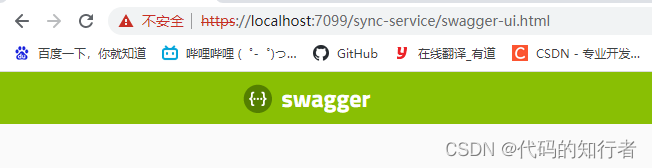
测试
- 进入到jdk安装目录的bin目录下
-
相关阅读:
golang jwt(hs,es,rs,ed)密钥生成、加签验签案例
【2023,学点儿新Java-10】Java17 API文档简介&获取 |详解Java核心机制:JVM |详解Java内存泄漏与溢出 |Java优缺点总结 |附:GPT3.5-turbo问答测试
tkinter模块高级操作(二)—— 界面切换效果、立体阴影字效果及gif动图的实现
qt作业day5
vue3 中使用echarts图表——柱状图
uniapp-ios打包安装测试
搜索与图论篇——DFS和BFS
2022年数学建模国赛--赛后总结
ADS127L11采集板系统噪声评估
企业风险管理与反舞弊调查实务研讨会在河南顺利举行
- 原文地址:https://blog.csdn.net/wts563540/article/details/126400435

- 最新文章
-
沪漂五周年了:我越来越迷茫了
Agentic Skill Routing 实战:别再把所有 Skill 塞进 AI Agent 上下文
MySQL-Seconds_behind_master的精度误差
[MAF预定义ChatClient中间件-03]CachingChatClient——利用缓存省钱省时间
AI的至暗历史:从万众期待到被政府撤资,AI的两次死亡徘徊
Agent OS :五种驯服不确定性的范式
PortSwigger SQL注入LAB11
数据库即时编译JIT
[Begin]AI Learn Data Day 0
深度学习进阶(二十七)现代 LLM 的核心架构设计其二:SwiGLU