-
Android动画详解
Android动画大方向上分为:View 视图动画(里面又分为补间动画和帧动画)和属性动画
一.view视图动画
1.补间动画
有4种补间动画:放大缩小scale ,旋转 rotate ,平移 translate,透明度动画alpha。
使用方式有两种,第一种是动态代码实现MyViewGroup myViewGroup=findViewById(R.id.myviewgroup); RotateAnimation rotateAnimation=new RotateAnimation(0,90, Animation.RELATIVE_TO_SELF,0.5f,Animation.RELATIVE_TO_SELF,0.5f); rotateAnimation.setDuration(10000); rotateAnimation.setFillAfter(true); myViewGroup.startAnimation(rotateAnimation);- 1
- 2
- 3
- 4
- 5
第二种 是.xml 动画。
xml代码
<set xmlns:android="http://schemas.android.com/apk/res/android"> <rotate xmlns:android="http://schemas.android.com/apk/res/android" android:fromDegrees="0" android:toDegrees="90" android:pivotX="50%" android:pivotY="50%" android:fillAfter="true" android:duration="10000" > rotate> set>- 1
- 2
- 3
- 4
- 5
- 6
- 7
- 8
- 9
- 10
- 11
- 12
- 13
myViewGroup.getChildAt(0).startAnimation(AnimationUtils.loadAnimation(this,R.anim.rotate_y));- 1
其他几种几乎一样,不一一说了
2.帧动画
先准备动画文件<animation-list xmlns:android="http://schemas.android.com/apk/res/android"> <item android:drawable="@color/white" android:duration="1200">item> <item android:drawable="@color/cardview_dark_background" android:duration="1200">item> animation-list>- 1
- 2
- 3
- 4
- 5
然后在view中设置background。

在代码中start就可以播放动画了
((AnimationDrawable) myViewGroup.getBackground()).start();
二.属性动画
为什么要引入属性动画,上面说说的动画,是针对view,这就留下了场景的局限性,很多场景我们都是要针对数值,或者是一个对象,不局限于view。这就引入了两个重要的类 ValueAnimation ObjectAnimation。我们先看看使用 ,另外多一句,属性动画是可以代替上面我们所说的传统动画。比如下面的代码:

对任何一个object 的属性都能进行动画,当然对没有视图显示的object 进行监听
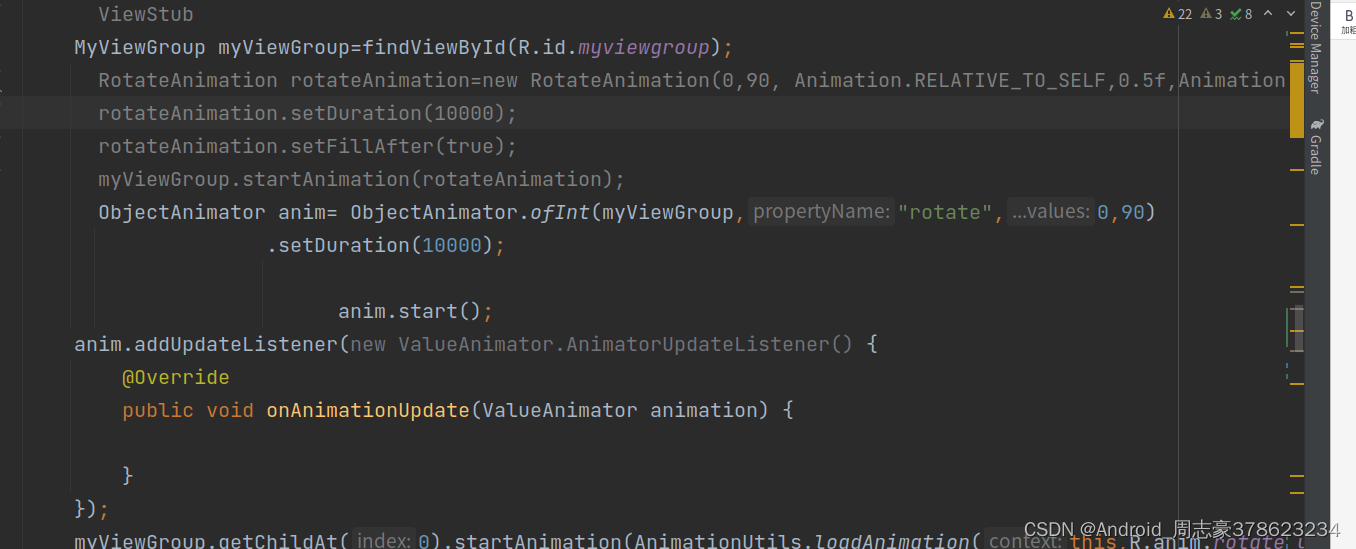 ValueAnimator 的使用,也是可以设置listen监听,从值的变化来驱动动画。
ValueAnimator anim = ValueAnimator.ofFloat(0f, 5f, 3f, 10f); anim.setDuration(5000); anim.start();- 1
- 2
- 3
-
相关阅读:
2696. Minimum String Length Afte
pycharm转移缓存目录
centos安装部署OpenStack train版
1、error LNK2019: 无法解析的外部符号“struct ********“
智慧燃气系统建设方案:建设目标、建设方案、技术特征、应用价值
web开发概述
【一月一本技术书】-【Go语言设计与实现】- 9月
LGBM 模型保存为PMML 文件
ARM/X86工业级数据采集 (DAQ) 与控制产品解决方案
吴恩达作业ex5:Regularized Linear Regression and Bias v.s. Variance
- 原文地址:https://blog.csdn.net/u012553125/article/details/126369743
- 最新文章
-
沪漂五周年了:我越来越迷茫了
Agentic Skill Routing 实战:别再把所有 Skill 塞进 AI Agent 上下文
MySQL-Seconds_behind_master的精度误差
[MAF预定义ChatClient中间件-03]CachingChatClient——利用缓存省钱省时间
AI的至暗历史:从万众期待到被政府撤资,AI的两次死亡徘徊
Agent OS :五种驯服不确定性的范式
PortSwigger SQL注入LAB11
数据库即时编译JIT
[Begin]AI Learn Data Day 0
深度学习进阶(二十七)现代 LLM 的核心架构设计其二:SwiGLU