-
ext文件系统
Linux 以文件的形式对计算机中的数据和硬件资源进行管理,也就是彻底的一切皆文件,反映在 Linux 的文件类型上就是:普通文件、目录文件(也就是文件夹)、设备文件、链接文件、管道文件、套接字文件(数据通信的接口)等等。Linux 上的文件系统一般来说就是 EXT2/3/4。
EXT 是 延 伸 文 件 系 统 ( 英 语 : Extended file system,缩写为 ext 或 ext1),也译为扩展文件系统,一种文件系统,于 1992 年 4 月发表,是为 linux 核心所做的第一个文件系统。ext2既有超级块的速度又有非常小的cpu占用率,可用于硬盘和移动存储设备;ext3在ext2的基础上增加了日志功能,可以回溯;ext4是日志式的文件系统,容量可支持1EB,最大单个文件支持16TB,支持连续写入以减少文件碎片,现在是linux默认的文件系统。
除此之外,linux还支持文件系统xfs(rehl的默认文件系统,可以管理500TB的硬盘)、brtfs(针对固态硬盘做了优化)。还有windows支持的文件系统fat、ntfs等。这些不是今天介绍的主角,就不赘述了。硬盘结构
先看一看硬盘的结构
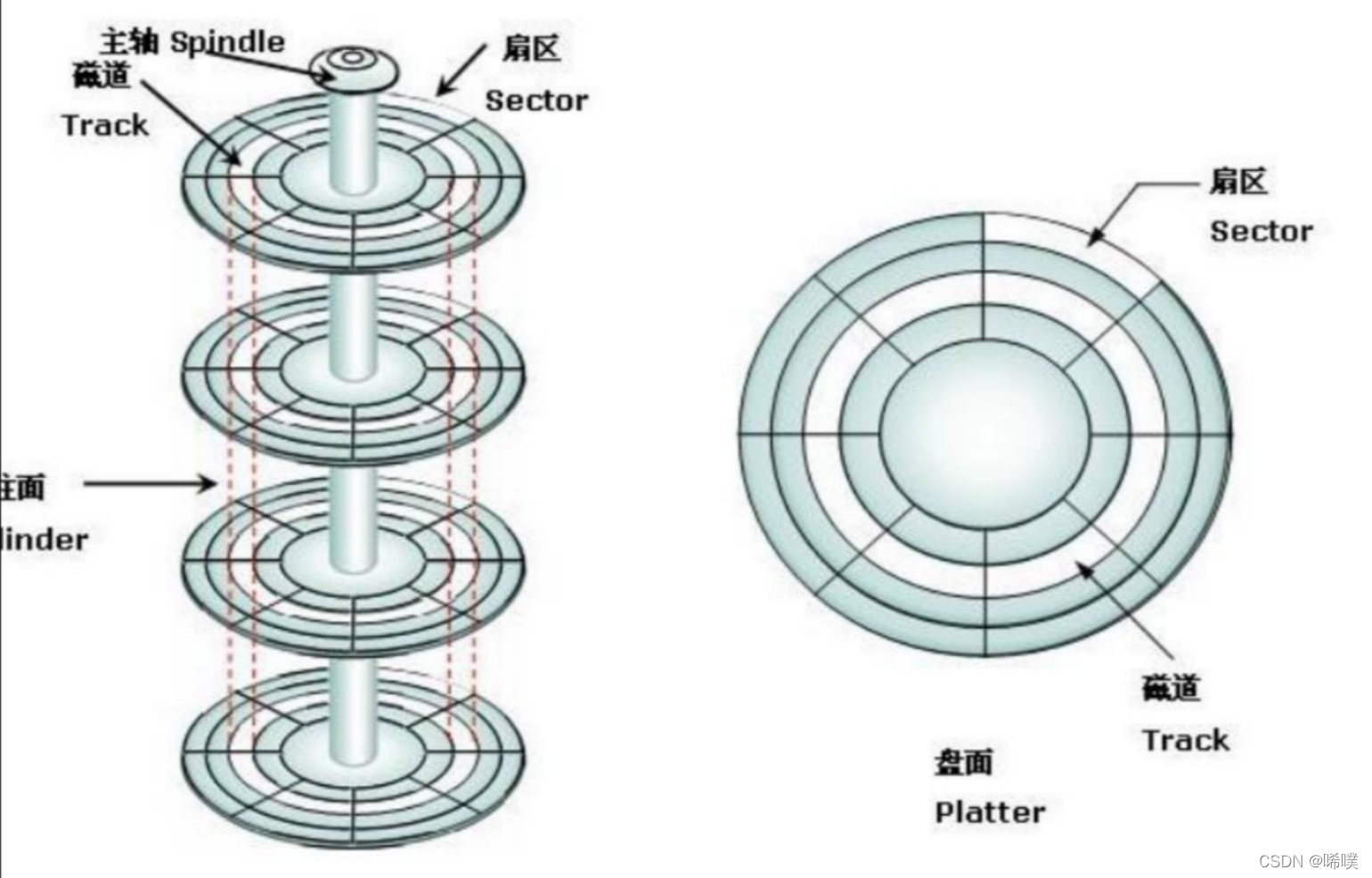
扇区是硬盘上最小的物理存储单位,一个扇区512B。
柱面是系统分区的最小单位。由所有盘面上半径相同的磁道们组成,即柱面上所有磁道与主轴距离相等,目的是提高磁盘读写速度。磁头在同一时间处于同一半径上,为了提高存取速度,数据一般按照柱面的顺序来存储。ext2
EXT2 第 二 代 扩 展 文 件 系 统 ( 英 语 : secondextended filesystem,缩写为 ext2),是 LINUX 内核所用的文件系统。它开始由 Rémy Card 设计,用以代替ext,于 1993 年 1 月加入 linux 核心支持之中。ext2 的经典实现为 LINUX 内核中的 ext2fs 文件系统驱动,最大可支持 2TB 的文件系统,至 linux 核心 2.6 版时,扩展到可支持 32TB。
ext2文件系统是 Linux 系统中的标准文件系统,是通过对 Minix 的文件系统进行扩展而得到的,其存取文件的性能极好。在ext2 文件系统中,文件由 inode(包含有文件的所有信息)进行唯一标识。一个文件可能对应多个文件名,只有在所有文件名都被删除后,该文件才会被删除。此外,同一文件在磁盘中存放和被打开时所对应的 inode是不同的,并由内核负责同步。
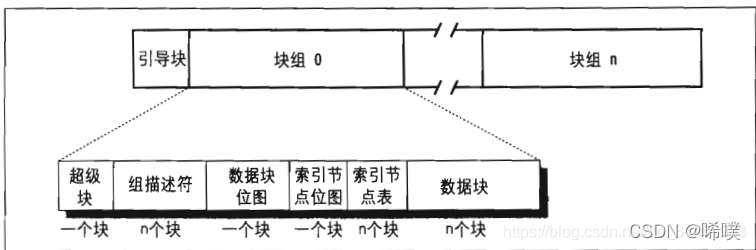
在 ext2 系统中,所有元数据结构的大小均基于“块”,而不是“扇区”。块的大小随文件系统的大小而有所不同。而一定数量的块又组成一个块组,每个块组的起始部分有多种多样的描述该块组各种属性的元数据结构。相关数据结构
ext2系统的磁盘布局
超级块
超级块(Super Block)描述整个分区的文件系统信息,如inode/block的大小、总量、使用量、剩余量,以及文件系统的格式与相关信息。超级块在每个块组的开头都有一份拷贝(第一个块组必须有,后面的块组可以没有)。 为了保证文件系统在磁盘部分扇区出现物理问题的情况下还能正常工作,就必须保证文件系统的super block信息在这种情况下也能正常访问。所以一个文件系统的super block会在多个block group中进行备份,这些super block区域的数据保持一致。
/* * Structure of the super block */ //超级块,起始地址为其所在分区的第1024字节,占用空间1KB struct ext2_super_block { //文件系统中inode总数 __le32 s_inodes_count; /* Inodes count */ //文件系统中的块总数 __le32 s_blocks_count; /* Blocks count */ //文件系统中保留的块总数 __le32 s_r_blocks_count; /* Reserved blocks count */ //文件系统中未使用的块总数,包括保留块 __le32 s_free_blocks_count; /* Free blocks count */ //文件系统中未使用的inode总数 __le32 s_free_inodes_count; /* Free inodes count */ //文件系统中第一个数据块 __le32 s_first_data_block; /* First Data Block */ //用于计算构架块大小 __le32 s_log_block_size; /* Block size */ //用于计算片大小 __le32 s_log_frag_size; /* Frgment size */ //每组中块数 __le32 s_blocks_per_group; /* # Blocks per group */ //每组中片数 __le32 s_frags_per_group; /* # Fragments per group */ //每组中索引节点数 __le32 s_inodes_per_group; /* # Inodes per group */ //最后一次mount时间 __le32 s_mtime; /* Mount time */ //最后一次对该超级块写操作的时间 __le32 s_wtime; /* Write time */ //挂载计数 __le16 s_mnt_count; /* Mount count */ //最大可挂载计数 __le16 s_max_mnt_count; /* Maximal mount count */ //用于确定文件系统版本的标志 __le16 s_magic; /* Magic signature */ //文件系统的状态 __le16 s_state; /* File system state */ //当检测到错误时如何处理 __le16 s_errors; /* Behaviour when detecting errors */ //次版本号 __le16 s_minor_rev_level; /* minor revision level */ //最后一次检测文件系统状态的时间 __le32 s_lastcheck; /* time of last check */ //两次对文件系统进行检测之间的间隔时间 __le32 s_checkinterval; /* max. time between checks */ //版本号 __le32 s_creator_os; /* OS */ __le32 s_rev_level; /* Revision level */ //保留块的默认用户标识号 __le16 s_def_resuid; /* Default uid for reserved blocks */ //保留块的默认用户组标识号 __le16 s_def_resgid; /* Default gid for reserved blocks */ /* * These fields are for EXT2_DYNAMIC_REV superblocks only. * * Note: the difference between the compatible feature set and * the incompatible feature set is that if there is a bit set * in the incompatible feature set that the kernel doesn't * know about, it should refuse to mount the filesystem. * * e2fsck's requirements are more strict; if it doesn't know * about a feature in either the compatible or incompatible * feature set, it must abort and not try to meddle with * things it doesn't understand... */ //第一个非保留的索引节点 __le32 s_first_ino; /* First non-reserved inode */ //索引节点的大小 __le16 s_inode_size; /* size of inode structure */ //该超级块的块组号 __le16 s_block_group_nr; /* block group # of this superblock */ //兼容特点的位图 __le32 s_feature_compat; /* compatible feature set */ //非兼容特点的位图 __le32 s_feature_incompat; /* incompatible feature set */ //只读兼容特点的位图 __le32 s_feature_ro_compat; /* readonly-compatible feature set */ //128位的文件系统标识号 __u8 s_uuid[16]; /* 128-bit uuid for volume */ //卷名 char s_volume_name[16]; /* volume name */ char s_last_mounted[64]; /* directory where last mounted */ //文件系统采用的压缩算法 __le32 s_algorithm_usage_bitmap; /* For compression */ /* * Performance hints. Directory preallocation should only * happen if the EXT2_COMPAT_PREALLOC flag is on. */ //预分配的块数 __u8 s_prealloc_blocks; /* Nr of blocks to try to preallocate*/ //给目录项预分配的块数 __u8 s_prealloc_dir_blocks; /* Nr to preallocate for dirs */ __u16 s_padding1; /* * Journaling support valid if EXT3_FEATURE_COMPAT_HAS_JOURNAL set. */ //日志超级块的卷标识符 __u8 s_journal_uuid[16]; /* uuid of journal superblock */ //日志文件数 __u32 s_journal_inum; /* inode number of journal file */ //日志文件的设备数 __u32 s_journal_dev; /* device number of journal file */ //要删除inode列表的起始位置 __u32 s_last_orphan; /* start of list of inodes to delete */ __u32 s_hash_seed[4]; /* HTREE hash seed */ __u8 s_def_hash_version; /* Default hash version to use */ __u8 s_reserved_char_pad; __u16 s_reserved_word_pad; __le32 s_default_mount_opts; __le32 s_first_meta_bg; /* First metablock block group */ __u32 s_reserved[190]; /* Padding to the end of the block */ };- 1
- 2
- 3
- 4
- 5
- 6
- 7
- 8
- 9
- 10
- 11
- 12
- 13
- 14
- 15
- 16
- 17
- 18
- 19
- 20
- 21
- 22
- 23
- 24
- 25
- 26
- 27
- 28
- 29
- 30
- 31
- 32
- 33
- 34
- 35
- 36
- 37
- 38
- 39
- 40
- 41
- 42
- 43
- 44
- 45
- 46
- 47
- 48
- 49
- 50
- 51
- 52
- 53
- 54
- 55
- 56
- 57
- 58
- 59
- 60
- 61
- 62
- 63
- 64
- 65
- 66
- 67
- 68
- 69
- 70
- 71
- 72
- 73
- 74
- 75
- 76
- 77
- 78
- 79
- 80
- 81
- 82
- 83
- 84
- 85
- 86
- 87
- 88
- 89
- 90
- 91
- 92
- 93
- 94
- 95
- 96
- 97
- 98
- 99
- 100
- 101
- 102
- 103
- 104
- 105
- 106
- 107
- 108
- 109
- 110
- 111
- 112
- 113
- 114
块组描述符
使用块组描述符用以描述一个块组的属性。
/* * Structure of a blocks group descriptor */ struct ext2_group_desc { //块位图所在的第一个块的id __le32 bg_block_bitmap; /* Blocks bitmap block */ //inode位图所在的第一个块的id __le32 bg_inode_bitmap; /* Inodes bitmap block */ //inode表所在的第一个块的id __le32 bg_inode_table; /* Inodes table block */ //块组中没有被使用的块总数 __le16 bg_free_blocks_count; /* Free blocks count */ //块组中没有被使用的inode总数 __le16 bg_free_inodes_count; /* Free inodes count */ //块组分配目录的inode总数 __le16 bg_used_dirs_count; /* Directories count */ __le16 bg_pad; __le32 bg_reserved[3]; };- 1
- 2
- 3
- 4
- 5
- 6
- 7
- 8
- 9
- 10
- 11
- 12
- 13
- 14
- 15
- 16
- 17
- 18
- 19
- 20
inode 表
inode 表用于跟踪定位每个文件,包括位置、大小等(但不包括文件名),一个块组只有一个 inode 表。
/* * Structure of an inode on the disk */ struct ext2_inode { //文件格式的访问权限 __le16 i_mode; /* File mode */ //文件的所有者id的低16位 __le16 i_uid; /* Low 16 bits of Owner Uid */ //文件的字节大小 __le32 i_size; /* Size in bytes */ //文件上次被访问的时间 __le32 i_atime; /* Access time */ //文件创建时间 __le32 i_ctime; /* Creation time */ //文件上次修改时间 __le32 i_mtime; /* Modification time */ //文件被删除时间 __le32 i_dtime; /* Deletion Time */ //文件的所有者的组id的低16位 __le16 i_gid; /* Low 16 bits of Group Id */ //inode被链接次数 __le16 i_links_count; /* Links count */ //用于保留块总数 __le32 i_blocks; /* Blocks count */ //inode访问时,ext2的实现方式 __le32 i_flags; /* File flags */ union { struct { __le32 l_i_reserved1; } linux1; struct { __le32 h_i_translator; } hurd1; struct { __le32 m_i_reserved1; } masix1; } osd1; /* OS dependent 1 */ //保留使用 __le32 i_block[EXT2_N_BLOCKS];/* Pointers to blocks */ __le32 i_generation; /* File version (for NFS) */ __le32 i_file_acl; /* File ACL */ __le32 i_dir_acl; /* Directory ACL */ __le32 i_faddr; /* Fragment address */ union { struct { __u8 l_i_frag; /* Fragment number */ __u8 l_i_fsize; /* Fragment size */ __u16 i_pad1; __le16 l_i_uid_high; /* these 2 fields */ __le16 l_i_gid_high; /* were reserved2[0] */ __u32 l_i_reserved2; } linux2; struct { __u8 h_i_frag; /* Fragment number */ __u8 h_i_fsize; /* Fragment size */ __le16 h_i_mode_high; __le16 h_i_uid_high; __le16 h_i_gid_high; __le32 h_i_author; } hurd2; struct { __u8 m_i_frag; /* Fragment number */ __u8 m_i_fsize; /* Fragment size */ __u16 m_pad1; __u32 m_i_reserved2[2]; } masix2; } osd2; /* OS dependent 2 */ };- 1
- 2
- 3
- 4
- 5
- 6
- 7
- 8
- 9
- 10
- 11
- 12
- 13
- 14
- 15
- 16
- 17
- 18
- 19
- 20
- 21
- 22
- 23
- 24
- 25
- 26
- 27
- 28
- 29
- 30
- 31
- 32
- 33
- 34
- 35
- 36
- 37
- 38
- 39
- 40
- 41
- 42
- 43
- 44
- 45
- 46
- 47
- 48
- 49
- 50
- 51
- 52
- 53
- 54
- 55
- 56
- 57
- 58
- 59
- 60
- 61
- 62
- 63
- 64
- 65
- 66
- 67
目录结构
在 ext2 文件系统中,目录是作为文件存储的。
/* * Structure of a directory entry */ struct ext2_dir_entry { __le32 inode; /* Inode number */ __le16 rec_len; /* Directory entry length */ __le16 name_len; /* Name length */ char name[]; /* File name, up to EXT2_NAME_LEN */ }; /* * The new version of the directory entry. Since EXT2 structures are * stored in intel byte order, and the name_len field could never be * bigger than 255 chars, it's safe to reclaim the extra byte for the * file_type field. */ struct ext2_dir_entry_2 { //文件入口的inode的编号 __le32 inode; /* Inode number */ //目录项长度 __le16 rec_len; /* Directory entry length */ __u8 name_len; /* Name length */ //文件类型 __u8 file_type; char name[]; /* File name, up to EXT2_NAME_LEN */ };- 1
- 2
- 3
- 4
- 5
- 6
- 7
- 8
- 9
- 10
- 11
- 12
- 13
- 14
- 15
- 16
- 17
- 18
- 19
- 20
- 21
- 22
- 23
- 24
- 25
- 26
- 27
ext3
Ext3是Ext2的增强版,与Ext2兼容,其磁盘数据结构与Ext2基本相同,在Ext2的基础上重点强化了日志功能。这也是ext3的优势,ext2升级到ext3,不需要备份和恢复数据。
文件系统通常有两种块,包含元数据的块和包含普通文件数据的块,Ext2和Ext3中元数据是指超级块,块组描述符,索引节点,位图块等,不同文件系统使用不同的元数据。Ext3支持将元数据块和普通文件数据块都写入日志中,具体提供了三种不同大的日志模式。- 日志(journal),文件系统的所有文件数据和元数据的改变都写入日志中。该模式减少了文件修改丢失,但是增加了额外的磁盘开销,是最安全和最慢的模式
- 顺序(ordered),只有文件系统的元数据的修改才写入日志,但是保证当元数据块和相关的文件数据块都需要写入磁盘时,文件数据块会比元数据块先写入磁盘,此时元数据块已经在日志中保存了一个副本。该模式是Linux的默认模式,可以减少普通文件修改的丢失,因为要维护元数据块和普通文件块的相关性和两者的磁盘写入顺序,相比写回模式有轻微的性能损耗。
- 写回(writeback),只有文件系统的元数据的修改才写入日志,对元数据块和普通文件数据块写入磁盘的顺序不做限制,由页高速缓存的脏页刷新机制决定。该模式是其他日志文件系统使用的方式,是最快的模式,但是当系统故障时存在文件损坏的风险。
当然,ext3还有缺陷,缺少动态的inode和树状的资料存放结构。
ext4
EXT4 是第四代扩展文件系统,是 Linux 系统下的日志文件系统,是 ext3 文件系统的后继版本。Ext4 产生原因是开发人员在 Ext3 中加入了新的高级功能,但在实现的过程出现了几个重要问题:
- 一些新功能违背向后兼容性
- 新功能使 Ext3 代码变得更加复杂并难以维护
- 新加入的更改使原来十分可靠的 Ext3 变得不可靠。
为了解决这些问题,ext4应运而生,其有以下特性:
- 更大的文件系统和更大的文件:Ext3-32TB 文件系统和2TB 文件。Ext4-1EB 文件系统和 16TB 文件 容量
- 更多的子目录数:Ext3 支持 32000 个子目录,Ext4 取消此限制
- 更多的块和 inode数量:ext3使用32 位空间记录块数量,ext4使用64 位空间记录块数量
- 多块分配:ext3一次只能分配一个4KB的块,ext4有多块分配器,可以一次性分配多个块,提升分配速度。
- 延迟分配:ext3的数据块分配是尽快分配,ext4是尽量延迟分配,直到文件在缓存中写完才分配数据块,写入到磁盘中。这样做可以优化整个文件数据块的分配,使性能得意提升。
- 日志校验功能:日志是文件系统最常用的基本数据结构。日志很容易受到破坏,从损坏的日志中恢复数据可能会导致更多的数据损坏。对于ext4,有了日志检验功能,可以判断日志的数据是否已损坏。
- 支持“无日志”模式:日志总会占用一定开销,ext4可以关闭日志功能,以便一些有特殊要求的用户借此来提升性能。
- 在线碎片整理:尽管延迟分配,多块分配可以有效减少文件碎片,但是不能完全避免。ext4 通过 e4defrag 提供支持在线碎片整理。
打开文件流程
打开文件的三个步骤:
- 需要在父目录的数据中查找文件对应的目录项,从目录项得到索引节点的编号,然后在内存中创建索引节点的副本。
- 需要分配文件的一个打开实例,即file 结构体,关联到文件的索引节点。
- 在进程的打开文件表中分配一个文件描述符,把文件描述符和打开实例的映射添加到进程的打开文件表中。
系统调用 open 和 openat 都把主要工作委托给函数do_sys_open , open 传 入 特 殊 的 文 件 描 述 符AT_FDCWD,表示“如果文件路径是相对路径,就解释为相对调用进程的当前工作目录"。
系统调用 open 和 openat 都把主要工作委托给函数do_sys_open , open 传 入 特 殊 的 文 件 描 述 符
AT_FDCWD,表示如果文件路径是相对路径,就解释为相对调用进程的当前工作目录。

结合流程图看代码long do_sys_open(int dfd, const char __user *filename, int flags, umode_t mode) { struct open_flags op; //把标志位分类为打开标志、访问模式、查找标志位 //再保存到结构体op中 int fd = build_open_flags(flags, mode, &op); struct filename *tmp; if (fd) return fd; //把文件路径从用户的缓冲区复制到内核空间的缓冲区 tmp = getname(filename); if (IS_ERR(tmp)) return PTR_ERR(tmp); //分配文件描述符 fd = get_unused_fd_flags(flags); //会继续往下跟这个函数 if (fd >= 0) { //解析文件路径并得到文件的索引节点 //创建一个文件的打开实例,把打开实例关联到文件的索引节点 struct file *f = do_filp_open(dfd, tmp, &op); //下面还会贴代码 if (IS_ERR(f)) { put_unused_fd(fd); fd = PTR_ERR(f); } else { //通知打开文件事件,进程可以使用inotify监视文件系统的事件 fsnotify_open(f); //把文件的打开实例添加到进程的打开文件表中 fd_install(fd, f); } } putname(tmp); return fd; } //open系统调用 SYSCALL_DEFINE3(open, const char __user *, filename, int, flags, umode_t, mode) { //如果是64位内核,强制设置标志位O_LARGEFILE,表示允许打开长度超过4GB的大文件 if (force_o_largefile()) flags |= O_LARGEFILE; return do_sys_open(AT_FDCWD, filename, flags, mode); } SYSCALL_DEFINE4(openat, int, dfd, const char __user *, filename, int, flags, umode_t, mode) { if (force_o_largefile()) flags |= O_LARGEFILE; return do_sys_open(dfd, filename, flags, mode); }- 1
- 2
- 3
- 4
- 5
- 6
- 7
- 8
- 9
- 10
- 11
- 12
- 13
- 14
- 15
- 16
- 17
- 18
- 19
- 20
- 21
- 22
- 23
- 24
- 25
- 26
- 27
- 28
- 29
- 30
- 31
- 32
- 33
- 34
- 35
- 36
- 37
- 38
- 39
- 40
- 41
- 42
- 43
- 44
- 45
- 46
- 47
- 48
- 49
- 50
- 51
- 52
- 53
- 54
继续往下跟,先看build_open_flags
static inline int build_open_flags(int flags, umode_t mode, struct open_flags *op) { int lookup_flags = 0; int acc_mode = ACC_MODE(flags); /* * Clear out all open flags we don't know about so that we don't report * them in fcntl(F_GETFD) or similar interfaces. */ flags &= VALID_OPEN_FLAGS; if (flags & (O_CREAT | __O_TMPFILE)) op->mode = (mode & S_IALLUGO) | S_IFREG; else op->mode = 0; /* Must never be set by userspace */ flags &= ~FMODE_NONOTIFY & ~O_CLOEXEC; /* * O_SYNC is implemented as __O_SYNC|O_DSYNC. As many places only * check for O_DSYNC if the need any syncing at all we enforce it's * always set instead of having to deal with possibly weird behaviour * for malicious applications setting only __O_SYNC. */ if (flags & __O_SYNC) flags |= O_DSYNC; if (flags & __O_TMPFILE) { if ((flags & O_TMPFILE_MASK) != O_TMPFILE) return -EINVAL; if (!(acc_mode & MAY_WRITE)) return -EINVAL; } else if (flags & O_PATH) { /* * If we have O_PATH in the open flag. Then we * cannot have anything other than the below set of flags */ flags &= O_DIRECTORY | O_NOFOLLOW | O_PATH; acc_mode = 0; } op->open_flag = flags; /* O_TRUNC implies we need access checks for write permissions */ if (flags & O_TRUNC) acc_mode |= MAY_WRITE; /* Allow the LSM permission hook to distinguish append access from general write access. */ if (flags & O_APPEND) acc_mode |= MAY_APPEND; op->acc_mode = acc_mode; op->intent = flags & O_PATH ? 0 : LOOKUP_OPEN; if (flags & O_CREAT) { op->intent |= LOOKUP_CREATE; if (flags & O_EXCL) op->intent |= LOOKUP_EXCL; } if (flags & O_DIRECTORY) lookup_flags |= LOOKUP_DIRECTORY; if (!(flags & O_NOFOLLOW)) lookup_flags |= LOOKUP_FOLLOW; op->lookup_flags = lookup_flags; return 0; }- 1
- 2
- 3
- 4
- 5
- 6
- 7
- 8
- 9
- 10
- 11
- 12
- 13
- 14
- 15
- 16
- 17
- 18
- 19
- 20
- 21
- 22
- 23
- 24
- 25
- 26
- 27
- 28
- 29
- 30
- 31
- 32
- 33
- 34
- 35
- 36
- 37
- 38
- 39
- 40
- 41
- 42
- 43
- 44
- 45
- 46
- 47
- 48
- 49
- 50
- 51
- 52
- 53
- 54
- 55
- 56
- 57
- 58
- 59
- 60
- 61
- 62
- 63
- 64
- 65
- 66
- 67
- 68
- 69
- 70
get_unused_fd_flags
/* * allocate a file descriptor, mark it busy. */ int __alloc_fd(struct files_struct *files, unsigned start, unsigned end, unsigned flags) { unsigned int fd; int error; struct fdtable *fdt; spin_lock(&files->file_lock); repeat: fdt = files_fdtable(files); fd = start; //从(上次分配的描述符+1)开始尝试分配描述符 if (fd < files->next_fd) fd = files->next_fd; //如果fd小于打开文件表的大小,就在文件描述符位图中查找一个空闲的文件描述符 if (fd < fdt->max_fds) fd = find_next_fd(fdt, fd); /* * N.B. For clone tasks sharing a files structure, this test * will limit the total number of files that can be opened. */ //如果进程打开的文件数量达到了限制,返回-EMFILE error = -EMFILE; if (fd >= end) goto out; //如果当前打开文件表已经分配完文件描述符,就扩大打开文件表 error = expand_files(files, fd); if (error < 0) goto out; /* * If we needed to expand the fs array we * might have blocked - try again. */ //如果打开文件表被扩大,那么重新尝试分配文件描述符 if (error) goto repeat; //记录下一次分配文件描述符的位置(fd+1) if (start <= files->next_fd) files->next_fd = fd + 1; //在文件描述符位图中记录fd已被分配 __set_open_fd(fd, fdt); //如果调用进程设置标志位O_CLOEXEC,表示系统调用execve()装载程序的时候关闭文件 //那么在_close_on_exec位图中设置fd对应的位,否则在_close_on_exec清除对应的位 if (flags & O_CLOEXEC) __set_close_on_exec(fd, fdt); else __clear_close_on_exec(fd, fdt); error = fd; #if 1 /* Sanity check */ if (rcu_access_pointer(fdt->fd[fd]) != NULL) { printk(KERN_WARNING "alloc_fd: slot %d not NULL!\n", fd); rcu_assign_pointer(fdt->fd[fd], NULL); } #endif out: spin_unlock(&files->file_lock); return error; } static int alloc_fd(unsigned start, unsigned flags) { return __alloc_fd(current->files, start, rlimit(RLIMIT_NOFILE), flags); } //负责分配文件描述符 //把主要工作委托给__alloc_fd,有个可分配文件描述符的范围 int get_unused_fd_flags(unsigned flags) { //rlimit(RLIMIT_NOFILE):允许进程打开文件的最大数量,默认1024 return __alloc_fd(current->files, 0, rlimit(RLIMIT_NOFILE), flags); } EXPORT_SYMBOL(get_unused_fd_flags);- 1
- 2
- 3
- 4
- 5
- 6
- 7
- 8
- 9
- 10
- 11
- 12
- 13
- 14
- 15
- 16
- 17
- 18
- 19
- 20
- 21
- 22
- 23
- 24
- 25
- 26
- 27
- 28
- 29
- 30
- 31
- 32
- 33
- 34
- 35
- 36
- 37
- 38
- 39
- 40
- 41
- 42
- 43
- 44
- 45
- 46
- 47
- 48
- 49
- 50
- 51
- 52
- 53
- 54
- 55
- 56
- 57
- 58
- 59
- 60
- 61
- 62
- 63
- 64
- 65
- 66
- 67
- 68
- 69
- 70
- 71
- 72
- 73
- 74
- 75
- 76
- 77
- 78
- 79
- 80
- 81
- 82
- 83
do_filp_open
//解析文件路径并得到文件的索引节点,创建一个文件打开实例并把它关联到索引节点 struct file *do_filp_open(int dfd, struct filename *pathname, const struct open_flags *op) { //结构体nameidata用来向解析函数传递参数 struct nameidata nd; //下面贴代码 int flags = op->lookup_flags; struct file *filp; /* 这里调用三次path_openat,以解析文件路径 1.解析传入标志LOOKUP_RCU,利用RCU查找方式(rcu-walk)。RCU查找方式速度最快 2.如果在第一次解析过程中其他处理器修改了正在查找的目录,返回-ECHILD。 此时第二次查找就使用引用查找方式(ref-walk)。引用查找方式速度较慢,后面稍微介绍一下这两种查找方式 3.网络文件系统的文件在网络服务器上,本地中上次查询到的信息可能过期,和服务器当前的状态不一致。 如果第二次解析发现信息过期,返回错误号-ESTALE,那么此时进行第三次解析,传入标志LOOKUP_REVAL,表示需要重新确认消息是否有效 */ set_nameidata(&nd, dfd, pathname); filp = path_openat(&nd, op, flags | LOOKUP_RCU); if (unlikely(filp == ERR_PTR(-ECHILD))) filp = path_openat(&nd, op, flags); if (unlikely(filp == ERR_PTR(-ESTALE))) filp = path_openat(&nd, op, flags | LOOKUP_REVAL); restore_nameidata(); return filp; }- 1
- 2
- 3
- 4
- 5
- 6
- 7
- 8
- 9
- 10
- 11
- 12
- 13
- 14
- 15
- 16
- 17
- 18
- 19
- 20
- 21
- 22
- 23
- 24
- 25
- 26
看一下nameidata结构体
#define EMBEDDED_LEVELS 2 struct nameidata { //存放解析得到的挂载描述符和目录项 //下面的inode成员存放目录项对应的索引节点 struct path path; //存放了解析的文件路径的分量 //是一个快速字符串,不仅包含字符串,还包含长度和散列值 struct qstr last; struct path root; //存放目录项对应的索引节点(再写一遍) struct inode *inode; /* path.dentry.d_inode */ unsigned int flags; unsigned seq, m_seq; int last_type; unsigned depth; int total_link_count; struct saved { struct path link; struct delayed_call done; const char *name; unsigned seq; } *stack, internal[EMBEDDED_LEVELS]; struct filename *name; struct nameidata *saved; struct inode *link_inode; unsigned root_seq; int dfd; };- 1
- 2
- 3
- 4
- 5
- 6
- 7
- 8
- 9
- 10
- 11
- 12
- 13
- 14
- 15
- 16
- 17
- 18
- 19
- 20
- 21
- 22
- 23
- 24
- 25
- 26
- 27
- 28
上面的代码,提到了RCU查找方式和引用查找方式。
- rcu-walk方式:采用RCU锁的方式进行查找,并发查找过程中并不会因为等待spinlock而阻塞,因此速度相对更快。但是它并不能保证所有情况下都能查找成功。RCU锁:读者不需要获得任何锁就可访问RCU保护的临界区;写者在访问临界区时,写者“自己”将先拷贝一个临界区副本,然后对副本进行修改。此外,RCU还有相应的垃圾回收机制,在所有的读者访问结束时,会删除旧数据。RCU的适用场景是频繁地读取数据的场景,频繁写入的话就不要用,可以考虑宽限期RCU。
- ref-walk方式:指的是路径查找过程中,使用Spinlock并发使用或者修改目录项,来保证系统最终目录项内容的正确性。但是Spinlock因为会引发阻塞,所以效率会低于RCU-Walk。
关闭文件流程
进程可以使用系统调用 close 关闭文件。另外,在进程退出时,内核将会把进程打开的所有文件关闭。
流程图加代码

/* * Careful here! We test whether the file pointer is NULL before * releasing the fd. This ensures that one clone task can't release * an fd while another clone is opening it. */ SYSCALL_DEFINE1(close, unsigned int, fd) { int retval = __close_fd(current->files, fd); /* can't restart close syscall because file table entry was cleared */ if (unlikely(retval == -ERESTARTSYS || retval == -ERESTARTNOINTR || retval == -ERESTARTNOHAND || retval == -ERESTART_RESTARTBLOCK)) retval = -EINTR; return retval; } EXPORT_SYMBOL(sys_close);- 1
- 2
- 3
- 4
- 5
- 6
- 7
- 8
- 9
- 10
- 11
- 12
- 13
- 14
- 15
- 16
- 17
- 18
- 19
__close_fd
/* * The same warnings as for __alloc_fd()/__fd_install() apply here... */ int __close_fd(struct files_struct *files, unsigned fd) { struct file *file; struct fdtable *fdt; spin_lock(&files->file_lock); fdt = files_fdtable(files); if (fd >= fdt->max_fds) goto out_unlock; file = fdt->fd[fd]; if (!file) goto out_unlock; rcu_assign_pointer(fdt->fd[fd], NULL); __clear_close_on_exec(fd, fdt); __put_unused_fd(files, fd); spin_unlock(&files->file_lock); return filp_close(file, files); out_unlock: spin_unlock(&files->file_lock); return -EBADF; }- 1
- 2
- 3
- 4
- 5
- 6
- 7
- 8
- 9
- 10
- 11
- 12
- 13
- 14
- 15
- 16
- 17
- 18
- 19
- 20
- 21
- 22
- 23
- 24
- 25
filp_close
int filp_close(struct file *filp, fl_owner_t id) { int retval = 0; if (!file_count(filp)) { printk(KERN_ERR "VFS: Close: file count is 0\n"); return 0; } if (filp->f_op->flush) retval = filp->f_op->flush(filp, id); if (likely(!(filp->f_mode & FMODE_PATH))) { dnotify_flush(filp, id); locks_remove_posix(filp, id); } fput(filp); return retval; }- 1
- 2
- 3
- 4
- 5
- 6
- 7
- 8
- 9
- 10
- 11
- 12
- 13
- 14
- 15
- 16
- 17
- 18
- 19
fput最终会调用__fput
/* the real guts of fput() - releasing the last reference to file */ static void __fput(struct file *file) { struct dentry *dentry = file->f_path.dentry; struct vfsmount *mnt = file->f_path.mnt; struct inode *inode = file->f_inode; might_sleep(); //通知关闭文件事件,进程可以使用inotify监视文件系统的事件 fsnotify_close(file); /* * The function eventpoll_release() should be the first called * in the file cleanup chain. */ //如果进程使用eventpoll监听文件系统的事件,那么把文件从eventpoll数据库中删除 eventpoll_release(file); //如果进程持有文件锁,就释放文件锁 locks_remove_file(file); if (unlikely(file->f_flags & FASYNC)) { if (file->f_op->fasync) file->f_op->fasync(-1, file, 0); } ima_file_free(file); //调用具体文件系统类型的文件操作集合的release方法 if (file->f_op->release) file->f_op->release(inode, file); security_file_free(file); if (unlikely(S_ISCHR(inode->i_mode) && inode->i_cdev != NULL && !(file->f_mode & FMODE_PATH))) { cdev_put(inode->i_cdev); } //把文件操作集合结构体引用计数减1 fops_put(file->f_op); //解除file实例和目录项、挂载描述符和索引节点的关联 put_pid(file->f_owner.pid); if ((file->f_mode & (FMODE_READ | FMODE_WRITE)) == FMODE_READ) i_readcount_dec(inode); if (file->f_mode & FMODE_WRITER) { put_write_access(inode); __mnt_drop_write(mnt); } file->f_path.dentry = NULL; file->f_path.mnt = NULL; file->f_inode = NULL; file_free(file); //释放file实例的内存 dput(dentry); //释放目录项 mntput(mnt); //释放挂载描述符 }- 1
- 2
- 3
- 4
- 5
- 6
- 7
- 8
- 9
- 10
- 11
- 12
- 13
- 14
- 15
- 16
- 17
- 18
- 19
- 20
- 21
- 22
- 23
- 24
- 25
- 26
- 27
- 28
- 29
- 30
- 31
- 32
- 33
- 34
- 35
- 36
- 37
- 38
- 39
- 40
- 41
- 42
- 43
- 44
- 45
- 46
- 47
- 48
- 49
- 50
- 51
- 52
- 53
-
相关阅读:
深入浅出Java多线程(五):线程间通信
极简解析!IP计费的s5爬虫IP
Linux 内核打印(高级字符设备六)
【前端学习】—判断成立(十二)
项目开发中使用Date和LocalDateTime处理日期
没有前端如何测试后端跨域问题
【从零开始学微服务】06.微服务架构的建设思路
Linux系统开发(1):IO多路复用
正则表达式学习笔记
K8sGPT,基于 AI 的云原生终极工具
- 原文地址:https://blog.csdn.net/m0_65931372/article/details/126368087
