-
Word控件Spire.Doc 【段落处理】教程(二):C#/VB.NET:在 Word 中设置段落缩进
在 Word 文档中,缩进是一种段落格式,用于调整段落正文和页边距之间的距离。它包括左缩进、右缩进、首行缩进和悬挂缩进。左缩进和右缩进可以应用于段落的所有行,而首行缩进只能应用于段落的第一行。至于悬挂缩进,它可以应用于除第一行之外的段落的每一行。本文介绍了如何使用Spire.Doc for .NET以编程方式在 Word 文档中设置段落缩进
Spire.Doc for.NET 最新下载
 https://www.evget.com/product/3368/download
为 .NET 安装 Spire.Doc
首先,您需要添加 Spire.Doc for .NET 包中包含的 DLL 文件作为 .NET 项目中的引用。DLL 文件可以从此链接下载或通过NuGet安装。
在 Word 中设置段落缩进
下表列出了一些用于在 Word 文档中设置不同段落缩进的核心类和属性。
姓名 描述 段落格式类 表示段落的格式。 ParagraphFormat.LeftIndent 属性 返回或设置表示段落左缩进的值。 ParagraphFormat.RightIndent 属性 返回或设置表示段落右缩进的值。 ParagraphFormat.FirstLineIndent 属性 获取或设置第一行或悬挂缩进的值。正值代表首行缩进,负值代表悬挂缩进。 详细步骤如下:
- 创建一个文档实例。
- 使用Document.LoadFromFile()方法加载示例 Word 文档。
- 使用Document.Sections[]属性获取指定部分。
- 使用Section.Paragraphs[]属性获取指定段落。
- 使用Paragraph.Format属性获取段落格式,然后使用ParagraphFormat类的上面列出的属性设置段落缩进。
- 使用Document.SaveToFile()方法将文档保存到另一个文件。
【C#】
using Spire.Doc;
using Spire.Doc.Documents;

namespace WordIndent
{
class Program
{
static void Main(string[] args)
{
//Create a Document instance
Document doc = new Document();

//Load a sample Word document
doc.LoadFromFile("sample.docx");

//Get the first paragraph and set left indent
Paragraph para1 = doc.Sections[0].Paragraphs[0];
para1.Format.LeftIndent = 30;

//Get the second paragraph and set right indent
Paragraph para2 = doc.Sections[0].Paragraphs[1];
para2.Format.RightIndent = 30;

//Get the third paragraph and set first line indent
Paragraph para3 = doc.Sections[0].Paragraphs[2];
para3.Format.FirstLineIndent = 30;

//Get the fourth paragraph and set hanging indent
Paragraph para4 = doc.Sections[0].Paragraphs[3];
para4.Format.FirstLineIndent = -30;

//Save the document to file
doc.SaveToFile("Indent.docx", FileFormat.Docx2010);
}
}
}
【VB.NET】
Imports Spire.Doc
Imports Spire.Doc.Documents

Namespace WordIndent
Friend Class Program
Shared Sub Main(ByVal args() As String)

'Create a Document instance
Dim doc As New Document()

'Load a sample Word document
doc.LoadFromFile("sample.docx")

'Get the first paragraph and set left indent
Dim para1 As Paragraph = doc.Sections(0).Paragraphs(0)
para1.Format.LeftIndent = 30

'Get the second paragraph and set right indent
Dim para2 As Paragraph = doc.Sections(0).Paragraphs(1)
para2.Format.RightIndent = 30

'Get the third paragraph and set first line indent
Dim para3 As Paragraph = doc.Sections(0).Paragraphs(2)
para3.Format.FirstLineIndent = 30

'Get the fourth paragraph and set hanging indent
Dim para4 As Paragraph = doc.Sections(0).Paragraphs(3)
para4.Format.FirstLineIndent = -30

'Save the document to file
doc.SaveToFile("Indent.docx", FileFormat.Docx2010)
End Sub
End Class
End Namespace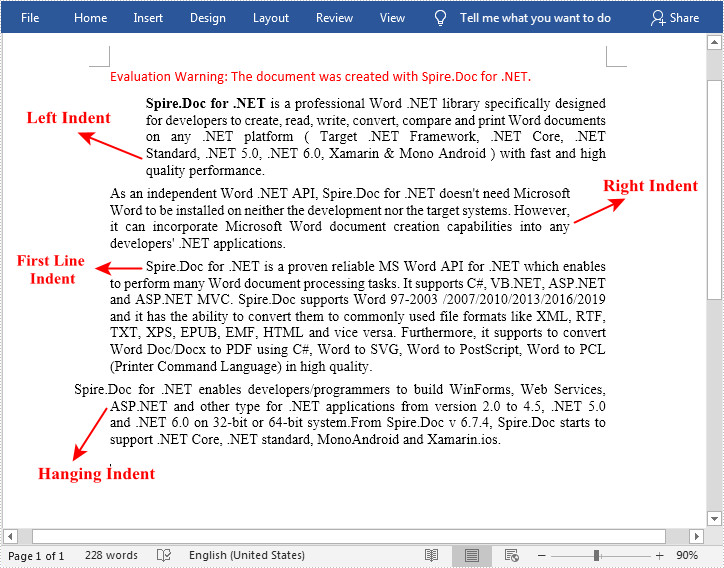
-
相关阅读:
webUI自动化之基本框架搭建(python + selenium + unittest)
jffs2文件系统(二)
一条 SQL 更新语句如何执行的
【数据结构与算法】之深入解析“检测正方形”的求解思路与算法示例
【我不熟悉的css】05. csc中使用变量,:root伪元素的应用
Liunx 重置MySQL用户密码
MySQL InnoDB 表不存在问题修复
2022-08-29 C++并发编程(十六)
网安朝阳·西门子白帽黑客大赛 | 聚焦实战攻防竞赛 促进网安人才发展
Jmeter---非GUI命令行的执行生成报告、使用ant插件执行接口测试脚本生成报告
- 原文地址:https://blog.csdn.net/m0_67129275/article/details/126359219

- 最新文章
-
沪漂五周年了:我越来越迷茫了
Agentic Skill Routing 实战:别再把所有 Skill 塞进 AI Agent 上下文
MySQL-Seconds_behind_master的精度误差
[MAF预定义ChatClient中间件-03]CachingChatClient——利用缓存省钱省时间
AI的至暗历史:从万众期待到被政府撤资,AI的两次死亡徘徊
Agent OS :五种驯服不确定性的范式
PortSwigger SQL注入LAB11
数据库即时编译JIT
[Begin]AI Learn Data Day 0
深度学习进阶(二十七)现代 LLM 的核心架构设计其二:SwiGLU