-
elasticsearch-.yml(中文配置详解)
原文出处:http://www.cnblogs.com/zlslch/p/6419948.html
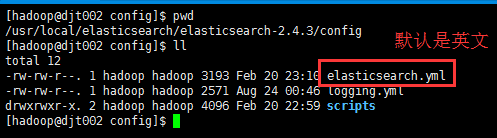
此elasticsearch-.yml配置文件,是在$ES_HOME/config/下
elasticsearch-.yml(中文配置详解)
# ======================== Elasticsearch Configuration =========================
# NOTE: Elasticsearch comes with reasonable defaults for most settings.
# Before you set out to tweak and tune the configuration, make sure you
# understand what are you trying to accomplish and the consequences.# The primary way of configuring a node is via this file. This template lists
# the most important settings you may want to configure for a production cluster.# Please see the documentation for further information on configuration options:
# http://www.elastic.co/guide/en/elasticsearch/reference/current/setup-configuration.html# ---------------------------------- Cluster -----------------------------------
# Use a descriptive name for your cluster:
# 集群名称,默认是elasticsearch
# cluster.name: my-application# ------------------------------------ Node ------------------------------------
# Use a descriptive name for the node:
# 节点名称,默认从elasticsearch-2.4.3/lib/elasticsearch-2.4.3.jar!config/names.txt中随机选择一个名称
# node.name: node-1# Add custom attributes to the node:
# node.rack: r1
# ----------------------------------- Paths ------------------------------------
# Path to directory where to store the data (separate multiple locations by comma):
# 可以指定es的数据存储目录,默认存储在es_home/data目录下
# path.data: /path/to/data# Path to log files:
# 可以指定es的日志存储目录,默认存储在es_home/logs目录下
# path.logs: /path/to/logs# ----------------------------------- Memory -----------------------------------
# Lock the memory on startup:
锁定物理内存地址,防止elasticsearch内存被交换出去,也就是避免es使用swap交换分区
# bootstrap.memory_lock: true
# 确保ES_HEAP_SIZE参数设置为系统可用内存的一半左右
# Make sure that the `ES_HEAP_SIZE` environment variable is set to about half the memory
# available on the system and that the owner of the process is allowed to use this limit.# 当系统进行内存交换的时候,es的性能很差
# Elasticsearch performs poorly when the system is swapping the memory.# ---------------------------------- Network -----------------------------------
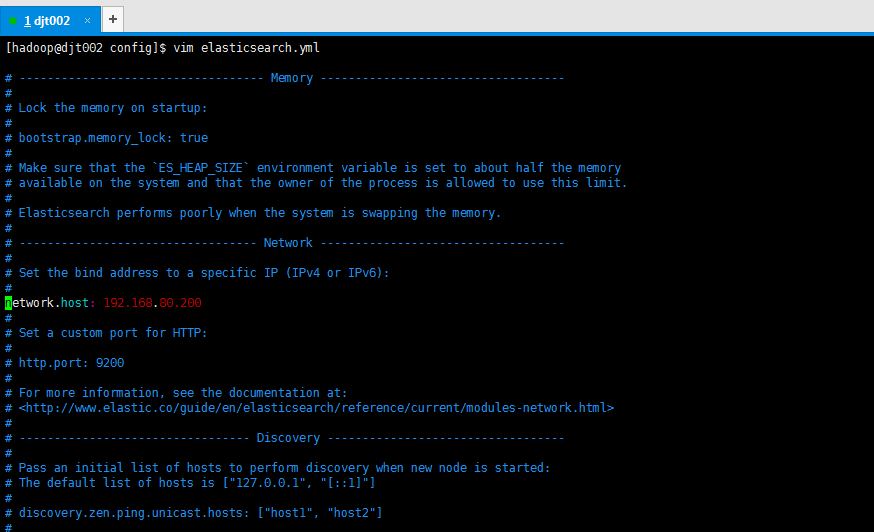
# 为es设置ip绑定,默认是127.0.0.1,也就是默认只能通过127.0.0.1 或者localhost才能访问
# es1.x版本默认绑定的是0.0.0.0 所以不需要配置,但是es2.x版本默认绑定的是127.0.0.1,需要配置
# Set the bind address to a specific IP (IPv4 or IPv6):# network.host: 192.168.0.1
# 为es设置自定义端口,默认是9200
# 注意:在同一个服务器中启动多个es节点的话,默认监听的端口号会自动加1:例如:9200,9201,9202…
# Set a custom port for HTTP:# http.port: 9200
# For more information, see the documentation at:
# http://www.elastic.co/guide/en/elasticsearch/reference/current/modules-network.html# --------------------------------- Discovery ----------------------------------
# 当启动新节点时,通过这个ip列表进行节点发现,组建集群
# 默认节点列表:
# 127.0.0.1,表示ipv4的回环地址。
# [::1],表示ipv6的回环地址# 在es1.x中默认使用的是组播(multicast)协议,默认会自动发现同一网段的es节点组建集群,
# 在es2.x中默认使用的是单播(unicast)协议,想要组建集群的话就需要在这指定要发现的节点信息了。
# 注意:如果是发现其他服务器中的es服务,可以不指定端口[默认9300],如果是发现同一个服务器中的es服务,就需要指定端口了。
# Pass an initial list of hosts to perform discovery when new node is started:# The default list of hosts is [“127.0.0.1”, “[::1]”]
# discovery.zen.ping.unicast.hosts: [“host1”, “host2”]
# 通过配置这个参数来防止集群脑裂现象 (集群总节点数量/2)+1
# Prevent the “split brain” by configuring the majority of nodes (total number of nodes / 2 + 1):# discovery.zen.minimum_master_nodes: 3
# For more information, see the documentation at:
# http://www.elastic.co/guide/en/elasticsearch/reference/current/modules-discovery.html# ---------------------------------- Gateway -----------------------------------
# Block initial recovery after a full cluster restart until N nodes are started:
# 一个集群中的N个节点启动后,才允许进行数据恢复处理,默认是1
# gateway.recover_after_nodes: 3# For more information, see the documentation at:
# http://www.elastic.co/guide/en/elasticsearch/reference/current/modules-gateway.html# ---------------------------------- Various -----------------------------------
# 在一台服务器上禁止启动多个es服务
# Disable starting multiple nodes on a single system:# node.max_local_storage_nodes: 1
# 设置是否可以通过正则或者_all删除或者关闭索引库,默认true表示必须需要显式指定索引库名称
# 生产环境建议设置为true,删除索引库的时候必须显式指定,否则可能会误删索引库中的索引库。
# Require explicit names when deleting indices:# action.destructive_requires_name: true
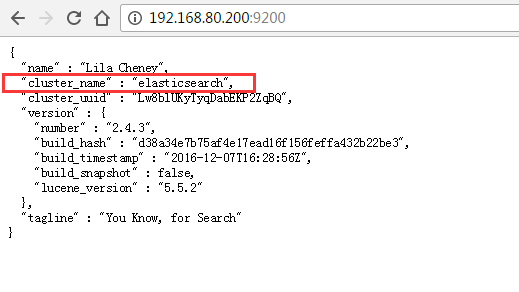
集群名称,默认是elasticsearch
输入,http://192.168.80.200:9200/
默认存储在es_home/data目录下

total 60
drwxrwxr-x. 2 hadoop hadoop 4096 Feb 20 22:54 bin
drwxrwxr-x. 3 hadoop hadoop 4096 Feb 21 01:28 config
drwxrwxr-x. 3 hadoop hadoop 4096 Feb 20 22:59 data
drwxrwxr-x. 2 hadoop hadoop 4096 Feb 20 22:54 lib
-rw-rw-r–. 1 hadoop hadoop 11358 Aug 24 00:46 LICENSE.txt
drwxrwxr-x. 2 hadoop hadoop 4096 Feb 21 00:33 logs
drwxrwxr-x. 5 hadoop hadoop 4096 Dec 8 00:41 modules
-rw-rw-r–. 1 hadoop hadoop 150 Aug 24 00:46 NOTICE.txt
drwxrwxr-x. 4 hadoop hadoop 4096 Feb 21 23:13 plugins
-rw-rw-r–. 1 hadoop hadoop 8700 Aug 24 00:46 README.textile
-rw-rw-r–. 1 hadoop hadoop 288 Feb 21 07:07 request
[hadoop@djt002 elasticsearch-2.4.3]$ cd data/
[hadoop@djt002 data]$ pwd
/usr/local/elasticsearch/elasticsearch-2.4.3/data
[hadoop@djt002 data]$ ll
total 4
drwxrwxr-x. 3 hadoop hadoop 4096 Feb 20 23:00 elasticsearch
[hadoop@djt002 data]$ cd elasticsearch/
[hadoop@djt002 elasticsearch]$ ll
total 4
drwxrwxr-x. 3 hadoop hadoop 4096 Feb 20 23:00 nodes
[hadoop@djt002 elasticsearch]$ cd nodes/
[hadoop@djt002 nodes]$ ll
total 4
drwxrwxr-x. 4 hadoop hadoop 4096 Feb 21 22:51 0
[hadoop@djt002 nodes]$ cd 0
[hadoop@djt002 0]$ ll
total 8
drwxrwxr-x. 3 hadoop hadoop 4096 Feb 21 01:33 indices
-rw-rw-r–. 1 hadoop hadoop 0 Feb 20 23:00 node.lock
drwxrwxr-x. 2 hadoop hadoop 4096 Feb 21 22:51 _state
[hadoop@djt002 0]$索引片段,里面存放着具体的数据
如,segments_6,是在/usr/local/elasticsearch/elasticsearch-2.4.3/data/elasticsearch/nodes/0/indices/zhouls/0/index

drwxrwxr-x. 3 hadoop hadoop 4096 Feb 21 01:33 indices
-rw-rw-r–. 1 hadoop hadoop 0 Feb 20 23:00 node.lock
drwxrwxr-x. 2 hadoop hadoop 4096 Feb 21 22:51 _state
[hadoop@djt002 0]$ cd indices/
[hadoop@djt002 indices]$ ll
total 4
drwxrwxr-x. 8 hadoop hadoop 4096 Feb 21 00:33 zhouls
[hadoop@djt002 indices]$ cd zhouls/
[hadoop@djt002 zhouls]$ ll
total 24
drwxrwxr-x. 5 hadoop hadoop 4096 Feb 21 00:33 0
drwxrwxr-x. 5 hadoop hadoop 4096 Feb 21 00:33 1
drwxrwxr-x. 5 hadoop hadoop 4096 Feb 21 00:33 2
drwxrwxr-x. 5 hadoop hadoop 4096 Feb 21 00:33 3
drwxrwxr-x. 5 hadoop hadoop 4096 Feb 21 00:33 4
drwxrwxr-x. 2 hadoop hadoop 4096 Feb 21 22:51 _state
[hadoop@djt002 zhouls]$ cd 0
[hadoop@djt002 0]$ ll
total 12
drwxrwxr-x. 2 hadoop hadoop 4096 Feb 21 22:57 index
drwxrwxr-x. 2 hadoop hadoop 4096 Feb 21 22:51 _state
drwxrwxr-x. 2 hadoop hadoop 4096 Feb 21 22:51 translog
[hadoop@djt002 0]$ cd index/
[hadoop@djt002 index]$ pwd
/usr/local/elasticsearch/elasticsearch-2.4.3/data/elasticsearch/nodes/0/indices/zhouls/0/index
[hadoop@djt002 index]$ ll
total 16
-rw-rw-r–. 1 hadoop hadoop 363 Feb 21 03:35 _0.cfe
-rw-rw-r–. 1 hadoop hadoop 2488 Feb 21 03:35 _0.cfs
-rw-rw-r–. 1 hadoop hadoop 371 Feb 21 03:35 _0.si
-rw-rw-r–. 1 hadoop hadoop 224 Feb 21 22:57 segments_6
-rw-rw-r–. 1 hadoop hadoop 0 Feb 21 00:33 write.lock
[hadoop@djt002 index]$总结
1、es已经为大多数参数设置合理的默认值
2、这个配置文件中列出来了针对生产环境下的一些重要配置
3、注意:这个文件是yaml格式的文件
(1):属性顶格写,不能有空格
(2):缩进一定不能使用tab制表符
(3):属性和值之间的:后面需要有空格
network.host: 192.168.80.200
4、es的1.*版本比2.*版本,这个配置文件多了很多属性,为什么2.*版本没了呢,因为,es很多地方做了默认配置。
。
-
相关阅读:
计算机视觉与深度学习 | 基于视觉惯性紧耦合的SLAM后端优化算法
静电除尘器的工作原理及使用说明
自适应 t 分布与动态边界策略改进的算术优化算法-附代码
Java Math.abs()如何获取绝对值呢?
前端学习路线(一)
贝叶斯网络详解
【动态规划】Leetcode 279. 完全平方数【中等】
1)合同/案件/法务/合规/风险 开篇
利用norm.ppf&norm.interval分别计算正态置信区间[实例]
SpringCloud案例day03.md
- 原文地址:https://blog.csdn.net/m0_67401055/article/details/126359981