-
k8s--基础--22.16--storageclass--实践--实现nfs做存储类的动态供给
k8s–基础–22.16–storageclass–实践–实现nfs做存储类的动态供给
1、参考
https://jimmysong.io/kubernetes-handbook/practice/using-nfs-for-persistent-storage.html- 1
2、创建运行nfs-provisioner的sa账号
2.1、脚本
vi /root/test4/serviceaccount.yaml- 1
内容
apiVersion: v1 kind: ServiceAccount metadata: # sa账号名称 name: nfs-provisioner- 1
- 2
- 3
- 4
- 5
2.2、执行
kubectl apply -f /root/test4/serviceaccount.yaml- 1
- 2
查看
[root@master1 test4]# kubectl get sa NAME SECRETS AGE default 1 98d nfs-provisioner 1 1s- 1
- 2
- 3
- 4
- 5
- 6
3、对sa账号做rbac授权
3.1、脚本
vi /root/test4/rbac.yaml- 1
内容
kind: ClusterRole apiVersion: rbac.authorization.k8s.io/v1 metadata: name: nfs-provisioner-runner rules: - apiGroups: [""] resources: ["persistentvolumes"] verbs: ["get", "list", "watch", "create", "delete"] - apiGroups: [""] resources: ["persistentvolumeclaims"] verbs: ["get", "list", "watch", "update"] - apiGroups: ["storage.k8s.io"] resources: ["storageclasses"] verbs: ["get", "list", "watch"] - apiGroups: [""] resources: ["events"] verbs: ["create", "update", "patch"] - apiGroups: [""] resources: ["services", "endpoints"] verbs: ["get"] - apiGroups: ["extensions"] resources: ["podsecuritypolicies"] resourceNames: ["nfs-provisioner"] verbs: ["use"] --- kind: ClusterRoleBinding apiVersion: rbac.authorization.k8s.io/v1 metadata: name: run-nfs-provisioner subjects: - kind: ServiceAccount name: nfs-provisioner namespace: default roleRef: kind: ClusterRole name: nfs-provisioner-runner apiGroup: rbac.authorization.k8s.io --- kind: Role apiVersion: rbac.authorization.k8s.io/v1 metadata: name: leader-locking-nfs-provisioner rules: - apiGroups: [""] resources: ["endpoints"] verbs: ["get", "list", "watch", "create", "update", "patch"] --- kind: RoleBinding apiVersion: rbac.authorization.k8s.io/v1 metadata: name: leader-locking-nfs-provisioner subjects: - kind: ServiceAccount name: nfs-provisioner namespace: default roleRef: kind: Role name: leader-locking-nfs-provisioner apiGroup: rbac.authorization.k8s.io- 1
- 2
- 3
- 4
- 5
- 6
- 7
- 8
- 9
- 10
- 11
- 12
- 13
- 14
- 15
- 16
- 17
- 18
- 19
- 20
- 21
- 22
- 23
- 24
- 25
- 26
- 27
- 28
- 29
- 30
- 31
- 32
- 33
- 34
- 35
- 36
- 37
- 38
- 39
- 40
- 41
- 42
- 43
- 44
- 45
- 46
- 47
- 48
- 49
- 50
- 51
- 52
- 53
- 54
- 55
- 56
- 57
- 58
- 59
3.2、执行
kubectl apply -f /root/test4/rbac.yaml # 查看 kubectl get ClusterRole kubectl get ClusterRoleBinding kubectl get Role kubectl get RoleBinding- 1
- 2
- 3
- 4
- 5
- 6
- 7
- 8
- 9
- 10
- 11
- 12
内容
[root@master1 test4]# kubectl get Role NAME CREATED AT leader-locking-nfs-provisioner 2022-06-26T01:19:22Z [root@master1 test4]# kubectl get RoleBinding NAME ROLE AGE leader-locking-nfs-provisioner Role/leader-locking-nfs-provisioner 105s [root@master1 test4]# kubectl get ClusterRole NAME CREATED AT admin 2022-03-19T02:06:46Z calico-node 2022-03-19T02:14:19Z cluster-admin 2022-03-19T02:06:46Z edit 2022-03-19T02:06:46Z kubeadm:get-nodes 2022-03-19T02:06:49Z kubernetes-dashboard 2022-03-19T13:40:13Z nfs-provisioner-runner 2022-06-26T01:19:22Z system:aggregate-to-admin 2022-03-19T02:06:46Z system:aggregate-to-edit 2022-03-19T02:06:46Z system:aggregate-to-view 2022-03-19T02:06:46Z system:auth-delegator 2022-03-19T02:06:46Z system:basic-user 2022-03-19T02:06:46Z system:certificates.k8s.io:certificatesigningrequests:nodeclient 2022-03-19T02:06:46Z system:certificates.k8s.io:certificatesigningrequests:selfnodeclient 2022-03-19T02:06:46Z system:certificates.k8s.io:kube-apiserver-client-approver 2022-03-19T02:06:46Z system:certificates.k8s.io:kube-apiserver-client-kubelet-approver 2022-03-19T02:06:46Z system:certificates.k8s.io:kubelet-serving-approver 2022-03-19T02:06:46Z system:certificates.k8s.io:legacy-unknown-approver 2022-03-19T02:06:46Z system:controller:attachdetach-controller 2022-03-19T02:06:46Z system:controller:certificate-controller 2022-03-19T02:06:47Z system:controller:clusterrole-aggregation-controller 2022-03-19T02:06:46Z system:controller:cronjob-controller 2022-03-19T02:06:46Z system:controller:daemon-set-controller 2022-03-19T02:06:46Z system:controller:deployment-controller 2022-03-19T02:06:46Z system:controller:disruption-controller 2022-03-19T02:06:46Z system:controller:endpoint-controller 2022-03-19T02:06:46Z system:controller:endpointslice-controller 2022-03-19T02:06:46Z system:controller:expand-controller 2022-03-19T02:06:46Z system:controller:generic-garbage-collector 2022-03-19T02:06:46Z system:controller:horizontal-pod-autoscaler 2022-03-19T02:06:46Z system:controller:job-controller 2022-03-19T02:06:46Z system:controller:namespace-controller 2022-03-19T02:06:46Z system:controller:node-controller 2022-03-19T02:06:46Z system:controller:persistent-volume-binder 2022-03-19T02:06:46Z system:controller:pod-garbage-collector 2022-03-19T02:06:46Z system:controller:pv-protection-controller 2022-03-19T02:06:47Z system:controller:pvc-protection-controller 2022-03-19T02:06:47Z system:controller:replicaset-controller 2022-03-19T02:06:46Z system:controller:replication-controller 2022-03-19T02:06:46Z system:controller:resourcequota-controller 2022-03-19T02:06:46Z system:controller:route-controller 2022-03-19T02:06:46Z system:controller:service-account-controller 2022-03-19T02:06:47Z system:controller:service-controller 2022-03-19T02:06:47Z system:controller:statefulset-controller 2022-03-19T02:06:47Z system:controller:ttl-controller 2022-03-19T02:06:47Z system:coredns 2022-03-19T02:06:49Z system:discovery 2022-03-19T02:06:46Z system:heapster 2022-03-19T02:06:46Z system:kube-aggregator 2022-03-19T02:06:46Z system:kube-controller-manager 2022-03-19T02:06:46Z system:kube-dns 2022-03-19T02:06:46Z system:kube-scheduler 2022-03-19T02:06:46Z system:kubelet-api-admin 2022-03-19T02:06:46Z system:metrics-server 2022-03-19T03:42:49Z system:node 2022-03-19T02:06:46Z system:node-bootstrapper 2022-03-19T02:06:46Z system:node-problem-detector 2022-03-19T02:06:46Z system:node-proxier 2022-03-19T02:06:46Z system:persistent-volume-provisioner 2022-03-19T02:06:46Z system:public-info-viewer 2022-03-19T02:06:46Z system:volume-scheduler 2022-03-19T02:06:46Z traefik-ingress-controller 2022-03-19T02:27:00Z view 2022-03-19T02:06:46Z [root@master1 test4]# kubectl get ClusterRoleBinding NAME ROLE AGE calico-node ClusterRole/calico-node 98d cluster-admin ClusterRole/cluster-admin 98d kubeadm:get-nodes ClusterRole/kubeadm:get-nodes 98d kubeadm:kubelet-bootstrap ClusterRole/system:node-bootstrapper 98d kubeadm:node-autoapprove-bootstrap ClusterRole/system:certificates.k8s.io:certificatesigningrequests:nodeclient 98d kubeadm:node-autoapprove-certificate-rotation ClusterRole/system:certificates.k8s.io:certificatesigningrequests:selfnodeclient 98d kubeadm:node-proxier ClusterRole/system:node-proxier 98d kubernetes-dashboard ClusterRole/kubernetes-dashboard 98d metrics-server:system:auth-delegator ClusterRole/system:auth-delegator 98d run-nfs-provisioner ClusterRole/nfs-provisioner-runner 105s system:basic-user ClusterRole/system:basic-user 98d system:controller:attachdetach-controller ClusterRole/system:controller:attachdetach-controller 98d system:controller:certificate-controller ClusterRole/system:controller:certificate-controller 98d system:controller:clusterrole-aggregation-controller ClusterRole/system:controller:clusterrole-aggregation-controller 98d system:controller:cronjob-controller ClusterRole/system:controller:cronjob-controller 98d system:controller:daemon-set-controller ClusterRole/system:controller:daemon-set-controller 98d system:controller:deployment-controller ClusterRole/system:controller:deployment-controller 98d system:controller:disruption-controller ClusterRole/system:controller:disruption-controller 98d system:controller:endpoint-controller ClusterRole/system:controller:endpoint-controller 98d system:controller:endpointslice-controller ClusterRole/system:controller:endpointslice-controller 98d system:controller:expand-controller ClusterRole/system:controller:expand-controller 98d system:controller:generic-garbage-collector ClusterRole/system:controller:generic-garbage-collector 98d system:controller:horizontal-pod-autoscaler ClusterRole/system:controller:horizontal-pod-autoscaler 98d system:controller:job-controller ClusterRole/system:controller:job-controller 98d system:controller:namespace-controller ClusterRole/system:controller:namespace-controller 98d system:controller:node-controller ClusterRole/system:controller:node-controller 98d system:controller:persistent-volume-binder ClusterRole/system:controller:persistent-volume-binder 98d system:controller:pod-garbage-collector ClusterRole/system:controller:pod-garbage-collector 98d system:controller:pv-protection-controller ClusterRole/system:controller:pv-protection-controller 98d system:controller:pvc-protection-controller ClusterRole/system:controller:pvc-protection-controller 98d system:controller:replicaset-controller ClusterRole/system:controller:replicaset-controller 98d system:controller:replication-controller ClusterRole/system:controller:replication-controller 98d system:controller:resourcequota-controller ClusterRole/system:controller:resourcequota-controller 98d system:controller:route-controller ClusterRole/system:controller:route-controller 98d system:controller:service-account-controller ClusterRole/system:controller:service-account-controller 98d system:controller:service-controller ClusterRole/system:controller:service-controller 98d system:controller:statefulset-controller ClusterRole/system:controller:statefulset-controller 98d system:controller:ttl-controller ClusterRole/system:controller:ttl-controller 98d system:coredns ClusterRole/system:coredns 98d system:discovery ClusterRole/system:discovery 98d system:kube-controller-manager ClusterRole/system:kube-controller-manager 98d system:kube-dns ClusterRole/system:kube-dns 98d system:kube-scheduler ClusterRole/system:kube-scheduler 98d system:metrics-server ClusterRole/system:metrics-server 98d system:node ClusterRole/system:node 98d system:node-proxier ClusterRole/system:node-proxier 98d system:public-info-viewer ClusterRole/system:public-info-viewer 98d system:volume-scheduler ClusterRole/system:volume-scheduler 98d traefik-ingress-controller ClusterRole/traefik-ingress-controller 98d- 1
- 2
- 3
- 4
- 5
- 6
- 7
- 8
- 9
- 10
- 11
- 12
- 13
- 14
- 15
- 16
- 17
- 18
- 19
- 20
- 21
- 22
- 23
- 24
- 25
- 26
- 27
- 28
- 29
- 30
- 31
- 32
- 33
- 34
- 35
- 36
- 37
- 38
- 39
- 40
- 41
- 42
- 43
- 44
- 45
- 46
- 47
- 48
- 49
- 50
- 51
- 52
- 53
- 54
- 55
- 56
- 57
- 58
- 59
- 60
- 61
- 62
- 63
- 64
- 65
- 66
- 67
- 68
- 69
- 70
- 71
- 72
- 73
- 74
- 75
- 76
- 77
- 78
- 79
- 80
- 81
- 82
- 83
- 84
- 85
- 86
- 87
- 88
- 89
- 90
- 91
- 92
- 93
- 94
- 95
- 96
- 97
- 98
- 99
- 100
- 101
- 102
- 103
- 104
- 105
- 106
- 107
- 108
- 109
- 110
- 111
- 112
- 113
- 114
- 115
- 116
- 117
- 118
- 119
- 120
- 121
- 122
- 123
- 124
- 125
- 126
- 127
- 128
- 129
- 130
- 131
- 132
- 133
- 134
4、创建nfs共享目录
4.1、设置共享目录
4.1.1、创建共享目录
# 创建目录 mkdir /nfs/provisioner -p # 给与权限 chmod 777 /nfs/provisioner- 1
- 2
- 3
- 4
- 5
- 6
- 7
4.1.2、编辑配置文件
# vim /etc/exports /nfs/provisioner 192.168.187.0/24(rw,no_root_squash)- 1
- 2
说明
- /nfs/provisioner 允许192.168.187.0/24的客户端访问。
- rw:表示允许读写,ro表示为只读;
- no_root_squash:表示当客户机以root身份访问时赋予本地root权限
4.2、重启NFS服务程序
# 使配置文件生效 exportfs -arv # 重启nfs systemctl restart nfs- 1
- 2
- 3
- 4
- 5
- 6
- 7
- 8
5、通过deployment创建pod用来运行nfs-provisioner程序(用来划分pv的程序)
就是创建provisioner的提供者
5.1、脚本
vi /root/test4/nfs-deployment.yaml- 1
内容
kind: Deployment apiVersion: apps/v1 metadata: # provisioner的名称是nfs-provisioner name: nfs-provisioner spec: selector: matchLabels: # 使用那个标签的pod app: nfs-provisioner replicas: 1 strategy: # 定义回收策略 type: Recreate # 定义模板 template: metadata: labels: app: nfs-provisioner spec: # sa账号 serviceAccount: nfs-provisioner containers: # 容器名称 - name: nfs-provisioner # 镜像 image: registry.cn-hangzhou.aliyuncs.com/open-ali/nfs-client-provisioner:latest # 使用的挂载卷 volumeMounts: # 使用的挂载卷名称 - name: nfs-client-root # 挂载路径 mountPath: /persistentvolumes # 定义环境变量 env: # 定义供应商名称,StorageClass会使用这个名称 - name: PROVISIONER_NAME value: example.com/nfs # NFS 服务地址 - name: NFS_SERVER value: 192.168.187.154 # NFS 共享目录 - name: NFS_PATH value: /nfs/provisioner # 定义挂载卷 volumes: # 挂载卷名称 - name: nfs-client-root nfs: # NFS 服务地址 server: 192.168.187.154 # NFS 共享目录 path: /nfs/provisioner- 1
- 2
- 3
- 4
- 5
- 6
- 7
- 8
- 9
- 10
- 11
- 12
- 13
- 14
- 15
- 16
- 17
- 18
- 19
- 20
- 21
- 22
- 23
- 24
- 25
- 26
- 27
- 28
- 29
- 30
- 31
- 32
- 33
- 34
- 35
- 36
- 37
- 38
- 39
- 40
- 41
- 42
- 43
- 44
- 45
- 46
- 47
- 48
- 49
- 50
- 51
- 52
- 53
- 54
5.2、执行
kubectl apply -f /root/test4/nfs-deployment.yaml # 查看 kubectl get Deployment kubectl get pods- 1
- 2
- 3
- 4
- 5
- 6
注:2、3、4这三个步骤是用来创建nfs外部供应商程序的,我们storageclass要想使用nfs作为外部供应者,必须执行这三个步骤。

6、创建storageclass
创建存储类
6.1、脚本
vi /root/test4/nfs-storageclass.yaml- 1
内容
kind: StorageClass apiVersion: storage.k8s.io/v1 metadata: # 定义存储类名称 name: nfs # 使用名称为example.com/nfs的供应商 provisioner: example.com/nfs- 1
- 2
- 3
- 4
- 5
- 6
- 7
- 8
6.2、执行
kubectl apply -f /root/test4/nfs-storageclass.yaml # 查看 kubectl get StorageClass- 1
- 2
- 3
- 4

7、 验证 通过pvc动态生成pv
这个只是测试使用,可以不做
7.1、 创建pvc
7.1.1、脚本
vi /root/test4/pv-claim.yaml- 1
内容
kind: PersistentVolumeClaim apiVersion: v1 metadata: name: pv-claim spec: # 定义 使用名称为nfs的存储类 storageClassName: nfs # 定义访问模式 accessModes: ["ReadWriteMany"] # 定义pvc的资源是多大,这里是500m resources: requests: storage: 500Mi- 1
- 2
- 3
- 4
- 5
- 6
- 7
- 8
- 9
- 10
- 11
- 12
- 13
- 14
7.1.2、执行
kubectl apply -f /root/test4/pv-claim.yaml # 查看 kubectl get pvc kubectl get pv- 1
- 2
- 3
- 4
- 5
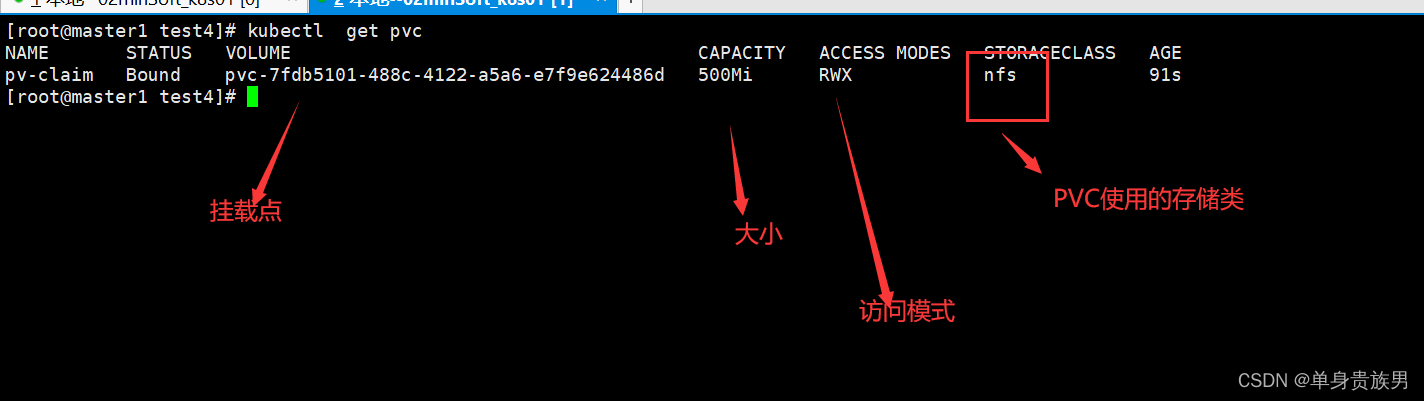

通过上图,我们得知,创建pvc的时候,会自动创建pv
7.2、创建pod,使用storageclass动态生成pv
7.2.1、脚本
vi /root/test4/read-pod.yaml- 1
内容
kind: Pod apiVersion: v1 metadata: name: read-pod spec: containers: - name: read-pod image: nginx volumeMounts: # 使用名称为nfs-pvc的挂载卷 - name: nfs-pvc # 挂载目录 mountPath: /usr/share/nginx/html # 重启策略 restartPolicy: "Never" volumes: # 定义挂载卷名称 - name: nfs-pvc # 定义pvc,也就是使用哪个pvc persistentVolumeClaim: claimName: pv-claim- 1
- 2
- 3
- 4
- 5
- 6
- 7
- 8
- 9
- 10
- 11
- 12
- 13
- 14
- 15
- 16
- 17
- 18
- 19
- 20
- 21
- 22
7.2.2、执行
kubectl apply -f /root/test4/read-pod.yaml # 查看 kubectl get pods kubectl describe pods read-pod- 1
- 2
- 3
- 4
- 5


上面案例说明,read-pod 使用了名称为pv-claim的pvc。而pvc又自动的和pv绑定了。
8、创建statefulset,动态生成存储
需要完成上面的第(2)、(3)、(4)、(5)、(6)步
8.1、脚本
vi /root/test4/statefulset-storage.yaml- 1
内容
apiVersion: v1 kind: Service metadata: # Service 名称 name: service-storage # Service 标签 labels: la: service-storage spec: # Service 端口 ports: - port: 80 name: nginx-port clusterIP: None # 选择器匹配的标签 selector: la: nginx --- apiVersion: apps/v1 kind: StatefulSet metadata: # StatefulSet的名称 name: statefulset-storage spec: # 使用名称为service-storage的service serviceName: "service-storage" replicas: 2 # 选择器 selector: # 选择器匹配的标签 matchLabels: la: nginx # 定义模板 template: metadata: labels: la: nginx # 定义容器 spec: containers: - name: nginx image: nginx ports: - containerPort: 80 name: web # 定义挂载 volumeMounts: # 使用 存储卷模板名称 - name: www # 定义挂载点 mountPath: /usr/share/nginx/html # 定义存储卷模板 volumeClaimTemplates: - metadata: # 存储卷模板名称 name: www # 使用名称为nfs的存储类 annotations: volume.beta.kubernetes.io/storage-class: "nfs" spec: # 定义pvc的访问模式 accessModes: [ "ReadWriteOnce" ] # 定义pvc的大小 resources: requests: storage: 100Mi- 1
- 2
- 3
- 4
- 5
- 6
- 7
- 8
- 9
- 10
- 11
- 12
- 13
- 14
- 15
- 16
- 17
- 18
- 19
- 20
- 21
- 22
- 23
- 24
- 25
- 26
- 27
- 28
- 29
- 30
- 31
- 32
- 33
- 34
- 35
- 36
- 37
- 38
- 39
- 40
- 41
- 42
- 43
- 44
- 45
- 46
- 47
- 48
- 49
- 50
- 51
- 52
- 53
- 54
- 55
- 56
- 57
- 58
- 59
- 60
- 61
- 62
- 63
- 64
- 65
- 66
- 67
- 68
- 69
- 70
- 71
- 72
- 73
- 74
8.2、执行
kubectl apply -f /root/test4/statefulset-storage.yaml- 1
- 2
8.3、查看
8.3.1、Service
kubectl get sc- 1
- 2
- 3

8.3.2、StatefulSet
kubectl get StatefulSet- 1
- 2

8.3.3、pod
kubectl get pods- 1
- 2
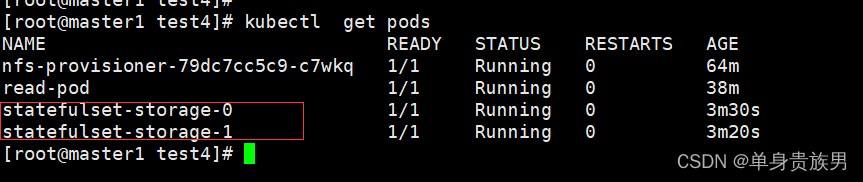
8.3.4、pvc
kubectl get pvc- 1
- 2

8.3.5、pv
kubectl get pv- 1
- 2

-
相关阅读:
QQ邮箱批量发送
腾讯云新用户:定义、专属福利及优惠活动
python 中指定GPU乱序解决方案
AI算法+视频技术助力构建智慧城管解决方案,实现城市管理精细化
【Python练习】task-07 函数的扩展应用
【ROS】Nav2源码之nav2_planner详解
谢尔平斯基三角形分形 - 产生随机性的最简方法
计算机网络——物理层( 物理层下面的传输媒体)
排序算法总结
阿里8年测试老鸟教你软件测试工程师简历,技术栈,项目经验怎么写
- 原文地址:https://blog.csdn.net/zhou920786312/article/details/126242108


- 最新文章
-
沪漂五周年了:我越来越迷茫了
Agentic Skill Routing 实战:别再把所有 Skill 塞进 AI Agent 上下文
MySQL-Seconds_behind_master的精度误差
[MAF预定义ChatClient中间件-03]CachingChatClient——利用缓存省钱省时间
AI的至暗历史:从万众期待到被政府撤资,AI的两次死亡徘徊
Agent OS :五种驯服不确定性的范式
PortSwigger SQL注入LAB11
数据库即时编译JIT
[Begin]AI Learn Data Day 0
深度学习进阶(二十七)现代 LLM 的核心架构设计其二:SwiGLU