• C# Socket网络编程入门(服务器与客户端通信,客户端与客户端通信)


    一.效果展示:

    效果描述:
    1.服务器充当管理员,给所有人发送信息,除服务器以外其他人都能接受到。
    2.其他用户发送信息除自己以外其他用户和管理员全能接受到。
    在这里插入图片描述

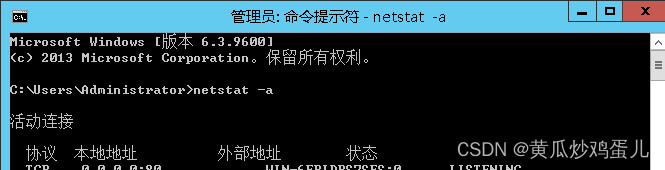
    注意:图中打码处为服务器IP和端口,每个电脑都只能访问自己的服务器以及端口,用cmd打开管理员命令窗口,用如下代码 可以查看本机所有IP和端口

    netstat -a
    //或者
    netstat -an
    
    • 1
    • 2
    • 3

    在这里插入图片描述

    二.服务器代码:

    	public partial class MainForm : Form
    {
    
        List ClientProxSocketList = new List();
    
        public MainForm()
        {
            InitializeComponent();
        }
    
        Socket proxSocket;
    
    
        //点击启动按钮
        private void btn_Start_Click(object sender, EventArgs e)
        {
            
            //1  创建Socket
            Socket socket = new Socket(AddressFamily.InterNetwork,SocketType.Stream,ProtocolType.Tcp);
    
            //2 绑定端口Ip
            socket.Bind(new IPEndPoint(IPAddress.Parse(txt_Ip.Text),int.Parse(txt_Port.Text)));
    
            //3 开启监听
            socket.Listen(1000);  //链接:最大接收请求数,超出返回错误信息
    
            //4 开始接收客户端的链接
            ThreadPool.QueueUserWorkItem(new WaitCallback(this.AcceptClientConnect),socket);
    
            
        }
    
    
        //将远程连接的客户端的IP地址和Socket存入集合中
        Dictionary dicSocket = new Dictionary();
    
        public void AcceptClientConnect(object socket)
        {
            var serverSocket = socket as Socket;
    
            this.AppendTextToTxtLog("服务器开始接受客户端的链接。");
    
            while (true)
            {
                //负责跟客户通信的Socket
                proxSocket = serverSocket.Accept();
                //将远程连接的客户端的IP地址和Socket存入集合中
                dicSocket.Add(proxSocket.RemoteEndPoint.ToString(),proxSocket);
                //将远程连接的客户端IP地址和端口存储下拉框中
                //cboUsers.Items.Add(proxSocket.RemoteEndPoint.ToString());
    
                this.AppendTextToTxtLog(string.Format("客户端:{0}链接上了",proxSocket.RemoteEndPoint.ToString()));
    
                ClientProxSocketList.Add(proxSocket);
    
                //不停的接收当前链接的客户端发送的信息
                // proxSocket.Receive();
    
                ThreadPool.QueueUserWorkItem(new WaitCallback(ReceiveData),proxSocket);
            }
    
        }
    
    
        //接收客户端的消息
        public void ReceiveData(object socket)
        {
            var proxSocket = socket as Socket;
            byte[] data = new byte[1024 * 1024 * 2];
            while (true)
            {
    
                int len = 0;
    
                try
                {
                    len = proxSocket.Receive(data, 0, data.Length, SocketFlags.None);
                }
                catch (Exception)
                {
                    //异常退出
                    AppendTextToTxtLog(string.Format("客户端:{0}正常退出", proxSocket.RemoteEndPoint.ToString()));
                    ClientProxSocketList.Remove(proxSocket);
                    return;
                }


                if(len <= 0)
                {
                    //客户端正常退出
                    AppendTextToTxtLog(string.Format("客户端:{0}正常退出", proxSocket.RemoteEndPoint.ToString()));
    
                    ClientProxSocketList.Remove(proxSocket);
                    return;//让方法结束,终结当前接受客户端数据的异步线程
                }
    
                //把接收到的数据放到文本框中
               string str =  Encoding.UTF8.GetString(data,0,len);
               AppendTextToTxtLog(string.Format("接收到客户端:{0}的消息是:{1}",proxSocket.RemoteEndPoint.ToString(),str));
    
    			//服务器转发信息,除发送方以外,转发信息
                byte[] buffer = System.Text.Encoding.UTF8.GetBytes(str);
                foreach (var item in dicSocket)
                {
                    if (item.Key != proxSocket.RemoteEndPoint.ToString())
                        item.Value.Send(buffer);
                }
    
            }
        }
    
        //往日志的文本框上追加数据
        public void AppendTextToTxtLog(string txt)
        {
            if (txt_Cont.InvokeRequired)
            {
                txt_Cont.Invoke(new Action(s =>
                {
                    this.txt_Cont.Text = string.Format("{0}\r\n{1}", s, txt_Cont.Text);
                }),txt);
            }
            else
            {
                this.txt_Cont.Text = string.Format("{0}\r\n{1}", txt, txt_Cont.Text);
            }
    
            
        }
    
    
        //服务器给客户端发送信息
        private void btn_Send_Click(object sender, EventArgs e)
        {
            #region
            //foreach (var proxSocket in ClientProxSocketList)
            //{
            //    if (proxSocket.Connected)
            //    {
            //        byte[] data = Encoding.Default.GetBytes(txt_Msg.Text);
            //        proxSocket.Send(data, 0, data.Length, SocketFlags.None);
            //    }
            //}
            #endregion
    
            string str = txt_Msg.Text;
            byte[] buffer = System.Text.Encoding.UTF8.GetBytes(str);
            //获取用户在下拉框中选择的IP地址
            //string ip = cboUsers.SelectedItem.ToString();


            foreach (var item in dicSocket)
            {
                //if(item.Key != proxSocket.RemoteEndPoint.ToString())
                    item.Value.Send(buffer);
            }
    
            
            //proxSocket.Send(buffer);
    
        }
    }
    
    • 1
    • 2
    • 3
    • 4
    • 5
    • 6
    • 7
    • 8
    • 9
    • 10
    • 11
    • 12
    • 13
    • 14
    • 15
    • 16
    • 17
    • 18
    • 19
    • 20
    • 21
    • 22
    • 23
    • 24
    • 25
    • 26
    • 27
    • 28
    • 29
    • 30
    • 31
    • 32
    • 33
    • 34
    • 35
    • 36
    • 37
    • 38
    • 39
    • 40
    • 41
    • 42
    • 43
    • 44
    • 45
    • 46
    • 47
    • 48
    • 49
    • 50
    • 51
    • 52
    • 53
    • 54
    • 55
    • 56
    • 57
    • 58
    • 59
    • 60
    • 61
    • 62
    • 63
    • 64
    • 65
    • 66
    • 67
    • 68
    • 69
    • 70
    • 71
    • 72
    • 73
    • 74
    • 75
    • 76
    • 77
    • 78
    • 79
    • 80
    • 81
    • 82
    • 83
    • 84
    • 85
    • 86
    • 87
    • 88
    • 89
    • 90
    • 91
    • 92
    • 93
    • 94
    • 95
    • 96
    • 97
    • 98
    • 99
    • 100
    • 101
    • 102
    • 103
    • 104
    • 105
    • 106
    • 107
    • 108
    • 109
    • 110
    • 111
    • 112
    • 113
    • 114
    • 115
    • 116
    • 117
    • 118
    • 119
    • 120
    • 121
    • 122
    • 123
    • 124
    • 125
    • 126
    • 127
    • 128
    • 129
    • 130
    • 131
    • 132
    • 133
    • 134
    • 135
    • 136
    • 137
    • 138
    • 139
    • 140
    • 141
    • 142
    • 143
    • 144
    • 145
    • 146
    • 147
    • 148
    • 149
    • 150
    • 151
    • 152
    • 153
    • 154
    • 155
    • 156
    • 157
    • 158
    • 159
    • 160
    • 161
    • 162
    • 163
    • 164
    • 165

    三.客户端代码:

     public partial class ClientForm : Form
    {
        public ClientForm()
        {
            InitializeComponent();
        }
    
        Socket socketSend;
    
        //点击连接
        private void btn_Link_Click(object sender, EventArgs e)
        {
            //创建负责通信的Socket
            socketSend = new Socket(AddressFamily.InterNetwork,SocketType.Stream,ProtocolType.Tcp);
    
            IPAddress ip = IPAddress.Parse(lab_Ip.Text);
            IPEndPoint point = new IPEndPoint(ip,Convert.ToInt32(lab_Port.Text));
            socketSend.Connect(point);
    
            ShowMsg("连接成功");
    
            //开启一个线程不停接受服务器发送来的信息
            Thread th = new Thread(Recive);
            th.IsBackground = true;
            th.Start();
    
        }
    
        //不停接受服务器发来的消息
        void Recive()
        {
            while (true)
            {
                byte[] buffer = new byte[1024 * 1024 * 3];
                //实际接受到的有效字节
                int r = socketSend.Receive(buffer);
    
                if(r <= 0)
                {
                    break;
                }
    
                string s = Encoding.UTF8.GetString(buffer,0,r);
    
                ShowMsg(socketSend.RemoteEndPoint+":"+s);
            }
        }
    
    
        void ShowMsg(string str)
        {
            txt_Cont.AppendText(str + "\r\n");
        }
    
        //点击发送按钮,客户端给服务器发送消息
        private void btn_Send_Click(object sender, EventArgs e)
        {
            string str = txt_Msg.Text.Trim();
            byte[] buffer = System.Text.Encoding.UTF8.GetBytes(str);
            socketSend.Send(buffer);
        }
    }
    
    • 1
    • 2
    • 3
    • 4
    • 5
    • 6
    • 7
    • 8
    • 9
    • 10
    • 11
    • 12
    • 13
    • 14
    • 15
    • 16
    • 17
    • 18
    • 19
    • 20
    • 21
    • 22
    • 23
    • 24
    • 25
    • 26
    • 27
    • 28
    • 29
    • 30
    • 31
    • 32
    • 33
    • 34
    • 35
    • 36
    • 37
    • 38
    • 39
    • 40
    • 41
    • 42
    • 43
    • 44
    • 45
    • 46
    • 47
    • 48
    • 49
    • 50
    • 51
    • 52
    • 53
    • 54
    • 55
    • 56
    • 57
    • 58
    • 59
    • 60
    • 61
    • 62

    四.总结&猜想

    这里的服务器转发只用了一个Dictionary存储了所有连接服务器的Socket。如果要做一个更好的单独会话,就在数据库好友的链接表里面,记录好端口和IP,每次选择好友查询数据库,单独发送给好友

    五.学习链接:

    CSDN C# Socket 会话思路与实现

    BiLibili Winform应用程序_多线程和socket网络编程

    吐槽:
    就很怪,现在发布文章,字数不多还提示推荐受影响。。。
    CSDN路走窄了啊,浓缩的都是精华好吧。
    再这样下去,我只能放弃CSDN去博客园了。

    吐槽:
    就很怪,现在发布文章,字数不多还提示推荐受影响。。。
    CSDN路走窄了啊,浓缩的都是精华好吧。
    再这样下去,我只能放弃CSDN去博客园了。

    吐槽:
    就很怪,现在发布文章,字数不多还提示推荐受影响。。。
    CSDN路走窄了啊,浓缩的都是精华好吧。
    再这样下去,我只能放弃CSDN去博客园了。

    吐槽:
    就很怪,现在发布文章,字数不多还提示推荐受影响。。。
    CSDN路走窄了啊,浓缩的都是精华好吧。
    再这样下去,我只能放弃CSDN去博客园了。

  • 相关阅读:
    Nodejs+vue+elementui汽车销售网站管理系统
    06-线程池(3大方法、7大参数,4种拒绝策略)
    Kafka系列之:深入理解Transformations
    web技术分享| 【高德地图】实现自定义的轨迹回放
    python:搭建 flask_restful 服务
    校正叠加(calibrated stacking)方法—技术
    [附源码]计算机毕业设计springboot学生疫情防控信息填报系统
    5、Zab协议
    yolo自动化项目实例解析(一)日志格式输出、并发异步多线程、websocket、循环截图、yolo推理、3d寻路
    Python爬虫之Js逆向案例(10)-爬虫数据批量写入mysql数据库
  • 原文地址:https://blog.csdn.net/wuyanEdwardElrid/article/details/126307846