-
【MATLAB】 03 变量与数据访问
文章目录
MATLAB 中的数据类型
- Multidimensional Array
logicalcharnumericint8,int16,int32,int64,uint8,uint16,uint32,uint64
singledoublecellstruct
- Scalar
- function handle (@)
numeric中,int8后面的数字表示bit,uint8中的u表示 unsigned.本文主要关注
char,string,cell,struct, 也会涉及部分function handle数据类型转换
函数 作用 double ()Convert to double precision single ()Convert to single precision int8 ()Convert to 8-bit signed integer int16 ()Convert to 16-bit signed integer int32 ()Convert to 32-bit signed integer int64 ()Convert to 64-bit signed integer uint8()Convert to 8-bit unsigned integer uint16()Convert to 16-bit unsigned integer uint32()Convert to 32-bit unsigned integer uint64()Convert to 64-bit unsigned integer char-
char数据类型使用 0 到 255 之间的 ASCII 码表示 -
将字符放入引号内(一般用单引号
') 即可对字符d型变量赋值-
>> s1 = 'h' s1 = 'h' >> uint8(s1) ans = uint8 % 104 是 h 的 ASCII 码值 104- 1
- 2
- 3
- 4
- 5
- 6
- 7
- 8
- 9
- 10
- 11
- 12
- 13
-
String-
字符数组
str = 'myString';
-
字符串连接
-
>> str1 = 'Example'; >> str2 = 'String'; >> s = [str1 str2] s = 'ExampleString' >> s2 = [str1 ; str2] Error using vertcat Dimensions of arrays being concatenated are not consistent.- 1
- 2
- 3
- 4
- 5
- 6
- 7
- 8
- 9
- 10
- 11
-
两个字符串的维度不一样, 不能纵向拼接
-
字符逻辑运算
- 多数数字运算符和逻辑运算符都能用在字符串变量上
>> str = 'aardvark' str = 'aardvark' >> 'a' == str ans = 1×8 logical array 1 1 0 0 0 1 0 0- 1
- 2
- 3
- 4
- 5
- 6
- 7
- 8
- 9
- 10
- 11
- 12
- 13
- 字符替换
>> str(str == 'a') = 'Z' str = 'ZZrdvZrk'- 1
- 2
- 3
- 4
- 5
Exercise
- Write a script that inverts any given string
s1 = 'I like the letter E's2 = 'E rettel eht ekil I'
str = input('Enter a string: ','s'); invertStr = str(end:-1:1); disp(invertStr)- 1
- 2
- 3
Structure结构体 一种可以储存不同类型数据的数据结构
-
创建方式
-
直接构建
-
node(1).name = 'John Doe'; node(2).name = 'Tim the Cook'; node(1).age = 31; node(2).age = 22;- 1
- 2
- 3
- 4
-
-
使用
struct函数-
node = struct('name', {'John Doe', 'Tim the Cook'}, 'age',{31, 22}) node(1).name- 1
- 2
-
key - value 对形式, 每两个一对, 在 MATLAB 中,
key称为field
-
-
当一个变量含有
.时, MATLAB 会自动将这个变量识别为structstructfunctions函数名 作用 cell2structConvert cell array to structure array
将元胞数组转换为结构体数组fieldnamesField names of structure, or public fields of object
获取结构体的字段名, 或者对象的 public 字段getfieldField of structure array
获取结构体数组的字段isfieldDetermine whether input is structure array field
判断输入是否为结构体数组的一个字段名isstructDetermine whether input is structure array
判断输入是否为一个结构体数组orderfieldsOrder fields of structure array
对结构体数组的字段名按字母顺序排序rmfield(, ) Remove fields from structure
删除结构体中的字段setfieldAssign values to structure array field
为结构体字段分配值structCreate structure array
创建结构体数组struct2cellConvert structure to cell array
将结构体转换为元胞数组struc tfunApply function to each field of scalar structure
对结构体所有字段进行 function 操作Nesting Structures
struct可以嵌套Cell Array元胞数组 一种可以储存不同类型数据的数据结构
与矩阵类似, 但是每个元素可以时不同类型的数据
通过
{}声明>> A(1,1)={[1 4 3; 0 5 8; 7 2 9]}; >> A(1,2) ={'Anne Smith'}; >> A(2,1) ={3+7i}; >> A(2,2)={-pi:pi:pi}; >> A A = 2×2 cell array {3×3 double } {'Anne Smith' } {[3.0000 + 7.0000i]} {[-3.1416 0 3.1416]}- 1
- 2
- 3
- 4
- 5
- 6
- 7
- 8
- 9
- 10
- 11
- 12
- 13
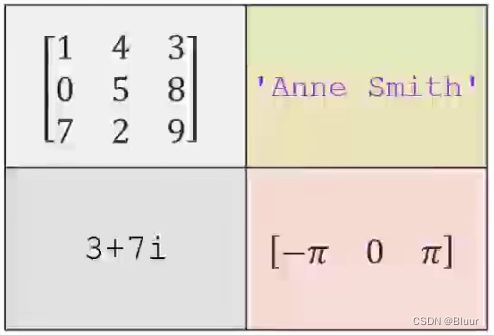
以上数据也可以这样声明:
>> A{1,1} = [1 4 3; 0 5 8; 7 2 9]; >> A{1,2} = 'Anne Smith'; >> A{2,1} = 3 + 7i; >> A{2,2} = -pi:pi:pi; >> A A = 2×2 cell array {3×3 double } {'Anne Smith' } {[3.0000 + 7.0000i]} {[-3.1416 0 3.1416]}- 1
- 2
- 3
- 4
- 5
- 6
- 7
- 8
- 9
- 10
- 11
- 12
注意花括号的位置
MATLAB 如何通过一个变量(结构体或元胞数组)存储不同的数据类型:
结构体/元胞数组不直接存储数据, 而是存储指向数据的指针. 类似 Java 中的引用数据类型.
Accessing
Cell Array>> A(1,1) % 通过圆括号括起来的坐标访问 ans = 1×1 cell array {3×3 double} >> A{1,1} % 通过花括号括起来的坐标访问 ans = 1 4 3 0 5 8 7 2 9- 1
- 2
- 3
- 4
- 5
- 6
- 7
- 8
- 9
- 10
- 11
- 12
- 13
- 14
- 15
通过花括号与坐标, 直接访问数据, 如果使用圆括号, 访问的是一个元胞数组.
num2cell()&mat2cell()num2cell()将数字转换为元胞数组mat2cell()将矩阵转换为元胞数组>> a = magic(3) a = 8 1 6 3 5 7 4 9 2 >> b = num2cell(a) b = 3×3 cell array {[8]} {[1]} {[6]} {[3]} {[5]} {[7]} {[4]} {[9]} {[2]} >> c = mat2cell(a, [1 1 1], 3) c = 3×1 cell array {[8 1 6]} {[3 5 7]} {[4 9 2]}- 1
- 2
- 3
- 4
- 5
- 6
- 7
- 8
- 9
- 10
- 11
- 12
- 13
- 14
- 15
- 16
- 17
- 18
- 19
- 20
- 21
- 22
- 23
- 24
- 25
- 26
- 27
magic()生成魔方矩阵, 其每行, 每列, 对角线上数字之和相等. 该和的值为 ( n 1 ) ! n \large\frac{(n^1)!}{n} n(n1)! , 其中 n ≥ 3 n\geq 3 n≥3mat2cell(, ,
) - 在上面的示例程序中 [1 1 1], 3, 表示一个列向量与一个行向量相乘, 表示的是生成的元胞数组的形状
也就是 [ [ 1 × 3 ] [ 1 × 3 ] [ 1 × 3 ] ]⎣ ⎡[1×3][1×3][1×3]⎦ ⎤[ [ 1 × 3 ] [ 1 × 3 ] [ 1 × 3 ] ] - 例如 :
C = mat2cell(A,[10 20 30],[25 25]),其中 A 为 60 × 50 60 \times 50 60×50 矩阵
- 在上面的示例程序中 [1 1 1], 3, 表示一个列向量与一个行向量相乘, 表示的是生成的元胞数组的形状
Multidimensional Array
多维数组
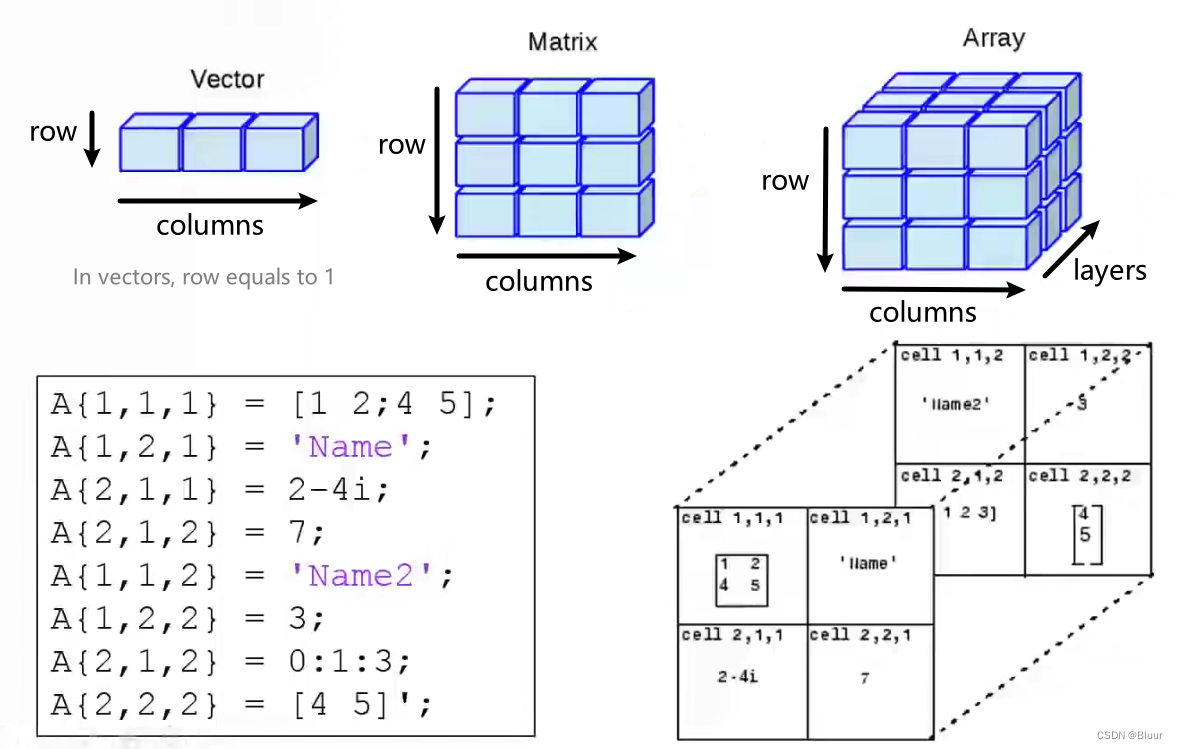
Array concatenation
cat()数组拼接函数
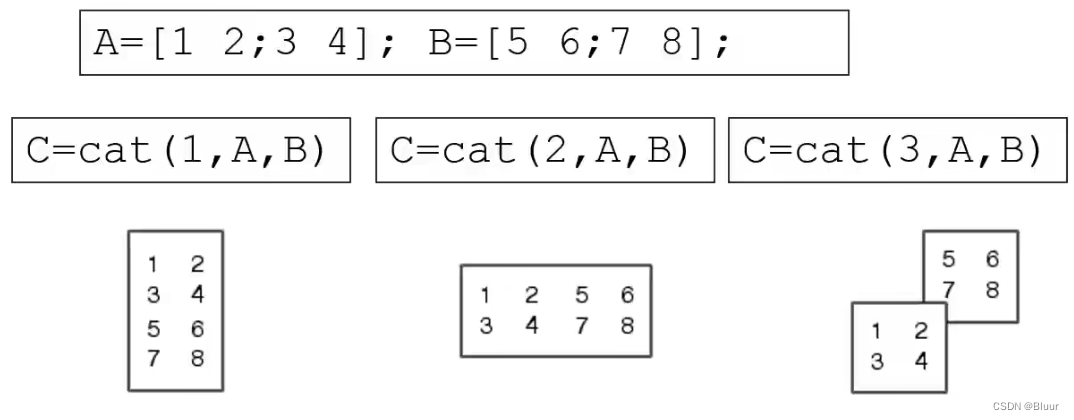
- 由上图可以看出,
cat()函数的第一个参数为拼接方向1表示按 row 拼接2表示按 column 拼接3表示按 layer 拼接
按 row/column 拼接操作也可以直接通过
[]实现 例如[A B], [A; B]可以先操作 2 维矩阵, 然后使用
cat()函数拼接为三维矩阵reshape()可以将 r 1 × c 1 r_1\times c_1 r1×c1 矩阵转换为 t 2 × c 2 t_2\times c_2 t2×c2 矩阵( 要求 r 1 × c 1 = t 2 × c 2 r_1\times c_1 = t_2\times c_2 r1×c1=t2×c2)
>> A={'James Bond', [1 2;3 4; 5 6]; pi, magic(5)} A = 2×2 cell array {'James Bond'} {3×2 double} {[ 3.1416]} {5×5 double} >> C = reshape(A,1,4) C = 1×4 cell array {'James Bond'} {[3.1416]} {3×2 double} {5×5 double}- 1
- 2
- 3
- 4
- 5
- 6
- 7
- 8
- 9
- 10
- 11
- 12
- 13
- 14
- 15
- 16
通过测试此函数, 可以看出, 转换前后元素的下标没有改变
访问文件
File Content Extension Description Import Function Export Function MATLAB formatted data MAT Saved MATLAB workspace loadsaveText Space delimited numbers loadsaveSpreadsheet XLS,XLSX Excel xlsreadxlswritesave()clear; a = magic() save myData1.mat save myData2.mat -ascii- 1
- 2
- 3
- 4
第二个
save指定了encoding in ascii
指定后可以以 plaintext 查看- 保存单个变量到文件
save myMatrix.mat AA 为需要保存的变量
- 保存至指定路径
save('D:\MATLABrepo\myMatrix.mat','A')- 即
save('','variableName')
load()load('mydata1.mat') load('mydata2.mat','-ascii')- 1
- 2
第二个
load指定了decoding in asciiExcel File Reading:
xlsread()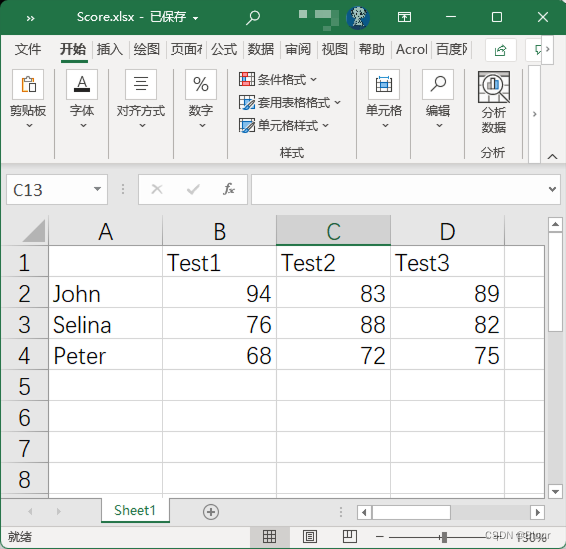
Score = xlsread('score.xlsx') Score = xlsread('score.xlsx', 'B2:D4') % 指定读取的范围- 1
- 2
不指定范围, 直接读取, 会忽略掉字符串字段
Excel File Writing:
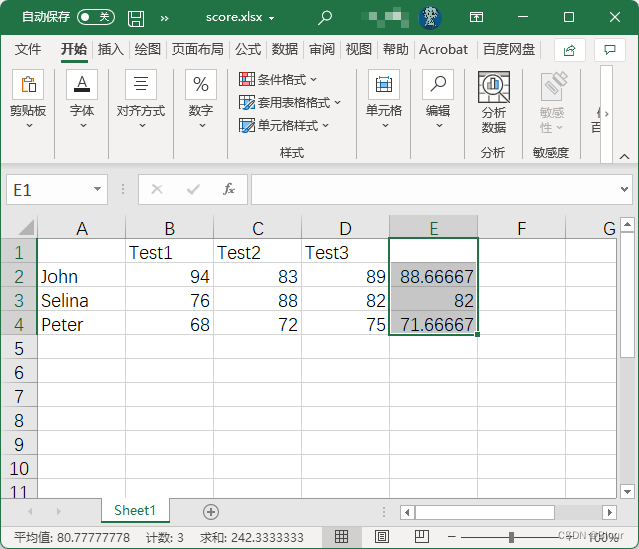
xlswrite()计算成绩平均值并写入
xlsx文件M = mean(Score')'; % mean() 是列操作, 先做转置, 计算平均值之后再转置 xlswrite('score.xlsx', M, 1, 'E2:E4');- 1
- 2
xlswrite('score.xlsx', M, 1, 'E2:E4');
xlswrite(, , , ); 写入结果:
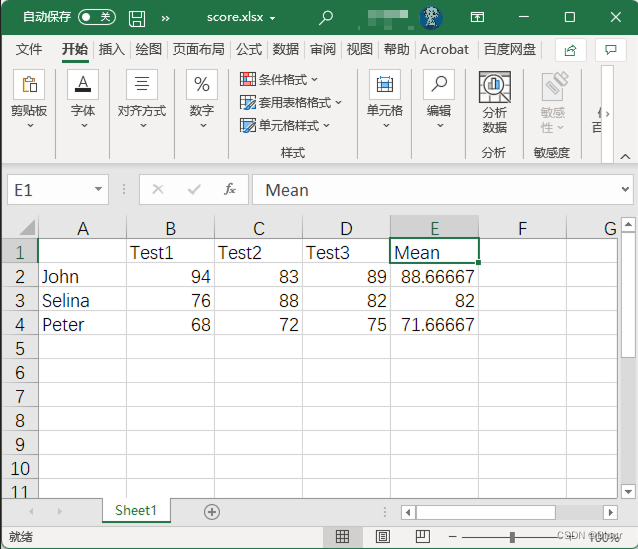
写入字段:
xlswrite('score.xlsx', {'Mean'}, 1, 'E1');- 1
Getting Text in Excel Spreadsheet
使用两个变量接受
xlsx表格中的字符串字段>> [Score Header] = xlsread('score.xlsx') Score = 94.0000 83.0000 89.0000 88.6667 76.0000 88.0000 82.0000 82.0000 68.0000 72.0000 75.0000 71.6667 Header = 4×5 cell array {0×0 char} {'Test1' } {'Test2' } {'Test3' } {'Mean' } {'John' } {0×0 char} {0×0 char} {0×0 char} {0×0 char} {'Selina'} {0×0 char} {0×0 char} {0×0 char} {0×0 char} {'Peter' } {0×0 char} {0×0 char} {0×0 char} {0×0 char}- 1
- 2
- 3
- 4
- 5
- 6
- 7
- 8
- 9
- 10
- 11
- 12
- 13
- 14
- 15
- 16
- 17
Low-level File I/O
- 在字节/字符层面读写文件
- 一个文件必须要有 ID
fid - 文件中的定位通过可移动的指针实现
Low-level File I/O Functions
函数 作用 fopenOpen file, or obtain information about open files fcloseClose one or all open files fscanfRead data from text file fprintfWrite data to text file feofTest for end-of-file Open and close a file
fid = fopen('', ' '); % 读取文件名, 和文件权限 rwa, 分别为可读可写可访问 status = fclose(fid); - 1
- 2
Writing Sine Values into a File
x = 0:pi/10:pi; y = sin(x); fid = fopen('sinx.txt', 'w'); for i=1:11 fprintf(fid,'%5.3f %8.4f\n', x(i), y(i)); end fclose(fid); type sinx.txt- 1
- 2
- 3
- 4
- 5
- 6
- 7
- 8
- 关于读取的格式
A = fscanf(fid, format, size);A是用于存储读取数据的变量size是读取的数据量
- 关于写入的格式
fprintf(fid, format, x(i), y(i));x(i),y(i)是需要写入的变量, 会写入对应占位符的位置
- 关于 Format Specifier
%5.3f %8.4f\n%5.3f表示 5 位浮点数, 其中, 小数点后有 3 位%8.4f表示 8 位浮点数, 其中, 小数点后有 4 位
- 读取至
EOF
fid = fopen('asciiData.txt', 'r'); i = 1; while ~feof(fid) name(i,:) = fscanf(fid,'%5c', 1); year(i) = fscanf(fid,'%d', 1); no1(i) = fscanf(fid,'%d', 1); no2(i) = fscanf(fid,'%d', 1); no3(i) = fscanf(fid,'%g', 1); no4(i) = fscanf(fid,'%g', 1); i = i + 1; end fclose(fid);- 1
- 2
- 3
- 4
- 5
- 6
- 7
- 8
- 9
- 10
- 11
- 12
feof(返回值是布尔类型, 判断文件是否到达末尾 (EOF)) - Multidimensional Array
-
相关阅读:
Day23_8 Java学习之多线程安全、死锁及状态
AHB、APB详解和FCLK,PCLK,HCLK详解
迪文科技工业串口屏(DMG10600C070-03WTC)更新程序烧录刷机
2023年中国铁路行车监测系统竞争格局、市场规模及行业发展趋势分析[图]
【python】list 删除列表中某个元素的3种方法;附加删除numpy数组中的指定索引元素的方法
卷积神经网络——李宏毅机器学习笔记
正确理解redux Toolkits中createSlice的action.payload
如何在 Windows 10 上恢复未保存的 Word 文档
docker常用命令
Arthas(阿尔萨斯)--(三)
- 原文地址:https://blog.csdn.net/Bluur/article/details/126271254
